Hard Drive Management Gone Haywire

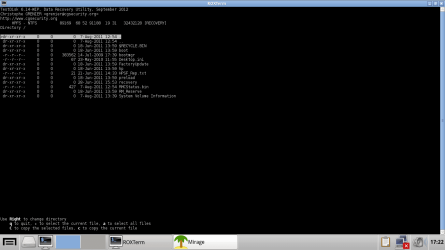
Also, I have installed Paragon's B&D software. It was less than expected. Out of 3 images, 2 were of the System Reserved partition. 1 was my Chrome user profile.
However, I am still looking forward to being able to recover the current copy of my files on my laptop, because I have more important files there.
EDIT: I can't extract the files! :P In a Chrome profile, there are many folders, and to extract the files, I have to browse through EVERY SINGLE FOLDER and select EVERY SINGLE FILE!
If I just select the folder, it'll give me an access denied error message :P
 

My Computer My Computer

At a glance

N/A
OS
N/A
Yeah, try loading the 214GB part found in backup (last line of the Testdisk screen)
 

My Computer My Computer

At a glance

x64 (6.3.9600) Win8.1 Pro & soon dual boot x6...AMD A6-3420M APU with Radeon(tm) HD Graphics6.00 GBAMD Radeon(TM) HD 6520G
Computer type
Laptop
Computer Manufacturer/Model Number
HP Pavilion dv6-6c10us
OS
x64 (6.3.9600) Win8.1 Pro & soon dual boot x64 (6.1.7601) Win7_SP1 HomePrem
CPU
AMD A6-3420M APU with Radeon(tm) HD Graphics
Motherboard
Hewlett-Packard 1805
Memory
6.00 GB
Graphics Card(s)
AMD Radeon(TM) HD 6520G
Sound Card
(1) AMD High Definition Audio Device (2) IDT High Definiti
Monitor(s) Displays
HP W2072a 20" LCD (1600 x 900) @ 60 Hz
Screen Resolution
1366 x 768 x 32 bits (4294967296 colors) @ 60 Hz
Hard Drives
ST640LM0 00 HM641JI SATA Disk Device
Keyboard
Logitech k520 wireless KB
Mouse
Logitech m320 wireless mouse (bundled with KB)
Internet Speed
15/5 | 54 MB Wireless 'n'
Antivirus
Realtime: Defender or Avast | On-demand: Malwarebytes, ESET
Browser
IE 11 on Win8, IE 10 on win 7
Other Info
Media: [Gimp, Audacity, VLC] || Comm: [WEmail 2012, Skype] || Productivity: [OpenOffice,| Textpad] || Utils: [Sysinternals, cCleaner, Speccy, Defraggler]
I just re-did the deep scan. The results were all the same. Got a screenshot of the Recovery partition.
 

Attachments

  • Recovery Partition.png
    Recovery Partition.png
    22.6 KB · Views: 2

My Computer My Computer

At a glance

N/A
OS
N/A
Yeah, try loading the 214GB part found in backup (last line of the Testdisk screen)

How do I do that? Press "L"?
I just realized, that last line changes depending what partition that I select! Like, when I press up and down, the line changes.
 

My Computer My Computer

At a glance

N/A
OS
N/A
Yes, 'L'oad. I can't see what you see. I've asked you to post screens as you work through it. I won't ask again.
If you want to step through it, post a screen at each step - that way I can look at all of the steps and follow what you're doing.

You say a deep scan - why? because a quick scan doesn't find anything?

What I'm looking for is steps 4 - 10 in http://www.sevenforums.com/software/190430-regain-lost-drive-using-test-disk-illustrated-guide.html

Please post a screen shot at every step - you can put them in the same post, just like the guide.

Do not Write anything - just look.


The screen I see is your HP recovery partition. You said, the data you're looking for is on [Hard Drive] - any other inofrmation is just a distraction.

Bill
 

My Computer My Computer

At a glance

x64 (6.3.9600) Win8.1 Pro & soon dual boot x6...AMD A6-3420M APU with Radeon(tm) HD Graphics6.00 GBAMD Radeon(TM) HD 6520G
Computer type
Laptop
Computer Manufacturer/Model Number
HP Pavilion dv6-6c10us
OS
x64 (6.3.9600) Win8.1 Pro & soon dual boot x64 (6.1.7601) Win7_SP1 HomePrem
CPU
AMD A6-3420M APU with Radeon(tm) HD Graphics
Motherboard
Hewlett-Packard 1805
Memory
6.00 GB
Graphics Card(s)
AMD Radeon(TM) HD 6520G
Sound Card
(1) AMD High Definition Audio Device (2) IDT High Definiti
Monitor(s) Displays
HP W2072a 20" LCD (1600 x 900) @ 60 Hz
Screen Resolution
1366 x 768 x 32 bits (4294967296 colors) @ 60 Hz
Hard Drives
ST640LM0 00 HM641JI SATA Disk Device
Keyboard
Logitech k520 wireless KB
Mouse
Logitech m320 wireless mouse (bundled with KB)
Internet Speed
15/5 | 54 MB Wireless 'n'
Antivirus
Realtime: Defender or Avast | On-demand: Malwarebytes, ESET
Browser
IE 11 on Win8, IE 10 on win 7
Other Info
Media: [Gimp, Audacity, VLC] || Comm: [WEmail 2012, Skype] || Productivity: [OpenOffice,| Textpad] || Utils: [Sysinternals, cCleaner, Speccy, Defraggler]
I did a deep scan because a quick scan couldn't find anything, so I thought that the deep scan would find something :P Already did steps #4-9, but instead of the quick scan, I finished it and started the deep scan.

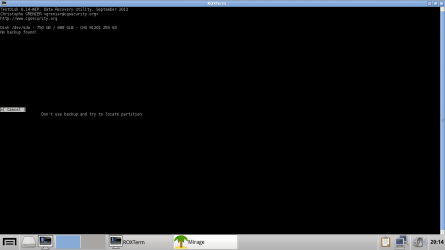
The Load function is NOT to load the partition. In step #8, where the bottom says "Backup", it backups the partition structure to a "backup.log" file. That's what you "load". I tried pressing "load" and I the result is shown in the image.

To show how the last line changes...I used up and down to select the partitions, and look at the last line. It changes accordingly. These images are in the ZIP file.
 

Attachments

  • Last Line Changes.zip
    Last Line Changes.zip
    284.5 KB · Views: 2
  • What happens when I press Load.png
    What happens when I press Load.png
    15.9 KB · Views: 6

My Computer My Computer

At a glance

N/A
OS
N/A
Does ANYBODY here at SevenForums have an idea about how I can recover my files?
I would LOVE some help, especially since Slartybart hasn't been online at all for 4 days :P

Thanks! :D
 

My Computer My Computer

At a glance

N/A
OS
N/A

My Computer My Computer

At a glance

64-bit Windows 11 Pro for WorkstationsIntel i7-8700K OC'd to 5 GHz64 GB (4x16GB) G.SKILL TridentZ RGB DDR4 3600...ASUS ROG-STRIX-GTX1080TI-O11G-GAMING
Computer type
PC/Desktop
Computer Manufacturer/Model Number
Self built custom
OS
64-bit Windows 11 Pro for Workstations
CPU
Intel i7-8700K OC'd to 5 GHz
Motherboard
ASUS ROG Maximus XI Formula Z390
Memory
64 GB (4x16GB) G.SKILL TridentZ RGB DDR4 3600 MHz
Graphics Card(s)
ASUS ROG-STRIX-GTX1080TI-O11G-GAMING
Sound Card
Integrated
Monitor(s) Displays
2 x Samsung Odyssey G7 27"
Screen Resolution
2560x1440
Hard Drives
1TB Samsung 990 PRO M.2,
4TB Samsung 990 PRO PRO M.2,
TerraMaster F8 SSD Plus NAS
PSU
Seasonic Prime Titanium 850W
Case
Thermaltake Core P3
Cooling
Corsair Hydro H115i
Keyboard
Logitech wireless K800
Mouse
Logitech MX Master 4
Internet Speed
2 Gb/s Download and 100 Mb/s Upload
Antivirus
Malwarebyte Anti-Malware Premium
Browser
Google Chrome
Other Info
Logitech Z625 speaker system,
Logitech BRIO 4K Pro webcam,
HP Color LaserJet Pro MFP M477fdn,
APC SMART-UPS RT 1000 XL - SURT1000XLI,
Galaxy S23 Plus phone
Thanks for the input, Brink.
I believe that no Linux distros would be able to view my files, as the filesystem has been corrupted and is no longer NTFS, but RAW. However, I will try and report back.

Thanks.
 

My Computer My Computer

At a glance

N/A
OS
N/A
Have a look with a Linux. distro.

I would use gparted bootable to create a small partiton just a gb or two at the end of the drive ( on the right as you see the diskmap).

Then see if partition recovery function on PW or partition assistant or similar - paragon has one on the boot disk, I expect. You may need to try a couple as they are not the same.
 

My Computers My Computers

  • At a glance

    7 X64i5 84002x8gb 3200mhz
    Computer type
    PC/Desktop
    OS
    7 X64
    CPU
    i5 8400
    Motherboard
    gigabyte b365m ds3h
    Memory
    2x8gb 3200mhz
    Hard Drives
    various
    PSU
    pure power 11 400w cm
    Case
    Coolermaster
    Cooling
    cryorig m9i
  • At a glance

    7x64g54008gb ddr4 2400
    Computer type
    PC/Desktop
    OS
    7x64
    CPU
    g5400
    Motherboard
    ga b365m ds3h
    Memory
    8gb ddr4 2400
    PSU
    xfx pro 450w
Thanks for the input, Brink.
I believe that no Linux distros would be able to view my files, as the filesystem has been corrupted and is no longer NTFS, but RAW. However, I will try and report back.

Thanks.

Brink, I cannot see ANY of my original files with Peppermint. Only the files on the live USB :(
 

My Computer My Computer

At a glance

N/A
OS
N/A
Have a look with a Linux. distro.

I would use gparted bootable to create a small partiton just a gb or two at the end of the drive ( on the right as you see the diskmap).

Then see if partition recovery function on PW or partition assistant or similar - paragon has one on the boot disk, I expect. You may need to try a couple as they are not the same.

I have tried TestDisk, and Slartybart will probably get back to me, but he hasn't been online for a week now.
I've done Surface Test and Partition Recovery with PW bootable, the drive's OK and it can't recover my partition.
I would probably not make a partition, because it might disturb the partition table that I want to recover.
Paragon does NOT have a partition recovery tool on its boot disc, sadly.

What else can anybody suggest? I have some pretty important files there, and losing them is a not an option.
 

My Computer My Computer

At a glance

N/A
OS
N/A
Then you should not have ignored the help we were giving you a week ago and gone off to wildly run commands which ruined your OS, never having backed up your files.

I had asked for help with using TestDisk which you thought had found your partition after PW couldn't, but it was not successful in several attempts. I don't know what you thought he was going to do to help you then.

Ok, so I messed around a bit, and completely screwed up mah system :P
I ran some variation of this command: bootsect /nt60 sys force, and now, when I boot, it gives me the message "No bootable device, insert boot device and press any key to continue."
Also, I realized that the filesystem was changed to RAW :P And I can't see any of mah files :(
 
Then you should not have ignored the help we were giving you a week ago and gone off to wildly run commands which ruined your OS, never having backed up your files.

I had asked for help with using TestDisk which you thought had found your partition after PW couldn't, but it was not successful in several attempts. I don't know what you thought he was going to do to help you then.

Ok, so I messed around a bit, and completely screwed up mah system :P
I ran some variation of this command: bootsect /nt60 sys force, and now, when I boot, it gives me the message "No bootable device, insert boot device and press any key to continue."
Also, I realized that the filesystem was changed to RAW :P And I can't see any of mah files :(

Ok :(
TestDisk DID detect my partition that I wanted, by in the results list, it's not there. I don't know why.
Slartybart also wanted me to use the "Load" function, but it was supposed to load a backup that wasn't there. The "Load" function actually changes from the partition that's selected and highlighted, but because my partition's not on the final screen, it can't be "Loaded", even if I DID have a backup.

What could be done to reverse what I did to the boot files?
 

My Computer My Computer

At a glance

N/A
OS
N/A
I have run Recuva from a Windows Repair Disc, but it cannot scan the disk because it "cannot determine the filesystem type".
 

My Computer My Computer

At a glance

N/A
OS
N/A
What Windows Repair disk has Recuva? You'd need a boot disk like Hirens or Ultimate Boot Disk, which we do not support here. But there are plenty of options on one.
 
What Windows Repair disk has Recuva? You'd need a boot disk like Hirens or Ultimate Boot Disk, which we do not support here. But there are plenty of options on one.

Oh, LOL.
I just used it on the Windows Recovery Environment and copied the file over.
But still, I doubt that it'll work.
 

My Computer My Computer

At a glance

N/A
OS
N/A
Back
Top