Too much memory being used. What can I do?

My Computer My Computer

At a glance

Windows 7 Home Premium 64bitPentium Dual Core 3.20GHz3GB
Computer type
PC/Desktop
Computer Manufacturer/Model Number
Acer
OS
Windows 7 Home Premium 64bit
CPU
Pentium Dual Core 3.20GHz
Memory
3GB
Hard Drives
500gb internal
1tb external
Antivirus
Microsoft Security Essentials
Browser
Firefox
You can use this program i use it and it works very well just go in the options and enable trim processes' working set every 5 minutes and if you want you can start memory cleaner with windows

Memory Cleaner - Software - Koshy John
 

My Computer My Computer

At a glance

Windows 7 Pro SP1 x64Intel Core i5 4670k @3.4 GhzCorsair XMS3 16GB 1333 Mhz 9/9/9Asus 7850 2GB Edition 860/1200
Computer type
PC/Desktop
Computer Manufacturer/Model Number
Custom Build
OS
Windows 7 Pro SP1 x64
CPU
Intel Core i5 4670k @3.4 Ghz
Motherboard
Gigabyte Z87X-D3H
Memory
Corsair XMS3 16GB 1333 Mhz 9/9/9
Graphics Card(s)
Asus 7850 2GB Edition 860/1200
Sound Card
Logitech z506 Speakers / Logitech G930 Headset
Monitor(s) Displays
Asus VE278H / Vizio E320-A0
Screen Resolution
1920x1080 (Asus) / 1366x768 (Vizio)
Hard Drives
120GB OCZ Vertex 3 SSD
1TB Seagate HDD
PSU
Corsair RM 650 Watts
Case
Fractal Define R4 Black Pearl
Cooling
1x140mm Front Intake Fan 1x140mm Rear Exhaust Fan
Keyboard
Cooler Master Quickfire TK Cherry Mx Blue
Mouse
Razer Naga Blue
Internet Speed
Wired Ethernet 15 PING 35.00 Mbps Download 10.00 Mbps Upload
Antivirus
Eset Smart Security 8
Browser
Google Chrome
Other Info
Just ask me if i missed something
You can use this program i use it and it works very well just go in the options and enable trim processes' working set every 5 minutes and if you want you can start memory cleaner with windows

Memory Cleaner - Software - Koshy John

Neat little tool... but it still doesn't explain where all my RAM goes.. even when Firefox isn't open.
Either way, I will keep this running as it does seem to help a little.
 

My Computer My Computer

At a glance

Windows 7 Home Premium 64bitPentium Dual Core 3.20GHz3GB
Computer type
PC/Desktop
Computer Manufacturer/Model Number
Acer
OS
Windows 7 Home Premium 64bit
CPU
Pentium Dual Core 3.20GHz
Memory
3GB
Hard Drives
500gb internal
1tb external
Antivirus
Microsoft Security Essentials
Browser
Firefox
I think you could cut down on your processes,all i see in your snipets,is 75+ instances running.Each and everyone of them,is consuming portions of RAM,lots or less.Download CCleaner,go to startup tab,cut down unnecessary startup items.Try Autoruns for Windows and keep an eye on what is running on logon and trim down.You could even disable several unused Windows services,not as a performance gain,but to cut down on your memory usage.
 

My Computer My Computer

At a glance

Microsoft Windows 7 Ultimate 64-bit Service P...Intel(R) Core(TM)2 Quad Q 9550 @ 2.83 GHz4x1024 GB DDR2 Corsair PC2-6400 800 MhzMSI TwiFrozer II 1024MB GDDR5
Computer type
PC/Desktop
Computer Manufacturer/Model Number
Homebuilt,Quadcore processor on Asus MB
OS
Microsoft Windows 7 Ultimate 64-bit Service Pack 1
CPU
Intel(R) Core(TM)2 Quad Q 9550 @ 2.83 GHz
Motherboard
ASUS P5B-Deluxe Wi-Fi Edition
Memory
4x1024 GB DDR2 Corsair PC2-6400 800 Mhz
Graphics Card(s)
MSI TwiFrozer II 1024MB GDDR5
Sound Card
Realtek ALC883 @ Intel 82801HB ICH8 - High Def
Monitor(s) Displays
Asus VW195 [19" LCD]
Screen Resolution
1440x860 pixels
Hard Drives
OCZ Vertex Plus Series SATA II 2.5" SSD 128GB-

Westarn Digital SATA II 250GB
PSU
Corsair CX600W
Case
Custom built,cut and painted
Cooling
Xigmatek Gaia 2x120mm fan
Keyboard
MS Generic
Mouse
MS Optical 6000
Internet Speed
never enough
Antivirus
ESET Smart Security 6.0.306.0
One step that lots of folks miss when diagnosing these kinds of problems is to restart the computer.

If a program has a memory leak it claims and then does not release memory addresses even after closing the program (that is the very nature and cause of a memory leak).
Only by restarting the computer can the system reclaim those addresses as free. Sometimes it can be necessary to completely shut down and then cold boot to reclaim them.

A good test is to shut down, then start up and check memory usage as soon as you get to the desktop. If it is normal at first start that is a very good indication it is a problematic program.
 

My Computer My Computer

At a glance

Windows 7 64 Bit Home Premium SP1i7-3820GSkill F3-14900CL9Q - 16GBEVGA GeForce GTX660 - Driver 352.86
Computer type
PC/Desktop
Computer Manufacturer/Model Number
Home Built - Jan 2013
OS
Windows 7 64 Bit Home Premium SP1
CPU
i7-3820
Motherboard
Asus P9X79-PRO - Bios 4608
Memory
GSkill F3-14900CL9Q - 16GB
Graphics Card(s)
EVGA GeForce GTX660 - Driver 352.86
Sound Card
On board Realtek ALC898
Monitor(s) Displays
Acer S271HL
Screen Resolution
1920 x 1080
Hard Drives
#1- Samsung 840 Pro Series
#2- Western Digital WD1002FAEX Sata3 Black
#3- Western Digital WD1002FAEX Sata3 Black
PSU
Corsair CMPSU-850TX-V2 - 850 watt (by Seasonic)
Case
Corsair Obsidian 550D
Cooling
Standard 3 120mm case fans, Cooler Master Hyper 212 EVO
Keyboard
MS KC-0405
Mouse
Intellimouse 5-button
Internet Speed
56 Mbits/Sec (on a good day)
Antivirus
Avast & Malwarebytes
Browser
Firefox
Other Info
Asus DVD - DRW-24B1ST 24X
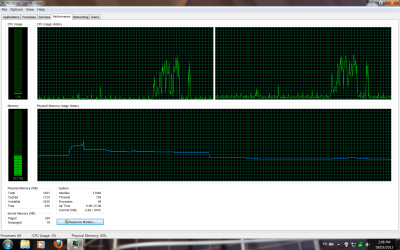
I did the restart suggestion...the first one attached is the first restart. The second one is the second restart, after deleting a few programs.

Notice that part where it goes up all of a sudden? I have no idea what triggers it.. by that point, I have closed any programs that that came up at startup and it is just sitting there not doing anything.

I will download ccleaner soon.
 

Attachments

  • RAM on startup.png
    RAM on startup.png
    55.1 KB · Views: 3
  • RAM on startup 2.png
    RAM on startup 2.png
    53.9 KB · Views: 3

My Computer My Computer

At a glance

Windows 7 Home Premium 64bitPentium Dual Core 3.20GHz3GB
Computer type
PC/Desktop
Computer Manufacturer/Model Number
Acer
OS
Windows 7 Home Premium 64bit
CPU
Pentium Dual Core 3.20GHz
Memory
3GB
Hard Drives
500gb internal
1tb external
Antivirus
Microsoft Security Essentials
Browser
Firefox
Does it drop again afterwards? Please post a screenshot of Resource Monitor when launching IE (do not open Firefox at all).

So,

Restart/Boot > Launch IE > Post Screenshot
 

My Computer My Computer

Computer type
Laptop
Back
Top