BSOD playing CS:GO and LoL - Also after computer goes to sleep

rambowoohoo

New member
Local time
6:16 PM
Messages
9
As the topic says, I am getting a BSOD while playing games randomly, but most of the times, I'll receive a BSOD after the computer goes to sleep.

Sorry if I sound like a noobie, because I am :(

I think i've uploaded the dump files correctly, but please provide me with anything I could do to receive more help. Thanks!
 

My Computer My Computer

At a glance

Windows 7 Home Premium 64bit
Computer type
PC/Desktop
OS
Windows 7 Home Premium 64bit
Please upload your msinfo32.nfo file. To get this: Start Menu -> Type msinfo32 into the Search programs and files box -> When it opens, go to File, Save -> Save as msinfo32.nfo and save in a place you will remember -> Let it finish the process of gathering and saving the system info -> Right click the .nfo file, click send to compressed (zipped) folder -> Upload the .zip file here.

Please upload your msinfo32.txt file. To get this: Start Menu -> Type msinfo32 into the Search programs and files box -> When it opens, go to File, Export -> Save as msinfo32.txt and save in a place you will remember -> Let it finish the process of gathering and saving the system info -> Right click the .txt file, click send to compressed (zipped) folder -> Upload the .zip file here.

The following is for information purposes only.
Any drivers in red should be updated/replaced/removed.

wdcsam64.sys Wed Apr 16 14:39:08 2008 (4805BB2C)
Western Digital SCSI Arcitecture Model (SAM) WDM driver[br]2008 driver version has known BSOD issues in Win7
http://www.carrona.org/drivers/driver.php?id=wdcsam64.sys

AODDriver2.sys Thu Apr 5 15:23:37 2012 (4F7D6499)
AMD Overdrive; also in EasyTune6 for Gigabyte motherboard [br] Known BSOD issues in Win7
http://www.carrona.org/drivers/driver.php?id=AODDriver2.sys

athrx.sys Fri Nov 23 10:51:22 2012 (50AF00CA)
Atheros network adapter driver
http://www.carrona.org/drivers/driver.php?id=athrx.sys

atikmpag.sys Thu Dec 20 01:32:55 2012 (50D21667)
ATI Video driver (remove the Catalyst Control Center and only install the Display Driver)
http://www.carrona.org/drivers/driver.php?id=atikmpag.sys

atikmdag.sys Thu Dec 20 02:38:55 2012 (50D225DF)
ATI Video driver (remove the Catalyst Control Center and only install the Display Driver)
http://www.carrona.org/drivers/driver.php?id=atikmdag.sys

Rt64win7.sys Wed Dec 26 23:17:50 2012 (50DB313E)
Realtek RTL8168D/8111D Family PCI-E Gigabit Ethernet NIC
http://www.carrona.org/drivers/driver.php?id=Rt64win7.sys

Use the System File Checker tool (SFC.exe) to determine which file is causing the issue, and then replace the file.

To do this, follow these steps:
  1. Open an elevated command prompt. To do this, click Start, click All Programs, click Accessories, right-click Command Prompt, and then click Run as administrator. If you are prompted for an administrator password or for a confirmation, type the password, or click Allow.
  2. At the command prompt, type the following command, and then press ENTER: sfc /scannow
    The sfc /scannow command scans all protected system files and replaces incorrect versions with correct Microsoft versions.
http://www.sevenforums.com/tutorials/1538-sfc-scannow-command-system-file-checker.html
Install all updates and Service Pack 1:
Number down items at start-up. Keep only your anti-virus, this also improves the time for logging into windows.
  • Click on the Start button
  • Type “msconfig (without quotes), click the resulting link. It will open the System Configuration window.
  • Select the “Startup” tab.
  • Deselect all items other than the antivirus.
  • Apply > OK
  • Accept then restart.
Full tutorial:
Check your hard drive(s) for errors by running chkdsk
The following is for information purposes only. The following information contains the relevant information from the blue screen analysis:
Code:
[FONT="Lucida Console"]Debug session time: Thu Mar 28 03:04:06.872 2013 (UTC + 6:00)
Loading Dump File [C:\Users\Yusra\SysnativeBSODApps\032713-10935-01.dmp]
[B][COLOR=RED]Missing Windows 7 Service Pack 1[/COLOR][/B]
Built by: 7600.17207.amd64fre.win7_gdr.130104-1435
System Uptime: 0 days 1:08:11.978
*** WARNING: Unable to verify timestamp for athrx.sys
*** ERROR: Module load completed but symbols could not be loaded for athrx.sys
Probably caused by : athrx.sys ( athrx+190706 )
BugCheck D1, {0, 2, 8, 0}
BugCheck Info: [url=http://www.carrona.org/bsodindx.html#0x000000D1]DRIVER_IRQL_NOT_LESS_OR_EQUAL (d1)[/url]
Bugcheck code 000000d1
Arguments: 
Arg1: 0000000000000000, memory referenced
Arg2: 0000000000000002, IRQL
Arg3: 0000000000000008, value 0 = read operation, 1 = write operation
Arg4: 0000000000000000, address which referenced memory
PROCESS_NAME:  svchost.exe
BUGCHECK_STR:  0xD1
DEFAULT_BUCKET_ID:  WIN7_DRIVER_FAULT
FAILURE_BUCKET_ID:  X64_0xD1_CODE_AV_NULL_IP_athrx+190706
BiosVersion = V1.11
BiosReleaseDate = 10/31/2012
SystemManufacturer = MSI
SystemProductName = MS-7693
¨¨¨¨¨¨¨¨¨¨¨¨¨¨¨¨¨¨¨¨¨¨¨¨¨¨¨¨¨¨¨¨¨¨¨¨¨¨¨¨¨¨¨¨¨¨¨¨¨¨¨¨¨¨¨¨¨¨¨¨¨¨¨¨¨¨¨¨¨¨¨¨¨¨¨¨¨¨¨¨¨¨¨¨¨¨``
Debug session time: Tue Mar 26 09:05:28.952 2013 (UTC + 6:00)
Loading Dump File [C:\Users\Yusra\SysnativeBSODApps\032513-10280-01.dmp]
[B][COLOR=RED]Missing Windows 7 Service Pack 1[/COLOR][/B]
Built by: 7600.17207.amd64fre.win7_gdr.130104-1435
System Uptime: 0 days 6:54:02.434
*** WARNING: Unable to verify timestamp for athrx.sys
*** ERROR: Module load completed but symbols could not be loaded for athrx.sys
Probably caused by : athrx.sys ( athrx+190706 )
BugCheck D1, {0, 2, 8, 0}
BugCheck Info: [url=http://www.carrona.org/bsodindx.html#0x000000D1]DRIVER_IRQL_NOT_LESS_OR_EQUAL (d1)[/url]
Bugcheck code 000000d1
Arguments: 
Arg1: 0000000000000000, memory referenced
Arg2: 0000000000000002, IRQL
Arg3: 0000000000000008, value 0 = read operation, 1 = write operation
Arg4: 0000000000000000, address which referenced memory
PROCESS_NAME:  svchost.exe
BUGCHECK_STR:  0xD1
DEFAULT_BUCKET_ID:  WIN7_DRIVER_FAULT
FAILURE_BUCKET_ID:  X64_0xD1_CODE_AV_NULL_IP_athrx+190706
BiosVersion = V1.11
BiosReleaseDate = 10/31/2012
SystemManufacturer = MSI
SystemProductName = MS-7693
¨¨¨¨¨¨¨¨¨¨¨¨¨¨¨¨¨¨¨¨¨¨¨¨¨¨¨¨¨¨¨¨¨¨¨¨¨¨¨¨¨¨¨¨¨¨¨¨¨¨¨¨¨¨¨¨¨¨¨¨¨¨¨¨¨¨¨¨¨¨¨¨¨¨¨¨¨¨¨¨¨¨¨¨¨¨``
Debug session time: Mon Mar 25 09:51:52.980 2013 (UTC + 6:00)
Loading Dump File [C:\Users\Yusra\SysnativeBSODApps\032413-10857-01.dmp]
[B][COLOR=RED]Missing Windows 7 Service Pack 1[/COLOR][/B]
Built by: 7600.17207.amd64fre.win7_gdr.130104-1435
System Uptime: 0 days 8:42:49.462
*** WARNING: Unable to verify timestamp for athrx.sys
*** ERROR: Module load completed but symbols could not be loaded for athrx.sys
Probably caused by : athrx.sys ( athrx+190706 )
BugCheck D1, {0, 2, 8, 0}
BugCheck Info: [url=http://www.carrona.org/bsodindx.html#0x000000D1]DRIVER_IRQL_NOT_LESS_OR_EQUAL (d1)[/url]
Bugcheck code 000000d1
Arguments: 
Arg1: 0000000000000000, memory referenced
Arg2: 0000000000000002, IRQL
Arg3: 0000000000000008, value 0 = read operation, 1 = write operation
Arg4: 0000000000000000, address which referenced memory
PROCESS_NAME:  svchost.exe
BUGCHECK_STR:  0xD1
DEFAULT_BUCKET_ID:  WIN7_DRIVER_FAULT
FAILURE_BUCKET_ID:  X64_0xD1_CODE_AV_NULL_IP_athrx+190706
BiosVersion = V1.11
BiosReleaseDate = 10/31/2012
SystemManufacturer = MSI
SystemProductName = MS-7693
¨¨¨¨¨¨¨¨¨¨¨¨¨¨¨¨¨¨¨¨¨¨¨¨¨¨¨¨¨¨¨¨¨¨¨¨¨¨¨¨¨¨¨¨¨¨¨¨¨¨¨¨¨¨¨¨¨¨¨¨¨¨¨¨¨¨¨¨¨¨¨¨¨¨¨¨¨¨¨¨¨¨¨¨¨¨``
Debug session time: Sun Mar 24 09:55:07.069 2013 (UTC + 6:00)
Loading Dump File [C:\Users\Yusra\SysnativeBSODApps\032313-10748-01.dmp]
[B][COLOR=RED]Missing Windows 7 Service Pack 1[/COLOR][/B]
Built by: 7600.17207.amd64fre.win7_gdr.130104-1435
System Uptime: 0 days 12:59:13.191
*** WARNING: Unable to verify timestamp for athrx.sys
*** ERROR: Module load completed but symbols could not be loaded for athrx.sys
Probably caused by : athrx.sys ( athrx+190706 )
BugCheck D1, {0, 2, 8, 0}
BugCheck Info: [url=http://www.carrona.org/bsodindx.html#0x000000D1]DRIVER_IRQL_NOT_LESS_OR_EQUAL (d1)[/url]
Bugcheck code 000000d1
Arguments: 
Arg1: 0000000000000000, memory referenced
Arg2: 0000000000000002, IRQL
Arg3: 0000000000000008, value 0 = read operation, 1 = write operation
Arg4: 0000000000000000, address which referenced memory
PROCESS_NAME:  explorer.exe
BUGCHECK_STR:  0xD1
DEFAULT_BUCKET_ID:  WIN7_DRIVER_FAULT
FAILURE_BUCKET_ID:  X64_0xD1_CODE_AV_NULL_IP_athrx+190706
BiosVersion = V1.11
BiosReleaseDate = 10/31/2012
SystemManufacturer = MSI
SystemProductName = MS-7693
¨¨¨¨¨¨¨¨¨¨¨¨¨¨¨¨¨¨¨¨¨¨¨¨¨¨¨¨¨¨¨¨¨¨¨¨¨¨¨¨¨¨¨¨¨¨¨¨¨¨¨¨¨¨¨¨¨¨¨¨¨¨¨¨¨¨¨¨¨¨¨¨¨¨¨¨¨¨¨¨¨¨¨¨¨¨``
Debug session time: Sat Mar 23 11:21:12.859 2013 (UTC + 6:00)
Loading Dump File [C:\Users\Yusra\SysnativeBSODApps\032313-10030-01.dmp]
[B][COLOR=RED]Missing Windows 7 Service Pack 1[/COLOR][/B]
Built by: 7600.17207.amd64fre.win7_gdr.130104-1435
System Uptime: 0 days 4:41:11.341
*** WARNING: Unable to verify timestamp for athrx.sys
*** ERROR: Module load completed but symbols could not be loaded for athrx.sys
Probably caused by : athrx.sys ( athrx+190706 )
BugCheck D1, {0, 2, 8, 0}
BugCheck Info: [url=http://www.carrona.org/bsodindx.html#0x000000D1]DRIVER_IRQL_NOT_LESS_OR_EQUAL (d1)[/url]
Bugcheck code 000000d1
Arguments: 
Arg1: 0000000000000000, memory referenced
Arg2: 0000000000000002, IRQL
Arg3: 0000000000000008, value 0 = read operation, 1 = write operation
Arg4: 0000000000000000, address which referenced memory
PROCESS_NAME:  svchost.exe
BUGCHECK_STR:  0xD1
DEFAULT_BUCKET_ID:  WIN7_DRIVER_FAULT
FAILURE_BUCKET_ID:  X64_0xD1_CODE_AV_NULL_IP_athrx+190706
BiosVersion = V1.11
BiosReleaseDate = 10/31/2012
SystemManufacturer = MSI
SystemProductName = MS-7693
¨¨¨¨¨¨¨¨¨¨¨¨¨¨¨¨¨¨¨¨¨¨¨¨¨¨¨¨¨¨¨¨¨¨¨¨¨¨¨¨¨¨¨¨¨¨¨¨¨¨¨¨¨¨¨¨¨¨¨¨¨¨¨¨¨¨¨¨¨¨¨¨¨¨¨¨¨¨¨¨¨¨¨¨¨¨``
Debug session time: Fri Mar 22 13:11:58.109 2013 (UTC + 6:00)
Loading Dump File [C:\Users\Yusra\SysnativeBSODApps\032213-16707-01.dmp]
[B][COLOR=RED]Missing Windows 7 Service Pack 1[/COLOR][/B]
Built by: 7600.17207.amd64fre.win7_gdr.130104-1435
System Uptime: 0 days 7:27:21.231
*** WARNING: Unable to verify timestamp for athrx.sys
*** ERROR: Module load completed but symbols could not be loaded for athrx.sys
Probably caused by : athrx.sys ( athrx+190706 )
BugCheck D1, {0, 2, 8, 0}
BugCheck Info: [url=http://www.carrona.org/bsodindx.html#0x000000D1]DRIVER_IRQL_NOT_LESS_OR_EQUAL (d1)[/url]
Bugcheck code 000000d1
Arguments: 
Arg1: 0000000000000000, memory referenced
Arg2: 0000000000000002, IRQL
Arg3: 0000000000000008, value 0 = read operation, 1 = write operation
Arg4: 0000000000000000, address which referenced memory
PROCESS_NAME:  svchost.exe
BUGCHECK_STR:  0xD1
DEFAULT_BUCKET_ID:  WIN7_DRIVER_FAULT
FAILURE_BUCKET_ID:  X64_0xD1_CODE_AV_NULL_IP_athrx+190706
BiosVersion = V1.11
BiosReleaseDate = 10/31/2012
SystemManufacturer = MSI
SystemProductName = MS-7693
¨¨¨¨¨¨¨¨¨¨¨¨¨¨¨¨¨¨¨¨¨¨¨¨¨¨¨¨¨¨¨¨¨¨¨¨¨¨¨¨¨¨¨¨¨¨¨¨¨¨¨¨¨¨¨¨¨¨¨¨¨¨¨¨¨¨¨¨¨¨¨¨¨¨¨¨¨¨¨¨¨¨¨¨¨¨``[/FONT]

Await the .nfo file.
 
Last edited:

My Computer My Computer

At a glance

Windows 10 Home 64BitIntel Core i5 10400 @ 2.90GHz8.00GB Single-Channel Unknown @ 1329MHz (16-2...
Computer type
PC/Desktop
Computer Manufacturer/Model Number
Self assembled
OS
Windows 10 Home 64Bit
CPU
Intel Core i5 10400 @ 2.90GHz
Motherboard
Intel Corporation DG41WV (PROCESSOR)
Memory
8.00GB Single-Channel Unknown @ 1329MHz (16-20-20-38)
Sound Card
Realtek High Definition Audio
Monitor(s) Displays
DELL E170S
Screen Resolution
1280x1024 pixels
Hard Drives
931GB TOSHIBA DT01ACA100 (SATA)
238GB TEAM TM8PS7256G (SATA SSD)
Case
Nothing Fancy
Cooling
Fans
Keyboard
A4 Tech Co LTD
Mouse
A4 Tech Co Ltd/Logitech
Internet Speed
25 Mbps
Should I remove the AMD Overdrive and WD drivers?
And follow the rest of the steps? As of now, I've only uploaded the msinfo's into 1 zip file. Do you require anything else? Thanks!
 

My Computer My Computer

At a glance

Windows 7 Home Premium 64bit
Computer type
PC/Desktop
OS
Windows 7 Home Premium 64bit

My Computer My Computer

At a glance

Windows 10 Home 64BitIntel Core i5 10400 @ 2.90GHz8.00GB Single-Channel Unknown @ 1329MHz (16-2...
Computer type
PC/Desktop
Computer Manufacturer/Model Number
Self assembled
OS
Windows 10 Home 64Bit
CPU
Intel Core i5 10400 @ 2.90GHz
Motherboard
Intel Corporation DG41WV (PROCESSOR)
Memory
8.00GB Single-Channel Unknown @ 1329MHz (16-20-20-38)
Sound Card
Realtek High Definition Audio
Monitor(s) Displays
DELL E170S
Screen Resolution
1280x1024 pixels
Hard Drives
931GB TOSHIBA DT01ACA100 (SATA)
238GB TEAM TM8PS7256G (SATA SSD)
Case
Nothing Fancy
Cooling
Fans
Keyboard
A4 Tech Co LTD
Mouse
A4 Tech Co Ltd/Logitech
Internet Speed
25 Mbps
I don't have an antivirus at the moment actually
 

My Computer My Computer

At a glance

Windows 7 Home Premium 64bit
Computer type
PC/Desktop
OS
Windows 7 Home Premium 64bit
Did you ever install one?
 

My Computer My Computer

At a glance

Windows 10 Home 64BitIntel Core i5 10400 @ 2.90GHz8.00GB Single-Channel Unknown @ 1329MHz (16-2...
Computer type
PC/Desktop
Computer Manufacturer/Model Number
Self assembled
OS
Windows 10 Home 64Bit
CPU
Intel Core i5 10400 @ 2.90GHz
Motherboard
Intel Corporation DG41WV (PROCESSOR)
Memory
8.00GB Single-Channel Unknown @ 1329MHz (16-20-20-38)
Sound Card
Realtek High Definition Audio
Monitor(s) Displays
DELL E170S
Screen Resolution
1280x1024 pixels
Hard Drives
931GB TOSHIBA DT01ACA100 (SATA)
238GB TEAM TM8PS7256G (SATA SSD)
Case
Nothing Fancy
Cooling
Fans
Keyboard
A4 Tech Co LTD
Mouse
A4 Tech Co Ltd/Logitech
Internet Speed
25 Mbps
How do i remove the AMD overdrive driver?

Also, I've used the SFC.exe and it said it had found corrupted files and fixed them
 

My Computer My Computer

At a glance

Windows 7 Home Premium 64bit
Computer type
PC/Desktop
OS
Windows 7 Home Premium 64bit
No, I have never installed one. Or at least I believe I haven't
 

My Computer My Computer

At a glance

Windows 7 Home Premium 64bit
Computer type
PC/Desktop
OS
Windows 7 Home Premium 64bit
How do i remove the AMD overdrive driver?

Try uninstalling from Control Panel.
Uninstall or change a program

Or use revo uninstaller free:

Download and install Revo Uninstaller free from here: Download Revo Uninstaller Freeware - Free and Full Download - Uninstall software, remove programs, solve uninstall problems

Opt for "Advanced Mode" and uninstall the software (also delete the leftover registry entries).

No, I have never installed one. Or at least I believe I haven't

That's really bad.

Scan your system with the following:

Kaspersky TDSSKiller
How to remove malware belonging to the family Rootkit.Win32.TDSS (aka Tidserv, TDSServ, Alureon)

ESET online scanner
One-time virus scanner free with ESET online scanner

We recommended Microsoft Security Essentials from a strict BSOD perspective.

Microsoft Security Essentials, Free antivirus for windows
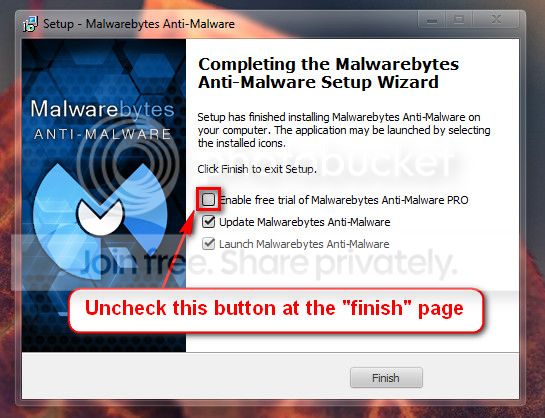
Malwarebytes Anti-Malware Free
Good and Free system security combination

   Warning
Do not start the free trial of Malware Bytes; remember to deselect that option when prompted.

2013-03-09_224312_zps62dc7c23.jpg


Run a full scan with both (separately) once downloaded, installed and updated.
 

My Computer My Computer

At a glance

Windows 10 Home 64BitIntel Core i5 10400 @ 2.90GHz8.00GB Single-Channel Unknown @ 1329MHz (16-2...
Computer type
PC/Desktop
Computer Manufacturer/Model Number
Self assembled
OS
Windows 10 Home 64Bit
CPU
Intel Core i5 10400 @ 2.90GHz
Motherboard
Intel Corporation DG41WV (PROCESSOR)
Memory
8.00GB Single-Channel Unknown @ 1329MHz (16-20-20-38)
Sound Card
Realtek High Definition Audio
Monitor(s) Displays
DELL E170S
Screen Resolution
1280x1024 pixels
Hard Drives
931GB TOSHIBA DT01ACA100 (SATA)
238GB TEAM TM8PS7256G (SATA SSD)
Case
Nothing Fancy
Cooling
Fans
Keyboard
A4 Tech Co LTD
Mouse
A4 Tech Co Ltd/Logitech
Internet Speed
25 Mbps
Should I just uninstall AMD Catalyst in order to remove AMD Overdrive?

Also, I have already ran Kaspersky and it came up clean. I am currently running ESET and will get back to you ASAP
 

My Computer My Computer

At a glance

Windows 7 Home Premium 64bit
Computer type
PC/Desktop
OS
Windows 7 Home Premium 64bit
Yes, uninstall CCC
 

My Computer My Computer

At a glance

Windows 10 Home 64BitIntel Core i5 10400 @ 2.90GHz8.00GB Single-Channel Unknown @ 1329MHz (16-2...
Computer type
PC/Desktop
Computer Manufacturer/Model Number
Self assembled
OS
Windows 10 Home 64Bit
CPU
Intel Core i5 10400 @ 2.90GHz
Motherboard
Intel Corporation DG41WV (PROCESSOR)
Memory
8.00GB Single-Channel Unknown @ 1329MHz (16-20-20-38)
Sound Card
Realtek High Definition Audio
Monitor(s) Displays
DELL E170S
Screen Resolution
1280x1024 pixels
Hard Drives
931GB TOSHIBA DT01ACA100 (SATA)
238GB TEAM TM8PS7256G (SATA SSD)
Case
Nothing Fancy
Cooling
Fans
Keyboard
A4 Tech Co LTD
Mouse
A4 Tech Co Ltd/Logitech
Internet Speed
25 Mbps
Ran it, and found out that Yoontoo was a threat and it was removed. Is there anything else required for me to do?
 

My Computer My Computer

At a glance

Windows 7 Home Premium 64bit
Computer type
PC/Desktop
OS
Windows 7 Home Premium 64bit
Nothing really until you get another BSOD.

Did you update to service pack 1?
 

My Computer My Computer

At a glance

Windows 10 Home 64BitIntel Core i5 10400 @ 2.90GHz8.00GB Single-Channel Unknown @ 1329MHz (16-2...
Computer type
PC/Desktop
Computer Manufacturer/Model Number
Self assembled
OS
Windows 10 Home 64Bit
CPU
Intel Core i5 10400 @ 2.90GHz
Motherboard
Intel Corporation DG41WV (PROCESSOR)
Memory
8.00GB Single-Channel Unknown @ 1329MHz (16-20-20-38)
Sound Card
Realtek High Definition Audio
Monitor(s) Displays
DELL E170S
Screen Resolution
1280x1024 pixels
Hard Drives
931GB TOSHIBA DT01ACA100 (SATA)
238GB TEAM TM8PS7256G (SATA SSD)
Case
Nothing Fancy
Cooling
Fans
Keyboard
A4 Tech Co LTD
Mouse
A4 Tech Co Ltd/Logitech
Internet Speed
25 Mbps
Haven't updated to service pack 1, I will do that.

Also, when trying to uninstall AMD Catalyst manager, I received a BSOD during uninstall phase. What could have caused it?
 

My Computer My Computer

At a glance

Windows 7 Home Premium 64bit
Computer type
PC/Desktop
OS
Windows 7 Home Premium 64bit
Upload new crash reports.
 

My Computer My Computer

At a glance

Windows 10 Home 64BitIntel Core i5 10400 @ 2.90GHz8.00GB Single-Channel Unknown @ 1329MHz (16-2...
Computer type
PC/Desktop
Computer Manufacturer/Model Number
Self assembled
OS
Windows 10 Home 64Bit
CPU
Intel Core i5 10400 @ 2.90GHz
Motherboard
Intel Corporation DG41WV (PROCESSOR)
Memory
8.00GB Single-Channel Unknown @ 1329MHz (16-20-20-38)
Sound Card
Realtek High Definition Audio
Monitor(s) Displays
DELL E170S
Screen Resolution
1280x1024 pixels
Hard Drives
931GB TOSHIBA DT01ACA100 (SATA)
238GB TEAM TM8PS7256G (SATA SSD)
Case
Nothing Fancy
Cooling
Fans
Keyboard
A4 Tech Co LTD
Mouse
A4 Tech Co Ltd/Logitech
Internet Speed
25 Mbps
Here is the new crash report
 

My Computer My Computer

At a glance

Windows 7 Home Premium 64bit
Computer type
PC/Desktop
OS
Windows 7 Home Premium 64bit
http://www.sevenforums.com/crash-lo...op-0x116-video_tdr_error-troubleshooting.html

Code:
*******************************************************************************
*                                                                             *
*                        Bugcheck Analysis                                    *
*                                                                             *
*******************************************************************************

Use !analyze -v to get detailed debugging information.

BugCheck 116, {fffffa80079464e0, fffff8800ad8545c, 0, 2}

Unable to load image \SystemRoot\system32\DRIVERS\atikmpag.sys, Win32 error 0n2
*** WARNING: Unable to verify timestamp for atikmpag.sys
*** ERROR: Module load completed but symbols could not be loaded for atikmpag.sys
Probably caused by : atikmpag.sys ( atikmpag+745c )

Followup: MachineOwner
---------

5: kd> !analyze -v
*******************************************************************************
*                                                                             *
*                        Bugcheck Analysis                                    *
*                                                                             *
*******************************************************************************

VIDEO_TDR_FAILURE (116)
Attempt to reset the display driver and recover from timeout failed.
Arguments:
Arg1: fffffa80079464e0, Optional pointer to internal TDR recovery context (TDR_RECOVERY_CONTEXT).
Arg2: fffff8800ad8545c, The pointer into responsible device driver module (e.g. owner tag).
Arg3: 0000000000000000, Optional error code (NTSTATUS) of the last failed operation.
Arg4: 0000000000000002, Optional internal context dependent data.

Debugging Details:
------------------


FAULTING_IP: 
atikmpag+745c
fffff880`0ad8545c 4883ec28        sub     rsp,28h

DEFAULT_BUCKET_ID:  GRAPHICS_DRIVER_TDR_FAULT

CUSTOMER_CRASH_COUNT:  1

BUGCHECK_STR:  0x116

PROCESS_NAME:  System

CURRENT_IRQL:  0

STACK_TEXT:  
fffff880`0b7f19c8 fffff880`044d4000 : 00000000`00000116 fffffa80`079464e0 fffff880`0ad8545c 00000000`00000000 : nt!KeBugCheckEx
fffff880`0b7f19d0 fffff880`044d3d0a : fffff880`0ad8545c fffffa80`079464e0 fffffa80`07303960 fffffa80`08282410 : dxgkrnl!TdrBugcheckOnTimeout+0xec
fffff880`0b7f1a10 fffff880`0457af07 : fffffa80`079464e0 00000000`00000000 fffffa80`07303960 fffffa80`08282410 : dxgkrnl!TdrIsRecoveryRequired+0x1a2
fffff880`0b7f1a40 fffff880`045a4b75 : 00000000`ffffffff 00000000`00003079 00000000`00000000 00000000`00000002 : dxgmms1!VidSchiReportHwHang+0x40b
fffff880`0b7f1b20 fffff880`045a32bb : 00000000`00000102 00000000`00000000 00000000`00003079 00000000`00000000 : dxgmms1!VidSchiCheckHwProgress+0x71
fffff880`0b7f1b50 fffff880`045762c6 : ffffffff`ff676980 fffffa80`08282410 00000000`00000000 00000000`00000000 : dxgmms1!VidSchiWaitForSchedulerEvents+0x1fb
fffff880`0b7f1bf0 fffff880`045a2e7a : 00000000`00000000 fffffa80`07303960 00000000`00000080 fffffa80`08282410 : dxgmms1!VidSchiScheduleCommandToRun+0x1da
fffff880`0b7f1d00 fffff800`02f2ba4a : fffff880`069cfc50 fffffa80`084abb60 fffffa80`06cdc040 fffff800`02c846c7 : dxgmms1!VidSchiWorkerThread+0xba
fffff880`0b7f1d40 fffff800`02c6ae26 : fffff880`030a4180 fffffa80`084abb60 fffff880`030af040 fffff880`01223624 : nt!PspSystemThreadStartup+0x5a
fffff880`0b7f1d80 00000000`00000000 : 00000000`00000000 00000000`00000000 00000000`00000000 00000000`00000000 : nt!KxStartSystemThread+0x16


STACK_COMMAND:  .bugcheck ; kb

FOLLOWUP_IP: 
atikmpag+745c
fffff880`0ad8545c 4883ec28        sub     rsp,28h

SYMBOL_NAME:  atikmpag+745c

FOLLOWUP_NAME:  MachineOwner

MODULE_NAME: atikmpag

IMAGE_NAME:  atikmpag.sys

DEBUG_FLR_IMAGE_TIMESTAMP:  4dae3558

FAILURE_BUCKET_ID:  X64_0x116_IMAGE_atikmpag.sys

BUCKET_ID:  X64_0x116_IMAGE_atikmpag.sys

Followup: MachineOwner
---------

5: kd> lmvm atikmpag
start             end                 module name
fffff880`0ad7e000 fffff880`0adce000   atikmpag T (no symbols)           
    Loaded symbol image file: atikmpag.sys
    Image path: \SystemRoot\system32\DRIVERS\atikmpag.sys
    Image name: atikmpag.sys
    Timestamp:        Wed Apr 20 07:22:32 2011 (4DAE3558)
    CheckSum:         00050398
    ImageSize:        00050000
    Translations:     0000.04b0 0000.04e4 0409.04b0 0409.04e4
 

My Computer My Computer

At a glance

Windows 10 Home 64BitIntel Core i5 10400 @ 2.90GHz8.00GB Single-Channel Unknown @ 1329MHz (16-2...
Computer type
PC/Desktop
Computer Manufacturer/Model Number
Self assembled
OS
Windows 10 Home 64Bit
CPU
Intel Core i5 10400 @ 2.90GHz
Motherboard
Intel Corporation DG41WV (PROCESSOR)
Memory
8.00GB Single-Channel Unknown @ 1329MHz (16-20-20-38)
Sound Card
Realtek High Definition Audio
Monitor(s) Displays
DELL E170S
Screen Resolution
1280x1024 pixels
Hard Drives
931GB TOSHIBA DT01ACA100 (SATA)
238GB TEAM TM8PS7256G (SATA SSD)
Case
Nothing Fancy
Cooling
Fans
Keyboard
A4 Tech Co LTD
Mouse
A4 Tech Co Ltd/Logitech
Internet Speed
25 Mbps
Back
Top