Wolfenstein 2009: WHEA-Logger Event ID: 18 crash

toyo

New member
Member
Local time
12:11 AM
Messages
38
This is the first game I'm trying in Windows 7 (it's the RTM). The settings are maxed. After a while it crashes on a black screen, with "Out of range" message on the monitor sometimes.
The only way I got the game working was by installing the DirectX 9 that came on the DVD, otherwise the game kept on telling me it misses some D3D9 stuff. This worried me, but Dxdiag seems to report DirectX 11 fully functional.
Also, my videocard (it's speeds are stock) is heating very much with this game (88-90 Celsius), but this should be just fine with HD 4850. The fan also spins like crazy, in XP it never raised above 8700 rpm (which should be ok as far as I know), in this game + Win 7 it's going into 11000...
The CPU, a stock E7200 (2533 MHz) also heats up a lot - 55 Celsius (compared to other games in XP that I played), even if it never goes past 75% usage. Unreal (last ver.) engine games use it 100% and it stays on 50 Celsius. The CPU fan also spins like crazy for a game, 2200 rpm. In XP it never got past 1900 rpm in games, only in testing/benchmarking.
I tested the CPU (and memory) stability with Linpack (57-60 Celsius max), OCCT, and Everest too. The values I mention come from .csv files Everest is logging. The system is stable under the stress tests. As a matter of fact, the Wolfenstein gave my Win 7 the only BSODs and crashes.
Thank you for your help.


The actual event:

Log Name: System
Source: Microsoft-Windows-WHEA-Logger
Date: 20.08.2009 18:13:24
Event ID: 18
Task Category: None
Level: Error
Keywords:
User: LOCAL SERVICE
Computer: toyz
Description:
A fatal hardware error has occurred.

Reported by component: Processor Core
Error Source: Machine Check Exception
Error Type: Bus/Interconnect Error
Processor ID: 0

The details view of this entry contains further information.
Event Xml:
<Event xmlns="http://schemas.microsoft.com/win/2004/08/events/event">
<System>
<Provider Name="Microsoft-Windows-WHEA-Logger" Guid="{C26C4F3C-3F66-4E99-8F8A-39405CFED220}" />
<EventID>18</EventID>
<Version>0</Version>
<Level>2</Level>
<Task>0</Task>
<Opcode>0</Opcode>
<Keywords>0x8000000000000000</Keywords>
<TimeCreated SystemTime="2009-08-20T15:13:24.455631500Z" />
<EventRecordID>14117</EventRecordID>
<Correlation ActivityID="{EF43DFD1-3165-450E-BF69-4D1017AD5B54}" />
<Execution ProcessID="1424" ThreadID="2272" />
<Channel>System</Channel>
<Computer>toyz</Computer>
<Security UserID="S-1-5-19" />
</System>
<EventData>
<Data Name="ErrorSource">3</Data>
<Data Name="ApicId">0</Data>
<Data Name="MCABank">5</Data>
<Data Name="MciStat">0xf200001034000e0f</Data>
<Data Name="MciAddr">0x0</Data>
<Data Name="MciMisc">0x0</Data>
<Data Name="ErrorType">10</Data>
<Data Name="TransactionType">256</Data>
<Data Name="Participation">3</Data>
<Data Name="RequestType">0</Data>
<Data Name="MemorIO">3</Data>
<Data Name="MemHierarchyLvl">3</Data>
<Data Name="Timeout">0</Data>
<Data Name="OperationType">256</Data>
<Data Name="Channel">256</Data>
<Data Name="Length">928</Data>
<Data Name="RawData">435045521002FFFFFFFF03000100000002000000A00300000B0D0F00140809140000000000000000000000000000000000000000000000000000000000000000BDC407CF89B7184EB3C41F732CB57131FE6FF5E89C91C54CBA8865ABE14913BBA46475B8A821CA0102000000000000000000000000000000000000000000000058010000C00000000102000001000000ADCC7698B447DB4BB65E16F193C4F3DB0000000000000000000000000000000001000000000000000000000000000000000000000000000018020000800000000102000000000000B0A03EDC44A19747B95B53FA242B6E1D0000000000000000000000000000000001000000000000000000000000000000000000000000000098020000080100000102000000000000011D1E8AF94257459C33565E5CC3F7E8000000000000000000000000000000000100000000000000000000000000000000000000000000007F01000000000000000204000003000076060100000000000000000000000000000000000000000000000000000000000000000000000000000000000000000000000000000000000000000000000000000000000000000000000000000000000000000000000000000000000000000000000000000000000000000000000000000000000000000000000000000000000000000000000000000000000000000000000000000000000000000000000000000000000000000000000000000000000700000000000000000000000000000076060100000802009DE30800FFFBEBBF0000000000000000000000000000000000000000000000000000000000000000B3F8F31CB1C5A249AA595EEF92FFA63C01000000000000009E07C0E606000000000000000000000000000000000000000000000000000000000000000000000001000000010000007DAD8BBBA821CA010000000000000000000000000000000000000000050000000F0E0034100000F2000000000000000000000000000000000000000000000000000000000000000000000000000000000000000000000000000000000000000000000000000000000000000000000000000000000000000000000000000000000000000000000000000000000000000000000000000000000000000000000000000000000000000000000000000000000000000000000000000000000000000000000000000000000000000000000000000000000000000000000000000000000000000000000000000000000000000000000000000000000000000000000000</Data>
</EventData>
</Event>
 

My Computer My Computer

At a glance

Windows 7 x64 UltimateAMD FX 8350Kingston HyperX 8GBAsus EAH4850 512 MB
Computer type
PC/Desktop
Computer Manufacturer/Model Number
custom
OS
Windows 7 x64 Ultimate
CPU
AMD FX 8350
Motherboard
Gigabyte GA-990XA-UD3
Memory
Kingston HyperX 8GB
Graphics Card(s)
Asus EAH4850 512 MB
Sound Card
M-Audio Audiophile USB / Yamaha HS80M monitors
Monitor(s) Displays
Fujitsu-Siemens Amilo LSL 3230T 23" FullHD
Screen Resolution
1080p
Hard Drives
WD Caviar Blue 1TB
Case
Thermaltake
Keyboard
Logitech Wave Pro
Mouse
Logitech Performance MX
Internet Speed
100 mbps
The same thing happens to me quite oftenly, and only when I play Wolfenstein 09. It really heats up my GPU and most of the time my PC ends crashing in a BSOD. I don't know what this game does to stress the computer that hard, no other game does it. I do hope they release a patch for it, to make it playable. It's a pity really. I even bought an additional case cooler, but not even that helped in the end :(
 

My Computer My Computer

At a glance

Windows XP SP3
OS
Windows XP SP3
Hmmmm....that doesn't sound good. I just picked up the game tonight and was debating between the PC version and the 360 and I went with the PC version. Hopefully I won't experience all of these problems.
 

My Computer My Computer

At a glance

Windows 7 Ultimate x64Intel Q9550 2.83Ghz OC'd to 3.40Ghz8GB G.Skill PI DDR2-800, 4-4-4-12 timingsEVGA 1280MB Nvidia GeForce GTX570
Computer Manufacturer/Model Number
Self-Built in July 2009
OS
Windows 7 Ultimate x64
CPU
Intel Q9550 2.83Ghz OC'd to 3.40Ghz
Motherboard
Gigabyte GA-EP45-UD3R rev. 1.1, F12 BIOS
Memory
8GB G.Skill PI DDR2-800, 4-4-4-12 timings
Graphics Card(s)
EVGA 1280MB Nvidia GeForce GTX570
Sound Card
Realtek ALC899A 8 channel onboard audio
Monitor(s) Displays
23" Acer x233H
Screen Resolution
1920x1080
Hard Drives
Intel X25-M 80GB Gen 2 SSD
Western Digital 1TB Caviar Black, 32MB cache. WD1001FALS
PSU
Corsair 620HX modular
Case
Antec P182
Cooling
stock
Keyboard
ABS M1 Mechanical
Mouse
Logitech G9 Laser Mouse
Internet Speed
15/2 cable modem
Other Info
Windows and Linux enthusiast. Logitech G35 Headset.
I do not have any problems with this game so far.
 

My Computer My Computer

At a glance

Windows 7QuadCore Intel Core 2 Quad Q9400, 2666 MHzKingston HyperX KHX8500D2K2/2GN x 4PowerColor PCS+ HD4870 512MB GDDR5
OS
Windows 7
CPU
QuadCore Intel Core 2 Quad Q9400, 2666 MHz
Motherboard
Gigabyte GA-EP43-S3L
Memory
Kingston HyperX KHX8500D2K2/2GN x 4
Graphics Card(s)
PowerColor PCS+ HD4870 512MB GDDR5
Sound Card
Integrated
Monitor(s) Displays
Asus VW221
Hard Drives
WDC WD5000AAKS-00A7B2 (465 GB)
Hitachi HDP725032GLA360 (298 GB)
WDC WD2500JS-00MHB1 (232 GB)
WD 5000AAV External (465 GB)
PSU
ASUS 650W
Case
GIGABYTE 3D AURORA 570
Cooling
ASUS Arctic Square
I must admit I don't have any problems either and despite it being a heavily GPU dependant game, it actually runs a lot cooler those some games :huh:
 

My Computer My Computer

At a glance

8 Pro x64i7 3770K 4.6GHz16GB G.Skill Trident X 2666mhzx2 EVGA 780 Ti Superclocked SLI
Computer type
PC/Desktop
Computer Manufacturer/Model Number
Systems by SmartEyeball
OS
8 Pro x64
CPU
i7 3770K 4.6GHz
Motherboard
ASUS P8Z77 WS
Memory
16GB G.Skill Trident X 2666mhz
Graphics Card(s)
x2 EVGA 780 Ti Superclocked SLI
Sound Card
SB X-FI Surround 5.1 PRO USB / ATH-AD900 Headphones
Monitor(s) Displays
x3 Dell U2410 / 58" Samsung
Screen Resolution
5760*1200/ 1920*1200
Hard Drives
2x Intel 520 240GB (RAID 0) * 2x WD Caviar Blacks 2TB (RAID 0) * 2TB WD Caviar Black * Sony Optirac DVD
PSU
Silverstone Strider Evolution 1200W
Case
Thermaltake Level 10 GT Snow Edition
Cooling
Noctua NH-D14
Keyboard
Topre Realforce // Ducky Shine MX Black // Filco Ninja TKL
Mouse
Thermaltake Theron (Highly Recommended) + Razer Imperator
Antivirus
MSE
Browser
IE, FF, WaterFox
Other Info
GT Extreme V2 Sim Racing Cockpit + 40" LCD and K/B Mouse stand ▼
Fanatec CSR Elite Wheel + Clubsport V1 Pedals + CSR shifter/7G-H ▼Saitek X52 Pro ▼ TrackIR 5 Pro
Buttkicker v2 Seat Rumbler with Dedicated 5.1 and Sub Woofer attached to frame ▼
=
Bloody Big Grin
I've been playing it for about an hour on my PC and haven't noticed any issues. Think my video card was around 60 Celsius and it had the fan running at 60%...but box seemed stable. I noticed my Q9550 core temps were only showing mid 30's when I exited out of the game. I'm idling now between 24 and 29 Celcius on my 4 cores. My GPU hovers right around 42 Celcius.
 

My Computer My Computer

At a glance

Windows 7 Ultimate x64Intel Q9550 2.83Ghz OC'd to 3.40Ghz8GB G.Skill PI DDR2-800, 4-4-4-12 timingsEVGA 1280MB Nvidia GeForce GTX570
Computer Manufacturer/Model Number
Self-Built in July 2009
OS
Windows 7 Ultimate x64
CPU
Intel Q9550 2.83Ghz OC'd to 3.40Ghz
Motherboard
Gigabyte GA-EP45-UD3R rev. 1.1, F12 BIOS
Memory
8GB G.Skill PI DDR2-800, 4-4-4-12 timings
Graphics Card(s)
EVGA 1280MB Nvidia GeForce GTX570
Sound Card
Realtek ALC899A 8 channel onboard audio
Monitor(s) Displays
23" Acer x233H
Screen Resolution
1920x1080
Hard Drives
Intel X25-M 80GB Gen 2 SSD
Western Digital 1TB Caviar Black, 32MB cache. WD1001FALS
PSU
Corsair 620HX modular
Case
Antec P182
Cooling
stock
Keyboard
ABS M1 Mechanical
Mouse
Logitech G9 Laser Mouse
Internet Speed
15/2 cable modem
Other Info
Windows and Linux enthusiast. Logitech G35 Headset.
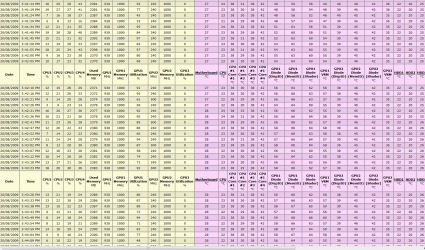
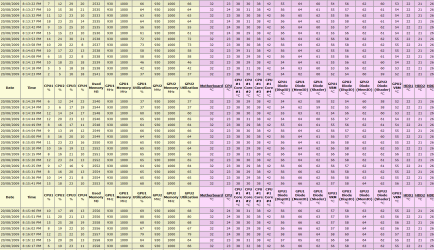
These are some screenshots of my Everest logs after running Wolfenstein for a few hours-

Single Card:
wolf single.PNG

Dual Card:
wolf s double.PNG

As you can see, the GPU does most of the work, but the temps are still relatively cool (both GPUS are overclocked as well)

It's not a particularly demanding game.
 

My Computer My Computer

At a glance

8 Pro x64i7 3770K 4.6GHz16GB G.Skill Trident X 2666mhzx2 EVGA 780 Ti Superclocked SLI
Computer type
PC/Desktop
Computer Manufacturer/Model Number
Systems by SmartEyeball
OS
8 Pro x64
CPU
i7 3770K 4.6GHz
Motherboard
ASUS P8Z77 WS
Memory
16GB G.Skill Trident X 2666mhz
Graphics Card(s)
x2 EVGA 780 Ti Superclocked SLI
Sound Card
SB X-FI Surround 5.1 PRO USB / ATH-AD900 Headphones
Monitor(s) Displays
x3 Dell U2410 / 58" Samsung
Screen Resolution
5760*1200/ 1920*1200
Hard Drives
2x Intel 520 240GB (RAID 0) * 2x WD Caviar Blacks 2TB (RAID 0) * 2TB WD Caviar Black * Sony Optirac DVD
PSU
Silverstone Strider Evolution 1200W
Case
Thermaltake Level 10 GT Snow Edition
Cooling
Noctua NH-D14
Keyboard
Topre Realforce // Ducky Shine MX Black // Filco Ninja TKL
Mouse
Thermaltake Theron (Highly Recommended) + Razer Imperator
Antivirus
MSE
Browser
IE, FF, WaterFox
Other Info
GT Extreme V2 Sim Racing Cockpit + 40" LCD and K/B Mouse stand ▼
Fanatec CSR Elite Wheel + Clubsport V1 Pedals + CSR shifter/7G-H ▼Saitek X52 Pro ▼ TrackIR 5 Pro
Buttkicker v2 Seat Rumbler with Dedicated 5.1 and Sub Woofer attached to frame ▼
=
Bloody Big Grin
Thank you all for your replies!

Update:

1. The game played ok on lower resolution (1680x1050) for a few hours. It is starting to seem like a temperature issue.
2. With FurMark at 1080p, 8xAA, my system ran for hours in the hottest part of the day (35 Celsius), max temp is like 96-98 Celsius.
3. What seems to bring down my GPU is the lights on a scene. Whenever BJ looks ar one or moves around it, GPU fan start spinning like crazy.
4. It's damn unusual that the error reported by the OS is a CPU one, although it seems that the GPU is having problems.
5. It seems that Win 7, Catalyst 9.8 or who knows what is having problems monitoring/adjusting temps.
6. If I have time I'll try posting a csv graph of the temps during a 1080p session and a 1680x1050 one.
 

My Computer My Computer

At a glance

Windows 7 x64 UltimateAMD FX 8350Kingston HyperX 8GBAsus EAH4850 512 MB
Computer type
PC/Desktop
Computer Manufacturer/Model Number
custom
OS
Windows 7 x64 Ultimate
CPU
AMD FX 8350
Motherboard
Gigabyte GA-990XA-UD3
Memory
Kingston HyperX 8GB
Graphics Card(s)
Asus EAH4850 512 MB
Sound Card
M-Audio Audiophile USB / Yamaha HS80M monitors
Monitor(s) Displays
Fujitsu-Siemens Amilo LSL 3230T 23" FullHD
Screen Resolution
1080p
Hard Drives
WD Caviar Blue 1TB
Case
Thermaltake
Keyboard
Logitech Wave Pro
Mouse
Logitech Performance MX
Internet Speed
100 mbps
Still crashes, even at 1680x1050

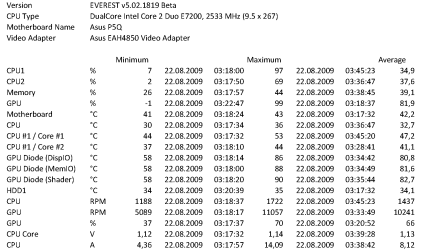
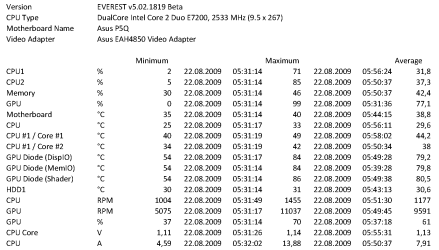
I promised I'll post some palpable data, so here I am with 2 Everest monitoring logs that should say a lot about what is happening in my system.
The game crashed at 1680x1050 too after a few hours, but the temps were reasonable and in no way high for a E7200 or a HD 4850, you can take a look for yourselves. This crash happened once on the ATI driver and once on the exe file, both problems were recovered by Windows (no rebooting necessary like the 1080p processor issue described in the first post).
I am playing now the game in Administrator mode and with Vista (no SP selected) compatibility, and I managed to achieve two clean runs of 2-4 hours each. I certainly hope this is a Wolfenstein issue, and Windows 7 is 100% ready for gaming :)
 

Attachments

  • crash log 1080p.png
    crash log 1080p.png
    16.9 KB · Views: 163
  • crash log 1650x1050.png
    crash log 1650x1050.png
    16 KB · Views: 91

My Computer My Computer

At a glance

Windows 7 x64 UltimateAMD FX 8350Kingston HyperX 8GBAsus EAH4850 512 MB
Computer type
PC/Desktop
Computer Manufacturer/Model Number
custom
OS
Windows 7 x64 Ultimate
CPU
AMD FX 8350
Motherboard
Gigabyte GA-990XA-UD3
Memory
Kingston HyperX 8GB
Graphics Card(s)
Asus EAH4850 512 MB
Sound Card
M-Audio Audiophile USB / Yamaha HS80M monitors
Monitor(s) Displays
Fujitsu-Siemens Amilo LSL 3230T 23" FullHD
Screen Resolution
1080p
Hard Drives
WD Caviar Blue 1TB
Case
Thermaltake
Keyboard
Logitech Wave Pro
Mouse
Logitech Performance MX
Internet Speed
100 mbps
Update:


5. It seems that Win 7, Catalyst 9.8 or who knows what is having problems monitoring/adjusting temps.

After looking at those temps, the card is running warm - within specs -but still warm.

It may be worthwhile creating a profile and manually increasing your cards fan speed, however that's probably not be the issue.

The game shouldn't need to run in compatibility or admin though. I haven't had any problems with this game (so far) :huh:

Have you installed your motherboards chipset drivers?

Are you overclocking?
 

My Computer My Computer

At a glance

8 Pro x64i7 3770K 4.6GHz16GB G.Skill Trident X 2666mhzx2 EVGA 780 Ti Superclocked SLI
Computer type
PC/Desktop
Computer Manufacturer/Model Number
Systems by SmartEyeball
OS
8 Pro x64
CPU
i7 3770K 4.6GHz
Motherboard
ASUS P8Z77 WS
Memory
16GB G.Skill Trident X 2666mhz
Graphics Card(s)
x2 EVGA 780 Ti Superclocked SLI
Sound Card
SB X-FI Surround 5.1 PRO USB / ATH-AD900 Headphones
Monitor(s) Displays
x3 Dell U2410 / 58" Samsung
Screen Resolution
5760*1200/ 1920*1200
Hard Drives
2x Intel 520 240GB (RAID 0) * 2x WD Caviar Blacks 2TB (RAID 0) * 2TB WD Caviar Black * Sony Optirac DVD
PSU
Silverstone Strider Evolution 1200W
Case
Thermaltake Level 10 GT Snow Edition
Cooling
Noctua NH-D14
Keyboard
Topre Realforce // Ducky Shine MX Black // Filco Ninja TKL
Mouse
Thermaltake Theron (Highly Recommended) + Razer Imperator
Antivirus
MSE
Browser
IE, FF, WaterFox
Other Info
GT Extreme V2 Sim Racing Cockpit + 40" LCD and K/B Mouse stand ▼
Fanatec CSR Elite Wheel + Clubsport V1 Pedals + CSR shifter/7G-H ▼Saitek X52 Pro ▼ TrackIR 5 Pro
Buttkicker v2 Seat Rumbler with Dedicated 5.1 and Sub Woofer attached to frame ▼
=
Bloody Big Grin
The card is a single-slot cooling, reference-design Asus EAH4850 512 MB. To make it run this cold I had to mess within it's Powerplay values in BIOS with RBE, but Asus released a official BIOS update that reduces the clock to 160/250 on idle and it's even better. It idles at 50 Celsius and gets to 85-90 in heavy gaming.
Making a fan profile would be useless since it auto-adjusts the fan duty-cycle from Powerplay and it is much better than a constant rpm.
The drivers for the Asus P5Q MB are the official Intel P45 drivers, last version, installed with -OVERALL so they can overwrite all Microsoft default stuff.
No overclocking whatsoever on any system component.
 

My Computer My Computer

At a glance

Windows 7 x64 UltimateAMD FX 8350Kingston HyperX 8GBAsus EAH4850 512 MB
Computer type
PC/Desktop
Computer Manufacturer/Model Number
custom
OS
Windows 7 x64 Ultimate
CPU
AMD FX 8350
Motherboard
Gigabyte GA-990XA-UD3
Memory
Kingston HyperX 8GB
Graphics Card(s)
Asus EAH4850 512 MB
Sound Card
M-Audio Audiophile USB / Yamaha HS80M monitors
Monitor(s) Displays
Fujitsu-Siemens Amilo LSL 3230T 23" FullHD
Screen Resolution
1080p
Hard Drives
WD Caviar Blue 1TB
Case
Thermaltake
Keyboard
Logitech Wave Pro
Mouse
Logitech Performance MX
Internet Speed
100 mbps
I had a pair of those cards (with the glaciator fansinks) and creating a profile did affect the fanspeed and temps.

It sounds like it's software based, since XP ran fine. The machine check could just be a driver incorrectly referencing non-existent memory address etc - What driver exactly is hard to say.

I'm also using Cat 9.8 and haven't had any issues with them :huh:

So all the chipset drivers actually installed correctly?

No errors showing in device manager?
 

My Computer My Computer

At a glance

8 Pro x64i7 3770K 4.6GHz16GB G.Skill Trident X 2666mhzx2 EVGA 780 Ti Superclocked SLI
Computer type
PC/Desktop
Computer Manufacturer/Model Number
Systems by SmartEyeball
OS
8 Pro x64
CPU
i7 3770K 4.6GHz
Motherboard
ASUS P8Z77 WS
Memory
16GB G.Skill Trident X 2666mhz
Graphics Card(s)
x2 EVGA 780 Ti Superclocked SLI
Sound Card
SB X-FI Surround 5.1 PRO USB / ATH-AD900 Headphones
Monitor(s) Displays
x3 Dell U2410 / 58" Samsung
Screen Resolution
5760*1200/ 1920*1200
Hard Drives
2x Intel 520 240GB (RAID 0) * 2x WD Caviar Blacks 2TB (RAID 0) * 2TB WD Caviar Black * Sony Optirac DVD
PSU
Silverstone Strider Evolution 1200W
Case
Thermaltake Level 10 GT Snow Edition
Cooling
Noctua NH-D14
Keyboard
Topre Realforce // Ducky Shine MX Black // Filco Ninja TKL
Mouse
Thermaltake Theron (Highly Recommended) + Razer Imperator
Antivirus
MSE
Browser
IE, FF, WaterFox
Other Info
GT Extreme V2 Sim Racing Cockpit + 40" LCD and K/B Mouse stand ▼
Fanatec CSR Elite Wheel + Clubsport V1 Pedals + CSR shifter/7G-H ▼Saitek X52 Pro ▼ TrackIR 5 Pro
Buttkicker v2 Seat Rumbler with Dedicated 5.1 and Sub Woofer attached to frame ▼
=
Bloody Big Grin
Everything is tip-top. No errors whatsoever. Also, as I said, FurMark and OCCT GPU burn tests ran for hours without any errors, with the GPU reaching 97-98 Celsius (brrrrrrr... I certainly remember things were cooler back in XP)
My card has the reference design fan which already runs at 12.000 rpm during this game. I also have a Arctic Cooling exhaust fan just above the card, blowing all the produced hot air outside of the case. Another similar fan is doing the same for the CPU, so that leaves me with 0 fans to go, as this is what Asus P5Q offers, 2 chassis fan headers.
It must be some compatibility issue, exacerbated by higher resolutions and temps. With the game on 1680x1050, I only had 2-3 crashes, all of the recoverable to the desktop. With 1080p I have to press the reboot button on the case, and it crashes within the first 30 minutes of play with no exception.
 

My Computer My Computer

At a glance

Windows 7 x64 UltimateAMD FX 8350Kingston HyperX 8GBAsus EAH4850 512 MB
Computer type
PC/Desktop
Computer Manufacturer/Model Number
custom
OS
Windows 7 x64 Ultimate
CPU
AMD FX 8350
Motherboard
Gigabyte GA-990XA-UD3
Memory
Kingston HyperX 8GB
Graphics Card(s)
Asus EAH4850 512 MB
Sound Card
M-Audio Audiophile USB / Yamaha HS80M monitors
Monitor(s) Displays
Fujitsu-Siemens Amilo LSL 3230T 23" FullHD
Screen Resolution
1080p
Hard Drives
WD Caviar Blue 1TB
Case
Thermaltake
Keyboard
Logitech Wave Pro
Mouse
Logitech Performance MX
Internet Speed
100 mbps
I promised I'll post some palpable data, so here I am with 2 Everest monitoring logs that should say a lot about what is happening in my system.
The game crashed at 1680x1050 too after a few hours, but the temps were reasonable and in no way high for a E7200 or a HD 4850, you can take a look for yourselves. This crash happened once on the ATI driver and once on the exe file, both problems were recovered by Windows (no rebooting necessary like the 1080p processor issue described in the first post).
I am playing now the game in Administrator mode and with Vista (no SP selected) compatibility, and I managed to achieve two clean runs of 2-4 hours each. I certainly hope this is a Wolfenstein issue, and Windows 7 is 100% ready for gaming :)
Do you have monitor Dell U2410 ? This is wrong. Try another monitor.
 

My Computer My Computer

At a glance

windows XP
OS
windows XP
This is an old thread and I finished Wolfenstein months ago through the crashes. But... I really wonder how that Dell U2410 can be wrong somewhere? IPS 24" etc etc etc I'd throw my (listed in Sys Specs) Fujitsu TNT out the window anytime just to have that one.
 

My Computer My Computer

At a glance

Windows 7 x64 UltimateAMD FX 8350Kingston HyperX 8GBAsus EAH4850 512 MB
Computer type
PC/Desktop
Computer Manufacturer/Model Number
custom
OS
Windows 7 x64 Ultimate
CPU
AMD FX 8350
Motherboard
Gigabyte GA-990XA-UD3
Memory
Kingston HyperX 8GB
Graphics Card(s)
Asus EAH4850 512 MB
Sound Card
M-Audio Audiophile USB / Yamaha HS80M monitors
Monitor(s) Displays
Fujitsu-Siemens Amilo LSL 3230T 23" FullHD
Screen Resolution
1080p
Hard Drives
WD Caviar Blue 1TB
Case
Thermaltake
Keyboard
Logitech Wave Pro
Mouse
Logitech Performance MX
Internet Speed
100 mbps
This is an old thread and I finished Wolfenstein months ago through the crashes. But... I really wonder how that Dell U2410 can be wrong somewhere? IPS 24" etc etc etc I'd throw my (listed in Sys Specs) Fujitsu TNT out the window anytime just to have that one.
Try 3DMark 06. My U2410 crash during test always. Only picture test run still. My U2410 randomly crash in Wolfenstein and Resident Evil 5. When i connect my old Eizo - no problem. U2410 is **** i back him to Dell. In 2D is good.
 

My Computer My Computer

At a glance

windows XP
OS
windows XP
I got the exact same problem - also WHEA Logger, eventID: 18 - while playing COD Modern Warfare (btw, not MW2. That one seems to work just fine!)
But it's strange, because about 2 months ago I managed to play Modern Warfare perfectly on Windows 7 64 bits.

So it has to be due to me installing some bad driver or something...
 

My Computer My Computer

At a glance

Windows 7 | b7100 | 64 bitsIntel Q6600 2.4Ghz4GBAsus nVidia 8800 GTX 768MB
Computer Manufacturer/Model Number
built by shop
OS
Windows 7 | b7100 | 64 bits
CPU
Intel Q6600 2.4Ghz
Motherboard
Asus P5K Deluxe Wifi-AP
Memory
4GB
Graphics Card(s)
Asus nVidia 8800 GTX 768MB
Sound Card
built in on mobo
Monitor(s) Displays
Samsung Syncmaster 206BW (widescreen 20")
Screen Resolution
1680x1050
Hard Drives
Samsung Spinpoint 320GB
PSU
Corsair 550 Watt
Case
Antec P182
Keyboard
Logitech LX710
Mouse
Logitech MX510
Internet Speed
ADSL (about 4.8 Mbps average)
SOLUTION (for me) :)

Ok, so after A LOT of troubleshooting, I found this: I went to my computer, right clicked and clicked properties, went to device manager, and then to sound, audio, and game controllers. The problem for ME was an audio problem. I play WoW a lot and was getting blue screens with this EXACT SAME error message. Under my sound there were TWO audio devices: ATI High Definition Audio Device and just plain old High Definition Audio Device. ONE of these is the Graphics Card (ATI RADEON 5750 in my case) Audio Device and the other is the Motherboard Device (I think). Anyway, I disabled the ATI audio device (can be done by right clicking on it) and I LEFT THE OTHER ONE ON! Presto, no more blue screens while gaming. I hope this solution is helpful to you, it worked for me. This has something to do with two sound devices being on at once and your processor getting confused (I think, once again). Also, my ATI Audio Device is to be used with HDMI equiptment. In my case, I have an LED screen, but I don't believe it is in fact HDMI, as I need an adapter to plug it in at all. I tried to make as much of my own conclusions as possible here, and undoubtedly some of them are wrong, but anyway, this worked for me, maybe it will work for you!
 

My Computer My Computer

At a glance

Windows 7
OS
Windows 7
Thx for registering on this forum to explain your solution!:)

Unfortunately, I dont see two sound devices appearing in the hardware manager...

But now that I read my previous post again, I cant ever remember I had that problem lol.
I think its was eventually fixed otherwise i would still remember all this:p

But now i'm having issues with bfbc2.
A lot of gamers have pc lockups and sound freezes, only with this game! And im one of them.:rolleyes:
 

My Computer My Computer

At a glance

Windows 7 | b7100 | 64 bitsIntel Q6600 2.4Ghz4GBAsus nVidia 8800 GTX 768MB
Computer Manufacturer/Model Number
built by shop
OS
Windows 7 | b7100 | 64 bits
CPU
Intel Q6600 2.4Ghz
Motherboard
Asus P5K Deluxe Wifi-AP
Memory
4GB
Graphics Card(s)
Asus nVidia 8800 GTX 768MB
Sound Card
built in on mobo
Monitor(s) Displays
Samsung Syncmaster 206BW (widescreen 20")
Screen Resolution
1680x1050
Hard Drives
Samsung Spinpoint 320GB
PSU
Corsair 550 Watt
Case
Antec P182
Keyboard
Logitech LX710
Mouse
Logitech MX510
Internet Speed
ADSL (about 4.8 Mbps average)
Back
Top