
Solved Desktop Problem

Status
Not open for further replies.

Dick H

New member
Member
VIP
Local time
8:50 AM
Messages
102
I did a search for my TEST folder. When I looked at the resulting Properties it showed it as on the Desktop (see link to image), but it is not on the desktop.
Apparently, there is a desktop FOLDER and there are folders in that desktop folder that are not on my desktop. This is very confusing.

In Windows XP when I clicked on My Computer I am sure I could see the desktop items.

How are things getting into that folder?
Why are things getting into that folder?
In Windows 7 how can I see the list of folders, etc. that are on my desktop?

p1510415972-4.jpg
 
Last edited by a moderator:

My Computer My Computer

OS
Windows 7 Home Premium

My Computer My Computer

Computer type
PC/Desktop
Computer Manufacturer/Model Number
Home made Desktop
OS
Windows 10 Pro. 64/ version 1709 Windows 7 Pro/64
CPU
Intel i7-6800K @ 4.3
Motherboard
ASUS X-99 Deluxe II
Memory
Corsair Platinum 16 gig @2400
Graphics Card(s)
EVGA GTX 1070 OC
Monitor(s) Displays
Asus 27" LED LCD/VE278Q
Screen Resolution
1920-1080 or 1280-720 HDMI
Hard Drives
INTEL SSD 730-240 Gb Sata 3.0/
PSU
EVGA Platium 1200W
Case
Phanteks Luxe Tempered Glass 8 fans/ one radiator
Cooling
XSPC/ Water Cooled CPU
Keyboard
Das 4 Professional
Mouse
Logitech M705/MX Anywhere 2-S
Internet Speed
100 mbits
Antivirus
Microsoft Security Essentials/ Malwarebytes Premium 3.0/ SAS
Browser
I.E. 11 default/Firefox/ ISP Time Warner Cable/Spectrum
Other Info
LG BluRay Burner/
Sound system-KLipsch-THX/
Icy Dock ssd Hot Swap bays.
Hello Dick!

Right click on your desktop > Click "View" > Now click "Auto arrange icons"

Now do those folders appear on your desktop?
 
Did you do this yet? What did you see?
You should see all the folders that are on your Desktop.

If you don't see your Test folder find your Test folder and right click on it and Send to Desktop (create a shortcut)
Then right click on a blank spot on the Desktop and select Refresh.
 

My Computer My Computer

Computer type
PC/Desktop
Computer Manufacturer/Model Number
Home made Desktop
OS
Windows 10 Pro. 64/ version 1709 Windows 7 Pro/64
CPU
Intel i7-6800K @ 4.3
Motherboard
ASUS X-99 Deluxe II
Memory
Corsair Platinum 16 gig @2400
Graphics Card(s)
EVGA GTX 1070 OC
Monitor(s) Displays
Asus 27" LED LCD/VE278Q
Screen Resolution
1920-1080 or 1280-720 HDMI
Hard Drives
INTEL SSD 730-240 Gb Sata 3.0/
PSU
EVGA Platium 1200W
Case
Phanteks Luxe Tempered Glass 8 fans/ one radiator
Cooling
XSPC/ Water Cooled CPU
Keyboard
Das 4 Professional
Mouse
Logitech M705/MX Anywhere 2-S
Internet Speed
100 mbits
Antivirus
Microsoft Security Essentials/ Malwarebytes Premium 3.0/ SAS
Browser
I.E. 11 default/Firefox/ ISP Time Warner Cable/Spectrum
Other Info
LG BluRay Burner/
Sound system-KLipsch-THX/
Icy Dock ssd Hot Swap bays.
Hello Dick!

Right click on your desktop > Click "View" > Now click "Auto arrange icons"

Now do those folders appear on your desktop?

My desktop items are arranged exactly the way I want them. I don't want to "Auto arrange" them.
But I would like an answer to my questions.
 

My Computer My Computer

OS
Windows 7 Home Premium
Hello Dick!

Right click on your desktop > Click "View" > Now click "Auto arrange icons"

Now do those folders appear on your desktop?

My desktop items are arranged exactly the way I want them. I don't want to "Auto arrange" them.
But I would like an answer to my questions.

Sometimes toggling auto arrange can help with your type of problem.
 

My Computer My Computer

Computer type
PC/Desktop
OS
Windows 7 Home Premium 64bit
Also it was suggested to right click on desktop and choose refresh. Did you try that?
 

My Computer My Computer

Computer type
PC/Desktop
OS
Windows 7 Home Premium 64bit
Hello Dick!

Right click on your desktop > Click "View" > Now click "Auto arrange icons"

Now do those folders appear on your desktop?

My desktop items are arranged exactly the way I want them. I don't want to "Auto arrange" them.
But I would like an answer to my questions.
You have been given several suggestions, ignored or not responded too, they are trying to help you fix the issue. Many time one needs to do something that's not wanted to get to the end, it's like messing up a solved side of a Rubik's cube to solve it.
 

My Computer My Computer

Computer type
PC/Desktop
Computer Manufacturer/Model Number
Home Built Desktop By DataTech
OS
Windows 7 Ultimate X64 SP1
CPU
Intel i5-2550K, Differing ~4.4-4.8GHz No built in GPU
Motherboard
ASUS P8Z68-V PRO/GEN3
Memory
16GB G.Skill Sniper 1866MHz @ 2133MHz 2x8GB
Graphics Card(s)
ASUS GTX650TIB-DC2OC-2GD5, (650TI Boost)
Sound Card
Onboard Realtek 5-1
Monitor(s) Displays
Samsung P2570HD
Screen Resolution
1920x1080
Hard Drives
Samsung 840 Pro 256GB SSD for OS, 500GB Seagate Constellation (Enterprise drive) for Data
PSU
Corsair HX650W
Case
Inwin Dragon Rider
Cooling
Hyper 212 EVO w/two Noctua fans, push-pull, @1300 RPM
Keyboard
E-Z Eyes, bright yellow keys with large characters
Mouse
steelseries SENSEI Laser Pro Gaming
Internet Speed
48-51Mbs Mbs down, 11 Mbs up Xfinity Cable
Antivirus
Norton Internet Security 2013
Browser
IE 10, Opera, Pale Moon if needed
Other Info
4 case fans, LG BluRay-RE, ASUS DVD-RW, Mr. Fusion power supply, 1.21 gigawatts.
Hello Dick!

Right click on your desktop > Click "View" > Now click "Auto arrange icons"

Now do those folders appear on your desktop?

My desktop items are arranged exactly the way I want them. I don't want to "Auto arrange" them.
But I would like an answer to my questions.
You have been given several suggestions, ignored or not responded too, they are trying to help you fix the issue. Many time one needs to do something that's not wanted to get to the end, it's like messing up a solved side of a Rubik's cube to solve it.
I could not respond because I had to go to a fire - I am a fire dept. photographer.
Yes, I did the Refresh and it did not do anything.
I did not mention it before because people would jump all over me because I have 100 icons on my desk top. That's the way I work and it suits me. If I use the Auto Arrange, I'm sure it would mess them all up and it would take considerable time to get them back the way I like them.

Also, it's not just one folder -there are 6 or 7 that are in that desktop folder and not on the desktop.
And no one has bothered to answer my questions:
How did those folders get in there?
Why were they put there?

When folders or files are in that other folder I don't know they are there. That becomes another problem.
I am tempted to just get rid of that folder. Will that cause problems?
 

My Computer My Computer

OS
Windows 7 Home Premium
Did you look at the desktop in explorer?
Lots of people keep many icons on their desktop, so it's understandable not wanting auto-arrange.
 

My Computer My Computer

Computer type
PC/Desktop
Computer Manufacturer/Model Number
Home Built Desktop By DataTech
OS
Windows 7 Ultimate X64 SP1
CPU
Intel i5-2550K, Differing ~4.4-4.8GHz No built in GPU
Motherboard
ASUS P8Z68-V PRO/GEN3
Memory
16GB G.Skill Sniper 1866MHz @ 2133MHz 2x8GB
Graphics Card(s)
ASUS GTX650TIB-DC2OC-2GD5, (650TI Boost)
Sound Card
Onboard Realtek 5-1
Monitor(s) Displays
Samsung P2570HD
Screen Resolution
1920x1080
Hard Drives
Samsung 840 Pro 256GB SSD for OS, 500GB Seagate Constellation (Enterprise drive) for Data
PSU
Corsair HX650W
Case
Inwin Dragon Rider
Cooling
Hyper 212 EVO w/two Noctua fans, push-pull, @1300 RPM
Keyboard
E-Z Eyes, bright yellow keys with large characters
Mouse
steelseries SENSEI Laser Pro Gaming
Internet Speed
48-51Mbs Mbs down, 11 Mbs up Xfinity Cable
Antivirus
Norton Internet Security 2013
Browser
IE 10, Opera, Pale Moon if needed
Other Info
4 case fans, LG BluRay-RE, ASUS DVD-RW, Mr. Fusion power supply, 1.21 gigawatts.
Did you look at the desktop in explorer?
Lots of people keep many icons on their desktop, so it's understandable not wanting auto-arrange.

I use Firefox. I don't have Explorer.
 

My Computer My Computer

OS
Windows 7 Home Premium
Explorer is where your files live.

Go :orb:>Computer>C>User>your User name>Desktop to see if the file is there. If so it should be somewhere on your desktop. If not back up to Users>Public Folder or Default to see if its there.
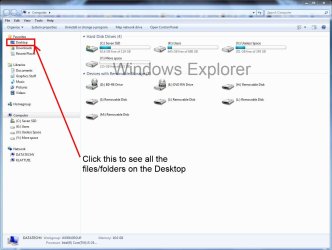
It may be that you have placed it in another User name account's Desktop. Check that also.
 
Last edited:
Not Internet Explorer, Windows Explorer, common mistake. :D
Explorer.JPG
 

My Computer My Computer

Computer type
PC/Desktop
Computer Manufacturer/Model Number
Home Built Desktop By DataTech
OS
Windows 7 Ultimate X64 SP1
CPU
Intel i5-2550K, Differing ~4.4-4.8GHz No built in GPU
Motherboard
ASUS P8Z68-V PRO/GEN3
Memory
16GB G.Skill Sniper 1866MHz @ 2133MHz 2x8GB
Graphics Card(s)
ASUS GTX650TIB-DC2OC-2GD5, (650TI Boost)
Sound Card
Onboard Realtek 5-1
Monitor(s) Displays
Samsung P2570HD
Screen Resolution
1920x1080
Hard Drives
Samsung 840 Pro 256GB SSD for OS, 500GB Seagate Constellation (Enterprise drive) for Data
PSU
Corsair HX650W
Case
Inwin Dragon Rider
Cooling
Hyper 212 EVO w/two Noctua fans, push-pull, @1300 RPM
Keyboard
E-Z Eyes, bright yellow keys with large characters
Mouse
steelseries SENSEI Laser Pro Gaming
Internet Speed
48-51Mbs Mbs down, 11 Mbs up Xfinity Cable
Antivirus
Norton Internet Security 2013
Browser
IE 10, Opera, Pale Moon if needed
Other Info
4 case fans, LG BluRay-RE, ASUS DVD-RW, Mr. Fusion power supply, 1.21 gigawatts.
... because I have 100 icons on my desk top...

Man you just ignored the suggestions. When you have lots of icons on the desktop, some of them are pushed out of view of desktop (i.e out towards the right, yes, out of display). If that's the case, those out-of-view items won't come back until you do this:

Untitled.png

Also make sure your desktop has some "free space" for items and is not just totally full.
 
Test is not a System folder or any other folder that I know about, except that one would make to test if a folder is showing up - which is what I though you had done.

So if you're asking how Test folder got there, we cannot say.

Can you post back the contents of the folder as we may pick up on what it is from.
 
Test is not a System folder or any other folder that I know about, except that one would make to test if a folder is showing up - which is what I though you had done.

So if you're asking how Test folder got there, we cannot say.

Can you post back the contents of the folder as we may pick up on what it is from.

It's a folder I named TEST because it has some test photos in it.
The question is how does a folder - ANY folder - get into that folder named desktop and it is not on the real desktop? Is it just another example of this Windows 7 putting things where it decides they should go instead of letting me put them where I want them?

QUESTION: If I delete that folder named desktop will it cause problems???
 

My Computer My Computer

OS
Windows 7 Home Premium
Desktop under your User name is a System file which should not be deleted. It contains all the files, shortcuts and other icons that appear on your desktop.

The only way Test would show up in your User Name's Desktop folder and not be on your desktop somewhere is because as suggested it is pushed off into an area you can't see if there are that many icons, depending upon your screen resolution, or it's in another User's Desktop folder. Check under C:Users to see if there's another another Dick besides you, or you are signed in to another named Account or the Administrator account.
 
Any time you install a program there are prompts that say add shortcut to desktop. w7 does not just randomly add them.
 

My Computer My Computer

Computer type
PC/Desktop
Computer Manufacturer/Model Number
Dude Build
OS
Windows 10 Pro X64
CPU
Intel(R) Core(TM) i5-3570K CPU OC@ 4.5GHZ Turbo
Motherboard
MSI Z77A-G45 Gaming
Memory
8.00 GB DDR3 1600Mhz
Graphics Card(s)
MSI Gaming X GTX 1070
Sound Card
Realtek High Definition
Monitor(s) Displays
Dell S23O9W, HP L1710
Screen Resolution
DELL-1920 x 1080 HP-1280 x1024
Hard Drives
Crucial m4 256 SSD, WD 7200RPM 500GB WD 1TB
PSU
Seasonic X650 GOLD
Case
Zalman Z12
Cooling
Antec Kuhler 920
Keyboard
Logitech
Mouse
MSI DS100 Interceptor
Internet Speed
50 down and 5 up
Antivirus
MSE
Browser
Chrome, IE 11
Other Info
Logitech X-620 Speakers

My Computer My Computer

Computer type
PC/Desktop
Computer Manufacturer/Model Number
Home Built Desktop By DataTech
OS
Windows 7 Ultimate X64 SP1
CPU
Intel i5-2550K, Differing ~4.4-4.8GHz No built in GPU
Motherboard
ASUS P8Z68-V PRO/GEN3
Memory
16GB G.Skill Sniper 1866MHz @ 2133MHz 2x8GB
Graphics Card(s)
ASUS GTX650TIB-DC2OC-2GD5, (650TI Boost)
Sound Card
Onboard Realtek 5-1
Monitor(s) Displays
Samsung P2570HD
Screen Resolution
1920x1080
Hard Drives
Samsung 840 Pro 256GB SSD for OS, 500GB Seagate Constellation (Enterprise drive) for Data
PSU
Corsair HX650W
Case
Inwin Dragon Rider
Cooling
Hyper 212 EVO w/two Noctua fans, push-pull, @1300 RPM
Keyboard
E-Z Eyes, bright yellow keys with large characters
Mouse
steelseries SENSEI Laser Pro Gaming
Internet Speed
48-51Mbs Mbs down, 11 Mbs up Xfinity Cable
Antivirus
Norton Internet Security 2013
Browser
IE 10, Opera, Pale Moon if needed
Other Info
4 case fans, LG BluRay-RE, ASUS DVD-RW, Mr. Fusion power supply, 1.21 gigawatts.
A folder or folders will always ask you where you want to save it, then after if you just click save it will go to your default location. I would just go through everything on your desktop and delete anything you don`t want. Windows does not just create folders on it`s own.

Change your default location to "Downloads" for awhile and you will see.
 

My Computer My Computer

Computer type
PC/Desktop
Computer Manufacturer/Model Number
Skylake Special #666
OS
Windows 10 Pro x64
CPU
Intel Core i7 6700K
Motherboard
Asus Sabertooth Z170 Mark 1
Memory
GSkill TridentZ RGB 16GB 3600 16-16-16-36
Graphics Card(s)
EVGA GTX 980 Ti SC x2
Sound Card
Realtek High Definition
Monitor(s) Displays
AOC G2460PG
Screen Resolution
1920 x 1080 144Hz
Hard Drives
Samsung 860 Pro 256GB, Seagate Barracuda 4TB x2
PSU
EVGA 1000 P2, EVGA White Custom Braided Cables
Case
Corsair Vengeance C70 Gunmetal Black
Cooling
Corsair H100i v2, Corsair ML120 x2, Thermal Grizzly Kryonaut
Keyboard
Logitech G910 Orion Spectrum
Mouse
Logitech G700s
Internet Speed
Verizon Fios Quantum Gateway 75/75
Antivirus
Windows Defender, Malwarebytes Free 3.8.3
Browser
Chrome
Other Info
Corsair SP120 x4, LG Blu-ray Drive, Durabrand HT-395 100 Watt Dolby Digital Amp, Corsair H2100 Wireless 7.1 Headset
Status
Not open for further replies.
Back
Top