- Local time
- 9:04 PM
- Messages
- 102
I did a search for my TEST folder. When I looked at the resulting Properties it showed it as on the Desktop (see link to image), but it is not on the desktop.
Apparently, there is a desktop FOLDER and there are folders in that desktop folder that are not on my desktop. This is very confusing.
In Windows XP when I clicked on My Computer I am sure I could see the desktop items.
How are things getting into that folder?
Why are things getting into that folder?
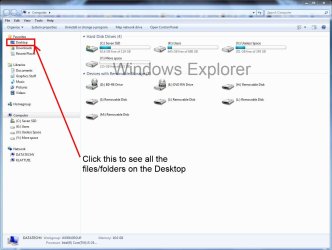
In Windows 7 how can I see the list of folders, etc. that are on my desktop?

Apparently, there is a desktop FOLDER and there are folders in that desktop folder that are not on my desktop. This is very confusing.
In Windows XP when I clicked on My Computer I am sure I could see the desktop items.
How are things getting into that folder?
Why are things getting into that folder?
In Windows 7 how can I see the list of folders, etc. that are on my desktop?
Last edited by a moderator:
My Computer
- OS
- Windows 7 Home Premium


 rb:>Computer>C>User>your User name>Desktop to see if the file is there. If so it should be somewhere on your desktop. If not back up to Users>Public Folder or Default to see if its there.