
Some text appears blurry, clears up if mouseover

bpadlows

New member
Local time
5:45 AM
Messages
5
Location
Connecticut
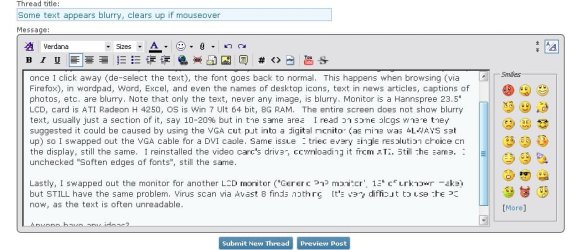
This problem started about 3 weeks ago. Every now & then (about half the time on PC) the text on the screen appears to be fuzzy or blurry, almost washed-out as if it were waterbased ink in the rain (see attached screen grab); it almost looks washed-out or sometimes grayed out. If I mouseover and highlight the blurry text and then click outside the selected, fuzzy-text area (de-select the text) or scroll up & down, the font then goes back to normal for a little while (returns very soon). This happens when browsing (via Firefox), in wordpad, Word, Excel, and even the names of desktop icons and when typing in a blog- like this one, text in news articles, captions of photos, etc. are blurry. Note that only the text, never any image, is blurry. Monitor is a Hannspree 23.5" LCD, card is ATI Radeon H 4250, OS is Win 7 Ult 64 bit, 8G RAM, AMD Phenom II X6 1055T 2.80 GHz. PC is homebuilt but has been running perfectly for over a year. I have made no system changes, and have not downloaded any software recently. The entire screen does not show blurry text, usually just a section of it, say 10-20% but in the same area. I read on some blogs where they suggested it could be caused by using the VGA out put into a digital monitor (as mine was ALWAYS set up) so I swapped out the VGA cable for a DVI cable. Same issue. I tried every single resolution choice on the display, still the same. I reinstalled the video card's driver, downloading it from ATI. Still the same. I unchecked "Soften edges of fonts", still the same.

Lastly, I swapped out the monitor for another LCD monitor ("Generic PnP monitor", 15" of unknown make) but STILL have the same problem. Virus scan via Avast 8 finds nothing. It's very difficult to use the PC now, as the text is often unreadable.

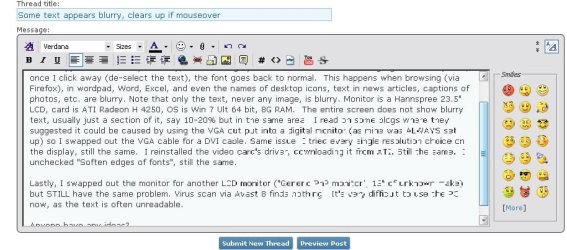
I have attached a screen grab of the very window I was typing in on this forum when suddenly I got the fuzzy text symptom.

Anyone have any ideas? This is driving me nuts!
 

Attachments
  • fuzzy_text_problem_sm.jpg
    fuzzy_text_problem_sm.jpg
    73.2 KB · Views: 24
Last edited:

My Computer My Computer

Computer type
PC/Desktop
Computer Manufacturer/Model Number
custom build
OS
Win 7 Ultimate 64 bit
CPU
AMD Phenom II X6 1055 Processor 2.80 GHz
Motherboard
880GM-E35 Socket AM3 880G mATX AMD Motherboard
Memory
8G
Graphics Card(s)
ATI Radeon H 4250
Hard Drives
Western Digital
Antivirus
Avast 8.0 1483
Browser
Firfox
Click Start :orb: > Type "cleartype" [without quotes] and hit Enter
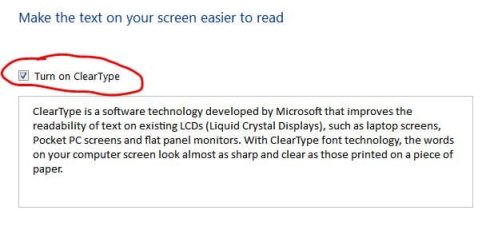
Check "Turn on ClearType" and click Next:

Capture.JPG

Click the box that looks best to you and keep doing this (4 times) and ultimately click Finish at the end.

Now how's the text everywhere?
 
Thanks. Although I will give Cleartext a whirl tonight, I'm not hopeful since only portions of the screen show unreadable, washed-out text (almost as though it was washed away). Much of the screen's text is quite sharp.
 

My Computer My Computer

Computer type
PC/Desktop
Computer Manufacturer/Model Number
custom build
OS
Win 7 Ultimate 64 bit
CPU
AMD Phenom II X6 1055 Processor 2.80 GHz
Motherboard
880GM-E35 Socket AM3 880G mATX AMD Motherboard
Memory
8G
Graphics Card(s)
ATI Radeon H 4250
Hard Drives
Western Digital
Antivirus
Avast 8.0 1483
Browser
Firfox
Click Start :orb: > Type "cleartype" [without quotes] and hit Enter
Check "Turn on ClearType" and click Next:

View attachment 262453

Click the box that looks best to you and keep doing this (4 times) and ultimately click Finish at the end.

Now how's the text everywhere?

I'm having the same problem in my PC.

I reinstall windows in a different HDD, maintaining the original HDD in D:, and the problem persist. I try to setup clear type and deactivate, and still having problems.

Now i'm scanning (virus?) my HDD with MSE, but because of the amount of storage, it takes hours and hours.

EDIT: Reading again the first post, I notice some coincidences with bpadlows.
I start with this problems a few weeks ago like him, and i have the same Graphic card (HD 4250) not sure if this is relevant.
 

My Computer My Computer

Computer type
PC/Desktop
OS
Windows 7 Home x64
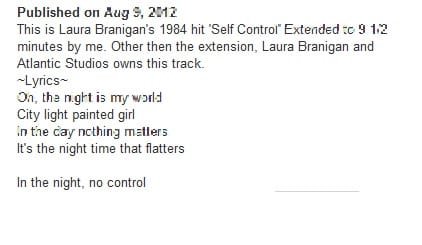
I implemented Cleartext and, as I feared, it had no effect. Here is an example of blurred, washed-out text AFTER turning Cleartext on (attached). The "Laura Brannigan" text is AFTER implementing Cleartext. The other is an example of a bad smearing of text.

So, anyone have any ideas? This is getting to be a real issue, as often the text is not readable at all (this latest example is mild- often it is impossible to read).
 

Attachments

  • fuzzy_text_problem_2.jpg
    fuzzy_text_problem_2.jpg
    13.3 KB · Views: 22
  • fuzzy_text_problem_sm.jpg
    fuzzy_text_problem_sm.jpg
    73.2 KB · Views: 13

My Computer My Computer

Computer type
PC/Desktop
Computer Manufacturer/Model Number
custom build
OS
Win 7 Ultimate 64 bit
CPU
AMD Phenom II X6 1055 Processor 2.80 GHz
Motherboard
880GM-E35 Socket AM3 880G mATX AMD Motherboard
Memory
8G
Graphics Card(s)
ATI Radeon H 4250
Hard Drives
Western Digital
Antivirus
Avast 8.0 1483
Browser
Firfox
I have the same issue but only when scrolling text on a web page. I had a thread much earlier but no one came up with any help. I'll check back and see if there is something new. I also have clear type "on".
 

My Computer My Computer

Computer type
PC/Desktop
Computer Manufacturer/Model Number
Home Built Desktop By DataTech
OS
Windows 7 Ultimate X64 SP1
CPU
Intel i5-2550K, Differing ~4.4-4.8GHz No built in GPU
Motherboard
ASUS P8Z68-V PRO/GEN3
Memory
16GB G.Skill Sniper 1866MHz @ 2133MHz 2x8GB
Graphics Card(s)
ASUS GTX650TIB-DC2OC-2GD5, (650TI Boost)
Sound Card
Onboard Realtek 5-1
Monitor(s) Displays
Samsung P2570HD
Screen Resolution
1920x1080
Hard Drives
Samsung 840 Pro 256GB SSD for OS, 500GB Seagate Constellation (Enterprise drive) for Data
PSU
Corsair HX650W
Case
Inwin Dragon Rider
Cooling
Hyper 212 EVO w/two Noctua fans, push-pull, @1300 RPM
Keyboard
E-Z Eyes, bright yellow keys with large characters
Mouse
steelseries SENSEI Laser Pro Gaming
Internet Speed
48-51Mbs Mbs down, 11 Mbs up Xfinity Cable
Antivirus
Norton Internet Security 2013
Browser
IE 10, Opera, Pale Moon if needed
Other Info
4 case fans, LG BluRay-RE, ASUS DVD-RW, Mr. Fusion power supply, 1.21 gigawatts.
This is very frustrating! I have read dozns of blogs on this topic, but no one has yet offered a working solution. And then there are the twits who reported the problem, and finally say "I fixed it" or "The problem is resolved" without saying HOW they fixed it. Doh!
 

My Computer My Computer

Computer type
PC/Desktop
Computer Manufacturer/Model Number
custom build
OS
Win 7 Ultimate 64 bit
CPU
AMD Phenom II X6 1055 Processor 2.80 GHz
Motherboard
880GM-E35 Socket AM3 880G mATX AMD Motherboard
Memory
8G
Graphics Card(s)
ATI Radeon H 4250
Hard Drives
Western Digital
Antivirus
Avast 8.0 1483
Browser
Firfox
For me, I did a fresh install for other reasons and the buggy text is still there. :confused:
 

My Computer My Computer

Computer type
PC/Desktop
Computer Manufacturer/Model Number
Home Built Desktop By DataTech
OS
Windows 7 Ultimate X64 SP1
CPU
Intel i5-2550K, Differing ~4.4-4.8GHz No built in GPU
Motherboard
ASUS P8Z68-V PRO/GEN3
Memory
16GB G.Skill Sniper 1866MHz @ 2133MHz 2x8GB
Graphics Card(s)
ASUS GTX650TIB-DC2OC-2GD5, (650TI Boost)
Sound Card
Onboard Realtek 5-1
Monitor(s) Displays
Samsung P2570HD
Screen Resolution
1920x1080
Hard Drives
Samsung 840 Pro 256GB SSD for OS, 500GB Seagate Constellation (Enterprise drive) for Data
PSU
Corsair HX650W
Case
Inwin Dragon Rider
Cooling
Hyper 212 EVO w/two Noctua fans, push-pull, @1300 RPM
Keyboard
E-Z Eyes, bright yellow keys with large characters
Mouse
steelseries SENSEI Laser Pro Gaming
Internet Speed
48-51Mbs Mbs down, 11 Mbs up Xfinity Cable
Antivirus
Norton Internet Security 2013
Browser
IE 10, Opera, Pale Moon if needed
Other Info
4 case fans, LG BluRay-RE, ASUS DVD-RW, Mr. Fusion power supply, 1.21 gigawatts.

My Computer My Computer

Computer type
PC/Desktop
Computer Manufacturer/Model Number
Home Built Desktop By DataTech
OS
Windows 7 Ultimate X64 SP1
CPU
Intel i5-2550K, Differing ~4.4-4.8GHz No built in GPU
Motherboard
ASUS P8Z68-V PRO/GEN3
Memory
16GB G.Skill Sniper 1866MHz @ 2133MHz 2x8GB
Graphics Card(s)
ASUS GTX650TIB-DC2OC-2GD5, (650TI Boost)
Sound Card
Onboard Realtek 5-1
Monitor(s) Displays
Samsung P2570HD
Screen Resolution
1920x1080
Hard Drives
Samsung 840 Pro 256GB SSD for OS, 500GB Seagate Constellation (Enterprise drive) for Data
PSU
Corsair HX650W
Case
Inwin Dragon Rider
Cooling
Hyper 212 EVO w/two Noctua fans, push-pull, @1300 RPM
Keyboard
E-Z Eyes, bright yellow keys with large characters
Mouse
steelseries SENSEI Laser Pro Gaming
Internet Speed
48-51Mbs Mbs down, 11 Mbs up Xfinity Cable
Antivirus
Norton Internet Security 2013
Browser
IE 10, Opera, Pale Moon if needed
Other Info
4 case fans, LG BluRay-RE, ASUS DVD-RW, Mr. Fusion power supply, 1.21 gigawatts.
I also ran ATI's diagnostic driver updater on my PC; it installed a new driver (although Windows said my driver was the latest one). After reboot, same problem.

As I see it (I could be wrong!), all that's left is the video card, or some malware.

Years ago, there was a virus (Twisty?) which would suddenly take chunks of your screen and swap them like a puzzle. I thought it's possible it was a virus or malware, so I wrote to Avast describing the problem, but still no response.
 

My Computer My Computer

Computer type
PC/Desktop
Computer Manufacturer/Model Number
custom build
OS
Win 7 Ultimate 64 bit
CPU
AMD Phenom II X6 1055 Processor 2.80 GHz
Motherboard
880GM-E35 Socket AM3 880G mATX AMD Motherboard
Memory
8G
Graphics Card(s)
ATI Radeon H 4250
Hard Drives
Western Digital
Antivirus
Avast 8.0 1483
Browser
Firfox
i had the same problem

I had exactly the same problem. I was sure it was a virus, but could not find anything.
Finally after hours of research I think I got it. Its pretty simple.
Open options in your browser. I had a mozilla. Go to last tab advanced and untick the
use hardware accelaration.
Well looks like it did it for me.

good luck
 

My Computer My Computer

Computer type
PC/Desktop
OS
windows 7 home premium 64 bit
hope it will help you out

I had exactly the same problem. I was sure it was a virus, but could not find anything.
Finally after hours of research I think I got it. Its pretty simple. I had a mozilla
Open options in your browser. . Go to last tab advanced and un tick the
use hardware accelaration.
Well looks like it did it for me.

good luck


This problem started about 3 weeks ago. Every now & then (about half the time on PC) the text on the screen appears to be fuzzy or blurry, almost washed-out as if it were waterbased ink in the rain (see attached screen grab); it almost looks washed-out or sometimes grayed out. If I mouseover and highlight the blurry text and then click outside the selected, fuzzy-text area (de-select the text) or scroll up & down, the font then goes back to normal for a little while (returns very soon). This happens when browsing (via Firefox), in wordpad, Word, Excel, and even the names of desktop icons and when typing in a blog- like this one, text in news articles, captions of photos, etc. are blurry. Note that only the text, never any image, is blurry. Monitor is a Hannspree 23.5" LCD, card is ATI Radeon H 4250, OS is Win 7 Ult 64 bit, 8G RAM, AMD Phenom II X6 1055T 2.80 GHz. PC is homebuilt but has been running perfectly for over a year. I have made no system changes, and have not downloaded any software recently. The entire screen does not show blurry text, usually just a section of it, say 10-20% but in the same area. I read on some blogs where they suggested it could be caused by using the VGA out put into a digital monitor (as mine was ALWAYS set up) so I swapped out the VGA cable for a DVI cable. Same issue. I tried every single resolution choice on the display, still the same. I reinstalled the video card's driver, downloading it from ATI. Still the same. I unchecked "Soften edges of fonts", still the same.

Lastly, I swapped out the monitor for another LCD monitor ("Generic PnP monitor", 15" of unknown make) but STILL have the same problem. Virus scan via Avast 8 finds nothing. It's very difficult to use the PC now, as the text is often unreadable.

I have attached a screen grab of the very window I was typing in on this forum when suddenly I got the fuzzy text symptom.

Anyone have any ideas? This is driving me nuts!
 

My Computer My Computer

Computer type
PC/Desktop
OS
windows 7 home premium 64 bit
I use IE9 and there is no Hardware Acceleration option.
 

My Computer My Computer

Computer type
PC/Desktop
Computer Manufacturer/Model Number
Home Built Desktop By DataTech
OS
Windows 7 Ultimate X64 SP1
CPU
Intel i5-2550K, Differing ~4.4-4.8GHz No built in GPU
Motherboard
ASUS P8Z68-V PRO/GEN3
Memory
16GB G.Skill Sniper 1866MHz @ 2133MHz 2x8GB
Graphics Card(s)
ASUS GTX650TIB-DC2OC-2GD5, (650TI Boost)
Sound Card
Onboard Realtek 5-1
Monitor(s) Displays
Samsung P2570HD
Screen Resolution
1920x1080
Hard Drives
Samsung 840 Pro 256GB SSD for OS, 500GB Seagate Constellation (Enterprise drive) for Data
PSU
Corsair HX650W
Case
Inwin Dragon Rider
Cooling
Hyper 212 EVO w/two Noctua fans, push-pull, @1300 RPM
Keyboard
E-Z Eyes, bright yellow keys with large characters
Mouse
steelseries SENSEI Laser Pro Gaming
Internet Speed
48-51Mbs Mbs down, 11 Mbs up Xfinity Cable
Antivirus
Norton Internet Security 2013
Browser
IE 10, Opera, Pale Moon if needed
Other Info
4 case fans, LG BluRay-RE, ASUS DVD-RW, Mr. Fusion power supply, 1.21 gigawatts.
I also have the exact same problem with my laptop which was working quite fine till a month ago. The blurred text syndrome happens in all the browsers I use (Firefox, Chrome and IE) and I have seen it only in browsers. Need to check if it happens in other apps also.
 

My Computer My Computer

Computer type
Laptop
Computer Manufacturer/Model Number
HP EliteBook 8530w Mobile Workstation
OS
Windows 7 Ultimate x64 (XP, 98SE, 95, 3.11, DOS 7.10 on VM) + Ubuntu 10.04 LTS Lucid Lynx
CPU
Intel Core 2 Duo Processor P8600 (2.40 GHz, 3 MB L2 cache)
Motherboard
Mobile Intel PM45 Express Chipset ICH9M-Enhanced
Memory
4GB 800 MHz DDR2 SDRAM
Graphics Card(s)
ATI Mobility FireGL V5700 with 256 MB
Sound Card
SoundMAX Integrated Digital HD Audio
Monitor(s) Displays
15.4-inch WXGA anti-glare (1280 x 800 resolution)
Screen Resolution
1280 x 800
Hard Drives
500GB + 1TB
Mouse
Synaptics PS/2 Port Touchpad, USB Mouse
Internet Speed
4 Mbps
Antivirus
MSE
Browser
Firefox, Chrome, IE
Other Info
Authentec AES2810 Fingerprint Reader
Yes, I only see it in IE9, my only browser. It always appears here in this forum in a scrolling text box or anywhere there is an additional box in any window that has to be scrolled to read.
 

My Computer My Computer

Computer type
PC/Desktop
Computer Manufacturer/Model Number
Home Built Desktop By DataTech
OS
Windows 7 Ultimate X64 SP1
CPU
Intel i5-2550K, Differing ~4.4-4.8GHz No built in GPU
Motherboard
ASUS P8Z68-V PRO/GEN3
Memory
16GB G.Skill Sniper 1866MHz @ 2133MHz 2x8GB
Graphics Card(s)
ASUS GTX650TIB-DC2OC-2GD5, (650TI Boost)
Sound Card
Onboard Realtek 5-1
Monitor(s) Displays
Samsung P2570HD
Screen Resolution
1920x1080
Hard Drives
Samsung 840 Pro 256GB SSD for OS, 500GB Seagate Constellation (Enterprise drive) for Data
PSU
Corsair HX650W
Case
Inwin Dragon Rider
Cooling
Hyper 212 EVO w/two Noctua fans, push-pull, @1300 RPM
Keyboard
E-Z Eyes, bright yellow keys with large characters
Mouse
steelseries SENSEI Laser Pro Gaming
Internet Speed
48-51Mbs Mbs down, 11 Mbs up Xfinity Cable
Antivirus
Norton Internet Security 2013
Browser
IE 10, Opera, Pale Moon if needed
Other Info
4 case fans, LG BluRay-RE, ASUS DVD-RW, Mr. Fusion power supply, 1.21 gigawatts.
Got it! I've had this problem for a few weeks, and I was having a terrible time trying to find the issue. Most postings send you to tune the ClearType. Turns out, it's a FireFox problem. Open an instance of the browser, go into Tools, Options, then the Advanced tab, and the General sub-tab. Make sure the "use hardware acceleration when available" box is not checked.

That's it! Hope it works for you too.
 

My Computer My Computer

Computer type
PC/Desktop
Computer Manufacturer/Model Number
custom
OS
Win 7 64-bit Ultimate
BULLSHIT !!!.gif
 

My Computer My Computer

Computer type
PC/Desktop
Computer Manufacturer/Model Number
HP Pavilion / P6670T
OS
Windows 7 Home Premium 64 bit
CPU
Intel Core i3
Motherboard
HP
Memory
4 GB
Graphics Card(s)
Intel HD Graphics
Sound Card
Realtek HD Audio
Monitor(s) Displays
HP M22f
Screen Resolution
1920 x 1080
Hard Drives
Hitachi
Case
Mid
Keyboard
Microsoft 600
Mouse
Microsoft 3500 Cyan Blue, Logitech M325, Blue
Internet Speed
Fast enough !!
Antivirus
MSE
Browser
IE 11, MS Edge
Other Info
TV Tuner w/Windows Media Center
External Speakers: Creative Labs T40 Series II
If this is a global issue, how can it be one application? What does FF (that I have used for close to 15 years (after Opera dropped it's past format).
The only problem like that is when I tried to switch to W10, it had the same issue across the board due to scaling changes. :devil:
 

My Computers My Computers

System One System Two

  • Computer type
    Laptop
    Computer Manufacturer/Model Number
    Toshiba
    OS
    Win7 x64
    CPU
    AMD
  • Computer type
    PC/Desktop
    System Manufacturer/Model Number
    AMD based MB
    OS
    Win 7 Pro x64
    CPU
    AMD FX-8350
    Motherboard
    Gigabyte GA-970A-D3P
    Memory
    16GB
    Graphics Card(s)
    nVidia GeForce 1060
    Monitor(s) Displays
    25"
    Screen Resolution
    1920x1200
    Hard Drives
    two SSD;
    two 4TB HDD
    PSU
    700watt Seasonic
    Internet Speed
    300MB up & down
    Browser
    Firefox
    Other Info
    BD Recorder
Back
Top