Dual Channel Suddenly Stopped Working, Only Single Channel Remains

Britton

New member
Member
Local time
4:15 AM
Messages
32
Location
Danville, VA
Hey everyone
smile.gif


I got a bit of a problem here, and I'm at a loss on what to do to fix it.

Some background about the situation would be a good place to start. A few days ago I came home from work and found my PC in a "lights are on, but no one's home" state. The power button was lit up and the fans were in motion, but the monitors were in power saver mode, not the normal on state with the blank screen saver. I tried moving the mouse, mashing on the keyboard but nothing happened. So I reset the machine and it just went to a blank screen, no beeps, or messages, just the same ole lights on no ones home deal again.

Now before this I had been having memory problems, with blue screens saying "memory management" and "IRQL not less than or equal". So I thought it might be a bad strip of ram, and even bought two more strips to replace the ones I had removed. In the process of testing each strip I discovered that one was bad. (That was not the fix by the way)

After putting in the new ram in for a total of 8GB's of ram (figured if I'm gonna buy new ram might as well increase the total amount) it booted up and no more blue screens after loading into windows, YaY it was fixed or so I thought. A few weeks later the above incident occurred and the only way to get the PC to boot up was to pull two strips of the ram and insert the remaining strips into slots 1 and 3 for a single channel configuration. Didn't matter which set of ram I used, just so long as I didn't mix two different brands on the same channel. It's never needed to be set in that manner before. CPUID reports it as single channel, with a blank entry in the DC mode, so I assume its ganged up and in single channel, YUCK!

While the PC is operational, since I'm typing this up on it, I know its not at its optimal configuration which annoys me to no end. After researching the problem via Google and numerous forum post with info unrelated to my exact problem I decided to write up a post, in the hopes that some one out there can help me to figure out if the problem lies in my motherboard (doubtful) or in the processors integrated memory controller.

I think its the Phenom's memory controller that is faulty, or failing. It's been in operation since 2009, almost continuously and its been a good computer and still is. I think the new ram might have been the culprit that shot my memory controller in the back. There CAS/RAS ratio's do not match by one number one is at CAS 6 the other set CAS 5, and when all 8GB's was installed the ram would run at 667 not the 800mhz it's rated to run. So like a dumb ass, not knowing enough. I went in the BIOS and overrode the auto setting for the ram and set it 400mhz vs the 333mhz it was defaulting to. Did I inadvertently over work the memory controller? All the current Ram I have is working and not faulty. So that only leaves the Mobo and the processor.

I don't have tons of cash to spend, I'm a poor man. So before I bite the bullet and buy a new Phenom to replace the one I have I'd like to try and verify if that is indeed the problem.

System Info:


  • Asus M4A785-M Motherboard

  • AMD Phenom II X2 550 B.E. 3.1Ghz (unlocked and over clocked it once but it was unstable, back in 2009)

  • NVIDIA 9800GT 1024GB @ 900mhz, Core 550mhz Bit Width 256 Bit

  • 4 to 8GB's of Ram, when it worked it was at 8GB's now it's at 4GB for now.

  • 3 SATA Hard drives all independent of each other, not raided.

  • 730W OCZ PSU

I think that's the gist of the system info one would need. If it is indeed my processors memory controller and there is nothing that can be done with what i have on hand to correct the problem then I plan on buying a Phenom II X4 965. It's about the same price as my X2 was in 2009. Plus it has the same socket and should work with my motherboard. Could the motherboard some how be at fault, how can I test this without additional hardware?

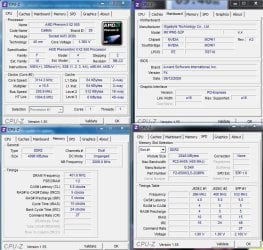
Here is more information about my memory.

Sorry I didn't post enough information, here are the timings for the ram that is currently installed.

Newer Ram Specs:
Type DDR2
Size 4096 Mega Bytes (4GB)
DRAM Frequency 400.0Mhz
FSB : DRAM 1:2
CAS#CL 5.0 Clocks
RAS# to CAS# Delay 6 Clocks
RAS# Precharge 6 Clocks
Cycle Time 18 Clocks
Bank Cycle Time 24 Clocks
Command Rate 2T

Channels# Single
NB Frequency 2000 MHz

Older Ram Specs
Type DDR2
Size 4096 Mega Bytes (4GB)
DRAM Frequency 400.0Mhz
FSB : DRAM 1:2
CAS#CL 6.0 Clocks
RAS# to CAS# Delay 5 Clocks
RAS# Precharge 5 Clocks
Cycle Time 18 Clocks
Bank Cycle Time 23 Clocks
Command Rate 2T

Channels# Single
NB Frequency 2000 MHz

As you can see there almost identical and the PC used to be able to run either set so long as they were not mixed up. I.E two matching strips in the blue slots and two matching strips in the black slots. Dual Channel is acheived by pairing the memory in side by side slots. Which at the moment it is not set that way, in order to make the system boot up.

While I had the case open a few mins ago to swap the ram, I tried putting the ram in dual channel on slots 3 and 4 but the same thing happens. I turn on the system and it just sits there, you can hear the HDD do a read operation and the CD rom flashes its light and then it just sits there dead for all intents and purposes.
 
Last edited:

My Computer My Computer

At a glance

Windows 10 ProAMD FX-4100 4Ghz8GB Corsair PC3-10700H Dual Channel @1600mhzNVIDIA GeForce GTX 660 2GB GDDR5
Computer type
PC/Desktop
OS
Windows 10 Pro
CPU
AMD FX-4100 4Ghz
Motherboard
Gigabyte GA-970A-DS3
Memory
8GB Corsair PC3-10700H Dual Channel @1600mhz
Graphics Card(s)
NVIDIA GeForce GTX 660 2GB GDDR5
Sound Card
Realtek HD Audio (On Board Audio Controller)
Monitor(s) Displays
Dell 19" 1400x900 and HP x20LED 1600x900 plus mounted TV
Hard Drives
C: - 640GB Western Digital
D: - 1000GB Western Digital
E: - 3000GB Toshiba (3TB)
PSU
OCZ ModXstream-Pro 730W
Case
Rosewill Nautilus
Cooling
Traditional Air/Fan Cooling
Keyboard
Ivation Illuminated Keyboard (Blue LED)
Mouse
E-3lue Cobra
Internet Speed
DSL @ 740kb/s download
Antivirus
Microsoft Security Essentials
Browser
Firefox
Britton, go to the asus site for your motherboard. Download and install the latest drivers. Download a copy of your manual and review the bios settings. If need be manually input the correct timings for your ram. Also make sure to follow the ram installation documentation for which slots to use to enable dual channel.
 

My Computer My Computer

At a glance

Windows 10 Pro X64Intel(R) Core(TM) i5-3570K CPU OC@ 4.5GHZ Turbo8.00 GB DDR3 1600MhzMSI Gaming X GTX 1070
Computer type
PC/Desktop
Computer Manufacturer/Model Number
Dude Build
OS
Windows 10 Pro X64
CPU
Intel(R) Core(TM) i5-3570K CPU OC@ 4.5GHZ Turbo
Motherboard
MSI Z77A-G45 Gaming
Memory
8.00 GB DDR3 1600Mhz
Graphics Card(s)
MSI Gaming X GTX 1070
Sound Card
Realtek High Definition
Monitor(s) Displays
Dell S23O9W, HP L1710
Screen Resolution
DELL-1920 x 1080 HP-1280 x1024
Hard Drives
Crucial m4 256 SSD, WD 7200RPM 500GB WD 1TB
PSU
Seasonic X650 GOLD
Case
Zalman Z12
Cooling
Antec Kuhler 920
Keyboard
Logitech
Mouse
MSI DS100 Interceptor
Internet Speed
50 down and 5 up
Antivirus
MSE
Browser
Chrome, IE 11
Other Info
Logitech X-620 Speakers
Britton, go to the asus site for your motherboard. Download and install the latest drivers. Download a copy of your manual and review the bios settings. If need be manually input the correct timings for your ram. Also make sure to follow the ram installation documentation for which slots to use to enable dual channel.

Thank you for your reply, there is one BIOS update available which I am going to try now. I don't think it will fix this but it never hurts to try. I'll let you know how it goes in a couple of minutes. The BIOS for this board does not let you set individual timings, all of that is controlled by the integrated memory controller.
 

My Computer My Computer

At a glance

Windows 10 ProAMD FX-4100 4Ghz8GB Corsair PC3-10700H Dual Channel @1600mhzNVIDIA GeForce GTX 660 2GB GDDR5
Computer type
PC/Desktop
OS
Windows 10 Pro
CPU
AMD FX-4100 4Ghz
Motherboard
Gigabyte GA-970A-DS3
Memory
8GB Corsair PC3-10700H Dual Channel @1600mhz
Graphics Card(s)
NVIDIA GeForce GTX 660 2GB GDDR5
Sound Card
Realtek HD Audio (On Board Audio Controller)
Monitor(s) Displays
Dell 19" 1400x900 and HP x20LED 1600x900 plus mounted TV
Hard Drives
C: - 640GB Western Digital
D: - 1000GB Western Digital
E: - 3000GB Toshiba (3TB)
PSU
OCZ ModXstream-Pro 730W
Case
Rosewill Nautilus
Cooling
Traditional Air/Fan Cooling
Keyboard
Ivation Illuminated Keyboard (Blue LED)
Mouse
E-3lue Cobra
Internet Speed
DSL @ 740kb/s download
Antivirus
Microsoft Security Essentials
Browser
Firefox
Well I thought it was an update for it, turns out I already have BIOS version 1101 installed, which is the most recent update they offer on the ASUS website. Looks like I'll just have to buy a new processor if I want my dual channel memory configuration to work again. :(

I've posted this question on 2 forums and no one seems have an answer or just doesn't care to reply.
 

My Computer My Computer

At a glance

Windows 10 ProAMD FX-4100 4Ghz8GB Corsair PC3-10700H Dual Channel @1600mhzNVIDIA GeForce GTX 660 2GB GDDR5
Computer type
PC/Desktop
OS
Windows 10 Pro
CPU
AMD FX-4100 4Ghz
Motherboard
Gigabyte GA-970A-DS3
Memory
8GB Corsair PC3-10700H Dual Channel @1600mhz
Graphics Card(s)
NVIDIA GeForce GTX 660 2GB GDDR5
Sound Card
Realtek HD Audio (On Board Audio Controller)
Monitor(s) Displays
Dell 19" 1400x900 and HP x20LED 1600x900 plus mounted TV
Hard Drives
C: - 640GB Western Digital
D: - 1000GB Western Digital
E: - 3000GB Toshiba (3TB)
PSU
OCZ ModXstream-Pro 730W
Case
Rosewill Nautilus
Cooling
Traditional Air/Fan Cooling
Keyboard
Ivation Illuminated Keyboard (Blue LED)
Mouse
E-3lue Cobra
Internet Speed
DSL @ 740kb/s download
Antivirus
Microsoft Security Essentials
Browser
Firefox
Page 53 of your manual shows DRAM Timing mode
 

My Computer My Computer

At a glance

Windows 10 Pro X64Intel(R) Core(TM) i5-3570K CPU OC@ 4.5GHZ Turbo8.00 GB DDR3 1600MhzMSI Gaming X GTX 1070
Computer type
PC/Desktop
Computer Manufacturer/Model Number
Dude Build
OS
Windows 10 Pro X64
CPU
Intel(R) Core(TM) i5-3570K CPU OC@ 4.5GHZ Turbo
Motherboard
MSI Z77A-G45 Gaming
Memory
8.00 GB DDR3 1600Mhz
Graphics Card(s)
MSI Gaming X GTX 1070
Sound Card
Realtek High Definition
Monitor(s) Displays
Dell S23O9W, HP L1710
Screen Resolution
DELL-1920 x 1080 HP-1280 x1024
Hard Drives
Crucial m4 256 SSD, WD 7200RPM 500GB WD 1TB
PSU
Seasonic X650 GOLD
Case
Zalman Z12
Cooling
Antec Kuhler 920
Keyboard
Logitech
Mouse
MSI DS100 Interceptor
Internet Speed
50 down and 5 up
Antivirus
MSE
Browser
Chrome, IE 11
Other Info
Logitech X-620 Speakers
I am running a similar rig to this one, Today. I'm not sure if the CPU or the motherboard controlls the dual channel aspect.
 

Attachments

  • CPU-Z_Phenom_550.JPG
    CPU-Z_Phenom_550.JPG
    129.3 KB · Views: 5

My Computer My Computer

At a glance

Win7 Enterprise, Win7 x86 (Ult 7600), Win7 x6...AMD fx8350 4ghz, AMD-32 2400mhz, AMD-64 3200m...2gb, 4gb on the Ult 7600, 4gb on Technet RTM,...Draw my own Graphics, several nVidia cards
Computer type
PC/Desktop
Computer Manufacturer/Model Number
Built them myself, Science Experiments !
OS
Win7 Enterprise, Win7 x86 (Ult 7600), Win7 x64 Ult 7600, TechNet RTM on AMD x64 (2.8Ghz)
CPU
AMD fx8350 4ghz, AMD-32 2400mhz, AMD-64 3200mhz, AMDx64 2.8G
Motherboard
SIS 755, ECS-K8M890M-M (Ult 7600), GigaByte & others
Memory
2gb, 4gb on the Ult 7600, 4gb on Technet RTM, 32gb on FX8350
Graphics Card(s)
Draw my own Graphics, several nVidia cards
Sound Card
on motherboard
Monitor(s) Displays
19" flat scr, 28" I-Inc widescr,22" Emprex Widescr, 23" Acer
Screen Resolution
1280 x 1024, 1440 x 900, 1920 x 1080
Hard Drives
6 pata Ide HD's & 2 Sata HD's
added 80gb external on Ult 7600 computer,
numerous extra 1tb, 2TB, 3Tb SATA HD's
A collection of ext HD Docks w/ HDs
PSU
430w, 550w, 600w, 700, 800, etc
Case
All Generic Full Towers
Cooling
Open Air & a few fans, some w/ colored LEDs
Keyboard
Compaq & Dell recycled from GoodWill
Mouse
Made in China Optical Wired Mouse
Internet Speed
Fast Cable InterNet
Antivirus
AVG Free on 24 different Desktops, NO Problems!
Browser
IE 8 is preferred, but use FireFox sometimes
Other Info
Linksys Routers, switches, & Hubs
Too Many USB Flash Drives to count, Biggest is 64GB !
Eight computers in my home network.
Sixteen computers at my business network.
Linked via TeamViewer !
Lots of old used spare computer parts everywhere!
Page 53 of your manual shows DRAM Timing mode

I have a copy of the manual and a quick guide book and I see the timing page your talking about but what does all that mean. Should I write down my current timings and then manually try to set them? I know about computers but that part is beyond my current scope of understanding. It shows the basic memory settings all set as auto and that has always worked. If there is a chance I can some how configure the memory in the BIOS manually then I'm all for it but I'm not sure what settings to change. Should I just trial and error it until I figure it out, or would that damage my hardware even more?
 

My Computer My Computer

At a glance

Windows 10 ProAMD FX-4100 4Ghz8GB Corsair PC3-10700H Dual Channel @1600mhzNVIDIA GeForce GTX 660 2GB GDDR5
Computer type
PC/Desktop
OS
Windows 10 Pro
CPU
AMD FX-4100 4Ghz
Motherboard
Gigabyte GA-970A-DS3
Memory
8GB Corsair PC3-10700H Dual Channel @1600mhz
Graphics Card(s)
NVIDIA GeForce GTX 660 2GB GDDR5
Sound Card
Realtek HD Audio (On Board Audio Controller)
Monitor(s) Displays
Dell 19" 1400x900 and HP x20LED 1600x900 plus mounted TV
Hard Drives
C: - 640GB Western Digital
D: - 1000GB Western Digital
E: - 3000GB Toshiba (3TB)
PSU
OCZ ModXstream-Pro 730W
Case
Rosewill Nautilus
Cooling
Traditional Air/Fan Cooling
Keyboard
Ivation Illuminated Keyboard (Blue LED)
Mouse
E-3lue Cobra
Internet Speed
DSL @ 740kb/s download
Antivirus
Microsoft Security Essentials
Browser
Firefox

My Computer My Computer

At a glance

Windows 10 Pro X64Intel(R) Core(TM) i5-3570K CPU OC@ 4.5GHZ Turbo8.00 GB DDR3 1600MhzMSI Gaming X GTX 1070
Computer type
PC/Desktop
Computer Manufacturer/Model Number
Dude Build
OS
Windows 10 Pro X64
CPU
Intel(R) Core(TM) i5-3570K CPU OC@ 4.5GHZ Turbo
Motherboard
MSI Z77A-G45 Gaming
Memory
8.00 GB DDR3 1600Mhz
Graphics Card(s)
MSI Gaming X GTX 1070
Sound Card
Realtek High Definition
Monitor(s) Displays
Dell S23O9W, HP L1710
Screen Resolution
DELL-1920 x 1080 HP-1280 x1024
Hard Drives
Crucial m4 256 SSD, WD 7200RPM 500GB WD 1TB
PSU
Seasonic X650 GOLD
Case
Zalman Z12
Cooling
Antec Kuhler 920
Keyboard
Logitech
Mouse
MSI DS100 Interceptor
Internet Speed
50 down and 5 up
Antivirus
MSE
Browser
Chrome, IE 11
Other Info
Logitech X-620 Speakers
I am running a similar rig to this one, Today. I'm not sure if the CPU or the motherboard controlls the dual channel aspect.

Yeah that's exactly how my CPU ID used to look, almost the exact same timings and everything, yours is in dual channel mode though. Did you have to do anything special to make the ram work. My ram was working by default and then suddenly just stopped working, but only if I have it in dual channel mode. This is a function that had been working fine.
 

My Computer My Computer

At a glance

Windows 10 ProAMD FX-4100 4Ghz8GB Corsair PC3-10700H Dual Channel @1600mhzNVIDIA GeForce GTX 660 2GB GDDR5
Computer type
PC/Desktop
OS
Windows 10 Pro
CPU
AMD FX-4100 4Ghz
Motherboard
Gigabyte GA-970A-DS3
Memory
8GB Corsair PC3-10700H Dual Channel @1600mhz
Graphics Card(s)
NVIDIA GeForce GTX 660 2GB GDDR5
Sound Card
Realtek HD Audio (On Board Audio Controller)
Monitor(s) Displays
Dell 19" 1400x900 and HP x20LED 1600x900 plus mounted TV
Hard Drives
C: - 640GB Western Digital
D: - 1000GB Western Digital
E: - 3000GB Toshiba (3TB)
PSU
OCZ ModXstream-Pro 730W
Case
Rosewill Nautilus
Cooling
Traditional Air/Fan Cooling
Keyboard
Ivation Illuminated Keyboard (Blue LED)
Mouse
E-3lue Cobra
Internet Speed
DSL @ 740kb/s download
Antivirus
Microsoft Security Essentials
Browser
Firefox
If I'm looking at your specs right you need DDR3 1600 ram

I can't afford that stuff, but my manual says it only supports up to DDR2 @ 1066mhz and only in the blue slots for dual channel mode. The if I put DDR3 @ 1600mhz my processor would probably burn out.
 

My Computer My Computer

At a glance

Windows 10 ProAMD FX-4100 4Ghz8GB Corsair PC3-10700H Dual Channel @1600mhzNVIDIA GeForce GTX 660 2GB GDDR5
Computer type
PC/Desktop
OS
Windows 10 Pro
CPU
AMD FX-4100 4Ghz
Motherboard
Gigabyte GA-970A-DS3
Memory
8GB Corsair PC3-10700H Dual Channel @1600mhz
Graphics Card(s)
NVIDIA GeForce GTX 660 2GB GDDR5
Sound Card
Realtek HD Audio (On Board Audio Controller)
Monitor(s) Displays
Dell 19" 1400x900 and HP x20LED 1600x900 plus mounted TV
Hard Drives
C: - 640GB Western Digital
D: - 1000GB Western Digital
E: - 3000GB Toshiba (3TB)
PSU
OCZ ModXstream-Pro 730W
Case
Rosewill Nautilus
Cooling
Traditional Air/Fan Cooling
Keyboard
Ivation Illuminated Keyboard (Blue LED)
Mouse
E-3lue Cobra
Internet Speed
DSL @ 740kb/s download
Antivirus
Microsoft Security Essentials
Browser
Firefox
If I'm looking at your specs right you can run Unregistered DIMMs up to PC2-8500 (DDR2-1066MHz) -AND- PC3-10600 (DDR3-1333MHz)

AMD Phenom II X2 550 Black Edition CPU Review - A Second Core Disabled

I see that, didn't know that it could utilize DDR3. I'm not going to buy that though, its to expensive. All I'm getting from Tom's Hardware is some butt hole that says I write to much detail and talk about nothing. Thanks for your help though, I'll just buy an upgraded version of my processor and see if that fixes it. Sorry to waste your time.
 

My Computer My Computer

At a glance

Windows 10 ProAMD FX-4100 4Ghz8GB Corsair PC3-10700H Dual Channel @1600mhzNVIDIA GeForce GTX 660 2GB GDDR5
Computer type
PC/Desktop
OS
Windows 10 Pro
CPU
AMD FX-4100 4Ghz
Motherboard
Gigabyte GA-970A-DS3
Memory
8GB Corsair PC3-10700H Dual Channel @1600mhz
Graphics Card(s)
NVIDIA GeForce GTX 660 2GB GDDR5
Sound Card
Realtek HD Audio (On Board Audio Controller)
Monitor(s) Displays
Dell 19" 1400x900 and HP x20LED 1600x900 plus mounted TV
Hard Drives
C: - 640GB Western Digital
D: - 1000GB Western Digital
E: - 3000GB Toshiba (3TB)
PSU
OCZ ModXstream-Pro 730W
Case
Rosewill Nautilus
Cooling
Traditional Air/Fan Cooling
Keyboard
Ivation Illuminated Keyboard (Blue LED)
Mouse
E-3lue Cobra
Internet Speed
DSL @ 740kb/s download
Antivirus
Microsoft Security Essentials
Browser
Firefox
Yes I udated that post DIMMs up to PC2-8500 (DDR2-1066MHz) -AND- PC3-10600 (DDR3-1333MHz). Thats why your new ram wont work.
 

My Computer My Computer

At a glance

Windows 10 Pro X64Intel(R) Core(TM) i5-3570K CPU OC@ 4.5GHZ Turbo8.00 GB DDR3 1600MhzMSI Gaming X GTX 1070
Computer type
PC/Desktop
Computer Manufacturer/Model Number
Dude Build
OS
Windows 10 Pro X64
CPU
Intel(R) Core(TM) i5-3570K CPU OC@ 4.5GHZ Turbo
Motherboard
MSI Z77A-G45 Gaming
Memory
8.00 GB DDR3 1600Mhz
Graphics Card(s)
MSI Gaming X GTX 1070
Sound Card
Realtek High Definition
Monitor(s) Displays
Dell S23O9W, HP L1710
Screen Resolution
DELL-1920 x 1080 HP-1280 x1024
Hard Drives
Crucial m4 256 SSD, WD 7200RPM 500GB WD 1TB
PSU
Seasonic X650 GOLD
Case
Zalman Z12
Cooling
Antec Kuhler 920
Keyboard
Logitech
Mouse
MSI DS100 Interceptor
Internet Speed
50 down and 5 up
Antivirus
MSE
Browser
Chrome, IE 11
Other Info
Logitech X-620 Speakers
I built this particular computer about 4 years ago. MB, CPU, memory, Win7 Pro are original & have not been changed or re-installed during all this time. It just keeps working!!! :)
 

My Computer My Computer

At a glance

Win7 Enterprise, Win7 x86 (Ult 7600), Win7 x6...AMD fx8350 4ghz, AMD-32 2400mhz, AMD-64 3200m...2gb, 4gb on the Ult 7600, 4gb on Technet RTM,...Draw my own Graphics, several nVidia cards
Computer type
PC/Desktop
Computer Manufacturer/Model Number
Built them myself, Science Experiments !
OS
Win7 Enterprise, Win7 x86 (Ult 7600), Win7 x64 Ult 7600, TechNet RTM on AMD x64 (2.8Ghz)
CPU
AMD fx8350 4ghz, AMD-32 2400mhz, AMD-64 3200mhz, AMDx64 2.8G
Motherboard
SIS 755, ECS-K8M890M-M (Ult 7600), GigaByte & others
Memory
2gb, 4gb on the Ult 7600, 4gb on Technet RTM, 32gb on FX8350
Graphics Card(s)
Draw my own Graphics, several nVidia cards
Sound Card
on motherboard
Monitor(s) Displays
19" flat scr, 28" I-Inc widescr,22" Emprex Widescr, 23" Acer
Screen Resolution
1280 x 1024, 1440 x 900, 1920 x 1080
Hard Drives
6 pata Ide HD's & 2 Sata HD's
added 80gb external on Ult 7600 computer,
numerous extra 1tb, 2TB, 3Tb SATA HD's
A collection of ext HD Docks w/ HDs
PSU
430w, 550w, 600w, 700, 800, etc
Case
All Generic Full Towers
Cooling
Open Air & a few fans, some w/ colored LEDs
Keyboard
Compaq & Dell recycled from GoodWill
Mouse
Made in China Optical Wired Mouse
Internet Speed
Fast Cable InterNet
Antivirus
AVG Free on 24 different Desktops, NO Problems!
Browser
IE 8 is preferred, but use FireFox sometimes
Other Info
Linksys Routers, switches, & Hubs
Too Many USB Flash Drives to count, Biggest is 64GB !
Eight computers in my home network.
Sixteen computers at my business network.
Linked via TeamViewer !
Lots of old used spare computer parts everywhere!
Its not a waste of time. Price the new cpu or compatible ram and get what best suits your needs.
 

My Computer My Computer

At a glance

Windows 10 Pro X64Intel(R) Core(TM) i5-3570K CPU OC@ 4.5GHZ Turbo8.00 GB DDR3 1600MhzMSI Gaming X GTX 1070
Computer type
PC/Desktop
Computer Manufacturer/Model Number
Dude Build
OS
Windows 10 Pro X64
CPU
Intel(R) Core(TM) i5-3570K CPU OC@ 4.5GHZ Turbo
Motherboard
MSI Z77A-G45 Gaming
Memory
8.00 GB DDR3 1600Mhz
Graphics Card(s)
MSI Gaming X GTX 1070
Sound Card
Realtek High Definition
Monitor(s) Displays
Dell S23O9W, HP L1710
Screen Resolution
DELL-1920 x 1080 HP-1280 x1024
Hard Drives
Crucial m4 256 SSD, WD 7200RPM 500GB WD 1TB
PSU
Seasonic X650 GOLD
Case
Zalman Z12
Cooling
Antec Kuhler 920
Keyboard
Logitech
Mouse
MSI DS100 Interceptor
Internet Speed
50 down and 5 up
Antivirus
MSE
Browser
Chrome, IE 11
Other Info
Logitech X-620 Speakers
Check NewEgg.com for prices on Memory!
 

My Computer My Computer

At a glance

Win7 Enterprise, Win7 x86 (Ult 7600), Win7 x6...AMD fx8350 4ghz, AMD-32 2400mhz, AMD-64 3200m...2gb, 4gb on the Ult 7600, 4gb on Technet RTM,...Draw my own Graphics, several nVidia cards
Computer type
PC/Desktop
Computer Manufacturer/Model Number
Built them myself, Science Experiments !
OS
Win7 Enterprise, Win7 x86 (Ult 7600), Win7 x64 Ult 7600, TechNet RTM on AMD x64 (2.8Ghz)
CPU
AMD fx8350 4ghz, AMD-32 2400mhz, AMD-64 3200mhz, AMDx64 2.8G
Motherboard
SIS 755, ECS-K8M890M-M (Ult 7600), GigaByte & others
Memory
2gb, 4gb on the Ult 7600, 4gb on Technet RTM, 32gb on FX8350
Graphics Card(s)
Draw my own Graphics, several nVidia cards
Sound Card
on motherboard
Monitor(s) Displays
19" flat scr, 28" I-Inc widescr,22" Emprex Widescr, 23" Acer
Screen Resolution
1280 x 1024, 1440 x 900, 1920 x 1080
Hard Drives
6 pata Ide HD's & 2 Sata HD's
added 80gb external on Ult 7600 computer,
numerous extra 1tb, 2TB, 3Tb SATA HD's
A collection of ext HD Docks w/ HDs
PSU
430w, 550w, 600w, 700, 800, etc
Case
All Generic Full Towers
Cooling
Open Air & a few fans, some w/ colored LEDs
Keyboard
Compaq & Dell recycled from GoodWill
Mouse
Made in China Optical Wired Mouse
Internet Speed
Fast Cable InterNet
Antivirus
AVG Free on 24 different Desktops, NO Problems!
Browser
IE 8 is preferred, but use FireFox sometimes
Other Info
Linksys Routers, switches, & Hubs
Too Many USB Flash Drives to count, Biggest is 64GB !
Eight computers in my home network.
Sixteen computers at my business network.
Linked via TeamViewer !
Lots of old used spare computer parts everywhere!

My Computer My Computer

At a glance

Windows 10 Pro X64Intel(R) Core(TM) i5-3570K CPU OC@ 4.5GHZ Turbo8.00 GB DDR3 1600MhzMSI Gaming X GTX 1070
Computer type
PC/Desktop
Computer Manufacturer/Model Number
Dude Build
OS
Windows 10 Pro X64
CPU
Intel(R) Core(TM) i5-3570K CPU OC@ 4.5GHZ Turbo
Motherboard
MSI Z77A-G45 Gaming
Memory
8.00 GB DDR3 1600Mhz
Graphics Card(s)
MSI Gaming X GTX 1070
Sound Card
Realtek High Definition
Monitor(s) Displays
Dell S23O9W, HP L1710
Screen Resolution
DELL-1920 x 1080 HP-1280 x1024
Hard Drives
Crucial m4 256 SSD, WD 7200RPM 500GB WD 1TB
PSU
Seasonic X650 GOLD
Case
Zalman Z12
Cooling
Antec Kuhler 920
Keyboard
Logitech
Mouse
MSI DS100 Interceptor
Internet Speed
50 down and 5 up
Antivirus
MSE
Browser
Chrome, IE 11
Other Info
Logitech X-620 Speakers
Yes I udated that post DIMMs up to PC2-8500 (DDR2-1066MHz) -AND- PC3-10600 (DDR3-1333MHz). Thats why your new ram wont work.


Alright maybe I'm over loading my post with to much information.

The BIOS shows supported memory options for ram speed up to 1066mhz but I can't use all for slots that way. It also has settings for 333 and 400 mhz (667 and 800 mhz respectively). That RAM has worked fine at 800Mhz since the day I built the machine. It's not an issue with the ram not working at the correct speed, the issue is that the dual channel configuration no longer works.

The computer does not boot or work at all if I put the ram (regardless of its rated frequency) in dual channel mode. That's all I was trying to figure out. It's ok I can see that this is not something that will get an answer because there isn't one. At least not a software/BIOS answer that can fix it. I've answered my own question I guess, it has to be the on board (built in) memory controller. There is nothing else left I can try except maybe shutting down one of the 2 cores and trying the ram again in dual channel.
 

My Computer My Computer

At a glance

Windows 10 ProAMD FX-4100 4Ghz8GB Corsair PC3-10700H Dual Channel @1600mhzNVIDIA GeForce GTX 660 2GB GDDR5
Computer type
PC/Desktop
OS
Windows 10 Pro
CPU
AMD FX-4100 4Ghz
Motherboard
Gigabyte GA-970A-DS3
Memory
8GB Corsair PC3-10700H Dual Channel @1600mhz
Graphics Card(s)
NVIDIA GeForce GTX 660 2GB GDDR5
Sound Card
Realtek HD Audio (On Board Audio Controller)
Monitor(s) Displays
Dell 19" 1400x900 and HP x20LED 1600x900 plus mounted TV
Hard Drives
C: - 640GB Western Digital
D: - 1000GB Western Digital
E: - 3000GB Toshiba (3TB)
PSU
OCZ ModXstream-Pro 730W
Case
Rosewill Nautilus
Cooling
Traditional Air/Fan Cooling
Keyboard
Ivation Illuminated Keyboard (Blue LED)
Mouse
E-3lue Cobra
Internet Speed
DSL @ 740kb/s download
Antivirus
Microsoft Security Essentials
Browser
Firefox
Back
Top