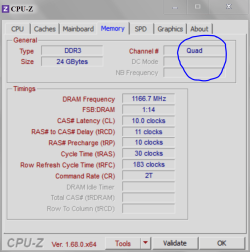
Hi.. So as usual im an idiot and i looked into my case and am still debating if my ram really should sit right next to eachother and i started Speccy and it said that i had single channel ram 2 different channels with 16GB total. I got confused becouse the motherboard manual said i should put the ram like i did.. So now i moved one ramstick, Whent into bios to check if everything was working like it should and now i have dual channel 16GB ram 8x2.
This started a question.. What performance boosts does dualchannel give over single channel.. I know its better but just. In what cases will it be "better" and will you notice it? And in witch scenario will you notice it?
This started a question.. What performance boosts does dualchannel give over single channel.. I know its better but just. In what cases will it be "better" and will you notice it? And in witch scenario will you notice it?
My Computer
- Computer type
- PC/Desktop
- Computer Manufacturer/Model Number
- Custom Built
- OS
- Windows 10 64Bit
- CPU
- Intel i7 6700K Cooled by Noctua NH-U14S
- Motherboard
- ASUS Z170 Pro Gaming
- Memory
- 16GB 2133MHZ DDR4 Corsair
- Graphics Card(s)
- ASUS Direct CUII OC GTX 660
- Sound Card
- Supreme FX (On-Board)
- Monitor(s) Displays
- 1: 24" Asus 144hz 2: 21.5" Benq 3: 20" Hp 2009m
- Screen Resolution
- 1:1920x1080 2:1920x1080 3:1600:900
- Hard Drives
- Primary/OS: Samsung 850 EVO SSD 250GB
Secondary/Main: Seagate 1TB SSHD 3.5"
Media/Backups: WD Green 2TB HDD 3.5"
- PSU
- Corsair RM 650W
- Case
- Fractal Design R4
- Cooling
- 2 140mm Noctua NF-A14 ULN, Noctua NH-U14S Cpu cooler
- Keyboard
- Corsair K70 RGB
- Mouse
- ROCCAT Kone XTD
- Internet Speed
- 100 Mbit/s Download 100MBit/s Upload
- Antivirus
- F-Secure SAFE
- Browser
- Chrome, Firefox
- Other Info
- I hope hanging up your harddrives in rubber-bands for noise reasons isn't too harmful for the drives :S, but eh, rather silence than lasting drives.. :|