How can I remove windows 7 log in password? Please help.......

rizu

New member
Local time
6:00 AM
Messages
3
Dear members,
I am very new in this forum. Recently I have been trying to remove my windows 7 log in password. But every time I try to remove my password from control panel, a popup window appears saying that
Windows can not remove the password. Password and/or account policies require the account to have a password.

Could you help me out there? I have read a lot of tutorial to auto login the windows 7 . But what I want is to remove the windows password. The account I have been running is probably the administrator account. Hope I could find some help...

Thanks
 

My Computer My Computer

At a glance

Windows 7 Home Premium 64bit.4GB
Computer type
Laptop
Computer Manufacturer/Model Number
Lenovo
OS
Windows 7 Home Premium 64bit.
Memory
4GB
Antivirus
Kaspersky internet security
You have to be the administrator, not probably.
 

My Computer My Computer

At a glance

Windows 10 Pro x64Intel Core i7 6700KGSkill TridentZ RGB 16GB 3600 16-16-16-36EVGA GTX 980 Ti SC x2
Computer type
PC/Desktop
Computer Manufacturer/Model Number
Skylake Special #666
OS
Windows 10 Pro x64
CPU
Intel Core i7 6700K
Motherboard
Asus Sabertooth Z170 Mark 1
Memory
GSkill TridentZ RGB 16GB 3600 16-16-16-36
Graphics Card(s)
EVGA GTX 980 Ti SC x2
Sound Card
Realtek High Definition
Monitor(s) Displays
AOC G2460PG
Screen Resolution
1920 x 1080 144Hz
Hard Drives
Samsung 860 Pro 256GB, Seagate Barracuda 4TB x2
PSU
EVGA 1000 P2, EVGA White Custom Braided Cables
Case
Corsair Vengeance C70 Gunmetal Black
Cooling
Corsair H100i v2, Corsair ML120 x2, Thermal Grizzly Kryonaut
Keyboard
Logitech G910 Orion Spectrum
Mouse
Logitech G700s
Internet Speed
Verizon Fios Quantum Gateway 75/75
Antivirus
Windows Defender, Malwarebytes Free 3.8.3
Browser
Chrome
Other Info
Corsair SP120 x4, LG Blu-ray Drive, Durabrand HT-395 100 Watt Dolby Digital Amp, Corsair H2100 Wireless 7.1 Headset
Hi rizu,
i also had such kind of problem with by account. one of my friends mailed me these steps to cure this problem. I would suggest you to follow them and see what happens


  • Click on start, right click on computer.
  • Click on manage, under local user and groups, click on users.
  • Right click on the account you want to delete the password, and click on the properties.
  • Check if “User cannot change the password” has a check mark.
  • If yes, then uncheck “User cannot change the password” and ok.
please reply me it helped you.
 

My Computer My Computer

At a glance

window 7
Computer type
PC/Desktop
OS
window 7

My Computer My Computer

At a glance

Win7 Pro-64 Biti7-2600-3.4GHz8 GIG DDR3onboard
Computer Manufacturer/Model Number
Put together
OS
Win7 Pro-64 Bit
CPU
i7-2600-3.4GHz
Motherboard
ASRock Z68M
Memory
8 GIG DDR3
Graphics Card(s)
onboard
Sound Card
onboard
Hard Drives
Seagate 1TB 7200RPM
PSU
680 W
Case
black
Cooling
stock fans
Keyboard
Microsoft
Mouse
Microsoft optical

My Computer My Computer

At a glance

Windows 7 Home Premium 64bit.4GB
Computer type
Laptop
Computer Manufacturer/Model Number
Lenovo
OS
Windows 7 Home Premium 64bit.
Memory
4GB
Antivirus
Kaspersky internet security
Have you tried BrightBlessings post # 4?
 

My Computer My Computer

At a glance

Windows 10 Pro. 64/ version 1709 Windows 7 Pr...Intel i7-6800K @ 4.3Corsair Platinum 16 gig @2400EVGA GTX 1070 OC
Computer type
PC/Desktop
Computer Manufacturer/Model Number
Home made Desktop
OS
Windows 10 Pro. 64/ version 1709 Windows 7 Pro/64
CPU
Intel i7-6800K @ 4.3
Motherboard
ASUS X-99 Deluxe II
Memory
Corsair Platinum 16 gig @2400
Graphics Card(s)
EVGA GTX 1070 OC
Monitor(s) Displays
Asus 27" LED LCD/VE278Q
Screen Resolution
1920-1080 or 1280-720 HDMI
Hard Drives
INTEL SSD 730-240 Gb Sata 3.0/
PSU
EVGA Platium 1200W
Case
Phanteks Luxe Tempered Glass 8 fans/ one radiator
Cooling
XSPC/ Water Cooled CPU
Keyboard
Das 4 Professional
Mouse
Logitech M705/MX Anywhere 2-S
Internet Speed
100 mbits
Antivirus
Microsoft Security Essentials/ Malwarebytes Premium 3.0/ SAS
Browser
I.E. 11 default/Firefox/ ISP Time Warner Cable/Spectrum
Other Info
LG BluRay Burner/
Sound system-KLipsch-THX/
Icy Dock ssd Hot Swap bays.
BrightBlessings,
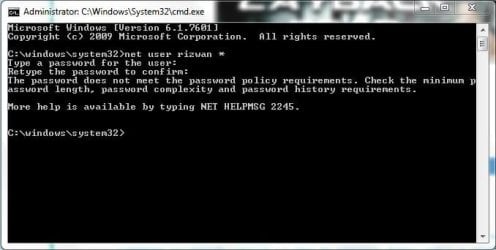
Sorry for replying so late. I tried your post using elevated command prompt. But instead saying
The command completed successfully
, It says my password doesn't match or whatsoever. I am giving you the screenshot......
 

Attachments

  • Capture.JPG
    Capture.JPG
    34.4 KB · Views: 21

My Computer My Computer

At a glance

Windows 7 Home Premium 64bit.4GB
Computer type
Laptop
Computer Manufacturer/Model Number
Lenovo
OS
Windows 7 Home Premium 64bit.
Memory
4GB
Antivirus
Kaspersky internet security
Hi rizu,
i also had such kind of problem with by account. one of my friends mailed me these steps to cure this problem. I would suggest you to follow them and see what happens


  • Click on start, right click on computer.
  • Click on manage, under local user and groups, click on users.
  • Right click on the account you want to delete the password, and click on the properties.
  • Check if “User cannot change the password” has a check mark.
  • If yes, then uncheck “User cannot change the password” and ok.
please reply me it helped you.

There isn't that option on Windows 7 Home Premium .

@ rizu

Log in to another administrator account . If you don't have one enable the built-in Administrator account

Click on :orb: type CMD inside Search Programs and files . Right click on CMD under Programs(1) choose Run as administrator . Click on the Yes button on the User Access Control window .

   Note
Command prompt should open up to C:\Windows\System32>_


Type the command below

net user administrator /active:yes
Press <ENTER>

Log off and the account your using and log in with the activated Administrator account . There is no password .

Once you're on the desktop under builtin Administrator open the command prompt as administrator

Click on :orb: type CMD inside Search Programs and files . Right click on CMD under Programs(1) choose Run as administrator . Click on the Yes button on the User Access Control window .

Type command below

net user
press <ENTER>

Enter the user account you want to remove the password of and press <ENTER>

Press <ENTER> twice . That should remove the password .

Log off from the builtin administrator and log in with the account you removed the password from .

To disable the builtin Administrator account :

Click on :orb: type CMD inside Search Programs and files . Right click on CMD under Programs(1) choose Run as administrator . Click on the Yes button on the User Access Control window .

Type command

net user administrator /active:no
press <ENTER>
 

My Computer My Computer

At a glance

Windows 7 Ultimate 32-Bit & Windows 7 Ultimat...Intel Core i7 CPU 950 @ 3.07GHzOCZ 6GB (3 x 2GB) 240-Pin DDR3 SDRAM DDR3 160...ATI Radeon HD 5700 Series
Computer Manufacturer/Model Number
Custom Built
OS
Windows 7 Ultimate 32-Bit & Windows 7 Ultimate 64-Bit
CPU
Intel Core i7 CPU 950 @ 3.07GHz
Motherboard
ASUS P6T DELUXE V2
Memory
OCZ 6GB (3 x 2GB) 240-Pin DDR3 SDRAM DDR3 1600 OCZ3X1600R2
Graphics Card(s)
ATI Radeon HD 5700 Series
Sound Card
OnBoard
Hard Drives
WD6400AACS-00M3B0 (640GB SATA )
PSU
CORSAIR 850w
Case
NZXT LEXA
Cooling
Intel Stock Heatsink Fan
Keyboard
Microsoft Wireless Laser Keyboard 7000
Mouse
Microsoft Wireless Laser Mouse 7000
Back
Top