My external hard drive suddenly became unllocated:

Thebeholder

Banned
Local time
9:41 PM
Messages
116
Location
Hadramawt
I have restored an image created by Macrium from my external hard disk which became now unllocated for reasone I didn't now. After the restoration successfuly completed, I closed the macrium environement. Then, after my computer restarted I found that there is a window telling me this:
Windows Manager Boot:
Windows failed to start. A recent hardware or software change might be the cause. To fix the problem:
1- insert your windows installation dis and restart your computer.
2-choose your language settings and then click 'next'
3- click repair your computer.
if you don't have this disc, conatact your system adminstrator.
---------

I booted from Macrium Secure CD version 4.0, which has an option to fix the boot error. Then, I choose fix boot error.
There were four optitions, Which I think were:
Master Boot Recored
Unique Hard Code
Boot Database configuration

NOTE: I have run boot fixing while my external hard drive is connecting to my computer, is this the reasone causing my external hard drive became unlocated.

After fixing Boot, my system booted correctely.
However, I was shocked that my external hard dirve which mostly has all my very important data has been unllocated. So my system didn't recognised my hard drive.
I am quite sure that I didn't do anything wrong because I am quite keen.
I didn't do anything so far(such as format or created), so could you please let me know if I could do anything to let my drive keep all the data stored on it.
Could you please help me becuase this hard Drive has everything(Images, programs, and data) I did two years ago?:cry::mad: It is exactly my archeive.


Even when I resore my system from recovery disk, the same thing is

This is the hard disk management::

mydrivebecameunllocated.png


When I first connect my hard drive after a clean installation of windows from my recovery disks, I saw this window, although that the hard drive was one partition with NTFS.
myharddrivebecameunlloc.png


This is the device manager::

thisisdevciemanageritis.png


Could you please at least give me any program to help me to recover all my data stored on my hard drive which became unllocated. I didn't proceed anything until now because I am afraid that if I had recreated it all the data inside it would be permentely deleted and would not be able to recovered.
It would be highly appreciated if you could help me.
 
Last edited:

My Computer My Computer

At a glance

Windows Ultimate x86, SP1Intel(R) core(TM)i5-2410M CPU @ 2.30GHz6GBATI Radeon HD 6770M
Computer type
Laptop
Computer Manufacturer/Model Number
HP Pavilion dv6 Notbook PC
OS
Windows Ultimate x86, SP1
CPU
Intel(R) core(TM)i5-2410M CPU @ 2.30GHz
Motherboard
Hewlett -Packard, model: 1657 10.1C
Memory
6GB
Graphics Card(s)
ATI Radeon HD 6770M
Hard Drives
TOSHIBA MK7559GXP(700GB)
Antivirus
NORTON Internet Security
Browser
MS IE, FireFox and Google Chrome
Your 1TB external drive (Disk 1 in your screenshot) has turned unallocated and you want it to be fixed without losing any data on it. Right?

Then try the procedure given below. Do plug out all other external HDDs - your Passport for example - and any other pen drives/ storage devices..

Download and install the latest version of MiniTools Partition Wizard Home Edition (Free) from Free download Magic Partition Manager Software, partition magic alternative, free partition magic, partition magic Windows 7 and server partition software - Partition Wizard Online

Proceed to the topic in Recovery with Partition Wizard: SanDisk Cruzer Blade 16GB (In your case it will be the "unallocated" external drive.)
http://www.sevenforums.com/software...ive-turned-raw-partition-wizard-testdisk.html

Run the partition Recovery Wizard and recover the partition.
 

My Computer My Computer

At a glance

Windows 7 Home Premium 32 bit
OS
Windows 7 Home Premium 32 bit
Thank you so much indeed for your kind reply.

Yes, you are absolutely right. But could you please let me know what caused my drive which has one partition with NTFS to be suddenly unllocated. Did what I said about fixing boot error for windows restored from Macrium image cuased this. I don't think that. Or maybe I accidentely did something with Bootable Wizard partition CD anything. I didn't remember I did something wrong because I am quit keen to not do something wrong while trying fixing the problem with system image restored via Macrium secure cd.
I would like to say something I remembered now,
I resotred an system image of a different version of windows contaning two partitions (system and C(OS), on a diffrenent version of windows installed on a diffrent layout(two partitions) of hard drive.
In other words,
Images restored was two partition(system(active) and C(OS)] of Windows 64x home premium.
Windows installed was two partition(C(OS) active) and personal Data partition(E).
When I restored image via Macrium CD, I drugged the two partition(System and C) one after the the partition (C) on desitnation. So, the personal partition (E) on destination remained as it was.
Also, I moved all user accounts to another partition other than system partition(C) in the image restored.

So when I fixed the boot error with Macrium Secure CD 4.0, and I logged in windows while my external hard drive was connected, I faced that I was logged with a temporary porfile because the user account which are on the partition didn't restored were for other version of windows.


loggingwithtempararypro.png

So I think this the Windows caused the problem while preparing desktop of my user account.

I should have restored all the layout of image(System:active partition, C: OS and personal data:D) as long as I moved all the user accounts to another partition other than system partition because logged with the user accounts moved to D, windows created a temparay profile because it thought that profile of user deleted.

By the way I was having both MiniTool® Partition Wizard installation and Bootable CD; however, the data recovery and lost partition recovery are not activated in the free edition. Only the copy and spilte drive are avialable

Also,
I was using Mini data recovery Wizard before I faced this problem. There were about five options:

1- Recovery deleted item,
2- Recovery lost partition
3-'Data recovery'
4- Recovery media
5- Recovery optical drivers
However, when I tried running 'Recovery lost partition' and 'Data recovery'

I didn't see any benefit from those options at all.
All the datas recovered were corrupted, although the program took about 3 hours on the entire disk whose space is (700GB), and took about 2 hours on a partition whose space is 600 GB.

Also, I saw in the result of Mini Data Recovery Wizard for entire disk(lost partition optition) that there were some Partitions listed in the result, one of them with RAW and the others don't have 'RAW'. when I click show files, I saw that there are catogaries such as: Media player vedio, MP3 player. Quick player. Archieve such as winrar and winzip. However, I didn't see that there are Setup files of programs, My hard dirve has many setup of programs and many documents.
Besides, whenever I chose a catogary to be recovered, I saw that some files are corrupted when I run them. Also, I saw that the files which were recovered were insided folder which is called 'RAW'
Also, if I chose the catogary 'Media player vedio' I saw that files were recovered in this folder ''Media player vedio'

As a result, I would never get the same organisation of my folders, subfolders, files and Mcrium images inside my hard drive, even if I successed recovered it.


Note: I didn't proceed anything since my drive has been unllocated because I have been shacking from what heppened. I was quite sure that I didn't do anything made this happened.

I want my external hard drive to be fixed and returned as it was (all folders, and subfolders and files inside them with the same names and organization)


This is a very, very imporatant drive for me, so I don't want to do anything which can result in lost all the data stored on my hard dirve. So could you please help me with a remote help?


I am ready to do anything to let my drive return back as it was, could you possibly help me with this issue?
I nearly don't like to talk or see anybody since this problem happened for my hard drive. So if you helped me with issue and let my drive come back as it was, you would be as if you gave me a ten thousands dollars.

This is the picture of Mini partition wizard, after clicking on partition recovery wizard,
Then this wizard showed me

If I successed recovering my unllocated drive, where should I recover the result?
capturew.PNG

How much time do you think it will be taking to recover all the datas stored on the drive?
Do you think that my hard drive can be returned back as it was?

I would quite highly appreciate your help.
 
Last edited:

My Computer My Computer

At a glance

Windows Ultimate x86, SP1Intel(R) core(TM)i5-2410M CPU @ 2.30GHz6GBATI Radeon HD 6770M
Computer type
Laptop
Computer Manufacturer/Model Number
HP Pavilion dv6 Notbook PC
OS
Windows Ultimate x86, SP1
CPU
Intel(R) core(TM)i5-2410M CPU @ 2.30GHz
Motherboard
Hewlett -Packard, model: 1657 10.1C
Memory
6GB
Graphics Card(s)
ATI Radeon HD 6770M
Hard Drives
TOSHIBA MK7559GXP(700GB)
Antivirus
NORTON Internet Security
Browser
MS IE, FireFox and Google Chrome
Your questions clearly show that you haven't read the topic I had referenced with due diligence. For your information I am reproducing it here with little modifications:

Click on Partition Recovery Wizard and Next.

In the Partition Recovery Wizard screen, select the external drive to be recovered and click on Next.

Select Full Disk, and then Next.

Select Quick Scan, Next

If the partition is found correctly showing full details instead of unallocated, select it and double click on it. Does the Partition Explorer show the files on it? (Unlike in TestDisk, one cannot copy the files at this stage. The partition has to be necessarily restored.)


Close the Partition Explorer and click on Finish.

The Main Screen will show the restored external drive but still without a drive letter.


Right click on the drive, click on Change letter and give a drive letter.

Click on Apply to execute the two pending operations.

The partition will be restored and your external drive will now be functional and you can access the files and folders.

( The Partition Recovery procedure merely rewrites the possibly corrupt partition table and does not touch any of your data. Your external hard drive is restored in-situ to its original condition with all data inside.)
 

My Computer My Computer

At a glance

Windows 7 Home Premium 32 bit
OS
Windows 7 Home Premium 32 bit
Thank you so much for contuning

If I fell that I might do something wrong, could I undo the step without reulting any problem on my drive.
Should I proceed without afraid of anything can cuase me drive?
On other words, must I be very keen about something before proceeding. Or even I did something wrong, I can apply the step again until my drive be recovered as it was
If I have done step by wrong, could it cause permentely lose of my data stored on drive?
This is what I am afraid about.
I hope you understand me.

capturejjo.png


in you screenshot you have chosen fat 32. However, my drive was NTFS.

The partition explore comes after choosing searched partitions, does it? Because if so, I can see my fils and folders and will know all my datas will be recovered with same organisation as they were.
 

My Computer My Computer

At a glance

Windows Ultimate x86, SP1Intel(R) core(TM)i5-2410M CPU @ 2.30GHz6GBATI Radeon HD 6770M
Computer type
Laptop
Computer Manufacturer/Model Number
HP Pavilion dv6 Notbook PC
OS
Windows Ultimate x86, SP1
CPU
Intel(R) core(TM)i5-2410M CPU @ 2.30GHz
Motherboard
Hewlett -Packard, model: 1657 10.1C
Memory
6GB
Graphics Card(s)
ATI Radeon HD 6770M
Hard Drives
TOSHIBA MK7559GXP(700GB)
Antivirus
NORTON Internet Security
Browser
MS IE, FireFox and Google Chrome
In the trial I did it was a FAT32 formatted pen drive and so it rightly showed FAT32. :)

In your case if the Partition Recovery Wizard is successful, it will indicate NTFS.

Absolutely nothing can go wrong. Just make sure that you select your unallocated drive.

In the worst case, if the Partition Recovery Wizard is unable to find the partition information after a quick scan ( first)/ Full/Deep scan (if Quick scan fails) , it will indicate that you have to resort to some other Data Recovery procedure.

And nothing happens till you click on Apply and you will be doing that only after confirming that your external drive is shown with correct details, and the Partition Explorer shows all your files.

The partition table is located in in the first sector of the drive called boot sector/MBR. Rewriting the first sector does not affect your data located in other sectors.

Note: I prefer not to say anything about the other aspects you had brought in post #3 coz........ I don't want to pull my hair on it - though I have a lot of it left.:)
 
Last edited:

My Computer My Computer

At a glance

Windows 7 Home Premium 32 bit
OS
Windows 7 Home Premium 32 bit
The only reason this would have happened in restoring an image from the external HDD is either the restore process was interrupted or power was lost temporarily to the external for whatever reason.
 

My Computer My Computer

At a glance

Vista Ultimate X64/ Windows 7 Dual-bootQ66004G OCZ PC2 8500 PlatinumEVGA 8800GTS Vid Card
Computer Manufacturer/Model Number
Self-Built
OS
Vista Ultimate X64/ Windows 7 Dual-boot
CPU
Q6600
Motherboard
ASUS P5K
Memory
4G OCZ PC2 8500 Platinum
Graphics Card(s)
EVGA 8800GTS Vid Card
Hard Drives
500G Seagate SATA
200G Seagate SATA
100G WD Caviar SATA
80G WD Caviar IDE
PSU
OCZ Elite 800W PSU
Case
RaidMax Smilodon Case
I have done what you have said but I still have not applied the two operations.
I would like to ask you about these two inquires
First: All the folders named in Arabic are shown with a question mark as this screenshot shows. Will they be restored with a question mark or with its original name?
shwingquestionmark.png


Second: Are these surrounded by the blue colour files or folders, if they were files, there should have been a size number under size catogary on fornt of them as the files under them.

arethesefiles.png


But the most strange thing is that the hard drive is not shown under my computer while unllocated. However, I can click on drive to be removed safely in system tray.
 

My Computer My Computer

At a glance

Windows Ultimate x86, SP1Intel(R) core(TM)i5-2410M CPU @ 2.30GHz6GBATI Radeon HD 6770M
Computer type
Laptop
Computer Manufacturer/Model Number
HP Pavilion dv6 Notbook PC
OS
Windows Ultimate x86, SP1
CPU
Intel(R) core(TM)i5-2410M CPU @ 2.30GHz
Motherboard
Hewlett -Packard, model: 1657 10.1C
Memory
6GB
Graphics Card(s)
ATI Radeon HD 6770M
Hard Drives
TOSHIBA MK7559GXP(700GB)
Antivirus
NORTON Internet Security
Browser
MS IE, FireFox and Google Chrome
I pass these questions to others who might have some knowledge about it. :D

But I shall repeat that restoring the partition does not write a single bit, byte, zero or one to your data sectors and it will be accessible "as was, where was, how was and what was". I don't know how was and what was.:)

And if you really want to, you can resort to the other method of data recovery using TestDisk. TestDisk - CGSecurity The advantage here is that you can copy all the files/folders or any of it to another drive. Note: If you want to copy to another external hdd or pen drive, you have to plug-in those before you run Test Disk. When you run Test Disk, those drives will also be seen in it. Once you have copied and seen the folders/files, you can raise any further queries on the recovered files ( the ones you have raised in the previous post )

Recovery with TestDisk:

Run TestDisk

1. At the first screen select “No Log” ENTER

2. Select the drive to analyse, choose “Proceed” ENTER

3. Select partition type – Intel for a PC. ENTER

4.Select “Analyse” ENTER. The drive/partition will be analysed. At this screen the message “ Partition sector doesn’t have the endmark 0xAA55 “ appeared.(This happened even in the case of the other Imation 1 GB flash drive. So I would presume that this will happen with every flash drive.)


5. Select “Quick Search” ENTER

6. Press “Y” if the partitions were created under Vista or later – “N” if not. "Y" if you do not know.

7. Partition identified correctly.


8. At this stage I pressed “P” to list the files and check whether it can see the files. It
showed all the files. I copied one file to a partition on my internal drive and checked
that it played. I terminated TestDisk after this since I have to now try Partition Wizard.


If one wants to write the partition table, instead of “P”, press ENTER to continue, select ‘Write” ENTER . Quit TestDisk and reboot your PC. (Since this is a flash drive, safely remove it and plug it in.) Later I made a repeat of this exercise starting from the lowlevel format and confirmed that it was successful.
 

My Computer My Computer

At a glance

Windows 7 Home Premium 32 bit
OS
Windows 7 Home Premium 32 bit
Thank you so much indeed,
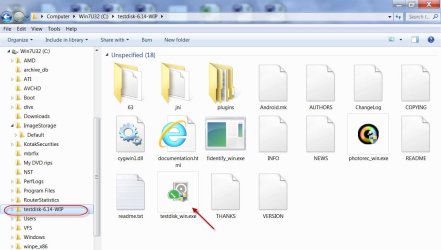
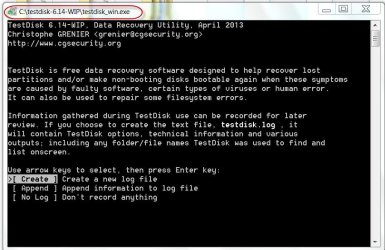
When I downloaded test disk, I didn't find any file for setup. Is the test disk utility not for installing? Also when I clicked on the file highlighted in the second screenshot below, I found this error in the first screenshot below.

68191282.PNG

41266847.png


I am fairly sure that the question marks only show in front of each entity written in Arabic only in via exploring of Wizard because the Wizard didn't support Arabic language.
If I had proceeded to apply the two pending operations with partition recovery wizard regardless of questions mark, no thing wrong would be going on, would it?
As a result, You, of course, wanted me to apply this test disk only in order for I am quite sure that all my datas will be restored as they were, don't you?
 
Last edited:

My Computer My Computer

At a glance

Windows Ultimate x86, SP1Intel(R) core(TM)i5-2410M CPU @ 2.30GHz6GBATI Radeon HD 6770M
Computer type
Laptop
Computer Manufacturer/Model Number
HP Pavilion dv6 Notbook PC
OS
Windows Ultimate x86, SP1
CPU
Intel(R) core(TM)i5-2410M CPU @ 2.30GHz
Motherboard
Hewlett -Packard, model: 1657 10.1C
Memory
6GB
Graphics Card(s)
ATI Radeon HD 6770M
Hard Drives
TOSHIBA MK7559GXP(700GB)
Antivirus
NORTON Internet Security
Browser
MS IE, FireFox and Google Chrome
.......If I had proceeded to apply the two pending operations with partition recovery wizard regardless of questions mark, no thing wrong would be going on, would it?
As a result, You, of course, wanted me to apply this test disk only in order for I am quite sure that all my datas will be restored as they were, don't you?

Yep, you are absolutely correct.

You seem to be too much worried as to the status of the files when you go ahead with partition recovery using Partition Wizard - in spite of my repeatedly telling that rewriting the partition table in the first sector of your hard drive will in no way affect your data. I am exasperated.

And that is why I suggested that you go with TestDisk, where you can copy the files to another drive and see for yourself.:) ( I cannot peep into your drive and see "how is, what is")

And TestDisk does not require any installation. You merely extract the zip file into the root of your C drive or any other new folder.. You will find the files extracted into a folder named testdisk-6.14-WIP. Just click/double click on testdisk_win.exe to run it. ( I don't know what all you have done and why that C:users/blah blah/AppData/local /Temp/ blah blah blah blah :banghead: )

17-04-2013 09-10-58.jpg

17-04-2013 09-51-18.jpg
 
Last edited:

My Computer My Computer

At a glance

Windows 7 Home Premium 32 bit
OS
Windows 7 Home Premium 32 bit
Thank you so much indeed, yes, it is now alright. but I exracted the Winzip I dowonloaded two times, the first time I extract I got this,
capturepdw.png


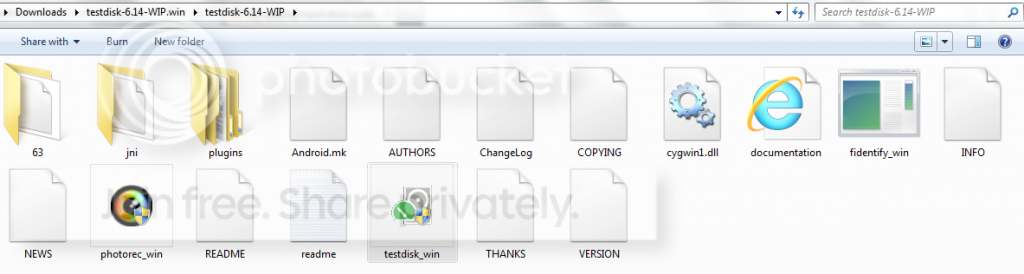
Then, I extract testdisk-win above to get these files and folders:

Capture1.png


But do you think that test disk will show all my files and folders with the same name even if they are written in Arabic
 
Last edited:

My Computer My Computer

At a glance

Windows Ultimate x86, SP1Intel(R) core(TM)i5-2410M CPU @ 2.30GHz6GBATI Radeon HD 6770M
Computer type
Laptop
Computer Manufacturer/Model Number
HP Pavilion dv6 Notbook PC
OS
Windows Ultimate x86, SP1
CPU
Intel(R) core(TM)i5-2410M CPU @ 2.30GHz
Motherboard
Hewlett -Packard, model: 1657 10.1C
Memory
6GB
Graphics Card(s)
ATI Radeon HD 6770M
Hard Drives
TOSHIBA MK7559GXP(700GB)
Antivirus
NORTON Internet Security
Browser
MS IE, FireFox and Google Chrome
......But do you think that test disk will show all my files and folders with the same name even if they are written in Arabic

There is no Arabic version of TestDisk. So it will perhaps put question marks only. Thank you for enlightening me. Even the "so-called" experts need to learn. :)

kalash, kallivalli mudhir :)
 

My Computer My Computer

At a glance

Windows 7 Home Premium 32 bit
OS
Windows 7 Home Premium 32 bit
Thank you very much for continuing

I have tried appying the TestDisk
However, I found that no disk to be recovered.

1. At the first screen select “No Log” ENTER

2. Select the drive to analyse, choose “Proceed” ENTER
Afterselectingthediskthenclickedonproceed.png


3. Select partition type – Intel for a PC. ENTER

4.Select “Analyse” ENTER.
Note, There is no message “ Partition sector doesn’t have the endmark 0xAA55 “ appeared after choosing Analyse; however, only this message showed me:

ThereisnomessageldquoPartitionsectordoesnrsquothavetheendmark0xAA55ldquoappearedafterchoosingAnalys.png


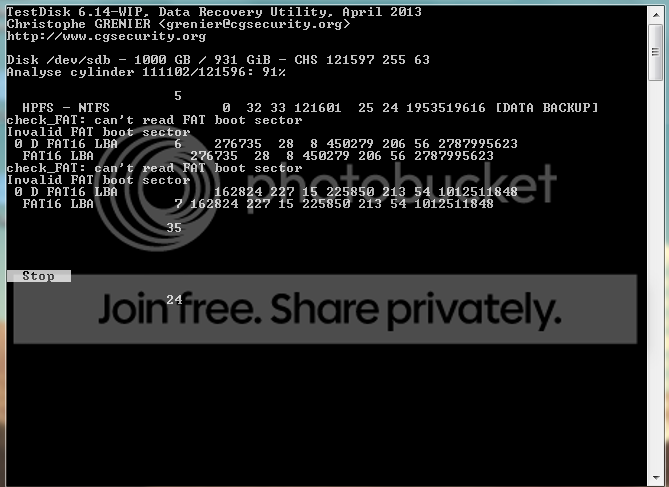
5- While 'Quick Search' was running, this window was showing me:::
Testdisk.png


after 'Quick Search' completed in about four hours, this windows showed me, there was not any window containing “P” to list the files.
afterQuickSearchcompletedthiswindowsshowedmetherewerenotanyldquoPrdquotolistthefiles-1.png

What does mean with the hardisk seems too small???????

Even when I clicking on 'continue' in the above screenshot, there was not any window containing “P” to list the files:

afterclickingoncontinuetherewerenotanyldquoPrdquotolistthefiles.png


Aslo, after clicking on 'continue', there was any window containing 'write' to write table partition. Only this window showed me:

Asloafterclickingoncontinuetherewerenotanywritetowritetablepartition.png


Also, I chose 'deeper search' in the last bove screenshot, which also took about six hours, when the quick search seemed that it failed, but the same thing happened.
 

My Computer My Computer

At a glance

Windows Ultimate x86, SP1Intel(R) core(TM)i5-2410M CPU @ 2.30GHz6GBATI Radeon HD 6770M
Computer type
Laptop
Computer Manufacturer/Model Number
HP Pavilion dv6 Notbook PC
OS
Windows Ultimate x86, SP1
CPU
Intel(R) core(TM)i5-2410M CPU @ 2.30GHz
Motherboard
Hewlett -Packard, model: 1657 10.1C
Memory
6GB
Graphics Card(s)
ATI Radeon HD 6770M
Hard Drives
TOSHIBA MK7559GXP(700GB)
Antivirus
NORTON Internet Security
Browser
MS IE, FireFox and Google Chrome
What is this message, your screenshots weren't shown at all.
 

My Computer My Computer

At a glance

Windows Ultimate x86, SP1Intel(R) core(TM)i5-2410M CPU @ 2.30GHz6GBATI Radeon HD 6770M
Computer type
Laptop
Computer Manufacturer/Model Number
HP Pavilion dv6 Notbook PC
OS
Windows Ultimate x86, SP1
CPU
Intel(R) core(TM)i5-2410M CPU @ 2.30GHz
Motherboard
Hewlett -Packard, model: 1657 10.1C
Memory
6GB
Graphics Card(s)
ATI Radeon HD 6770M
Hard Drives
TOSHIBA MK7559GXP(700GB)
Antivirus
NORTON Internet Security
Browser
MS IE, FireFox and Google Chrome
Hi Thebeholder,

TestDisk could not find a partition.

Go back to Partition Wizard now, and complete the pending operations as at your post #8.

That is your only hope now. Let us see.
 

My Computer My Computer

At a glance

Windows 7 Home Premium 32 bit
OS
Windows 7 Home Premium 32 bit
Do you think that this could also happen with partition wizard?

I am afraid if the unllocated hard drive will be recovered with files and folders with question mark or not running. So can I be able to recover(copy) my hard disk via partition recovery wizard to another external hard dirve to see if all datas will be recovered as they were. Or I can only recovere the unllocated disk to be as it was only. In other words, I cannot copy 'unllocated disk' to anothe external hard drive after it became showon after 'quick scan'
 

My Computer My Computer

At a glance

Windows Ultimate x86, SP1Intel(R) core(TM)i5-2410M CPU @ 2.30GHz6GBATI Radeon HD 6770M
Computer type
Laptop
Computer Manufacturer/Model Number
HP Pavilion dv6 Notbook PC
OS
Windows Ultimate x86, SP1
CPU
Intel(R) core(TM)i5-2410M CPU @ 2.30GHz
Motherboard
Hewlett -Packard, model: 1657 10.1C
Memory
6GB
Graphics Card(s)
ATI Radeon HD 6770M
Hard Drives
TOSHIBA MK7559GXP(700GB)
Antivirus
NORTON Internet Security
Browser
MS IE, FireFox and Google Chrome
Do you think that this could also happen with partition wizard?

I am afraid if the unllocated hard drive will be recovered with files and folders with question mark or not running. So can I be able to recover(copy) my hard disk via partition recovery wizard to another external hard dirve to see if all datas will be recovered as they were. Or I can only recovere the unllocated disk to be as it was only. In other words, I cannot copy 'unllocated disk' to anothe external hard drive after it became showon after 'quick scan'

I cannot predict anything.

There is no way to copy the files shown by Partition Wizard. You can only access them after it writes the partition table it found.

As I had repeatedly told, writing the partition table, does not affect the data.

But still taking your concern into account, I would recommend that you copy and save the first sector (MBR). Even if Partition Wizard fails after rewriting the partition table, you can restore the first sector and bring your HDD back to the condition it was before to try any other data recovery method.

I shall come back after another six or seven hours and tell you how. ( My stock trading time now.:))
 

My Computer My Computer

At a glance

Windows 7 Home Premium 32 bit
OS
Windows 7 Home Premium 32 bit
So here we go to backup the first sector of your problem external drive. Please remove all other external drives / pen drives and lock them elsewhere.

Download HD Hacker v 1.4 from http://dimio.altervista.org/eng/

Unzip it to your C drive. You will find the extracted files in the folder HDHacker.

With only your problem drive plugged in, right click on HDHacker.exe and Run it as administrator.

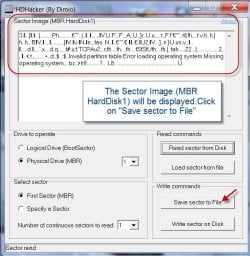
Select “Physical Drive (MBR)” and drive “1” and click on “Read sector from Disk”

1Read Sector .jpg

The “Sector Image (MBR HardDisk1)” will be displayed. Click on “Save sector to File” and in the ensuing dialog box, click on “Save”.

2 Save.jpg

The MBR will be saved as “MBR_HardDisk1.dat” in the HDHacker folder. Check and then close HD Hacker.

Now go ahead with the Partition Recovery Wizard and restore the partition (as in your post No.8)

Good luck..
 

My Computer My Computer

At a glance

Windows 7 Home Premium 32 bit
OS
Windows 7 Home Premium 32 bit
Thank you so much indeed, Mr.jumanji for your continuing helping me.
I really applied the two operations pending with the partition recovery wizard yesterday before seeing your last post. I have not experienced such a problem at all. That drive has been having all my datas. I am going to copy it to at least three another external hard drives.

I am quite surprised that when I appied the two operations pending in partition recovery wizard, I saw that the hard drive returned as it was. But only I want to ask you these points and I hope you will be answring me.

First: When I connected my external drive, I didn't see that autoplay shows me as it was.
Second: The two operations took only less than one minute. Why did the testdisk take more than four hours and it faild in the end?

Third: if there a hard drive formated or deleted, had been recreated, could I be able to use recover the datas stored on the previous partition with this partition recovery wizard? I really formated and deleted a hard drive containing datas. Then, I recreated it again. After that, I have tried applying 'partition recovery wizard' to see if the hard drive will be recovered or not. I didn't see any folders or files in that hard drive, except 'System Volume 'Information'$RECYCLE.BIN'
However, there were not any personal datas of mine.

Finally: Do you think that I can open another new thread for the problems of restoring images containing layout differring from the layout to be written? Because as I said in my very first post this:
I resotred an system image of a different version of windows contaning two partitions (system and C(OS), on a diffrenent version of windows installed on a diffrent layout(two partitions) of hard drive.
In other words,
Images restored was two partition(system(active) and C(OS)] of Windows 64x home premium.
Windows installed was two partition(C(OS) active) and personal Data partition(E).
When I restored image via Macrium CD, I drugged the two partition(System and C) one after the the partition (C) on desitnation. So, the personal partition (E) on destination remained as it was.
Also, I moved all user accounts to another partition other than system partition(C) in the image restored.

So when I fixed the boot error with Macrium Secure CD 4.0, and reached to windows' login, there were two user accounts, I logged in with a user while my external hard drive was connected, I faced that I was logged with a temporary porfile because the user profile account I logged in was moved to the partition I didn't restored.


So the Windows prepared another desktop of the user account.


So I think the Windows caused the problem while preparing desktop of my user account.

NB: when I logged off, and then I have tried logging in with same user account again, I found that
The group policy client service failed login. Access is denied.

The same thing happened with the other user account(on the first log in I logged in with a temporary porifle, then Access is denied


In conclusion: I think that I should have restored all the layout of image(System:active partition, C:\ 'OS' and D:\ 'personal data' :D) as long as I moved all the user accounts to another partition other than system partition because logged with the user accounts moved to D, windows created a temparay profile because it thought that profile of user deleted.

However, this raised another question which is very important: If I have OS installed on "System:active, and C: and then I moved all the user accounts to another partition which is specified for my personal data, for instance 'D'
So, I have imaged only 'System and C:' alone
Also I have imaged D alone.
When I restore OS(system and C partiton) alone, I will face like this problem. Then what is the benefit from letting images of Windows(system and C partitions) be sperated from my personal data( 'D' partition) in my case.
In other words, I have alway been hearing that some users say it is better to move all your personal data to another partition other than System partition in the internal hard drive. Then, put the images of 'OS'(full and differentials) on a partition on an external hard drive and all your personal datas on another partition on the same external hard drive.

Internal hard drive (System: Active, C:\(OS))>----------------------> D:\ personal data(move all user accounts here)
External hard drive: E:\ for images of System and C:\ 'full and differentials' <---> F:\(images daily for D:\)

I really have been facing too many problems with restoring images, in particular if I restore image created of the different layout of a hard drive on Windows installed on another layout of a hard drive,
Such as, this message 'No bootable device, insert boot cd and press any key', which appears after restarting computer inside the Macrium environment, although that the image has been compeleted successfully in the Macrium environment.
When I booted to Mini partition bootable CD, I found that there isn't an active partition. So, I let the C: active, the problem was solved.
I hope you understand me.
 
Last edited:

My Computer My Computer

At a glance

Windows Ultimate x86, SP1Intel(R) core(TM)i5-2410M CPU @ 2.30GHz6GBATI Radeon HD 6770M
Computer type
Laptop
Computer Manufacturer/Model Number
HP Pavilion dv6 Notbook PC
OS
Windows Ultimate x86, SP1
CPU
Intel(R) core(TM)i5-2410M CPU @ 2.30GHz
Motherboard
Hewlett -Packard, model: 1657 10.1C
Memory
6GB
Graphics Card(s)
ATI Radeon HD 6770M
Hard Drives
TOSHIBA MK7559GXP(700GB)
Antivirus
NORTON Internet Security
Browser
MS IE, FireFox and Google Chrome
Back
Top