WD External Hard Drive Not Showing on My PC

Despite of your issue, it seems that you created the disk as MBR and it should be created as GPT. MBR disk has a limit size of 2T.
Wait for Jumanji instructions. He is the disk guru.
 

My Computers My Computers

  • At a glance

    Windows 7 HP 64i5 6600K - 800MHz to 4200MHz4+4G GSkill DDR4 3000IG - Intel 530
    Computer type
    PC/Desktop
    Computer Manufacturer/Model Number
    custom build
    OS
    Windows 7 HP 64
    CPU
    i5 6600K - 800MHz to 4200MHz
    Motherboard
    GA-Z170-HD3P
    Memory
    4+4G GSkill DDR4 3000
    Graphics Card(s)
    IG - Intel 530
    Monitor(s) Displays
    Samsung 226BW
    Screen Resolution
    1680x1050
    Hard Drives
    (1) -1 SM951 – 128GB M.2 AHCI PCIe SSD drive for Windows 7 and Lubuntu
    (2) -1 WD SATA 3 - 1T for Data
    (3) -1 WD SATA 3 - 1T for backup
    PSU
    Thermaltake 450W TR2 gold
    Keyboard
    Old and good Chicony mechanical keyboard
    Mouse
    Logitech mX performance - 9 buttons (had to disable some)
    Internet Speed
    500Mb/s
    Browser
    Firefox 64
    Other Info
    TinyWall firewall
  • At a glance

    Windows 7 Proi7-4500U 800MHz to 3.0GHz(4+4)G DDR3 1600IG intel 4400 + NVIDIA GeForce GT 745M
    Computer type
    Laptop
    System Manufacturer/Model Number
    Asus Q550LF
    OS
    Windows 7 Pro
    CPU
    i7-4500U 800MHz to 3.0GHz
    Motherboard
    Asus Q550LF
    Memory
    (4+4)G DDR3 1600
    Graphics Card(s)
    IG intel 4400 + NVIDIA GeForce GT 745M
    Sound Card
    Realtek
    Monitor(s) Displays
    LG Display LP156WF4-SPH1
    Screen Resolution
    1920 x 1080
    Hard Drives
    BX500 120G SSD for Windows and programs +
    1T HDD for data
    Internet Speed
    500 Mb/s
    Browser
    Firefox
    Other Info
    TinyWall firewall
Despite of your issue, it seems that you created the disk as MBR and it should be created as GPT. MBR disk has a limit size of 2T.
Wait for Jumanji instructions. He is the disk guru.

I will await for him... But your point over here is still not clear to me.. if MBR has just 2T; then why is it not showing as GPT then
 

My Computer My Computer

At a glance

Windows 7 Home Premium 64bit
Computer type
Laptop
Computer Manufacturer/Model Number
Toshiba
OS
Windows 7 Home Premium 64bit
Hard Drives
Hitachi
The Third one did not show any results on the screen even after 100% done...
 

My Computer My Computer

At a glance

Windows 7 Home Premium 64bit
Computer type
Laptop
Computer Manufacturer/Model Number
Toshiba
OS
Windows 7 Home Premium 64bit
Hard Drives
Hitachi
Here is the Image file for it..

Blue Hard Drive Disk partition work finihsed.png
 

My Computer My Computer

At a glance

Windows 7 Home Premium 64bit
Computer type
Laptop
Computer Manufacturer/Model Number
Toshiba
OS
Windows 7 Home Premium 64bit
Hard Drives
Hitachi
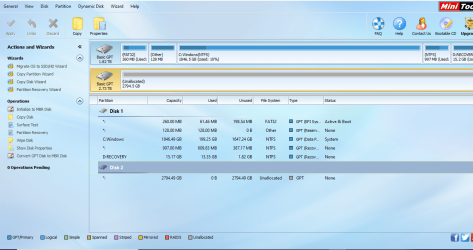
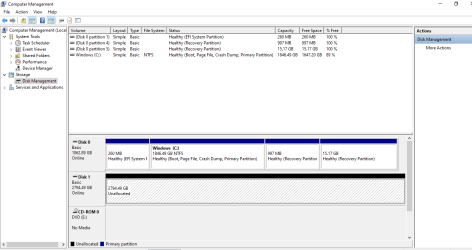
Here is the Screen Shot of the Disk Management Tool for the WD Hard Drive..

Here The "WD Hard Drive is Referred to as "Disk 1" and the local PC Drive is referred to as "Disk 0"..."


View attachment 411476


Over here, it shows 2 sections on the Hard Drive; does it mean that it had 2 partitions but are not visible now anymore..?
 

My Computer My Computer

At a glance

Windows 7 Home Premium 64bit
Computer type
Laptop
Computer Manufacturer/Model Number
Toshiba
OS
Windows 7 Home Premium 64bit
Hard Drives
Hitachi
Hi farhaj,

I have seen all the screenshots. Let me think about it and decide upon the strategy.Till then do not do anything. Just wait for further instructions. Safely remove the external HDD and keep it at rest.
 

My Computer My Computer

At a glance

Windows 7 Home Premium 32 bit
OS
Windows 7 Home Premium 32 bit
Hi farhaj,

I have seen all the screenshots. Let me think about it and decide upon the strategy.Till then do not do anything. Just wait for further instructions. Safely remove the external HDD and keep it at rest.

Alright, I will...
Thank you for your cooperation and help..

Please, try to do upmost :o for me that I am able to retrieve my data from it...
 

My Computer My Computer

At a glance

Windows 7 Home Premium 64bit
Computer type
Laptop
Computer Manufacturer/Model Number
Toshiba
OS
Windows 7 Home Premium 64bit
Hard Drives
Hitachi
I will await for him... But your point over here is still not clear to me.. if MBR has just 2T; then why is it not showing as GPT then

When you buy a drive bigger than 2.2T, it may be already initialized as GPT or come as unallocated.
If you initialize as MBR it will create a 2T partition and the remaining space will be kept as unallocated that can't be used.
This is not relevant now. Your priority is to retrieve your data.
 

My Computers My Computers

  • At a glance

    Windows 7 HP 64i5 6600K - 800MHz to 4200MHz4+4G GSkill DDR4 3000IG - Intel 530
    Computer type
    PC/Desktop
    Computer Manufacturer/Model Number
    custom build
    OS
    Windows 7 HP 64
    CPU
    i5 6600K - 800MHz to 4200MHz
    Motherboard
    GA-Z170-HD3P
    Memory
    4+4G GSkill DDR4 3000
    Graphics Card(s)
    IG - Intel 530
    Monitor(s) Displays
    Samsung 226BW
    Screen Resolution
    1680x1050
    Hard Drives
    (1) -1 SM951 – 128GB M.2 AHCI PCIe SSD drive for Windows 7 and Lubuntu
    (2) -1 WD SATA 3 - 1T for Data
    (3) -1 WD SATA 3 - 1T for backup
    PSU
    Thermaltake 450W TR2 gold
    Keyboard
    Old and good Chicony mechanical keyboard
    Mouse
    Logitech mX performance - 9 buttons (had to disable some)
    Internet Speed
    500Mb/s
    Browser
    Firefox 64
    Other Info
    TinyWall firewall
  • At a glance

    Windows 7 Proi7-4500U 800MHz to 3.0GHz(4+4)G DDR3 1600IG intel 4400 + NVIDIA GeForce GT 745M
    Computer type
    Laptop
    System Manufacturer/Model Number
    Asus Q550LF
    OS
    Windows 7 Pro
    CPU
    i7-4500U 800MHz to 3.0GHz
    Motherboard
    Asus Q550LF
    Memory
    (4+4)G DDR3 1600
    Graphics Card(s)
    IG intel 4400 + NVIDIA GeForce GT 745M
    Sound Card
    Realtek
    Monitor(s) Displays
    LG Display LP156WF4-SPH1
    Screen Resolution
    1920 x 1080
    Hard Drives
    BX500 120G SSD for Windows and programs +
    1T HDD for data
    Internet Speed
    500 Mb/s
    Browser
    Firefox
    Other Info
    TinyWall firewall
Hi farhaj

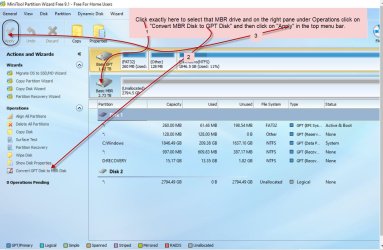
Please plugin your faulty drive again and run Partition Wizard 9.1. Click exactly on the Basic MBR drive icon to select that disk and on the left Pane click on "Convert MBR Disk to GPT Disk". Now that disk will show as a GPT disk. Take a screenshot. Click on "Apply" on the top menu bar. ( as Shown in the screenshot below) for the change to take effect.

01-04-2020 20-10-22.jpg

That should convert the disk to GPT. Close Partition Wizard. Reboot your PC and check whether the disk is accessible and you can access the data.

Post the screenshot that you took.

Converting the MBR disk to GPT with PW does not affect the data. So do not worry.

Warning: Make sure you click on the MBR disk icon and not the GPT disk which is your system Disk.
 

My Computer My Computer

At a glance

Windows 7 Home Premium 32 bit
OS
Windows 7 Home Premium 32 bit
Hi farhaj

Please plugin your faulty drive again and run Partition Wizard 9.1. Click exactly on the Basic MBR drive icon to select that disk and on the left Pane click on "Convert MBR Disk to GPT Disk". Now that disk will show as a GPT disk. Take a screenshot. Click on "Apply" on the top menu bar. ( as Shown in the screenshot below) for the change to take effect.

View attachment 411487

That should convert the disk to GPT. Close Partition Wizard. Reboot your PC and check whether the disk is accessible and you can access the data.

Post the screenshot that you took.

Converting the MBR disk to GPT with PW does not affect the data. So do not worry.

Warning: Make sure you click on the MBR disk icon and not the GPT disk which is your system Disk.

1) First, of all I would say that you really explain it well enough with Screen Shots and Arrow Points, getting to the positive Results.
I like that of your work..:cool:

2) Secondly, No offence just for my knowledge;
a) what affect will this have on the Drive
b) why do we want to change the mode to GPT from MBR..

3) Can you please explain it to me that what does GPT and MBR mean here..?

4) Someone, over here earlier mentioned that the Drive has just One volume when bought new; and the Partitions are then made.. I really did not understand this statement as well to what that meant exactly.. So, if you could emphasize this more over here..

5) Can you also tell me as to what does "Volumes" and "Partitions" mean..? ANd what are its rolls on a hard Drive..?

6) And for now from the amount of information you see from the Screenshots; How many "Volumes" or "Partitions" I have got of the Hard Drive which I possess..?


hoping for your nice explanations over here for me:D...
 

My Computer My Computer

At a glance

Windows 7 Home Premium 64bit
Computer type
Laptop
Computer Manufacturer/Model Number
Toshiba
OS
Windows 7 Home Premium 64bit
Hard Drives
Hitachi
MBR
GPT

The Master Boot Record (MBR) partitioning scheme, widely used since the early 1980s, imposed limitations for use of modern hardware. A major deficiency is the limited size of 32 bits for block addresses and related information. For hard disks with 512-byte sectors, the MBR partition table entries allow a maximum size of 2 TiB (2³² × 512 bytes).

In the late 1990s, Intel developed a new partition table format as part of what eventually became the Unified Extensible Firmware Interface (UEFI). As of 2010, the GUID Partition Table forms a subset of the UEFI specification.[2] GPT uses 64 bits for logical block addresses, allowing a maximum disk size of 264 sectors. For disks with 512-byte sectors, the maximum size is 9.4 ZB (9.4 × 10²¹ bytes) or 8 ZiB (264 sectors × 29 bytes per sector)
 

My Computers My Computers

  • At a glance

    Windows 7 HP 64i5 6600K - 800MHz to 4200MHz4+4G GSkill DDR4 3000IG - Intel 530
    Computer type
    PC/Desktop
    Computer Manufacturer/Model Number
    custom build
    OS
    Windows 7 HP 64
    CPU
    i5 6600K - 800MHz to 4200MHz
    Motherboard
    GA-Z170-HD3P
    Memory
    4+4G GSkill DDR4 3000
    Graphics Card(s)
    IG - Intel 530
    Monitor(s) Displays
    Samsung 226BW
    Screen Resolution
    1680x1050
    Hard Drives
    (1) -1 SM951 – 128GB M.2 AHCI PCIe SSD drive for Windows 7 and Lubuntu
    (2) -1 WD SATA 3 - 1T for Data
    (3) -1 WD SATA 3 - 1T for backup
    PSU
    Thermaltake 450W TR2 gold
    Keyboard
    Old and good Chicony mechanical keyboard
    Mouse
    Logitech mX performance - 9 buttons (had to disable some)
    Internet Speed
    500Mb/s
    Browser
    Firefox 64
    Other Info
    TinyWall firewall
  • At a glance

    Windows 7 Proi7-4500U 800MHz to 3.0GHz(4+4)G DDR3 1600IG intel 4400 + NVIDIA GeForce GT 745M
    Computer type
    Laptop
    System Manufacturer/Model Number
    Asus Q550LF
    OS
    Windows 7 Pro
    CPU
    i7-4500U 800MHz to 3.0GHz
    Motherboard
    Asus Q550LF
    Memory
    (4+4)G DDR3 1600
    Graphics Card(s)
    IG intel 4400 + NVIDIA GeForce GT 745M
    Sound Card
    Realtek
    Monitor(s) Displays
    LG Display LP156WF4-SPH1
    Screen Resolution
    1920 x 1080
    Hard Drives
    BX500 120G SSD for Windows and programs +
    1T HDD for data
    Internet Speed
    500 Mb/s
    Browser
    Firefox
    Other Info
    TinyWall firewall
MBR
GPT

The Master Boot Record (MBR) partitioning scheme, widely used since the early 1980s, imposed limitations for use of modern hardware. A major deficiency is the limited size of 32 bits for block addresses and related information. For hard disks with 512-byte sectors, the MBR partition table entries allow a maximum size of 2 TiB (2³² × 512 bytes).

In the late 1990s, Intel developed a new partition table format as part of what eventually became the Unified Extensible Firmware Interface (UEFI). As of 2010, the GUID Partition Table forms a subset of the UEFI specification.[2] GPT uses 64 bits for logical block addresses, allowing a maximum disk size of 264 sectors. For disks with 512-byte sectors, the maximum size is 9.4 ZB (9.4 × 10²¹ bytes) or 8 ZiB (264 sectors × 29 bytes per sector)

Thanks for sharing that...

can you tell me what do the sectors represent.. I did not understand that part clearly well enough..
 

My Computer My Computer

At a glance

Windows 7 Home Premium 64bit
Computer type
Laptop
Computer Manufacturer/Model Number
Toshiba
OS
Windows 7 Home Premium 64bit
Hard Drives
Hitachi
A disk is divided in tracks (same radius) and each track is divided in sectors (angle)
Disk sector
 

My Computers My Computers

  • At a glance

    Windows 7 HP 64i5 6600K - 800MHz to 4200MHz4+4G GSkill DDR4 3000IG - Intel 530
    Computer type
    PC/Desktop
    Computer Manufacturer/Model Number
    custom build
    OS
    Windows 7 HP 64
    CPU
    i5 6600K - 800MHz to 4200MHz
    Motherboard
    GA-Z170-HD3P
    Memory
    4+4G GSkill DDR4 3000
    Graphics Card(s)
    IG - Intel 530
    Monitor(s) Displays
    Samsung 226BW
    Screen Resolution
    1680x1050
    Hard Drives
    (1) -1 SM951 – 128GB M.2 AHCI PCIe SSD drive for Windows 7 and Lubuntu
    (2) -1 WD SATA 3 - 1T for Data
    (3) -1 WD SATA 3 - 1T for backup
    PSU
    Thermaltake 450W TR2 gold
    Keyboard
    Old and good Chicony mechanical keyboard
    Mouse
    Logitech mX performance - 9 buttons (had to disable some)
    Internet Speed
    500Mb/s
    Browser
    Firefox 64
    Other Info
    TinyWall firewall
  • At a glance

    Windows 7 Proi7-4500U 800MHz to 3.0GHz(4+4)G DDR3 1600IG intel 4400 + NVIDIA GeForce GT 745M
    Computer type
    Laptop
    System Manufacturer/Model Number
    Asus Q550LF
    OS
    Windows 7 Pro
    CPU
    i7-4500U 800MHz to 3.0GHz
    Motherboard
    Asus Q550LF
    Memory
    (4+4)G DDR3 1600
    Graphics Card(s)
    IG intel 4400 + NVIDIA GeForce GT 745M
    Sound Card
    Realtek
    Monitor(s) Displays
    LG Display LP156WF4-SPH1
    Screen Resolution
    1920 x 1080
    Hard Drives
    BX500 120G SSD for Windows and programs +
    1T HDD for data
    Internet Speed
    500 Mb/s
    Browser
    Firefox
    Other Info
    TinyWall firewall
A disk is divided in tracks (same radius) and each track is divided in sectors (angle)
Disk sector

if you don't mind; I wanted to tell you that I saw all those 3 links which you sent, but.... I still did not understand it clearly the theory of MBR, GBT and the sectors...

so, if you can; just no offence, can you explain those more to me with respect to my issue of the HArd drive which I possess and over all how they are related into Hard Drives and so on..
 

My Computer My Computer

At a glance

Windows 7 Home Premium 64bit
Computer type
Laptop
Computer Manufacturer/Model Number
Toshiba
OS
Windows 7 Home Premium 64bit
Hard Drives
Hitachi
Hi farhaj

Please plugin your faulty drive again and run Partition Wizard 9.1. Click exactly on the Basic MBR drive icon to select that disk and on the left Pane click on "Convert MBR Disk to GPT Disk". Now that disk will show as a GPT disk. Take a screenshot. Click on "Apply" on the top menu bar. ( as Shown in the screenshot below) for the change to take effect.

View attachment 411487

That should convert the disk to GPT. Close Partition Wizard. Reboot your PC and check whether the disk is accessible and you can access the data.

Post the screenshot that you took.

Converting the MBR disk to GPT with PW does not affect the data. So do not worry.

Warning: Make sure you click on the MBR disk icon and not the GPT disk which is your system Disk.

In a Day or Two, I will post the Screen shot as you explained on the top.. Then, guide me from thier..
I appreciate all you are looking into..
 

My Computer My Computer

At a glance

Windows 7 Home Premium 64bit
Computer type
Laptop
Computer Manufacturer/Model Number
Toshiba
OS
Windows 7 Home Premium 64bit
Hard Drives
Hitachi
Hi farhaj

Please plugin your faulty drive again and run Partition Wizard 9.1. Click exactly on the Basic MBR drive icon to select that disk and on the left Pane click on "Convert MBR Disk to GPT Disk". Now that disk will show as a GPT disk. Take a screenshot. Click on "Apply" on the top menu bar. ( as Shown in the screenshot below) for the change to take effect.

View attachment 411487

That should convert the disk to GPT. Close Partition Wizard. Reboot your PC and check whether the disk is accessible and you can access the data.

Post the screenshot that you took.

Converting the MBR disk to GPT with PW does not affect the data. So do not worry.

Warning: Make sure you click on the MBR disk icon and not the GPT disk which is your system Disk.

I made the Changes to it as you told me...

1) Here is the Screenshot After making changes in the wizard..

mbr to gpt disk.png

2) this is the snapshot of the DIsk Management Tool after doing the changes in the wizard

Disk Management after conversion.png

Inform me how to proceed next now..

Waiting anxiously for your feed back..
 

My Computer My Computer

At a glance

Windows 7 Home Premium 64bit
Computer type
Laptop
Computer Manufacturer/Model Number
Toshiba
OS
Windows 7 Home Premium 64bit
Hard Drives
Hitachi
This is what I get in My PC


this PC after connecting harddrive.png
 

My Computer My Computer

At a glance

Windows 7 Home Premium 64bit
Computer type
Laptop
Computer Manufacturer/Model Number
Toshiba
OS
Windows 7 Home Premium 64bit
Hard Drives
Hitachi
Hi farhaj

I am afraid that your disk has been wiped out completely.

Anyway, we shall complete the investigation. Now your disk is converted into GPT. Run Partition Recovery Wizard on it as you did before ( as in my post #12)

At the end of the full scan does it show any found partition/s?

Post a screenshot.

If it does find a partition, double click on it and check whether it shows any of your files and folders.

Report.
 

My Computer My Computer

At a glance

Windows 7 Home Premium 32 bit
OS
Windows 7 Home Premium 32 bit
Hi farhaj

I am afraid that your disk has been wiped out completely.

Anyway, we shall complete the investigation. Now your disk is converted into GPT. Run Partition Recovery Wizard on it as you did before ( as in my post #12)

At the end of the full scan does it show any found partition/s?

Post a screenshot.

If it does find a partition, double click on it and check whether it shows any of your files and folders.

Report.

why do you say that..?
wiped out completly...
their is no way to return the data from it then...

if, it still does not show anything then what would be the chances then..??
 

My Computer My Computer

At a glance

Windows 7 Home Premium 64bit
Computer type
Laptop
Computer Manufacturer/Model Number
Toshiba
OS
Windows 7 Home Premium 64bit
Hard Drives
Hitachi
If it has been wiped out there is no way to get it back.

Run Partition Recovery Wizard as asked and check if any partitions are found. If found double click on the partitions and check whether your files and folders are seen. Simply asking questions will not bring back your data. Anybody who had access to your drive could have wiped it.

If no data is seen one final attempt. Download the trial version of Getdataback Pro and scan your external drive, Choose level 4 scan. If it shows your data , you can check the integrity and if you are satisfied buy it to copy the data. If it does not show your data, that is the end of the story.

Data Recovery Software Products - Runtime Software Products
 

My Computer My Computer

At a glance

Windows 7 Home Premium 32 bit
OS
Windows 7 Home Premium 32 bit
Back
Top