wireless adapter won't connect to new router

vipomorge

New member
Local time
8:33 AM
Messages
13
Hey I have a new problem.

I got a new computer with Intel(R) Centrino(R) Advanced-N 6200 AGN wireless card and it will connect fine to my old router, but I upgraded to a dlink and when I go to connect it says no internet access. So I upgraded my driver and it still didn't work. I thought maybe it was the router so I got my old laptop out and connected to my new router and it works fine. So right now I'm kinda confused since it's not necessarily my router since my old compy can connect or my wireless card since i can connect to other routers.

I realize this isn't that much to start with, but I will be on here often to answer any follow up questions!
Thanks in advance guys!!
 
Last edited:

My Computer My Computer

At a glance

Windows 7 UltimateIntel Core i7 2630QM @ 2.00GHz8 GB2048MB GeForce GTX 560M
Computer type
Laptop
Computer Manufacturer/Model Number
ASUS G53SX-XT1
OS
Windows 7 Ultimate
CPU
Intel Core i7 2630QM @ 2.00GHz
Motherboard
ASUSTeK Computer Inc. G53SX (CPU 1)
Memory
8 GB
Graphics Card(s)
2048MB GeForce GTX 560M
Sound Card
NVIDIA High Definition Audio Realtek High Definition Audio
Monitor(s) Displays
Generic PnP Monitor (1920x1080@60Hz)
Screen Resolution
Generic PnP Monitor (1920x1080@60Hz)
Hard Drives
75GB INTEL SSDSA2CW080G3 (SSD)
596GB Hitachi HTS547564A9E384 (SATA)
Internet Speed
VERIZON FIOS 50/25
Antivirus
AVAST
Browser
CHROME
Hello,

Your Wi-Fi adapter doesn't seem to be compatible with your router. Have you tried changing the wireless security - WPA or WPA2?
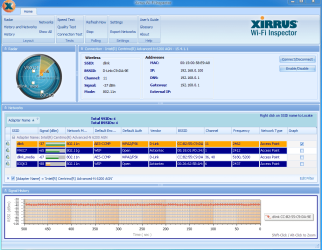
From your computer can you please post a Xirrus snip. Download, install and run Xirrus Wi-Fi Inspector.

To run Xirrus Wi-Fi Inspector, double click the Xirrus icon on your Desktop, you may use the Windows 7 snipping tool to crop or Paint by tapping the Print screen key on your keyboard, open up Paint (Click on Start>All Programs>Accessories>Paint) then choose Edit from the Menu and select Paste, then save it and please attach the file on your next post.

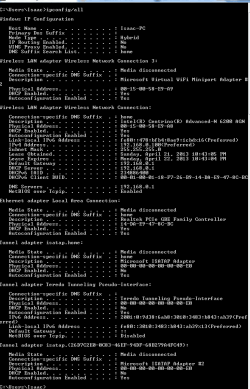
Can you also post ipconfig/all output for review?
 

My Computer My Computer

At a glance

Win7 & Win8 64bitIntel i5
Computer Manufacturer/Model Number
Lenovo Desktop/Samsung Laptop
OS
Win7 & Win8 64bit
CPU
Intel i5
Internet Speed
Charter-20 Mbps
Antivirus
Avast
Browser
FF, IE9 and Chrome
I tried changing the wireless security from wpa2 to wpa and even open, but nothing changed. Once in a while I can surf the web even though it says "no internet access" and then it will stop. Here are the pics not sure what wanted me to run on xirrus. This is a weird one for me, thanks for stopping to help out!!

wifitest.PNG

ipconfig.PNG
 

My Computer My Computer

At a glance

Windows 7 UltimateIntel Core i7 2630QM @ 2.00GHz8 GB2048MB GeForce GTX 560M
Computer type
Laptop
Computer Manufacturer/Model Number
ASUS G53SX-XT1
OS
Windows 7 Ultimate
CPU
Intel Core i7 2630QM @ 2.00GHz
Motherboard
ASUSTeK Computer Inc. G53SX (CPU 1)
Memory
8 GB
Graphics Card(s)
2048MB GeForce GTX 560M
Sound Card
NVIDIA High Definition Audio Realtek High Definition Audio
Monitor(s) Displays
Generic PnP Monitor (1920x1080@60Hz)
Screen Resolution
Generic PnP Monitor (1920x1080@60Hz)
Hard Drives
75GB INTEL SSDSA2CW080G3 (SSD)
596GB Hitachi HTS547564A9E384 (SATA)
Internet Speed
VERIZON FIOS 50/25
Antivirus
AVAST
Browser
CHROME
You did well, all looks good. Great signal and all.....
I hate to inform you that you may either try changing your Wi-Fi card or switch the router back to your old router, it is an incompatibility issue between you Wi-Fi card with your new router.
 

My Computer My Computer

At a glance

Win7 & Win8 64bitIntel i5
Computer Manufacturer/Model Number
Lenovo Desktop/Samsung Laptop
OS
Win7 & Win8 64bit
CPU
Intel i5
Internet Speed
Charter-20 Mbps
Antivirus
Avast
Browser
FF, IE9 and Chrome
Hmmn... didn't know that could be an issue. Hate to hear that though :( If I got a new card how would I know that the new one would be compatible? And thanks again for your help.
 

My Computer My Computer

At a glance

Windows 7 UltimateIntel Core i7 2630QM @ 2.00GHz8 GB2048MB GeForce GTX 560M
Computer type
Laptop
Computer Manufacturer/Model Number
ASUS G53SX-XT1
OS
Windows 7 Ultimate
CPU
Intel Core i7 2630QM @ 2.00GHz
Motherboard
ASUSTeK Computer Inc. G53SX (CPU 1)
Memory
8 GB
Graphics Card(s)
2048MB GeForce GTX 560M
Sound Card
NVIDIA High Definition Audio Realtek High Definition Audio
Monitor(s) Displays
Generic PnP Monitor (1920x1080@60Hz)
Screen Resolution
Generic PnP Monitor (1920x1080@60Hz)
Hard Drives
75GB INTEL SSDSA2CW080G3 (SSD)
596GB Hitachi HTS547564A9E384 (SATA)
Internet Speed
VERIZON FIOS 50/25
Antivirus
AVAST
Browser
CHROME
You'll have to give it a try, we wouldn't know if it works or not without trying it. :D
If I got a new card how would I know that the new one would be compatible?
 

My Computer My Computer

At a glance

Win7 & Win8 64bitIntel i5
Computer Manufacturer/Model Number
Lenovo Desktop/Samsung Laptop
OS
Win7 & Win8 64bit
CPU
Intel i5
Internet Speed
Charter-20 Mbps
Antivirus
Avast
Browser
FF, IE9 and Chrome
I tried changing the wireless security from wpa2 to wpa and even open, but nothing changed. Once in a while I can surf the web even though it says "no internet access" and then it will stop. Here are the pics not sure what wanted me to run on xirrus. This is a weird one for me, thanks for stopping to help out!!

View attachment 265054

View attachment 265055

In many cases this type of problem can be fixed by updating the firmware on the router, although you haven't posted the router's model number so I can't look for the firmware update.
 

My Computer My Computer

At a glance

Windows 7 Ult, Windows 8.1 Pro,Q9650-4.275GHz, E8600 4.5GHz, E6750-3.8GHzG.Skill PC2 9600 1200Mhz 5 5 5 15 2TGTX480
Computer type
PC/Desktop
Computer Manufacturer/Model Number
Home built
OS
Windows 7 Ult, Windows 8.1 Pro,
CPU
Q9650-4.275GHz, E8600 4.5GHz, E6750-3.8GHz
Motherboard
Evga 780i FTW
Memory
G.Skill PC2 9600 1200Mhz 5 5 5 15 2T
Graphics Card(s)
GTX480
Sound Card
Asus Xonar D2
Monitor(s) Displays
HannsG
Screen Resolution
1680X1050
Hard Drives
GSkill Phoenix Pro 120GB SSD
PSU
ThermalTake Toughpower 1000Watt modular
Case
ThermalTake XaserV
Cooling
Xigmatek S1283
Keyboard
Logitech G15
Mouse
Logitech G9
Internet Speed
T1
@Chev65 My router is d-link hd media router 2000 dir-827 and I upgraded the firmware to the latest update and still didn't work. Any other suggestions? Thanks!
 

My Computer My Computer

At a glance

Windows 7 UltimateIntel Core i7 2630QM @ 2.00GHz8 GB2048MB GeForce GTX 560M
Computer type
Laptop
Computer Manufacturer/Model Number
ASUS G53SX-XT1
OS
Windows 7 Ultimate
CPU
Intel Core i7 2630QM @ 2.00GHz
Motherboard
ASUSTeK Computer Inc. G53SX (CPU 1)
Memory
8 GB
Graphics Card(s)
2048MB GeForce GTX 560M
Sound Card
NVIDIA High Definition Audio Realtek High Definition Audio
Monitor(s) Displays
Generic PnP Monitor (1920x1080@60Hz)
Screen Resolution
Generic PnP Monitor (1920x1080@60Hz)
Hard Drives
75GB INTEL SSDSA2CW080G3 (SSD)
596GB Hitachi HTS547564A9E384 (SATA)
Internet Speed
VERIZON FIOS 50/25
Antivirus
AVAST
Browser
CHROME
Does your new laptop see your new routers wireless network? Exactly what happens when you try to Connect to it?

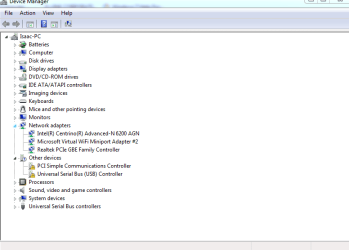
Also, can you go into Device Manager, click on Network Adapters, and tell me what entries you have in there please?
 

My Computer My Computer

At a glance

Windows 7 Professional 64bit SP1Intel Core i5-3570K @ 4.5GHzCorsair Vengeance 16GB (4x4) @1866MHz CL 9-9-...EVGA GTX 750 Ti FTW
Computer type
PC/Desktop
Computer Manufacturer/Model Number
Custom Built
OS
Windows 7 Professional 64bit SP1
CPU
Intel Core i5-3570K @ 4.5GHz
Motherboard
Asus Sabertooth Z77
Memory
Corsair Vengeance 16GB (4x4) @1866MHz CL 9-9-9-24 1T
Graphics Card(s)
EVGA GTX 750 Ti FTW
Sound Card
Onboard Audio
Monitor(s) Displays
Dell S2309W
Screen Resolution
1920x1080
Hard Drives
Samsung 830 128GB SSD - OS
(4) Seagate 5TB HDD
(1) Seagate 2TB HDD
PSU
Seasonic X750 80+ Gold Full Modular
Case
Antec Eleven Hundred Super Mid Tower
Cooling
Intel Liquid Cooler
Keyboard
Max Nighthawk X8 Mechanical keyboard
Mouse
Mionix Naos 7000
Internet Speed
50 Mbps Down / 10 Mbps Up
Antivirus
Microsoft Security Essentials/Malwarebytes Anti-Malware
Browser
Chrome/Firefox
Other Info
Klipsch ProMedia 2.1's
Asus RT-N66R Wireless Router
@kbrady1979 My computer can see the router, and it used to be that I could connect to it and it would show the yellow exclamation point on wireless signal and say no internet access. But now when I try to connect it asks for my password (which is correct since I tried other device with same password) and it says windows was unable to connect.

device manager.PNG
 

My Computer My Computer

At a glance

Windows 7 UltimateIntel Core i7 2630QM @ 2.00GHz8 GB2048MB GeForce GTX 560M
Computer type
Laptop
Computer Manufacturer/Model Number
ASUS G53SX-XT1
OS
Windows 7 Ultimate
CPU
Intel Core i7 2630QM @ 2.00GHz
Motherboard
ASUSTeK Computer Inc. G53SX (CPU 1)
Memory
8 GB
Graphics Card(s)
2048MB GeForce GTX 560M
Sound Card
NVIDIA High Definition Audio Realtek High Definition Audio
Monitor(s) Displays
Generic PnP Monitor (1920x1080@60Hz)
Screen Resolution
Generic PnP Monitor (1920x1080@60Hz)
Hard Drives
75GB INTEL SSDSA2CW080G3 (SSD)
596GB Hitachi HTS547564A9E384 (SATA)
Internet Speed
VERIZON FIOS 50/25
Antivirus
AVAST
Browser
CHROME
I was just on my wife's computer and she can't connect either and I checked my old computer that could connect and it can't now. So I am going to reset my router and try setting it back up again to see if that works. Also the router defaults to Wpa2 aes security, is that not compatible with some computers?
 

My Computer My Computer

At a glance

Windows 7 UltimateIntel Core i7 2630QM @ 2.00GHz8 GB2048MB GeForce GTX 560M
Computer type
Laptop
Computer Manufacturer/Model Number
ASUS G53SX-XT1
OS
Windows 7 Ultimate
CPU
Intel Core i7 2630QM @ 2.00GHz
Motherboard
ASUSTeK Computer Inc. G53SX (CPU 1)
Memory
8 GB
Graphics Card(s)
2048MB GeForce GTX 560M
Sound Card
NVIDIA High Definition Audio Realtek High Definition Audio
Monitor(s) Displays
Generic PnP Monitor (1920x1080@60Hz)
Screen Resolution
Generic PnP Monitor (1920x1080@60Hz)
Hard Drives
75GB INTEL SSDSA2CW080G3 (SSD)
596GB Hitachi HTS547564A9E384 (SATA)
Internet Speed
VERIZON FIOS 50/25
Antivirus
AVAST
Browser
CHROME
I just checked my old computer that was able to connect to the router and my wife's and neither one works. So I am going to reset it and try setting it back up to see if that works also, the router security defaults to wpa2 aes is that not compatible with some computers or settings?
 

My Computer My Computer

At a glance

Windows 7 UltimateIntel Core i7 2630QM @ 2.00GHz8 GB2048MB GeForce GTX 560M
Computer type
Laptop
Computer Manufacturer/Model Number
ASUS G53SX-XT1
OS
Windows 7 Ultimate
CPU
Intel Core i7 2630QM @ 2.00GHz
Motherboard
ASUSTeK Computer Inc. G53SX (CPU 1)
Memory
8 GB
Graphics Card(s)
2048MB GeForce GTX 560M
Sound Card
NVIDIA High Definition Audio Realtek High Definition Audio
Monitor(s) Displays
Generic PnP Monitor (1920x1080@60Hz)
Screen Resolution
Generic PnP Monitor (1920x1080@60Hz)
Hard Drives
75GB INTEL SSDSA2CW080G3 (SSD)
596GB Hitachi HTS547564A9E384 (SATA)
Internet Speed
VERIZON FIOS 50/25
Antivirus
AVAST
Browser
CHROME
I just checked my old computer that was able to connect to the router and my wife's and neither one works. So I am going to reset it and try setting it back up to see if that works also, the router security defaults to wpa2 aes is that not compatible with some computers or settings?

WPA2 and AES should work with most newer machines, if these machines can only work with wireless G or below then you need to be sure and use the mixed mode 802.11 settings, if all these machines are wireless N capable then it may work best using the 802.11n Only setting.
 

My Computer My Computer

At a glance

Windows 7 Ult, Windows 8.1 Pro,Q9650-4.275GHz, E8600 4.5GHz, E6750-3.8GHzG.Skill PC2 9600 1200Mhz 5 5 5 15 2TGTX480
Computer type
PC/Desktop
Computer Manufacturer/Model Number
Home built
OS
Windows 7 Ult, Windows 8.1 Pro,
CPU
Q9650-4.275GHz, E8600 4.5GHz, E6750-3.8GHz
Motherboard
Evga 780i FTW
Memory
G.Skill PC2 9600 1200Mhz 5 5 5 15 2T
Graphics Card(s)
GTX480
Sound Card
Asus Xonar D2
Monitor(s) Displays
HannsG
Screen Resolution
1680X1050
Hard Drives
GSkill Phoenix Pro 120GB SSD
PSU
ThermalTake Toughpower 1000Watt modular
Case
ThermalTake XaserV
Cooling
Xigmatek S1283
Keyboard
Logitech G15
Mouse
Logitech G9
Internet Speed
T1
Back
Top