Okay, so here is my devices page...and no, nForce has seemed to assumed direct control. The wireless thing is my usb wireless stick, obviously.
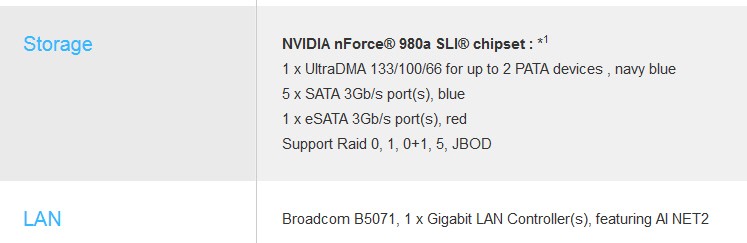
Well, I'm certainly mystified by why the ASUS description for your motherboard shows a Broadcom LAN adapter, but let's just forget about it and proceed with what's shown... namely that you somehow apparently have an nVidia wired LAN adapter. You didn't add this separate discrete nVidia network card to your machine, did you? You're really using the onboard network connector from the motherboard? Very strange.
Anyway, the other Linksys WUSB100 item shown is obviously plug-in USB wireless LAN adapter. This is what is providing your wireless connection to the Verizon router, temporarily. I understand.
Went ahead and ran those ipconfig tests anyway...here is the WIRELESS one:
I would say that at the moment it is your wireless adapter that is operational, and that your Verizon FIOS router is seen as 192.168.1.1. Your PC has been DHCP-assigned an IP address of 192.168.1.129, wirelessly connected to the FIOS router.
This is perfectly fine and seemingly perfectly operational... wirelessly... as you confirm.
Obviously not simultaneously operational. If it were, you'd also see 192.168.1.1 as the "default gateway" and some other IP address (say 192.168.1.130) for IPv4.
But you don't. This really just confirms that the nVidia wired LAN is not operational, for some reason.
Although it's technically possible to have BOTH wired and wireless network adapters active and operational at the same time (with your PC having TWO separate IP addresses assigned by the router), that's not normally the right way to operate. So you either want to be wired (if it worked) or wireless. But to shoot the wired problem you're going to have to remove the Linksys USB adapter, I'm afraid.
And yes, I have went into bios to no avail...the ONBOARD LAN option is enabled.
This is confirmed by the fact that Device Manager shows it without any tiny icon overlaid, which would indicate some type of hardware or driver issue. Looks perfectly operational in Device Manager.
Plus, you say that it used to work just fine wired... until the Verizon guy swapped routers.
I'm fairly certain that the new router has a different set of IP addresses (e.g. that it is now 192.168.1.1 whereas your old router might have been 192.168.0.1 or maybe even 10.0.0.1 or something else). So Windows has now created a new "network connection", and you just need to enable it properly and specify it correctly as a "home network".
Ok. First, you need to disconnect the Linksys wireless adapter and just go wired, in order for us to chase this down. Shut your machine down and remove the USB Linksys adapter, connecting the FIOS router wired to your nVidia network connector. Then re-boot.
NOTE: I know I shouldn't have to say this, but you've connected your PC to one of the 1-4 LAN ports on the router, right? You haven't connected it to the WAN port (which goes to the modem), right? Sorry to ask that, but I just want to be sure.
Now, you should see in the lower right system tray notification area those two icons... (1) Action Center, and (2) Network, which I posted a screenshot of earlier. Are they both clean, as my screenshot shows? Or is there a small exclamation mark or red "x" or anything overlaid on one or both that indicates a problem? Hover your mouse over the icon and report back what the popup flyout message says.
If there is a problem shown on the network icon (as there likely will be), right-click on it and select the "troubleshoot problems" item to kick off the Windows networking troubleshooting wizard. This may resolve everything, with the wizard discovering the problem (i.e. perhaps that non-enabled new home network) and place you at the dialog for you to check home/work/public network (and you check the "home network" item). That could be all it takes.
Second possible solution: click on the Start button, and in the "search programs and files" field type in "network connections" (without the surrounding quotes) and press ENTER. This should open the Control Panel -> Network and Internet -> Network connections window. You should probably see BOTH of your networks... (1) the wireless one corresponding to your USB Linksys adapter, which should say DISABLED, and (2) the wired one corresponding to your nVidia onboard adapter. Does it also show DISABLED, or does it show ENABLED? Or DISCONNECTED? Or what?
Left-click on the wired connection icon to select it. Right-click on the icon and select STATUS to produce the status window. What gets shown as the current status? Does it look operational or not? Close the STATUS window.
If it's already ENABLED, right-click on the wired connection icon and select DISABLE. The network icon in the system tray should now show a red "X" over it. Wait 15 seconds. Now right-click on the wired connection icon again and this time select ENABLE. The red "X" over the network icon in the system tray should disappear. Hopefully the wired connection should now spring to life and be operational.
If it doesn't show ENABLED, right-click on the wired connection icon and select DIAGNOSE, and let the wizard try to find a problem. We're trying to get that home/work/public network dialog for the new router's newly created wired network, and if/when we do and you then select "home network" I believe from that point on you will now once again be operational using wired.
Third possibility (lowest probability): right-click on the wired connection icon (in the above "network connections" window) and select PROPERTIES, to get the properties dialog window. Down about 3 from the bottom in the list of various connection items is the "Internet Protocol version 4 (TCP/IPv4)" item. Select it.
Now push the "properties" button. In the resulting properties window, you should have (1) obtain an IP address automatically, and (2) obtain DNS server address automatically, both CHECKED. You shouldn't have the alternative radio buttons checked which specify a hard-coded IP address for your PC (which would have been based on your old Verizon router's network IP address) and/or a hard-coded IP address for your DNS server (i.e. what probably would be the old IP address of your old Verizon router).
In other words, having static values here would likely be tied to your old Verizon router, and would thus prevent your PC from connecting properly to your new Verizon router. By sticking with the "obtain automatically" radio button for both options, your PC should automatically be given an IP address by whatever router you're talking to... as long as the new network (for the new router) is correctly initiated, enabled, and marked as "home network" (which is what I've tried to kick-start with the two approaches described above).
These are just assorted ideas. Report back if you have any success or breakthroughs pursuing any of these approaches.