Windows 7 wetwork between 3 computers but public folders can't sync

Steveforrest

New member
Local time
1:45 PM
Messages
4
I have setup a network for someone. it was working fine when i left it but it is used by a small organisation/charity so has lots of volunteers who aren't all very well versed in using computers. i set it up so they would all be able to share files through the public folders but for some reason the individual public folders on each computer can't see whats in the public folder for the other computer on the network. i have gone through the network and made sure all the sharing setting are correct. and can find each computer on the network , i can go into network and sharing centre and browse through the other computer's files that way but cannot utilise the public folder the way its meant to be.

any ideas?
 

My Computer My Computer

At a glance

windows 7 various
Computer type
PC/Desktop
OS
windows 7 various
I have setup a network for someone. it was working fine when i left it but it is used by a small organisation/charity so has lots of volunteers who aren't all very well versed in using computers. i set it up so they would all be able to share files through the public folders but for some reason the individual public folders on each computer can't see whats in the public folder for the other computer on the network. i have gone through the network and made sure all the sharing setting are correct. and can find each computer on the network , i can go into network and sharing centre and browse through the other computer's files that way but cannot utilise the public folder the way its meant to be.

any ideas?

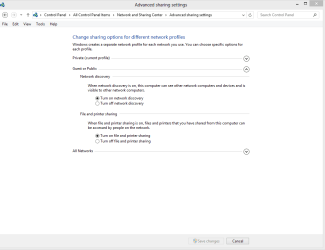
You should first check in the Network and Sharing Center> Advanced Sharing Settings, there are separate settings for the Public folders that must be enabled in order to share the Public folders. You should check to ensure that Network Discovery and Printer and File sharing are both enabled.

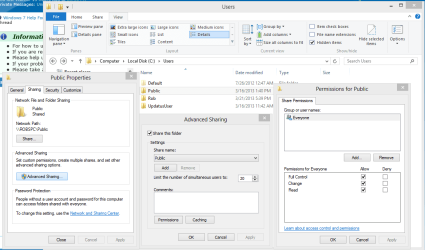
You should also make share that the permission settings on the C:>Users>Public folder appear as in the picture. :)
 

Attachments

  • Public folders sharing enabled.PNG
    Public folders sharing enabled.PNG
    37.4 KB · Views: 3

My Computer My Computer

At a glance

Windows 7 Ult, Windows 8.1 Pro,Q9650-4.275GHz, E8600 4.5GHz, E6750-3.8GHzG.Skill PC2 9600 1200Mhz 5 5 5 15 2TGTX480
Computer type
PC/Desktop
Computer Manufacturer/Model Number
Home built
OS
Windows 7 Ult, Windows 8.1 Pro,
CPU
Q9650-4.275GHz, E8600 4.5GHz, E6750-3.8GHz
Motherboard
Evga 780i FTW
Memory
G.Skill PC2 9600 1200Mhz 5 5 5 15 2T
Graphics Card(s)
GTX480
Sound Card
Asus Xonar D2
Monitor(s) Displays
HannsG
Screen Resolution
1680X1050
Hard Drives
GSkill Phoenix Pro 120GB SSD
PSU
ThermalTake Toughpower 1000Watt modular
Case
ThermalTake XaserV
Cooling
Xigmatek S1283
Keyboard
Logitech G15
Mouse
Logitech G9
Internet Speed
T1
yeah everything u have suggested i have done but still there is no connection between the public folders. is there anything else u can think of. I was asked to move the location of the public folder on one computer to make it easier for them to find it (not that its hidden anyway lol) and two computers were communicating before i tried to move the route location of the public folder on one computer with no success i settled on just pinning the public folder to the start menu but then the two computers couldn't sync their public folders. i then decided to add the third computer to the network but this also had the same problem. so i can't see that i coulda broke sommit there. someone suggested that there may be a problem with the ip addresses, if anyone has any ideas?
 

My Computer My Computer

At a glance

windows 7 various
Computer type
PC/Desktop
OS
windows 7 various
yeah everything u have suggested i have done but still there is no connection between the public folders. is there anything else u can think of. I was asked to move the location of the public folder on one computer to make it easier for them to find it (not that its hidden anyway lol) and two computers were communicating before i tried to move the route location of the public folder on one computer with no success i settled on just pinning the public folder to the start menu but then the two computers couldn't sync their public folders. i then decided to add the third computer to the network but this also had the same problem. so i can't see that i coulda broke sommit there. someone suggested that there may be a problem with the ip addresses, if anyone has any ideas?

You may be able to restore the default Public folder location by following the tutorial in the link below. It doesn't show the exact steps to restore the Public folder location but the basic directions for restoring default file locations may help.

http://www.sevenforums.com/tutorials/18583-user-folders-restore-default-location.html
 

My Computer My Computer

At a glance

Windows 7 Ult, Windows 8.1 Pro,Q9650-4.275GHz, E8600 4.5GHz, E6750-3.8GHzG.Skill PC2 9600 1200Mhz 5 5 5 15 2TGTX480
Computer type
PC/Desktop
Computer Manufacturer/Model Number
Home built
OS
Windows 7 Ult, Windows 8.1 Pro,
CPU
Q9650-4.275GHz, E8600 4.5GHz, E6750-3.8GHz
Motherboard
Evga 780i FTW
Memory
G.Skill PC2 9600 1200Mhz 5 5 5 15 2T
Graphics Card(s)
GTX480
Sound Card
Asus Xonar D2
Monitor(s) Displays
HannsG
Screen Resolution
1680X1050
Hard Drives
GSkill Phoenix Pro 120GB SSD
PSU
ThermalTake Toughpower 1000Watt modular
Case
ThermalTake XaserV
Cooling
Xigmatek S1283
Keyboard
Logitech G15
Mouse
Logitech G9
Internet Speed
T1
Am I missing something here?

The Public Folders on different computers on same worgroup or Homegroup are not meant to be synced. I really do not know what you are talking about?

I have quite a large home network. When I want to other network computers to easily access something I have saved on my computer, I save it in Public folders. The saved files will of course not be synced with those other computers Public folders; in order for those other computers to access the files they need to get into my computer to get them using Explorer and browsing to my Public folders.

Each computer's Public folders only contain the locally stored files, they do not sync with other computers.

i can go into network and sharing centre and browse through the other computer's files that way but cannot utilise the public folder the way its meant to be.

That is exactly the way it should be, it is and was never meant to be as you describe. To access files on another computer, you open it in Explorer adn browse to Public or other shared folders of that other PC.

Short: Public Folders are not synced between the computers.

Kari
 

My Computer My Computer

At a glance

Windows 10 Pro x64 EN-GB1.6 GHz Intel Core i7-720QM Processor6 GBATI Mobility Radeon HD 5850 Graphics
Computer type
Laptop
Computer Manufacturer/Model Number
HP ENVY 17-1150eg
OS
Windows 10 Pro x64 EN-GB
CPU
1.6 GHz Intel Core i7-720QM Processor
Memory
6 GB
Graphics Card(s)
ATI Mobility Radeon HD 5850 Graphics
Sound Card
Beats sound system with integrated subwoofer
Monitor(s) Displays
17" laptop display, 22" LED and 32" Full HD TV through HDMI
Screen Resolution
1600*900 (1), 1920*1080 (2&3)
Hard Drives
Internal: 2 x 500 GB SATA Hard Disk Drive 7200 rpm
External: 2TB for backups, 3TB USB3 network drive for media
Cooling
As Envy runs a bit warm, I have it on a Cooler Master pad
Keyboard
Logitech diNovo Media Desktop Laser (bluetooth)
Mouse
Logitech Performance Mouse MX
Internet Speed
50/10 Mbps VDSL
Antivirus
Windows Defender 4.3.9431.0
Browser
Maxthon 3.5.2., IE11
Am I missing something here?

The Public Folders on different computers on same worgroup or Homegroup are not meant to be synced. I really do not know what you are talking about?

I have quite a large home network. When I want to other network computers to easily access something I have saved on my computer, I save it in Public folders. The saved files will of course not be synced with those other computers Public folders; in order for those other computers to access the files they need to get into my computer to get them using Explorer and browsing to my Public folders.

Each computer's Public folders only contain the locally stored files, they do not sync with other computers.

i can go into network and sharing centre and browse through the other computer's files that way but cannot utilise the public folder the way its meant to be.

That is exactly the way it should be, it is and was never meant to be as you describe. To access files on another computer, you open it in Explorer adn browse to Public or other shared folders of that other PC.

Short: Public Folders are not synced between the computers.

Kari

Kari I believe he was incorrectly using the term synced to explain a file access problem, I could tell by what he was saying that he really only had a file access problem which most likely occurred because he changed the default location of the Public folders.
 

My Computer My Computer

At a glance

Windows 7 Ult, Windows 8.1 Pro,Q9650-4.275GHz, E8600 4.5GHz, E6750-3.8GHzG.Skill PC2 9600 1200Mhz 5 5 5 15 2TGTX480
Computer type
PC/Desktop
Computer Manufacturer/Model Number
Home built
OS
Windows 7 Ult, Windows 8.1 Pro,
CPU
Q9650-4.275GHz, E8600 4.5GHz, E6750-3.8GHz
Motherboard
Evga 780i FTW
Memory
G.Skill PC2 9600 1200Mhz 5 5 5 15 2T
Graphics Card(s)
GTX480
Sound Card
Asus Xonar D2
Monitor(s) Displays
HannsG
Screen Resolution
1680X1050
Hard Drives
GSkill Phoenix Pro 120GB SSD
PSU
ThermalTake Toughpower 1000Watt modular
Case
ThermalTake XaserV
Cooling
Xigmatek S1283
Keyboard
Logitech G15
Mouse
Logitech G9
Internet Speed
T1
karl on my personal home computer i save files in a folder in my public documents save it then on the laptop i log on and can access that same file and then vice versa. but at the centre when a file is saved in any of the public folders they canot be accessed from any of the other computers public folders. i hope this was more clear of what i meant sorry for being unclear previously
 

My Computer My Computer

At a glance

windows 7 various
Computer type
PC/Desktop
OS
windows 7 various
chev one question about if it was me changing the file location. i only change the location on one computer but the other two computers did not sync ( yes its the incorrect word but most accurate i know). so what could be wrong between the other two or coulod i some how have changed the router settings by changing the folders location?
 

My Computer My Computer

At a glance

windows 7 various
Computer type
PC/Desktop
OS
windows 7 various
chev one question about if it was me changing the file location. i only change the location on one computer but the other two computers did not sync ( yes its the incorrect word but most accurate i know). so what could be wrong between the other two or coulod i some how have changed the router settings by changing the folders location?

That wouldn't change the router or the subnet, I'm not sure how it would effect the other machines but messing with default file locations isn't advised for obvious reasons.

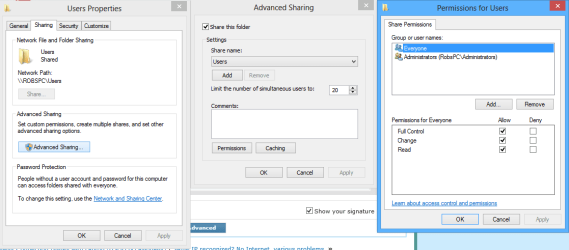
I can't really see the changes you made and it's pretty hard to guess at it from here but you should make sure that the C:>Users folder is shared out correctly or else the subfolders such as the Public folders won't allow access.

You might want to also check in the Advanced Sharing settings to make sure that the Public folders have network discovery and file and printer sharing turned on "second picture".
 

Attachments

  • sharing tab full permissions.PNG
    sharing tab full permissions.PNG
    20.8 KB · Views: 2
  • Network discovery turned on for Public folders.PNG
    Network discovery turned on for Public folders.PNG
    13.8 KB · Views: 1

My Computer My Computer

At a glance

Windows 7 Ult, Windows 8.1 Pro,Q9650-4.275GHz, E8600 4.5GHz, E6750-3.8GHzG.Skill PC2 9600 1200Mhz 5 5 5 15 2TGTX480
Computer type
PC/Desktop
Computer Manufacturer/Model Number
Home built
OS
Windows 7 Ult, Windows 8.1 Pro,
CPU
Q9650-4.275GHz, E8600 4.5GHz, E6750-3.8GHz
Motherboard
Evga 780i FTW
Memory
G.Skill PC2 9600 1200Mhz 5 5 5 15 2T
Graphics Card(s)
GTX480
Sound Card
Asus Xonar D2
Monitor(s) Displays
HannsG
Screen Resolution
1680X1050
Hard Drives
GSkill Phoenix Pro 120GB SSD
PSU
ThermalTake Toughpower 1000Watt modular
Case
ThermalTake XaserV
Cooling
Xigmatek S1283
Keyboard
Logitech G15
Mouse
Logitech G9
Internet Speed
T1
Back
Top