Solved Wired connection, internet stuck at "Identifying", 169.XX IP problem

Please change the TCPIPv4 settings back to using DHCP set to automatically obtain an IP address and DNS server address.

Please check these services are started and set to automatic unless otherwise stated go to start>control panel>administrative Tasks>Services

• COM+ Event System (for WZC issues)
• Computer Browser is set to manual
• DHCP Client
• DNS Client
• Network Connections
• Network Location Awareness
• Remote Procedure Call (RPC)
• Server
• TCP/IP Netbios helper
• Wired Autoconfig is set to manual(wired ethernet connections only)
• Wireless Zero Configuration ( XP wireless configurations only)
• WLAN AutoConfig ( Vista/7 wireless configurations only)
• Workstation

Also what anti-virus and firewall(Internet security) package are you using on the computer?
 

My Computer My Computer

At a glance

Windows 7 Ultimate x64AMD turion 64x2 TL-64 2.2GhzSodimm DDR2 4GBATI Radeon 1250 128MB IGP
Computer Manufacturer/Model Number
HP Compaq 6715B
OS
Windows 7 Ultimate x64
CPU
AMD turion 64x2 TL-64 2.2Ghz
Motherboard
HC030
Memory
Sodimm DDR2 4GB
Graphics Card(s)
ATI Radeon 1250 128MB IGP
Hard Drives
Fujitsu Siemens 500GB sata 3.0 Gb/s
Alright. Update.

I reinstalled windows and still no dice. My ISP has a bot responding to all emails so that's no go. If I call them, they say it's a personal issue and not on their end so they can't help with it.

I am beyond frustrated.
 

My Computer My Computer

At a glance

win xp pro
OS
win xp pro
So - what operating system is on this laptop now? You had mentioned that you might put W8 on it.

Also, can you test the laptop on another location (another network, another router) - using a hard wire and DHCP for both the IP and the DNS addresses. Maybe a neighbor has the same router/ISP.

Instead of showing up at a neighbor's door holding a measuring cup and wanting to borrow a cup of sugar - you show up with a laptop and network cable wanting to borrow a router LAN jack :-)


I would be interested to see if you get two DNS addresses that are both the router. I don't think that I've ever seen that before - but I cannot say that I've specifically looked for it. If you don't have a neighbor that you can test this with, maybe your work place, local library or a hotel lobby would do.

Do the computers that work okay on your network get this double DNS entry (router listed twice)?
 

My Computer My Computer

At a glance

W7 Pro SP1 64biti78GBIntel HD Graphics
Computer type
Laptop
Computer Manufacturer/Model Number
Employer provided Dell Latitude
OS
W7 Pro SP1 64bit
CPU
i7
Memory
8GB
Graphics Card(s)
Intel HD Graphics
Hard Drives
crappy SSD
Antivirus
Employer mandated Symantec Endpoint Protection
Browser
Pale Moon 64bit, IE11 64bit & Chrome 64bit
Hi there. I re-installed windows 7 using the "restore to factory settings" since I couldn't acquire a copy of W8 legally.

Also, I'll be going over to my friend's house tomorrow who lives a block or so away since all of my neighbours are arabs and I don't speak arabic. Will update then.

Do the computers that work okay on your network get this double DNS entry (router listed twice)?
If you are asking whether the working connections have both DNS servers showing as 192.168.1.1 in cmd.exe when I type ipconfig/all, then yes.


They all have it set to 192.168.1.1, which I read (as I mentioned earlier) online that it has something to do with proxies and i'll have to contant my ISP (which didnt happen)
 

My Computer My Computer

At a glance

win xp pro
OS
win xp pro

My Computer My Computer

At a glance

W7 Pro SP1 64biti78GBIntel HD Graphics
Computer type
Laptop
Computer Manufacturer/Model Number
Employer provided Dell Latitude
OS
W7 Pro SP1 64bit
CPU
i7
Memory
8GB
Graphics Card(s)
Intel HD Graphics
Hard Drives
crappy SSD
Antivirus
Employer mandated Symantec Endpoint Protection
Browser
Pale Moon 64bit, IE11 64bit & Chrome 64bit
What anti-virus and firewall(Internet security) package are you using on the computer?
 

My Computer My Computer

At a glance

Windows 7 Ultimate x64AMD turion 64x2 TL-64 2.2GhzSodimm DDR2 4GBATI Radeon 1250 128MB IGP
Computer Manufacturer/Model Number
HP Compaq 6715B
OS
Windows 7 Ultimate x64
CPU
AMD turion 64x2 TL-64 2.2Ghz
Motherboard
HC030
Memory
Sodimm DDR2 4GB
Graphics Card(s)
ATI Radeon 1250 128MB IGP
Hard Drives
Fujitsu Siemens 500GB sata 3.0 Gb/s
Sorry for not responding, I have exams in a week or so and I haven't been able to go to my friend's place to test my connection there.

And I just tested the other computers, all have DNS servers as 192.168.1.1. If this is some weird router configuration then I will never be able to fix it. My ISP customer service is shit and after spending 1 hour talking with them, I'm pretty sure I can plug my ethernet cable into the dump I took yesterday still get a better internet connection.

As for my Anti-Virus, I had Avast before I re-installed windows, switched to Microsoft security essentials and I reinstalled MS-SE after reinstalling windows.
 

My Computer My Computer

At a glance

win xp pro
OS
win xp pro
.........I just tested the other computers, all have DNS servers as 192.168.1.1. ....
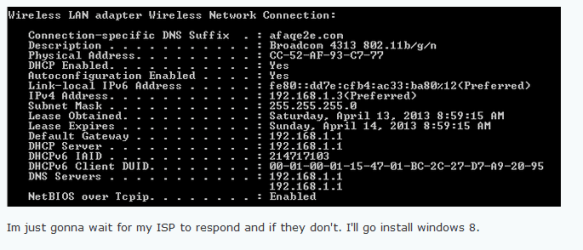
Okay, you used the plural for servers...
...but I'm still not sure if the computers that can get online have this weird double entry that you show in your first post:

DNS-times-two.PNG

Do you see where 192.168.1.1 is listed twice in the DNS area at the bottom of you ipconfig info?

That is weird.

Is the ipconfig DNS info for the computers that can get online just as weird?
 

My Computer My Computer

At a glance

W7 Pro SP1 64biti78GBIntel HD Graphics
Computer type
Laptop
Computer Manufacturer/Model Number
Employer provided Dell Latitude
OS
W7 Pro SP1 64bit
CPU
i7
Memory
8GB
Graphics Card(s)
Intel HD Graphics
Hard Drives
crappy SSD
Antivirus
Employer mandated Symantec Endpoint Protection
Browser
Pale Moon 64bit, IE11 64bit & Chrome 64bit
BTW, it is fine to have 192.168.1.1 as the DNS value and I doubt that having it twice is a problem... I'm just looking for differences between computers that can get online and the one that cannot (at least not via hard wired connection).
 

My Computer My Computer

At a glance

W7 Pro SP1 64biti78GBIntel HD Graphics
Computer type
Laptop
Computer Manufacturer/Model Number
Employer provided Dell Latitude
OS
W7 Pro SP1 64bit
CPU
i7
Memory
8GB
Graphics Card(s)
Intel HD Graphics
Hard Drives
crappy SSD
Antivirus
Employer mandated Symantec Endpoint Protection
Browser
Pale Moon 64bit, IE11 64bit & Chrome 64bit
Lel, so I'll try to put it in a better way.
When I use ipconfig/all on every computer in my house, it shows BOTH DNS servers as 192.168.1.1 for every computer.

I'll try and ask some friend's to check their connections to make sure this same DNS server issue isn't just on my router or something.
 

My Computer My Computer

At a glance

win xp pro
OS
win xp pro
Thx - it was probably just me having a bad day with English.

So having it twice does not seem to be an issue.

There is usually a place with the router's interface that lets you assigned DNS IP addresses. Those DNS IP addresses should be automatically assigned to each computer that gets its IPs from the router via DHCP. You might try setting those fields to OpenDNS's or Google's DNS servers.

I don't recall and I don't have time right now to scan the thread again:
What happens if you set a static IP address on one of the computers that can get online?
That should let us know if the router just does not like computers with static IP addresses.

:::back later:::
 

My Computer My Computer

At a glance

W7 Pro SP1 64biti78GBIntel HD Graphics
Computer type
Laptop
Computer Manufacturer/Model Number
Employer provided Dell Latitude
OS
W7 Pro SP1 64bit
CPU
i7
Memory
8GB
Graphics Card(s)
Intel HD Graphics
Hard Drives
crappy SSD
Antivirus
Employer mandated Symantec Endpoint Protection
Browser
Pale Moon 64bit, IE11 64bit & Chrome 64bit
......I'll try and ask some friend's to check their connections to make sure this same DNS server issue isn't just on my router or something.
Or take the laptop and a lan cable to another home as a test.

.............
I don't recall and I don't have time right now to scan the thread again:
What happens if you set a static IP address on one of the computers that can get online?
That should let us know if the router just does not like computers with static IP addresses.

:::back later:::
Never mind. I see where you already did something like that.
Can you please post a current screenshot of the screen shown in this post?
 

My Computer My Computer

At a glance

W7 Pro SP1 64biti78GBIntel HD Graphics
Computer type
Laptop
Computer Manufacturer/Model Number
Employer provided Dell Latitude
OS
W7 Pro SP1 64bit
CPU
i7
Memory
8GB
Graphics Card(s)
Intel HD Graphics
Hard Drives
crappy SSD
Antivirus
Employer mandated Symantec Endpoint Protection
Browser
Pale Moon 64bit, IE11 64bit & Chrome 64bit
Please give the firewall used also as i requested.

Just to clarify on DNS it is always best to use your ISP's DNS servers in your router or free DNS servers in your country locale if ISP dns servers are unknown or know n to have issues.

Your gateway IP address as the DNS server cannot resolve hostnames and tries and connects to a DNS server in the hope of a response.
 

My Computer My Computer

At a glance

Windows 7 Ultimate x64AMD turion 64x2 TL-64 2.2GhzSodimm DDR2 4GBATI Radeon 1250 128MB IGP
Computer Manufacturer/Model Number
HP Compaq 6715B
OS
Windows 7 Ultimate x64
CPU
AMD turion 64x2 TL-64 2.2Ghz
Motherboard
HC030
Memory
Sodimm DDR2 4GB
Graphics Card(s)
ATI Radeon 1250 128MB IGP
Hard Drives
Fujitsu Siemens 500GB sata 3.0 Gb/s
take the laptop and a lan cable to another home as a test.

Will do as soon as I have time, exams.
Never mind. I see where you already did something like that.
Can you please post a current screenshot of the screen shown in this post?

f0ec21ba70.png


Please give the firewall used also as i requested.

Just to clarify on DNS it is always best to use your ISP's DNS servers in your router or free DNS servers in your country locale if ISP dns servers are unknown or know n to have issues.

Your gateway IP address as the DNS server cannot resolve hostnames and tries and connects to a DNS server in the hope of a response.

Windows firewall is being used.
Also, if you read the whole thread putting ANY DNS IP doesn't work. My isp isnt providing any DNS server to me either.

Also, could you clarify the last sentence?
 

My Computer My Computer

At a glance

win xp pro
OS
win xp pro
Let me try and explain Your gateway IP address as the DNS server cannot resolve hostnames and tries and connects to a DNS server in the hope of a response since I was going to need to mention how this part should work:

There are computers that keep lists of IP addresses. We call these computers DNS servers. When one of the computers on your network asks for sevenforums.com, the DNS server returns with 184.172.52.100 and your computer connects to 184.172.52.100.

Your router does not keep this rather massive table of IP addresses. When one of your computers requests sevenforums.com, that computer sends a DNS query to your router. Your router then sends that request to whatever DNS server your ISP told it to use. That DNS server tells the router that sevenforums.com = 184.172.52.100. The router tells your computer that sevenforums.com = 184.172.52.100, The router is nothing more than a relay.

When your computer asks for an automatic configuration from your router, the computer is assigned an IP address and DNS servers. In this case, your router is assigning 192.168.1.1 two times as the DNS servers to use.

For the sake of simplicity, we will say that your router connects to your ISP. The router asks for an automatic configuration from the ISP. The router is assigned an IP address and DNS servers. Somewhere in the router's interface you might find a status page that tells you what IP address and what DNS servers the router was assigned.

So, having bored you with all of that, here are some things to try:
In the screenshot, there is an empty field named Primary DNS server address. Put 8.8.8.8 in that field and 8.8.4.4 in the secondary field. Doing this may cause your router to restart (it does on my router). Then restart a computer that can get online. Let that computer gets its IP address and DNS info via DHCP. The router should now assign 8.8.8.8 and 8.8.4.4 as the DNS servers that each computer on your network should use. Check to see if those DNS IP addresses now appear in the ipconfig info for the computer that you just restarted. Also check to see if that computer can surf the net.

If it does have 8.8.8.8 and 8.8.4.4 as its DNS servers AND if it can surf the net, then it seems like it is the router that is preventing traffic from DNS servers that it did not assign to computers on your network.

If it does have 8.8.8.8 and 8.8.4.4 as its DNS servers BUT it cannot surf the net, then it seems like it is your ISP that is restricting which DNS servers may be used*.

All of the above does very little to help us to know why a wired network adapter fails to get an IP via DHCP and yet a wireless network adapter on the same computer works via DHCP. The hope is that if the router is doling out 8.8.8.8 and 8.8.4.4 as DNS servers via DHCP, then maybe the router will not reject 8.8.8.8 and 8.8.4.4** if they are manually assigned to the failing wired network adapter. Confused yet :-)


*Now, if the ISP seems to be blocking certain DNS servers, then look around in the router's interface for the DNS server addresses that the ISP assigned to the router... or contact your ISP and ask for the DNS server addresses. Put those addresses into the field named Primary DNS server address and Secondary DNS server address. Then restart a computer and see if you can surf.

**Those DNS servers are really slow for me. I use OpenDNS for my DNS servers. If you get bored some day, you can read this: How do I test DNS lookup latency with ns_bench? SBC DSL FAQ | DSLReports.com, ISP Information
 

My Computer My Computer

At a glance

W7 Pro SP1 64biti78GBIntel HD Graphics
Computer type
Laptop
Computer Manufacturer/Model Number
Employer provided Dell Latitude
OS
W7 Pro SP1 64bit
CPU
i7
Memory
8GB
Graphics Card(s)
Intel HD Graphics
Hard Drives
crappy SSD
Antivirus
Employer mandated Symantec Endpoint Protection
Browser
Pale Moon 64bit, IE11 64bit & Chrome 64bit
Well, at long last I was finally able to fix this problem. Turns out my router had some weird ass configuration and was assigning my port to a internet service I hadn't subscribed to. So my laptop was requesting service, but since I hadn't subscribed to it, I was getting nothing. Whats even more weird is that it was only happening to my laptop even tho several other PCs were connected using that port. Soft and hard resets were useless for some reason.

I contacted my ISP and explained the problem to them and they removed the service from my router. Everything is working fine now, no need for static IP addresses. Static IP addresses wouldn't have worked anyways because Saudi Arabia blocks a lot of websites and the ISP didn't want to give me their DNS servers or allow me to change which DNS I could use. This was their reasoning for not giving me the DNS servers. Thank you all VERY much for the detailed and quick responses.

TL;DR for those who want a quick solution: Too bad, read the whole thread, you might actually learn something.
 

My Computer My Computer

At a glance

win xp pro
OS
win xp pro
Glad you got it working and thanks for posting back with the resolution.
 

My Computer My Computer

At a glance

W7 Pro SP1 64biti78GBIntel HD Graphics
Computer type
Laptop
Computer Manufacturer/Model Number
Employer provided Dell Latitude
OS
W7 Pro SP1 64bit
CPU
i7
Memory
8GB
Graphics Card(s)
Intel HD Graphics
Hard Drives
crappy SSD
Antivirus
Employer mandated Symantec Endpoint Protection
Browser
Pale Moon 64bit, IE11 64bit & Chrome 64bit
Back
Top