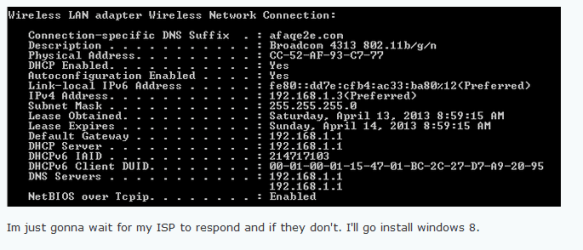
Please change the TCPIPv4 settings back to using DHCP set to automatically obtain an IP address and DNS server address.
Please check these services are started and set to automatic unless otherwise stated go to start>control panel>administrative Tasks>Services
• COM+ Event System (for WZC issues)
• Computer Browser is set to manual
• DHCP Client
• DNS Client
• Network Connections
• Network Location Awareness
• Remote Procedure Call (RPC)
• Server
• TCP/IP Netbios helper
• Wired Autoconfig is set to manual(wired ethernet connections only)
• Wireless Zero Configuration ( XP wireless configurations only)
• WLAN AutoConfig ( Vista/7 wireless configurations only)
• Workstation
Also what anti-virus and firewall(Internet security) package are you using on the computer?
Please check these services are started and set to automatic unless otherwise stated go to start>control panel>administrative Tasks>Services
• COM+ Event System (for WZC issues)
• Computer Browser is set to manual
• DHCP Client
• DNS Client
• Network Connections
• Network Location Awareness
• Remote Procedure Call (RPC)
• Server
• TCP/IP Netbios helper
• Wired Autoconfig is set to manual(wired ethernet connections only)
• Wireless Zero Configuration ( XP wireless configurations only)
• WLAN AutoConfig ( Vista/7 wireless configurations only)
• Workstation
Also what anti-virus and firewall(Internet security) package are you using on the computer?
My Computer
At a glance
Windows 7 Ultimate x64AMD turion 64x2 TL-64 2.2GhzSodimm DDR2 4GBATI Radeon 1250 128MB IGP
- Computer Manufacturer/Model Number
- HP Compaq 6715B
- OS
- Windows 7 Ultimate x64
- CPU
- AMD turion 64x2 TL-64 2.2Ghz
- Motherboard
- HC030
- Memory
- Sodimm DDR2 4GB
- Graphics Card(s)
- ATI Radeon 1250 128MB IGP
- Hard Drives
- Fujitsu Siemens 500GB sata 3.0 Gb/s