Solved How do I set my ram to use permanently?

stuckstuck

New member
Member
VIP
Local time
10:54 AM
Messages
168
Hey guys just wondering if you help me out to figure out what need to do in order to have all my 8gb ram to full use without having any percentage of it go into the reserved space of no return. Thanks
 

My Computer My Computer

At a glance

Microsoft Windows 7 Professional 64-bit5960X @ 4.4GHz16.0 GBNVIDIA GeForce GTX 980 Ti
Computer type
PC/Desktop
Computer Manufacturer/Model Number
Custom
OS
Microsoft Windows 7 Professional 64-bit
CPU
5960X @ 4.4GHz
Motherboard
X99 SABERTOOTH
Memory
16.0 GB
Graphics Card(s)
NVIDIA GeForce GTX 980 Ti
Hard Drives
(1) OCZ-VERT EX460 SCSI Disk Device
(2) WDC WD1002FAEX-00Z3A SCSI Disk Device
(3) WDC WD1003FZEX-00MK2 SCSI Disk Device
Internet Speed
God Speed.
Antivirus
Glock 9
Hi,

Your computer will only use as much RAM as it needs- you cannot force it to use all the RAM if it doesn't require it.

Regards,
Golden
 

My Computer My Computer

At a glance

Windows 10 Pro x64 ; Xubuntu x64Intel i7 860 @ 2.80 GHz O/C'ed to 4.0GHz16GB Corsair Vengance DDR3 @ 661 MHz Dual Cha...EVGA NVidia GTX 560 1024MB
Computer type
PC/Desktop
Computer Manufacturer/Model Number
Golden Mk. I.4
OS
Windows 10 Pro x64 ; Xubuntu x64
CPU
Intel i7 860 @ 2.80 GHz O/C'ed to 4.0GHz
Motherboard
Gigabyte P55A-UD3R Rev.1. Award BIOS F13
Memory
16GB Corsair Vengance DDR3 @ 661 MHz Dual Channel (9-9-9-24)
Graphics Card(s)
EVGA NVidia GTX 560 1024MB
Sound Card
Realtek Integrated
Monitor(s) Displays
Dual Samsung SyncMaster 2494HS
Screen Resolution
1920*1080 and 1920*1080
Hard Drives
1*Samsung 840 EVO 120GB SSD;
1*OCZ Vertex 2 60GB SSD;
2*Samsung F3 SpinPoint 1TB in RAID0;
1*Samsung F1 SpinPoint 1TB;
2*Western Digital 1TB External USB 3.0
1*Western Digital 500GB External USB 3.0
1*Seagate 500GB External USB 2.0
PSU
Thermaltake ToughPower QFan 750W
Case
Thermaltake Element S VK60001W2Z
Cooling
Corsair H60 Water Cooling, 2*230mm and 2*80mm case fans
Keyboard
Logitech G110
Mouse
Logitech MX518
Yes I see where you're coming from and I didn't mean it like that, what I meant was that I would like to have all my ram installed to be available, not in use. My bad for not being clear enough with my issue.
 

My Computer My Computer

At a glance

Microsoft Windows 7 Professional 64-bit5960X @ 4.4GHz16.0 GBNVIDIA GeForce GTX 980 Ti
Computer type
PC/Desktop
Computer Manufacturer/Model Number
Custom
OS
Microsoft Windows 7 Professional 64-bit
CPU
5960X @ 4.4GHz
Motherboard
X99 SABERTOOTH
Memory
16.0 GB
Graphics Card(s)
NVIDIA GeForce GTX 980 Ti
Hard Drives
(1) OCZ-VERT EX460 SCSI Disk Device
(2) WDC WD1002FAEX-00Z3A SCSI Disk Device
(3) WDC WD1003FZEX-00MK2 SCSI Disk Device
Internet Speed
God Speed.
Antivirus
Glock 9
stuckstuck, have a look at this tutorial

Memory
 

My Computer My Computer

At a glance

Windows 10 Pro X64Intel(R) Core(TM) i5-3570K CPU OC@ 4.5GHZ Turbo8.00 GB DDR3 1600MhzMSI Gaming X GTX 1070
Computer type
PC/Desktop
Computer Manufacturer/Model Number
Dude Build
OS
Windows 10 Pro X64
CPU
Intel(R) Core(TM) i5-3570K CPU OC@ 4.5GHZ Turbo
Motherboard
MSI Z77A-G45 Gaming
Memory
8.00 GB DDR3 1600Mhz
Graphics Card(s)
MSI Gaming X GTX 1070
Sound Card
Realtek High Definition
Monitor(s) Displays
Dell S23O9W, HP L1710
Screen Resolution
DELL-1920 x 1080 HP-1280 x1024
Hard Drives
Crucial m4 256 SSD, WD 7200RPM 500GB WD 1TB
PSU
Seasonic X650 GOLD
Case
Zalman Z12
Cooling
Antec Kuhler 920
Keyboard
Logitech
Mouse
MSI DS100 Interceptor
Internet Speed
50 down and 5 up
Antivirus
MSE
Browser
Chrome, IE 11
Other Info
Logitech X-620 Speakers
Unless you have used the boot options there is no such thing as reserved RAM. In resource monitor you may have noticed a bar labeled as "Standby". This memory is not in any way reserved but is available for the use of any process. This is fully managed by the operating system for best performance. Any manual intervention is almost certain to impair performance.

Is that what you mean by "reserved space of no return"?
If not please specify.
 

My Computer My Computer

At a glance

Windows 7 Pro 64 bitXeon W35208 GBNvidia Geforce 210
Computer type
PC/Desktop
Computer Manufacturer/Model Number
HP
OS
Windows 7 Pro 64 bit
CPU
Xeon W3520
Memory
8 GB
Graphics Card(s)
Nvidia Geforce 210
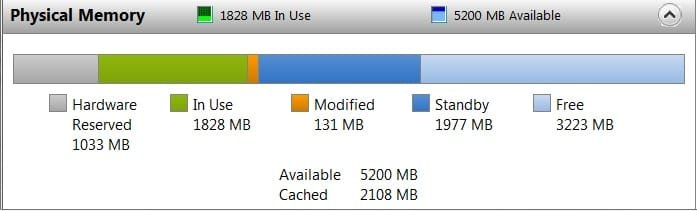
'Hardware Reserved', 1gb of it is gone towards that section, never has this ever happened till now.
 

My Computer My Computer

At a glance

Microsoft Windows 7 Professional 64-bit5960X @ 4.4GHz16.0 GBNVIDIA GeForce GTX 980 Ti
Computer type
PC/Desktop
Computer Manufacturer/Model Number
Custom
OS
Microsoft Windows 7 Professional 64-bit
CPU
5960X @ 4.4GHz
Motherboard
X99 SABERTOOTH
Memory
16.0 GB
Graphics Card(s)
NVIDIA GeForce GTX 980 Ti
Hard Drives
(1) OCZ-VERT EX460 SCSI Disk Device
(2) WDC WD1002FAEX-00Z3A SCSI Disk Device
(3) WDC WD1003FZEX-00MK2 SCSI Disk Device
Internet Speed
God Speed.
Antivirus
Glock 9
try this
msconfig/ boot tab/ advanced options/ uncheck the maximum memory if it is limited.

then check resource monitor memory tab to check
 

My Computer My Computer

At a glance

Windows 10 Pro X64Intel(R) Core(TM) i5-3570K CPU OC@ 4.5GHZ Turbo8.00 GB DDR3 1600MhzMSI Gaming X GTX 1070
Computer type
PC/Desktop
Computer Manufacturer/Model Number
Dude Build
OS
Windows 10 Pro X64
CPU
Intel(R) Core(TM) i5-3570K CPU OC@ 4.5GHZ Turbo
Motherboard
MSI Z77A-G45 Gaming
Memory
8.00 GB DDR3 1600Mhz
Graphics Card(s)
MSI Gaming X GTX 1070
Sound Card
Realtek High Definition
Monitor(s) Displays
Dell S23O9W, HP L1710
Screen Resolution
DELL-1920 x 1080 HP-1280 x1024
Hard Drives
Crucial m4 256 SSD, WD 7200RPM 500GB WD 1TB
PSU
Seasonic X650 GOLD
Case
Zalman Z12
Cooling
Antec Kuhler 920
Keyboard
Logitech
Mouse
MSI DS100 Interceptor
Internet Speed
50 down and 5 up
Antivirus
MSE
Browser
Chrome, IE 11
Other Info
Logitech X-620 Speakers
Make and model of the computer or motherboard would help. It is possible that the board only supports up to 8 GB, which if that is the case then this is what you are running into,

The system memory that is reported in the System Information dialog box in Windows Vista is less than you expect if 4 GB of RAM is installed

When the physical RAM that is installed on a computer equals the address space that is supported by the chipset, the total system memory that is available to the operating system is always less than the physical RAM that is installed. For example, consider a computer that has an Intel 975X chipset that supports 8 GB of address space. If you install 8 GB of RAM, the system memory that is available to the operating system will be reduced by the PCI configuration requirements. In this scenario, PCI configuration requirements reduce the memory that is available to the operating system by an amount that is between approximately 200 MB and approximately 1 GB. The reduction depends on the configuration.

Despite almost all new(er) motherboards support more than 8 GB, it is possible that the manufacturer put a bios limit on it which will override what the memory controller/chipset supports (lower only, not higher).
 

My Computer My Computer

At a glance

Win 7 Ultimate x64FX-8350 @ 4.6 GHz so farADATA XPG V1 Series Black 8GB DDR3 1600Sapphire R9 270x Dual-X
Computer type
PC/Desktop
Computer Manufacturer/Model Number
Me
OS
Win 7 Ultimate x64
CPU
FX-8350 @ 4.6 GHz so far
Motherboard
Asus M5A97 EVO
Memory
ADATA XPG V1 Series Black 8GB DDR3 1600
Graphics Card(s)
Sapphire R9 270x Dual-X
Sound Card
Xonar DGX w/ Corsair Vengence 1300
Monitor(s) Displays
Acer S232HL Abid
Screen Resolution
1920x1080
Hard Drives
120 GB OCZ Vertex 3
500 GB Seagate 7200.12
PSU
Antec Earthwatts 650W Green
Case
Antec Three Hundred
Cooling
Cooler Master 212 EVO
Keyboard
Logitech G510
Mouse
Logitech G500s
Internet Speed
35000/3000
Yeah the memory maximum usage is ticked off but no luck.
 

My Computer My Computer

At a glance

Microsoft Windows 7 Professional 64-bit5960X @ 4.4GHz16.0 GBNVIDIA GeForce GTX 980 Ti
Computer type
PC/Desktop
Computer Manufacturer/Model Number
Custom
OS
Microsoft Windows 7 Professional 64-bit
CPU
5960X @ 4.4GHz
Motherboard
X99 SABERTOOTH
Memory
16.0 GB
Graphics Card(s)
NVIDIA GeForce GTX 980 Ti
Hard Drives
(1) OCZ-VERT EX460 SCSI Disk Device
(2) WDC WD1002FAEX-00Z3A SCSI Disk Device
(3) WDC WD1003FZEX-00MK2 SCSI Disk Device
Internet Speed
God Speed.
Antivirus
Glock 9
updating your specs will help. Do you have onboard video, if so it uses shared memory.. Stormy13's post explains things too.
 

My Computer My Computer

At a glance

Windows 10 Pro X64Intel(R) Core(TM) i5-3570K CPU OC@ 4.5GHZ Turbo8.00 GB DDR3 1600MhzMSI Gaming X GTX 1070
Computer type
PC/Desktop
Computer Manufacturer/Model Number
Dude Build
OS
Windows 10 Pro X64
CPU
Intel(R) Core(TM) i5-3570K CPU OC@ 4.5GHZ Turbo
Motherboard
MSI Z77A-G45 Gaming
Memory
8.00 GB DDR3 1600Mhz
Graphics Card(s)
MSI Gaming X GTX 1070
Sound Card
Realtek High Definition
Monitor(s) Displays
Dell S23O9W, HP L1710
Screen Resolution
DELL-1920 x 1080 HP-1280 x1024
Hard Drives
Crucial m4 256 SSD, WD 7200RPM 500GB WD 1TB
PSU
Seasonic X650 GOLD
Case
Zalman Z12
Cooling
Antec Kuhler 920
Keyboard
Logitech
Mouse
MSI DS100 Interceptor
Internet Speed
50 down and 5 up
Antivirus
MSE
Browser
Chrome, IE 11
Other Info
Logitech X-620 Speakers
Despite almost all new(er) motherboards support more than 8 GB, it is possible that the manufacturer put a bios limit on it which will override what the memory controller/chipset supports (lower only, not higher).

I don't think it's anything to do with the BIOS, even though I've already checked for the sake of finding an answer to my issue and my computer is custom built. Like I said this problem only came up recently, before I didn't have a problem.
But to answer your question my motherboard is capable of handling up to 32gb.
 

My Computer My Computer

At a glance

Microsoft Windows 7 Professional 64-bit5960X @ 4.4GHz16.0 GBNVIDIA GeForce GTX 980 Ti
Computer type
PC/Desktop
Computer Manufacturer/Model Number
Custom
OS
Microsoft Windows 7 Professional 64-bit
CPU
5960X @ 4.4GHz
Motherboard
X99 SABERTOOTH
Memory
16.0 GB
Graphics Card(s)
NVIDIA GeForce GTX 980 Ti
Hard Drives
(1) OCZ-VERT EX460 SCSI Disk Device
(2) WDC WD1002FAEX-00Z3A SCSI Disk Device
(3) WDC WD1003FZEX-00MK2 SCSI Disk Device
Internet Speed
God Speed.
Antivirus
Glock 9

My Computer My Computer

At a glance

Windows 10 Pro X64Intel(R) Core(TM) i5-3570K CPU OC@ 4.5GHZ Turbo8.00 GB DDR3 1600MhzMSI Gaming X GTX 1070
Computer type
PC/Desktop
Computer Manufacturer/Model Number
Dude Build
OS
Windows 10 Pro X64
CPU
Intel(R) Core(TM) i5-3570K CPU OC@ 4.5GHZ Turbo
Motherboard
MSI Z77A-G45 Gaming
Memory
8.00 GB DDR3 1600Mhz
Graphics Card(s)
MSI Gaming X GTX 1070
Sound Card
Realtek High Definition
Monitor(s) Displays
Dell S23O9W, HP L1710
Screen Resolution
DELL-1920 x 1080 HP-1280 x1024
Hard Drives
Crucial m4 256 SSD, WD 7200RPM 500GB WD 1TB
PSU
Seasonic X650 GOLD
Case
Zalman Z12
Cooling
Antec Kuhler 920
Keyboard
Logitech
Mouse
MSI DS100 Interceptor
Internet Speed
50 down and 5 up
Antivirus
MSE
Browser
Chrome, IE 11
Other Info
Logitech X-620 Speakers

My Computer My Computer

At a glance

Microsoft Windows 7 Professional 64-bit5960X @ 4.4GHz16.0 GBNVIDIA GeForce GTX 980 Ti
Computer type
PC/Desktop
Computer Manufacturer/Model Number
Custom
OS
Microsoft Windows 7 Professional 64-bit
CPU
5960X @ 4.4GHz
Motherboard
X99 SABERTOOTH
Memory
16.0 GB
Graphics Card(s)
NVIDIA GeForce GTX 980 Ti
Hard Drives
(1) OCZ-VERT EX460 SCSI Disk Device
(2) WDC WD1002FAEX-00Z3A SCSI Disk Device
(3) WDC WD1003FZEX-00MK2 SCSI Disk Device
Internet Speed
God Speed.
Antivirus
Glock 9
can you post a screenshot of your resource monitor memory tab
 

My Computer My Computer

At a glance

Windows 10 Pro X64Intel(R) Core(TM) i5-3570K CPU OC@ 4.5GHZ Turbo8.00 GB DDR3 1600MhzMSI Gaming X GTX 1070
Computer type
PC/Desktop
Computer Manufacturer/Model Number
Dude Build
OS
Windows 10 Pro X64
CPU
Intel(R) Core(TM) i5-3570K CPU OC@ 4.5GHZ Turbo
Motherboard
MSI Z77A-G45 Gaming
Memory
8.00 GB DDR3 1600Mhz
Graphics Card(s)
MSI Gaming X GTX 1070
Sound Card
Realtek High Definition
Monitor(s) Displays
Dell S23O9W, HP L1710
Screen Resolution
DELL-1920 x 1080 HP-1280 x1024
Hard Drives
Crucial m4 256 SSD, WD 7200RPM 500GB WD 1TB
PSU
Seasonic X650 GOLD
Case
Zalman Z12
Cooling
Antec Kuhler 920
Keyboard
Logitech
Mouse
MSI DS100 Interceptor
Internet Speed
50 down and 5 up
Antivirus
MSE
Browser
Chrome, IE 11
Other Info
Logitech X-620 Speakers
can you post a screenshot of your resource monitor memory tab
Ohh and how can I get my ram to be available rather than cached? That's annoying.
 

Attachments

  • bs 3.jpg
    bs 3.jpg
    17.4 KB · Views: 6

My Computer My Computer

At a glance

Microsoft Windows 7 Professional 64-bit5960X @ 4.4GHz16.0 GBNVIDIA GeForce GTX 980 Ti
Computer type
PC/Desktop
Computer Manufacturer/Model Number
Custom
OS
Microsoft Windows 7 Professional 64-bit
CPU
5960X @ 4.4GHz
Motherboard
X99 SABERTOOTH
Memory
16.0 GB
Graphics Card(s)
NVIDIA GeForce GTX 980 Ti
Hard Drives
(1) OCZ-VERT EX460 SCSI Disk Device
(2) WDC WD1002FAEX-00Z3A SCSI Disk Device
(3) WDC WD1003FZEX-00MK2 SCSI Disk Device
Internet Speed
God Speed.
Antivirus
Glock 9
The Cached memory is for performance, programs and processes which are used often, can cached so the performance of that program is increased.

In my opinion, your memory allocation seems to be completely normal.
 

My Computer My Computer

Computer type
Laptop
Please leave it as it is, your memory usage is completely normal. Cached = Modified + Standby. You need cache, without it your computer would be useless.

You have absolutely no issue, no reason to be annoyed. You should mark this thread solved and forget the whole thing.

Kari
 

My Computer My Computer

At a glance

Windows 10 Pro x64 EN-GB1.6 GHz Intel Core i7-720QM Processor6 GBATI Mobility Radeon HD 5850 Graphics
Computer type
Laptop
Computer Manufacturer/Model Number
HP ENVY 17-1150eg
OS
Windows 10 Pro x64 EN-GB
CPU
1.6 GHz Intel Core i7-720QM Processor
Memory
6 GB
Graphics Card(s)
ATI Mobility Radeon HD 5850 Graphics
Sound Card
Beats sound system with integrated subwoofer
Monitor(s) Displays
17" laptop display, 22" LED and 32" Full HD TV through HDMI
Screen Resolution
1600*900 (1), 1920*1080 (2&3)
Hard Drives
Internal: 2 x 500 GB SATA Hard Disk Drive 7200 rpm
External: 2TB for backups, 3TB USB3 network drive for media
Cooling
As Envy runs a bit warm, I have it on a Cooler Master pad
Keyboard
Logitech diNovo Media Desktop Laser (bluetooth)
Mouse
Logitech Performance Mouse MX
Internet Speed
50/10 Mbps VDSL
Antivirus
Windows Defender 4.3.9431.0
Browser
Maxthon 3.5.2., IE11
Please leave it as it is, your memory usage is completely normal. Cached = Modified + Standby. You need cache, without it your computer would be useless.

You have absolutely no issue, no reason to be annoyed. You should mark this thread solved and forget the whole thing.

Kari

:ditto:
 

My Computer My Computer

Computer type
Laptop
thanks Kari and xBluerobot, stuckstuck read this on superfetch

There are a lot of myths going around about SuperFetch, the most predominant probably having to do with how Task Manager reports memory statistics. If you open Task Manager (in Windows 7), it'll tell you Total, Cached, Available, and Free. The problems arise from the "Cached" figure, since this figure is generally substantially higher than the "Free" figure.

When people look at the Task Manager, and they see the figure for "Cached" compared to the number of "Free", people assume that only very little of their memory is available for the applications they are about to launch. What they forget is that the Cache filled by SuperFetch and the standard caching mechanism runs on a lower priority; in other words, memory requests by applications will always supersede SuperFetch.

In other words, whatever you see in the "Cached" figure is actually accessible to applications
 

My Computer My Computer

At a glance

Windows 10 Pro X64Intel(R) Core(TM) i5-3570K CPU OC@ 4.5GHZ Turbo8.00 GB DDR3 1600MhzMSI Gaming X GTX 1070
Computer type
PC/Desktop
Computer Manufacturer/Model Number
Dude Build
OS
Windows 10 Pro X64
CPU
Intel(R) Core(TM) i5-3570K CPU OC@ 4.5GHZ Turbo
Motherboard
MSI Z77A-G45 Gaming
Memory
8.00 GB DDR3 1600Mhz
Graphics Card(s)
MSI Gaming X GTX 1070
Sound Card
Realtek High Definition
Monitor(s) Displays
Dell S23O9W, HP L1710
Screen Resolution
DELL-1920 x 1080 HP-1280 x1024
Hard Drives
Crucial m4 256 SSD, WD 7200RPM 500GB WD 1TB
PSU
Seasonic X650 GOLD
Case
Zalman Z12
Cooling
Antec Kuhler 920
Keyboard
Logitech
Mouse
MSI DS100 Interceptor
Internet Speed
50 down and 5 up
Antivirus
MSE
Browser
Chrome, IE 11
Other Info
Logitech X-620 Speakers
I was trying to find that exact link ;)
 

My Computer My Computer

Computer type
Laptop
Back
Top