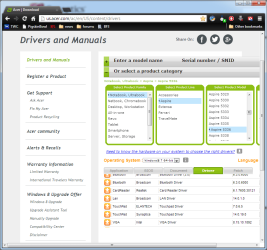
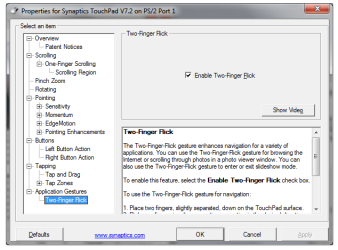
I did a clean install of win7 (yeah for me!) on my acer aspire 5336-2524. I also downloaded the device driver for Synaptics PS/2 Port Compatible TouchPad, unzipped it, and I think I installed it? I did an auto search for the best driver and result was the best driver was installed.
My problem is this, there used to a function within Personalize > Change Mouse Pointers > then touch pad. Here is where I could stop the function of the scroll bar along the right side of the touch pad and make scroll work with two fingers.
I don't know if that function was part of acer or Synaptics PS/2 Port Compatible TouchPad. But I want it back!
also there is nothing of the original factory install because when I made all the restore and back up it was crap, I found out after I needed it.
Mike W
My problem is this, there used to a function within Personalize > Change Mouse Pointers > then touch pad. Here is where I could stop the function of the scroll bar along the right side of the touch pad and make scroll work with two fingers.
I don't know if that function was part of acer or Synaptics PS/2 Port Compatible TouchPad. But I want it back!
also there is nothing of the original factory install because when I made all the restore and back up it was crap, I found out after I needed it.
Mike W
My Computer
At a glance
Microsoft Windows 7 Home Premium 32-bit 7601 ...Intel(R) Celeron(R) CPU 900 @ 2.20GHz3.00 GB(1) Mobile Intel(R) 4 Series Express Chipset ...
- Computer type
- Laptop
- Computer Manufacturer/Model Number
- acer, aspire, 5336-2524
- OS
- Microsoft Windows 7 Home Premium 32-bit 7601 Multiprocessor Free Service Pack 1
- CPU
- Intel(R) Celeron(R) CPU 900 @ 2.20GHz
- Motherboard
- Acer JE51_MV
- Memory
- 3.00 GB
- Graphics Card(s)
- (1) Mobile Intel(R) 4 Series Express Chipset Family (2) Mo
- Sound Card
- (1) High Definition Audio Device (2) High Definition Audio
- Screen Resolution
- 1366 x 768 x 32 bits (4294967296 colors) @ 59 Hz
- Hard Drives
- (1) WDC WD2500BEVT-22A23T0 ATA Device (2) Generic- Multi-Card USB Device