Solved Robocopy /MOV command copying but not deleting from source directory

ajishb03

New member
Member
Local time
6:14 PM
Messages
32
Hi All,

I have one folder A and have another folder B in the same drive E: I need to move all the content from folder A which are more than 2 years old to folder B. Hence when I ran the robocopy it just copied and I lost all disk space in drive E.

My question is even though I used /MOV command why it is not copied and deleted from the source?

robocopy E:/A E:/B /e /MOV /MINAGE:730

Please suggest..
 

My Computer My Computer

OS
windows 7 Home premium 64 bit
I created folders Test and Test2 on drive E:, copied some files over and under two years old and tested with command
Code:
robocopy E:\Test E:\Test2 /e /mov /minage:730
Works perfect. All files older than 730 are moved, copied to destination and deleted from source. I can only think of two possible causes for your issue:
  1. System considers files to be newer than 730 days old
  2. A syntax error in your command
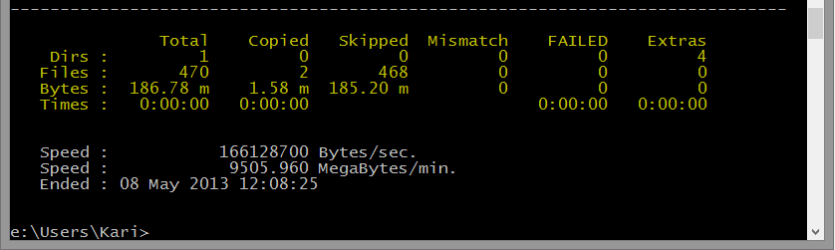
Please run the command, take screenshot of the last part of summary (under the dotted line, highlighted in screenshot below) and post it here.

Robocopy_1.png

Kari
 

My Computer My Computer

Computer type
Laptop
Computer Manufacturer/Model Number
HP ENVY 17-1150eg
OS
Windows 10 Pro x64 EN-GB
CPU
1.6 GHz Intel Core i7-720QM Processor
Memory
6 GB
Graphics Card(s)
ATI Mobility Radeon HD 5850 Graphics
Sound Card
Beats sound system with integrated subwoofer
Monitor(s) Displays
17" laptop display, 22" LED and 32" Full HD TV through HDMI
Screen Resolution
1600*900 (1), 1920*1080 (2&3)
Hard Drives
Internal: 2 x 500 GB SATA Hard Disk Drive 7200 rpm
External: 2TB for backups, 3TB USB3 network drive for media
Cooling
As Envy runs a bit warm, I have it on a Cooler Master pad
Keyboard
Logitech diNovo Media Desktop Laser (bluetooth)
Mouse
Logitech Performance Mouse MX
Internet Speed
50/10 Mbps VDSL
Antivirus
Windows Defender 4.3.9431.0
Browser
Maxthon 3.5.2., IE11
Hence when I ran the robocopy it just copied and I lost all disk space in drive E.
Maybe there was an error because the drive is full, so the command couldn't complete successfully ?
 

My Computer My Computer

Computer type
PC/Desktop
Computer Manufacturer/Model Number
home built
OS
Multi-Boot W7_Pro_x64 W8.1_Pro_x64 W10_Pro_x64 +Linux_VMs +Chromium_VM
CPU
AMD Athlon II x4 620
Motherboard
Gigabyte GA-MA785G-UD3H
Memory
6GB GSkill DDR2 800
Graphics Card(s)
AMD 4670 GPU + AMD 4200 IGP
Sound Card
on board Realtek ALC889A
Monitor(s) Displays
RCA 40" LCD TV, Insignia 32" LCD TV, HP 15" LCD monitor
Screen Resolution
1680 x 1050
Hard Drives
OCZ Vertex 3 120GB,
Samsung F3 1TB (3),
Several others - WD, Seagate, Hitachi, ...
PSU
Corsair 500 W
Case
Rosewill mid tower
Cooling
CM 90mm rifle
Keyboard
Gyration wireless, Logitech wireless, Dell USB wired
Mouse
Gyration wireless, Logitech wireless, V7 USB wired
Internet Speed
Spectrum - 100Mbps D / 10Mbps U
Antivirus
Avast, MBAM3, EMET, WinPatrol
Browser
Pale Moon, Firefox, IE
Other Info
2 multi-boot PC's
Mainly HTPC/Office/Gen purpose (no gaming).
Trendnet USB KVM.
LG DVD burner/Blue Ray Player.
Tray system for removable SATA backup drives.

Not currently OCd, under-volted.
I use Hybrid sleep, rarely re-boot or shutdown.

Hauppauge HD-PVR, Avermedia PCIe TV Tuner, Hauppauge PCI TV Tuner.

My Computer My Computer

Computer type
Laptop
Computer Manufacturer/Model Number
HP ENVY 17-1150eg
OS
Windows 10 Pro x64 EN-GB
CPU
1.6 GHz Intel Core i7-720QM Processor
Memory
6 GB
Graphics Card(s)
ATI Mobility Radeon HD 5850 Graphics
Sound Card
Beats sound system with integrated subwoofer
Monitor(s) Displays
17" laptop display, 22" LED and 32" Full HD TV through HDMI
Screen Resolution
1600*900 (1), 1920*1080 (2&3)
Hard Drives
Internal: 2 x 500 GB SATA Hard Disk Drive 7200 rpm
External: 2TB for backups, 3TB USB3 network drive for media
Cooling
As Envy runs a bit warm, I have it on a Cooler Master pad
Keyboard
Logitech diNovo Media Desktop Laser (bluetooth)
Mouse
Logitech Performance Mouse MX
Internet Speed
50/10 Mbps VDSL
Antivirus
Windows Defender 4.3.9431.0
Browser
Maxthon 3.5.2., IE11
Hence when I ran the robocopy it just copied and I lost all disk space in drive E.
Maybe there was an error because the drive is full, so the command couldn't complete successfully ?

Thanks for the reply both of you..

Well the drive had 46GB free but the files I wanted to move was more than 46GB. However it should not effect I guess because it is not only copying but also deleting from the same drive?

Thanks
 

My Computer My Computer

OS
windows 7 Home premium 64 bit
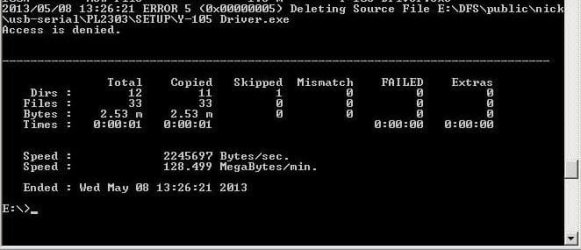
I have tried again but same result. It is just doing the copy and not deleting. I am using wind server 2008 R2. Does that make any difference?
 

Attachments

  • 34.jpg
    34.jpg
    25 KB · Views: 11

My Computer My Computer

OS
windows 7 Home premium 64 bit
It's not clear to me what you are doing now...:confused::o
How much, if any, free space is on the E: drive?
Is there enough free space on E:, to allow a "copy file"?
If E: is full or does not have enough extra free space to use, that can cause errors.
It looks like may you have a permissions issue because your screen print shows "Access is denied".

Can you make sure you have enough free space and try to copy and delete one file to see if that works?
IMHO a MOVE is more risky than a "COPY and manual DELETE"...
If a MOVE fails, you could lose the data...

I don't use wind server 2008 R2, so I have no idea if that makes a difference...
 

My Computer My Computer

Computer type
PC/Desktop
Computer Manufacturer/Model Number
home built
OS
Multi-Boot W7_Pro_x64 W8.1_Pro_x64 W10_Pro_x64 +Linux_VMs +Chromium_VM
CPU
AMD Athlon II x4 620
Motherboard
Gigabyte GA-MA785G-UD3H
Memory
6GB GSkill DDR2 800
Graphics Card(s)
AMD 4670 GPU + AMD 4200 IGP
Sound Card
on board Realtek ALC889A
Monitor(s) Displays
RCA 40" LCD TV, Insignia 32" LCD TV, HP 15" LCD monitor
Screen Resolution
1680 x 1050
Hard Drives
OCZ Vertex 3 120GB,
Samsung F3 1TB (3),
Several others - WD, Seagate, Hitachi, ...
PSU
Corsair 500 W
Case
Rosewill mid tower
Cooling
CM 90mm rifle
Keyboard
Gyration wireless, Logitech wireless, Dell USB wired
Mouse
Gyration wireless, Logitech wireless, V7 USB wired
Internet Speed
Spectrum - 100Mbps D / 10Mbps U
Antivirus
Avast, MBAM3, EMET, WinPatrol
Browser
Pale Moon, Firefox, IE
Other Info
2 multi-boot PC's
Mainly HTPC/Office/Gen purpose (no gaming).
Trendnet USB KVM.
LG DVD burner/Blue Ray Player.
Tray system for removable SATA backup drives.

Not currently OCd, under-volted.
I use Hybrid sleep, rarely re-boot or shutdown.

Hauppauge HD-PVR, Avermedia PCIe TV Tuner, Hauppauge PCI TV Tuner.
It's not clear to me what you are doing now...:confused::o
How much, if any, free space is on the E: drive?
Is there enough free space on E:, to allow a "copy file"?
If E: is full or does not have enough extra free space to use, that can cause errors.
It looks like may you have a permissions issue because your screen print shows "Access is denied".

Can you make sure you have enough free space and try to copy and delete one file to see if that works?
IMHO a MOVE is more risky than a "COPY and manual DELETE"...
If a MOVE fails, you could lose the data...

I don't use wind server 2008 R2, so I have no idea if that makes a difference...

I did not get any errors. I can access all files but dont know why that message came up. Also I have tried moving 5 gb files and my disk space was 46gb. Even then it is copying all files but not deleting it from the source.
 

My Computer My Computer

OS
windows 7 Home premium 64 bit
OK.
With that answer I think you have some type of permissions problem because of the "Access is denied" error.
I'm no security (or any) expert, so my advice is wait for someone more knowledgeable to help with this.

It may be as simple as taking ownership of the source folder and all files...
But it's best to wait for someone who can confirm that, or give a better/definite answer...
 

My Computer My Computer

Computer type
PC/Desktop
Computer Manufacturer/Model Number
home built
OS
Multi-Boot W7_Pro_x64 W8.1_Pro_x64 W10_Pro_x64 +Linux_VMs +Chromium_VM
CPU
AMD Athlon II x4 620
Motherboard
Gigabyte GA-MA785G-UD3H
Memory
6GB GSkill DDR2 800
Graphics Card(s)
AMD 4670 GPU + AMD 4200 IGP
Sound Card
on board Realtek ALC889A
Monitor(s) Displays
RCA 40" LCD TV, Insignia 32" LCD TV, HP 15" LCD monitor
Screen Resolution
1680 x 1050
Hard Drives
OCZ Vertex 3 120GB,
Samsung F3 1TB (3),
Several others - WD, Seagate, Hitachi, ...
PSU
Corsair 500 W
Case
Rosewill mid tower
Cooling
CM 90mm rifle
Keyboard
Gyration wireless, Logitech wireless, Dell USB wired
Mouse
Gyration wireless, Logitech wireless, V7 USB wired
Internet Speed
Spectrum - 100Mbps D / 10Mbps U
Antivirus
Avast, MBAM3, EMET, WinPatrol
Browser
Pale Moon, Firefox, IE
Other Info
2 multi-boot PC's
Mainly HTPC/Office/Gen purpose (no gaming).
Trendnet USB KVM.
LG DVD burner/Blue Ray Player.
Tray system for removable SATA backup drives.

Not currently OCd, under-volted.
I use Hybrid sleep, rarely re-boot or shutdown.

Hauppauge HD-PVR, Avermedia PCIe TV Tuner, Hauppauge PCI TV Tuner.
OK.
With that answer I think you have some type of permissions problem because of the "Access is denied" error.
I'm no security (or any) expert, so my advice is wait for someone more knowledgeable to help with this.

It may be as simple as taking ownership of the source folder and all files...
But it's best to wait for someone who can confirm that, or give a better/definite answer...

sure.. why not... I guess in order to delete the files I need folder permission but could copy any how.
 

My Computer My Computer

OS
windows 7 Home premium 64 bit
OK.
With that answer I think you have some type of permissions problem because of the "Access is denied" error.
I'm no security (or any) expert, so my advice is wait for someone more knowledgeable to help with this.

It may be as simple as taking ownership of the source folder and all files...
But it's best to wait for someone who can confirm that, or give a better/definite answer...

sure.. why not... I guess in order to delete the files I need folder permission but could copy any how.

Thank you very much for all your support I can confirm now that it was the permission issue. I gave myself full rights and now its working.,..

Many Thanks all...
 

My Computer My Computer

OS
windows 7 Home premium 64 bit
Great, glad to hear you have it fixed!
Thanks for posting back with the solution!!
:p
 

My Computer My Computer

Computer type
PC/Desktop
Computer Manufacturer/Model Number
home built
OS
Multi-Boot W7_Pro_x64 W8.1_Pro_x64 W10_Pro_x64 +Linux_VMs +Chromium_VM
CPU
AMD Athlon II x4 620
Motherboard
Gigabyte GA-MA785G-UD3H
Memory
6GB GSkill DDR2 800
Graphics Card(s)
AMD 4670 GPU + AMD 4200 IGP
Sound Card
on board Realtek ALC889A
Monitor(s) Displays
RCA 40" LCD TV, Insignia 32" LCD TV, HP 15" LCD monitor
Screen Resolution
1680 x 1050
Hard Drives
OCZ Vertex 3 120GB,
Samsung F3 1TB (3),
Several others - WD, Seagate, Hitachi, ...
PSU
Corsair 500 W
Case
Rosewill mid tower
Cooling
CM 90mm rifle
Keyboard
Gyration wireless, Logitech wireless, Dell USB wired
Mouse
Gyration wireless, Logitech wireless, V7 USB wired
Internet Speed
Spectrum - 100Mbps D / 10Mbps U
Antivirus
Avast, MBAM3, EMET, WinPatrol
Browser
Pale Moon, Firefox, IE
Other Info
2 multi-boot PC's
Mainly HTPC/Office/Gen purpose (no gaming).
Trendnet USB KVM.
LG DVD burner/Blue Ray Player.
Tray system for removable SATA backup drives.

Not currently OCd, under-volted.
I use Hybrid sleep, rarely re-boot or shutdown.

Hauppauge HD-PVR, Avermedia PCIe TV Tuner, Hauppauge PCI TV Tuner.
Back
Top