Need help setting Excel to display as I would like

eaglepi

New member
Member
VIP
Local time
4:56 AM
Messages
193
A problem I have had for a few years now and have not been able to figure it out so I put up with it. When I use Excel 2010 and open more than one worksheet I have troubles finding each worksheet, is there a way to have Excel display a tab for each worksheet so I can switch back and forth easier.

Thanks
 

My Computer My Computer

At a glance

Windows 7 ultimate SP1Intel Core i7-870 Lynnfield 4.00GHzCorsair Vengeance 16GB (2x8GB) DDR3 1600 MHz ...MSI NX8600GTS T2D256EZ
Computer type
PC/Desktop
Computer Manufacturer/Model Number
Home made :)
OS
Windows 7 ultimate SP1
CPU
Intel Core i7-870 Lynnfield 4.00GHz
Motherboard
ASUS Z97-A ATX DDR3 2600 LGA 1150 Motherboards Z97-A
Memory
Corsair Vengeance 16GB (2x8GB) DDR3 1600 MHz (PC3 12800) Des
Graphics Card(s)
MSI NX8600GTS T2D256EZ
Sound Card
intergraded on MB
Monitor(s) Displays
Two 24" Samsung
Screen Resolution
1920 X1200
Hard Drives
3 of: Seagate 2TB Desktop HDD SATA 6Gb/s 64MB Cache 3.5-Inch Internal Bare Drive
1 of: Seagate 1TB Desktop HDD SATA 6Gb/s 64MB Cache 3.5-Inch Internal Bare Drive
PSU
OCZ GameXStream OCZ700GXSSLI 700W ATX12V
Case
Antec Performance TX640B ATX Mini Tower Case
Cooling
Thermalright Ultima 90
Keyboard
Logitech
Mouse
Logitec
Internet Speed
10 Mbps cable

My Computer My Computer

At a glance

Windows 10 Pro X64Intel(R) Core(TM) i5-3570K CPU OC@ 4.5GHZ Turbo8.00 GB DDR3 1600MhzMSI Gaming X GTX 1070
Computer type
PC/Desktop
Computer Manufacturer/Model Number
Dude Build
OS
Windows 10 Pro X64
CPU
Intel(R) Core(TM) i5-3570K CPU OC@ 4.5GHZ Turbo
Motherboard
MSI Z77A-G45 Gaming
Memory
8.00 GB DDR3 1600Mhz
Graphics Card(s)
MSI Gaming X GTX 1070
Sound Card
Realtek High Definition
Monitor(s) Displays
Dell S23O9W, HP L1710
Screen Resolution
DELL-1920 x 1080 HP-1280 x1024
Hard Drives
Crucial m4 256 SSD, WD 7200RPM 500GB WD 1TB
PSU
Seasonic X650 GOLD
Case
Zalman Z12
Cooling
Antec Kuhler 920
Keyboard
Logitech
Mouse
MSI DS100 Interceptor
Internet Speed
50 down and 5 up
Antivirus
MSE
Browser
Chrome, IE 11
Other Info
Logitech X-620 Speakers

My Computer My Computer

At a glance

Microsoft Windows 7 Home Premium 64-bits 7601...Intel(R) Core(TM) i3 CPU M 370 @ 2.40GHz4,00 GBATI Mobility Radeon HD 5400 Series
Computer type
Laptop
Computer Manufacturer/Model Number
ACER ASPIRE 5742G
OS
Microsoft Windows 7 Home Premium 64-bits 7601 Multiprocessor Free Service Pack 1
CPU
Intel(R) Core(TM) i3 CPU M 370 @ 2.40GHz
Motherboard
Acer Aspire 5742G
Memory
4,00 GB
Graphics Card(s)
ATI Mobility Radeon HD 5400 Series
Sound Card
(1) AMD High Definition Audio Device (2) Realtek High Defi
Screen Resolution
1366 x 768 x 32 bits (4294967296 colors) @ 60 Hz
Hard Drives
WDC WD5000BEVT-22ZAT0
eaglepi, give this a look

:ar: Tabs for excel

Sorry Dude but I don't see how that helps me, it seems to deal with working with tabs in a worksheet. My problem is when I have one worksheet open and have to open another to copy and paste data from it to the original worksheet I have trouble getting each workbook to be the active workbook.

I have to move the first workbook by grabbing the title bar and moving it until I see the other workbook. There has to be a better way to do this.
 

My Computer My Computer

At a glance

Windows 7 ultimate SP1Intel Core i7-870 Lynnfield 4.00GHzCorsair Vengeance 16GB (2x8GB) DDR3 1600 MHz ...MSI NX8600GTS T2D256EZ
Computer type
PC/Desktop
Computer Manufacturer/Model Number
Home made :)
OS
Windows 7 ultimate SP1
CPU
Intel Core i7-870 Lynnfield 4.00GHz
Motherboard
ASUS Z97-A ATX DDR3 2600 LGA 1150 Motherboards Z97-A
Memory
Corsair Vengeance 16GB (2x8GB) DDR3 1600 MHz (PC3 12800) Des
Graphics Card(s)
MSI NX8600GTS T2D256EZ
Sound Card
intergraded on MB
Monitor(s) Displays
Two 24" Samsung
Screen Resolution
1920 X1200
Hard Drives
3 of: Seagate 2TB Desktop HDD SATA 6Gb/s 64MB Cache 3.5-Inch Internal Bare Drive
1 of: Seagate 1TB Desktop HDD SATA 6Gb/s 64MB Cache 3.5-Inch Internal Bare Drive
PSU
OCZ GameXStream OCZ700GXSSLI 700W ATX12V
Case
Antec Performance TX640B ATX Mini Tower Case
Cooling
Thermalright Ultima 90
Keyboard
Logitech
Mouse
Logitec
Internet Speed
10 Mbps cable
A problem I have had for a few years now and have not been able to figure it out so I put up with it. When I use Excel 2010 and open more than one worksheet I have troubles finding each worksheet, is there a way to have Excel display a tab for each worksheet so I can switch back and forth easier.

Thanks
Are you really talking about worksheets? Or do you mean workbooks? What is a workbook, or a worksheet in MS Excel? | Worldstart's Tech Tips Newsletter

Yes sorry I meant workbooks and I corrected that in my reply to Dude..
 

My Computer My Computer

At a glance

Windows 7 ultimate SP1Intel Core i7-870 Lynnfield 4.00GHzCorsair Vengeance 16GB (2x8GB) DDR3 1600 MHz ...MSI NX8600GTS T2D256EZ
Computer type
PC/Desktop
Computer Manufacturer/Model Number
Home made :)
OS
Windows 7 ultimate SP1
CPU
Intel Core i7-870 Lynnfield 4.00GHz
Motherboard
ASUS Z97-A ATX DDR3 2600 LGA 1150 Motherboards Z97-A
Memory
Corsair Vengeance 16GB (2x8GB) DDR3 1600 MHz (PC3 12800) Des
Graphics Card(s)
MSI NX8600GTS T2D256EZ
Sound Card
intergraded on MB
Monitor(s) Displays
Two 24" Samsung
Screen Resolution
1920 X1200
Hard Drives
3 of: Seagate 2TB Desktop HDD SATA 6Gb/s 64MB Cache 3.5-Inch Internal Bare Drive
1 of: Seagate 1TB Desktop HDD SATA 6Gb/s 64MB Cache 3.5-Inch Internal Bare Drive
PSU
OCZ GameXStream OCZ700GXSSLI 700W ATX12V
Case
Antec Performance TX640B ATX Mini Tower Case
Cooling
Thermalright Ultima 90
Keyboard
Logitech
Mouse
Logitec
Internet Speed
10 Mbps cable
eaglepi, give this a look

:ar: Tabs for excel

Sorry Dude but I don't see how that helps me, it seems to deal with working with tabs in a worksheet. My problem is when I have one worksheet open and have to open another to copy and paste data from it to the original worksheet I have trouble getting each workbook to be the active workbook.

I have to move the first workbook by grabbing the title bar and moving it until I see the other workbook. There has to be a better way to do this.
So your talking about workbooks. And you're talking about 1 window of excel running. Correct?
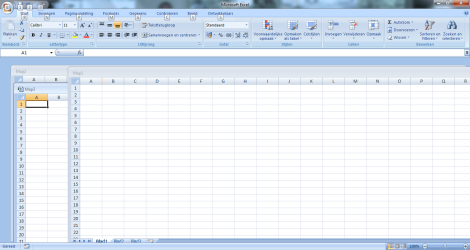
Something like this?
 

Attachments

  • Naamloos.png
    Naamloos.png
    46.9 KB · Views: 3
Last edited:

My Computer My Computer

At a glance

Microsoft Windows 7 Home Premium 64-bits 7601...Intel(R) Core(TM) i3 CPU M 370 @ 2.40GHz4,00 GBATI Mobility Radeon HD 5400 Series
Computer type
Laptop
Computer Manufacturer/Model Number
ACER ASPIRE 5742G
OS
Microsoft Windows 7 Home Premium 64-bits 7601 Multiprocessor Free Service Pack 1
CPU
Intel(R) Core(TM) i3 CPU M 370 @ 2.40GHz
Motherboard
Acer Aspire 5742G
Memory
4,00 GB
Graphics Card(s)
ATI Mobility Radeon HD 5400 Series
Sound Card
(1) AMD High Definition Audio Device (2) Realtek High Defi
Screen Resolution
1366 x 768 x 32 bits (4294967296 colors) @ 60 Hz
Hard Drives
WDC WD5000BEVT-22ZAT0
You can use CTRL-TAB to select the next workbook (in current excel window). Or hover over the excel icon on taskbar and select the workbook you want.
 
Last edited:

My Computer My Computer

At a glance

Microsoft Windows 7 Home Premium 64-bits 7601...Intel(R) Core(TM) i3 CPU M 370 @ 2.40GHz4,00 GBATI Mobility Radeon HD 5400 Series
Computer type
Laptop
Computer Manufacturer/Model Number
ACER ASPIRE 5742G
OS
Microsoft Windows 7 Home Premium 64-bits 7601 Multiprocessor Free Service Pack 1
CPU
Intel(R) Core(TM) i3 CPU M 370 @ 2.40GHz
Motherboard
Acer Aspire 5742G
Memory
4,00 GB
Graphics Card(s)
ATI Mobility Radeon HD 5400 Series
Sound Card
(1) AMD High Definition Audio Device (2) Realtek High Defi
Screen Resolution
1366 x 768 x 32 bits (4294967296 colors) @ 60 Hz
Hard Drives
WDC WD5000BEVT-22ZAT0
eaglepi, give this a look

:ar: Tabs for excel

Sorry Dude but I don't see how that helps me, it seems to deal with working with tabs in a worksheet. My problem is when I have one worksheet open and have to open another to copy and paste data from it to the original worksheet I have trouble getting each workbook to be the active workbook.

I have to move the first workbook by grabbing the title bar and moving it until I see the other workbook. There has to be a better way to do this.
So your talking about workbooks. And you're talking about 1 instance of excel running. Correct?
Something like this?


Yes I open a workbook and then I download a excel data workbook from my bank. I then try to open the bank data workbook and it opens within the original workbook already open. To find each workbook I have to do as you have shown in your attached image, move the workbooks unitl I can see the 2nd workbook.

If I remember correctly when I learned what I know about Excel which is only enough to do basic stuff. I learned in Excel 2000 long ago and I thought when I opened different workbooks I could change back and forth easier than moving one book to see the other.
 

My Computer My Computer

At a glance

Windows 7 ultimate SP1Intel Core i7-870 Lynnfield 4.00GHzCorsair Vengeance 16GB (2x8GB) DDR3 1600 MHz ...MSI NX8600GTS T2D256EZ
Computer type
PC/Desktop
Computer Manufacturer/Model Number
Home made :)
OS
Windows 7 ultimate SP1
CPU
Intel Core i7-870 Lynnfield 4.00GHz
Motherboard
ASUS Z97-A ATX DDR3 2600 LGA 1150 Motherboards Z97-A
Memory
Corsair Vengeance 16GB (2x8GB) DDR3 1600 MHz (PC3 12800) Des
Graphics Card(s)
MSI NX8600GTS T2D256EZ
Sound Card
intergraded on MB
Monitor(s) Displays
Two 24" Samsung
Screen Resolution
1920 X1200
Hard Drives
3 of: Seagate 2TB Desktop HDD SATA 6Gb/s 64MB Cache 3.5-Inch Internal Bare Drive
1 of: Seagate 1TB Desktop HDD SATA 6Gb/s 64MB Cache 3.5-Inch Internal Bare Drive
PSU
OCZ GameXStream OCZ700GXSSLI 700W ATX12V
Case
Antec Performance TX640B ATX Mini Tower Case
Cooling
Thermalright Ultima 90
Keyboard
Logitech
Mouse
Logitec
Internet Speed
10 Mbps cable
You can use CTRL-TAB to select the next workbook (in current excel instance). Or hover over the excel icon on taskbar and select the workbook you want.


Thansk Kaktussoft for your post that is exactly what I was looking for and it works perfectly. I am sorry Dude for mistyping worksheet rather than workbook. Had I said the proper terms I would have wasted your time.

Thanks to Dude as well.
 

My Computer My Computer

At a glance

Windows 7 ultimate SP1Intel Core i7-870 Lynnfield 4.00GHzCorsair Vengeance 16GB (2x8GB) DDR3 1600 MHz ...MSI NX8600GTS T2D256EZ
Computer type
PC/Desktop
Computer Manufacturer/Model Number
Home made :)
OS
Windows 7 ultimate SP1
CPU
Intel Core i7-870 Lynnfield 4.00GHz
Motherboard
ASUS Z97-A ATX DDR3 2600 LGA 1150 Motherboards Z97-A
Memory
Corsair Vengeance 16GB (2x8GB) DDR3 1600 MHz (PC3 12800) Des
Graphics Card(s)
MSI NX8600GTS T2D256EZ
Sound Card
intergraded on MB
Monitor(s) Displays
Two 24" Samsung
Screen Resolution
1920 X1200
Hard Drives
3 of: Seagate 2TB Desktop HDD SATA 6Gb/s 64MB Cache 3.5-Inch Internal Bare Drive
1 of: Seagate 1TB Desktop HDD SATA 6Gb/s 64MB Cache 3.5-Inch Internal Bare Drive
PSU
OCZ GameXStream OCZ700GXSSLI 700W ATX12V
Case
Antec Performance TX640B ATX Mini Tower Case
Cooling
Thermalright Ultima 90
Keyboard
Logitech
Mouse
Logitec
Internet Speed
10 Mbps cable
If excel is already open, the new workbook opens in same excel window as you already saw. WORD doesn't! Powerpoint doesn't!

To open in seperate excel window: open excel again from start menu and keep it opened. Now doubleclick on xls file. Now you have 2 seperate excel instances. You can display both if you want. Even side by side. Even on 2 monitors.

trick to solve it

Office Button > Excel Options > Advanced > General > Ignore Other appli.... ...(DDE)
Check this box. It is probably wise to uncheck it again before closing the last instance of excel...

Excel is still an MDI (Multiple Document Interface) application, while Word and PowerPoint have moved to a modified SDI (Single Document Interface) - the latter run only one instance of the application, but each document has its own application window. This is not possible in Excel.

You can start multiple instances of Excel, but that has several disadvantages:
  • It uses more resources.
  • Copying / pasting between separate instances is similar to copying / pasting between different applications, so some intelligent Excel features will not work.
 

My Computer My Computer

At a glance

Microsoft Windows 7 Home Premium 64-bits 7601...Intel(R) Core(TM) i3 CPU M 370 @ 2.40GHz4,00 GBATI Mobility Radeon HD 5400 Series
Computer type
Laptop
Computer Manufacturer/Model Number
ACER ASPIRE 5742G
OS
Microsoft Windows 7 Home Premium 64-bits 7601 Multiprocessor Free Service Pack 1
CPU
Intel(R) Core(TM) i3 CPU M 370 @ 2.40GHz
Motherboard
Acer Aspire 5742G
Memory
4,00 GB
Graphics Card(s)
ATI Mobility Radeon HD 5400 Series
Sound Card
(1) AMD High Definition Audio Device (2) Realtek High Defi
Screen Resolution
1366 x 768 x 32 bits (4294967296 colors) @ 60 Hz
Hard Drives
WDC WD5000BEVT-22ZAT0
If excel is already open, the new workbook opens in same excel window as you already saw. WORD doesn't! Powerpoint doesn't!

To open in seperate excel instance: open excel again from start menu and keep it opened. Now doubleclick on xls file. Now you have 2 seperate excel instances. You can displaye both if you want. Even side by side. Even on 2 monitors.

trick to solve it

Office Button > Excel Options > Advanced > General > Ignore Other appli.... ...(DDE)
Check this box. It is probably wise to uncheck it again before closing the last instance of excel...

Excel is still an MDI (Multiple Document Interface) application, while Word and PowerPoint have moved to a modified SDI (Single Document Interface) - the latter run only one instance of the application, but each document has its own application window. This is not possible in Excel.
You can start multiple instances of Excel, but that has several disadvantages:
  • It uses more resources.
  • Copying / pasting between separate instances is similar to copying / pasting between different applications, so some intelligent Excel features will not work.
Thanks for the added reply, I think now with both ways I will not have this problem any longer and once again thank all of you for the help
Ron
 

My Computer My Computer

At a glance

Windows 7 ultimate SP1Intel Core i7-870 Lynnfield 4.00GHzCorsair Vengeance 16GB (2x8GB) DDR3 1600 MHz ...MSI NX8600GTS T2D256EZ
Computer type
PC/Desktop
Computer Manufacturer/Model Number
Home made :)
OS
Windows 7 ultimate SP1
CPU
Intel Core i7-870 Lynnfield 4.00GHz
Motherboard
ASUS Z97-A ATX DDR3 2600 LGA 1150 Motherboards Z97-A
Memory
Corsair Vengeance 16GB (2x8GB) DDR3 1600 MHz (PC3 12800) Des
Graphics Card(s)
MSI NX8600GTS T2D256EZ
Sound Card
intergraded on MB
Monitor(s) Displays
Two 24" Samsung
Screen Resolution
1920 X1200
Hard Drives
3 of: Seagate 2TB Desktop HDD SATA 6Gb/s 64MB Cache 3.5-Inch Internal Bare Drive
1 of: Seagate 1TB Desktop HDD SATA 6Gb/s 64MB Cache 3.5-Inch Internal Bare Drive
PSU
OCZ GameXStream OCZ700GXSSLI 700W ATX12V
Case
Antec Performance TX640B ATX Mini Tower Case
Cooling
Thermalright Ultima 90
Keyboard
Logitech
Mouse
Logitec
Internet Speed
10 Mbps cable
If excel is already open, the new workbook opens in same excel window as you already saw. WORD doesn't! Powerpoint doesn't!

To open in seperate excel instance: open excel again from start menu and keep it opened. Now doubleclick on xls file. Now you have 2 seperate excel instances. You can displaye both if you want. Even side by side. Even on 2 monitors.

trick to solve it

Office Button > Excel Options > Advanced > General > Ignore Other appli.... ...(DDE)
Check this box. It is probably wise to uncheck it again before closing the last instance of excel...

Excel is still an MDI (Multiple Document Interface) application, while Word and PowerPoint have moved to a modified SDI (Single Document Interface) - the latter run only one instance of the application, but each document has its own application window. This is not possible in Excel.


You can start multiple instances of Excel, but that has several disadvantages:
  • It uses more resources.
  • Copying / pasting between separate instances is similar to copying / pasting between different applications, so some intelligent Excel features will not work.
Thanks for the added reply, I think now with both ways I will not have this problem any longer and once again thank all of you for the help
Ron
Glad you solved it. Why you think my name is Ron?

my name is Ron also and I was just signing my post with my name to thank you guys and make it a bit more personal.
 

My Computer My Computer

At a glance

Windows 7 ultimate SP1Intel Core i7-870 Lynnfield 4.00GHzCorsair Vengeance 16GB (2x8GB) DDR3 1600 MHz ...MSI NX8600GTS T2D256EZ
Computer type
PC/Desktop
Computer Manufacturer/Model Number
Home made :)
OS
Windows 7 ultimate SP1
CPU
Intel Core i7-870 Lynnfield 4.00GHz
Motherboard
ASUS Z97-A ATX DDR3 2600 LGA 1150 Motherboards Z97-A
Memory
Corsair Vengeance 16GB (2x8GB) DDR3 1600 MHz (PC3 12800) Des
Graphics Card(s)
MSI NX8600GTS T2D256EZ
Sound Card
intergraded on MB
Monitor(s) Displays
Two 24" Samsung
Screen Resolution
1920 X1200
Hard Drives
3 of: Seagate 2TB Desktop HDD SATA 6Gb/s 64MB Cache 3.5-Inch Internal Bare Drive
1 of: Seagate 1TB Desktop HDD SATA 6Gb/s 64MB Cache 3.5-Inch Internal Bare Drive
PSU
OCZ GameXStream OCZ700GXSSLI 700W ATX12V
Case
Antec Performance TX640B ATX Mini Tower Case
Cooling
Thermalright Ultima 90
Keyboard
Logitech
Mouse
Logitec
Internet Speed
10 Mbps cable
Back
Top