My USB flash drive won't format to NTFS

gjoellee

New member
Local time
11:27 PM
Messages
22
I need my 4gb flahs disk to be formatted with NTFS, but it does not always fail. It works fine with FAT, exFAT and FAT32, but not with NTFS. I have formatted it with NTFS before....

I have tried formatting quick and slow, on Right Click ---> Format as well as on Device Manager. I still get the same error: "Windows was unable to complete the format". I have the same issue with gParted in Linux.
 

My Computer My Computer

At a glance

Windows 7 & Linux
OS
Windows 7 & Linux
You need to enable "Optimize for performance" in "Policies" tab in the usb drive properties, before formatting in ntfs.
 

My Computer My Computer

At a glance

Windows 7 x64 pro/ Windows 7 x86 Pro/ XP SP3 x86
Computer Manufacturer/Model Number
Too many to describe...
OS
Windows 7 x64 pro/ Windows 7 x86 Pro/ XP SP3 x86
You need to enable "Optimize for performance" in "Policies" tab in the usb drive properties, before formatting in ntfs.

That does not make any difference
 

My Computer My Computer

At a glance

Windows 7 & Linux
OS
Windows 7 & Linux

My Computer My Computer

At a glance

Windows 7 x64 pro/ Windows 7 x86 Pro/ XP SP3 x86
Computer Manufacturer/Model Number
Too many to describe...
OS
Windows 7 x64 pro/ Windows 7 x86 Pro/ XP SP3 x86
This is the problem.. it persists
2013-05-08_1015.jpg
 

Attachments

  • 2013-05-08_1015.png
    2013-05-08_1015.png
    9.8 KB · Views: 19

My Computer My Computer

At a glance

windows 7 home basic 64 biti34gb ram. 500 gb hdd1 gb amd 7 series
Computer type
Laptop
Computer Manufacturer/Model Number
HP
OS
windows 7 home basic 64 bit
CPU
i3
Memory
4gb ram. 500 gb hdd
Graphics Card(s)
1 gb amd 7 series
Screen Resolution
1366x768
Keyboard
standard
Internet Speed
1 Mbps
Browser
google chrome 25
Hi Sriram PV.

Welcome to SevenForums.

Why are you tagging on to a 3 year old thread? You could have started a new thread clearly defining your problem with full details.

1. What is the make/model/capacity of your pen drive?

2. Is it a new one? Still under warranty? If not, for how long have you been using it?

3. From the screenshot, I see that there are no files in it. If there are files, copy those a
to another media and then try to format it with HP USB Disk Storage Format Tool v2.2.3 Download HP USB Disk Storage Format Tool 2.2.3 Free - Windows-based Format Utility for HP Drive Key or DiskOnKey USB Device - Softpedia
and try to format it to NTFS.

(Right click on the .exe file and Run as administrator. Make sure that the correct drive is selected for formatting. Better remove all other USB drives.)

Report results alongwith answers to the above two questions.
 

My Computer My Computer

At a glance

Windows 7 Home Premium 32 bit
OS
Windows 7 Home Premium 32 bit
its a new pen-drive. but it doesnt covers warranty. i buyed that while i was on a tour. but its an original one.. its kingston datatraveller g3 - 32gb
 

My Computer My Computer

At a glance

windows 7 home basic 64 biti34gb ram. 500 gb hdd1 gb amd 7 series
Computer type
Laptop
Computer Manufacturer/Model Number
HP
OS
windows 7 home basic 64 bit
CPU
i3
Memory
4gb ram. 500 gb hdd
Graphics Card(s)
1 gb amd 7 series
Screen Resolution
1366x768
Keyboard
standard
Internet Speed
1 Mbps
Browser
google chrome 25
Original one -- Kingston Data Traveller g3 -32 Gb -- and you bought it without a bill and warranty. Could have cared less because it came so cheap. Right?

You may check your pen drive with H2testw Test for Fake USB Flash Drives – H2testw | Portable USB Applications

h2testw – Gold standard in detecting fake capacity flash | Fighting flash fraud on Ebay

It is preferred to copy all the files in your pen drive elsewhere, format it and then run it to write and verify. Read the Readme file.

Try to format it with the tool I had recommended. hmmmm...... you don't seem to have done it. And not a word about it.:)
 

My Computer My Computer

At a glance

Windows 7 Home Premium 32 bit
OS
Windows 7 Home Premium 32 bit
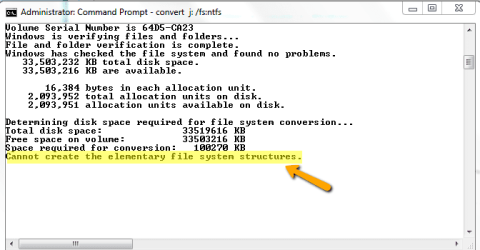
i did tested it already using that h2test sw. its been detected as 32gb drive only.. but the thing is.. i could not able to convert it to ntfs.. thats d problem. i could not able to copy files more than 4 gb when i have a 32 gb flash drive. i did searched for it in internet a lot and i finally found this post. i did tried in cmd for converting and i could not find any changes in it. so do im requesting whether is there any process of converting it or not.. :cry: or else would throw away that if its impossible mission to complete :banghead::banghead: .. :)
 

My Computer My Computer

At a glance

windows 7 home basic 64 biti34gb ram. 500 gb hdd1 gb amd 7 series
Computer type
Laptop
Computer Manufacturer/Model Number
HP
OS
windows 7 home basic 64 bit
CPU
i3
Memory
4gb ram. 500 gb hdd
Graphics Card(s)
1 gb amd 7 series
Screen Resolution
1366x768
Keyboard
standard
Internet Speed
1 Mbps
Browser
google chrome 25
OK. Did you try formatting it with the HP Tool I recommended?
 

My Computer My Computer

At a glance

Windows 7 Home Premium 32 bit
OS
Windows 7 Home Premium 32 bit
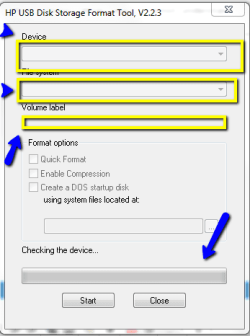
no. its not working. its doesn't works our at all. the options are not just working. as if like a img..
 

My Computer My Computer

At a glance

windows 7 home basic 64 biti34gb ram. 500 gb hdd1 gb amd 7 series
Computer type
Laptop
Computer Manufacturer/Model Number
HP
OS
windows 7 home basic 64 bit
CPU
i3
Memory
4gb ram. 500 gb hdd
Graphics Card(s)
1 gb amd 7 series
Screen Resolution
1366x768
Keyboard
standard
Internet Speed
1 Mbps
Browser
google chrome 25
What is not working? What options? What .img? I cannot understand.

Can you please upload the screenshot of the HP tool with your pen drive plugged in?
 

My Computer My Computer

At a glance

Windows 7 Home Premium 32 bit
OS
Windows 7 Home Premium 32 bit
ths s what happening. the options are not working.. its just displays like a image..2013-05-09_1227.png
 

My Computer My Computer

At a glance

windows 7 home basic 64 biti34gb ram. 500 gb hdd1 gb amd 7 series
Computer type
Laptop
Computer Manufacturer/Model Number
HP
OS
windows 7 home basic 64 bit
CPU
i3
Memory
4gb ram. 500 gb hdd
Graphics Card(s)
1 gb amd 7 series
Screen Resolution
1366x768
Keyboard
standard
Internet Speed
1 Mbps
Browser
google chrome 25
Shut down your computer and then start.

Plug in your pen drive.

Then run the HP tool as administrator.

Check whether your pen drive shows up.

If not, it is a real problem.

Go to Disk Management and check whether your pen drive is seen and post a screenshot.
 

My Computer My Computer

At a glance

Windows 7 Home Premium 32 bit
OS
Windows 7 Home Premium 32 bit
i did tested it already using that h2test sw. its been detected as 32gb drive only..

I believed it. Now I don't.

Run the latest version of H2testw and post the screenshot of the result.

Seeing is believing.:)
 

My Computer My Computer

At a glance

Windows 7 Home Premium 32 bit
OS
Windows 7 Home Premium 32 bit
Back
Top