Why doesn't the copy function ever know that 2 folders are identical?

larrydonline

New member
Local time
3:09 PM
Messages
11
I'm copying folder A on external drive E to folder B on external drive K. Folder B is an older copy of folder A which I now want to update so that I have an identical copy of folder A on drive K. I'm calling the copy of folder A on drive K "folder B" just for simplicity. Folder A is 27 gigabytes, 121 folders, 4,000 files.

When I copy A to B the system copies just the new files and after awhile tells me that there are copies of the remaining files already in folder B so I click on cancel or skip remaining files. Then just to be sure I copy folder B back to folder A and it finds a couple hundred files that it says are not in folder A so it adds them then tells me the rest are already in A. So next I just want to be really sure they are both the same so copy folder A back to folder B again, but it starts copying another hundred files from A to B.

I have done this back and forth thing over 20 times till I got completely bored doing it and every single time it copys more files from B to A, then more files from A to B, then more files from B to A, then more files from A to B and on and on. If I look at the properties of both A and B they are identical, same number of bytes, files and folders. But the copy process never sees that they are identical. It will forever think there are some files in A that are not in B and that there are some files in B that are not in A no matter how many times I do this cross copying.

I realize I can just check properties earlier and let it go at that when the properties are identical, but since I keep multiple backups of important files and I'm not always sure when they were last updated I like to do this copying in both directions. But now I find that I can't rely on Windows 7 to really know that some files already exist and it doesn't need to keep copying them over and over again. Is this some kind of bug in Windows 7?
 

My Computer My Computer

At a glance

Windows 72.40GH Q6600 Intel 2 Quad4.0 GBNVIDIA GeForce 8800 GT
Computer Manufacturer/Model Number
Dell XPS 420
OS
Windows 7
CPU
2.40GH Q6600 Intel 2 Quad
Motherboard
?
Memory
4.0 GB
Graphics Card(s)
NVIDIA GeForce 8800 GT
Sound Card
Creative X-FI (WDM)
Monitor(s) Displays
Dell
Hard Drives
C is 1 terabyte
Also use four 1 terabyte USB drives
PSU
?
Case
?
Cooling
?

My Computer My Computer

At a glance

Microsoft Windows 7 Home Premium 64-bit 7601 ...Intel(R) Core(TM) i7-3770 CPU @ 3.40GHz8.00 GBIntel(R) HD Graphics 4000
Computer type
PC/Desktop
OS
Microsoft Windows 7 Home Premium 64-bit 7601 Multiprocessor Free Service Pack 1
CPU
Intel(R) Core(TM) i7-3770 CPU @ 3.40GHz
Motherboard
ASUSTeK COMPUTER INC. P8H77-M
Memory
8.00 GB
Graphics Card(s)
Intel(R) HD Graphics 4000
Sound Card
On Board
Monitor(s) Displays
Dell 24"
Screen Resolution
1920 x 1080
Hard Drives
(1) INTEL SSDSC2CT180A3 ATA Device (2) ST500DM002-1BD142 ATA Device (3) WDC WD3200AAKS-75L9A0 ATA Device (4) Generic- Compact Flash USB Device (5) Generic- MS/MS-Pro USB Device (6) Generic- SD/MMC USB Device (7) Generic- SM/xD-Picture USB
PSU
500w Corsair
Case
Cooler Master
Cooling
3 Fans
Keyboard
Logitech MK300
Mouse
Logitech WOM
Internet Speed
75Mb
Antivirus
Norton 360
Browser
Firefox, Opera, IE
Thanks, Mitchell. I'll give it a try.
 

My Computer My Computer

At a glance

Windows 72.40GH Q6600 Intel 2 Quad4.0 GBNVIDIA GeForce 8800 GT
Computer Manufacturer/Model Number
Dell XPS 420
OS
Windows 7
CPU
2.40GH Q6600 Intel 2 Quad
Motherboard
?
Memory
4.0 GB
Graphics Card(s)
NVIDIA GeForce 8800 GT
Sound Card
Creative X-FI (WDM)
Monitor(s) Displays
Dell
Hard Drives
C is 1 terabyte
Also use four 1 terabyte USB drives
PSU
?
Case
?
Cooling
?

My Computer My Computer

At a glance

Microsoft Windows 7 Home Premium 64-bit 7601 ...Intel(R) Core(TM) i7-3770 CPU @ 3.40GHz8.00 GBIntel(R) HD Graphics 4000
Computer type
PC/Desktop
OS
Microsoft Windows 7 Home Premium 64-bit 7601 Multiprocessor Free Service Pack 1
CPU
Intel(R) Core(TM) i7-3770 CPU @ 3.40GHz
Motherboard
ASUSTeK COMPUTER INC. P8H77-M
Memory
8.00 GB
Graphics Card(s)
Intel(R) HD Graphics 4000
Sound Card
On Board
Monitor(s) Displays
Dell 24"
Screen Resolution
1920 x 1080
Hard Drives
(1) INTEL SSDSC2CT180A3 ATA Device (2) ST500DM002-1BD142 ATA Device (3) WDC WD3200AAKS-75L9A0 ATA Device (4) Generic- Compact Flash USB Device (5) Generic- MS/MS-Pro USB Device (6) Generic- SD/MMC USB Device (7) Generic- SM/xD-Picture USB
PSU
500w Corsair
Case
Cooler Master
Cooling
3 Fans
Keyboard
Logitech MK300
Mouse
Logitech WOM
Internet Speed
75Mb
Antivirus
Norton 360
Browser
Firefox, Opera, IE
While I think the SyncToy is a good tool, I didn't find that it helped me because it can only deal with one folder at a time. By highlighting and dragging I can copy dozens of folders at a time. It would take many hours to do with the SyncToy what I can do by dragging and dropping in a matter of minutes. I guess I will just remain mystified as to why the copy function done this way does not recognize that it has already copied some files. I may try clicking on refresh to both open windows after the first copy and see if that makes a difference, or even closing and reopening the windows. I have found many times in the past when that has solved some problems related to Windows not recognizing all the files that are supposed to be in a folder.
 

My Computer My Computer

At a glance

Windows 72.40GH Q6600 Intel 2 Quad4.0 GBNVIDIA GeForce 8800 GT
Computer Manufacturer/Model Number
Dell XPS 420
OS
Windows 7
CPU
2.40GH Q6600 Intel 2 Quad
Motherboard
?
Memory
4.0 GB
Graphics Card(s)
NVIDIA GeForce 8800 GT
Sound Card
Creative X-FI (WDM)
Monitor(s) Displays
Dell
Hard Drives
C is 1 terabyte
Also use four 1 terabyte USB drives
PSU
?
Case
?
Cooling
?
While I think the SyncToy is a good tool, I didn't find that it helped me because it can only deal with one folder at a time.
Have another look at Sync Toy. I sync 18 folders at a time no problem!
 

My Computer My Computer

At a glance

Microsoft Windows 7 Home Premium 64-bit 7601 ...Intel(R) Core(TM) i7-3770 CPU @ 3.40GHz8.00 GBIntel(R) HD Graphics 4000
Computer type
PC/Desktop
OS
Microsoft Windows 7 Home Premium 64-bit 7601 Multiprocessor Free Service Pack 1
CPU
Intel(R) Core(TM) i7-3770 CPU @ 3.40GHz
Motherboard
ASUSTeK COMPUTER INC. P8H77-M
Memory
8.00 GB
Graphics Card(s)
Intel(R) HD Graphics 4000
Sound Card
On Board
Monitor(s) Displays
Dell 24"
Screen Resolution
1920 x 1080
Hard Drives
(1) INTEL SSDSC2CT180A3 ATA Device (2) ST500DM002-1BD142 ATA Device (3) WDC WD3200AAKS-75L9A0 ATA Device (4) Generic- Compact Flash USB Device (5) Generic- MS/MS-Pro USB Device (6) Generic- SD/MMC USB Device (7) Generic- SM/xD-Picture USB
PSU
500w Corsair
Case
Cooler Master
Cooling
3 Fans
Keyboard
Logitech MK300
Mouse
Logitech WOM
Internet Speed
75Mb
Antivirus
Norton 360
Browser
Firefox, Opera, IE
File Manager

You could use a different file manager program.

FreeCommander lets you open two file panels and it has a file and folder compare button.
It can be set to highlight the files that are different in each panel.
If the files in both panels are identical, it displays a message.
It only compares using a couple of attributes/properties though.
 

My Computer My Computer

At a glance

W7 Ultimate SP1, LM19.2 MATE, W10 Home 1703, ...AMD Phenom II x6 1100T, 3.3 GHz12GB DDR3 1333 G-Skill (4GB x 2), G-Skill (2G...NVIDIA GeForce GTX 660
Computer type
PC/Desktop
Computer Manufacturer/Model Number
n/a
OS
W7 Ultimate SP1, LM19.2 MATE, W10 Home 1703, W10 Pro 1703 VM, #All 64 bit
CPU
AMD Phenom II x6 1100T, 3.3 GHz
Motherboard
ASUS M4A88T-M/USB3 (AM3)
Memory
12GB DDR3 1333 G-Skill (4GB x 2), G-Skill (2GB x 2)
Graphics Card(s)
NVIDIA GeForce GTX 660
Sound Card
Realtek?
Monitor(s) Displays
Samsung S23B350
Screen Resolution
1920x1080
Hard Drives
WD Green 2TB (SATA), WD Green 3TB (SATA), WD Blue 4TB (SATA), WD Blue 6TB (SATA)
PSU
Cooler Master
Case
Antec GX300 Tower
Cooling
3x Antec TRICOOL 120mm Fans
Mouse
Wired Optical
Internet Speed
DSL
Antivirus
Avast
Browser
Pale Moon (64 bit)
Other Info
2018-12-27 Upgraded HDDs
2015-12-10 Upgraded case, graphics card, storage
2015-08-15 Upgraded motherboard & RAM
2015-07-15 Upgraded LM17.1 to LM17.2
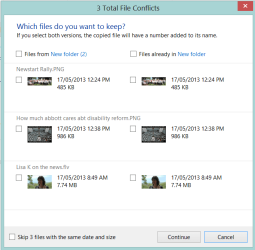
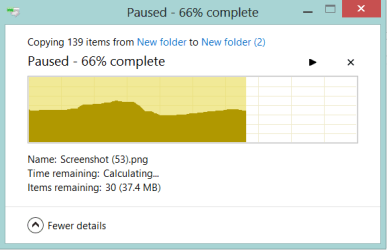
Not so much a tip, as an observation.

This is one area (file moving/copying) where Windows 8 is a genuine improvement
over Windows 7.

It will show copies of both files (with little thumbnails), and you can select/deselect
which ones to copy/move or not. You can also pause/unpause the operation.

It's one of the things I'd hoped would be in a Service Pack 2 for Windows 7. :(:cry:

Wenda.
 

Attachments

  • File Conflict W8.PNG
    File Conflict W8.PNG
    16.2 KB · Views: 3
  • File Copy W8.PNG
    File Copy W8.PNG
    5.9 KB · Views: 3

My Computer My Computer

At a glance

Windows 7 Ultimate SP1 32-bit; Windows 7 Home...Intel T6500 Core 2 Duo@2Ghz.3GB DDR2Intel 4500MHD
Computer type
Laptop
Computer Manufacturer/Model Number
Acer AS5735
OS
Windows 7 Ultimate SP1 32-bit; Windows 7 Home Premium 64-bit (VM).
CPU
Intel T6500 Core 2 Duo@2Ghz.
Motherboard
Acer
Memory
3GB DDR2
Graphics Card(s)
Intel 4500MHD
Sound Card
Realtek onboard
Monitor(s) Displays
Built-in, no touch
Screen Resolution
1366x768
Hard Drives
250GB SATA in two equal partitions.
PSU
Stock
Case
Laptop
Cooling
Stock
Keyboard
Full 101-key
Mouse
USB cordless IR
Antivirus
MSE
Browser
IE9, Firefox.
Other Info
A top little machine that hasn't let me down once since the day I removed it from its packaging over four years ago. It's done everything I could want, and more, all without a single issue. 10/10, Acer!!
Another good one is Fastcopy, just read the page to know what the options do, then select the one you want (if you just want to overwrite if the copied stuff is newer you need to do nothing, that's the default option).
 

My Computer My Computer

At a glance

Win 7 Pro 64-bit 7601AMD Phenom 9650 QuadCore, revision DR-B35 GB yes I run 2x 2GB and 1x 1GB, different b...NVIDIA GeForce 9800 GT 512 Mb, unknown manufa...
Computer type
PC/Desktop
Computer Manufacturer/Model Number
custom built
OS
Win 7 Pro 64-bit 7601
CPU
AMD Phenom 9650 QuadCore, revision DR-B3
Motherboard
ASUS M4A78
Memory
5 GB yes I run 2x 2GB and 1x 1GB, different brand, spank me.
Graphics Card(s)
NVIDIA GeForce 9800 GT 512 Mb, unknown manufacturer.
Sound Card
Crappy Realtek Integrated Audio
Monitor(s) Displays
Fujitsu Siemens P19-3P
Screen Resolution
1280 x 1024 x 32 bits @ 60 Hz Oh yeah, 4:3 rocks!
Hard Drives
(1) MAXTOR S TM3320613AS SATA Disk Device (2) STM35004 18AS SATA Disk Device (3) TOSHIBA USB 2.5"-HDD
PSU
whatever, around 450w
Case
Scavenged from old company PC, 10+ years old
Cooling
CPU fan, GPU fan, case fan, nothing fancy
Keyboard
Microsoft, PS/2, white.
Mouse
Optical, logitec.
Internet Speed
effective max speeds: 70-ish kB/s down 30-ish kB/s up
Antivirus
Avira, free edition.
Browser
Firefox with FXChrome to make it look like Google Chrome :P
Other Info
Was discarded by previous owner due to "horrible performance".
Was running Win Xp from a IDE drive. Yeah. Was a pain.
SATA II drive and Win7 and it zips away! Yay!
If you attempt to copy a file to an identical copy of that file, it will tell you that it already exists and only offer to let you replace it.

If you attempt to copy a file to a similar but slightly different copy of that file, it should offer to Merge it which will then sort out the file differences letting you choose based on the size and age differences.

So it's OK to accept Merge if offered because you still get control over what ends up being in the copied location as you can choose between the differences.

If this is not what you need exactly then let me know.
 
Responding to Mitchell's statement that he can select 18 folders at a time using SyncToy, I don't know how to do that. When the program asks me to pick a folder I tried selecting one from a list and then holding the shift key while selecting another farther down the list in hope that all folders between those two would also be selected but it didn't work that way. Selecting the second folder simply replaced the first one that had been selected. Holding the shift key down had no effect.
 

My Computer My Computer

At a glance

Windows 72.40GH Q6600 Intel 2 Quad4.0 GBNVIDIA GeForce 8800 GT
Computer Manufacturer/Model Number
Dell XPS 420
OS
Windows 7
CPU
2.40GH Q6600 Intel 2 Quad
Motherboard
?
Memory
4.0 GB
Graphics Card(s)
NVIDIA GeForce 8800 GT
Sound Card
Creative X-FI (WDM)
Monitor(s) Displays
Dell
Hard Drives
C is 1 terabyte
Also use four 1 terabyte USB drives
PSU
?
Case
?
Cooling
?
Responding to Mitchell's statement that he can select 18 folders at a time using SyncToy, I don't know how to do that. When the program asks me to pick a folder I tried selecting one from a list and then holding the shift key while selecting another farther down the list in hope that all folders between those two would also be selected but it didn't work that way. Selecting the second folder simply replaced the first one that had been selected. Holding the shift key down had no effect.
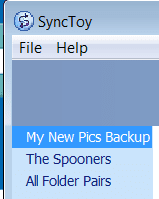
But if you create one pair of folders, then another separate pair and so on, on the left side of SyncToy GUI you will have the choice "All folder pairs" as in the screenshot. This is a sceenshot from my second PC and only shows two pairs but it makes no difference how many pairs there are. The advantage of this is that the chances are you will only need to update paerhaps two or three folders at a time. Of course you can choose "All Pairs" every time but the more pairs you sync the longer the process. Even if there are no changes it will still check each folder!

SyncToy.PNG
 

My Computer My Computer

At a glance

Microsoft Windows 7 Home Premium 64-bit 7601 ...Intel(R) Core(TM) i7-3770 CPU @ 3.40GHz8.00 GBIntel(R) HD Graphics 4000
Computer type
PC/Desktop
OS
Microsoft Windows 7 Home Premium 64-bit 7601 Multiprocessor Free Service Pack 1
CPU
Intel(R) Core(TM) i7-3770 CPU @ 3.40GHz
Motherboard
ASUSTeK COMPUTER INC. P8H77-M
Memory
8.00 GB
Graphics Card(s)
Intel(R) HD Graphics 4000
Sound Card
On Board
Monitor(s) Displays
Dell 24"
Screen Resolution
1920 x 1080
Hard Drives
(1) INTEL SSDSC2CT180A3 ATA Device (2) ST500DM002-1BD142 ATA Device (3) WDC WD3200AAKS-75L9A0 ATA Device (4) Generic- Compact Flash USB Device (5) Generic- MS/MS-Pro USB Device (6) Generic- SD/MMC USB Device (7) Generic- SM/xD-Picture USB
PSU
500w Corsair
Case
Cooler Master
Cooling
3 Fans
Keyboard
Logitech MK300
Mouse
Logitech WOM
Internet Speed
75Mb
Antivirus
Norton 360
Browser
Firefox, Opera, IE
Back
Top