I have just installed and run Macrium Reflect free version (5.1, build 5870) for the first time using the setting to image the Windows operating system disk. I have two physical disks in my PC, a 256GB SSD for the operating system (of which I am using around 140GB at present) and a 7200rpm disk for user data. I ran a backup to the user data drive and it saved a single 80GB file to the user data disk. Right clicking this I was able to mount it and see various C drive files and folders so I assume it's copied everything (including the MBR). I specify including the MBR since before I installed my SSD the MBR was on a separate partition but it looks like now the MBR is included on the C drive since the C drive is marked (under disk management) as "System, boot page file, active, crash dump, primary partition" and there is no separate 100MB partition. Does it sound like I have copied everything necessary in the event of total disk failure and the need to fit a new SSD?
A few more questions.
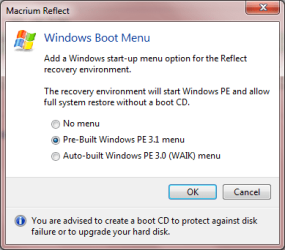
(i) When I ran Macrium it did NOT ask me to create a rescue CD ROM disk. I ran it a second time and it offered to create a rescue disk with a choice of Linux or Windows PE with the caveat that the Windows PE required a 1GB download first. Linked to this thread somewhere was a disk image iso called Rescue5828 with the suggestion that I should burn it to a CD-ROM as some sort of basic version of windows that would rescue a system. Can I burn that to the disk and have a fully functioning rescue disk, or do I have to create a rescue disk that is unique to my system? What exactly is the image on the Rescue5828 and if I burn it to a CD-ROM will it restore my system, given that I am running Macrium 5870?
(ii) For belt and braces should I create a rescue disk with the Linux option AND burn the 5828 iso image? Or should I not have two versions of the resuce software on the same CD ROM disk?
(iii) When I ran Macrium I noticed that on my second internal hard drive in My Documents it had created a folder called Macrium and an 8kb xml document called My backup 25052012 (which is the name I had requested to be given to the backup - that's not the same name as the 80GB image file it created though). What is this 8kb xlm file that's now sitting in My documents, do I need it and do I need to back it up next time I run a file and folder backup of my data drive?
Many thanks for help with these queries.
Diddlededum