Is it possible to install Windows 7 on a Windows 8 computer?

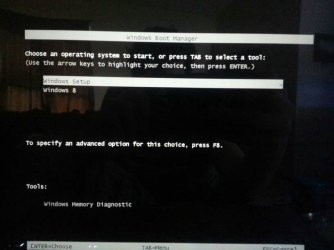
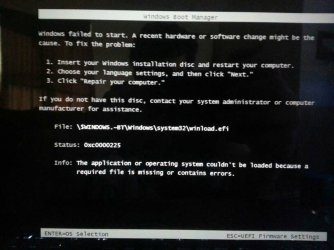
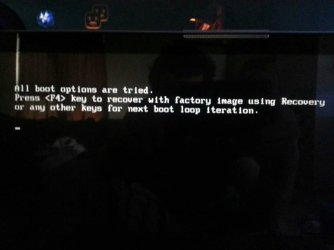
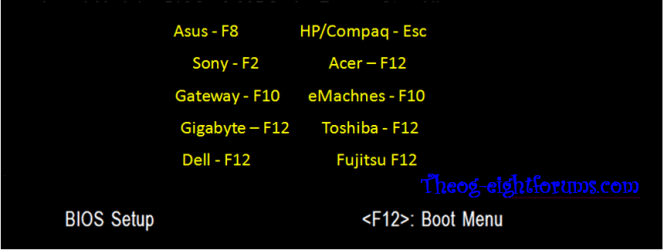
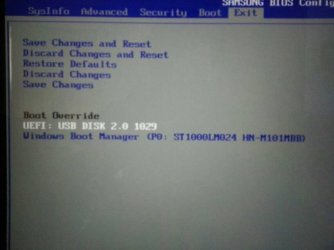
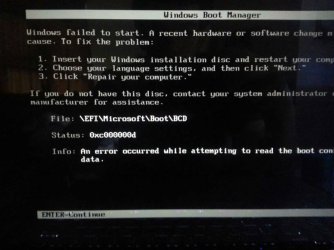
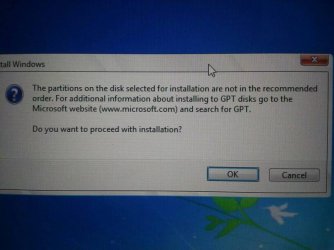
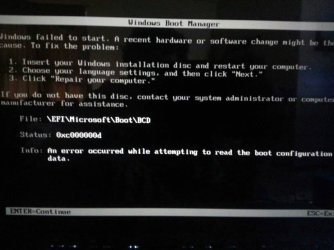
Boom same thing different flashdrive then I hit enter to continue and I get the next screen. If I then hit enter I get the third screen. If I hit esc I get the fourth screen. Pictures are in order of explanation.
 

Attachments
  • uploadfromtaptalk1369345228059.jpg
    uploadfromtaptalk1369345228059.jpg
    43.5 KB · Views: 4
  • uploadfromtaptalk1369345262696.jpg
    uploadfromtaptalk1369345262696.jpg
    34.9 KB · Views: 4
  • uploadfromtaptalk1369345358134.jpg
    uploadfromtaptalk1369345358134.jpg
    48.7 KB · Views: 4
  • uploadfromtaptalk1369345395570.jpg
    uploadfromtaptalk1369345395570.jpg
    27 KB · Views: 3

My Computer My Computer

At a glance

windows 8 x64intel core i7-365qm cpu @ 2.40ghz 2.40ghz8GB?
Computer type
Laptop
Computer Manufacturer/Model Number
samsung
OS
windows 8 x64
CPU
intel core i7-365qm cpu @ 2.40ghz 2.40ghz
Motherboard
?
Memory
8GB
Graphics Card(s)
?
Hard Drives
1Tb
Antivirus
?
Browser
firefox, chrome
Shrink the C drive and then format it to gpt as well and then install win7 on it.

You can not format to GPT.

He already shrunk it and made a new partition.He just needs to format that new partion with GPT and install win7 onto it.Thus making it a dual boot system.
 

My Computer My Computer

At a glance

Win8x64A64Gb7520G
Computer type
Laptop
Computer Manufacturer/Model Number
HP
OS
Win8x64
CPU
A6
Memory
4Gb
Graphics Card(s)
7520G
Hard Drives
500Gb 5400RPM
Antivirus
Norton
Browser
Mozilla
If you install Win7 on the new partition using GPT but with legacy boot I think you will still retain UEFI support for win 8.Since you are not installting both win 7 and win8 on the same partition right?

What do the mods think?
 

My Computer My Computer

At a glance

Win8x64A64Gb7520G
Computer type
Laptop
Computer Manufacturer/Model Number
HP
OS
Win8x64
CPU
A6
Memory
4Gb
Graphics Card(s)
7520G
Hard Drives
500Gb 5400RPM
Antivirus
Norton
Browser
Mozilla
No because a GPT disk cannot boot without UEFI, it requires an MBR disk to Bypass UEFI to Install WIn7 normally.

On some mobos at least you can install a second HD, set CSM to Dual mode and install to MBR disk normally.

I would probably take this to www.Eightforums.com where they have more experience with UEFI since we still deal mostly in MBR installs here. It's there where I got my flash stick sorted out for a UEFI Dual Boot recently.

However we will stick with you until it's installed one way or another. By now most users who are facing UEFI issues decided to Bypass UEFI to Install WIn7
 
I just want this to work so I can actually use the laptop. I have spent more time tring to figure this out then I have actually using the computer. It has to be something small im missing, I could upload a video of the entire process to YouTube, other then that I don't know what to do.
 

My Computer My Computer

At a glance

windows 8 x64intel core i7-365qm cpu @ 2.40ghz 2.40ghz8GB?
Computer type
Laptop
Computer Manufacturer/Model Number
samsung
OS
windows 8 x64
CPU
intel core i7-365qm cpu @ 2.40ghz 2.40ghz
Motherboard
?
Memory
8GB
Graphics Card(s)
?
Hard Drives
1Tb
Antivirus
?
Browser
firefox, chrome
Then I set the boot device priority and then save changes and reset

Windows Boot Manager is always first boot Option.

Use Boot Override or the One Time Boot Menu.

Windows 8 Downgrade-005 SB.PNG
 

My Computer My Computer

At a glance

ME/XP/Vista/Win7
OS
ME/XP/Vista/Win7
No because a GPT disk cannot boot without UEFI, it requires an MBR disk to Bypass UEFI to Install WIn7 normally.

On some mobos at least you can install a second HD, set CSM to Dual mode and install to MBR disk normally.

I would probably take this to www.Eightforums.com where they have more experience with UEFI since we still deal mostly in MBR installs here. It's there where I got my flash stick sorted out for a UEFI Dual Boot recently.

However we will stick with you until it's installed one way or another. By now most users who are facing UEFI issues decided to Bypass UEFI to Install WIn7


Maybe theog can help us out with this.He is on both forums.
 

My Computer My Computer

At a glance

Win8x64A64Gb7520G
Computer type
Laptop
Computer Manufacturer/Model Number
HP
OS
Win8x64
CPU
A6
Memory
4Gb
Graphics Card(s)
7520G
Hard Drives
500Gb 5400RPM
Antivirus
Norton
Browser
Mozilla
Shrink the C drive and then format it to gpt as well and then install win7 on it.

You can not format to GPT.

He already shrunk it and made a new partition.He just needs to format that new partion with GPT and install win7 onto it.Thus making it a dual boot system.

And the partition is formatted to NTFS. Which is right.

If you install Win7 on the new partition using GPT but with legacy boot I think you will still retain UEFI support for win 8.Since you are not installting both win 7 and win8 on the same partition right?

What do the mods think?

You would need two HDD's.

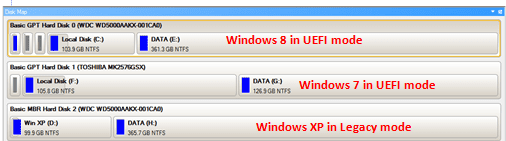
Win 8-7-XP-boot001-1.PNG
 
Last edited:

My Computer My Computer

At a glance

ME/XP/Vista/Win7
OS
ME/XP/Vista/Win7
What if its just one drive but different partitions?
 

My Computer My Computer

At a glance

Win8x64A64Gb7520G
Computer type
Laptop
Computer Manufacturer/Model Number
HP
OS
Win8x64
CPU
A6
Memory
4Gb
Graphics Card(s)
7520G
Hard Drives
500Gb 5400RPM
Antivirus
Norton
Browser
Mozilla
I just want this to work so I can actually use the laptop. I have spent more time tring to figure this out then I have actually using the computer. It has to be something small im missing, I could upload a video of the entire process to YouTube, other then that I don't know what to do.

Are you sure you are using Copy and not Cut in step 11?
 

My Computer My Computer

At a glance

Win8x64A64Gb7520G
Computer type
Laptop
Computer Manufacturer/Model Number
HP
OS
Win8x64
CPU
A6
Memory
4Gb
Graphics Card(s)
7520G
Hard Drives
500Gb 5400RPM
Antivirus
Norton
Browser
Mozilla
I just want this to work so I can actually use the laptop. I have spent more time tring to figure this out then I have actually using the computer. It has to be something small im missing, I could upload a video of the entire process to YouTube, other then that I don't know what to do.

Are you sure you are using Copy and not Cut in step 11?

Yes I have copied it the original file remains in its original location
 

My Computer My Computer

At a glance

windows 8 x64intel core i7-365qm cpu @ 2.40ghz 2.40ghz8GB?
Computer type
Laptop
Computer Manufacturer/Model Number
samsung
OS
windows 8 x64
CPU
intel core i7-365qm cpu @ 2.40ghz 2.40ghz
Motherboard
?
Memory
8GB
Graphics Card(s)
?
Hard Drives
1Tb
Antivirus
?
Browser
firefox, chrome

Attachments

  • uploadfromtaptalk1369346957362.jpg
    uploadfromtaptalk1369346957362.jpg
    30.8 KB · Views: 2
  • uploadfromtaptalk1369346974690.jpg
    uploadfromtaptalk1369346974690.jpg
    47.5 KB · Views: 3

My Computer My Computer

At a glance

windows 8 x64intel core i7-365qm cpu @ 2.40ghz 2.40ghz8GB?
Computer type
Laptop
Computer Manufacturer/Model Number
samsung
OS
windows 8 x64
CPU
intel core i7-365qm cpu @ 2.40ghz 2.40ghz
Motherboard
?
Memory
8GB
Graphics Card(s)
?
Hard Drives
1Tb
Antivirus
?
Browser
firefox, chrome

My Computer My Computer

At a glance

Win8x64A64Gb7520G
Computer type
Laptop
Computer Manufacturer/Model Number
HP
OS
Win8x64
CPU
A6
Memory
4Gb
Graphics Card(s)
7520G
Hard Drives
500Gb 5400RPM
Antivirus
Norton
Browser
Mozilla
Windows Boot Manager is always first boot Option.

Use Boot Override or the One Time Boot Menu.

View attachment 269407

If I load the bios and click on the UEFI-USB it instantly shows the same error:

Have you tried to install win7 from inside win8?

I tried it with a disc, can you try it with the usb and see if it works?


Yes I have tried to install windows 7 inside of windows 8 and it didn't work. I will try again when because I didn't have the bootx64.efi file in the boot folder when I tried to install it the original time in windows 8.
 

My Computer My Computer

At a glance

windows 8 x64intel core i7-365qm cpu @ 2.40ghz 2.40ghz8GB?
Computer type
Laptop
Computer Manufacturer/Model Number
samsung
OS
windows 8 x64
CPU
intel core i7-365qm cpu @ 2.40ghz 2.40ghz
Motherboard
?
Memory
8GB
Graphics Card(s)
?
Hard Drives
1Tb
Antivirus
?
Browser
firefox, chrome
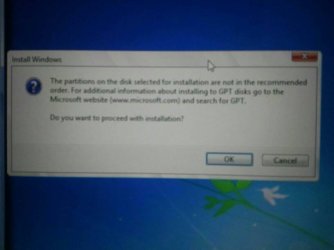
This is the error I get while installing in windows 8
 

Attachments

  • uploadfromtaptalk1369349532774.jpg
    uploadfromtaptalk1369349532774.jpg
    58.6 KB · Views: 2

My Computer My Computer

At a glance

windows 8 x64intel core i7-365qm cpu @ 2.40ghz 2.40ghz8GB?
Computer type
Laptop
Computer Manufacturer/Model Number
samsung
OS
windows 8 x64
CPU
intel core i7-365qm cpu @ 2.40ghz 2.40ghz
Motherboard
?
Memory
8GB
Graphics Card(s)
?
Hard Drives
1Tb
Antivirus
?
Browser
firefox, chrome
Ill try to upload it again.
 

My Computer My Computer

At a glance

windows 8 x64intel core i7-365qm cpu @ 2.40ghz 2.40ghz8GB?
Computer type
Laptop
Computer Manufacturer/Model Number
samsung
OS
windows 8 x64
CPU
intel core i7-365qm cpu @ 2.40ghz 2.40ghz
Motherboard
?
Memory
8GB
Graphics Card(s)
?
Hard Drives
1Tb
Antivirus
?
Browser
firefox, chrome
Error and then I click ok and it will copy windows files "it is in the process of doing" and then fail ill keep you posted.
 

Attachments

  • uploadfromtaptalk1369349668568.jpg
    uploadfromtaptalk1369349668568.jpg
    24.4 KB · Views: 4

My Computer My Computer

At a glance

windows 8 x64intel core i7-365qm cpu @ 2.40ghz 2.40ghz8GB?
Computer type
Laptop
Computer Manufacturer/Model Number
samsung
OS
windows 8 x64
CPU
intel core i7-365qm cpu @ 2.40ghz 2.40ghz
Motherboard
?
Memory
8GB
Graphics Card(s)
?
Hard Drives
1Tb
Antivirus
?
Browser
firefox, chrome
I just bypassed that error. It's informational and has to do with the Recovery partition being detected in front of the UEFI boot partition.
 
well it loaded further this time now it is stuck at the windows loading screen where it says starting windows. the logo is flashing so ill give it time to load, however the flash drive light is not flashing so I don't thing the computer is accessing any information it may be stuck.
 

My Computer My Computer

At a glance

windows 8 x64intel core i7-365qm cpu @ 2.40ghz 2.40ghz8GB?
Computer type
Laptop
Computer Manufacturer/Model Number
samsung
OS
windows 8 x64
CPU
intel core i7-365qm cpu @ 2.40ghz 2.40ghz
Motherboard
?
Memory
8GB
Graphics Card(s)
?
Hard Drives
1Tb
Antivirus
?
Browser
firefox, chrome
Back
Top