unable to record sounds my PC plays

dnldnl

New member
Local time
9:30 AM
Messages
3
I am trying to record the audio my PC is playing using audacity (or adobe audition), but it does not work. I have enabled stereo mix. I then setup audacity to record stereo mix, but it does not detect any sound.

I am able to capture my system sound when I record video with FRAPS while having "Record Win7 sound" box checked. So, I know there is no physical problem with my hardware.

Any help is greatly appreciated! Thank you.
 

My Computer My Computer

At a glance

Windows 7 Ultimate x64 SP1Intel(R) Core(TM) i7-3930K CPU @ 3.20GHz?? 16.0 GbNVIDIA GeForce GTX 560 Ti (1280 MB)
Computer type
PC/Desktop
Computer Manufacturer/Model Number
Alienware Aurora-R4
OS
Windows 7 Ultimate x64 SP1
CPU
Intel(R) Core(TM) i7-3930K CPU @ 3.20GHz
Motherboard
Alienware Aurora R4
Memory
?? 16.0 Gb
Graphics Card(s)
NVIDIA GeForce GTX 560 Ti (1280 MB)
Hard Drives
Seagate (1000 GB, 7200 RPM, SATA-II)
Antivirus
Kaspersky
Browser
Firefox
You have "enabled" Stereo Mix. But, have you made Stereo Mix the "default" Recording Device? It has to be set as the default recording device.
 

My Computer My Computer

At a glance

Windows 10 64 bitIntel i7 6700K16GB Corsair DominatorIntel CPU Graphics
Computer type
PC/Desktop
Computer Manufacturer/Model Number
My Own Build
OS
Windows 10 64 bit
CPU
Intel i7 6700K
Motherboard
ASUS ROG Maximus VIII Hero
Memory
16GB Corsair Dominator
Graphics Card(s)
Intel CPU Graphics
Sound Card
RealTek
Monitor(s) Displays
27" Dell S2719dgf
Screen Resolution
2560X1440
Hard Drives
1 TB Samsung 850 EVO SSD for Win 10 Pro
500GB Samsung 850 EVO SSD for Win 10 Insider
2 TB drive for backup
PSU
EVGA Supernova 750G2
Case
BeQuiet Silent Base 600
Cooling
Deepcool Captain 120EX
Keyboard
Microsoft Wireless 2000
Mouse
Microsoft wireless
Internet Speed
100 MB/sec (Cable)
Antivirus
Microsoft Defender and Malwarebytes
Browser
Edge/Firefox
Other Info
Cakewalk (Sonar) by BandLab and Studio One 4.1 Pro recording studio software. MOTU 896Mk3 Hybrid recording interface, Frontier Tranzport wireless control unit, Behringer X-Touch Control Surface.
Five USB connected optical drives for CD Audio production using Nero BurningROM
Yes, I have it set as a default device, but unfortunately that does not change anything.
 

My Computer My Computer

At a glance

Windows 7 Ultimate x64 SP1Intel(R) Core(TM) i7-3930K CPU @ 3.20GHz?? 16.0 GbNVIDIA GeForce GTX 560 Ti (1280 MB)
Computer type
PC/Desktop
Computer Manufacturer/Model Number
Alienware Aurora-R4
OS
Windows 7 Ultimate x64 SP1
CPU
Intel(R) Core(TM) i7-3930K CPU @ 3.20GHz
Motherboard
Alienware Aurora R4
Memory
?? 16.0 Gb
Graphics Card(s)
NVIDIA GeForce GTX 560 Ti (1280 MB)
Hard Drives
Seagate (1000 GB, 7200 RPM, SATA-II)
Antivirus
Kaspersky
Browser
Firefox
Hi dnldnl,
After recording, click file > export in Audacity the take your pick of the available formats. If you want it to be MP3, you need to install Lame for Audacity.
 

My Computer My Computer

At a glance

Win7 H.Prem. 32bit+SP1
Computer Manufacturer/Model Number
Look in my Signature.
OS
Win7 H.Prem. 32bit+SP1
Hi dnldnl,
After recording, click file > export in Audacity the take your pick of the available formats. If you want it to be MP3, you need to install Lame for Audacity.
But the OP's problem is he can't record.
dnldnl
Have you got a line in socket on your machine?
 

My Computer My Computer

At a glance

Microsoft Windows 7 Home Premium 64-bit 7601 ...Intel(R) Core(TM) i7-3770 CPU @ 3.40GHz8.00 GBIntel(R) HD Graphics 4000
Computer type
PC/Desktop
OS
Microsoft Windows 7 Home Premium 64-bit 7601 Multiprocessor Free Service Pack 1
CPU
Intel(R) Core(TM) i7-3770 CPU @ 3.40GHz
Motherboard
ASUSTeK COMPUTER INC. P8H77-M
Memory
8.00 GB
Graphics Card(s)
Intel(R) HD Graphics 4000
Sound Card
On Board
Monitor(s) Displays
Dell 24"
Screen Resolution
1920 x 1080
Hard Drives
(1) INTEL SSDSC2CT180A3 ATA Device (2) ST500DM002-1BD142 ATA Device (3) WDC WD3200AAKS-75L9A0 ATA Device (4) Generic- Compact Flash USB Device (5) Generic- MS/MS-Pro USB Device (6) Generic- SD/MMC USB Device (7) Generic- SM/xD-Picture USB
PSU
500w Corsair
Case
Cooler Master
Cooling
3 Fans
Keyboard
Logitech MK300
Mouse
Logitech WOM
Internet Speed
75Mb
Antivirus
Norton 360
Browser
Firefox, Opera, IE
I am trying to record the audio my PC is playing using audacity (or adobe audition), but it does not work. I have enabled stereo mix. I then setup audacity to record stereo mix, but it does not detect any sound.

I am able to capture my system sound when I record video with FRAPS while having "Record Win7 sound" box checked. So, I know there is no physical problem with my hardware.

Any help is greatly appreciated! Thank you.
Can you post an image of Audacity when music is playing & the record button has been clicked.
http://www.sevenforums.com/tutorials/9733-screenshots-files-upload-post-seven-forums.html
 

My Computer My Computer

At a glance

Win7 H.Prem. 32bit+SP1
Computer Manufacturer/Model Number
Look in my Signature.
OS
Win7 H.Prem. 32bit+SP1
But the OP's problem is he can't record.
dnldnl
Have you got a line in socket on your machine?

Yes, I have 6 female audio jacks on my motherboard: blue, green, pink, orange, black, and silver. Looks like the blue one is the line in.

Can you post an image of Audacity when music is playing & the record button has been clicked.
http://www.sevenforums.com/tutorials/9733-screenshots-files-upload-post-seven-forums.html

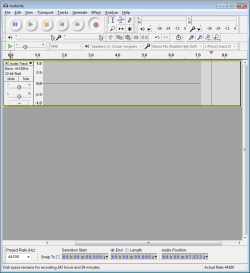
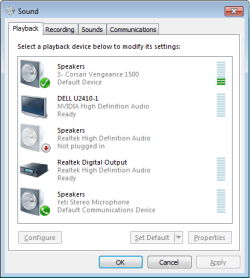
Sure. Here are are some screenshots. I pressed the record button while playing an audio file, but Audacity does not detect any sound activity:

Audacity.png

Playback.png

Recording.png
 

My Computer My Computer

At a glance

Windows 7 Ultimate x64 SP1Intel(R) Core(TM) i7-3930K CPU @ 3.20GHz?? 16.0 GbNVIDIA GeForce GTX 560 Ti (1280 MB)
Computer type
PC/Desktop
Computer Manufacturer/Model Number
Alienware Aurora-R4
OS
Windows 7 Ultimate x64 SP1
CPU
Intel(R) Core(TM) i7-3930K CPU @ 3.20GHz
Motherboard
Alienware Aurora R4
Memory
?? 16.0 Gb
Graphics Card(s)
NVIDIA GeForce GTX 560 Ti (1280 MB)
Hard Drives
Seagate (1000 GB, 7200 RPM, SATA-II)
Antivirus
Kaspersky
Browser
Firefox
Right click computer, select Manage and open Device Manager. Open as in red box in my image, right click each entry except Realtek HDA and disable it. Now look in Sound settings to see how it looks compared to your images above.

Capture.JPG
Click image to enlarge it.
 

My Computer My Computer

At a glance

Win7 H.Prem. 32bit+SP1
Computer Manufacturer/Model Number
Look in my Signature.
OS
Win7 H.Prem. 32bit+SP1
dnldnl
Have you got a line in socket on your machine?

Yes, I have 6 female audio jacks on my motherboard: blue, green, pink, orange, black, and silver. Looks like the blue one is the line in.
I couldn't get a link to work here but this is the Audacity troubleshooting section
You need to do this:
Why can I not record in Windows Vista, Windows 7 or Windows 8?

On new Windows Vista, Windows 7 or Windows 8 systems, you may receive "error opening sound device" when you try to record, and/or have no audio input devices (or only "microphone") in Device Toolbar.
To investigate this, exit Audacity then right-click over the Speaker icon by the system clock and choose Recording Devices. This opens the Recording tab of "Sound" in the Windows Control Panel. Show then enable all the disconnected and disabled input devices. For detailed instructions, see Using the Control Panel on the Audacity Wiki.
Many new Windows laptop, notebook or netbook computers only have a single audio input port. This will often be a mono port only meant for microphones. On some machines this single port may also be able to accept stereo line level input which is essential to record from standalone cassette decks or HiFi systems. See "How to connect your equipment" before connecting high output devices to a sole input.
 
Last edited:

My Computer My Computer

At a glance

Microsoft Windows 7 Home Premium 64-bit 7601 ...Intel(R) Core(TM) i7-3770 CPU @ 3.40GHz8.00 GBIntel(R) HD Graphics 4000
Computer type
PC/Desktop
OS
Microsoft Windows 7 Home Premium 64-bit 7601 Multiprocessor Free Service Pack 1
CPU
Intel(R) Core(TM) i7-3770 CPU @ 3.40GHz
Motherboard
ASUSTeK COMPUTER INC. P8H77-M
Memory
8.00 GB
Graphics Card(s)
Intel(R) HD Graphics 4000
Sound Card
On Board
Monitor(s) Displays
Dell 24"
Screen Resolution
1920 x 1080
Hard Drives
(1) INTEL SSDSC2CT180A3 ATA Device (2) ST500DM002-1BD142 ATA Device (3) WDC WD3200AAKS-75L9A0 ATA Device (4) Generic- Compact Flash USB Device (5) Generic- MS/MS-Pro USB Device (6) Generic- SD/MMC USB Device (7) Generic- SM/xD-Picture USB
PSU
500w Corsair
Case
Cooler Master
Cooling
3 Fans
Keyboard
Logitech MK300
Mouse
Logitech WOM
Internet Speed
75Mb
Antivirus
Norton 360
Browser
Firefox, Opera, IE
Show then enable all the disconnected and disabled input devices.
Further to the above post. You need to plug in a mini jack to the line in socket. This will then show in the "Sound" window as in your last screenshot. It should show athat it is enable whn you right click it but if not set it to enabled. You can then Open Audacity and choose Line In on the tool bar!
The other end of the cable needs to go into the soeakers socket. If you want to hear through the speakers whilst recording the you will need a mini jack splitter!
 

My Computer My Computer

At a glance

Microsoft Windows 7 Home Premium 64-bit 7601 ...Intel(R) Core(TM) i7-3770 CPU @ 3.40GHz8.00 GBIntel(R) HD Graphics 4000
Computer type
PC/Desktop
OS
Microsoft Windows 7 Home Premium 64-bit 7601 Multiprocessor Free Service Pack 1
CPU
Intel(R) Core(TM) i7-3770 CPU @ 3.40GHz
Motherboard
ASUSTeK COMPUTER INC. P8H77-M
Memory
8.00 GB
Graphics Card(s)
Intel(R) HD Graphics 4000
Sound Card
On Board
Monitor(s) Displays
Dell 24"
Screen Resolution
1920 x 1080
Hard Drives
(1) INTEL SSDSC2CT180A3 ATA Device (2) ST500DM002-1BD142 ATA Device (3) WDC WD3200AAKS-75L9A0 ATA Device (4) Generic- Compact Flash USB Device (5) Generic- MS/MS-Pro USB Device (6) Generic- SD/MMC USB Device (7) Generic- SM/xD-Picture USB
PSU
500w Corsair
Case
Cooler Master
Cooling
3 Fans
Keyboard
Logitech MK300
Mouse
Logitech WOM
Internet Speed
75Mb
Antivirus
Norton 360
Browser
Firefox, Opera, IE

My Computer My Computer

At a glance

Windows 10 Pro x64Intel i7 2600K @ 4.4GHz16GB Corsair Vengeance Pro DDR3 1600 MHzZOTAC GTX 1070 AMP Edition
Computer type
PC/Desktop
Computer Manufacturer/Model Number
Self Built
OS
Windows 10 Pro x64
CPU
Intel i7 2600K @ 4.4GHz
Motherboard
Asus P8Z77-V LX2
Memory
16GB Corsair Vengeance Pro DDR3 1600 MHz
Graphics Card(s)
ZOTAC GTX 1070 AMP Edition
Sound Card
Asus Xonar D2
Monitor(s) Displays
Viewsonic 24" VX2439WM LCD/LG 22" W2261VP LCD
Screen Resolution
1920x1080 DVI 1080p 16:9 on both screens
Hard Drives
1x SanDisk Extreme 120GB SSD SATA III (OS), 1x Samsung EVO 250GB SSD SATA III (Games), 1x Seagate Barracuda 1TB SATA III (Storage)
PSU
Corsair TX850W
Case
Corsair Carbide 200R
Cooling
3x 120mm Fans (Front, Bottom and Rear)
Keyboard
Roccat Isku
Mouse
Corsair M65 RGB
Internet Speed
Virgin Media 100Mb
Antivirus
Windows Defender
Browser
Firefox
Other Info
Logitech Z640 5.1 Speakers. Kingston HyperX Cloud Headset. M-Audio Oxygen 25/88 Keystation ES Midi Keyboard's

My Computer My Computer

At a glance

Microsoft Windows 7 Home Premium 64-bit 7601 ...Intel(R) Core(TM) i7-3770 CPU @ 3.40GHz8.00 GBIntel(R) HD Graphics 4000
Computer type
PC/Desktop
OS
Microsoft Windows 7 Home Premium 64-bit 7601 Multiprocessor Free Service Pack 1
CPU
Intel(R) Core(TM) i7-3770 CPU @ 3.40GHz
Motherboard
ASUSTeK COMPUTER INC. P8H77-M
Memory
8.00 GB
Graphics Card(s)
Intel(R) HD Graphics 4000
Sound Card
On Board
Monitor(s) Displays
Dell 24"
Screen Resolution
1920 x 1080
Hard Drives
(1) INTEL SSDSC2CT180A3 ATA Device (2) ST500DM002-1BD142 ATA Device (3) WDC WD3200AAKS-75L9A0 ATA Device (4) Generic- Compact Flash USB Device (5) Generic- MS/MS-Pro USB Device (6) Generic- SD/MMC USB Device (7) Generic- SM/xD-Picture USB
PSU
500w Corsair
Case
Cooler Master
Cooling
3 Fans
Keyboard
Logitech MK300
Mouse
Logitech WOM
Internet Speed
75Mb
Antivirus
Norton 360
Browser
Firefox, Opera, IE
Back
Top