BSOD most related to ntoskrnl.exe

Thewho

New member
Local time
7:47 AM
Messages
8
Hi there, this is my first time posting here.
I've been having these random BSOD lately, most on when playing Battlefield 3,
updated the drivers to the newest already, but still getting the BSODs.
Used bluescreenview and it pointed out that the most was caused by ntoskrnl.exe.
I really have no idea to solve this, and getting about five BSODs per day is pretty anoying.
Attached the SF Diagnostic Tool report, hoping to get some help.
 

My Computer My Computer

At a glance

Windows 7 Ultimate x64
Computer type
PC/Desktop
OS
Windows 7 Ultimate x64
The situation appears to be critical. Six BSODs today, with six different Bugcheck code. Depending on the situation, I think it is better to proceed slow and step by step.

What is most important information that you have SPTD installed, and as usual it is crashing.
Code:
fffff880`0aaea458  fffff880`01113adcUnable to load image \SystemRoot\System32\Drivers\[URL="http://carrona.org/drivers/driver.php?id=sptd.sys"]sptd.sys[/URL], Win32 error 0n2
*** WARNING: Unable to verify timestamp for [URL="http://carrona.org/drivers/driver.php?id=sptd.sys"]sptd.sys[/URL]
*** ERROR: Module load completed but symbols could not be loaded for [URL="http://carrona.org/drivers/driver.php?id=sptd.sys"]sptd.sys[/URL]
 sptd+0xb4adc
Keeping SPTD present in the system, no troubleshooting is meaningful.
Daemon Tools, Alcohol 120% and Power Archiver Pro uses SCSI Pass Through Direct (SPTD), which is a well known BSOD causer. Uninstall the program at first. Then download SPTD standalone installer from Disk-Tools.com, and execute the downloaded file as guided below :

  • Double click to open it.
  • Click this button only:
  • 2012-12-13_224441.jpg
  • If it is grayed out, as in the picture, there is no more SPTD in your system, and you just close the window.
Next, Free up the startup. Windows does not need any other program to auto start with it, but the auto start programs often conflicts and causes various problems including BSODs.

  1. Click on the Start button
  2. Type “msconfig (without quotes), click the resulting link. It will open the System Configuration window.
  3. Select the “Startup” tab.
  4. Deselect all items other than the antivirus.
  5. Apply > OK
  6. Accept then restart.
Your C drive is substantially filled up? Copy the documents to the other partitions which is having enough free space.

Let us know the situation after doing these three. Depending on the situation we will decide our next steps.
______________________________________________________________________________________
BSOD ANALYSIS:
Code:
BugCheck 1000007E, {ffffffffc0000005, fffff88004220cee, fffff880077ea568, fffff880077e9dc0}

Probably caused by : dxgmms1.sys ( dxgmms1!VIDMM_GLOBAL::ReferenceAllocationForPreparation+22 )

Followup: MachineOwner
------------------------------------------------------------------------------------------------
BugCheck A, {fffff38006bfb778, 2, 1, fffff8000473bc8f}

Probably caused by : memory_corruption ( nt!MiIdentifyPfn+26f )

Followup: MachineOwner
-------------------------------------------------------------------------------------------------
BugCheck 3B, {c0000005, fffff88001b8fdaa, fffff880039b6b60, 0}

Probably caused by : afd.sys ( afd!AfdBReceive+10a )

Followup: MachineOwner
-------------------------------------------------------------------------------------------------
BugCheck 1, {741c2e09, 0, f700, fffff8800a877b60}

Probably caused by : ntkrnlmp.exe ( nt!KiSystemServiceExit+245 )

Followup: MachineOwner
-------------------------------------------------------------------------------------------------
BugCheck 1E, {ffffffffc0000005, fffff800047be9bc, 0, ffffffffffffffff}

Probably caused by : Pool_Corruption ( nt!ExDeferredFreePool+100 )

Followup: Pool_corruption
-------------------------------------------------------------------------------------------------
BugCheck 50, {fffff1a000004700, 1, fffff800049dfe3d, 7}


Could not read faulting driver name
Probably caused by : ntkrnlmp.exe ( nt! ?? ::NNGAKEGL::`string'+884a )

Followup: MachineOwner
---------
 

My Computer My Computer

At a glance

Microsoft Windows 10 Pro Insider Preview 64-bitIntel(R) Core(TM) i3-4130 CPU @ 3.40GHzCorsair Vengence 4GB x2 (8.00GB Dual-Channel ...2047MB GeForce GTS 450 (ZOTAC International)
Computer type
PC/Desktop
Computer Manufacturer/Model Number
Self Assembled
OS
Microsoft Windows 10 Pro Insider Preview 64-bit
CPU
Intel(R) Core(TM) i3-4130 CPU @ 3.40GHz
Motherboard
Gigabyte Technology Co., Ltd. B85M-D3H
Memory
Corsair Vengence 4GB x2 (8.00GB Dual-Channel DDR3 @ 798MHz)
Graphics Card(s)
2047MB GeForce GTS 450 (ZOTAC International)
Sound Card
Onboard (Realtek High Definition Audio)
Monitor(s) Displays
LG Flatron E2040T
Screen Resolution
1600x900
Hard Drives
Western Digital 1 TB
Seagate 500 GB
PSU
Corsair VS550
Case
Cooler Master K380
Cooling
Cooler Master Seidon 120V Plus
Keyboard
Logitech MK260r
Mouse
Logitech MK260r
Internet Speed
PMPL Broadband
Antivirus
Windows Defender + MBAM
Browser
Firefox
Other Info
Dell Studio 15" Laptop
Thanks for the reply.
I followed the three steps above and had one BSOD so far.
Attached the data bellow, will update if there's more.
 

My Computer My Computer

At a glance

Windows 7 Ultimate x64
Computer type
PC/Desktop
OS
Windows 7 Ultimate x64
It is crashed with the latest version of display driver.

Are you overclocking? As you are getting BSODs, you should stop overclocking and run all the hardware components like CPU, GPU and RAM to their default settings. Also set the BIOS to default, too.
How To Clear CMOS (Reset BIOS)

Is the computer hot? Report us the heat of the computer after a couple of hours of your normal usage. Upload a screenshot of the summery tab of Speccy.

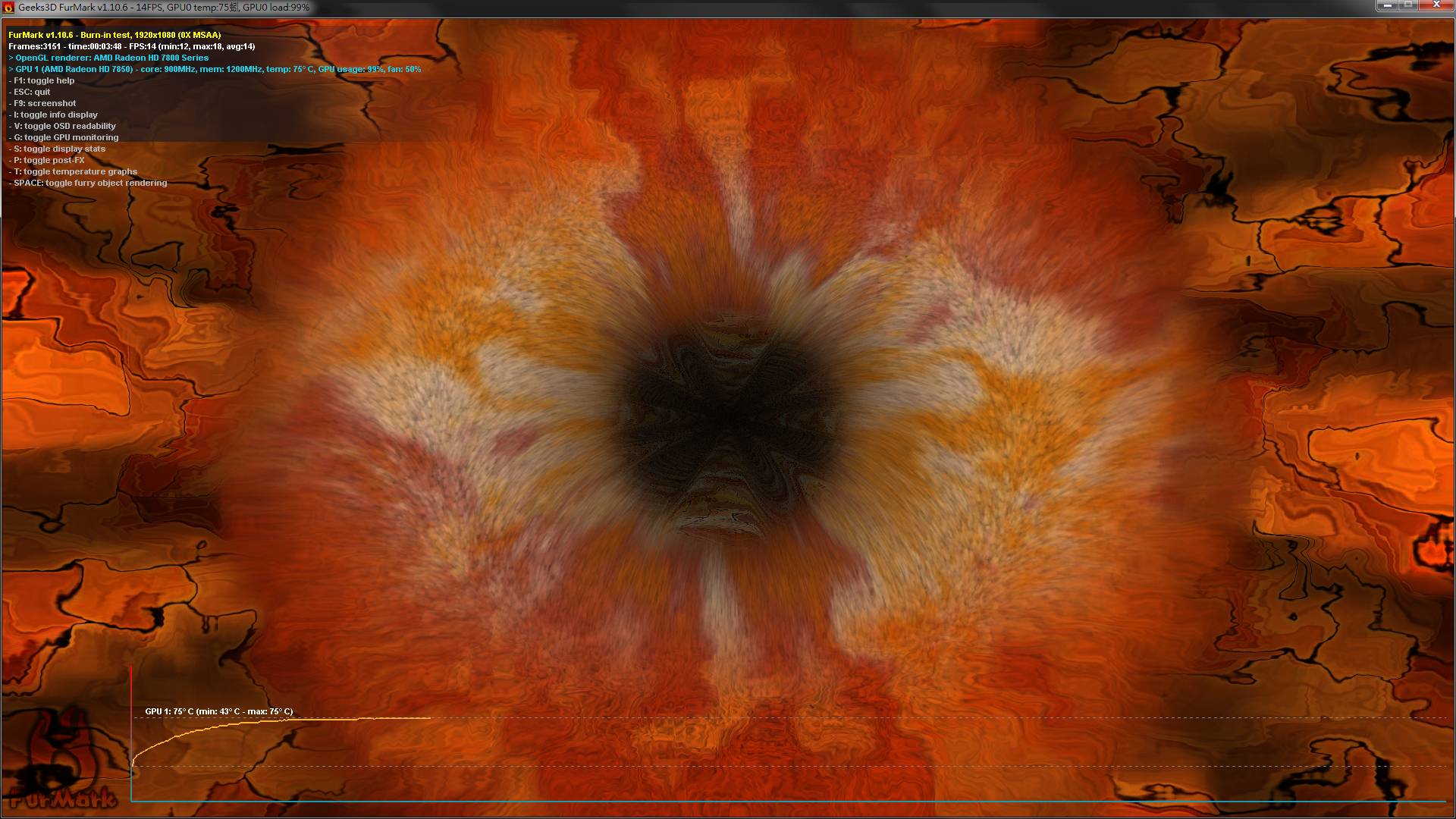
Stress test the Graphics Card using Furmark.
Video Card - Stress Test with Furmark

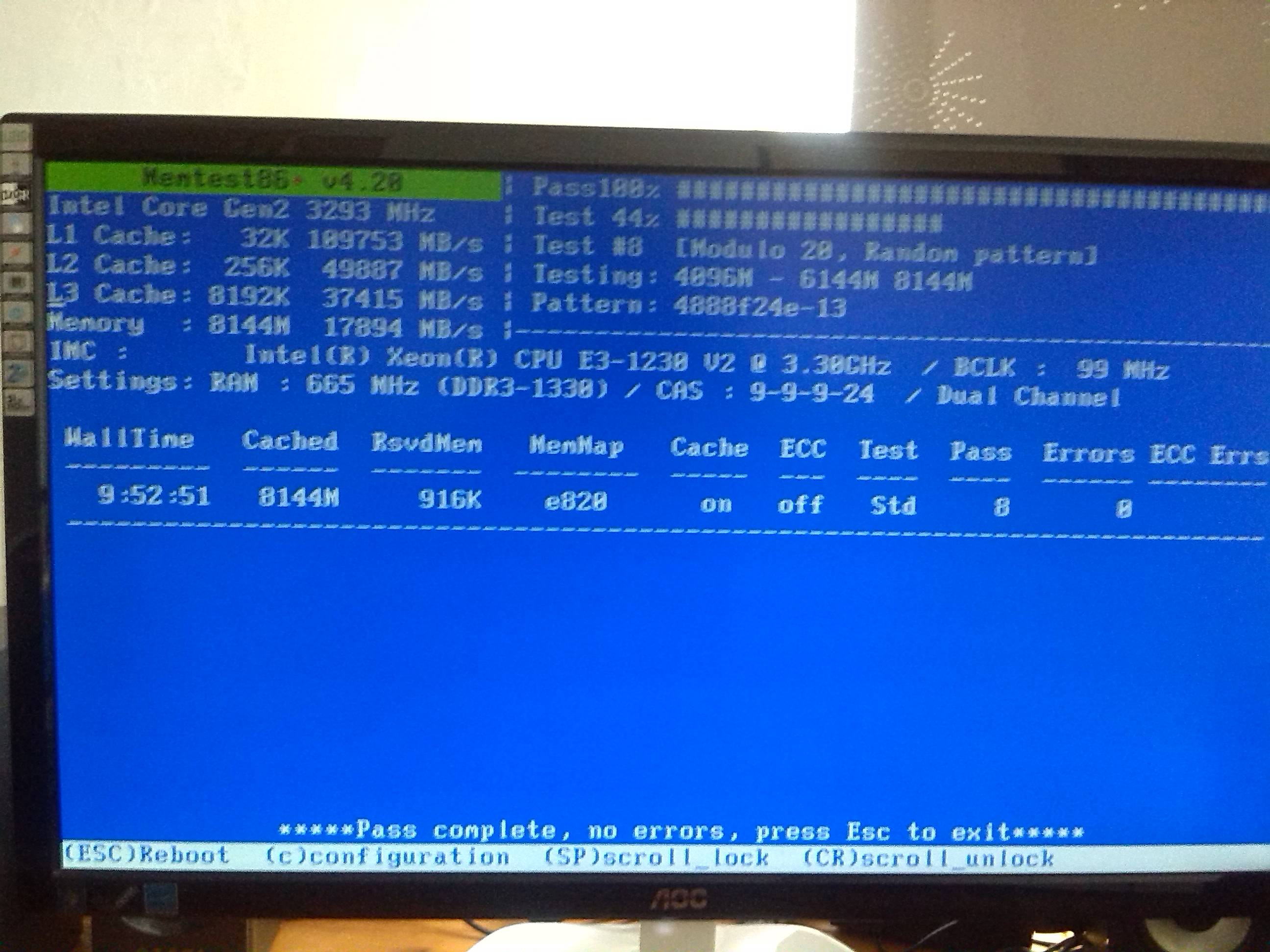
Test your RAM modules for possible errors.
How to Test and Diagnose RAM Issues with Memtest86+
Run memtest for at least 8 passes, preferably overnight.

Let us know the results.
_______________________________________________________________________
BSOD ANALYSIS:
Code:
*******************************************************************************
*                                                                             *
*                        Bugcheck Analysis                                    *
*                                                                             *
*******************************************************************************

Use !analyze -v to get detailed debugging information.

BugCheck 50, {ffffd98007288288, 1, fffff8800578cff3, 7}


Could not read faulting driver name
Probably caused by : dxgmms1.sys ( dxgmms1!VIDMM_GLOBAL::ReferenceAllocationForSubmission+a3 )

Followup: MachineOwner
---------

1: kd> !analyze -v
*******************************************************************************
*                                                                             *
*                        Bugcheck Analysis                                    *
*                                                                             *
*******************************************************************************

PAGE_FAULT_IN_NONPAGED_AREA (50)
Invalid system memory was referenced.  This cannot be protected by try-except,
it must be protected by a Probe.  Typically the address is just plain bad or it
is pointing at freed memory.
Arguments:
Arg1: ffffd98007288288, memory referenced.
Arg2: 0000000000000001, value 0 = read operation, 1 = write operation.
Arg3: fffff8800578cff3, If non-zero, the instruction address which referenced the bad memory
    address.
Arg4: 0000000000000007, (reserved)

Debugging Details:
------------------


Could not read faulting driver name

WRITE_ADDRESS: GetPointerFromAddress: unable to read from fffff80004903100
GetUlongFromAddress: unable to read from fffff800049031c0
 ffffd98007288288 Nonpaged pool

FAULTING_IP: 
dxgmms1!VIDMM_GLOBAL::ReferenceAllocationForSubmission+a3
fffff880`0578cff3 48894108        mov     qword ptr [rcx+8],rax

MM_INTERNAL_CODE:  7

CUSTOMER_CRASH_COUNT:  1

DEFAULT_BUCKET_ID:  WIN7_DRIVER_FAULT

BUGCHECK_STR:  0x50

PROCESS_NAME:  System

CURRENT_IRQL:  0

TRAP_FRAME:  fffff880075e3600 -- (.trap 0xfffff880075e3600)
NOTE: The trap frame does not contain all registers.
Some register values may be zeroed or incorrect.
rax=fffffa800746d630 rbx=0000000000000000 rcx=ffffd98007288280
rdx=fffff8a00af74640 rsi=0000000000000000 rdi=0000000000000000
rip=fffff8800578cff3 rsp=fffff880075e3790 rbp=0000000000000000
 r8=fffffa8006bfb7b0  r9=0000000000000001 r10=0000000000000000
r11=fffffa8008e8e3f0 r12=0000000000000000 r13=0000000000000000
r14=0000000000000000 r15=0000000000000000
iopl=0         nv up ei ng nz na pe nc
dxgmms1!VIDMM_GLOBAL::ReferenceAllocationForSubmission+0xa3:
fffff880`0578cff3 48894108        mov     qword ptr [rcx+8],rax ds:ffffd980`07288288=????????????????
Resetting default scope

LAST_CONTROL_TRANSFER:  from fffff8000474852b to fffff800046cbc00

STACK_TEXT:  
fffff880`075e3498 fffff800`0474852b : 00000000`00000050 ffffd980`07288288 00000000`00000001 fffff880`075e3600 : nt!KeBugCheckEx
fffff880`075e34a0 fffff800`046c9d2e : 00000000`00000001 ffffd980`07288288 00000000`00000000 fffff8a0`10b4fac0 : nt! ?? ::FNODOBFM::`string'+0x43781
fffff880`075e3600 fffff880`0578cff3 : fffff8a0`0b2a1410 fffffa80`06bfd680 fffffa80`08e8d000 00000000`00000000 : nt!KiPageFault+0x16e
fffff880`075e3790 fffff880`0578a8af : 00000000`00000000 fffffa80`06afd3f8 00000000`000000bd fffffa80`06e93bf0 : dxgmms1!VIDMM_GLOBAL::ReferenceAllocationForSubmission+0xa3
fffff880`075e37d0 fffff880`057a465d : 00000000`00000000 fffff8a0`0d7c6790 fffffa80`00000000 fffffa80`096ee2b0 : dxgmms1!VIDMM_GLOBAL::PrepareDmaBuffer+0xe1b
fffff880`075e39a0 fffff880`057a4398 : fffff880`04569f40 fffff880`057a3d00 fffffa80`00000000 fffffa80`00000000 : dxgmms1!VidSchiSubmitRenderCommand+0x241
fffff880`075e3b90 fffff880`057a3e96 : 00000000`00000000 fffffa80`06d2a990 00000000`00000080 fffffa80`08db2010 : dxgmms1!VidSchiSubmitQueueCommand+0x50
fffff880`075e3bc0 fffff800`04969ede : 00000000`022cdd37 fffffa80`08b23b50 fffffa80`066e2b30 fffffa80`08b23b50 : dxgmms1!VidSchiWorkerThread+0xd6
fffff880`075e3c00 fffff800`046bc906 : fffff880`04565180 fffffa80`08b23b50 fffff880`0456ffc0 00000000`00000000 : nt!PspSystemThreadStartup+0x5a
fffff880`075e3c40 00000000`00000000 : 00000000`00000000 00000000`00000000 00000000`00000000 00000000`00000000 : nt!KiStartSystemThread+0x16


STACK_COMMAND:  kb

FOLLOWUP_IP: 
dxgmms1!VIDMM_GLOBAL::ReferenceAllocationForSubmission+a3
fffff880`0578cff3 48894108        mov     qword ptr [rcx+8],rax

SYMBOL_STACK_INDEX:  3

SYMBOL_NAME:  dxgmms1!VIDMM_GLOBAL::ReferenceAllocationForSubmission+a3

FOLLOWUP_NAME:  MachineOwner

MODULE_NAME: dxgmms1

IMAGE_NAME:  dxgmms1.sys

DEBUG_FLR_IMAGE_TIMESTAMP:  4ce799c1

FAILURE_BUCKET_ID:  X64_0x50_dxgmms1!VIDMM_GLOBAL::ReferenceAllocationForSubmission+a3

BUCKET_ID:  X64_0x50_dxgmms1!VIDMM_GLOBAL::ReferenceAllocationForSubmission+a3

Followup: MachineOwner
---------
 

My Computer My Computer

At a glance

Microsoft Windows 10 Pro Insider Preview 64-bitIntel(R) Core(TM) i3-4130 CPU @ 3.40GHzCorsair Vengence 4GB x2 (8.00GB Dual-Channel ...2047MB GeForce GTS 450 (ZOTAC International)
Computer type
PC/Desktop
Computer Manufacturer/Model Number
Self Assembled
OS
Microsoft Windows 10 Pro Insider Preview 64-bit
CPU
Intel(R) Core(TM) i3-4130 CPU @ 3.40GHz
Motherboard
Gigabyte Technology Co., Ltd. B85M-D3H
Memory
Corsair Vengence 4GB x2 (8.00GB Dual-Channel DDR3 @ 798MHz)
Graphics Card(s)
2047MB GeForce GTS 450 (ZOTAC International)
Sound Card
Onboard (Realtek High Definition Audio)
Monitor(s) Displays
LG Flatron E2040T
Screen Resolution
1600x900
Hard Drives
Western Digital 1 TB
Seagate 500 GB
PSU
Corsair VS550
Case
Cooler Master K380
Cooling
Cooler Master Seidon 120V Plus
Keyboard
Logitech MK260r
Mouse
Logitech MK260r
Internet Speed
PMPL Broadband
Antivirus
Windows Defender + MBAM
Browser
Firefox
Other Info
Dell Studio 15" Laptop
So I set the BIOS to default, and had a BSOD on startup,
tried to let windows repair it, and tried to restore the system but both failed.
Then I googled it and found out the problem was the harddisk mode,
changed ACHI to IDE, then I was able to boot again.

But the problem is the system restore actually worked, and the system was set back to date 5/27.
So I lost the dumpfiles after 5/27, and the settings went back.

I followed the steps above again, and here are the new results:

I am not overclocking, and the BIOS are set to default now.

Speccy:
aO3Z8u1.jpg


Furmark:
I tested twice, couldn't find the screenshot file location at the first time, so used PrtScn on second attempt.
The temperature gets stable around 75°C.
Mx9r9mD.jpg


Memtest:
Memtest passed at 100%.
MFBDZWp.jpg


No BSODs so far, will update if so.
 

My Computer My Computer

At a glance

Windows 7 Ultimate x64
Computer type
PC/Desktop
OS
Windows 7 Ultimate x64
All seems good.

Now free up the startup. Windows does not need any other program to auto start with it, but the auto start programs often conflicts and causes various problems including BSODs.

  1. Click on the Start button
  2. Type “msconfig (without quotes), click the resulting link. It will open the System Configuration window.
  3. Select the “Startup” tab.
  4. Deselect all items other than the antivirus.
  5. Apply > OK
  6. Accept then restart.
For any further issue, let us know.


BTW, you had storage controller was set to IDE mode earlier, that I found in your original post.
Code:
名稱    Intel(R) 7 Series/C216 Chipset Family 2 port Serial ATA Storage Controller - 1E08
製造廠商    Intel
驅動程式    [COLOR=Red]c:\windows\system32\drivers\intelide.sys [/COLOR](6.1.7600.16385, 16.56 KB (16,960 個位元組), 2009/7/14 上午 07:19)
That was the IDE mode storage driver in use.
 

My Computer My Computer

At a glance

Microsoft Windows 10 Pro Insider Preview 64-bitIntel(R) Core(TM) i3-4130 CPU @ 3.40GHzCorsair Vengence 4GB x2 (8.00GB Dual-Channel ...2047MB GeForce GTS 450 (ZOTAC International)
Computer type
PC/Desktop
Computer Manufacturer/Model Number
Self Assembled
OS
Microsoft Windows 10 Pro Insider Preview 64-bit
CPU
Intel(R) Core(TM) i3-4130 CPU @ 3.40GHz
Motherboard
Gigabyte Technology Co., Ltd. B85M-D3H
Memory
Corsair Vengence 4GB x2 (8.00GB Dual-Channel DDR3 @ 798MHz)
Graphics Card(s)
2047MB GeForce GTS 450 (ZOTAC International)
Sound Card
Onboard (Realtek High Definition Audio)
Monitor(s) Displays
LG Flatron E2040T
Screen Resolution
1600x900
Hard Drives
Western Digital 1 TB
Seagate 500 GB
PSU
Corsair VS550
Case
Cooler Master K380
Cooling
Cooler Master Seidon 120V Plus
Keyboard
Logitech MK260r
Mouse
Logitech MK260r
Internet Speed
PMPL Broadband
Antivirus
Windows Defender + MBAM
Browser
Firefox
Other Info
Dell Studio 15" Laptop
Just got 2 BSODs.
 

My Computer My Computer

At a glance

Windows 7 Ultimate x64
Computer type
PC/Desktop
OS
Windows 7 Ultimate x64

My Computer My Computer

At a glance

Microsoft Windows 10 Pro Insider Preview 64-bitIntel(R) Core(TM) i3-4130 CPU @ 3.40GHzCorsair Vengence 4GB x2 (8.00GB Dual-Channel ...2047MB GeForce GTS 450 (ZOTAC International)
Computer type
PC/Desktop
Computer Manufacturer/Model Number
Self Assembled
OS
Microsoft Windows 10 Pro Insider Preview 64-bit
CPU
Intel(R) Core(TM) i3-4130 CPU @ 3.40GHz
Motherboard
Gigabyte Technology Co., Ltd. B85M-D3H
Memory
Corsair Vengence 4GB x2 (8.00GB Dual-Channel DDR3 @ 798MHz)
Graphics Card(s)
2047MB GeForce GTS 450 (ZOTAC International)
Sound Card
Onboard (Realtek High Definition Audio)
Monitor(s) Displays
LG Flatron E2040T
Screen Resolution
1600x900
Hard Drives
Western Digital 1 TB
Seagate 500 GB
PSU
Corsair VS550
Case
Cooler Master K380
Cooling
Cooler Master Seidon 120V Plus
Keyboard
Logitech MK260r
Mouse
Logitech MK260r
Internet Speed
PMPL Broadband
Antivirus
Windows Defender + MBAM
Browser
Firefox
Other Info
Dell Studio 15" Laptop
Hehe. I'm having the same issue with ntoskrnl.exe in my thread. Though no idea how to fix it..
 

My Computer My Computer

At a glance

Windows 7 Home Premium 64bit
OS
Windows 7 Home Premium 64bit
Hehe. I'm having the same issue with ntoskrnl.exe in my thread. Though no idea how to fix it..
Do what Koolkat77 and Golden suggested. They have idea.
 

My Computer My Computer

At a glance

Microsoft Windows 10 Pro Insider Preview 64-bitIntel(R) Core(TM) i3-4130 CPU @ 3.40GHzCorsair Vengence 4GB x2 (8.00GB Dual-Channel ...2047MB GeForce GTS 450 (ZOTAC International)
Computer type
PC/Desktop
Computer Manufacturer/Model Number
Self Assembled
OS
Microsoft Windows 10 Pro Insider Preview 64-bit
CPU
Intel(R) Core(TM) i3-4130 CPU @ 3.40GHz
Motherboard
Gigabyte Technology Co., Ltd. B85M-D3H
Memory
Corsair Vengence 4GB x2 (8.00GB Dual-Channel DDR3 @ 798MHz)
Graphics Card(s)
2047MB GeForce GTS 450 (ZOTAC International)
Sound Card
Onboard (Realtek High Definition Audio)
Monitor(s) Displays
LG Flatron E2040T
Screen Resolution
1600x900
Hard Drives
Western Digital 1 TB
Seagate 500 GB
PSU
Corsair VS550
Case
Cooler Master K380
Cooling
Cooler Master Seidon 120V Plus
Keyboard
Logitech MK260r
Mouse
Logitech MK260r
Internet Speed
PMPL Broadband
Antivirus
Windows Defender + MBAM
Browser
Firefox
Other Info
Dell Studio 15" Laptop
Will do the virus scan later.
Updated the Intel(R) USB 3.0 Driver,
I'm not using the vmicro USB PC Camera, so I wonder how should I take out the driver?
Disabled USB Selective Suspend, and went through USB Driver - General Fix for Problems.

Shall update after the virus scan.
 

My Computer My Computer

At a glance

Windows 7 Ultimate x64
Computer type
PC/Desktop
OS
Windows 7 Ultimate x64
The camera is installed. But if you dont use it, leave it.
 

My Computer My Computer

At a glance

Microsoft Windows 10 Pro Insider Preview 64-bitIntel(R) Core(TM) i3-4130 CPU @ 3.40GHzCorsair Vengence 4GB x2 (8.00GB Dual-Channel ...2047MB GeForce GTS 450 (ZOTAC International)
Computer type
PC/Desktop
Computer Manufacturer/Model Number
Self Assembled
OS
Microsoft Windows 10 Pro Insider Preview 64-bit
CPU
Intel(R) Core(TM) i3-4130 CPU @ 3.40GHz
Motherboard
Gigabyte Technology Co., Ltd. B85M-D3H
Memory
Corsair Vengence 4GB x2 (8.00GB Dual-Channel DDR3 @ 798MHz)
Graphics Card(s)
2047MB GeForce GTS 450 (ZOTAC International)
Sound Card
Onboard (Realtek High Definition Audio)
Monitor(s) Displays
LG Flatron E2040T
Screen Resolution
1600x900
Hard Drives
Western Digital 1 TB
Seagate 500 GB
PSU
Corsair VS550
Case
Cooler Master K380
Cooling
Cooler Master Seidon 120V Plus
Keyboard
Logitech MK260r
Mouse
Logitech MK260r
Internet Speed
PMPL Broadband
Antivirus
Windows Defender + MBAM
Browser
Firefox
Other Info
Dell Studio 15" Laptop
The virus scan was clean.
Here's some new BSODs:
 

My Computer My Computer

At a glance

Windows 7 Ultimate x64
Computer type
PC/Desktop
OS
Windows 7 Ultimate x64
Some more.
 

My Computer My Computer

At a glance

Windows 7 Ultimate x64
Computer type
PC/Desktop
OS
Windows 7 Ultimate x64
A question: is the BSOD appearing anywhere other than playing games like League of legends?
 

My Computer My Computer

At a glance

Microsoft Windows 10 Pro Insider Preview 64-bitIntel(R) Core(TM) i3-4130 CPU @ 3.40GHzCorsair Vengence 4GB x2 (8.00GB Dual-Channel ...2047MB GeForce GTS 450 (ZOTAC International)
Computer type
PC/Desktop
Computer Manufacturer/Model Number
Self Assembled
OS
Microsoft Windows 10 Pro Insider Preview 64-bit
CPU
Intel(R) Core(TM) i3-4130 CPU @ 3.40GHz
Motherboard
Gigabyte Technology Co., Ltd. B85M-D3H
Memory
Corsair Vengence 4GB x2 (8.00GB Dual-Channel DDR3 @ 798MHz)
Graphics Card(s)
2047MB GeForce GTS 450 (ZOTAC International)
Sound Card
Onboard (Realtek High Definition Audio)
Monitor(s) Displays
LG Flatron E2040T
Screen Resolution
1600x900
Hard Drives
Western Digital 1 TB
Seagate 500 GB
PSU
Corsair VS550
Case
Cooler Master K380
Cooling
Cooler Master Seidon 120V Plus
Keyboard
Logitech MK260r
Mouse
Logitech MK260r
Internet Speed
PMPL Broadband
Antivirus
Windows Defender + MBAM
Browser
Firefox
Other Info
Dell Studio 15" Laptop
Yes.
 

My Computer My Computer

At a glance

Windows 7 Ultimate x64
Computer type
PC/Desktop
OS
Windows 7 Ultimate x64
Alright for starters it appears that your install of windows is counterfeit, the product ID matches an Asus OEM key, but you are using a retail ASRock motherboard. please purchase a legal copy of windows format, and then re-install with the new legal copy of windows.
 

My Computer My Computer

At a glance

Windows 7 enterprise 64 bit, Windows 7 Pro 64...Core i5-2400, Athlon 64 X2 6400+ ,Core i7-3632QM4GB, 4gb g.skill ddr2, 8gbRadeon HD 4550 sgb, Radeon HD 4870, NVIDIA Ge...
Computer Manufacturer/Model Number
Lenovo ThinkCenter, Custom Built PC, Acer Aspire V3-771G-9809
OS
Windows 7 enterprise 64 bit, Windows 7 Pro 64 bit ,Windows 8 64bit
CPU
Core i5-2400, Athlon 64 X2 6400+ ,Core i7-3632QM
Motherboard
ASUS M4A79 Deluxe
Memory
4GB, 4gb g.skill ddr2, 8gb
Graphics Card(s)
Radeon HD 4550 sgb, Radeon HD 4870, NVIDIA Geforce GT 650m
Monitor(s) Displays
dual samsung 22" monitors
Hard Drives
500GB, Western Digital WD Blue WD6400AAKS 640GB 7200 RPM 16MB Cache SATA 3.0Gb/s, 1TB
Case
Antec Twelve Hundred V3 Black Steel ATX Full Tower
Cooling
ASUS Silent Square Pro
Mouse
Razar Death adder
Internet Speed
20 mbps
Back
Top