Solved Videos being cropped on all sides

Skopin

New member
Local time
1:52 AM
Messages
12
Hi everyone,

I'm having an issue when trying to watch videos. For some reason, videos I try to watch both on YouTube and in Windows Media Player (or Windows Media Center) are being cropped around the edges. I can get around the WMP issue by using VLC, because that will display the full video, but I can't find a workaround for online videos. At first I thought it may be a codec issue, but even updating them or installing new ones hasn't helped.

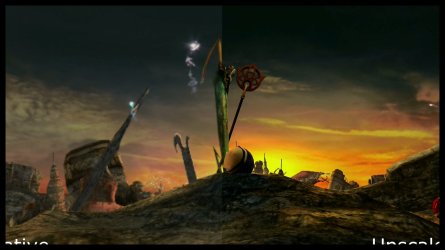
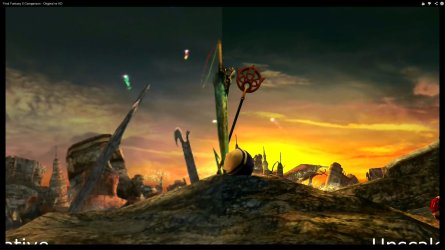
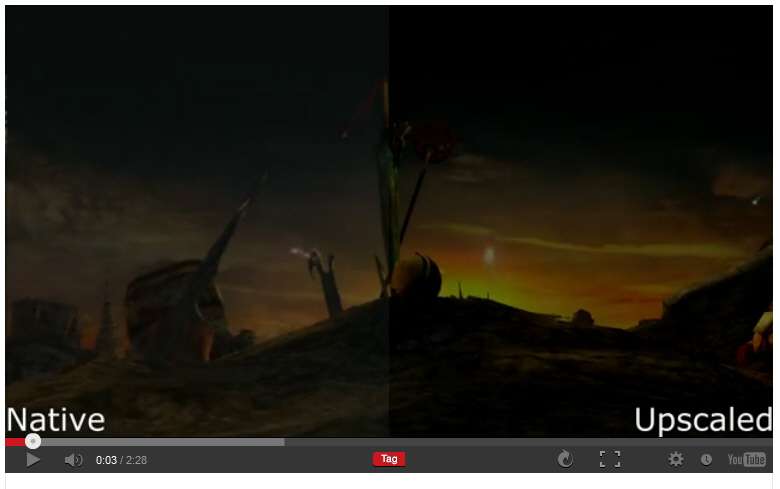
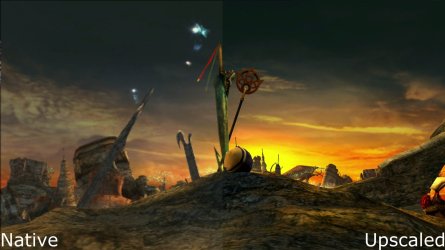
I've attached 3 screenshots from the same video: one from VLC showing how it's supposed to look, one from WMP, and one from YouTube.

I'd appreciate any insight anyone can offer on this.

Thanks!
 

Attachments
  • Full - VLC.jpg
    Full - VLC.jpg
    130.6 KB · Views: 5
  • Cropped - WMP.jpg
    Cropped - WMP.jpg
    107 KB · Views: 5
  • Cropped - YouTube.jpg
    Cropped - YouTube.jpg
    123.9 KB · Views: 3

My Computer My Computer

At a glance

Windows 7 Home Premium 64-bitIntel Core i7 2600KHIS IceQ Radeon HD7950
Computer type
PC/Desktop
Computer Manufacturer/Model Number
Custom
OS
Windows 7 Home Premium 64-bit
CPU
Intel Core i7 2600K
Motherboard
ASUS Sabertooth Z77
Graphics Card(s)
HIS IceQ Radeon HD7950
Hi and Welcome to the Forum
Have you tried a different browser and Can you post a link to one of the You Tube videos you are having trouble with?
 

My Computer My Computer

At a glance

Microsoft Windows 7 Home Premium 64-bit 7601 ...Intel(R) Core(TM) i7-3770 CPU @ 3.40GHz8.00 GBIntel(R) HD Graphics 4000
Computer type
PC/Desktop
OS
Microsoft Windows 7 Home Premium 64-bit 7601 Multiprocessor Free Service Pack 1
CPU
Intel(R) Core(TM) i7-3770 CPU @ 3.40GHz
Motherboard
ASUSTeK COMPUTER INC. P8H77-M
Memory
8.00 GB
Graphics Card(s)
Intel(R) HD Graphics 4000
Sound Card
On Board
Monitor(s) Displays
Dell 24"
Screen Resolution
1920 x 1080
Hard Drives
(1) INTEL SSDSC2CT180A3 ATA Device (2) ST500DM002-1BD142 ATA Device (3) WDC WD3200AAKS-75L9A0 ATA Device (4) Generic- Compact Flash USB Device (5) Generic- MS/MS-Pro USB Device (6) Generic- SD/MMC USB Device (7) Generic- SM/xD-Picture USB
PSU
500w Corsair
Case
Cooler Master
Cooling
3 Fans
Keyboard
Logitech MK300
Mouse
Logitech WOM
Internet Speed
75Mb
Antivirus
Norton 360
Browser
Firefox, Opera, IE

My Computer My Computer

At a glance

Windows 7 Home Premium 64-bitIntel Core i7 2600KHIS IceQ Radeon HD7950
Computer type
PC/Desktop
Computer Manufacturer/Model Number
Custom
OS
Windows 7 Home Premium 64-bit
CPU
Intel Core i7 2600K
Motherboard
ASUS Sabertooth Z77
Graphics Card(s)
HIS IceQ Radeon HD7950
Plays fine on my FF. Would suggst that you chek to see if you have the latest update for Flash player! Try here:
Adobe - Flash Player
 

My Computer My Computer

At a glance

Microsoft Windows 7 Home Premium 64-bit 7601 ...Intel(R) Core(TM) i7-3770 CPU @ 3.40GHz8.00 GBIntel(R) HD Graphics 4000
Computer type
PC/Desktop
OS
Microsoft Windows 7 Home Premium 64-bit 7601 Multiprocessor Free Service Pack 1
CPU
Intel(R) Core(TM) i7-3770 CPU @ 3.40GHz
Motherboard
ASUSTeK COMPUTER INC. P8H77-M
Memory
8.00 GB
Graphics Card(s)
Intel(R) HD Graphics 4000
Sound Card
On Board
Monitor(s) Displays
Dell 24"
Screen Resolution
1920 x 1080
Hard Drives
(1) INTEL SSDSC2CT180A3 ATA Device (2) ST500DM002-1BD142 ATA Device (3) WDC WD3200AAKS-75L9A0 ATA Device (4) Generic- Compact Flash USB Device (5) Generic- MS/MS-Pro USB Device (6) Generic- SD/MMC USB Device (7) Generic- SM/xD-Picture USB
PSU
500w Corsair
Case
Cooler Master
Cooling
3 Fans
Keyboard
Logitech MK300
Mouse
Logitech WOM
Internet Speed
75Mb
Antivirus
Norton 360
Browser
Firefox, Opera, IE
I do have the latest Flash. Also, it's not just YouTube videos. Any video I play in WMP or WMC is the same.
 

My Computer My Computer

At a glance

Windows 7 Home Premium 64-bitIntel Core i7 2600KHIS IceQ Radeon HD7950
Computer type
PC/Desktop
Computer Manufacturer/Model Number
Custom
OS
Windows 7 Home Premium 64-bit
CPU
Intel Core i7 2600K
Motherboard
ASUS Sabertooth Z77
Graphics Card(s)
HIS IceQ Radeon HD7950
Bump...Any other ideas?
 

My Computer My Computer

At a glance

Windows 7 Home Premium 64-bitIntel Core i7 2600KHIS IceQ Radeon HD7950
Computer type
PC/Desktop
Computer Manufacturer/Model Number
Custom
OS
Windows 7 Home Premium 64-bit
CPU
Intel Core i7 2600K
Motherboard
ASUS Sabertooth Z77
Graphics Card(s)
HIS IceQ Radeon HD7950
I'm using Firefox, but it's the same in any browser.

Final Fantasy X Comparison - Original vs HD - YouTube is the video that I took the images from.
As was already stated by mitchell65, works perfectly for me too using Firefox and YouTube, with latest Flash player installed (standard default settings I guess, since I've never adjusted anything). No problem at all.

youtubevideo.jpg


Did you download the video from YouTube to your PC, in order to run VLC and WMP on it locally?

Or did you run those two directly from the YouTube URL, or perhaps some other online URL for "streaming viewing" from an online location other than YouTube??
 

My Computer My Computer

At a glance

Windows 7 Pro x64 (1), Win7 Pro X64 (2)i5-3350p 3.1Ghz/6MB-cache (1); E8400 3.0Ghz/6...8GB PC3-12800 DDR3 (1); 4GB PC3-10600 DDR3 (2)ATI HD7750 (1), (see TV cards); ATI R7 250 (2)
Computer type
PC/Desktop
Computer Manufacturer/Model Number
Home-built, two systems (1) and (2)
OS
Windows 7 Pro x64 (1), Win7 Pro X64 (2)
CPU
i5-3350p 3.1Ghz/6MB-cache (1); E8400 3.0Ghz/6MB-cache (2)
Motherboard
ASUS P8Z77-V Pro (1); ASUS P5Q3 (2)
Memory
8GB PC3-12800 DDR3 (1); 4GB PC3-10600 DDR3 (2)
Graphics Card(s)
ATI HD7750 (1), (see TV cards); ATI R7 250 (2)
Sound Card
Realtek ALC892 HD Audio (1); Realtek ALC1200 HD Audio (2)
Monitor(s) Displays
Eizo HD2441W LCD, Eizo S2433W (1); Eizo 24" S2433W (2)
Screen Resolution
1920x1200, 1920x1200 (1); 1920x1200 (2)
Hard Drives
(1) 1TB SATA-II (7200RPM), 2x2TB SATA-III (7200RPM), 250GB SATA-III (10000RPM) for OS; 2x2TB external USB 3.0

(2) 320GB SATA-II (7200RPM), 750GB SATA-II (7200RPM), 150GB SATA-II (10000RPM) for OS; 2TB external USB 3.0
PSU
Nesteq ECS-6001 600W (1); Nesteq ECS-5001 500W (2)
Case
Acousti-Case 360 (1) and (2)
Cooling
Noctua NH-U12P SE2 for CPU, 2x120mm case fans (1) and (2)
Keyboard
IBM PS/2 (1) and (2)
Mouse
Logitech MX Revolution wireless (1); Microsoft wired (2)
Internet Speed
100mbps down / 10mbps up
Antivirus
Microsoft Security Essentials; Malwarebyte Anti-Malware Pro
Browser
Firefox
Other Info
Ceton InfiniTV 4-tuner cablecard-enabled TV card as well as Hauppauge HVR-2250 OTA/ATSC 2-tuner TV card in (1), running under Win7 WMC
I think the OP is getting this problem wether its You Tube or others videos on his PC.
Skopin
Have you downloaded any codec packs recently? Do you know a date when this problem started or has it always been like this?
 

My Computer My Computer

At a glance

Microsoft Windows 7 Home Premium 64-bit 7601 ...Intel(R) Core(TM) i7-3770 CPU @ 3.40GHz8.00 GBIntel(R) HD Graphics 4000
Computer type
PC/Desktop
OS
Microsoft Windows 7 Home Premium 64-bit 7601 Multiprocessor Free Service Pack 1
CPU
Intel(R) Core(TM) i7-3770 CPU @ 3.40GHz
Motherboard
ASUSTeK COMPUTER INC. P8H77-M
Memory
8.00 GB
Graphics Card(s)
Intel(R) HD Graphics 4000
Sound Card
On Board
Monitor(s) Displays
Dell 24"
Screen Resolution
1920 x 1080
Hard Drives
(1) INTEL SSDSC2CT180A3 ATA Device (2) ST500DM002-1BD142 ATA Device (3) WDC WD3200AAKS-75L9A0 ATA Device (4) Generic- Compact Flash USB Device (5) Generic- MS/MS-Pro USB Device (6) Generic- SD/MMC USB Device (7) Generic- SM/xD-Picture USB
PSU
500w Corsair
Case
Cooler Master
Cooling
3 Fans
Keyboard
Logitech MK300
Mouse
Logitech WOM
Internet Speed
75Mb
Antivirus
Norton 360
Browser
Firefox, Opera, IE
It has been like this for a few weeks. I got a new motherboard, so had to do a fresh install of Windows, and it has been like that since then.

The video I used for an example, I made myself. So the screenshots from WMP and VLC are from the original file, and the YouTube screenshot is from the same video after it was uploaded.

The problem occurred before installing any codec packs, but I have tried using a few others to no avail.
 

My Computer My Computer

At a glance

Windows 7 Home Premium 64-bitIntel Core i7 2600KHIS IceQ Radeon HD7950
Computer type
PC/Desktop
Computer Manufacturer/Model Number
Custom
OS
Windows 7 Home Premium 64-bit
CPU
Intel Core i7 2600K
Motherboard
ASUS Sabertooth Z77
Graphics Card(s)
HIS IceQ Radeon HD7950
When you say you carried out a fresh install where did you get the installation disc from? You shouldn't need to install any codecs at all. Have you actually installed complete packs or individual codecs? Uninstall all the codecs you have installed then run sfc /scannow from an elevated command prompt.
 

My Computer My Computer

At a glance

Microsoft Windows 7 Home Premium 64-bit 7601 ...Intel(R) Core(TM) i7-3770 CPU @ 3.40GHz8.00 GBIntel(R) HD Graphics 4000
Computer type
PC/Desktop
OS
Microsoft Windows 7 Home Premium 64-bit 7601 Multiprocessor Free Service Pack 1
CPU
Intel(R) Core(TM) i7-3770 CPU @ 3.40GHz
Motherboard
ASUSTeK COMPUTER INC. P8H77-M
Memory
8.00 GB
Graphics Card(s)
Intel(R) HD Graphics 4000
Sound Card
On Board
Monitor(s) Displays
Dell 24"
Screen Resolution
1920 x 1080
Hard Drives
(1) INTEL SSDSC2CT180A3 ATA Device (2) ST500DM002-1BD142 ATA Device (3) WDC WD3200AAKS-75L9A0 ATA Device (4) Generic- Compact Flash USB Device (5) Generic- MS/MS-Pro USB Device (6) Generic- SD/MMC USB Device (7) Generic- SM/xD-Picture USB
PSU
500w Corsair
Case
Cooler Master
Cooling
3 Fans
Keyboard
Logitech MK300
Mouse
Logitech WOM
Internet Speed
75Mb
Antivirus
Norton 360
Browser
Firefox, Opera, IE
The installation disc is my normal Win7 installation disc. I only tried installing other codecs after the problem started. Once they didn't work, I uninstalled them.

The scan returned no results: Windows Resource Protection did not find any integrity violations.
 

My Computer My Computer

At a glance

Windows 7 Home Premium 64-bitIntel Core i7 2600KHIS IceQ Radeon HD7950
Computer type
PC/Desktop
Computer Manufacturer/Model Number
Custom
OS
Windows 7 Home Premium 64-bit
CPU
Intel Core i7 2600K
Motherboard
ASUS Sabertooth Z77
Graphics Card(s)
HIS IceQ Radeon HD7950
I have just read your post #3! are you saying you downloaded a video from You Tube?
 

My Computer My Computer

At a glance

Microsoft Windows 7 Home Premium 64-bit 7601 ...Intel(R) Core(TM) i7-3770 CPU @ 3.40GHz8.00 GBIntel(R) HD Graphics 4000
Computer type
PC/Desktop
OS
Microsoft Windows 7 Home Premium 64-bit 7601 Multiprocessor Free Service Pack 1
CPU
Intel(R) Core(TM) i7-3770 CPU @ 3.40GHz
Motherboard
ASUSTeK COMPUTER INC. P8H77-M
Memory
8.00 GB
Graphics Card(s)
Intel(R) HD Graphics 4000
Sound Card
On Board
Monitor(s) Displays
Dell 24"
Screen Resolution
1920 x 1080
Hard Drives
(1) INTEL SSDSC2CT180A3 ATA Device (2) ST500DM002-1BD142 ATA Device (3) WDC WD3200AAKS-75L9A0 ATA Device (4) Generic- Compact Flash USB Device (5) Generic- MS/MS-Pro USB Device (6) Generic- SD/MMC USB Device (7) Generic- SM/xD-Picture USB
PSU
500w Corsair
Case
Cooler Master
Cooling
3 Fans
Keyboard
Logitech MK300
Mouse
Logitech WOM
Internet Speed
75Mb
Antivirus
Norton 360
Browser
Firefox, Opera, IE
No lol. I recorded/edited the video myself. Then I uploaded it to YouTube. I used that video as an example since I have the original file.
 

My Computer My Computer

At a glance

Windows 7 Home Premium 64-bitIntel Core i7 2600KHIS IceQ Radeon HD7950
Computer type
PC/Desktop
Computer Manufacturer/Model Number
Custom
OS
Windows 7 Home Premium 64-bit
CPU
Intel Core i7 2600K
Motherboard
ASUS Sabertooth Z77
Graphics Card(s)
HIS IceQ Radeon HD7950
No lol. I recorded/edited the video myself. Then I uploaded it to YouTube. I used that video as an example since I have the original file.
What I am interested in is where did the original images come from. In other words where did you record them from? We need to get this straight to ascertain if the problem is with the possible corruption of the files or if it is your Windows setup!
 

My Computer My Computer

At a glance

Microsoft Windows 7 Home Premium 64-bit 7601 ...Intel(R) Core(TM) i7-3770 CPU @ 3.40GHz8.00 GBIntel(R) HD Graphics 4000
Computer type
PC/Desktop
OS
Microsoft Windows 7 Home Premium 64-bit 7601 Multiprocessor Free Service Pack 1
CPU
Intel(R) Core(TM) i7-3770 CPU @ 3.40GHz
Motherboard
ASUSTeK COMPUTER INC. P8H77-M
Memory
8.00 GB
Graphics Card(s)
Intel(R) HD Graphics 4000
Sound Card
On Board
Monitor(s) Displays
Dell 24"
Screen Resolution
1920 x 1080
Hard Drives
(1) INTEL SSDSC2CT180A3 ATA Device (2) ST500DM002-1BD142 ATA Device (3) WDC WD3200AAKS-75L9A0 ATA Device (4) Generic- Compact Flash USB Device (5) Generic- MS/MS-Pro USB Device (6) Generic- SD/MMC USB Device (7) Generic- SM/xD-Picture USB
PSU
500w Corsair
Case
Cooler Master
Cooling
3 Fans
Keyboard
Logitech MK300
Mouse
Logitech WOM
Internet Speed
75Mb
Antivirus
Norton 360
Browser
Firefox, Opera, IE
The images are simply screen captures from the various programs. The original file was recorded from my PC, which displayed the full thing without issue. The 2 videos were spliced together using Sony Vegas. When I tried to play the raw files in WMP, they were cropped. Playing them in VLC worked fine. When editing the raw files in Vegas, the full image was shown in the Vegas preview window.

The rendered file (from which I showed the screen caps), is cropped when played on my computer in WMP or after being uploaded to YouTube. When played in VLC, it looks normal. It also looks normal from any other computer. It's the same for any other video, not just this one. I chose to do the screen caps for this video because I recorded it myself so I had the raw files, and the text at the bottom made it easier to show what was happening.
 

My Computer My Computer

At a glance

Windows 7 Home Premium 64-bitIntel Core i7 2600KHIS IceQ Radeon HD7950
Computer type
PC/Desktop
Computer Manufacturer/Model Number
Custom
OS
Windows 7 Home Premium 64-bit
CPU
Intel Core i7 2600K
Motherboard
ASUS Sabertooth Z77
Graphics Card(s)
HIS IceQ Radeon HD7950
I've downloaded your videos (in all available resolutions, starting from the 1080p one and down) and it appears they are encoded as H.264/AVC, i.e. with the AVC1 codec (as reported by PotPlayer, and also GSpot).

[Video Information]
Video Codec:AVC1 - DXVA Decoder(VLD - Slice Short)
Input type:AVC1(24 bits)
Input size:1280 x 720(1.78:1)
Output type:dxva
Output Size:1280 x 720(1.78:1)
Frame Rate:29.97
BitRate: Unknown

[Audio Information]
Audio Codec:AAC(0xaac0) - Default Decoder
Sample rate:44100 ->44100 samples / sec
Bit rate:16 ->16 bits / sample
Channels:2 ->4 channels
Bitrate: 191 kbps

GSpot describes it as AVC1: H.264/MPEG-4 AVC


I would have thought that this AVC1 codec should be supported "native" by Windows 7. According to GSpot, it is an ISO codec so I'm sure that means support for it comes built into Win7:

AVC1 H.264/MPEG-4 AVC ITU-T/ISO/IEC


But it's also supported by FFDSHOW. Actually, I have installed FFDSHOW on my own Win7 systems with most of the supported codecs checked as disabled if they're supported "native" by Windows 7 (which is most of them, actually). I don't want to interfere with (or add to) Win7's inherent fabulous support for multi-media formats unless in the rare case where an odd codec is not supported. So in particular, I have FFDSHOW's support for H.264/AVC "disabled", so I'm sure it's not participating in why I have no problems playing your video properly so that it appears uncropped.

==> I will NOT EVER INSTALL A CODEC PACK such as K-Lite, or Shark, or whatever.

Anyway, all your H.264/AVC MP4/FLV downloaded videos obviously play just fine for me locally using WMP12, as well as all my other media player products such as VLC and PotPlayer. Also plays fine with Firefox and current Flash Player.

Sorry, but there's no cropping from ANY of these on my systems... no matter played from the Internet or played locally with multiple different players.


NOTE: I have ATI video cards in my systems (HD4850, HD5770) and DXVA is "enabled" in all players, including with Flash Player running inside of Firefox.
 

My Computer My Computer

At a glance

Windows 7 Pro x64 (1), Win7 Pro X64 (2)i5-3350p 3.1Ghz/6MB-cache (1); E8400 3.0Ghz/6...8GB PC3-12800 DDR3 (1); 4GB PC3-10600 DDR3 (2)ATI HD7750 (1), (see TV cards); ATI R7 250 (2)
Computer type
PC/Desktop
Computer Manufacturer/Model Number
Home-built, two systems (1) and (2)
OS
Windows 7 Pro x64 (1), Win7 Pro X64 (2)
CPU
i5-3350p 3.1Ghz/6MB-cache (1); E8400 3.0Ghz/6MB-cache (2)
Motherboard
ASUS P8Z77-V Pro (1); ASUS P5Q3 (2)
Memory
8GB PC3-12800 DDR3 (1); 4GB PC3-10600 DDR3 (2)
Graphics Card(s)
ATI HD7750 (1), (see TV cards); ATI R7 250 (2)
Sound Card
Realtek ALC892 HD Audio (1); Realtek ALC1200 HD Audio (2)
Monitor(s) Displays
Eizo HD2441W LCD, Eizo S2433W (1); Eizo 24" S2433W (2)
Screen Resolution
1920x1200, 1920x1200 (1); 1920x1200 (2)
Hard Drives
(1) 1TB SATA-II (7200RPM), 2x2TB SATA-III (7200RPM), 250GB SATA-III (10000RPM) for OS; 2x2TB external USB 3.0

(2) 320GB SATA-II (7200RPM), 750GB SATA-II (7200RPM), 150GB SATA-II (10000RPM) for OS; 2TB external USB 3.0
PSU
Nesteq ECS-6001 600W (1); Nesteq ECS-5001 500W (2)
Case
Acousti-Case 360 (1) and (2)
Cooling
Noctua NH-U12P SE2 for CPU, 2x120mm case fans (1) and (2)
Keyboard
IBM PS/2 (1) and (2)
Mouse
Logitech MX Revolution wireless (1); Microsoft wired (2)
Internet Speed
100mbps down / 10mbps up
Antivirus
Microsoft Security Essentials; Malwarebyte Anti-Malware Pro
Browser
Firefox
Other Info
Ceton InfiniTV 4-tuner cablecard-enabled TV card as well as Hauppauge HVR-2250 OTA/ATSC 2-tuner TV card in (1), running under Win7 WMC
The images are simply screen captures from the various programs. The original file was recorded from my PC, which displayed the full thing without issue. The 2 videos were spliced together using Sony Vegas. When I tried to play the raw files in WMP, they were cropped. Playing them in VLC worked fine. When editing the raw files in Vegas, the full image was shown in the Vegas preview window.
So is your "You Tube name" HAB17A7? If so have you tried all your other videos that are on your account to see if they perform the same?
 

My Computer My Computer

At a glance

Microsoft Windows 7 Home Premium 64-bit 7601 ...Intel(R) Core(TM) i7-3770 CPU @ 3.40GHz8.00 GBIntel(R) HD Graphics 4000
Computer type
PC/Desktop
OS
Microsoft Windows 7 Home Premium 64-bit 7601 Multiprocessor Free Service Pack 1
CPU
Intel(R) Core(TM) i7-3770 CPU @ 3.40GHz
Motherboard
ASUSTeK COMPUTER INC. P8H77-M
Memory
8.00 GB
Graphics Card(s)
Intel(R) HD Graphics 4000
Sound Card
On Board
Monitor(s) Displays
Dell 24"
Screen Resolution
1920 x 1080
Hard Drives
(1) INTEL SSDSC2CT180A3 ATA Device (2) ST500DM002-1BD142 ATA Device (3) WDC WD3200AAKS-75L9A0 ATA Device (4) Generic- Compact Flash USB Device (5) Generic- MS/MS-Pro USB Device (6) Generic- SD/MMC USB Device (7) Generic- SM/xD-Picture USB
PSU
500w Corsair
Case
Cooler Master
Cooling
3 Fans
Keyboard
Logitech MK300
Mouse
Logitech WOM
Internet Speed
75Mb
Antivirus
Norton 360
Browser
Firefox, Opera, IE
The images are simply screen captures from the various programs. The original file was recorded from my PC, which displayed the full thing without issue. The 2 videos were spliced together using Sony Vegas. When I tried to play the raw files in WMP, they were cropped. Playing them in VLC worked fine. When editing the raw files in Vegas, the full image was shown in the Vegas preview window.
So is your "You Tube name" HAB17A7? If so have you tried all your other videos that are on your account to see if they perform the same?

Yessir, that is me. And yes, all videos are doing the same thing, whether from my channel or someone else's. It is the same with videos downloaded to my computer, even those that were fine before I reinstalled Windows.
 

My Computer My Computer

At a glance

Windows 7 Home Premium 64-bitIntel Core i7 2600KHIS IceQ Radeon HD7950
Computer type
PC/Desktop
Computer Manufacturer/Model Number
Custom
OS
Windows 7 Home Premium 64-bit
CPU
Intel Core i7 2600K
Motherboard
ASUS Sabertooth Z77
Graphics Card(s)
HIS IceQ Radeon HD7950
Well I think it is now established that the probelm is within your Windows environment. The best I can suggest is that you do a clean install of Windows using Gregrocker excellent guide here:
Clean Reinstall - Factory OEM Windows 7
Use the new downloaded ISO not your supplied disc and burn the ISO at the slowest speed your burner will go down to 4x is best and make sure you have the LAN driver handy as advised but often missed in the text!
I can't see that you will need any codecs. If you do don't install the whole pack just the one you need!
 

My Computer My Computer

At a glance

Microsoft Windows 7 Home Premium 64-bit 7601 ...Intel(R) Core(TM) i7-3770 CPU @ 3.40GHz8.00 GBIntel(R) HD Graphics 4000
Computer type
PC/Desktop
OS
Microsoft Windows 7 Home Premium 64-bit 7601 Multiprocessor Free Service Pack 1
CPU
Intel(R) Core(TM) i7-3770 CPU @ 3.40GHz
Motherboard
ASUSTeK COMPUTER INC. P8H77-M
Memory
8.00 GB
Graphics Card(s)
Intel(R) HD Graphics 4000
Sound Card
On Board
Monitor(s) Displays
Dell 24"
Screen Resolution
1920 x 1080
Hard Drives
(1) INTEL SSDSC2CT180A3 ATA Device (2) ST500DM002-1BD142 ATA Device (3) WDC WD3200AAKS-75L9A0 ATA Device (4) Generic- Compact Flash USB Device (5) Generic- MS/MS-Pro USB Device (6) Generic- SD/MMC USB Device (7) Generic- SM/xD-Picture USB
PSU
500w Corsair
Case
Cooler Master
Cooling
3 Fans
Keyboard
Logitech MK300
Mouse
Logitech WOM
Internet Speed
75Mb
Antivirus
Norton 360
Browser
Firefox, Opera, IE
I was thinking the same thing. I just wish I could figure out what caused it. It's a very odd occurrence.

I never install any codec packs; Windows usually has everything I need, and for those videos that don't work in WMP or WMC, VLC takes care of it. It was just really strange that streaming videos were affected as well.
 

My Computer My Computer

At a glance

Windows 7 Home Premium 64-bitIntel Core i7 2600KHIS IceQ Radeon HD7950
Computer type
PC/Desktop
Computer Manufacturer/Model Number
Custom
OS
Windows 7 Home Premium 64-bit
CPU
Intel Core i7 2600K
Motherboard
ASUS Sabertooth Z77
Graphics Card(s)
HIS IceQ Radeon HD7950
Back
Top