
how do i setup 2 networks to use at same time

bigdog2626

New member
Member
VIP
Local time
9:59 AM
Messages
296
Location
st.louis mo usa
ok i got a clear hub after being screwed by my last isp but went back to a dsl/cable isp n now i can still use the network part of the clear hub but not the internet part anyways i had two networks loaded once before but cant seem to find a good tut to explain it any help would be gladly accepted n many thanks to whom ever can do so
also if anyone knows how to tweak the clear hub to use my new isp that would be a +
 

My Computer My Computer

At a glance

Microsoft Windows 7 Home Premium 32-bitIntel(R) Pentium(R) D CPU 3.40GHz3.00 GBmobo
OS
Microsoft Windows 7 Home Premium 32-bit
CPU
Intel(R) Pentium(R) D CPU 3.40GHz
Motherboard
Wolfdale 1333-D667 P1.40 w/ onboard sound and LAN, 4USB port
Memory
3.00 GB
Graphics Card(s)
mobo
Sound Card
High Definition Audio Device
Hard Drives
Western Digital 320GB-WDC WD3200AAKS-00VYA0 ATA Device

Seagate FA GoFlex Desk USB Device-External hard disk media-1.82 TB

(1) WDC WD3200AAKS-00VYA0 ATA Device (2) Seagate FA GoFlex Desk USB Device
Keyboard
emachines
Mouse
laser lol
Internet Speed
new speed http://www.speedtest.net/result/1778078629.png
ok i got a clear hub after being screwed by my last isp but went back to a dsl/cable isp n now i can still use the network part of the clear hub but not the internet part anyways i had two networks loaded once before but cant seem to find a good tut to explain it any help would be gladly accepted n many thanks to whom ever can do so
also if anyone knows how to tweak the clear hub to use my new isp that would be a +
Hello,

Kind of unclear, if you don't mind to clarify what you're trying to accomplish.....Were you trying setup the first network with internet connection and a second network without internet but able to access shared resources (files, printer, etc...)?
 

My Computer My Computer

At a glance

Win7 & Win8 64bitIntel i5
Computer Manufacturer/Model Number
Lenovo Desktop/Samsung Laptop
OS
Win7 & Win8 64bit
CPU
Intel i5
Internet Speed
Charter-20 Mbps
Antivirus
Avast
Browser
FF, IE9 and Chrome
Were you trying setup the first network with internet connection and a second network without internet but able to access shared resources (files, printer, etc...)?
yes both networks active and being able to share between each other
 

My Computer My Computer

At a glance

Microsoft Windows 7 Home Premium 32-bitIntel(R) Pentium(R) D CPU 3.40GHz3.00 GBmobo
OS
Microsoft Windows 7 Home Premium 32-bit
CPU
Intel(R) Pentium(R) D CPU 3.40GHz
Motherboard
Wolfdale 1333-D667 P1.40 w/ onboard sound and LAN, 4USB port
Memory
3.00 GB
Graphics Card(s)
mobo
Sound Card
High Definition Audio Device
Hard Drives
Western Digital 320GB-WDC WD3200AAKS-00VYA0 ATA Device

Seagate FA GoFlex Desk USB Device-External hard disk media-1.82 TB

(1) WDC WD3200AAKS-00VYA0 ATA Device (2) Seagate FA GoFlex Desk USB Device
Keyboard
emachines
Mouse
laser lol
Internet Speed
new speed http://www.speedtest.net/result/1778078629.png
ok rite now i got it setup with 1 wired n the other wireless but i would like to be only wireless
2.JPG

1.JPG
 

My Computer My Computer

At a glance

Microsoft Windows 7 Home Premium 32-bitIntel(R) Pentium(R) D CPU 3.40GHz3.00 GBmobo
OS
Microsoft Windows 7 Home Premium 32-bit
CPU
Intel(R) Pentium(R) D CPU 3.40GHz
Motherboard
Wolfdale 1333-D667 P1.40 w/ onboard sound and LAN, 4USB port
Memory
3.00 GB
Graphics Card(s)
mobo
Sound Card
High Definition Audio Device
Hard Drives
Western Digital 320GB-WDC WD3200AAKS-00VYA0 ATA Device

Seagate FA GoFlex Desk USB Device-External hard disk media-1.82 TB

(1) WDC WD3200AAKS-00VYA0 ATA Device (2) Seagate FA GoFlex Desk USB Device
Keyboard
emachines
Mouse
laser lol
Internet Speed
new speed http://www.speedtest.net/result/1778078629.png
Just to confirm you only wanted the wireless network to be able to access the Internet, but you would like the Wired and Wireless network to be able to share files and other network resources?
ok rite now i got it setup with 1 wired n the other wireless but i would like to be only wireless
If YES, you may remove the Default Gateway and DNS Servers from the wired computers, they won't be able to connect to the internet but able to access shared network resources (printer, files, etc.)

Another thing that you need to setup is either Workgroup (for mixed Operating Systems) or Homegroup Network (for Windows 7).
 

My Computer My Computer

At a glance

Win7 & Win8 64bitIntel i5
Computer Manufacturer/Model Number
Lenovo Desktop/Samsung Laptop
OS
Win7 & Win8 64bit
CPU
Intel i5
Internet Speed
Charter-20 Mbps
Antivirus
Avast
Browser
FF, IE9 and Chrome
Just to confirm you only wanted the wireless network to be able to access the Internet
which is provided by charter just to make clear im on a laptop Toshiba sat. c655 or even share internet with the clear hub
but you would like the Wired and Wireless network to be able to share files and other network resources
yes or if i could internet connection
from the wired computers
that was momentarily
i already have a Homegroup setup
 

My Computer My Computer

At a glance

Microsoft Windows 7 Home Premium 32-bitIntel(R) Pentium(R) D CPU 3.40GHz3.00 GBmobo
OS
Microsoft Windows 7 Home Premium 32-bit
CPU
Intel(R) Pentium(R) D CPU 3.40GHz
Motherboard
Wolfdale 1333-D667 P1.40 w/ onboard sound and LAN, 4USB port
Memory
3.00 GB
Graphics Card(s)
mobo
Sound Card
High Definition Audio Device
Hard Drives
Western Digital 320GB-WDC WD3200AAKS-00VYA0 ATA Device

Seagate FA GoFlex Desk USB Device-External hard disk media-1.82 TB

(1) WDC WD3200AAKS-00VYA0 ATA Device (2) Seagate FA GoFlex Desk USB Device
Keyboard
emachines
Mouse
laser lol
Internet Speed
new speed http://www.speedtest.net/result/1778078629.png
after digging threw my pc sh!t i found my dlink di-524 now is there a way i can send my linksys to the link
 

My Computer My Computer

At a glance

Microsoft Windows 7 Home Premium 32-bitIntel(R) Pentium(R) D CPU 3.40GHz3.00 GBmobo
OS
Microsoft Windows 7 Home Premium 32-bit
CPU
Intel(R) Pentium(R) D CPU 3.40GHz
Motherboard
Wolfdale 1333-D667 P1.40 w/ onboard sound and LAN, 4USB port
Memory
3.00 GB
Graphics Card(s)
mobo
Sound Card
High Definition Audio Device
Hard Drives
Western Digital 320GB-WDC WD3200AAKS-00VYA0 ATA Device

Seagate FA GoFlex Desk USB Device-External hard disk media-1.82 TB

(1) WDC WD3200AAKS-00VYA0 ATA Device (2) Seagate FA GoFlex Desk USB Device
Keyboard
emachines
Mouse
laser lol
Internet Speed
new speed http://www.speedtest.net/result/1778078629.png
found this on another site will this work
Yes, here is what it should look like:

1. Don't use the WAN port. Connect the two routers from LAN port to LAN port
2. Turn off the DI-524's DHCP server
3. On Home > LAN, give the DI-524 an IP in your existing router's LAN network space
4. Ignore the other functionality (such as firewall, logs, and etc.)
5. All the other set up is the same

Anything connecting to the DI-524, via LAN port or wireless, will use your other router for DHCP, firewall, and net access.
 

My Computer My Computer

At a glance

Microsoft Windows 7 Home Premium 32-bitIntel(R) Pentium(R) D CPU 3.40GHz3.00 GBmobo
OS
Microsoft Windows 7 Home Premium 32-bit
CPU
Intel(R) Pentium(R) D CPU 3.40GHz
Motherboard
Wolfdale 1333-D667 P1.40 w/ onboard sound and LAN, 4USB port
Memory
3.00 GB
Graphics Card(s)
mobo
Sound Card
High Definition Audio Device
Hard Drives
Western Digital 320GB-WDC WD3200AAKS-00VYA0 ATA Device

Seagate FA GoFlex Desk USB Device-External hard disk media-1.82 TB

(1) WDC WD3200AAKS-00VYA0 ATA Device (2) Seagate FA GoFlex Desk USB Device
Keyboard
emachines
Mouse
laser lol
Internet Speed
new speed http://www.speedtest.net/result/1778078629.png
Yes this will work however you will only be able to have one subnet. For example all devices connected to the routers will have an ip address of something similar to : 192.168.1.x

Technically this is still one network and unless you have specific need to do so for example to extend the range of your network if it's a wireless router since all data is being sent through one Ethernet cable to the other router. Unless you are using a CAT6 cable and it is supported at both ends you may find performance hiccups if multiple users are trying to access the internet at the same time from the second router

Hope This Helps,
Josh
 

My Computer My Computer

At a glance

Windows 7 Professional x64 SP1 ; Windows Serv...Intel Core i5 2400 @ 3.10GHz8.0GB DDR3 @ 665MHz (2GBx4)AMD Radeon HD 6870
Computer type
PC/Desktop
Computer Manufacturer/Model Number
Custom Built
OS
Windows 7 Professional x64 SP1 ; Windows Server 2012 R2 Standard
CPU
Intel Core i5 2400 @ 3.10GHz
Motherboard
Foxconn H67MP-S/-V/H67MP
Memory
8.0GB DDR3 @ 665MHz (2GBx4)
Graphics Card(s)
AMD Radeon HD 6870
Sound Card
Realtek High Definition Audio
Monitor(s) Displays
AOC 2243W & SMB1930NW
Screen Resolution
1440x900 & 1920x1080
Hard Drives
977GB Seagate ST31000524AS ATA Drive (SATA)
250GB WD iSCSI attached Drive
PSU
750W Gaming PSU
Case
Novatech Night
Cooling
Fan
Keyboard
Dell Standard PS/2 Keyboard
Mouse
R.A.T 07 Gaming Mouse
Internet Speed
Download: 10 Mbps Ping: 30ms Upload: 0.81 Mbps
Browser
Google Chrome
Other Info
Optiarc DVD RW AD-5260S ATA Device
performance hiccups
how bad of of the hiccups lol i pay for 30mb dl so really i should get 3mb dl altogether oh well guess im going to give it a try

ok treid it and still cant figure it out any body know of a good tut im going to get sum rest maybe 2morrow ill get
 
Last edited:

My Computer My Computer

At a glance

Microsoft Windows 7 Home Premium 32-bitIntel(R) Pentium(R) D CPU 3.40GHz3.00 GBmobo
OS
Microsoft Windows 7 Home Premium 32-bit
CPU
Intel(R) Pentium(R) D CPU 3.40GHz
Motherboard
Wolfdale 1333-D667 P1.40 w/ onboard sound and LAN, 4USB port
Memory
3.00 GB
Graphics Card(s)
mobo
Sound Card
High Definition Audio Device
Hard Drives
Western Digital 320GB-WDC WD3200AAKS-00VYA0 ATA Device

Seagate FA GoFlex Desk USB Device-External hard disk media-1.82 TB

(1) WDC WD3200AAKS-00VYA0 ATA Device (2) Seagate FA GoFlex Desk USB Device
Keyboard
emachines
Mouse
laser lol
Internet Speed
new speed http://www.speedtest.net/result/1778078629.png
For example imagine that the cable between the two routers is a pipe. There is only so much water that can physically go through that small pipe. The water then has to be shared to the amount of people connected. If there are loads of people connected then the speed at which they want to receive the water (Data) is going to be slower. That being said if there is only one person connected then they will receive all the water and have no drop in speed.

Basically the maximum speed that can go through a cat5e cable is 100Mpbs. This has to be divided by the number of people connected to the second router. If everyone wants to access the internet at the same time then you will find that the download speeds that they receive won't be the full 30mpbs you are paying your ISP for.

As for a tutorial this may be of help however this is used to extend your current network rather than have two separate networks joined.

http://www.sevenforums.com/tutorials/91791-multi-router-network-configure.html

Josh
 

My Computer My Computer

At a glance

Windows 7 Professional x64 SP1 ; Windows Serv...Intel Core i5 2400 @ 3.10GHz8.0GB DDR3 @ 665MHz (2GBx4)AMD Radeon HD 6870
Computer type
PC/Desktop
Computer Manufacturer/Model Number
Custom Built
OS
Windows 7 Professional x64 SP1 ; Windows Server 2012 R2 Standard
CPU
Intel Core i5 2400 @ 3.10GHz
Motherboard
Foxconn H67MP-S/-V/H67MP
Memory
8.0GB DDR3 @ 665MHz (2GBx4)
Graphics Card(s)
AMD Radeon HD 6870
Sound Card
Realtek High Definition Audio
Monitor(s) Displays
AOC 2243W & SMB1930NW
Screen Resolution
1440x900 & 1920x1080
Hard Drives
977GB Seagate ST31000524AS ATA Drive (SATA)
250GB WD iSCSI attached Drive
PSU
750W Gaming PSU
Case
Novatech Night
Cooling
Fan
Keyboard
Dell Standard PS/2 Keyboard
Mouse
R.A.T 07 Gaming Mouse
Internet Speed
Download: 10 Mbps Ping: 30ms Upload: 0.81 Mbps
Browser
Google Chrome
Other Info
Optiarc DVD RW AD-5260S ATA Device
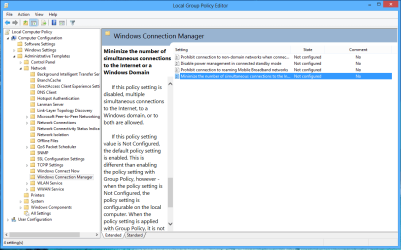
There is actually a Group Policy adjustment you can make in order to allow the use of two network connection at once. I'm not sure if this will work to fix the Op's problem but I'd say you have a better chance if this setting is enabled to use two connections at once.

By default, Windows doesn't really allow for the use of two connections at once but apparently it can be done with this setting.
 

Attachments

  • Group Policy for using two connections at once.PNG
    Group Policy for using two connections at once.PNG
    33.4 KB · Views: 4

My Computer My Computer

At a glance

Windows 7 Ult, Windows 8.1 Pro,Q9650-4.275GHz, E8600 4.5GHz, E6750-3.8GHzG.Skill PC2 9600 1200Mhz 5 5 5 15 2TGTX480
Computer type
PC/Desktop
Computer Manufacturer/Model Number
Home built
OS
Windows 7 Ult, Windows 8.1 Pro,
CPU
Q9650-4.275GHz, E8600 4.5GHz, E6750-3.8GHz
Motherboard
Evga 780i FTW
Memory
G.Skill PC2 9600 1200Mhz 5 5 5 15 2T
Graphics Card(s)
GTX480
Sound Card
Asus Xonar D2
Monitor(s) Displays
HannsG
Screen Resolution
1680X1050
Hard Drives
GSkill Phoenix Pro 120GB SSD
PSU
ThermalTake Toughpower 1000Watt modular
Case
ThermalTake XaserV
Cooling
Xigmatek S1283
Keyboard
Logitech G15
Mouse
Logitech G9
Internet Speed
T1
came across this in my routers setting don't know if this would be useful
9QP1GmP6Tui2Luh9qwOJ5A-FQc6ziY42gzB6Ba4qICF-feULjE4Si7r6CRoLBFa-T6QFToo46QM
bYX_LEDPki9ZcLsijTWPZrM8alC4IKFnAA3boEt1j8JxPqekrAI4AKT8nl7WZhhprETiycK9iIQ
9065_10200746897148917_927265553_n.jpg

will look into that shadow
& chev65 how do i locate that i tried the search but it doesn't pop up
 
Last edited:

My Computer My Computer

At a glance

Microsoft Windows 7 Home Premium 32-bitIntel(R) Pentium(R) D CPU 3.40GHz3.00 GBmobo
OS
Microsoft Windows 7 Home Premium 32-bit
CPU
Intel(R) Pentium(R) D CPU 3.40GHz
Motherboard
Wolfdale 1333-D667 P1.40 w/ onboard sound and LAN, 4USB port
Memory
3.00 GB
Graphics Card(s)
mobo
Sound Card
High Definition Audio Device
Hard Drives
Western Digital 320GB-WDC WD3200AAKS-00VYA0 ATA Device

Seagate FA GoFlex Desk USB Device-External hard disk media-1.82 TB

(1) WDC WD3200AAKS-00VYA0 ATA Device (2) Seagate FA GoFlex Desk USB Device
Keyboard
emachines
Mouse
laser lol
Internet Speed
new speed http://www.speedtest.net/result/1778078629.png
Group Policy editor is not available for Home premium editions unfortunately :( There is probably a registry tweak that can complete the task but I do not know it
 

My Computer My Computer

At a glance

Windows 7 Professional x64 SP1 ; Windows Serv...Intel Core i5 2400 @ 3.10GHz8.0GB DDR3 @ 665MHz (2GBx4)AMD Radeon HD 6870
Computer type
PC/Desktop
Computer Manufacturer/Model Number
Custom Built
OS
Windows 7 Professional x64 SP1 ; Windows Server 2012 R2 Standard
CPU
Intel Core i5 2400 @ 3.10GHz
Motherboard
Foxconn H67MP-S/-V/H67MP
Memory
8.0GB DDR3 @ 665MHz (2GBx4)
Graphics Card(s)
AMD Radeon HD 6870
Sound Card
Realtek High Definition Audio
Monitor(s) Displays
AOC 2243W & SMB1930NW
Screen Resolution
1440x900 & 1920x1080
Hard Drives
977GB Seagate ST31000524AS ATA Drive (SATA)
250GB WD iSCSI attached Drive
PSU
750W Gaming PSU
Case
Novatech Night
Cooling
Fan
Keyboard
Dell Standard PS/2 Keyboard
Mouse
R.A.T 07 Gaming Mouse
Internet Speed
Download: 10 Mbps Ping: 30ms Upload: 0.81 Mbps
Browser
Google Chrome
Other Info
Optiarc DVD RW AD-5260S ATA Device
by chance can that routing in the linksys be any useful
 

My Computer My Computer

At a glance

Microsoft Windows 7 Home Premium 32-bitIntel(R) Pentium(R) D CPU 3.40GHz3.00 GBmobo
OS
Microsoft Windows 7 Home Premium 32-bit
CPU
Intel(R) Pentium(R) D CPU 3.40GHz
Motherboard
Wolfdale 1333-D667 P1.40 w/ onboard sound and LAN, 4USB port
Memory
3.00 GB
Graphics Card(s)
mobo
Sound Card
High Definition Audio Device
Hard Drives
Western Digital 320GB-WDC WD3200AAKS-00VYA0 ATA Device

Seagate FA GoFlex Desk USB Device-External hard disk media-1.82 TB

(1) WDC WD3200AAKS-00VYA0 ATA Device (2) Seagate FA GoFlex Desk USB Device
Keyboard
emachines
Mouse
laser lol
Internet Speed
new speed http://www.speedtest.net/result/1778078629.png
Hi

I'm not sure if this helps but I'm currently trying to add a second ISP to my home network and have gone for this device Draytek Vigor 2830. This leaves a single device to resolve DCHP and ISP integration - well I hope so:D

Regards
UKMedia
 

My Computer My Computer

At a glance

Windows 7 Ultimate 64Bit (SP 1)Intel Core i7 4770K OC32GB 1600Mhz DDR3MSI GTX580 Twin Frozr II/OC and NVIDIA GTX 970
Computer Manufacturer/Model Number
Self Build
OS
Windows 7 Ultimate 64Bit (SP 1)
CPU
Intel Core i7 4770K OC
Motherboard
ASUS Maximus VII Ranger
Memory
32GB 1600Mhz DDR3
Graphics Card(s)
MSI GTX580 Twin Frozr II/OC and NVIDIA GTX 970
Sound Card
On-Board and Soundblaster Recon 3 D headset
Monitor(s) Displays
x2 Flat screen 21" LG displays + x1 LG W2363D (3D)
Hard Drives
5 internal Hard Drives:
1 x WD 120GB Solid State
4 x WD 1TB (CAVIAR BLACK 1TB 32MB 7200 SATA) as Raid 5 array
PSU
Dark Power Pro 10 1200W
Case
CoolerMaster HAF 932 Case - Black
Cooling
Thermaltake Contac21 cooler
Keyboard
Cyborg
Mouse
Razor Mamba
Internet Speed
0.5 Mb - (Benefits of rural location!) & 24 MB Sat
Antivirus
MSE
Other Info
Teaming 2 GB network connection to Wired 1GB switch.
Connected to 37TB (Raid 5) of network storage on a wired 1GB lan.
(Mixture of internal hard drives, 1TB, 2TB, 4TB & 16TB Terastations)
Back
Top