Can't Setup Homegroup, Can't Share Folders, 1000's of Man Hours

ThaChad

New member
Local time
3:06 PM
Messages
33
Hey All,


Okay, I'm pretty much at the point of formatting my HDD's and going back to windows Vista.

I have spent 1000's of man hours trying to get this "New, Easier To Use" network system MicroSHAFT has come up with to work..

I am completely at my breaking point... I'm sure Microsoft's answer would be "Just reinstall windows AGAIN, until it works" because that's their solution to all software problems..


I've reinstalled windows 7 at least 1/2 dozen times and I STILL can't get the problem fixed..

I've NEVER had a problem getting my stuff to share with my other computers in ANY previous version of windows since Windows 95.

Now I have Windows 7 on all my home computers, and I can't share anything with anything.

After 100's of man hours I FINALLY got the stupid thing to share media, but I STILL can't get it to share any folders, files or anything at all..

I try to create a home group and I get "Windows cannot setup a HomeGroup on this computer", I try to share a file, folder, or anything at all and I get "Your file cannot be shared.", I've tried the advance sharing option, I get "An error occurred while trying to share __________. Incorrect Function. The shared resource was not created at this time."

I have tried EVERY forum post I could find from both Microsoft directly, 3rd party forums such as this, and anything inbetween. I have tried EVERY suggestion offered, and NONE of them work.

I guess I'm just hoping someone has figured out the insanity Microsoft calls "easy networking" so I can get this fixed, otherwise I will go back to windows Vista, and be done with Microsoft forever.

Thanks for the help..

-TheChad
 

My Computer My Computer

At a glance

Windows 7 Professional x64Intel Core 2 Duo E8400 Wolfdale 3.00GHz8GB OCZ Reaper HPC (4 x 2GB) DDR2 1066 (PC2 8...EVGA 512-P2-N757-TR GeForce 8600 GT 512MB 128...
OS
Windows 7 Professional x64
CPU
Intel Core 2 Duo E8400 Wolfdale 3.00GHz
Motherboard
GIGABYTE GA-EP35-DS3P
Memory
8GB OCZ Reaper HPC (4 x 2GB) DDR2 1066 (PC2 8500)
Graphics Card(s)
EVGA 512-P2-N757-TR GeForce 8600 GT 512MB 128-bit GDDR3
Sound Card
Built-In - Realtek ALC889A
Monitor(s) Displays
LG Flatron W2252TQ
Hard Drives
1 x Seagate Barracuda ST3000DM001 3TB 7200 RPM SATA 6.0Gb/s 3.5" Internal Hard Drive

1 x Seagate Barracuda ST3750330AS 750GB 7200 RPM SATA 3.0Gb/s 3.5" Internal Hard Drive
Hehehe, sounds like you are having a bad day. Vista is still Microsoft though, and you are better off with Windows 7. Lets see if we can help you.

If I was in your position, I would start with this tutorial on creating a HomeGroup first. Follow it carefully since there are some specific requirements to create a homegroup.

http://www.sevenforums.com/tutorials/43961-homegroup-create.html

Once you have done that, post back and we will get the other PC's to join the homegroup you just created, or you can forge ahead with this tutorial.

http://www.sevenforums.com/tutorials/43972-homegroup-add-computer-join.html

Start from a clean slate with any other homegroups you created being cleared.

Regards,
Golden
 

My Computer My Computer

At a glance

Windows 10 Pro x64 ; Xubuntu x64Intel i7 860 @ 2.80 GHz O/C'ed to 4.0GHz16GB Corsair Vengance DDR3 @ 661 MHz Dual Cha...EVGA NVidia GTX 560 1024MB
Computer type
PC/Desktop
Computer Manufacturer/Model Number
Golden Mk. I.4
OS
Windows 10 Pro x64 ; Xubuntu x64
CPU
Intel i7 860 @ 2.80 GHz O/C'ed to 4.0GHz
Motherboard
Gigabyte P55A-UD3R Rev.1. Award BIOS F13
Memory
16GB Corsair Vengance DDR3 @ 661 MHz Dual Channel (9-9-9-24)
Graphics Card(s)
EVGA NVidia GTX 560 1024MB
Sound Card
Realtek Integrated
Monitor(s) Displays
Dual Samsung SyncMaster 2494HS
Screen Resolution
1920*1080 and 1920*1080
Hard Drives
1*Samsung 840 EVO 120GB SSD;
1*OCZ Vertex 2 60GB SSD;
2*Samsung F3 SpinPoint 1TB in RAID0;
1*Samsung F1 SpinPoint 1TB;
2*Western Digital 1TB External USB 3.0
1*Western Digital 500GB External USB 3.0
1*Seagate 500GB External USB 2.0
PSU
Thermaltake ToughPower QFan 750W
Case
Thermaltake Element S VK60001W2Z
Cooling
Corsair H60 Water Cooling, 2*230mm and 2*80mm case fans
Keyboard
Logitech G110
Mouse
Logitech MX518
Hehehe, sounds like you are having a bad day. Vista is still Microsoft though, and you are better off with Windows 7. Lets see if we can help you.

If I was in your position, I would start with this tutorial on creating a HomeGroup first. Follow it carefully since there are some specific requirements to create a homegroup.

http://www.sevenforums.com/tutorials/43961-homegroup-create.html

Once you have done that, post back and we will get the other PC's to join the homegroup you just created, or you can forge ahead with this tutorial.

http://www.sevenforums.com/tutorials/43972-homegroup-add-computer-join.html

Start from a clean slate with any other homegroups you created being cleared.

Regards,
Golden

I've never hated Microsoft until this Windows 7 HomeGroup FLAW, and not the joke they call Windows 8.

Windows Vista was a resource HOG, which is why I ended up upgrading both my systems to Windows 7 which does run a lot smoother/faster than Windows Vista, HOWEVER this network sharing joke they came up with is enough to make me give it all up. NO one should have to spend as much time as I have or really more than a few minutes to get their systems networked and sharing files..

Anyway, I finally got the Home group to work, I went threw the services one by one and found "HomeGroup Listener" had been stopped, even thought I've started it before, I started it AGAIN and set it to Automatic AGAIN, so far it's staying turned on. Now it let me create a Home Group.

However when I try to check the boxes to share my stuff, I check all the boxes and once I click okay, and go back in, all of them except printers are UNCHECKED.

.. and it STILL wont let me share ANYTHING..

-TheChad
 

My Computer My Computer

At a glance

Windows 7 Professional x64Intel Core 2 Duo E8400 Wolfdale 3.00GHz8GB OCZ Reaper HPC (4 x 2GB) DDR2 1066 (PC2 8...EVGA 512-P2-N757-TR GeForce 8600 GT 512MB 128...
OS
Windows 7 Professional x64
CPU
Intel Core 2 Duo E8400 Wolfdale 3.00GHz
Motherboard
GIGABYTE GA-EP35-DS3P
Memory
8GB OCZ Reaper HPC (4 x 2GB) DDR2 1066 (PC2 8500)
Graphics Card(s)
EVGA 512-P2-N757-TR GeForce 8600 GT 512MB 128-bit GDDR3
Sound Card
Built-In - Realtek ALC889A
Monitor(s) Displays
LG Flatron W2252TQ
Hard Drives
1 x Seagate Barracuda ST3000DM001 3TB 7200 RPM SATA 6.0Gb/s 3.5" Internal Hard Drive

1 x Seagate Barracuda ST3750330AS 750GB 7200 RPM SATA 3.0Gb/s 3.5" Internal Hard Drive
If the HomeGroup exists, follow the 2nd tutorial and try to join the HomeGroup. What is the result?
 

My Computer My Computer

At a glance

Windows 10 Pro x64 ; Xubuntu x64Intel i7 860 @ 2.80 GHz O/C'ed to 4.0GHz16GB Corsair Vengance DDR3 @ 661 MHz Dual Cha...EVGA NVidia GTX 560 1024MB
Computer type
PC/Desktop
Computer Manufacturer/Model Number
Golden Mk. I.4
OS
Windows 10 Pro x64 ; Xubuntu x64
CPU
Intel i7 860 @ 2.80 GHz O/C'ed to 4.0GHz
Motherboard
Gigabyte P55A-UD3R Rev.1. Award BIOS F13
Memory
16GB Corsair Vengance DDR3 @ 661 MHz Dual Channel (9-9-9-24)
Graphics Card(s)
EVGA NVidia GTX 560 1024MB
Sound Card
Realtek Integrated
Monitor(s) Displays
Dual Samsung SyncMaster 2494HS
Screen Resolution
1920*1080 and 1920*1080
Hard Drives
1*Samsung 840 EVO 120GB SSD;
1*OCZ Vertex 2 60GB SSD;
2*Samsung F3 SpinPoint 1TB in RAID0;
1*Samsung F1 SpinPoint 1TB;
2*Western Digital 1TB External USB 3.0
1*Western Digital 500GB External USB 3.0
1*Seagate 500GB External USB 2.0
PSU
Thermaltake ToughPower QFan 750W
Case
Thermaltake Element S VK60001W2Z
Cooling
Corsair H60 Water Cooling, 2*230mm and 2*80mm case fans
Keyboard
Logitech G110
Mouse
Logitech MX518
I was able to join the home group with both computers..

The laptop was able to share everything no problem... The desktop still won't share anything..

-ThaChad
 

My Computer My Computer

At a glance

Windows 7 Professional x64Intel Core 2 Duo E8400 Wolfdale 3.00GHz8GB OCZ Reaper HPC (4 x 2GB) DDR2 1066 (PC2 8...EVGA 512-P2-N757-TR GeForce 8600 GT 512MB 128...
OS
Windows 7 Professional x64
CPU
Intel Core 2 Duo E8400 Wolfdale 3.00GHz
Motherboard
GIGABYTE GA-EP35-DS3P
Memory
8GB OCZ Reaper HPC (4 x 2GB) DDR2 1066 (PC2 8500)
Graphics Card(s)
EVGA 512-P2-N757-TR GeForce 8600 GT 512MB 128-bit GDDR3
Sound Card
Built-In - Realtek ALC889A
Monitor(s) Displays
LG Flatron W2252TQ
Hard Drives
1 x Seagate Barracuda ST3000DM001 3TB 7200 RPM SATA 6.0Gb/s 3.5" Internal Hard Drive

1 x Seagate Barracuda ST3750330AS 750GB 7200 RPM SATA 3.0Gb/s 3.5" Internal Hard Drive
I was able to join the home group with both computers..

The laptop was able to share everything no problem... The desktop still won't share anything..

-ThaChad


Are you sure both Homegroup Passwords match and are on the same Work or Homegroup ?

I also found making a dedicated network drive through Homegroup would be better for sharing between machines
 

My Computer My Computer

At a glance

Windows 10 Home Premium 64bit sp1Intel I7-6700K @ 4.6 Ghz 1.344 volts everyday OC32GB G-Skill TridentZ 3200mhz 16-18-18-38 DDR4Sli Gigabyte Windforce GTX 980 G1
Computer type
PC/Desktop
Computer Manufacturer/Model Number
CoreI7-6700K MrFingerIII Special Builds
OS
Windows 10 Home Premium 64bit sp1
CPU
Intel I7-6700K @ 4.6 Ghz 1.344 volts everyday OC
Motherboard
Asrock Fatality K6 Z170 Socket 1151
Memory
32GB G-Skill TridentZ 3200mhz 16-18-18-38 DDR4
Graphics Card(s)
Sli Gigabyte Windforce GTX 980 G1
Sound Card
AC97 Creative Rage Tactic 3D Headphones Bluetooth
Monitor(s) Displays
27" Asus ROG Swift PG278Q G-Sync 48" Vizio Smart HD TV
Screen Resolution
2560x1440p 27"- 48" Currently Gaming at 2560x1440p Res 2K
Hard Drives
250GB Samsung Evo840SSD Seagate baracuda 500 GB WD Mybook 500Gb 1TB Seagate Barracuda
PSU
HX1050w Corsair Silver 80plus certified crosfire/sli
Case
Enthod Pro Full Tower
Cooling
Corsair H110i GT 280 mm High Performance WaterBlock
Keyboard
Logitech wireless keyboard
Mouse
Logitech wireless mouse
Internet Speed
Cox Cable 100+ mb
Antivirus
WebRoot Spysweeper with Antivirus
Browser
IE-10, Chrome, Opera
Other Info
My Other Rig is a AMD FX8320E @4.6Ghz 16GB Ballistic Sport Ram
Mobo Asrock Fatality 990FX 120GB OCZ SSD 1TB Seagate Barracuda Corsair H75 Cooling PSU Corsair CX750
GPU GTX Gigabyte 970G1
I was able to join the home group with both computers..

The laptop was able to share everything no problem... The desktop still won't share anything..

-ThaChad


Are you sure both Homegroup Passwords match and are on the same Work or Homegroup ?

I also found making a dedicated network drive through Homegroup would be better for sharing between machines

Yes, I created the Home Group on the Desktop PC, I then went to the laptop and joined the HomeGroup created on the desktop, using the password I created on the Desktop PC.
 

My Computer My Computer

At a glance

Windows 7 Professional x64Intel Core 2 Duo E8400 Wolfdale 3.00GHz8GB OCZ Reaper HPC (4 x 2GB) DDR2 1066 (PC2 8...EVGA 512-P2-N757-TR GeForce 8600 GT 512MB 128...
OS
Windows 7 Professional x64
CPU
Intel Core 2 Duo E8400 Wolfdale 3.00GHz
Motherboard
GIGABYTE GA-EP35-DS3P
Memory
8GB OCZ Reaper HPC (4 x 2GB) DDR2 1066 (PC2 8500)
Graphics Card(s)
EVGA 512-P2-N757-TR GeForce 8600 GT 512MB 128-bit GDDR3
Sound Card
Built-In - Realtek ALC889A
Monitor(s) Displays
LG Flatron W2252TQ
Hard Drives
1 x Seagate Barracuda ST3000DM001 3TB 7200 RPM SATA 6.0Gb/s 3.5" Internal Hard Drive

1 x Seagate Barracuda ST3750330AS 750GB 7200 RPM SATA 3.0Gb/s 3.5" Internal Hard Drive
This might help.
I like you ThaChad spent many hours on homegroup. Here is what solved my problem.

DO NOT use your own created password. Use only the password that Windows created when you first set up your home group. Example:
Windows created a password (abcdef). I cleared that password and made my own password (dogdodo)
I was never able to get home group to work.
When I used Windows password (abcdef) home group would work.
I have no idea why.
 

My Computer My Computer

At a glance

Windows 10 Pro. 64/ version 1709 Windows 7 Pr...Intel i7-6800K @ 4.3Corsair Platinum 16 gig @2400EVGA GTX 1070 OC
Computer type
PC/Desktop
Computer Manufacturer/Model Number
Home made Desktop
OS
Windows 10 Pro. 64/ version 1709 Windows 7 Pro/64
CPU
Intel i7-6800K @ 4.3
Motherboard
ASUS X-99 Deluxe II
Memory
Corsair Platinum 16 gig @2400
Graphics Card(s)
EVGA GTX 1070 OC
Monitor(s) Displays
Asus 27" LED LCD/VE278Q
Screen Resolution
1920-1080 or 1280-720 HDMI
Hard Drives
INTEL SSD 730-240 Gb Sata 3.0/
PSU
EVGA Platium 1200W
Case
Phanteks Luxe Tempered Glass 8 fans/ one radiator
Cooling
XSPC/ Water Cooled CPU
Keyboard
Das 4 Professional
Mouse
Logitech M705/MX Anywhere 2-S
Internet Speed
100 mbits
Antivirus
Microsoft Security Essentials/ Malwarebytes Premium 3.0/ SAS
Browser
I.E. 11 default/Firefox/ ISP Time Warner Cable/Spectrum
Other Info
LG BluRay Burner/
Sound system-KLipsch-THX/
Icy Dock ssd Hot Swap bays.
Not sure if it will help you TheChad, but I had the same problem on a friends laptop (An error occurred while trying to share *******. Incorrect Function). I can across a thread http://www.sevenforums.com/network-sharing/268813-incorrect-function-sharing.html that recommended this knowledge base article below

I receive the message that my ESET installation ended prematurely - ESET Knowledgebase

I didn't have high hopes as I still had the Base Filtering Engine service present. Anyway I ran the ESET ServicesRepair utility, rebooted as required and to my surprise I can now share folders.

I do recall having to remove some virus/spyware/trojan for them a while back with Malwarebytes so I'm guessing this was the cause of the issue...

Update: I just had a look in Control Panel -> Windows Firewall -> Allowed Programs and I've noticed there are a lot more options, mainly windows related apps and services.

I did try to run the Firewall Rules.reg xmonkz suggested also in the http://www.sevenforums.com/network-sharing/268813-incorrect-function-sharing.html thread, but it didn't work
 

My Computer My Computer

At a glance

Windows 8 Enterprise x64
Computer type
PC/Desktop
OS
Windows 8 Enterprise x64
This might help.
I like you ThaChad spent many hours on homegroup. Here is what solved my problem.

DO NOT use your own created password. Use only the password that Windows created when you first set up your home group. Example:
Windows created a password (abcdef). I cleared that password and made my own password (dogdodo)
I was never able to get home group to work.
When I used Windows password (abcdef) home group would work.
I have no idea why.

I seem to remember pointing that out to you awhile back. :geek:

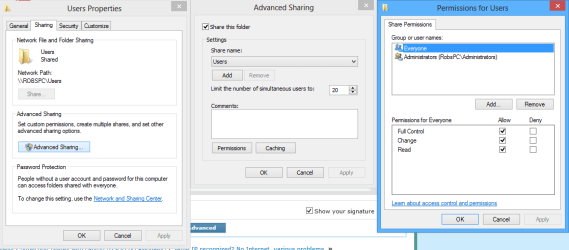
As for the Op's problem with sharing, it's important to make sure that Network Discovery and File and printer sharing are turned on in the Advanced Sharing settings.

You also need to make sure that the C:>Users folder is shared out as this setting controls all folders which reside in the Users folders. Without this one shared per the picture below no sharing will be possible.
 

Attachments

  • sharing tab full permissions.PNG
    sharing tab full permissions.PNG
    20.8 KB · Views: 0
Last edited:

My Computer My Computer

At a glance

Windows 7 Ult, Windows 8.1 Pro,Q9650-4.275GHz, E8600 4.5GHz, E6750-3.8GHzG.Skill PC2 9600 1200Mhz 5 5 5 15 2TGTX480
Computer type
PC/Desktop
Computer Manufacturer/Model Number
Home built
OS
Windows 7 Ult, Windows 8.1 Pro,
CPU
Q9650-4.275GHz, E8600 4.5GHz, E6750-3.8GHz
Motherboard
Evga 780i FTW
Memory
G.Skill PC2 9600 1200Mhz 5 5 5 15 2T
Graphics Card(s)
GTX480
Sound Card
Asus Xonar D2
Monitor(s) Displays
HannsG
Screen Resolution
1680X1050
Hard Drives
GSkill Phoenix Pro 120GB SSD
PSU
ThermalTake Toughpower 1000Watt modular
Case
ThermalTake XaserV
Cooling
Xigmatek S1283
Keyboard
Logitech G15
Mouse
Logitech G9
Internet Speed
T1
Back
Top