PLEASE HELP!!!!! I Think I May Have Lost Everything!

cbrent16

New member
Local time
2:35 PM
Messages
10
Hello,

I am not a tech-savvy person, and I'm currently having to write this from my phone, so I apologize in advance for any errors or whatever... Anyway, I use a Sony VAIO laptop for work, and it is used strictly fot work and work alone... I have hundreds of very important files on it, and I have never had an issue with it before.

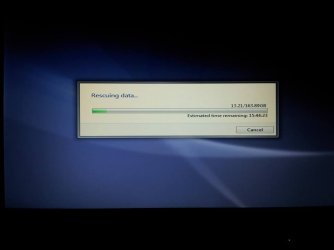
Last night, I was working on it just fine, and I left it on when I went to bed because I needed to print a large document. I woke up this morning and came down to continue working, and my screen had gone to that wavy blue user login background with a large message asking me if I wanted to perform a Data Rescue or System Rescue or something. Obviously confused and panicked, I chose yes, and it told me to back up my data to an external device. I plugged in my external hard drive, and set it as the device to have everything backed up to... I am currently on a wavy blue user log in style scree with a message that says "Rescuinng data..." and has a loading bar... It is currently at 2.87/163.89GB and has an estimated time of 23:55:30, but that time keeps fluctuating...

I am honestly in a panic and do not know what has happened or what to do... I use this laptop for work, and it contains a special $4,500 transcription program, as well as hundreds if not thousands of sensitive legal documents. Losing this data could easily mean losing my job... On top of all of this, I have a ton of work to do and I can't afford to fall behind!

Please, if anybody can explain to me what's going on or offer assistance in any way, I would appreciate it immeasurably. Thanks in advance for any response!
 

My Computer My Computer

At a glance

Windows 7
Computer type
Laptop
Computer Manufacturer/Model Number
Sony VAIO
OS
Windows 7
Antivirus
Advanced System Care 6, Malware Bytes
Browser
Google Chrome
Can you take a picture and upload the picture ? Use the paperclip next to the smiley to upload the image .
 

My Computer My Computer

At a glance

Windows 7 Ultimate 32-Bit & Windows 7 Ultimat...Intel Core i7 CPU 950 @ 3.07GHzOCZ 6GB (3 x 2GB) 240-Pin DDR3 SDRAM DDR3 160...ATI Radeon HD 5700 Series
Computer Manufacturer/Model Number
Custom Built
OS
Windows 7 Ultimate 32-Bit & Windows 7 Ultimate 64-Bit
CPU
Intel Core i7 CPU 950 @ 3.07GHz
Motherboard
ASUS P6T DELUXE V2
Memory
OCZ 6GB (3 x 2GB) 240-Pin DDR3 SDRAM DDR3 1600 OCZ3X1600R2
Graphics Card(s)
ATI Radeon HD 5700 Series
Sound Card
OnBoard
Hard Drives
WD6400AACS-00M3B0 (640GB SATA )
PSU
CORSAIR 850w
Case
NZXT LEXA
Cooling
Intel Stock Heatsink Fan
Keyboard
Microsoft Wireless Laser Keyboard 7000
Mouse
Microsoft Wireless Laser Mouse 7000

My Computer My Computer

At a glance

Windows 7
Computer type
Laptop
Computer Manufacturer/Model Number
Sony VAIO
OS
Windows 7
Antivirus
Advanced System Care 6, Malware Bytes
Browser
Google Chrome
When you got the window where it asks you Do you want to perform a Rescue Data did it have Sony Vaio Care on the top left hand corner ?
 

My Computer My Computer

At a glance

Windows 7 Ultimate 32-Bit & Windows 7 Ultimat...Intel Core i7 CPU 950 @ 3.07GHzOCZ 6GB (3 x 2GB) 240-Pin DDR3 SDRAM DDR3 160...ATI Radeon HD 5700 Series
Computer Manufacturer/Model Number
Custom Built
OS
Windows 7 Ultimate 32-Bit & Windows 7 Ultimate 64-Bit
CPU
Intel Core i7 CPU 950 @ 3.07GHz
Motherboard
ASUS P6T DELUXE V2
Memory
OCZ 6GB (3 x 2GB) 240-Pin DDR3 SDRAM DDR3 1600 OCZ3X1600R2
Graphics Card(s)
ATI Radeon HD 5700 Series
Sound Card
OnBoard
Hard Drives
WD6400AACS-00M3B0 (640GB SATA )
PSU
CORSAIR 850w
Case
NZXT LEXA
Cooling
Intel Stock Heatsink Fan
Keyboard
Microsoft Wireless Laser Keyboard 7000
Mouse
Microsoft Wireless Laser Mouse 7000
Yeah, actually, it did! I'm sorry I forgot to post that originally. I forgot about that detail.
 

My Computer My Computer

At a glance

Windows 7
Computer type
Laptop
Computer Manufacturer/Model Number
Sony VAIO
OS
Windows 7
Antivirus
Advanced System Care 6, Malware Bytes
Browser
Google Chrome
For the time being I would let it finish the rescue operation. Hopefully you will at least end up with your data on the backup disk. Then we'll see what's next.
 

My Computer My Computer

At a glance

Vista, Windows7, Mint Mate, Zorin, Windows 8from 1.6GHz Duo to i7
Computer Manufacturer/Model Number
HP, Dell, Gateway, Toshiba - 4 laptops and 2 desktops
OS
Vista, Windows7, Mint Mate, Zorin, Windows 8
CPU
from 1.6GHz Duo to i7
Monitor(s) Displays
2x HP w2207
Hard Drives
5x HDD, 7x SSD, 12x Externals
Keyboard
with trackball - no mices
Mouse
Trackball mice
Internet Speed
DSL 6000
If this is a work laptop given to you by your employer, you should contact your employer's IT support immediately.
 

My Computer My Computer

At a glance

Windows 10 Pro x64 EN-GB1.6 GHz Intel Core i7-720QM Processor6 GBATI Mobility Radeon HD 5850 Graphics
Computer type
Laptop
Computer Manufacturer/Model Number
HP ENVY 17-1150eg
OS
Windows 10 Pro x64 EN-GB
CPU
1.6 GHz Intel Core i7-720QM Processor
Memory
6 GB
Graphics Card(s)
ATI Mobility Radeon HD 5850 Graphics
Sound Card
Beats sound system with integrated subwoofer
Monitor(s) Displays
17" laptop display, 22" LED and 32" Full HD TV through HDMI
Screen Resolution
1600*900 (1), 1920*1080 (2&3)
Hard Drives
Internal: 2 x 500 GB SATA Hard Disk Drive 7200 rpm
External: 2TB for backups, 3TB USB3 network drive for media
Cooling
As Envy runs a bit warm, I have it on a Cooler Master pad
Keyboard
Logitech diNovo Media Desktop Laser (bluetooth)
Mouse
Logitech Performance Mouse MX
Internet Speed
50/10 Mbps VDSL
Antivirus
Windows Defender 4.3.9431.0
Browser
Maxthon 3.5.2., IE11
Did you accidentally press any keys ? That window is for putting the laptop back into Factory Settings . It will ask you do you want to back up your data before we run the factory restore .

( not trying to scare you . Just trying to get some info and give info )
 

My Computer My Computer

At a glance

Windows 7 Ultimate 32-Bit & Windows 7 Ultimat...Intel Core i7 CPU 950 @ 3.07GHzOCZ 6GB (3 x 2GB) 240-Pin DDR3 SDRAM DDR3 160...ATI Radeon HD 5700 Series
Computer Manufacturer/Model Number
Custom Built
OS
Windows 7 Ultimate 32-Bit & Windows 7 Ultimate 64-Bit
CPU
Intel Core i7 CPU 950 @ 3.07GHz
Motherboard
ASUS P6T DELUXE V2
Memory
OCZ 6GB (3 x 2GB) 240-Pin DDR3 SDRAM DDR3 1600 OCZ3X1600R2
Graphics Card(s)
ATI Radeon HD 5700 Series
Sound Card
OnBoard
Hard Drives
WD6400AACS-00M3B0 (640GB SATA )
PSU
CORSAIR 850w
Case
NZXT LEXA
Cooling
Intel Stock Heatsink Fan
Keyboard
Microsoft Wireless Laser Keyboard 7000
Mouse
Microsoft Wireless Laser Mouse 7000
Okay. I'll do that. Thanks very much for your help, I really do appreciate it...

If I might ask, this is a pretty pristine computer used only for offline document transcription and some light, work-related internet browsing... do you know what exactly may have caused this or what role the Sony VAIO Care has to play in all of this?
 

My Computer My Computer

At a glance

Windows 7
Computer type
Laptop
Computer Manufacturer/Model Number
Sony VAIO
OS
Windows 7
Antivirus
Advanced System Care 6, Malware Bytes
Browser
Google Chrome
Did you accidentally press any keys ? That window is for putting the laptop back into Factory Settings . It will ask you do you want to back up your data before we run the factory restore .

( not trying to scare you . Just trying to get some info and give info )

This is my own personal laptop. I purchased it myself because technically I'm a private contractor, so I have no IT department to go to, unfortunately.

And, VistaKing, no, I didn't press any keys. I set a large document to print last night, as I have done hundreds of times, and then I went to bed. Everything was working perfectly fine. I came down this morning, and the document was sitting in my printer bay perfectly printed, and that initial message asking me if I wanted to do a system rescue was on my screen.
 

My Computer My Computer

At a glance

Windows 7
Computer type
Laptop
Computer Manufacturer/Model Number
Sony VAIO
OS
Windows 7
Antivirus
Advanced System Care 6, Malware Bytes
Browser
Google Chrome
Lets see what happens after its completed .
 

My Computer My Computer

At a glance

Windows 7 Ultimate 32-Bit & Windows 7 Ultimat...Intel Core i7 CPU 950 @ 3.07GHzOCZ 6GB (3 x 2GB) 240-Pin DDR3 SDRAM DDR3 160...ATI Radeon HD 5700 Series
Computer Manufacturer/Model Number
Custom Built
OS
Windows 7 Ultimate 32-Bit & Windows 7 Ultimate 64-Bit
CPU
Intel Core i7 CPU 950 @ 3.07GHz
Motherboard
ASUS P6T DELUXE V2
Memory
OCZ 6GB (3 x 2GB) 240-Pin DDR3 SDRAM DDR3 1600 OCZ3X1600R2
Graphics Card(s)
ATI Radeon HD 5700 Series
Sound Card
OnBoard
Hard Drives
WD6400AACS-00M3B0 (640GB SATA )
PSU
CORSAIR 850w
Case
NZXT LEXA
Cooling
Intel Stock Heatsink Fan
Keyboard
Microsoft Wireless Laser Keyboard 7000
Mouse
Microsoft Wireless Laser Mouse 7000

My Computer My Computer

At a glance

Windows 7
Computer type
Laptop
Computer Manufacturer/Model Number
Sony VAIO
OS
Windows 7
Antivirus
Advanced System Care 6, Malware Bytes
Browser
Google Chrome
You're welcome .
 

My Computer My Computer

At a glance

Windows 7 Ultimate 32-Bit & Windows 7 Ultimat...Intel Core i7 CPU 950 @ 3.07GHzOCZ 6GB (3 x 2GB) 240-Pin DDR3 SDRAM DDR3 160...ATI Radeon HD 5700 Series
Computer Manufacturer/Model Number
Custom Built
OS
Windows 7 Ultimate 32-Bit & Windows 7 Ultimate 64-Bit
CPU
Intel Core i7 CPU 950 @ 3.07GHz
Motherboard
ASUS P6T DELUXE V2
Memory
OCZ 6GB (3 x 2GB) 240-Pin DDR3 SDRAM DDR3 1600 OCZ3X1600R2
Graphics Card(s)
ATI Radeon HD 5700 Series
Sound Card
OnBoard
Hard Drives
WD6400AACS-00M3B0 (640GB SATA )
PSU
CORSAIR 850w
Case
NZXT LEXA
Cooling
Intel Stock Heatsink Fan
Keyboard
Microsoft Wireless Laser Keyboard 7000
Mouse
Microsoft Wireless Laser Mouse 7000
Hey... So, I'm back. It ended up restoring my laptop completely to factory default... Luckily, everything (I think) was backed up to the external hard drive I had connected, but I have no idea how to get it all from the two new folders on my external hard drive back onto my laptop like normal...

The two folders are called 2013-06-15_C and 2013-06-15_D, if that's of any help for whatever reason. C has folders called 'Boot' and 'RModule', and D has a great deal of different folders with varying content.

I tried opening my work program from the hard drive, and it didn't recognize my user profile, so I couldn't even check to see if all my files were still there or not.

Is there a way to restore everything back to normal straight from the hard drive? Not really sure quite what to do. I really appreciate all the help.
 

My Computer My Computer

At a glance

Windows 7
Computer type
Laptop
Computer Manufacturer/Model Number
Sony VAIO
OS
Windows 7
Antivirus
Advanced System Care 6, Malware Bytes
Browser
Google Chrome
You won't able to run programs from the external drive . You would have to reinstall the programs that didn't come with your laptop back into your PC . To get the files back from the external hard drive to the laptop are they just regular files one specific file ?
 

My Computer My Computer

At a glance

Windows 7 Ultimate 32-Bit & Windows 7 Ultimat...Intel Core i7 CPU 950 @ 3.07GHzOCZ 6GB (3 x 2GB) 240-Pin DDR3 SDRAM DDR3 160...ATI Radeon HD 5700 Series
Computer Manufacturer/Model Number
Custom Built
OS
Windows 7 Ultimate 32-Bit & Windows 7 Ultimate 64-Bit
CPU
Intel Core i7 CPU 950 @ 3.07GHz
Motherboard
ASUS P6T DELUXE V2
Memory
OCZ 6GB (3 x 2GB) 240-Pin DDR3 SDRAM DDR3 1600 OCZ3X1600R2
Graphics Card(s)
ATI Radeon HD 5700 Series
Sound Card
OnBoard
Hard Drives
WD6400AACS-00M3B0 (640GB SATA )
PSU
CORSAIR 850w
Case
NZXT LEXA
Cooling
Intel Stock Heatsink Fan
Keyboard
Microsoft Wireless Laser Keyboard 7000
Mouse
Microsoft Wireless Laser Mouse 7000
You won't able to run programs from the external drive . You would have to reinstall the programs that didn't come with your laptop back into your PC . To get the files back from the external hard drive to the laptop are they just regular files one specific file ?

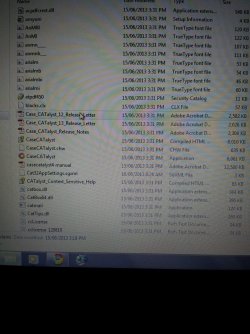
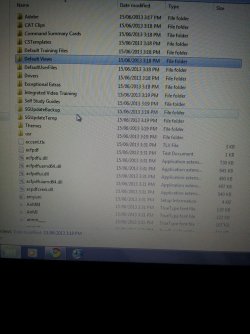
Okay, thanks... And to be totally honest, I'm not exactly sure. When I open the folder containing my work program, it has the application that starts the program, and then a TON of other folders and files in it as well... there are .tlx, .dll, .chw, .sgxml, .sgmsg, .clx, .utlx, .dat, and others. I have a feeling that some of these extensions are specific to my work program. All the other folders have their own files inside them, too... I've never seen any of this before because when I installed my program initially, I basically just got the icon on my desktop and never saw a folder with any of this stuff in it. Even if I re-download the program to my computer, I don't know how I would integrate my old files back into it from this. I don't know what's what at all.

UPDATE:

I reinstalled my work program and I managed to copy every file from the hard drive back over onto my laptop. Everything seemed perfect until I actually tried to open one of my jobs... Nothing was there. It literally recreated every folder and case I've ever made, but all the content, the actual jobs, aren't there. I don't know where they'd be, and I'm pretty sure they're just gone forever. Don't know that there's anything I can do about that.

Next thing I tried to do was get back all of my old Excel, MS Word, and WordPerfect files. None of those programs exist on my laptop anymore, but I was hoping that they would still be on my hard drive. I thought I could copy the contents of the Program Files folder from my hard drive onto my laptop, but almost immediately, it told me I did not have permission to enter something like 848 folders, and they could not be accessed for copying. I'm not really sure what to do now. Is there any way I can get back my old Excel, MS Word, an WordPerfect files, or any of the other folders/their contents that I had on my desktop before this catastrophe hit??

(Sorry. I tried to delete these images since I'm past that point now, but they're still there.)
 

Attachments

  • 993788_10152918237470650_859542901_n.jpg
    993788_10152918237470650_859542901_n.jpg
    87.7 KB · Views: 7
  • 1003653_10152918246640650_810024928_n.jpg
    1003653_10152918246640650_810024928_n.jpg
    76.3 KB · Views: 8
Last edited:

My Computer My Computer

At a glance

Windows 7
Computer type
Laptop
Computer Manufacturer/Model Number
Sony VAIO
OS
Windows 7
Antivirus
Advanced System Care 6, Malware Bytes
Browser
Google Chrome
To be able to view excel and word files you would need to reinstall Office again . To be able to use to use WordPerfect you would need to reinstall it
 

My Computer My Computer

At a glance

Windows 7 Ultimate 32-Bit & Windows 7 Ultimat...Intel Core i7 CPU 950 @ 3.07GHzOCZ 6GB (3 x 2GB) 240-Pin DDR3 SDRAM DDR3 160...ATI Radeon HD 5700 Series
Computer Manufacturer/Model Number
Custom Built
OS
Windows 7 Ultimate 32-Bit & Windows 7 Ultimate 64-Bit
CPU
Intel Core i7 CPU 950 @ 3.07GHz
Motherboard
ASUS P6T DELUXE V2
Memory
OCZ 6GB (3 x 2GB) 240-Pin DDR3 SDRAM DDR3 1600 OCZ3X1600R2
Graphics Card(s)
ATI Radeon HD 5700 Series
Sound Card
OnBoard
Hard Drives
WD6400AACS-00M3B0 (640GB SATA )
PSU
CORSAIR 850w
Case
NZXT LEXA
Cooling
Intel Stock Heatsink Fan
Keyboard
Microsoft Wireless Laser Keyboard 7000
Mouse
Microsoft Wireless Laser Mouse 7000
To be able to view excel and word files you would need to reinstall Office again . To be able to use to use WordPerfect you would need to reinstall it

Okay, thanks... Thanks for all your time and help, VK.
 

My Computer My Computer

At a glance

Windows 7
Computer type
Laptop
Computer Manufacturer/Model Number
Sony VAIO
OS
Windows 7
Antivirus
Advanced System Care 6, Malware Bytes
Browser
Google Chrome
Hi there
sometimes a commercial solution is the only answer -- you could try Undelete Plus -- I've used this with pretty well 90% recovery results. The main thing now is NOT TO DO ANY ACTION THAT WRITES TO YOUR HDD further as this will make recovery more difficult -- or impossible.

eSupport UndeletePlus - Easily undelete, unerase, and recover deleted files

Cheers
jimbo
 

My Computer My Computer

At a glance

Linux CENTOS 7 / various Windows OS'es and se...Intel i7 Intel i58GB, 16GBOn Motherboard
Computer type
PC/Desktop
Computer Manufacturer/Model Number
Custom built, several laptops HP/ASUS
OS
Linux CENTOS 7 / various Windows OS'es and servers
CPU
Intel i7 Intel i5
Memory
8GB, 16GB
Graphics Card(s)
On Motherboard
Sound Card
Realtek HD audio
Monitor(s) Displays
Apple Cinema display, Samsung LCD
Screen Resolution
1920 X 1080
Hard Drives
4 X 1TB SATA
Mouse
Toshiba wireless laser
Internet Speed
> 20MB up

My Computer My Computer

At a glance

Windows 7
Computer type
Laptop
Computer Manufacturer/Model Number
Sony VAIO
OS
Windows 7
Antivirus
Advanced System Care 6, Malware Bytes
Browser
Google Chrome
Back
Top