
Almost all memory used up during and after extraction or installation

CrimsonDog

New member
Local time
3:58 PM
Messages
11
Location
Croatia
Hi, Seven Forums.

I made an account to solve my most persistent issue with my PC.

You see, not sure when, but quite a while ago (we're talking about at least a year) I started to notice the following:
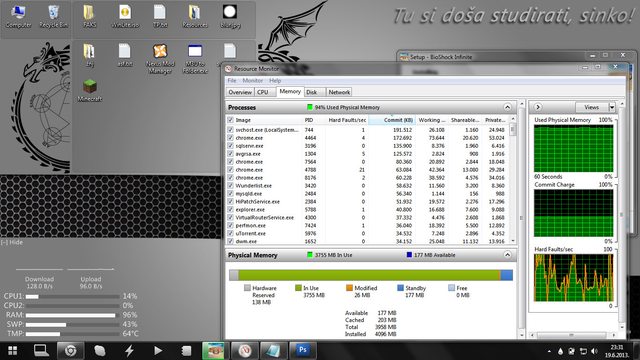
Whenever i unpack/extract a large compressed file (over 1.5 GB) or install a bulky piece of software (like a triple-A game or Visual Studio or something), during the installation or extraction process (I guess they fall pretty much into the same category of unpacking a compressed archive) most of my RAM is taken up (something like 95% of it) and my computer becomes really sluggish.

Now, although bothersome, this didn't strike me as odd or out of the ordinary that much, as it makes sense for the computer to struggle with multitasking while doing such a resource-heavy task, even though 95% and taking 2 whole minutes to turn on notepad is a bit extreme.

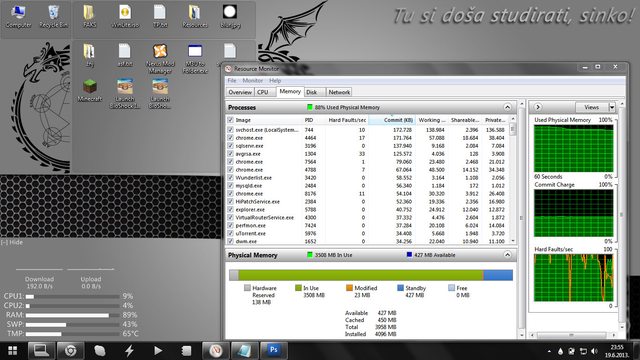
What did strike me as odd, however, is that, consistently, every time such a resource heavy extraction task was complete, done and closed, the memory usage would somehow stay at consistently high levels and the PC would still feel really sluggish, although to a infinitesimally lesser extent.

It's like Windows forgets to release the memory it reserved while the extraction was going on.

Here's the most recent example with installing Bioshock Infinite (click for expanded view):

During install:

After install:

My specs are:


Acer Aspire 5741G 334G64Mn:

  • Win7 x64
  • Intel Core i3 330M - 2 [email protected] GHz
  • Mobile Intel HM55 Express Chipset
  • 4 GB DDR3@1088 MHz
  • NVIDIA GeForce GT 320M 1 GB GDDR3
  • 1x640 GB HDD

What is causing this and how can I get around it?
A windows restart/reboot fixes the issue, but it's hardly a good solution to the problem.
 

My Computer My Computer

At a glance

Win7 x64Intel Core i3 330M4 GB DDR3@1088 MHzNVIDIA GeForce GT 320M 1 GB GDDR3
Computer type
Laptop
Computer Manufacturer/Model Number
Acer Aspire 5741G 334G64Mn
OS
Win7 x64
CPU
Intel Core i3 330M
Motherboard
Mobile Intel HM55 Express
Memory
4 GB DDR3@1088 MHz
Graphics Card(s)
NVIDIA GeForce GT 320M 1 GB GDDR3
Screen Resolution
1366x768 px
Hard Drives
1x640 GB
Antivirus
AVG
Browser
Chrome
May or may not be related to the issue you're having, but 4GB of RAM is basically the minimum to run Windows 7 64bit and other programs decently. I would get another 4GB either way, though it might not resolve the specific issue you're having.

Nothing in your Memory Processes log there seems to be taking up too much.
 
Last edited:

My Computer My Computer

At a glance

Windows 7 Professional SP1 64bit, Manjaro Xfc...Intel i7-3930K @ 4.2GHzCorsair Dominator 64GB Quad Channel DDR3 @ 16...EVGA GeForce GTX Titan Black Superclocked (×2...
Computer type
PC/Desktop
OS
Windows 7 Professional SP1 64bit, Manjaro Xfce, Debian 10 64bit Xfce
CPU
Intel i7-3930K @ 4.2GHz
Motherboard
ASUS P9X79 WS
Memory
Corsair Dominator 64GB Quad Channel DDR3 @ 1600MHz
Graphics Card(s)
EVGA GeForce GTX Titan Black Superclocked (×2, SLI)
Monitor(s) Displays
Sony Bravia 46"
Screen Resolution
1920×1080 (Full Screen), 1366×768 (Windows)
Hard Drives
Samsung 860 PRO 4TB SSD, Samsung 850 EVO 1TB SSD, Western Digital WD Gold 16TB 7200 RPM 512MB Cache HDD
PSU
Corsair AX1200 (1200W, 100.4A @ 12V)
Case
Corsair Obsidian 750D
Cooling
Corsair H110, 5 NOCTUA NF-A14 industrialPPC-3000 PWM Fans
Keyboard
Logitech K360
Mouse
Logitech M220
Browser
Firefox Developer Edition, Pale Moon, Tor
May or may not be related to the issue you're having, but 4GB of RAM is basically the minimum to run Windows 7 64bit and other programs decently. I would get another 4GB either way, though it might not resolve the specific issue you're having.

Fair point, although it may not be such a big issue for me.
My PC idles at around 52% most of the time, which leaves more than enough room for other applications.

The only thing i do on the PC that would bring my RAM usage to above 90% is the aforementioned extracting/installing and occasional video rendering that i do every few months or so.
 

My Computer My Computer

At a glance

Win7 x64Intel Core i3 330M4 GB DDR3@1088 MHzNVIDIA GeForce GT 320M 1 GB GDDR3
Computer type
Laptop
Computer Manufacturer/Model Number
Acer Aspire 5741G 334G64Mn
OS
Win7 x64
CPU
Intel Core i3 330M
Motherboard
Mobile Intel HM55 Express
Memory
4 GB DDR3@1088 MHz
Graphics Card(s)
NVIDIA GeForce GT 320M 1 GB GDDR3
Screen Resolution
1366x768 px
Hard Drives
1x640 GB
Antivirus
AVG
Browser
Chrome
I edited my previous post to included that it looks like the Memory Processes log looks OK.

Keep in mind too that with features such as SuperFetch your available RAM works as a HDD cache (dark blue portion in the Resource Monitor), which is kind of cool, and will speed up loading times of things you run or access from your HDD. So having extra RAM really isn't a waste, provided you have your PC up and running for the most part.

I currently have about 40GB cached in my RAM. ;)
 

My Computer My Computer

At a glance

Windows 7 Professional SP1 64bit, Manjaro Xfc...Intel i7-3930K @ 4.2GHzCorsair Dominator 64GB Quad Channel DDR3 @ 16...EVGA GeForce GTX Titan Black Superclocked (×2...
Computer type
PC/Desktop
OS
Windows 7 Professional SP1 64bit, Manjaro Xfce, Debian 10 64bit Xfce
CPU
Intel i7-3930K @ 4.2GHz
Motherboard
ASUS P9X79 WS
Memory
Corsair Dominator 64GB Quad Channel DDR3 @ 1600MHz
Graphics Card(s)
EVGA GeForce GTX Titan Black Superclocked (×2, SLI)
Monitor(s) Displays
Sony Bravia 46"
Screen Resolution
1920×1080 (Full Screen), 1366×768 (Windows)
Hard Drives
Samsung 860 PRO 4TB SSD, Samsung 850 EVO 1TB SSD, Western Digital WD Gold 16TB 7200 RPM 512MB Cache HDD
PSU
Corsair AX1200 (1200W, 100.4A @ 12V)
Case
Corsair Obsidian 750D
Cooling
Corsair H110, 5 NOCTUA NF-A14 industrialPPC-3000 PWM Fans
Keyboard
Logitech K360
Mouse
Logitech M220
Browser
Firefox Developer Edition, Pale Moon, Tor
64 GB of RAM? Jeez. :shock:

And yes, that's something I've noticed.
In task managed (and performance monitor), the memory the processes use doesn't add up to the actual used memory.
svchost, chrome, sqlservr and avgrsa processes (biggest spenders listed) are always at the listed amount of memory used, and i can work fine alongside them.
However, the memory still gets eaten up like free burgers at McDonalds whenever i try to extract anything bigger than 1.5 GB, and my PC become downright unusable, borderline unresponsive.
 

My Computer My Computer

At a glance

Win7 x64Intel Core i3 330M4 GB DDR3@1088 MHzNVIDIA GeForce GT 320M 1 GB GDDR3
Computer type
Laptop
Computer Manufacturer/Model Number
Acer Aspire 5741G 334G64Mn
OS
Win7 x64
CPU
Intel Core i3 330M
Motherboard
Mobile Intel HM55 Express
Memory
4 GB DDR3@1088 MHz
Graphics Card(s)
NVIDIA GeForce GT 320M 1 GB GDDR3
Screen Resolution
1366x768 px
Hard Drives
1x640 GB
Antivirus
AVG
Browser
Chrome
Sort the list by Private (KB) descending to see if it shows something different where a lot of memory is used.
 

My Computer My Computer

At a glance

Multi-Boot W7_Pro_x64 W8.1_Pro_x64 W10_Pro_x6...AMD Athlon II x4 6206GB GSkill DDR2 800AMD 4670 GPU + AMD 4200 IGP
Computer type
PC/Desktop
Computer Manufacturer/Model Number
home built
OS
Multi-Boot W7_Pro_x64 W8.1_Pro_x64 W10_Pro_x64 +Linux_VMs +Chromium_VM
CPU
AMD Athlon II x4 620
Motherboard
Gigabyte GA-MA785G-UD3H
Memory
6GB GSkill DDR2 800
Graphics Card(s)
AMD 4670 GPU + AMD 4200 IGP
Sound Card
on board Realtek ALC889A
Monitor(s) Displays
RCA 40" LCD TV, Insignia 32" LCD TV, HP 15" LCD monitor
Screen Resolution
1680 x 1050
Hard Drives
OCZ Vertex 3 120GB,
Samsung F3 1TB (3),
Several others - WD, Seagate, Hitachi, ...
PSU
Corsair 500 W
Case
Rosewill mid tower
Cooling
CM 90mm rifle
Keyboard
Gyration wireless, Logitech wireless, Dell USB wired
Mouse
Gyration wireless, Logitech wireless, V7 USB wired
Internet Speed
Spectrum - 100Mbps D / 10Mbps U
Antivirus
Avast, MBAM3, EMET, WinPatrol
Browser
Pale Moon, Firefox, IE
Other Info
2 multi-boot PC's
Mainly HTPC/Office/Gen purpose (no gaming).
Trendnet USB KVM.
LG DVD burner/Blue Ray Player.
Tray system for removable SATA backup drives.

Not currently OCd, under-volted.
I use Hybrid sleep, rarely re-boot or shutdown.

Hauppauge HD-PVR, Avermedia PCIe TV Tuner, Hauppauge PCI TV Tuner.
I already encountered this problem before, I just turn off/disabled other programs that is not very important or not useful to me. And I only have 2gb of ram lol but my computer runs properly :)
just try to disable some unnecessary stuffs.
 

My Computer My Computer

At a glance

Windows 7 Ultimate 64-bit SP1Intel(R) Core(TM) i3-2120 CPU @ 3.30GHz8.00GB Dual-Channel DDR3 @ 665MHz (9-9-9-24)NVIDIA GTX 750ti 2GB
Computer type
PC/Desktop
Computer Manufacturer/Model Number
Custom Build
OS
Windows 7 Ultimate 64-bit SP1
CPU
Intel(R) Core(TM) i3-2120 CPU @ 3.30GHz
Motherboard
ECS H61H2-M17
Memory
8.00GB Dual-Channel DDR3 @ 665MHz (9-9-9-24)
Graphics Card(s)
NVIDIA GTX 750ti 2GB
Sound Card
NVIDIA Virtual Audio Device
Monitor(s) Displays
Generic Non-PnP Monitor
Screen Resolution
1366x768
Hard Drives
2 TB SSHD
PSU
700watts
Case
X-Strike
Cooling
What's this?
Keyboard
TTesport Poseidon Z RGB (Brown edition)
Mouse
Cougar 700m
Internet Speed
300 kBps (shitty country)
Antivirus
Microsoft Security Essential
Browser
Google Chrome
Other Info
Road to Monster PC <3
Honestly I would turn off the Rainmeter because I noticed even on 6GB of ram I had issues extracting while running other things and then it went way better after doing the said instruction. Also if you're not running Chrome for REAL, it's okay to kill the other chrome things in the monitor to get some additional memory back (I'm pretty sure whatever you kill will come back after a restart or opening Chrome after you're done). Also Photoshop is not something I would run while extracting something huge which will take the living heck out of your computer (ESPECIALLY WITH A MOBILE I3). You can always get more RAM though.

You should look into disabling services that you don't really need - those take up some serious memory. There are numerous sites for that such as:
http://www.blackviper.com/service-c...dows-7-service-pack-1-service-configurations/

You should also look into your startup items which can and will use more memory.
 

My Computer My Computer

At a glance

Microsoft Windows 7 Ultimate 64-bit 7601 Mult...Intel(R) Core(TM) i5-2400S CPU @ 2.50GHz6.00 GBIntel(R) HD Graphics
Computer type
PC/Desktop
Computer Manufacturer/Model Number
HP
OS
Microsoft Windows 7 Ultimate 64-bit 7601 Multiprocessor Free Service Pack 1
CPU
Intel(R) Core(TM) i5-2400S CPU @ 2.50GHz
Motherboard
PEGATRON CORPORATION 2AC2
Memory
6.00 GB
Graphics Card(s)
Intel(R) HD Graphics
Sound Card
(1) Realtek High Definition Audio (2) HD Pro Webcam C910
Monitor(s) Displays
MAIN: HP S2331; Second: HP 2009m
Screen Resolution
1600 x 900 x 32 bits (4294967296 colors) @ 60 Hz
Hard Drives
(1) ATA Hitachi HDS72101 SCSI Disk Device (
PSU
300W Stock
Case
Stock HP Dv7T
Cooling
1 Case Fan; 1 stock CPU cooler
Antivirus
MS Security Essentials
Browser
Google Chrome/Chromium
I would be very wary about disabling system services. Unless your system is seriously short on memory this is unlikely to produce any significant savings.
The big problem with disabling service is that there is no publicly available documentation that completely describes the functions they perform. The descriptions that are available are incomplete and often contain errors, sometimes serious. Many an expert has got themselves into serious trouble by disabling some service that was thought to be unnecessary, but was.

Note that setting a service startup state to Manual is not a safe alternative to disabling it. In this state a service can be started if they system or an application needs it. But you can't assume that this will actually happen. Many applications will assume a service is running and fail if it is not.
 

My Computer My Computer

At a glance

Windows 7 Pro 64 bitXeon W35208 GBNvidia Geforce 210
Computer type
PC/Desktop
Computer Manufacturer/Model Number
HP
OS
Windows 7 Pro 64 bit
CPU
Xeon W3520
Memory
8 GB
Graphics Card(s)
Nvidia Geforce 210
I would be very wary about disabling system services. Unless your system is seriously short on memory this is unlikely to produce any significant savings.
The big problem with disabling service is that there is no publicly available documentation that completely describes the functions they perform. The descriptions that are available are incomplete and often contain errors, sometimes serious. Many an expert has got themselves into serious trouble by disabling some service that was thought to be unnecessary, but was.

Note that setting a service startup state to Manual is not a safe alternative to disabling it. In this state a service can be started if they system or an application needs it. But you can't assume that this will actually happen. Many applications will assume a service is running and fail if it is not.

Well I've disabled the ones that were obvious such as the Cardspace but you're right, there are no full descriptions as to how things work in the services. That's a great tip to point out to people. I went and did the "safe" section of it and so far there have been no problems on my end.
 

My Computer My Computer

At a glance

Microsoft Windows 7 Ultimate 64-bit 7601 Mult...Intel(R) Core(TM) i5-2400S CPU @ 2.50GHz6.00 GBIntel(R) HD Graphics
Computer type
PC/Desktop
Computer Manufacturer/Model Number
HP
OS
Microsoft Windows 7 Ultimate 64-bit 7601 Multiprocessor Free Service Pack 1
CPU
Intel(R) Core(TM) i5-2400S CPU @ 2.50GHz
Motherboard
PEGATRON CORPORATION 2AC2
Memory
6.00 GB
Graphics Card(s)
Intel(R) HD Graphics
Sound Card
(1) Realtek High Definition Audio (2) HD Pro Webcam C910
Monitor(s) Displays
MAIN: HP S2331; Second: HP 2009m
Screen Resolution
1600 x 900 x 32 bits (4294967296 colors) @ 60 Hz
Hard Drives
(1) ATA Hitachi HDS72101 SCSI Disk Device (
PSU
300W Stock
Case
Stock HP Dv7T
Cooling
1 Case Fan; 1 stock CPU cooler
Antivirus
MS Security Essentials
Browser
Google Chrome/Chromium
Sort the list by Private (KB) descending to see if it shows something different where a lot of memory is used.

The situation is not really handy to replicate, but i tried that and it didn't make much difference. No task really goes above the 200k MB used limit, no matter the column, so it looked much the same like the shown picture.

I already encountered this problem before, I just turn off/disabled other programs that is not very important or not useful to me. And I only have 2gb of ram lol but my computer runs properly :)
just try to disable some unnecessary stuffs.

The issue happens whichever applications i have open at the time, even when the only application is the Setup/7zip.

Honestly I would turn off the Rainmeter because I noticed even on 6GB of ram I had issues extracting while running other things and then it went way better after doing the said instruction. Also if you're not running Chrome for REAL, it's okay to kill the other chrome things in the monitor to get some additional memory back (I'm pretty sure whatever you kill will come back after a restart or opening Chrome after you're done). Also Photoshop is not something I would run while extracting something huge which will take the living heck out of your computer (ESPECIALLY WITH A MOBILE I3). You can always get more RAM though.

You should look into disabling services that you don't really need - those take up some serious memory. There are numerous sites for that such as:
» Black Viper’s Windows 7 Service Pack 1 Service Configurations

You should also look into your startup items which can and will use more memory.

Rainmeter is not an issue since i tried turning it off, Chrome as well. No change. It seems it happens no matter what applications i have open at the time, it just takes up all the available memory possible.
I only opened photoshop to paste the PrintScreen.

I wouldn't really mess around with services.
After the second picture, i tried killing the host process for some services (svchost.exe, newbie move), and it froze for about a minute :p

I would be very wary about disabling system services. Unless your system is seriously short on memory this is unlikely to produce any significant savings.
The big problem with disabling service is that there is no publicly available documentation that completely describes the functions they perform. The descriptions that are available are incomplete and often contain errors, sometimes serious. Many an expert has got themselves into serious trouble by disabling some service that was thought to be unnecessary, but was.

Note that setting a service startup state to Manual is not a safe alternative to disabling it. In this state a service can be started if they system or an application needs it. But you can't assume that this will actually happen. Many applications will assume a service is running and fail if it is not.

Exactly.

I don't really think services are my problem. Unless, you know, a service can cause a huge memory leak.
 

My Computer My Computer

At a glance

Win7 x64Intel Core i3 330M4 GB DDR3@1088 MHzNVIDIA GeForce GT 320M 1 GB GDDR3
Computer type
Laptop
Computer Manufacturer/Model Number
Acer Aspire 5741G 334G64Mn
OS
Win7 x64
CPU
Intel Core i3 330M
Motherboard
Mobile Intel HM55 Express
Memory
4 GB DDR3@1088 MHz
Graphics Card(s)
NVIDIA GeForce GT 320M 1 GB GDDR3
Screen Resolution
1366x768 px
Hard Drives
1x640 GB
Antivirus
AVG
Browser
Chrome
It would be useful to see a screenshot of Task Manager - Performance tab, when the problem occurs. There is important and possibly critical information there.
 

My Computer My Computer

At a glance

Windows 7 Pro 64 bitXeon W35208 GBNvidia Geforce 210
Computer type
PC/Desktop
Computer Manufacturer/Model Number
HP
OS
Windows 7 Pro 64 bit
CPU
Xeon W3520
Memory
8 GB
Graphics Card(s)
Nvidia Geforce 210
Yeah, Let us see. Maybe we can solve your problem asap.
 

My Computer My Computer

At a glance

Windows 7 Ultimate 64-bit SP1Intel(R) Core(TM) i3-2120 CPU @ 3.30GHz8.00GB Dual-Channel DDR3 @ 665MHz (9-9-9-24)NVIDIA GTX 750ti 2GB
Computer type
PC/Desktop
Computer Manufacturer/Model Number
Custom Build
OS
Windows 7 Ultimate 64-bit SP1
CPU
Intel(R) Core(TM) i3-2120 CPU @ 3.30GHz
Motherboard
ECS H61H2-M17
Memory
8.00GB Dual-Channel DDR3 @ 665MHz (9-9-9-24)
Graphics Card(s)
NVIDIA GTX 750ti 2GB
Sound Card
NVIDIA Virtual Audio Device
Monitor(s) Displays
Generic Non-PnP Monitor
Screen Resolution
1366x768
Hard Drives
2 TB SSHD
PSU
700watts
Case
X-Strike
Cooling
What's this?
Keyboard
TTesport Poseidon Z RGB (Brown edition)
Mouse
Cougar 700m
Internet Speed
300 kBps (shitty country)
Antivirus
Microsoft Security Essential
Browser
Google Chrome
Other Info
Road to Monster PC <3
It would be useful to see a screenshot of Task Manager - Performance tab, when the problem occurs. There is important and possibly critical information there.

Is there something critical you need from there?
The CPU usage is about normal, so there's nothing there.
Physical memory usage is consistently at 90+%
Physical Memory numbers are shown in the pictures.
The only thing that I don't recall so it isn't available is the System section (Handles, Threads, Processes, Uptime and Commit(MB)) and the Kernel Memory section (Paged, Nonpaged).

Yeah, Let us see. Maybe we can solve your problem asap.

Do you have something particular in mind?

EDIT: I'm going to go ahead and try to find another big installation so i can get to the bottom of this.
 

My Computer My Computer

At a glance

Win7 x64Intel Core i3 330M4 GB DDR3@1088 MHzNVIDIA GeForce GT 320M 1 GB GDDR3
Computer type
Laptop
Computer Manufacturer/Model Number
Acer Aspire 5741G 334G64Mn
OS
Win7 x64
CPU
Intel Core i3 330M
Motherboard
Mobile Intel HM55 Express
Memory
4 GB DDR3@1088 MHz
Graphics Card(s)
NVIDIA GeForce GT 320M 1 GB GDDR3
Screen Resolution
1366x768 px
Hard Drives
1x640 GB
Antivirus
AVG
Browser
Chrome
It would be useful to see a screenshot of Task Manager - Performance tab, when the problem occurs. There is important and possibly critical information there.

Is there something critical you need from there?
The CPU usage is about normal, so there's nothing there.
Physical memory usage is consistently at 90+%
Physical Memory numbers are shown in the pictures.
The only thing that I don't recall so it isn't available is the System section (Handles, Threads, Processes, Uptime and Commit(MB)) and the Kernel Memory section (Paged, Nonpaged).

Yeah, Let us see. Maybe we can solve your problem asap.

Do you have something particular in mind?

EDIT: I'm going to go ahead and try to find another big installation so i can get to the bottom of this.

Ok give us a picture of what's using your memory in your processes tab. If you're not extracting and it's at 90%+, extraction isn't your problem. Something has to be using up your memory.
 

My Computer My Computer

At a glance

Microsoft Windows 7 Ultimate 64-bit 7601 Mult...Intel(R) Core(TM) i5-2400S CPU @ 2.50GHz6.00 GBIntel(R) HD Graphics
Computer type
PC/Desktop
Computer Manufacturer/Model Number
HP
OS
Microsoft Windows 7 Ultimate 64-bit 7601 Multiprocessor Free Service Pack 1
CPU
Intel(R) Core(TM) i5-2400S CPU @ 2.50GHz
Motherboard
PEGATRON CORPORATION 2AC2
Memory
6.00 GB
Graphics Card(s)
Intel(R) HD Graphics
Sound Card
(1) Realtek High Definition Audio (2) HD Pro Webcam C910
Monitor(s) Displays
MAIN: HP S2331; Second: HP 2009m
Screen Resolution
1600 x 900 x 32 bits (4294967296 colors) @ 60 Hz
Hard Drives
(1) ATA Hitachi HDS72101 SCSI Disk Device (
PSU
300W Stock
Case
Stock HP Dv7T
Cooling
1 Case Fan; 1 stock CPU cooler
Antivirus
MS Security Essentials
Browser
Google Chrome/Chromium
It would be useful to see a screenshot of Task Manager - Performance tab, when the problem occurs. There is important and possibly critical information there.

Is there something critical you need from there?
The CPU usage is about normal, so there's nothing there.
Physical memory usage is consistently at 90+%
Physical Memory numbers are shown in the pictures.
The only thing that I don't recall so it isn't available is the System section (Handles, Threads, Processes, Uptime and Commit(MB)) and the Kernel Memory section (Paged, Nonpaged).

Yeah, Let us see. Maybe we can solve your problem asap.

Do you have something particular in mind?

EDIT: I'm going to go ahead and try to find another big installation so i can get to the bottom of this.

Ok give us a picture of what's using your memory in your processes tab. If you're not extracting and it's at 90%+, extraction isn't your problem. Something has to be using up your memory.

Give me of list of logs or such you need/want to see, because it's questionable whether or not i'll be able to access this page during the process
 

My Computer My Computer

At a glance

Win7 x64Intel Core i3 330M4 GB DDR3@1088 MHzNVIDIA GeForce GT 320M 1 GB GDDR3
Computer type
Laptop
Computer Manufacturer/Model Number
Acer Aspire 5741G 334G64Mn
OS
Win7 x64
CPU
Intel Core i3 330M
Motherboard
Mobile Intel HM55 Express
Memory
4 GB DDR3@1088 MHz
Graphics Card(s)
NVIDIA GeForce GT 320M 1 GB GDDR3
Screen Resolution
1366x768 px
Hard Drives
1x640 GB
Antivirus
AVG
Browser
Chrome
Just the full list of processes. You may have a bunch of unnecessary things running that are constantly clogging up your memory.
 

My Computer My Computer

At a glance

Microsoft Windows 7 Ultimate 64-bit 7601 Mult...Intel(R) Core(TM) i5-2400S CPU @ 2.50GHz6.00 GBIntel(R) HD Graphics
Computer type
PC/Desktop
Computer Manufacturer/Model Number
HP
OS
Microsoft Windows 7 Ultimate 64-bit 7601 Multiprocessor Free Service Pack 1
CPU
Intel(R) Core(TM) i5-2400S CPU @ 2.50GHz
Motherboard
PEGATRON CORPORATION 2AC2
Memory
6.00 GB
Graphics Card(s)
Intel(R) HD Graphics
Sound Card
(1) Realtek High Definition Audio (2) HD Pro Webcam C910
Monitor(s) Displays
MAIN: HP S2331; Second: HP 2009m
Screen Resolution
1600 x 900 x 32 bits (4294967296 colors) @ 60 Hz
Hard Drives
(1) ATA Hitachi HDS72101 SCSI Disk Device (
PSU
300W Stock
Case
Stock HP Dv7T
Cooling
1 Case Fan; 1 stock CPU cooler
Antivirus
MS Security Essentials
Browser
Google Chrome/Chromium
Just the full list of processes. You may have a bunch of unnecessary things running that are constantly clogging up your memory.

So just the process list? Nothing else?
Just throw at me everything that MAY be useful in this situation, it's not an easy thing to replicate

EDIT: Installing PES'13, at 86% usage, still responsive
 

My Computer My Computer

At a glance

Win7 x64Intel Core i3 330M4 GB DDR3@1088 MHzNVIDIA GeForce GT 320M 1 GB GDDR3
Computer type
Laptop
Computer Manufacturer/Model Number
Acer Aspire 5741G 334G64Mn
OS
Win7 x64
CPU
Intel Core i3 330M
Motherboard
Mobile Intel HM55 Express
Memory
4 GB DDR3@1088 MHz
Graphics Card(s)
NVIDIA GeForce GT 320M 1 GB GDDR3
Screen Resolution
1366x768 px
Hard Drives
1x640 GB
Antivirus
AVG
Browser
Chrome
Well like I said before, if you're not extracting and it's still stuck on 90% it's bound to be something running, a glitch, a possible hardware issue but let's hope it's just that you have some processes to kill; so yes just the process list.
 

My Computer My Computer

At a glance

Microsoft Windows 7 Ultimate 64-bit 7601 Mult...Intel(R) Core(TM) i5-2400S CPU @ 2.50GHz6.00 GBIntel(R) HD Graphics
Computer type
PC/Desktop
Computer Manufacturer/Model Number
HP
OS
Microsoft Windows 7 Ultimate 64-bit 7601 Multiprocessor Free Service Pack 1
CPU
Intel(R) Core(TM) i5-2400S CPU @ 2.50GHz
Motherboard
PEGATRON CORPORATION 2AC2
Memory
6.00 GB
Graphics Card(s)
Intel(R) HD Graphics
Sound Card
(1) Realtek High Definition Audio (2) HD Pro Webcam C910
Monitor(s) Displays
MAIN: HP S2331; Second: HP 2009m
Screen Resolution
1600 x 900 x 32 bits (4294967296 colors) @ 60 Hz
Hard Drives
(1) ATA Hitachi HDS72101 SCSI Disk Device (
PSU
300W Stock
Case
Stock HP Dv7T
Cooling
1 Case Fan; 1 stock CPU cooler
Antivirus
MS Security Essentials
Browser
Google Chrome/Chromium
Well like I said before, if you're not extracting and it's still stuck on 90% it's bound to be something running, a glitch, a possible hardware issue but let's hope it's just that you have some processes to kill; so yes just the process list.

God, I hope it isn't a hardware issue. Its not exactly a detrimental problem, but it's really annoying.

Install is half-way, 95% usage, still responsive, but a bit sluggish.
 

My Computer My Computer

At a glance

Win7 x64Intel Core i3 330M4 GB DDR3@1088 MHzNVIDIA GeForce GT 320M 1 GB GDDR3
Computer type
Laptop
Computer Manufacturer/Model Number
Acer Aspire 5741G 334G64Mn
OS
Win7 x64
CPU
Intel Core i3 330M
Motherboard
Mobile Intel HM55 Express
Memory
4 GB DDR3@1088 MHz
Graphics Card(s)
NVIDIA GeForce GT 320M 1 GB GDDR3
Screen Resolution
1366x768 px
Hard Drives
1x640 GB
Antivirus
AVG
Browser
Chrome
Back
Top