Computer extremely slow during and after clean install and reboots.

Paul Black

I WANT TO BELIEVE!
Guru
Gold Member
VIP
Local time
1:21 PM
Messages
3,823
Location
Planet Earth VGhlIFgtRmlsZXM=
Good afternoon,

I clean installed my new Fujitsu AH530 Windows 7 Home Premium SP1 64-bit from the recovery DVD that came with the computer. I did not connect to the Internet during installation or after it had installed. It was extremely slow when it was installing and is still extremely slow now that it has installed. Whether I double click an icon or click a link in Control Panel etc it can take anywhere from 10 seconds to 3 or 4 minutes to complete the task. After hanging to open an icon or a link it quite often gives me a blue screen and then shuts down and restarts, prompting me to Launch Startup Repair (recommended) or start Windows normally.

I also tried installing from an ISO that I got from the Microsoft site with exactly the same operating system that came with the computer.

The error messages I get are as follows:

(1)
STOP: 0x000000F4 (0x0000000000000003, 0xFFFFFA8006EE7510, 0xFFFFFA??FFFFF80002F95DBO)
Note, the question marks are when I took a picture and didn’t quite get the whole screen.

Collecting data for crash dump ...
Initializing disk for crash dump...

(2) Technical Information:
STOP: 0x0000007A (0xFFFFF6FC40009918, 0xFFFFFFFFC0000056,0x00000000AC707860, 0xFFFFF88001323944)

NTFS.sys – Address FFFFF88001323944 base at FFFFF88001236000, DateStamp4ce792f9

Collecting data for crash dump ...
Initializing disk for crash dump ...
Physical memory dump FAILED with status 0xC0000010.

(3) Technical Information:
STOP: 0x0000007B (0xFFFFF880009A9928, 0xFFFFFFFFC0000034,0x0000000000000000, 0x0000000000000000)

When I boot sometimes I get this:

(1)
Realtek PCIe GBE Family Controller Series v.2.36 (07/29/10)
PXE-E61: Media test failure, check cable

PXE-M0F: Exiting PXE ROM.

(2)
Operating System not found.

One further error message I got on one occasion was...
X:Windows/system32
...which is odd. I must admit that during one installation I did set the CD/DVDROM drive to X: so I could use the existing CD/DVDROM (which was D:)drive) as the data partition. This being said though, on the next installation I deleted ALL partitions. In the Management Console besides the reserved partition that was created during installation it is only showing C: (System),D: (Data partition), I: (Image partition) & E: (CD/DVDROM).

Sometimes when I turn the computer on it gives me the Start Windows Normally message and when I select it the computer shuts down.

Sometimes when I turn it on it gives me the Launch Startup Repair (recommended) and Start Windows Normally message and when I select Launch Startup Repair it says Windows is loading files... and then drops me back into the Launch Startup Repair (recommended) and Start Windows Normally message. When I select Start Windows Normally it gives me a cursor in the top left hand of the screen and then launches Windows, but then drops me back into Launch Startup Repair (recommended) and Start Windows Normally message. I then select Start Windows Normally and it boots into Windows and to the desktop.

Sometimes when I click Start Windows Normally it reboots and says Checking file system. Then it boots into Windows OK, but is extremely slow to react to anything.

What I have done so far:

I flashed the BIOS with the new version from the manufacturer’s site (I had done this previously before I re-installed the system and it worked fine, so I don’t think that this is the problem).

I downloaded and run DeskUpdate from the manufacturer’s site. This found quite a few updates for drivers, mice and other pointing devices, other devices, network adapters & software which I downloaded and installed without any problems.

I run sfc.exe /scannow and the results came back Windows Resource Protection did not find any integrity violations.

I run mdsched.exe (Memory Diagnostics Tool) in Standard modeand it said no memory errors were detected.

I run mdsched.exe (Memory Diagnostics Tool) in Extended mode and it said no memory errors were detected.

I ran the SystemDiagnostics software that came with the computer which checked:
Hard disks - OK.
Main memory - OK.
Processors - OK.
DVD/CD-ROM drives - OK.
Network adapters - OK.
Graphic adapters - OK.
Device status check - OK.

I ran perfmon /report and everything was OK.

I went through the Device Manager and checked for driver updates and everything seemed OK.

When I first tried to re-install I had a partition Disk 0 Partition 1:WINRE which I deleted along with the other partitions as advised by Megahertz07. During install I setup 3 partitions, one for the system(C) of 100 GB, one for the data (D) of 100 GB and one for imaging (I) of 100 GB. I also have unallocated space of 164.29 GB.

I was told by Megahertz07 who was extremely helpful to me in another thread that I have a...
OEM System Builder where licenses sold to small builders and you buy them at stores.

Unfortunately after all the above it is still extremely slow and I still get the BSOD errors and it reboots.

As I said previously, it was extremely slow when the installation had finished. After I had done all of the above it is still extremely slow. It takes anything from 10 seconds to 3 or 4 minutes to complete a task, even clicking on a link in Control Panel.

I have not done any Windows Updates as yet because I need to sort this out first in case I need to re-install again. That way, during the install, or directly after the install has finished I can correct it before I continue setting up my system like I want.

I am at a complete loss as what to do now!
It has taken me four days to compile the information above.

Has anyone has got any ideas please?

Thanks in advance, Paul

EDIT:

I have the following files which contain system information in Notepad, all generated by the system. Unfortunately they are beyond me but if they will be useful to see then I could upload them.

The files I have are as follows:
DPINST
DtcInstall (contains DTC Install errors)
Ntbtlog
PFRO (contains PFRO Errors)
Setupact
System Diagnostics Report (HTML document)
TSSysprep
WindowsUpdate
 

My Computer My Computer

At a glance

Win 7 HP SP1 64-bit Vista HB SP2 32-bit Linux...Intel(R) Pentium(R) CPU P6200 @ 2.13GHz4.00 GBIntel(R) Graphics Media Accelerator HD
Computer type
Laptop
Computer Manufacturer/Model Number
Fujitsu LIFEBOOK
OS
Win 7 HP SP1 64-bit Vista HB SP2 32-bit Linux Mint 18.3
CPU
Intel(R) Pentium(R) CPU P6200 @ 2.13GHz
Motherboard
FUJITSU FJNBB06
Memory
4.00 GB
Graphics Card(s)
Intel(R) Graphics Media Accelerator HD
Sound Card
[1] Realtek High Definition Audio [2] Intel(R) Display Audio
Screen Resolution
1366 x 768 x 32 bits (4294967296 colors) @ 59 Hz
Hard Drives
TOSHIBA MK5076GSX
Antivirus
AVG FREE
Hiyya Paul first up mate please do this

[FONT=Calibri, serif]SYSTEMSPECS[/FONT]

[FONT=Calibri, serif]Nowbefore we can help we do need to know what is in your machine so please do this [/FONT]System Info - See Your System Specs

[FONT=Calibri, serif]or either enter the specs of your system in your forum profile the specs will appear when we click on that little box bottom left of the postscreen it is for me the preferable option as it is easy. As you mayappreciate it is very hard when you don’t know what one is workingwith for example a diesel or petrol engine.[/FONT]

[FONT=Calibri, serif](pretypedto save time)[/FONT]

Plus before we get too into the problem I think maybe it would be worth while running a memtest because if it is not up to scratch then the rest will follow.

[FONT=Calibri, serif]MEMTEST[/FONT]

[FONT=Calibri, serif]Now to make absolutely we are on the same page the memtest linked here is the[/FONT][FONT=Calibri, serif] only [/FONT][FONT=Calibri, serif]one we recommend [/FONT][FONT=Calibri, serif]and it MUST be run for at least 8 passes [/FONT][FONT=Calibri, serif]or you may as well not bother. It is rather lengthy and best left for a downtime for that machine - overnight is good. Having said that you can stop the test if errors show up while you are around and then it is a matter of tracking down the bad stick of RAM. [/FONT]RAM - Test with Memtest86+

[FONT=Calibri, serif](This is pretyped to save time)[/FONT]
Now before that if you have some spare RAM sticks it might be worth trying a different stick in the slot/s

Edit: Just how old is the machine??
 

My Computer My Computer

At a glance

Desk1 7 Home Prem / Desk2 10 Pro / Main lap A...Desk1 i5 3750K / Laptop i7 GTX 860M / Desk2 i...Desk1 8GB (1866) / Desk2 16GB (1333) / Laptop...Desk 1& 2NVidia GTX 650 & Laptops on board Intel
Computer type
PC/Desktop
Computer Manufacturer/Model Number
Own build (new) Desk1 / Asus ROG Win 7 / Desk2 1st build
OS
Desk1 7 Home Prem / Desk2 10 Pro / Main lap Asus ROG 10 Pro 2 laptop Toshiba 7 Pro Asus P2520 7 & 10
CPU
Desk1 i5 3750K / Laptop i7 GTX 860M / Desk2 i5 2500
Motherboard
Desk1 Asus P877-V / Desk2 Gigabyte H67 UD3H / Laptop ?
Memory
Desk1 8GB (1866) / Desk2 16GB (1333) / Laptop 8Gb DDR3
Graphics Card(s)
Desk 1& 2NVidia GTX 650 & Laptops on board Intel
Sound Card
Desk 1 & 2 -XONAR DG Realtek High Def audio Laptop
Monitor(s) Displays
Desk 1 Benq HD 2450 / Desk2 Philips 24" / Laptop 17.5"
Screen Resolution
1920x1080 D1 & D2 & Laptop 1
Hard Drives
Desk1 Samsung 120GB 830 SSD
Asus ROG 256GB 850 Pro SSD
Desk2 Samsung 840 256 SSD
Toshiba 120GB EVO
PSU
Desk 1 Corsair HX 1050/ Laptop ? / Desk 2 Corsair HX 650
Case
Desk 1 Cooler HAF XM ? Toshiba laptop / Desk2 Coolermaster
Cooling
Fans on all Desk1 -2 Desk2 - all Coolermasters 5 Laptop ?
Keyboard
Desk 1 MS Sidewinder X6 Desk 2 MS Sidewinder X 4
Mouse
Desk 1&2 - Gigabyte MS 900 gamer - laptop - Logitec wireless
Internet Speed
ADSL2+
Other Info
One other Desktop (tester) and spare Toshba laptop both with SSD's
Running Kaspersky 2016 ISS on all machines config'd identically
Logitec audio stereo systems on each machine (x3)
Canon MG5250MFC
Router/modem TP-Link running WPA2SK
Hi ICIT2LOL, I very much appreciate thereply.

I bought my father the new Fujitsu LIFEBOOK-AH530 P6200 - 4GB - 500GB laptop back in 2012 for him to use. Unfortunately he was in bad health and never got around to even opening it. When he unfortunately died it came to me and I kept it in a cupboard because I couldn't face using it, it was for him.
Anyway, my poor old laptop that I have had for the last ten years has unfortunately seen better days and needs replacing so I have bitten the bullet and decided to use that one.
So it is new really as it was bought in 2012 and never used.

I ran the IE11-Windows6.1-x64-en-us file to update to I.E.11. because I haven’t run any Windows update as yet.

I tried to run the SystemInfo.exe and it said that it needed Microsoft.NET Framework v4 or higher to be able to run. I downloaded the latest version from here...

https://support.microsoft.com/en-gb/help/3151800/the-.net-framework-4.6.2-offline-installer-for-windows#!/en-gb/help/3151800/the-.net-framework-4.6.2-offline-installer-for-windows

...to my desktop and run it. Interestingly it seemed to install on drive D: which I had setup during the latest installation and was to be used for my documents etc. All the files then disappeared from that drive!!!

I ran SystemInfo again and it worked!!!

I haveupdated my specs.

I ran Memtest86+ from my USB and got 10 passes without error.
I have left it running for a while.

Thanks in advance, Paul
 

My Computer My Computer

At a glance

Win 7 HP SP1 64-bit Vista HB SP2 32-bit Linux...Intel(R) Pentium(R) CPU P6200 @ 2.13GHz4.00 GBIntel(R) Graphics Media Accelerator HD
Computer type
Laptop
Computer Manufacturer/Model Number
Fujitsu LIFEBOOK
OS
Win 7 HP SP1 64-bit Vista HB SP2 32-bit Linux Mint 18.3
CPU
Intel(R) Pentium(R) CPU P6200 @ 2.13GHz
Motherboard
FUJITSU FJNBB06
Memory
4.00 GB
Graphics Card(s)
Intel(R) Graphics Media Accelerator HD
Sound Card
[1] Realtek High Definition Audio [2] Intel(R) Display Audio
Screen Resolution
1366 x 768 x 32 bits (4294967296 colors) @ 59 Hz
Hard Drives
TOSHIBA MK5076GSX
Antivirus
AVG FREE
Hello Paul and I am sorry to hear about your Dad mine died last year and it iss wrench but life has to go on I think anayway. I just am glad to have had him for a father and what he taught me and I am guessing you feel the same way.

Anyway back OT you have been getting blue screens - if I am reading this right so could you please do these mate (for a fellow pom ;))

Dump Files - Configure Windows to Create on BSOD[/U][/SIZE][/FONT][/URL][/COLOR]

[FONT=Arial, sans-serif]&[/FONT]

Blue Screen of Death (BSOD) Posting Instructions[/U][/SIZE][/FONT][/URL][/COLOR]

Now the .NET stuff usually comes in updates mate and I am assuming because the old girl has been out of action it has some catching up to do.

Another thing I would be thinking of too Paul is to get a new hard drive and if the budget is not too tight an SSD because I don't know why he .NET stuff went onto D: drive that is usually the optical drive unless for some obscure reason the machine has two hard drives and even if it did this is most unusual as I said.
It might be worth testing that hard drive anyway so use this please
http://www.seagate.com/au/en/support/downloads/seatools/ use the Windows option and let us know how ti scrubs up because as anything else lying around doing nothing doesn't do anything much good.

Edit: Forgot mate the memtest has turned up rumps then so no problem there.
 

My Computer My Computer

At a glance

Desk1 7 Home Prem / Desk2 10 Pro / Main lap A...Desk1 i5 3750K / Laptop i7 GTX 860M / Desk2 i...Desk1 8GB (1866) / Desk2 16GB (1333) / Laptop...Desk 1& 2NVidia GTX 650 & Laptops on board Intel
Computer type
PC/Desktop
Computer Manufacturer/Model Number
Own build (new) Desk1 / Asus ROG Win 7 / Desk2 1st build
OS
Desk1 7 Home Prem / Desk2 10 Pro / Main lap Asus ROG 10 Pro 2 laptop Toshiba 7 Pro Asus P2520 7 & 10
CPU
Desk1 i5 3750K / Laptop i7 GTX 860M / Desk2 i5 2500
Motherboard
Desk1 Asus P877-V / Desk2 Gigabyte H67 UD3H / Laptop ?
Memory
Desk1 8GB (1866) / Desk2 16GB (1333) / Laptop 8Gb DDR3
Graphics Card(s)
Desk 1& 2NVidia GTX 650 & Laptops on board Intel
Sound Card
Desk 1 & 2 -XONAR DG Realtek High Def audio Laptop
Monitor(s) Displays
Desk 1 Benq HD 2450 / Desk2 Philips 24" / Laptop 17.5"
Screen Resolution
1920x1080 D1 & D2 & Laptop 1
Hard Drives
Desk1 Samsung 120GB 830 SSD
Asus ROG 256GB 850 Pro SSD
Desk2 Samsung 840 256 SSD
Toshiba 120GB EVO
PSU
Desk 1 Corsair HX 1050/ Laptop ? / Desk 2 Corsair HX 650
Case
Desk 1 Cooler HAF XM ? Toshiba laptop / Desk2 Coolermaster
Cooling
Fans on all Desk1 -2 Desk2 - all Coolermasters 5 Laptop ?
Keyboard
Desk 1 MS Sidewinder X6 Desk 2 MS Sidewinder X 4
Mouse
Desk 1&2 - Gigabyte MS 900 gamer - laptop - Logitec wireless
Internet Speed
ADSL2+
Other Info
One other Desktop (tester) and spare Toshba laptop both with SSD's
Running Kaspersky 2016 ISS on all machines config'd identically
Logitec audio stereo systems on each machine (x3)
Canon MG5250MFC
Router/modem TP-Link running WPA2SK
Hi ICIT2LOL,

I downloaded and ran the SeaTools for Windows. I ran:

(1) S.M.A.R.T.
(2) Short Drive Self Test.
(3) Short Generic.
(4) Long Generic (this took quite a while).

...and they all PASSED.

With regard to the D: drive and the Microsoft.NET Framework, during install I setup 3 partitions, one for the system(C:) of 100 GB, one for the data (D:) of 100 GB and one for imaging (I:) of 100 GB. I also have unallocated space of 164.29 GB. The optical drive was actually D: until I setup the 3 partitions and then it became F:. When installing the Microsoft.NET Framework it only momentarily appeared on drive D: and then all the files disappeared from that drive!!!

As far as the dump files are concerned, which one(s) do you want me to do as there are:

(1) Complete memory dump.
(2) Kernel memorydump.
(3) Small memorydump.

EDIT: I didn't get the complete memory dump option as I have 4 gigabytes (GB) of RAM installed, so I used the REG file option in Step 4 of Option Two of the Dump Files - Configure Windows to Create on BSOD tutorial.

I assume that I would have to use my computer and try to re-create the situation when it crashes and gives the BSOD?
Do you then want me to post the results into this thread or post them into a newly created BSOD Help and Support forum thread and post the link to that thread here?

I have been away from home since Saturday so I have not had chance until now to do anything.

My total computer on time out of interest is only 115 hours from new.

I will have a look at an SSD drive to see how much they are as funds are pretty tight at the moment.

Thank you for your time and interest, it is appreciated.
 
Last edited:

My Computer My Computer

At a glance

Win 7 HP SP1 64-bit Vista HB SP2 32-bit Linux...Intel(R) Pentium(R) CPU P6200 @ 2.13GHz4.00 GBIntel(R) Graphics Media Accelerator HD
Computer type
Laptop
Computer Manufacturer/Model Number
Fujitsu LIFEBOOK
OS
Win 7 HP SP1 64-bit Vista HB SP2 32-bit Linux Mint 18.3
CPU
Intel(R) Pentium(R) CPU P6200 @ 2.13GHz
Motherboard
FUJITSU FJNBB06
Memory
4.00 GB
Graphics Card(s)
Intel(R) Graphics Media Accelerator HD
Sound Card
[1] Realtek High Definition Audio [2] Intel(R) Display Audio
Screen Resolution
1366 x 768 x 32 bits (4294967296 colors) @ 59 Hz
Hard Drives
TOSHIBA MK5076GSX
Antivirus
AVG FREE
Hello Paul,

I've been reviewing the thread for your clean install.

PLEASE DO NOT TAKE THIS THE WRONG WAY.
and Mega & Kari KNOW what thier talking about.

What came to mind was
Using a sledgehammer to crack a nut.

Im not actually sure it came to a successfull resolution, hence your current problems.
My bet is that the targeted partitioning structure for user links is incorrect

from what i gather your partitions should read and wanted, and far easier using this tutorial
Partition the Hard Drive in a Windows 7 Install - Windows 7 Help Forums

100mb system reserved - Active
C: xxgb - boot
D: xxgb - data
I: xxgb - image ---- note TOTAL waste of space

After creating a STABLE basis then create the additional user links for D
User Folders - Change Default Location - Windows 7 Help Forums

I wouldn't mind betting that this is the only way to go:cry:


Roy
 

My Computer My Computer

At a glance

W7 home premium 32bit/W7HP 64bit/w10 tp insid...E5300 dual core3gbNvidia Geforce 7100 Nforce 630i
Computer type
PC/Desktop
Computer Manufacturer/Model Number
medionl/Aspire 6930G/acer x55a
OS
W7 home premium 32bit/W7HP 64bit/w10 tp insider ring
CPU
E5300 dual core
Motherboard
medion MS7366
Memory
3gb
Graphics Card(s)
Nvidia Geforce 7100 Nforce 630i
Monitor(s) Displays
avixc
Internet Speed
n (isp resticted to 72)
Antivirus
mse/pands
Browser
palemoon
Other Info
Belkin Fd7050 n USB using Railink RT2870 drivers, more upto date
Thanks for the reply Roy, it is appreciated.

I actually gave up trying to do this during a clean install.
I just setup 3 partitions during the install and I am going to transfer the users over when I have a proper working system.

Thanks for your time and suggestions.
 

My Computer My Computer

At a glance

Win 7 HP SP1 64-bit Vista HB SP2 32-bit Linux...Intel(R) Pentium(R) CPU P6200 @ 2.13GHz4.00 GBIntel(R) Graphics Media Accelerator HD
Computer type
Laptop
Computer Manufacturer/Model Number
Fujitsu LIFEBOOK
OS
Win 7 HP SP1 64-bit Vista HB SP2 32-bit Linux Mint 18.3
CPU
Intel(R) Pentium(R) CPU P6200 @ 2.13GHz
Motherboard
FUJITSU FJNBB06
Memory
4.00 GB
Graphics Card(s)
Intel(R) Graphics Media Accelerator HD
Sound Card
[1] Realtek High Definition Audio [2] Intel(R) Display Audio
Screen Resolution
1366 x 768 x 32 bits (4294967296 colors) @ 59 Hz
Hard Drives
TOSHIBA MK5076GSX
Antivirus
AVG FREE
Well, I am back trying to sort this out and clean install mysystem.

I downloaded the ISO kindly provided by Megahertz07 and burned it onto a USB.
I then changed the boot order to boot from the hard drive first etc.
I inserted the USB and booted up the computer and then pressed F12 and selected boot from USB.

After the installing updates stage and before the completing installation stage I removed the mouse.
I read that removing all USB devices could possibly help.
The computer restarted and has just hung on the completing installation stage for about three hours now.
How long does this stage usually take?

Do I need to load drivers or something, and if so, what drivers do I need to load (I have a disc that came with the computer)?

Has anyone got any suggestions please?

Thanks in advance.

:mad2:
 

My Computer My Computer

At a glance

Win 7 HP SP1 64-bit Vista HB SP2 32-bit Linux...Intel(R) Pentium(R) CPU P6200 @ 2.13GHz4.00 GBIntel(R) Graphics Media Accelerator HD
Computer type
Laptop
Computer Manufacturer/Model Number
Fujitsu LIFEBOOK
OS
Win 7 HP SP1 64-bit Vista HB SP2 32-bit Linux Mint 18.3
CPU
Intel(R) Pentium(R) CPU P6200 @ 2.13GHz
Motherboard
FUJITSU FJNBB06
Memory
4.00 GB
Graphics Card(s)
Intel(R) Graphics Media Accelerator HD
Sound Card
[1] Realtek High Definition Audio [2] Intel(R) Display Audio
Screen Resolution
1366 x 768 x 32 bits (4294967296 colors) @ 59 Hz
Hard Drives
TOSHIBA MK5076GSX
Antivirus
AVG FREE
Hello Paul now mate I haven't read the entire thread but I did notice you selected to boot from the hard drive do you mean THE hard drive ( which would become C:) or the stick ??

How did you prepare the hard drive just a format or a clean because personally I clean drives as i am not a fan of just formatting or letting the install process format the drive.

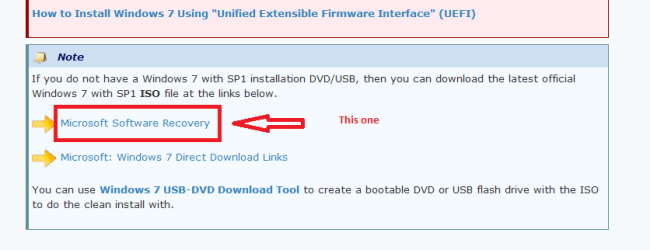
Me eprsoanlly again prefer a disk (DVD) burnt at a slow rate with ImgBurn to avoid any file corruption and if you have got the key I find the best way to get the ISO is from here not that I am saying Megahertz is wrong just that I prefer a disk. Software Download you will need to quote the activation code to get the download and when doem set the first boot device to the optical drive.
Now I said about burning it slowly and 4x is about as high as you really would want to go and I again personally use 2.4x to burn these disks.

Now the drivers you can install form the machines disk or download them onto a stick before hand form the manufactures site you will of course need to have at very least the LAN and/or the WLAN driver to be able to connect up to the net - the rest you can do after.

If that lnk I sent doesn't open for any reason it is the one form this tutorial Clean Install Windows 7 - Windows 7 Help Forums see pic.


Three hours is way too long mate something has gone wrong.Now you can try my method if you like the choice is yours but doo clean that drive first Disk - Clean and Clean All with Diskpart Command - Windows 7 Help Forums > clean is fine clean all is super clean and for what it is worth takes a very long time to do where a straight clean is reasonably quick - it will leave the drive unallocated just as you would buy it from a shop and when the install process asks where to put the OS choose the unallocated drive the install process will the take over any partitioning and formatting or formatting and partitioning whichever way it does it it's of no consequence to me at least.

But the choice is yours. .

But also make sure the first boot device is set for the optical drive.
 

Attachments

  • ISO.PNG
    ISO.PNG
    8.2 KB · Views: 1

My Computer My Computer

At a glance

Desk1 7 Home Prem / Desk2 10 Pro / Main lap A...Desk1 i5 3750K / Laptop i7 GTX 860M / Desk2 i...Desk1 8GB (1866) / Desk2 16GB (1333) / Laptop...Desk 1& 2NVidia GTX 650 & Laptops on board Intel
Computer type
PC/Desktop
Computer Manufacturer/Model Number
Own build (new) Desk1 / Asus ROG Win 7 / Desk2 1st build
OS
Desk1 7 Home Prem / Desk2 10 Pro / Main lap Asus ROG 10 Pro 2 laptop Toshiba 7 Pro Asus P2520 7 & 10
CPU
Desk1 i5 3750K / Laptop i7 GTX 860M / Desk2 i5 2500
Motherboard
Desk1 Asus P877-V / Desk2 Gigabyte H67 UD3H / Laptop ?
Memory
Desk1 8GB (1866) / Desk2 16GB (1333) / Laptop 8Gb DDR3
Graphics Card(s)
Desk 1& 2NVidia GTX 650 & Laptops on board Intel
Sound Card
Desk 1 & 2 -XONAR DG Realtek High Def audio Laptop
Monitor(s) Displays
Desk 1 Benq HD 2450 / Desk2 Philips 24" / Laptop 17.5"
Screen Resolution
1920x1080 D1 & D2 & Laptop 1
Hard Drives
Desk1 Samsung 120GB 830 SSD
Asus ROG 256GB 850 Pro SSD
Desk2 Samsung 840 256 SSD
Toshiba 120GB EVO
PSU
Desk 1 Corsair HX 1050/ Laptop ? / Desk 2 Corsair HX 650
Case
Desk 1 Cooler HAF XM ? Toshiba laptop / Desk2 Coolermaster
Cooling
Fans on all Desk1 -2 Desk2 - all Coolermasters 5 Laptop ?
Keyboard
Desk 1 MS Sidewinder X6 Desk 2 MS Sidewinder X 4
Mouse
Desk 1&2 - Gigabyte MS 900 gamer - laptop - Logitec wireless
Internet Speed
ADSL2+
Other Info
One other Desktop (tester) and spare Toshba laptop both with SSD's
Running Kaspersky 2016 ISS on all machines config'd identically
Logitec audio stereo systems on each machine (x3)
Canon MG5250MFC
Router/modem TP-Link running WPA2SK
Thanks for the reply ICIT2LOL,

I actually booted from the USB I created and then removed the USB when the install got to the first restart, just after installing updates.

When I tried installing from the DVD disk that came with the computer and when I also tried installing from the USB I created I just let them install over the top of what was there.

I will try your suggestion today of using Diskpart to clean all and go and buy some DVD’s to download Windows 7 Home Premium 64bit SP1 and burn a new installation disk using a slow rate with ImgBurn.

I will let you know how I get on mate.

Thanks again.
 

My Computer My Computer

At a glance

Win 7 HP SP1 64-bit Vista HB SP2 32-bit Linux...Intel(R) Pentium(R) CPU P6200 @ 2.13GHz4.00 GBIntel(R) Graphics Media Accelerator HD
Computer type
Laptop
Computer Manufacturer/Model Number
Fujitsu LIFEBOOK
OS
Win 7 HP SP1 64-bit Vista HB SP2 32-bit Linux Mint 18.3
CPU
Intel(R) Pentium(R) CPU P6200 @ 2.13GHz
Motherboard
FUJITSU FJNBB06
Memory
4.00 GB
Graphics Card(s)
Intel(R) Graphics Media Accelerator HD
Sound Card
[1] Realtek High Definition Audio [2] Intel(R) Display Audio
Screen Resolution
1366 x 768 x 32 bits (4294967296 colors) @ 59 Hz
Hard Drives
TOSHIBA MK5076GSX
Antivirus
AVG FREE
Good stuff mate keep us updated because I ma sure there has been some "cross infection" on your install and the clean drive will eliminate that rot.
 

My Computer My Computer

At a glance

Desk1 7 Home Prem / Desk2 10 Pro / Main lap A...Desk1 i5 3750K / Laptop i7 GTX 860M / Desk2 i...Desk1 8GB (1866) / Desk2 16GB (1333) / Laptop...Desk 1& 2NVidia GTX 650 & Laptops on board Intel
Computer type
PC/Desktop
Computer Manufacturer/Model Number
Own build (new) Desk1 / Asus ROG Win 7 / Desk2 1st build
OS
Desk1 7 Home Prem / Desk2 10 Pro / Main lap Asus ROG 10 Pro 2 laptop Toshiba 7 Pro Asus P2520 7 & 10
CPU
Desk1 i5 3750K / Laptop i7 GTX 860M / Desk2 i5 2500
Motherboard
Desk1 Asus P877-V / Desk2 Gigabyte H67 UD3H / Laptop ?
Memory
Desk1 8GB (1866) / Desk2 16GB (1333) / Laptop 8Gb DDR3
Graphics Card(s)
Desk 1& 2NVidia GTX 650 & Laptops on board Intel
Sound Card
Desk 1 & 2 -XONAR DG Realtek High Def audio Laptop
Monitor(s) Displays
Desk 1 Benq HD 2450 / Desk2 Philips 24" / Laptop 17.5"
Screen Resolution
1920x1080 D1 & D2 & Laptop 1
Hard Drives
Desk1 Samsung 120GB 830 SSD
Asus ROG 256GB 850 Pro SSD
Desk2 Samsung 840 256 SSD
Toshiba 120GB EVO
PSU
Desk 1 Corsair HX 1050/ Laptop ? / Desk 2 Corsair HX 650
Case
Desk 1 Cooler HAF XM ? Toshiba laptop / Desk2 Coolermaster
Cooling
Fans on all Desk1 -2 Desk2 - all Coolermasters 5 Laptop ?
Keyboard
Desk 1 MS Sidewinder X6 Desk 2 MS Sidewinder X 4
Mouse
Desk 1&2 - Gigabyte MS 900 gamer - laptop - Logitec wireless
Internet Speed
ADSL2+
Other Info
One other Desktop (tester) and spare Toshba laptop both with SSD's
Running Kaspersky 2016 ISS on all machines config'd identically
Logitec audio stereo systems on each machine (x3)
Canon MG5250MFC
Router/modem TP-Link running WPA2SK
Hi ICIT2LOL,

I couldn't use diskpart because it says clean all is not allowed on the disk containing the current boot etc.
I even tried safe mode with command prompt.
Have you got any other ideas please mate?

Thanks in advance.

EDIT:

I just had a thought.
Is there a system that I can put on a USB and boot from, this way won't I be able to run diskpart from that for the C: drive?
I read a thread where this was said...
Maybe SIW2 can find a way to put it on a WinPE stick. He is the expert on that.
...although it was about Bootmgr - Copy to C:\ with EasyBCD in an excellent tutorial by whs.
Is this possible maybe?

EDIT, EDIT:

Is there a way I can use diskpart clean all during the clean install?
 
Last edited:

My Computer My Computer

At a glance

Win 7 HP SP1 64-bit Vista HB SP2 32-bit Linux...Intel(R) Pentium(R) CPU P6200 @ 2.13GHz4.00 GBIntel(R) Graphics Media Accelerator HD
Computer type
Laptop
Computer Manufacturer/Model Number
Fujitsu LIFEBOOK
OS
Win 7 HP SP1 64-bit Vista HB SP2 32-bit Linux Mint 18.3
CPU
Intel(R) Pentium(R) CPU P6200 @ 2.13GHz
Motherboard
FUJITSU FJNBB06
Memory
4.00 GB
Graphics Card(s)
Intel(R) Graphics Media Accelerator HD
Sound Card
[1] Realtek High Definition Audio [2] Intel(R) Display Audio
Screen Resolution
1366 x 768 x 32 bits (4294967296 colors) @ 59 Hz
Hard Drives
TOSHIBA MK5076GSX
Antivirus
AVG FREE
Boot from the M$ installation disk, go to maintenance, open a Cmd window and you will be able to run the commands.
 

My Computers My Computers

  • At a glance

    Windows 7 HP 64i5 6600K - 800MHz to 4200MHz4+4G GSkill DDR4 3000IG - Intel 530
    Computer type
    PC/Desktop
    Computer Manufacturer/Model Number
    custom build
    OS
    Windows 7 HP 64
    CPU
    i5 6600K - 800MHz to 4200MHz
    Motherboard
    GA-Z170-HD3P
    Memory
    4+4G GSkill DDR4 3000
    Graphics Card(s)
    IG - Intel 530
    Monitor(s) Displays
    Samsung 226BW
    Screen Resolution
    1680x1050
    Hard Drives
    (1) -1 SM951 – 128GB M.2 AHCI PCIe SSD drive for Windows 7 and Lubuntu
    (2) -1 WD SATA 3 - 1T for Data
    (3) -1 WD SATA 3 - 1T for backup
    PSU
    Thermaltake 450W TR2 gold
    Keyboard
    Old and good Chicony mechanical keyboard
    Mouse
    Logitech mX performance - 9 buttons (had to disable some)
    Internet Speed
    500Mb/s
    Browser
    Firefox 64
    Other Info
    TinyWall firewall
  • At a glance

    Windows 7 Proi7-4500U 800MHz to 3.0GHz(4+4)G DDR3 1600IG intel 4400 + NVIDIA GeForce GT 745M
    Computer type
    Laptop
    System Manufacturer/Model Number
    Asus Q550LF
    OS
    Windows 7 Pro
    CPU
    i7-4500U 800MHz to 3.0GHz
    Motherboard
    Asus Q550LF
    Memory
    (4+4)G DDR3 1600
    Graphics Card(s)
    IG intel 4400 + NVIDIA GeForce GT 745M
    Sound Card
    Realtek
    Monitor(s) Displays
    LG Display LP156WF4-SPH1
    Screen Resolution
    1920 x 1080
    Hard Drives
    BX500 120G SSD for Windows and programs +
    1T HDD for data
    Internet Speed
    500 Mb/s
    Browser
    Firefox
    Other Info
    TinyWall firewall
Thanks Megahertz07.

I am re-installing and when I got to the partition stage I deleted everything there to leave a single unallocated space of 465 GB (my hard drive is 500 GB).
I then clicked the red cross to cancel the installation and entered system recovery options where I selected the Command Prompt.
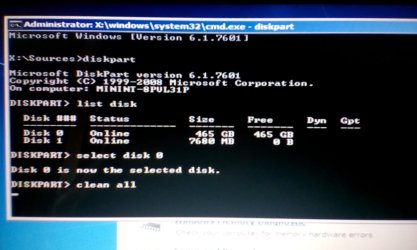
You can see from the image below the current status (I know this will take in the region of 2 hours to run).
What is the Disk 1 please and can I run clean all on that too?
I don't understand that because there was only a single unallocated space of 465 GB shown after the deletion of all the partitions>

Thanks in advance.
 

Attachments

  • IMG_20170728_160218.jpg
    IMG_20170728_160218.jpg
    184.8 KB · Views: 1
Last edited:

My Computer My Computer

At a glance

Win 7 HP SP1 64-bit Vista HB SP2 32-bit Linux...Intel(R) Pentium(R) CPU P6200 @ 2.13GHz4.00 GBIntel(R) Graphics Media Accelerator HD
Computer type
Laptop
Computer Manufacturer/Model Number
Fujitsu LIFEBOOK
OS
Win 7 HP SP1 64-bit Vista HB SP2 32-bit Linux Mint 18.3
CPU
Intel(R) Pentium(R) CPU P6200 @ 2.13GHz
Motherboard
FUJITSU FJNBB06
Memory
4.00 GB
Graphics Card(s)
Intel(R) Graphics Media Accelerator HD
Sound Card
[1] Realtek High Definition Audio [2] Intel(R) Display Audio
Screen Resolution
1366 x 768 x 32 bits (4294967296 colors) @ 59 Hz
Hard Drives
TOSHIBA MK5076GSX
Antivirus
AVG FREE
UPDATE:

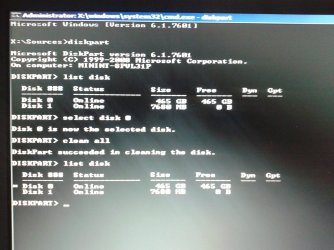
DiskPart has succeeded in cleaning the disk.
I noticed that Disk 0 now has an asterix (*) to the left of it.
I assume that this means that particular disk is still selected?
I would just like to know if I need to clean all Disk 1 (and what it is) please?
Pehaps this could be the reason for my problems doing a clean install?

Thanks in advance.
 

Attachments

  • 20170728_184505.jpg
    20170728_184505.jpg
    416.2 KB · Views: 1
Last edited:

My Computer My Computer

At a glance

Win 7 HP SP1 64-bit Vista HB SP2 32-bit Linux...Intel(R) Pentium(R) CPU P6200 @ 2.13GHz4.00 GBIntel(R) Graphics Media Accelerator HD
Computer type
Laptop
Computer Manufacturer/Model Number
Fujitsu LIFEBOOK
OS
Win 7 HP SP1 64-bit Vista HB SP2 32-bit Linux Mint 18.3
CPU
Intel(R) Pentium(R) CPU P6200 @ 2.13GHz
Motherboard
FUJITSU FJNBB06
Memory
4.00 GB
Graphics Card(s)
Intel(R) Graphics Media Accelerator HD
Sound Card
[1] Realtek High Definition Audio [2] Intel(R) Display Audio
Screen Resolution
1366 x 768 x 32 bits (4294967296 colors) @ 59 Hz
Hard Drives
TOSHIBA MK5076GSX
Antivirus
AVG FREE
Sorry Paul I should have said you would have to use another machine to clean the drive cos Windows can't clean itself if you get my drift. Anyway looks like things are going in the right direction now.

Now if you go to Computer right click and pick manage then Disk management you should see those drives in there and if disk 0 has been cleaned it will show up as unallocated.
Now I normally leave it like that if I am going to reinstall but some like to format it and partition it ready but Windows will do that as it installs anyway.

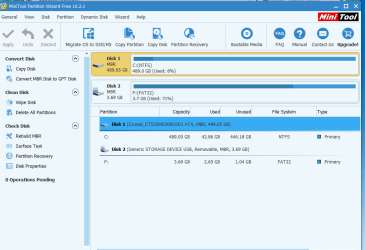
A good program for doing this stuff to is Partition Wizard Best Free Partition Manager for Windows | MiniTool Partition Free a very handy tool to keep mate and the interface is just great to work with when run it will show the drives and the status as described. See pic of this machines PW GUI
 

Attachments

  • PW.PNG
    PW.PNG
    26.4 KB · Views: 1

My Computer My Computer

At a glance

Desk1 7 Home Prem / Desk2 10 Pro / Main lap A...Desk1 i5 3750K / Laptop i7 GTX 860M / Desk2 i...Desk1 8GB (1866) / Desk2 16GB (1333) / Laptop...Desk 1& 2NVidia GTX 650 & Laptops on board Intel
Computer type
PC/Desktop
Computer Manufacturer/Model Number
Own build (new) Desk1 / Asus ROG Win 7 / Desk2 1st build
OS
Desk1 7 Home Prem / Desk2 10 Pro / Main lap Asus ROG 10 Pro 2 laptop Toshiba 7 Pro Asus P2520 7 & 10
CPU
Desk1 i5 3750K / Laptop i7 GTX 860M / Desk2 i5 2500
Motherboard
Desk1 Asus P877-V / Desk2 Gigabyte H67 UD3H / Laptop ?
Memory
Desk1 8GB (1866) / Desk2 16GB (1333) / Laptop 8Gb DDR3
Graphics Card(s)
Desk 1& 2NVidia GTX 650 & Laptops on board Intel
Sound Card
Desk 1 & 2 -XONAR DG Realtek High Def audio Laptop
Monitor(s) Displays
Desk 1 Benq HD 2450 / Desk2 Philips 24" / Laptop 17.5"
Screen Resolution
1920x1080 D1 & D2 & Laptop 1
Hard Drives
Desk1 Samsung 120GB 830 SSD
Asus ROG 256GB 850 Pro SSD
Desk2 Samsung 840 256 SSD
Toshiba 120GB EVO
PSU
Desk 1 Corsair HX 1050/ Laptop ? / Desk 2 Corsair HX 650
Case
Desk 1 Cooler HAF XM ? Toshiba laptop / Desk2 Coolermaster
Cooling
Fans on all Desk1 -2 Desk2 - all Coolermasters 5 Laptop ?
Keyboard
Desk 1 MS Sidewinder X6 Desk 2 MS Sidewinder X 4
Mouse
Desk 1&2 - Gigabyte MS 900 gamer - laptop - Logitec wireless
Internet Speed
ADSL2+
Other Info
One other Desktop (tester) and spare Toshba laptop both with SSD's
Running Kaspersky 2016 ISS on all machines config'd identically
Logitec audio stereo systems on each machine (x3)
Canon MG5250MFC
Router/modem TP-Link running WPA2SK
Thanks for the reply.

As you can see I managed to clean all drive C: during the installation process.
At the moment the computer is sitting as of screen shot 2 above.
Before I continue I would just like to know if I should do anything with Disk 1.
What is this data on Disk 1 as I deleted everything at the partition stage to leave a single unallocated space of 465 GB?

Now before I continue with the below...
Now if you go to Computer right click and pick manage then Disk management you should see those drives in there and if disk 0 has been cleaned it will show up as unallocated.
Now I normally leave it like that if I am going to reinstall but some like to format it and partition it ready but Windows will do that as it installs anyway.

The C: showed up as unallocated before I ran DiskPart!!!
I will partition and format the drive as I continue with the re-install.
Now I assume that if I click the cross in the top right hand corner of screen shot 2 above I will be able to go into Disk management?
How do I then get it to continue with the install or do I have to start from the beginning again please?

Thanks in advance.

EDIT:

X:\Sources>
I just had a thought, on one of the tries re-installing I changed the CD/DVD drive to X:.
Is Disk 1 the X: drive?
 

My Computer My Computer

At a glance

Win 7 HP SP1 64-bit Vista HB SP2 32-bit Linux...Intel(R) Pentium(R) CPU P6200 @ 2.13GHz4.00 GBIntel(R) Graphics Media Accelerator HD
Computer type
Laptop
Computer Manufacturer/Model Number
Fujitsu LIFEBOOK
OS
Win 7 HP SP1 64-bit Vista HB SP2 32-bit Linux Mint 18.3
CPU
Intel(R) Pentium(R) CPU P6200 @ 2.13GHz
Motherboard
FUJITSU FJNBB06
Memory
4.00 GB
Graphics Card(s)
Intel(R) Graphics Media Accelerator HD
Sound Card
[1] Realtek High Definition Audio [2] Intel(R) Display Audio
Screen Resolution
1366 x 768 x 32 bits (4294967296 colors) @ 59 Hz
Hard Drives
TOSHIBA MK5076GSX
Antivirus
AVG FREE
If you launch the CMD window from the installation disk:
- Disk 1 is your USB flash installation disk
- X: is the drive that has the Win PE from disk 1.

I have installed all kind of windows and never used diskpart.
Just boot from the installation disk, go to install - advanced - delete ALL partitions - create new.
On a Legacy - MBR
- 120M M$ reserved - RAW
- Big NTFS
Install on the big NTFS

On a UEFI - GPT
- 100M Fat32 UEFI
- 120M M$ reserved - RAW
- Big NTFS
Install on the big NTFS
 

My Computers My Computers

  • At a glance

    Windows 7 HP 64i5 6600K - 800MHz to 4200MHz4+4G GSkill DDR4 3000IG - Intel 530
    Computer type
    PC/Desktop
    Computer Manufacturer/Model Number
    custom build
    OS
    Windows 7 HP 64
    CPU
    i5 6600K - 800MHz to 4200MHz
    Motherboard
    GA-Z170-HD3P
    Memory
    4+4G GSkill DDR4 3000
    Graphics Card(s)
    IG - Intel 530
    Monitor(s) Displays
    Samsung 226BW
    Screen Resolution
    1680x1050
    Hard Drives
    (1) -1 SM951 – 128GB M.2 AHCI PCIe SSD drive for Windows 7 and Lubuntu
    (2) -1 WD SATA 3 - 1T for Data
    (3) -1 WD SATA 3 - 1T for backup
    PSU
    Thermaltake 450W TR2 gold
    Keyboard
    Old and good Chicony mechanical keyboard
    Mouse
    Logitech mX performance - 9 buttons (had to disable some)
    Internet Speed
    500Mb/s
    Browser
    Firefox 64
    Other Info
    TinyWall firewall
  • At a glance

    Windows 7 Proi7-4500U 800MHz to 3.0GHz(4+4)G DDR3 1600IG intel 4400 + NVIDIA GeForce GT 745M
    Computer type
    Laptop
    System Manufacturer/Model Number
    Asus Q550LF
    OS
    Windows 7 Pro
    CPU
    i7-4500U 800MHz to 3.0GHz
    Motherboard
    Asus Q550LF
    Memory
    (4+4)G DDR3 1600
    Graphics Card(s)
    IG intel 4400 + NVIDIA GeForce GT 745M
    Sound Card
    Realtek
    Monitor(s) Displays
    LG Display LP156WF4-SPH1
    Screen Resolution
    1920 x 1080
    Hard Drives
    BX500 120G SSD for Windows and programs +
    1T HDD for data
    Internet Speed
    500 Mb/s
    Browser
    Firefox
    Other Info
    TinyWall firewall
Not going well :doh:.

I have tried reinstalling again after clean all using DiskPart and it is even slower now than before.
It has been sitting on Expanding Windows files (0%) now for over an hour and that is booting from the recovery disk that came with the computer.
I even reset the BIOS back to default.

My brother-in-law is dropping round an 80 GB HDD later so I will try that and see if it works.
If it does, then all well and good and I will know it was the HDD, but if it doesn't then I am afraid that it must be another issue, although I can't think what that could be.

Out of interest, at what stage should I remove the installation disk?

Thanks in advance.

EDIT:
The HDD light is constantly on so I assume that must be doing something!!! :confused:

EDIT:
I have restarted from scratch and it is now installing, well at least it is Expanding Windows Files at the moment.
I will remove the installation disk at the first restart.

My brother-in-law is not coming until tomorrow now so if I still have problems then I will try the other HDD tomorrow.
 
Last edited:

My Computer My Computer

At a glance

Win 7 HP SP1 64-bit Vista HB SP2 32-bit Linux...Intel(R) Pentium(R) CPU P6200 @ 2.13GHz4.00 GBIntel(R) Graphics Media Accelerator HD
Computer type
Laptop
Computer Manufacturer/Model Number
Fujitsu LIFEBOOK
OS
Win 7 HP SP1 64-bit Vista HB SP2 32-bit Linux Mint 18.3
CPU
Intel(R) Pentium(R) CPU P6200 @ 2.13GHz
Motherboard
FUJITSU FJNBB06
Memory
4.00 GB
Graphics Card(s)
Intel(R) Graphics Media Accelerator HD
Sound Card
[1] Realtek High Definition Audio [2] Intel(R) Display Audio
Screen Resolution
1366 x 768 x 32 bits (4294967296 colors) @ 59 Hz
Hard Drives
TOSHIBA MK5076GSX
Antivirus
AVG FREE
Hmm to save me scouring back through the thread Paul have we done a memtest on the machine??
 

My Computer My Computer

At a glance

Desk1 7 Home Prem / Desk2 10 Pro / Main lap A...Desk1 i5 3750K / Laptop i7 GTX 860M / Desk2 i...Desk1 8GB (1866) / Desk2 16GB (1333) / Laptop...Desk 1& 2NVidia GTX 650 & Laptops on board Intel
Computer type
PC/Desktop
Computer Manufacturer/Model Number
Own build (new) Desk1 / Asus ROG Win 7 / Desk2 1st build
OS
Desk1 7 Home Prem / Desk2 10 Pro / Main lap Asus ROG 10 Pro 2 laptop Toshiba 7 Pro Asus P2520 7 & 10
CPU
Desk1 i5 3750K / Laptop i7 GTX 860M / Desk2 i5 2500
Motherboard
Desk1 Asus P877-V / Desk2 Gigabyte H67 UD3H / Laptop ?
Memory
Desk1 8GB (1866) / Desk2 16GB (1333) / Laptop 8Gb DDR3
Graphics Card(s)
Desk 1& 2NVidia GTX 650 & Laptops on board Intel
Sound Card
Desk 1 & 2 -XONAR DG Realtek High Def audio Laptop
Monitor(s) Displays
Desk 1 Benq HD 2450 / Desk2 Philips 24" / Laptop 17.5"
Screen Resolution
1920x1080 D1 & D2 & Laptop 1
Hard Drives
Desk1 Samsung 120GB 830 SSD
Asus ROG 256GB 850 Pro SSD
Desk2 Samsung 840 256 SSD
Toshiba 120GB EVO
PSU
Desk 1 Corsair HX 1050/ Laptop ? / Desk 2 Corsair HX 650
Case
Desk 1 Cooler HAF XM ? Toshiba laptop / Desk2 Coolermaster
Cooling
Fans on all Desk1 -2 Desk2 - all Coolermasters 5 Laptop ?
Keyboard
Desk 1 MS Sidewinder X6 Desk 2 MS Sidewinder X 4
Mouse
Desk 1&2 - Gigabyte MS 900 gamer - laptop - Logitec wireless
Internet Speed
ADSL2+
Other Info
One other Desktop (tester) and spare Toshba laptop both with SSD's
Running Kaspersky 2016 ISS on all machines config'd identically
Logitec audio stereo systems on each machine (x3)
Canon MG5250MFC
Router/modem TP-Link running WPA2SK
Back
Top