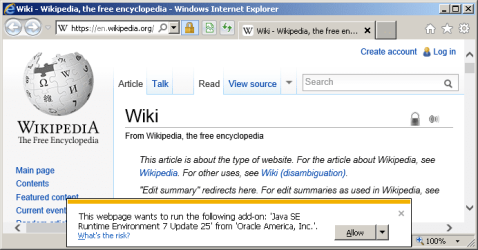
Webpage wants to run Java SE Runtime Environment 7 update 25.

arizonajack

Banned
Local time
6:31 AM
Messages
79
Just recently I've come across several websites (sites that I have used regularly for years) that give me the following message:

This webpage wants to run the following add-on: 'Java SE Runtime Environment 7 Update 25' from 'Oracle America, Inc'

I let it slide for a while but it seems like the sites did that every time I logged on so I let it run.

It got installed and I went to Java's website to verify the installation. The installation was verified and Control Panel - Programs and Features lists the program as of yesterday 6/20/13.

Today I go on to one of my usual sites and get the same message.

Any ideas?
 

My Computer

Computer Manufacturer/Model Number
Dell Studio 540
OS
Windows 7 Professional 64 bit Service Pack 1
CPU
Intel Core 2 Quad CPU
Motherboard
ECS Iris8
Memory
6 GB
Graphics Card(s)
ATI Radeon HD 3600 Series
Sound Card
AMD
Monitor(s) Displays
Samsung Syncmaster 2220WM
Hard Drives
Hitachi 400 GB
Unknown Brand 500 GB
FreeAgent Backup Drive 500 GB
Never let a website install flash, java, video players, etc. Always download from the source, or a trusted site like Filehippo. That said, you may have indeed gotten a legit download. Which browser are you using when this happens? A Guy
 

My Computer

Computer type
PC/Desktop
OS
Windows 10 Home x64
CPU
INTEL Core i5-750 Quad-Core 3.37GHz
Motherboard
ASUS P7P55D
Memory
HyperX Fury Black Series 8GB (2 x 4GB) 1866Mhz
Graphics Card(s)
EVGA GeForce GTX 750 Superclocked 1GB 128-Bit GDDR5
Monitor(s) Displays
LG 32MA68HY 32" IPS
Screen Resolution
1920 x 1080
Hard Drives
Samsung 840 Evo 120GB, SEAGATE 500GB Barracuda® 7200.12, SATA 3 Gb/s, 7200 RPM, 16MB cache
PSU
ANTEC TruePower New TP-550, 80 PLUS, 550W
Case
ANTEC Three Hundred Illusion
Cooling
COOLER MASTER Hyper 212 Plus, 4 x 120mm 1 x 140mm Noctua's
Internet Speed
85 + Mbps
Antivirus
Avast
Browser
Vivaldi
Never let a website install flash, java, video players, etc. Always download from the source, or a trusted site like Filehippo. That said, you may have indeed gotten a legit download. Which browser are you using when this happens? A Guy

IE 10.

I reinstalled Java from Java's website after the message recurred and the message is still coming back.
 

My Computer

Computer Manufacturer/Model Number
Dell Studio 540
OS
Windows 7 Professional 64 bit Service Pack 1
CPU
Intel Core 2 Quad CPU
Motherboard
ECS Iris8
Memory
6 GB
Graphics Card(s)
ATI Radeon HD 3600 Series
Sound Card
AMD
Monitor(s) Displays
Samsung Syncmaster 2220WM
Hard Drives
Hitachi 400 GB
Unknown Brand 500 GB
FreeAgent Backup Drive 500 GB
The Java sight confirms you have the right version, and it's working?

Verify Java Version

Is it just one website prompting for it, or several? I don't have IE 10 installed, or Java for that matter. Most sites don't use Java. A Guy
 

My Computer

Computer type
PC/Desktop
OS
Windows 10 Home x64
CPU
INTEL Core i5-750 Quad-Core 3.37GHz
Motherboard
ASUS P7P55D
Memory
HyperX Fury Black Series 8GB (2 x 4GB) 1866Mhz
Graphics Card(s)
EVGA GeForce GTX 750 Superclocked 1GB 128-Bit GDDR5
Monitor(s) Displays
LG 32MA68HY 32" IPS
Screen Resolution
1920 x 1080
Hard Drives
Samsung 840 Evo 120GB, SEAGATE 500GB Barracuda® 7200.12, SATA 3 Gb/s, 7200 RPM, 16MB cache
PSU
ANTEC TruePower New TP-550, 80 PLUS, 550W
Case
ANTEC Three Hundred Illusion
Cooling
COOLER MASTER Hyper 212 Plus, 4 x 120mm 1 x 140mm Noctua's
Internet Speed
85 + Mbps
Antivirus
Avast
Browser
Vivaldi
Several.

But just seems to come up once in a while.
 

My Computer

Computer Manufacturer/Model Number
Dell Studio 540
OS
Windows 7 Professional 64 bit Service Pack 1
CPU
Intel Core 2 Quad CPU
Motherboard
ECS Iris8
Memory
6 GB
Graphics Card(s)
ATI Radeon HD 3600 Series
Sound Card
AMD
Monitor(s) Displays
Samsung Syncmaster 2220WM
Hard Drives
Hitachi 400 GB
Unknown Brand 500 GB
FreeAgent Backup Drive 500 GB
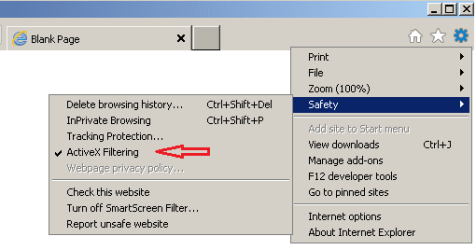
Every once in a while might mean active x filtering is activating,
Is there a Blue circle with a slash through it appearing on the top right of the browser bar ?
Use Alt+T and see if active x filtering is Checked. or Gear symbol and Safety.
You might even go to Internet options/ Advanced/ Check the top box-Use software rendering instead of gpu../ Apply and Okay.
 

My Computer

Computer type
PC/Desktop
Computer Manufacturer/Model Number
Custom assembled by me :}
OS
Win-7-Pro64bit 7-H-Prem-64bit
CPU
i7-5930K 2nd i9-9940x both water blocked VRM's too
Motherboard
ASUS SABERTOOTH X99 2nd ASUS x299 Apex
Memory
Trident-z 3200C14 2nd Trident-z 3600C16
Graphics Card(s)
EVGA 1080ti ftw3 2nd Titan Xp both water blocked
Sound Card
Built-in Realtek
Monitor(s) Displays
1-AOC G2460PG 24"G-Sync 144Hz/ 2nd 1-ASUS VG248QE 24" 144Hz
Screen Resolution
1920 x 1080 144Hz
Hard Drives
2-Samsung M.2 Evo & Evo Plus
2-Samsung 850 EVO 500GB SSD's/ 3-2.5 W.D. Black 1tb-&3-1tb/3-3.5 WD Black 1tb hdd's
PSU
EVGA SuperNOVA 1000-P2 2nd 1200-P2
Case
2-Corsair Obsidian Series 450D Black ATX Mid Tower
Cooling
Custom water loops
Keyboard
Logitech G710+/ 2nd Logitech G910
Mouse
2-RedDragon M901 Perdition 16400 dpi Gaming mouse = wired
Internet Speed
Comcast Ping 19ms 89.31mbps download speed 6.12mbps upload
Antivirus
Malwarebytes Pro/ Superantispyware Pro
Browser
FireFox & Pale moon
Other Info
2nd ASUS X299 Apex/Intel i9-9940x with Custom water loop/7H-Prem-x64/Corsair 450D case/Ram Trident-z 3600C16 4x8gb / Samsung970Evo plus 500gb SSD/Dual ssd EZ swap evo/PSU EVGA SuperNova 1200w-P2 80+Platinum/GPU Titan Xp /8-ML-140 on push-pull on 2-280GTX rads
I haven't been making notes on what sites but today it happened on Wikipedia and on 1911forum.com.

Every once in a while might mean active x filtering is activating,
Is there a Blue circle with a slash through it appearing on the top right of the browser bar ?

No.

Use Alt+T and see if active x filtering is Checked.

It's not checked.

You might even go to Internet options/ Advanced/ Check the top box-Use software rendering instead of gpu../ Apply and Okay.

I checked "use software rendering."

We'll see how that goes.

Thanks.
 

My Computer

Computer Manufacturer/Model Number
Dell Studio 540
OS
Windows 7 Professional 64 bit Service Pack 1
CPU
Intel Core 2 Quad CPU
Motherboard
ECS Iris8
Memory
6 GB
Graphics Card(s)
ATI Radeon HD 3600 Series
Sound Card
AMD
Monitor(s) Displays
Samsung Syncmaster 2220WM
Hard Drives
Hitachi 400 GB
Unknown Brand 500 GB
FreeAgent Backup Drive 500 GB
Have gotten the same message on a couple of other websites now.
 

My Computer

Computer Manufacturer/Model Number
Dell Studio 540
OS
Windows 7 Professional 64 bit Service Pack 1
CPU
Intel Core 2 Quad CPU
Motherboard
ECS Iris8
Memory
6 GB
Graphics Card(s)
ATI Radeon HD 3600 Series
Sound Card
AMD
Monitor(s) Displays
Samsung Syncmaster 2220WM
Hard Drives
Hitachi 400 GB
Unknown Brand 500 GB
FreeAgent Backup Drive 500 GB
Try this, open IE

Tools (Gear icon upper right)> Internet Options> Advanced> Click the top box Use software rendering instead of gpu rendering> Apply and OK your way out> Close and reopen IE and try again

Does the prompt occur on the webpages that cause it every time you go there, or is it random?

A Guy
 

My Computer

Computer type
PC/Desktop
OS
Windows 10 Home x64
CPU
INTEL Core i5-750 Quad-Core 3.37GHz
Motherboard
ASUS P7P55D
Memory
HyperX Fury Black Series 8GB (2 x 4GB) 1866Mhz
Graphics Card(s)
EVGA GeForce GTX 750 Superclocked 1GB 128-Bit GDDR5
Monitor(s) Displays
LG 32MA68HY 32" IPS
Screen Resolution
1920 x 1080
Hard Drives
Samsung 840 Evo 120GB, SEAGATE 500GB Barracuda® 7200.12, SATA 3 Gb/s, 7200 RPM, 16MB cache
PSU
ANTEC TruePower New TP-550, 80 PLUS, 550W
Case
ANTEC Three Hundred Illusion
Cooling
COOLER MASTER Hyper 212 Plus, 4 x 120mm 1 x 140mm Noctua's
Internet Speed
85 + Mbps
Antivirus
Avast
Browser
Vivaldi
Try this, open IE

Tools (Gear icon upper right)> Internet Options> Advanced> Click the top box Use software rendering instead of gpu rendering> Apply and OK your way out> Close and reopen IE and try again

Did that already. It was previously suggested above. Did not resolve.

Does the prompt occur on the webpages that cause it every time you go there, or is it random?

It recurs on regularly visited websites but does not recur at every visit.
 

My Computer

Computer Manufacturer/Model Number
Dell Studio 540
OS
Windows 7 Professional 64 bit Service Pack 1
CPU
Intel Core 2 Quad CPU
Motherboard
ECS Iris8
Memory
6 GB
Graphics Card(s)
ATI Radeon HD 3600 Series
Sound Card
AMD
Monitor(s) Displays
Samsung Syncmaster 2220WM
Hard Drives
Hitachi 400 GB
Unknown Brand 500 GB
FreeAgent Backup Drive 500 GB
It's still doing it.

I haven't found a solution yet.
 

My Computer

Computer Manufacturer/Model Number
Dell Studio 540
OS
Windows 7 Professional 64 bit Service Pack 1
CPU
Intel Core 2 Quad CPU
Motherboard
ECS Iris8
Memory
6 GB
Graphics Card(s)
ATI Radeon HD 3600 Series
Sound Card
AMD
Monitor(s) Displays
Samsung Syncmaster 2220WM
Hard Drives
Hitachi 400 GB
Unknown Brand 500 GB
FreeAgent Backup Drive 500 GB
Please list the web sites you are having problems with.
Wikipedia does not require Jave. I go there all the time and I haven't had Java in a long time.

From your post #1
Runtime Environment 7 Update 25

I'm thinking you might be infected and/or a bunch of trash hooked up with your browser. I would suggest going to our security thread. Please let them know you came from this thread.

http://www.sevenforums.com/system-security/
 

My Computer

Computer type
PC/Desktop
Computer Manufacturer/Model Number
Home made Desktop
OS
Windows 10 Pro. 64/ version 1709 Windows 7 Pro/64
CPU
Intel i7-6800K @ 4.3
Motherboard
ASUS X-99 Deluxe II
Memory
Corsair Platinum 16 gig @2400
Graphics Card(s)
EVGA GTX 1070 OC
Monitor(s) Displays
Asus 27" LED LCD/VE278Q
Screen Resolution
1920-1080 or 1280-720 HDMI
Hard Drives
INTEL SSD 730-240 Gb Sata 3.0/
PSU
EVGA Platium 1200W
Case
Phanteks Luxe Tempered Glass 8 fans/ one radiator
Cooling
XSPC/ Water Cooled CPU
Keyboard
Das 4 Professional
Mouse
Logitech M705/MX Anywhere 2-S
Internet Speed
100 mbits
Antivirus
Microsoft Security Essentials/ Malwarebytes Premium 3.0/ SAS
Browser
I.E. 11 default/Firefox/ ISP Time Warner Cable/Spectrum
Other Info
LG BluRay Burner/
Sound system-KLipsch-THX/
Icy Dock ssd Hot Swap bays.
Just recently I've come across several websites (sites that I have used regularly for years) that give me the following message:

This webpage wants to run the following add-on: 'Java SE Runtime Environment 7 Update 25' from 'Oracle America, Inc'

I let it slide for a while but it seems like the sites did that every time I logged on so I let it run.

It got installed and I went to Java's website to verify the installation. The installation was verified and Control Panel - Programs and Features lists the program as of yesterday 6/20/13.

Today I go on to one of my usual sites and get the same message.

Any ideas?
If you got that prompt - then you already had Java 7 Update 25 installed. The website is not asking you to install Java or even to re-install it. The website is simply asking you permission to use a small part of Java: the Java add-on for IE.

Running the Java add-on is not quite the same thing as running the Java Runtime Environment (JRE) (also called the Java Virtual Machine, JVM, Java Runtime Environment Virtual Machine). The website is not asking to run a Java app (at least not yet).

As I understand it (and I could be wrong):
Java applets run under the Java add-on. Think of it as Java-lite.
Java apps run under the full Java Virtual Machine.


Never let a website install flash, java, video players, etc. Always download from the source, or a trusted site like Filehippo. That said, you may have indeed gotten a legit download. Which browser are you using when this happens? A Guy

IE 10.

I reinstalled Java from Java's website after the message recurred and the message is still coming back.
And it will keep on "coming back" for some websites. This started with Java 7 somewhere around Update 4 or 5 and IE9. Whenever a website calls ActiveXObject with this parameter ("JavaWebStart.isInstalled") then you should see the prompt. (There are other ways to call the add-on too.) Just ignore or close the prompt if you do not trust the website. Or better yet, uninstall all versions of Java and see if you ever miss it.

If you must keep Java installed (like I must) and you don't want IE asking you for permission to run this add-on, then do as ThrashZone suggested and place a check by this option:
0-java-prompt.png

But be warned: some websites might not work as desired.
For example, this website...
http://ie.microsoft.com/testdrive/browser/activexfiltering/Default.html
...is pretty broken without activex. The same is true for many other websites.


Please list the web sites you are having problems with.
Wikipedia does not require Jave. I go there all the time and I haven't had Java in a long time.
~~~
Which is why you do not see the prompt that some wikipedia pages cause :-)

https://en.wikipedia.org/wiki/Wiki
1-java-prompt.png
If I say Allow, the page reloads (as expected) and some functionality is added... I just don't readily see what functionality was added.


These two websites also generate the same prompt that the OP mentions:

http://www.techques.com/
Here is the VirusTotal scan for the techques website.

http://www.pinlady.net/PluginDetect/Java/
Here is the VirusTotal scan for the pnilady website - one hit.


These popups are a whole different story:
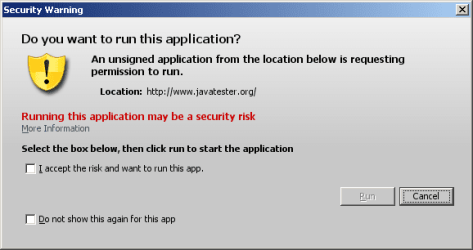
http://www.javatester.org/version.html
2-java-prompt.png
They are asking to run a Java app. They will start the full Java Virtual Machine (a.k.a. JVM, JRE).


If you opt to keep Java installed, you might want to read my ramblings in this post:
http://www.sevenforums.com/browsers-mail/288696-ie-10-not-keeping-temp-files.html#post2387775
Start near the bottom half of that post under the section named Generic advice.

 
Last edited:

My Computer

Computer type
Laptop
Computer Manufacturer/Model Number
Employer provided Dell Latitude
OS
W7 Pro SP1 64bit
CPU
i7
Memory
8GB
Graphics Card(s)
Intel HD Graphics
Hard Drives
crappy SSD
Antivirus
Employer mandated Symantec Endpoint Protection
Browser
Pale Moon 64bit, IE11 64bit & Chrome 64bit
If I can look at a web page without Java why would the same web page request Java from another person?
Be gentle I'm a tender person.

I'm thinking the browser just might have a boat load of PUP installed. PUP (potentially unwanted program)
 

My Computer

Computer type
PC/Desktop
Computer Manufacturer/Model Number
Home made Desktop
OS
Windows 10 Pro. 64/ version 1709 Windows 7 Pro/64
CPU
Intel i7-6800K @ 4.3
Motherboard
ASUS X-99 Deluxe II
Memory
Corsair Platinum 16 gig @2400
Graphics Card(s)
EVGA GTX 1070 OC
Monitor(s) Displays
Asus 27" LED LCD/VE278Q
Screen Resolution
1920-1080 or 1280-720 HDMI
Hard Drives
INTEL SSD 730-240 Gb Sata 3.0/
PSU
EVGA Platium 1200W
Case
Phanteks Luxe Tempered Glass 8 fans/ one radiator
Cooling
XSPC/ Water Cooled CPU
Keyboard
Das 4 Professional
Mouse
Logitech M705/MX Anywhere 2-S
Internet Speed
100 mbits
Antivirus
Microsoft Security Essentials/ Malwarebytes Premium 3.0/ SAS
Browser
I.E. 11 default/Firefox/ ISP Time Warner Cable/Spectrum
Other Info
LG BluRay Burner/
Sound system-KLipsch-THX/
Icy Dock ssd Hot Swap bays.
If I can look at a web page without Java why would the same web page request Java from another person?
Be gentle I'm a tender person.

I'm thinking the browser just might have a boat load of PUP installed. PUP (potentially unwanted program)
Sorry if I came across as rough/rude/... in the last post - that was not my intent. I spent several frustrating hours dealing with this same issue on some websites that some of the people that I support visit. I don't understand all about this stuff, but I know more than I ever wanted to know.

The Wikipedia website probably asked the same thing of your browser when you visited it that it did when I visited it... but IE9/IE10 did not ask you to allow something that you don't have installed. It is possible that the code asking to run the add-on is old (not used)... so no functionality is lost when you visit the website without Java installed. I uninstalled Java as a test and I didn't get the prompt.

BTW, I did learn that you can make the prompt go away and stay away by selecting "Allow for all websites". I just don't suggest that to anyone.


As far as PUPs, you probably know my position on that: for normal users (and abnormal users like me :-) one can never know for sure if a computer is free from all malware. I do not think that anti-malware tools are smarter than the best of the black hats. I cannot do an offline scan due to full disk encryption. I don't know the encryption key, my employer does. But SEP and ESET's online scanner show this box to be clean.

Again, sorry if my last post came across as rude. Please let me know if I ever sound like that.
 

My Computer

Computer type
Laptop
Computer Manufacturer/Model Number
Employer provided Dell Latitude
OS
W7 Pro SP1 64bit
CPU
i7
Memory
8GB
Graphics Card(s)
Intel HD Graphics
Hard Drives
crappy SSD
Antivirus
Employer mandated Symantec Endpoint Protection
Browser
Pale Moon 64bit, IE11 64bit & Chrome 64bit
No problem.
 

My Computer

Computer type
PC/Desktop
Computer Manufacturer/Model Number
Home made Desktop
OS
Windows 10 Pro. 64/ version 1709 Windows 7 Pro/64
CPU
Intel i7-6800K @ 4.3
Motherboard
ASUS X-99 Deluxe II
Memory
Corsair Platinum 16 gig @2400
Graphics Card(s)
EVGA GTX 1070 OC
Monitor(s) Displays
Asus 27" LED LCD/VE278Q
Screen Resolution
1920-1080 or 1280-720 HDMI
Hard Drives
INTEL SSD 730-240 Gb Sata 3.0/
PSU
EVGA Platium 1200W
Case
Phanteks Luxe Tempered Glass 8 fans/ one radiator
Cooling
XSPC/ Water Cooled CPU
Keyboard
Das 4 Professional
Mouse
Logitech M705/MX Anywhere 2-S
Internet Speed
100 mbits
Antivirus
Microsoft Security Essentials/ Malwarebytes Premium 3.0/ SAS
Browser
I.E. 11 default/Firefox/ ISP Time Warner Cable/Spectrum
Other Info
LG BluRay Burner/
Sound system-KLipsch-THX/
Icy Dock ssd Hot Swap bays.
Thanks, everybody, for all the suggestions since my last visit.

Especially usernameissues' explanation.

I'm going to click "allow" on websites that I trust and use frequently. So far I did that with one site and when I went back it didn't ask me again. Maybe that's the cure.
 

My Computer

Computer Manufacturer/Model Number
Dell Studio 540
OS
Windows 7 Professional 64 bit Service Pack 1
CPU
Intel Core 2 Quad CPU
Motherboard
ECS Iris8
Memory
6 GB
Graphics Card(s)
ATI Radeon HD 3600 Series
Sound Card
AMD
Monitor(s) Displays
Samsung Syncmaster 2220WM
Hard Drives
Hitachi 400 GB
Unknown Brand 500 GB
FreeAgent Backup Drive 500 GB
Back
Top