Just recently I've come across several websites (sites that I have used regularly for years) that give me the following message:
This webpage wants to run the following add-on: 'Java SE Runtime Environment 7 Update 25' from 'Oracle America, Inc'
I let it slide for a while but it seems like the sites did that every time I logged on so I let it run.
It got installed and I went to Java's website to verify the installation. The installation was verified and Control Panel - Programs and Features lists the program as of yesterday 6/20/13.
Today I go on to one of my usual sites and get the same message.
Any ideas?
If you got that prompt - then you already had Java 7 Update 25 installed. The website is not asking you to install Java or even to re-install it. The website is simply asking you permission to use a small part of Java: the Java add-on for IE.
Running the Java add-on is not quite the same thing as running the Java Runtime Environment (JRE) (also called the Java Virtual Machine, JVM, Java Runtime Environment Virtual Machine). The website is not asking to run a Java app (at least not yet).
As I understand it (and I could be wrong):
Java applets run under the Java add-on. Think of it as Java-lite.
Java apps run under the full Java Virtual Machine.
Never let a website install flash, java, video players, etc. Always download from the source, or a trusted site like Filehippo. That said, you may have indeed gotten a legit download. Which browser are you using when this happens? A Guy
IE 10.
I reinstalled Java from Java's website after the message recurred and the message is still coming back.
And it will keep on "
coming back" for some websites. This started with Java 7 somewhere around Update 4 or 5 and IE9. Whenever a website calls ActiveXObject with this parameter ("JavaWebStart.isInstalled") then you should see the prompt. (There are other ways to call the add-on too.) Just ignore or close the prompt if you do not trust the website. Or better yet, uninstall all versions of Java and see if you ever miss it.
If you must keep Java installed (like I must) and you don't want IE asking you for permission to run this add-on, then do as ThrashZone suggested and place a check by this option:
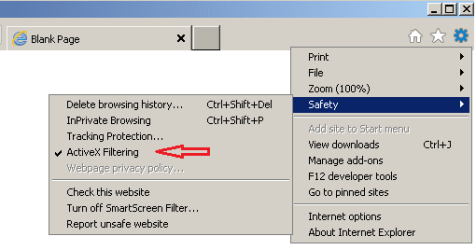 But be warned
:
some websites might not work as desired.
For example, this website...
http://ie.microsoft.com/testdrive/browser/activexfiltering/Default.html
...is pretty broken without activex. The same is true for many other websites.
Please list the web sites you are having problems with.
Wikipedia does not require Jave. I go there all the time and I haven't had Java in a long time.
~~~
Which is why you do not see the prompt that
some wikipedia pages cause
 https://en.wikipedia.org/wiki/Wiki
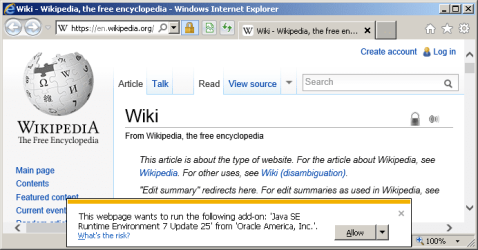
If I say Allow, the page reloads (as expected) and some functionality is added... I just don't readily see what functionality was added.
These two websites also generate the same prompt that the OP mentions:
http://www.techques.com/
Here is the
VirusTotal scan for the techques website.
http://www.pinlady.net/PluginDetect/Java/
Here is the
VirusTotal scan for the pnilady website - one hit.
These popups are a whole different story:
http://www.javatester.org/version.html
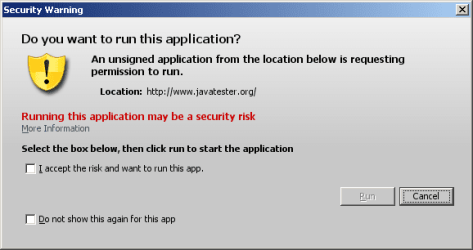
They are asking to run a Java app. They will start the full Java Virtual Machine (a.k.a. JVM, JRE).
If you opt to keep Java installed, you might want to read my ramblings in this post:
http://www.sevenforums.com/browsers-mail/288696-ie-10-not-keeping-temp-files.html#post2387775
Start near the bottom half of that post under the section named
Generic advice.



