
Solved Surely theres's a way to disable the annoying caps lock popup?

likearadiowave

New member
Local time
12:21 AM
Messages
13
Location
USA
I have a Samsung Series 9 A01US that I clean installed Windows 7 Home on. Then I installed the required drivers, etc ... and it all works very smoothly, except for one annoying thing:

the keyboard backlight requires a program called "Easy Settings". Normally I don't use bloatware ... and this laptop for being as expensive as it was, has a ton of it. But I wanted the keyboard backlight.

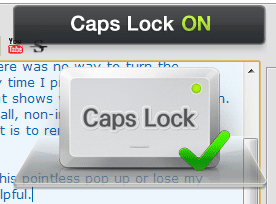
So after chatting to a samsung chat rep, she informed me that there was no way to turn the annoying "Caps lock on!" "caps lock off!" popup that displays every time I press the caps lock key. The only way to disable it is to uninstall the easy setting program, which also controls the keyboard backlight.

This seems nonsensical: the caps lock key has a blue LED light that shows whenever caps lock is on. Why would I need a popup? what's worse is that it isn't even a small, non-intrusive popup. It's a somewhat large, graphical pop up. And the only way to get rid of it is to remove samsung's "easy settings" program, which also controls the keyboard backlight ...

which I think is completely ridiculous. So it's either be stuck with this pointless pop up or lose my keyboard backlight ... I searched on google, but it wasn't really helpful.

This is especially annoying when i'm typing papers; although it only stays on the screen for a second, it's still pretty distracting and annoying.


So, I was wondering if anyone could help me, at least if anyone could tell me how to disable the popup, or at least if I uninstall easy settings, how to get the backlight. I don't think it's fair that I need to choose when I bought this laptop and one of the features comes at an annoying price. It doesn't make sense that they wouldn't give an option to turn the popup off. I've attached a screenshot of it ...

any ideas? thank you very much for your help.
 

Attachments
  • Untitled.png
    Untitled.png
    13.1 KB · Views: 60

My Computer My Computer

At a glance

Windows 7 Home Premium x648gb
Computer type
PC/Desktop
Computer Manufacturer/Model Number
Samsung Series 9
OS
Windows 7 Home Premium x64
Memory
8gb

My Computer My Computer

At a glance

Windows 10 Pro. 64/ version 1709 Windows 7 Pr...Intel i7-6800K @ 4.3Corsair Platinum 16 gig @2400EVGA GTX 1070 OC
Computer type
PC/Desktop
Computer Manufacturer/Model Number
Home made Desktop
OS
Windows 10 Pro. 64/ version 1709 Windows 7 Pro/64
CPU
Intel i7-6800K @ 4.3
Motherboard
ASUS X-99 Deluxe II
Memory
Corsair Platinum 16 gig @2400
Graphics Card(s)
EVGA GTX 1070 OC
Monitor(s) Displays
Asus 27" LED LCD/VE278Q
Screen Resolution
1920-1080 or 1280-720 HDMI
Hard Drives
INTEL SSD 730-240 Gb Sata 3.0/
PSU
EVGA Platium 1200W
Case
Phanteks Luxe Tempered Glass 8 fans/ one radiator
Cooling
XSPC/ Water Cooled CPU
Keyboard
Das 4 Professional
Mouse
Logitech M705/MX Anywhere 2-S
Internet Speed
100 mbits
Antivirus
Microsoft Security Essentials/ Malwarebytes Premium 3.0/ SAS
Browser
I.E. 11 default/Firefox/ ISP Time Warner Cable/Spectrum
Other Info
LG BluRay Burner/
Sound system-KLipsch-THX/
Icy Dock ssd Hot Swap bays.

My Computer My Computer

At a glance

Windows 7 Professional SP1 64-bitIntel Core 2 Duo Processor E8300 @ 2.83GHz4.00 GB Dual-Channel DDR2 @ 332MHz (5-5-5-15)Intel(R) G33/G31 Express Chipset Family
Computer type
PC/Desktop
Computer Manufacturer/Model Number
Dell Inspiron 530
OS
Windows 7 Professional SP1 64-bit
CPU
Intel Core 2 Duo Processor E8300 @ 2.83GHz
Motherboard
Dell Inc. 0RY007 (Socket 775)
Memory
4.00 GB Dual-Channel DDR2 @ 332MHz (5-5-5-15)
Graphics Card(s)
Intel(R) G33/G31 Express Chipset Family
Sound Card
Integrated 7.1 Channel Audio
Monitor(s) Displays
Acer G245HQL 23.6" LED(1920x1080@60Hz)
Screen Resolution
1920 x 1080
Hard Drives
Disk 0 HITACHI 1TB OS Installed - Disk 1 HITACHI 1TB For Backups
Keyboard
Dell USB Keyboard
Mouse
Dell Optical USB Mouse
Internet Speed
DSL 10 meg
Antivirus
Symantec(SEP)
Browser
Pale Moon
tried the registry trick. Didn't work. What was samsung thinking? did they really think that users wanted to be annoyed by a pop up when they're typing?
 

My Computer My Computer

At a glance

Windows 7 Home Premium x648gb
Computer type
PC/Desktop
Computer Manufacturer/Model Number
Samsung Series 9
OS
Windows 7 Home Premium x64
Memory
8gb

My Computer My Computer

At a glance

Windows 7 Home Premium x648gb
Computer type
PC/Desktop
Computer Manufacturer/Model Number
Samsung Series 9
OS
Windows 7 Home Premium x64
Memory
8gb
How often does someone use cap-locks anyway.
 

My Computer My Computer

At a glance

Windows 10 Pro x64Intel Core i7 6700KGSkill TridentZ RGB 16GB 3600 16-16-16-36EVGA GTX 980 Ti SC x2
Computer type
PC/Desktop
Computer Manufacturer/Model Number
Skylake Special #666
OS
Windows 10 Pro x64
CPU
Intel Core i7 6700K
Motherboard
Asus Sabertooth Z170 Mark 1
Memory
GSkill TridentZ RGB 16GB 3600 16-16-16-36
Graphics Card(s)
EVGA GTX 980 Ti SC x2
Sound Card
Realtek High Definition
Monitor(s) Displays
AOC G2460PG
Screen Resolution
1920 x 1080 144Hz
Hard Drives
Samsung 860 Pro 256GB, Seagate Barracuda 4TB x2
PSU
EVGA 1000 P2, EVGA White Custom Braided Cables
Case
Corsair Vengeance C70 Gunmetal Black
Cooling
Corsair H100i v2, Corsair ML120 x2, Thermal Grizzly Kryonaut
Keyboard
Logitech G910 Orion Spectrum
Mouse
Logitech G700s
Internet Speed
Verizon Fios Quantum Gateway 75/75
Antivirus
Windows Defender, Malwarebytes Free 3.8.3
Browser
Chrome
Other Info
Corsair SP120 x4, LG Blu-ray Drive, Durabrand HT-395 100 Watt Dolby Digital Amp, Corsair H2100 Wireless 7.1 Headset
How often does someone use cap-locks anyway ?

A lot, actually. It's an essential part of typing.

I use it when i'm typing papers for school, so that my essays don't look like facebook posts.
 

My Computer My Computer

At a glance

Windows 7 Home Premium x648gb
Computer type
PC/Desktop
Computer Manufacturer/Model Number
Samsung Series 9
OS
Windows 7 Home Premium x64
Memory
8gb
There is a [Shift] key that will work as well.
 

My Computer My Computer

At a glance

Windows 7 Professional 64bit SP1Intel Core i5-3570K @ 4.5GHzCorsair Vengeance 16GB (4x4) @1866MHz CL 9-9-...EVGA GTX 750 Ti FTW
Computer type
PC/Desktop
Computer Manufacturer/Model Number
Custom Built
OS
Windows 7 Professional 64bit SP1
CPU
Intel Core i5-3570K @ 4.5GHz
Motherboard
Asus Sabertooth Z77
Memory
Corsair Vengeance 16GB (4x4) @1866MHz CL 9-9-9-24 1T
Graphics Card(s)
EVGA GTX 750 Ti FTW
Sound Card
Onboard Audio
Monitor(s) Displays
Dell S2309W
Screen Resolution
1920x1080
Hard Drives
Samsung 830 128GB SSD - OS
(4) Seagate 5TB HDD
(1) Seagate 2TB HDD
PSU
Seasonic X750 80+ Gold Full Modular
Case
Antec Eleven Hundred Super Mid Tower
Cooling
Intel Liquid Cooler
Keyboard
Max Nighthawk X8 Mechanical keyboard
Mouse
Mionix Naos 7000
Internet Speed
50 Mbps Down / 10 Mbps Up
Antivirus
Microsoft Security Essentials/Malwarebytes Anti-Malware
Browser
Chrome/Firefox
Other Info
Klipsch ProMedia 2.1's
Asus RT-N66R Wireless Router
There is a [Shift] key that will work as well.

hm, never used shift for making uppercase letters, how does that work?

Anyway, that wasn't my original problem: my problem is that I want the pop-up to go away when I press the caps lock key, and while i'm still able to retain backlit keyboard functionality.
 

My Computer My Computer

At a glance

Windows 7 Home Premium x648gb
Computer type
PC/Desktop
Computer Manufacturer/Model Number
Samsung Series 9
OS
Windows 7 Home Premium x64
Memory
8gb
Just hold "shift" and press the keys that you want to be capitals ... you also have to use shift to get special characters like !"£$%^&*() which I'm sure you've used before ;)
 

My Computer My Computer

At a glance

Windows 7 Ultimate 64bitAMD Phenom Quad core 9950 black edition16Gb2x XFX Radeon 5850
Computer type
PC/Desktop
Computer Manufacturer/Model Number
Self Built
OS
Windows 7 Ultimate 64bit
CPU
AMD Phenom Quad core 9950 black edition
Motherboard
Gigabyte
Memory
16Gb
Graphics Card(s)
2x XFX Radeon 5850
Sound Card
PCI Express X-Fi Titanium / Logitech G35
Monitor(s) Displays
2x HP 2410i
Screen Resolution
1920x1080
Hard Drives
2x 500Gb Seagate
1x 300Gb Seagate
1x 1Tb Seagate
2x 1Tb Hitatchi
PSU
Jean Tech Storm 700W
Case
Cooler Master COSMOS S
Cooling
Akasa Evo Blue Pro
Keyboard
Logitech G15
Mouse
Mad Catz M.M.O. 7
Internet Speed
12mb
Just hold "shift" and press the keys that you want to be capitals ... you also have to use shift to get special characters like !"£$%^&*() which I'm sure you've used before ;)


That's helpful, but it doesn't solve my issue.

I am used to using the caps lock key for typing; it's been that way since 1995 when i've started using computers. I don't want a work around to my issue ... I want to fix my issue. The keyboard layout is stored in my muscle memory; I don't want to use shift for caps lock.

Which is, how to disable the pop-up that displays on my screen when I press the caps lock key as shown in the image above.
 

My Computer My Computer

At a glance

Windows 7 Home Premium x648gb
Computer type
PC/Desktop
Computer Manufacturer/Model Number
Samsung Series 9
OS
Windows 7 Home Premium x64
Memory
8gb
It DOES solve your issue. You use the shift key and leave the Caps lock key alone. You don't want a work around to your issue you say.........FIX the issue the correct way and start using the shift key like you are suppose to.
 

My Computer My Computer

At a glance

Windows 7 Professional 64bit SP1Intel Core i5-3570K @ 4.5GHzCorsair Vengeance 16GB (4x4) @1866MHz CL 9-9-...EVGA GTX 750 Ti FTW
Computer type
PC/Desktop
Computer Manufacturer/Model Number
Custom Built
OS
Windows 7 Professional 64bit SP1
CPU
Intel Core i5-3570K @ 4.5GHz
Motherboard
Asus Sabertooth Z77
Memory
Corsair Vengeance 16GB (4x4) @1866MHz CL 9-9-9-24 1T
Graphics Card(s)
EVGA GTX 750 Ti FTW
Sound Card
Onboard Audio
Monitor(s) Displays
Dell S2309W
Screen Resolution
1920x1080
Hard Drives
Samsung 830 128GB SSD - OS
(4) Seagate 5TB HDD
(1) Seagate 2TB HDD
PSU
Seasonic X750 80+ Gold Full Modular
Case
Antec Eleven Hundred Super Mid Tower
Cooling
Intel Liquid Cooler
Keyboard
Max Nighthawk X8 Mechanical keyboard
Mouse
Mionix Naos 7000
Internet Speed
50 Mbps Down / 10 Mbps Up
Antivirus
Microsoft Security Essentials/Malwarebytes Anti-Malware
Browser
Chrome/Firefox
Other Info
Klipsch ProMedia 2.1's
Asus RT-N66R Wireless Router
It DOES solve your issue. You use the shift key and leave the Caps lock key alone. You don't want a work around to your issue you say.........FIX the issue the correct way and start using the shift key like you are suppose to.

Perhaps you aren't understanding me correctly.

I am well aware that you can use the shift key instead of the caps lock key, but as i've already pointed out .... i'd rather not. I want to use the caps lock key.

My issue was that I want the pop up to stop displaying when I press the caps lock key. My issue is that I need the software, "Samsung Easy Settings" to display the backlight. The dilemma is that the samsung easy setting program also controls the backlight, so if I uninstall the program, I get no backlight.

So far, no one can help me do that, and the fixes provided do not help.

Telling me to use different keys doesn't solve the problem; the pop up is still there. It will be there regardless of what keys I use, unless I uninstall the program. I'd rather not do that if there is another way I can use caps-lock key WITH the samsung easy settings software so that I can retain the backlit keyboard functionality that the program provides without getting a pop-up that shows what the status of my caps lock key is; I can tell if it's on or off due to the LED light.

That was my initial reason for posting here. If I wanted to know what other keys I could use instead of caps-lock, that information is available anywhere. However, since I could not find any way to resolve my specific issue, I decided to post here for advice.

So I am asking again: does anyone here have experience with Samsung series 9 laptops? or samsung software that comes with them? does anyone actually know what i'm talking about or has had the same issue?

When you go to the auto repair shop and complain that your headlights aren't working, they don't tell you to strap on new headlights on top of the broken ones. They work on actually fixing the problem, right? I don't see how your replies are helpful; they don't tell me how to prevent the pop up shown above from displaying. And that's what I wanted to do.

Can anyone give me a more helpful hack/fix that will actually solve my problem? thanks so much.
 

My Computer My Computer

At a glance

Windows 7 Home Premium x648gb
Computer type
PC/Desktop
Computer Manufacturer/Model Number
Samsung Series 9
OS
Windows 7 Home Premium x64
Memory
8gb
Your auto repair reference isn't close to what I'm telling you. If you use the shift key like you are SUPPOSE to, you will almost never have to use the Caps lock key. I looked around and nobody has found a way to turn it off without removing the software for it. You've already contacted the manufacturer and they said it isn't possible as well. My idea isn't so crazy now is it?
 

My Computer My Computer

At a glance

Windows 7 Professional 64bit SP1Intel Core i5-3570K @ 4.5GHzCorsair Vengeance 16GB (4x4) @1866MHz CL 9-9-...EVGA GTX 750 Ti FTW
Computer type
PC/Desktop
Computer Manufacturer/Model Number
Custom Built
OS
Windows 7 Professional 64bit SP1
CPU
Intel Core i5-3570K @ 4.5GHz
Motherboard
Asus Sabertooth Z77
Memory
Corsair Vengeance 16GB (4x4) @1866MHz CL 9-9-9-24 1T
Graphics Card(s)
EVGA GTX 750 Ti FTW
Sound Card
Onboard Audio
Monitor(s) Displays
Dell S2309W
Screen Resolution
1920x1080
Hard Drives
Samsung 830 128GB SSD - OS
(4) Seagate 5TB HDD
(1) Seagate 2TB HDD
PSU
Seasonic X750 80+ Gold Full Modular
Case
Antec Eleven Hundred Super Mid Tower
Cooling
Intel Liquid Cooler
Keyboard
Max Nighthawk X8 Mechanical keyboard
Mouse
Mionix Naos 7000
Internet Speed
50 Mbps Down / 10 Mbps Up
Antivirus
Microsoft Security Essentials/Malwarebytes Anti-Malware
Browser
Chrome/Firefox
Other Info
Klipsch ProMedia 2.1's
Asus RT-N66R Wireless Router
Your auto repair reference isn't close to what I'm telling you. If you use the shift key like you are SUPPOSE to, you will almost never have to use the Caps lock key. I looked around and nobody has found a way to turn it off without removing the software for it. You've already contacted the manufacturer and they said it isn't possible as well. My idea isn't so crazy now is it?


It is. Because instead of giving me suggestions on how to solve my particular issue, you're just telling me to use different keys. Sure I can use the shift key, but I am more comfortable using the caps lock key; I don't see why this is a problem.

I can also map any function to a key and make it function the way I want it to; if I wanted to do that, I would have done that already myself.

You could have simply told me there was no fix for it instead, that would have been a lot more helpful. I suppose i'm just left to uninstalling the software for it. Thanks so much for your help.
 

My Computer My Computer

At a glance

Windows 7 Home Premium x648gb
Computer type
PC/Desktop
Computer Manufacturer/Model Number
Samsung Series 9
OS
Windows 7 Home Premium x64
Memory
8gb
I honestly would keep the software if it controls your backlighting. I'm just suggesting you try the shift key to keep the functionality of what that software controls.
 

My Computer My Computer

At a glance

Windows 7 Professional 64bit SP1Intel Core i5-3570K @ 4.5GHzCorsair Vengeance 16GB (4x4) @1866MHz CL 9-9-...EVGA GTX 750 Ti FTW
Computer type
PC/Desktop
Computer Manufacturer/Model Number
Custom Built
OS
Windows 7 Professional 64bit SP1
CPU
Intel Core i5-3570K @ 4.5GHz
Motherboard
Asus Sabertooth Z77
Memory
Corsair Vengeance 16GB (4x4) @1866MHz CL 9-9-9-24 1T
Graphics Card(s)
EVGA GTX 750 Ti FTW
Sound Card
Onboard Audio
Monitor(s) Displays
Dell S2309W
Screen Resolution
1920x1080
Hard Drives
Samsung 830 128GB SSD - OS
(4) Seagate 5TB HDD
(1) Seagate 2TB HDD
PSU
Seasonic X750 80+ Gold Full Modular
Case
Antec Eleven Hundred Super Mid Tower
Cooling
Intel Liquid Cooler
Keyboard
Max Nighthawk X8 Mechanical keyboard
Mouse
Mionix Naos 7000
Internet Speed
50 Mbps Down / 10 Mbps Up
Antivirus
Microsoft Security Essentials/Malwarebytes Anti-Malware
Browser
Chrome/Firefox
Other Info
Klipsch ProMedia 2.1's
Asus RT-N66R Wireless Router
I suppose i'm just left to uninstalling the software for it.

thats what i would do, who needs a backlit keyboard anyway.
and as for pressing the shift key now and then when you want a capital letter when you can press the caps lock key and keep pressing it on and off each time you type a word that needs one well thats just crazy.
give me a caps lock on always , then i can press the shift key to get small case letter.
but i'll need the light on when i do. :D
 

My Computer My Computer

At a glance

Microsoft Windows 7 Home Premium 64-bit 7600IIx4 amd athelon 635 processor2x2gbati radeon HD 5450
Computer Manufacturer/Model Number
Hewlett packard/p6512uk
OS
Microsoft Windows 7 Home Premium 64-bit 7600
CPU
IIx4 amd athelon 635 processor
Motherboard
FOXCONN 2AA9
Memory
2x2gb
Graphics Card(s)
ati radeon HD 5450
Sound Card
(1) Realtek High Definition Audio (2) AMD High Definition
Monitor(s) Displays
samsung lcd tv 32"
Screen Resolution
1360x 768
Hard Drives
(1) WDC WD10 01FAES-60Z2A0 SATA Disk Device (2) Maxtor OneTouch USB Device (3) ST310003 33AS USB Device (4) WD My Book 1111 USB Device
PSU
?
Cooling
air!
Keyboard
wireless hp
Mouse
wireless Hp,optical
Internet Speed
1.10mb/s
Antivirus
MSE
Browser
Firefox
The shift key is directly under the caps lock key, and you only have to press it once to capitalize a letter. The problem is you using the Caps lock key in the first place. That is NOT what 99.9% of people use. Like I said before, keep your software and learn to type correctly.
 

My Computer My Computer

At a glance

Windows 7 Professional 64bit SP1Intel Core i5-3570K @ 4.5GHzCorsair Vengeance 16GB (4x4) @1866MHz CL 9-9-...EVGA GTX 750 Ti FTW
Computer type
PC/Desktop
Computer Manufacturer/Model Number
Custom Built
OS
Windows 7 Professional 64bit SP1
CPU
Intel Core i5-3570K @ 4.5GHz
Motherboard
Asus Sabertooth Z77
Memory
Corsair Vengeance 16GB (4x4) @1866MHz CL 9-9-9-24 1T
Graphics Card(s)
EVGA GTX 750 Ti FTW
Sound Card
Onboard Audio
Monitor(s) Displays
Dell S2309W
Screen Resolution
1920x1080
Hard Drives
Samsung 830 128GB SSD - OS
(4) Seagate 5TB HDD
(1) Seagate 2TB HDD
PSU
Seasonic X750 80+ Gold Full Modular
Case
Antec Eleven Hundred Super Mid Tower
Cooling
Intel Liquid Cooler
Keyboard
Max Nighthawk X8 Mechanical keyboard
Mouse
Mionix Naos 7000
Internet Speed
50 Mbps Down / 10 Mbps Up
Antivirus
Microsoft Security Essentials/Malwarebytes Anti-Malware
Browser
Chrome/Firefox
Other Info
Klipsch ProMedia 2.1's
Asus RT-N66R Wireless Router
First Samsung has nothing to do with the way the cap lock or shift key work. That is the way Windows 7 works on both of my Windows 7 computers without Samsung.
I think what likearadiowave is looking for is some kind of registry trick to stop the pop up with out using the shift key. Retraining your little pinkie and all.
I know of know tricks. I'm in the process of retraining my little pinkie because I didn't even know the shift key did that. I always use the Cap Lock Key with picture and sound. That is how dumb I am.
 

My Computer My Computer

At a glance

Windows 10 Pro. 64/ version 1709 Windows 7 Pr...Intel i7-6800K @ 4.3Corsair Platinum 16 gig @2400EVGA GTX 1070 OC
Computer type
PC/Desktop
Computer Manufacturer/Model Number
Home made Desktop
OS
Windows 10 Pro. 64/ version 1709 Windows 7 Pro/64
CPU
Intel i7-6800K @ 4.3
Motherboard
ASUS X-99 Deluxe II
Memory
Corsair Platinum 16 gig @2400
Graphics Card(s)
EVGA GTX 1070 OC
Monitor(s) Displays
Asus 27" LED LCD/VE278Q
Screen Resolution
1920-1080 or 1280-720 HDMI
Hard Drives
INTEL SSD 730-240 Gb Sata 3.0/
PSU
EVGA Platium 1200W
Case
Phanteks Luxe Tempered Glass 8 fans/ one radiator
Cooling
XSPC/ Water Cooled CPU
Keyboard
Das 4 Professional
Mouse
Logitech M705/MX Anywhere 2-S
Internet Speed
100 mbits
Antivirus
Microsoft Security Essentials/ Malwarebytes Premium 3.0/ SAS
Browser
I.E. 11 default/Firefox/ ISP Time Warner Cable/Spectrum
Other Info
LG BluRay Burner/
Sound system-KLipsch-THX/
Icy Dock ssd Hot Swap bays.
I got a chuckle when I read OP talked to the manufacturer rep and was told no work around and yet carries on and on and on about it anyway, live without the lighting, tada, done. Adapt or get another keyboard, they wear out anyway.
:D

I have a logitech keyboard, I accidentally pressed Caps Lock often, so I used the app to disable it and same for Windows key, can re-enable in 4 clicks.
 

My Computer My Computer

At a glance

Windows 7 Ultimate Retail Box (64-bit install...AMD FX-8350 CPU v1.15 (or 1.0F) BIOS was requ...8G CAS-7 G-Skill DDR3 @1333 (2 fours) [mobo n...Radeon HD 7950 [3 gigs of GDDR5] MSI Twin Fro...
Computer type
PC/Desktop
Computer Manufacturer/Model Number
Self Built Custom
OS
Windows 7 Ultimate Retail Box (64-bit installed) + Service Pack 1
CPU
AMD FX-8350 CPU v1.15 (or 1.0F) BIOS was required!
Motherboard
MSI 890FXA-GD70
Memory
8G CAS-7 G-Skill DDR3 @1333 (2 fours) [mobo nonOC max rec'd]
Graphics Card(s)
Radeon HD 7950 [3 gigs of GDDR5] MSI Twin Frozr model
Sound Card
Realtek High Definition Audio (onboard mobo, ALC-889 chip)
Monitor(s) Displays
2 WS LED Monitors: One LG One Viewsonic
Screen Resolution
1920 by 1080
Hard Drives
SSD for OS: Samsung 840 Pro
SSD for VM and utilities: Adata SX900
7200 RPM SATA HDs for the rest: Hitachi and Seagate
PSU
Corsair TX850 - 850W max, in service since August 2010.
Case
Thermaltake Armor A90
Cooling
Thermaltake Spin Q CPU Cooler, in service since August 2010
Keyboard
Logitech G11
Mouse
Logitech M310 Wireless
Internet Speed
100 Megabit broadband supposedly upgraded from 50 (Cable)
Antivirus
Bitdefender Internet Security 2014 suite
Browser
Pale Moon 64-bit main, also IceDragon, Opera, and Maxthon.
Other Info
CompTIA A+ certified (220-800 series) in July 2013.
Back
Top