System becomes unresponsive at random intervals, W7 64-bit

Zymus

New member
Local time
4:09 PM
Messages
18
I've just recently installed Windows 7 64-bit on my Toshiba Laptop, and since day one, I have been having this recurring error. Windows will randomly become

unresponsive. I've looked through other posts on these forums, and others through Google, and the solutions found in those threads are not successful. It is not in any

particular order, and there's not one particular action that causes it more than another. It will happen when I right-click, it will happen when I open a webpage, it

will happen when nothing's happening, and the only thing that is running is the virus scanner. Because of this, it might indicate to me that there may be a problem

with the hard drive, but performing a diskcheck yields no errors.

Initially I had Arch Linux installed on my machine, but due to work, I needed to have a hard copy of Windows 7 installed (they stated that running it in a virtual

environment is not sufficient). Because I intended on installing Arch Linux again, I set a 100MB boot partition for GRUB to be installed on, and Windows 7 on the

partition immediately following that.

Partition table is:
100MB EXT2
160GB NTFS
160GB LVM


Tech Specs:

OS: Windows 7 64-bit SP 1
Processor: AMD Turion II P520
RAM: 4.00 GB

I have started in clean-boot mode, and safe mode. In the error log I have the following:

Critical:
Event ID: 41
Source: Kernel-Power
Description: The system has rebooted without cleanly shutting down first. This error could be caused if the system stopped responding, crashed, or lost power

unexpectedly.

Error:
Event ID: 3
Source: Kernel-EventTrace
Description: Session "Microsoft Security Client OOBE" stopped due to the following error: 0xC000000D


The error with the MSE OOBE shows up every time. I cannot post a Minidump file, as the machine does not BSOD. It just becomes completely unresponsive, requiring me to hold down the power button.
 

My Computer My Computer

OS
Windows 7 Professional x64
CPU
Intel Core 2 Quad Q9550
Motherboard
Gigabyte EP35-DS3R
Memory
8GB Mushkin
Graphics Card(s)
Zotac GTX 460
Hard Drives
Western Digital Caviar Black 320 GB
Western Digital Caviar Black 1 TB
PSU
Thermaltake 850w
Code: 0xc000000d

Code: 0xc000000d

When you start Windows Vista or Windows 7 computer, the boot manager (bootmgr) reads the boot entries stored in BCD (Boot Configuration Data) store to make them available for the boot loader and show a boot menu.

For any reason, if this sequence doesn't happen, the result is an unbootable computer with no access to data. These are some situations when you might need to use a Hard Drive Recovery utility.

For more clarification, read the following scenario. Suppose you install some Windows 7 patches on your computer. But when you restart the computer, it won' boot, presenting a black screen and the below error message:

“Windows Failed To Start. A Recent Hardware Or Software Change Might Be The Cause”

This further explains the steps to fix the problem, followed by the below mentioned error message:

File: \BOOT\BCD
Status: 0xc000000d
Info: An error occurred while attempting to read the boot configuration data.

Since the computer won't boot, it doesn't allow you to access data stored on your hard drive.

Explanation

The mentioned issue can occur in the absence of Bootmgr or if the BCD file has gone corrupted or missing. It can be a result of incompatibility or interruption while installing Windows patches.

User Action

If you encounter the above or similar problem, you are suggested to apply the following measures:

Boot your computer using Windows 7 install or repair disc. After 'Windows Recovery Environment' is opened, select 'Repair your computer' option and then select 'Startup Repair' option under 'System Recovery Options'.

If applying the above measure doesn't help, use 'Command Prompt' under 'System Recovery Options' to run Bootrec /RebuildBcd command, which starts Bootrec.exe tool.

If running Bootrec.exe doesn't work as expected, run the following sequence of commands to recreate the BCD store:

Bcdedit /export C:\BCD_Backup

ren c:\boot\bcd bcd.old

Bootrec /rebuildbcd

In case, performing the above steps is not feasible or they don't bring the required fixes, reinstall Windows 7 and restore the deleted data from your update backup. When backup is absent or exists in invalid state, use a Windows Hard Drive Recovery utility to scan and restore the deleted data. Hard Drive Recovery software are user-friendly applications to extract all the missing and lost information from logically crashed Windows disks.

Source: How to Resolve Boot Configuration Data Error 0xc000000d in Windows 7 ?

You may have messed up the boot loader or files in the boot partition with grub.
 
Last edited:

My Computer My Computer

Computer type
PC/Desktop
Computer Manufacturer/Model Number
Pandora (computer name)
OS
Windows 7 x64 / Windows Server 2008 / Linux (Redhat & Deb distros) / OS X / More
CPU
AMD FX 8150 Eight-Core Processor 4.23 Ghz OC
Motherboard
ASUS SaberTooth 990FX
Memory
G.SKILL Ripjaws X Series 32GB (4 x 8GB) DDR3 SDRAM 1333
Graphics Card(s)
2X Radeon HD 4870 CrossFire X
Sound Card
Onboard and loving it
Monitor(s) Displays
2x HP w2480 Wide LCD
Screen Resolution
1920x1200 each
Hard Drives
RAID (6x0 Seagate Barracuda 7200 rpm 32 MB cache 500Gb SATA)
PSU
Antec 850 Watt
Case
Antec 900
Cooling
Lots of fans
Keyboard
Logitech
Mouse
Rat 9
Internet Speed
40 Mbps Down 5 Mbps Up
Antivirus
AVG
Browser
Chrome, Firefox, IE
Other Info
My main desktop
So the error mentioning error 0xC000000D and the MSE is actually a result of a particular file being either missing or corrupted? Why is it only MSE that is mentioned in the error? Does it reference something in the boot files?

I was however worrying that I may need to reinstall W7. It's a simple enough process, but I am installing it on a laptop; the 25-key value has been worn off due to years of use. I have the product ID, and the Windows Genuine Check Tool states that it is a genuine copy, but I do not have the 25-digit product key. Tools that allow you to find the product keys do not work. What happened is that my laptop had W7 by default, but I had completely wiped the hard drive installing Linux on it. I got another CD Key from my University for being a student, it was a volume copy (so the tools available only show BBBBB-BBBBB-BBBBB-BBBBB-BB61D). I hadn't had to reinstall until now, and I am currently not a student anymore, so they will not give me the CD Key that they had given me originally. What sort of steps could I take to resolve this issue without having to reinstall?
 

My Computer My Computer

OS
Windows 7 Professional x64
CPU
Intel Core 2 Quad Q9550
Motherboard
Gigabyte EP35-DS3R
Memory
8GB Mushkin
Graphics Card(s)
Zotac GTX 460
Hard Drives
Western Digital Caviar Black 320 GB
Western Digital Caviar Black 1 TB
PSU
Thermaltake 850w
User Action

If you encounter the above or similar problem, you are suggested to apply the following measures:

Boot your computer using Windows 7 install or repair disc. After 'Windows Recovery Environment' is opened, select 'Repair your computer' option and then select 'Startup Repair' option under 'System Recovery Options'.

If applying the above measure doesn't help, use 'Command Prompt' under 'System Recovery Options' to run Bootrec /RebuildBcd command, which starts Bootrec.exe tool.

If running Bootrec.exe doesn't work as expected, run the following sequence of commands to recreate the BCD store:

Bcdedit /export C:\BCD_Backup

ren c:\boot\bcd bcd.old

Bootrec /rebuildbcd

I would follow this procedure before re installing windows. I sounds like you have the windows 7 disk, just not your product key. (which you may be able to get from Microsoft by contacting them)

Another procedure to try would be chkdsk and system file checker.

http://www.sevenforums.com/tutorials/433-disk-check.html

http://www.sevenforums.com/tutorials/1538-sfc-scannow-command-system-file-checker.html
 

My Computer My Computer

Computer type
PC/Desktop
Computer Manufacturer/Model Number
Pandora (computer name)
OS
Windows 7 x64 / Windows Server 2008 / Linux (Redhat & Deb distros) / OS X / More
CPU
AMD FX 8150 Eight-Core Processor 4.23 Ghz OC
Motherboard
ASUS SaberTooth 990FX
Memory
G.SKILL Ripjaws X Series 32GB (4 x 8GB) DDR3 SDRAM 1333
Graphics Card(s)
2X Radeon HD 4870 CrossFire X
Sound Card
Onboard and loving it
Monitor(s) Displays
2x HP w2480 Wide LCD
Screen Resolution
1920x1200 each
Hard Drives
RAID (6x0 Seagate Barracuda 7200 rpm 32 MB cache 500Gb SATA)
PSU
Antec 850 Watt
Case
Antec 900
Cooling
Lots of fans
Keyboard
Logitech
Mouse
Rat 9
Internet Speed
40 Mbps Down 5 Mbps Up
Antivirus
AVG
Browser
Chrome, Firefox, IE
Other Info
My main desktop
After performing those steps that you posted, the Windows Repair Tool stated that everything was successful. Rebooting the machine however states that my machine is no longer a genuine copy of Windows. MSE no longer works, and my machine now has a watermark stating that it is not a genuine copy.
 

My Computer My Computer

OS
Windows 7 Professional x64
CPU
Intel Core 2 Quad Q9550
Motherboard
Gigabyte EP35-DS3R
Memory
8GB Mushkin
Graphics Card(s)
Zotac GTX 460
Hard Drives
Western Digital Caviar Black 320 GB
Western Digital Caviar Black 1 TB
PSU
Thermaltake 850w
By steps are you referring to bootrec, chkdsk, and sfc? or just the first one? many times running system restore fixes this issue after start up repair has finished. assuming your system is at least running stable now (despite the genuine issue).

I am heading to bed for the night, but if no one else comes in here to further assist you, I'm posting the link to Microsoft support as I'm sure they can help you with this as well.

http://support.microsoft.com/?ln=en-au
 

My Computer My Computer

Computer type
PC/Desktop
Computer Manufacturer/Model Number
Pandora (computer name)
OS
Windows 7 x64 / Windows Server 2008 / Linux (Redhat & Deb distros) / OS X / More
CPU
AMD FX 8150 Eight-Core Processor 4.23 Ghz OC
Motherboard
ASUS SaberTooth 990FX
Memory
G.SKILL Ripjaws X Series 32GB (4 x 8GB) DDR3 SDRAM 1333
Graphics Card(s)
2X Radeon HD 4870 CrossFire X
Sound Card
Onboard and loving it
Monitor(s) Displays
2x HP w2480 Wide LCD
Screen Resolution
1920x1200 each
Hard Drives
RAID (6x0 Seagate Barracuda 7200 rpm 32 MB cache 500Gb SATA)
PSU
Antec 850 Watt
Case
Antec 900
Cooling
Lots of fans
Keyboard
Logitech
Mouse
Rat 9
Internet Speed
40 Mbps Down 5 Mbps Up
Antivirus
AVG
Browser
Chrome, Firefox, IE
Other Info
My main desktop
I was unable to perform the bootrec command. I was using the windows installation CD as I do not have the repair CD. There was no option to access the command prompt. I was unable to access the bootrec command while being active on the installation (wouldn't make sense to be able to modify that at runtime really). I did use sfc /scannow and chkdsk, everything checked out OK. I decided to just use the startup repair just to be safe from the installation CD, it stated that everything checked out, and only after that did I notice any changes, which resulted in the product ID, and the system is stating it's no longer genuine.
 

My Computer My Computer

OS
Windows 7 Professional x64
CPU
Intel Core 2 Quad Q9550
Motherboard
Gigabyte EP35-DS3R
Memory
8GB Mushkin
Graphics Card(s)
Zotac GTX 460
Hard Drives
Western Digital Caviar Black 320 GB
Western Digital Caviar Black 1 TB
PSU
Thermaltake 850w

My Computer My Computer

Computer type
PC/Desktop
Computer Manufacturer/Model Number
Pandora (computer name)
OS
Windows 7 x64 / Windows Server 2008 / Linux (Redhat & Deb distros) / OS X / More
CPU
AMD FX 8150 Eight-Core Processor 4.23 Ghz OC
Motherboard
ASUS SaberTooth 990FX
Memory
G.SKILL Ripjaws X Series 32GB (4 x 8GB) DDR3 SDRAM 1333
Graphics Card(s)
2X Radeon HD 4870 CrossFire X
Sound Card
Onboard and loving it
Monitor(s) Displays
2x HP w2480 Wide LCD
Screen Resolution
1920x1200 each
Hard Drives
RAID (6x0 Seagate Barracuda 7200 rpm 32 MB cache 500Gb SATA)
PSU
Antec 850 Watt
Case
Antec 900
Cooling
Lots of fans
Keyboard
Logitech
Mouse
Rat 9
Internet Speed
40 Mbps Down 5 Mbps Up
Antivirus
AVG
Browser
Chrome, Firefox, IE
Other Info
My main desktop
I hate it when I'm the only one responding to a thread :sleepy: I hope your issue gets resolved quick. At least we are on the right track though. :)
 

My Computer My Computer

Computer type
PC/Desktop
Computer Manufacturer/Model Number
Pandora (computer name)
OS
Windows 7 x64 / Windows Server 2008 / Linux (Redhat & Deb distros) / OS X / More
CPU
AMD FX 8150 Eight-Core Processor 4.23 Ghz OC
Motherboard
ASUS SaberTooth 990FX
Memory
G.SKILL Ripjaws X Series 32GB (4 x 8GB) DDR3 SDRAM 1333
Graphics Card(s)
2X Radeon HD 4870 CrossFire X
Sound Card
Onboard and loving it
Monitor(s) Displays
2x HP w2480 Wide LCD
Screen Resolution
1920x1200 each
Hard Drives
RAID (6x0 Seagate Barracuda 7200 rpm 32 MB cache 500Gb SATA)
PSU
Antec 850 Watt
Case
Antec 900
Cooling
Lots of fans
Keyboard
Logitech
Mouse
Rat 9
Internet Speed
40 Mbps Down 5 Mbps Up
Antivirus
AVG
Browser
Chrome, Firefox, IE
Other Info
My main desktop
I can't imagine why when your $100+ value Product Key was worn off requiring you to obtain a Student Key from school, that you would not write it down so you could reinstall. I'm afraid this repeat carelessness with $200+ of keys will require you to buy a new key if you cannot get MS Activation agent to provide a replacement key during the Activation process. Sometimes they will do this based on the partial key and Product ID.

The problem is that your boot sector is likely corrupted by GRUB requiring wiping the HD with http://www.sevenforums.com/tutorials/52129-disk-clean-clean-all-diskpart-command.html before doing a http://www.sevenforums.com/tutorials/219487-clean-reinstall-factory-oem-windows-7-a.html#post1839164.

If the partition which had GRUB is separate you might be able to delete and wipe it with http://www.sevenforums.com/tutorials/93322-partition-wizard-use-bootable-cd.html.

Otherwise go over your install thoroughly with the http://www.sevenforums.com/tutorials/220165-troubleshooting-steps-windows-7-a.html to see if something else might be the problem.
 
I did have both of the keys written down at one point. But recently I was the victim of a house fire, and a lot of important documents (including those keys) were destroyed.

Performing those steps did not give me a resolution. Just to be safe, I purchased a new hard drive, and reinstalled W7 on it. Nothing was wrong. I reinstalled MSE, and only then did I get the error again. I have since uninstalled it, and the machine has not become unresponsive since then. This indicates to me that it's likely an error with MSE and the current configuration of my machine that is causing the issue.
 

My Computer My Computer

OS
Windows 7 Professional x64
CPU
Intel Core 2 Quad Q9550
Motherboard
Gigabyte EP35-DS3R
Memory
8GB Mushkin
Graphics Card(s)
Zotac GTX 460
Hard Drives
Western Digital Caviar Black 320 GB
Western Digital Caviar Black 1 TB
PSU
Thermaltake 850w
Try uninstalling MSE to see if problem persists, making sure Windows Defender turns on. You can replace it with Avast free edition if necessary.

Did you establish a Clean Boot, check the System resources listed, test the hardware from Troubleshooting Steps for Windows 7?

Even though it's an inferior install if you cannot find the key to activate you may need to order Toshiba Recovery Disks for your model which will self-activate, then Clean Up Factory Bloatware. If the problem persists after doing this or getting the superior Clean Reinstall - Factory OEM Windows 7 then it is most likely hardware-related.
 
The error has happened again. I'll be trying those options you suggested now and will report back with the results.
 

My Computer My Computer

OS
Windows 7 Professional x64
CPU
Intel Core 2 Quad Q9550
Motherboard
Gigabyte EP35-DS3R
Memory
8GB Mushkin
Graphics Card(s)
Zotac GTX 460
Hard Drives
Western Digital Caviar Black 320 GB
Western Digital Caviar Black 1 TB
PSU
Thermaltake 850w
No, this is a brand new hard drive, and this is the first thing that I've done with it
 

My Computer My Computer

OS
Windows 7 Professional x64
CPU
Intel Core 2 Quad Q9550
Motherboard
Gigabyte EP35-DS3R
Memory
8GB Mushkin
Graphics Card(s)
Zotac GTX 460
Hard Drives
Western Digital Caviar Black 320 GB
Western Digital Caviar Black 1 TB
PSU
Thermaltake 850w
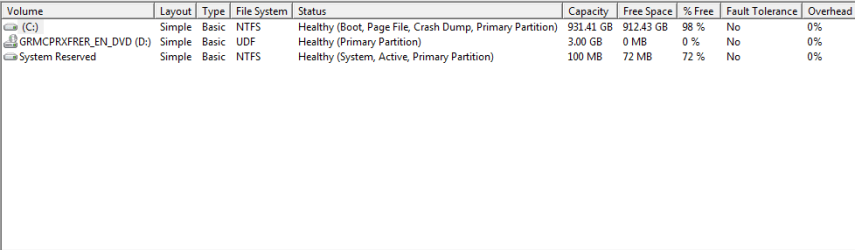
I just got done following the tutorial to a T, save for the parts I didn't care about (like backing up the files and restoring them). But everything else was done identically and I am still receiving that error.
 

Attachments

  • disk_management.PNG
    disk_management.PNG
    5.8 KB · Views: 2

My Computer My Computer

OS
Windows 7 Professional x64
CPU
Intel Core 2 Quad Q9550
Motherboard
Gigabyte EP35-DS3R
Memory
8GB Mushkin
Graphics Card(s)
Zotac GTX 460
Hard Drives
Western Digital Caviar Black 320 GB
Western Digital Caviar Black 1 TB
PSU
Thermaltake 850w
Have you tried running without MSE, using Defender or Avast to see the difference?

Test your RAM - Test with Memtest86+
for 5-6 passes or overnight. Swap RAM sticks, checking slots for debris, blow them out.

Complete any other steps missed from Troubleshooting Steps for Windows 7. Do you have a Clean Boot, are repeat errors resolved, all System Resources checked for problems and resolutions?
 
I have not tried running with something else yet. I ran memtest86 last night, and it worked for about 6 hours, and then it froze, but it didn't. It became unresponsive about 6 hours in. I couldn't reboot the machine using the keyboard, but on the screen, there was still a red + flashing in the title of the program. The timer however had stopped.
 

My Computer My Computer

OS
Windows 7 Professional x64
CPU
Intel Core 2 Quad Q9550
Motherboard
Gigabyte EP35-DS3R
Memory
8GB Mushkin
Graphics Card(s)
Zotac GTX 460
Hard Drives
Western Digital Caviar Black 320 GB
Western Digital Caviar Black 1 TB
PSU
Thermaltake 850w
Then I would pull out the RAM sticks, reseat them after blowing dust out of their slots. Insert only one stick to test it individually, until you find which stick or slot is faulty. The tutorial shows how.
 
Thank you so much for all of your help. I tested each stick individually in each slot, and found that one of the slots was causing the errors. Because the RAM sticks weren't very large, I went out and bought a new one. And put it in the slot that didn't work.
 

My Computer My Computer

OS
Windows 7 Professional x64
CPU
Intel Core 2 Quad Q9550
Motherboard
Gigabyte EP35-DS3R
Memory
8GB Mushkin
Graphics Card(s)
Zotac GTX 460
Hard Drives
Western Digital Caviar Black 320 GB
Western Digital Caviar Black 1 TB
PSU
Thermaltake 850w
Back
Top