Solved iPhone syncs but doesn't show up on "My Computer"

cqangel

New member
Local time
5:16 AM
Messages
7
Hi folks,

I have an iphone 4s which I sync on the PC using iTunes. When I plug the iPhone into the PC, iTunes syncs the phone but it doesn't show up under "My Computer," and I'm can't import my pictures to the PC.

Previous to this, I was having startup issues so I had Startup Repair fix the PC and restore it to a working configuration before the issue. However, now Norton Utilities wasn't working and I had to reinstall that. I'm wondering if this had anything to do with it. I got this error message:

"Windows cannot start this hardware device because its configuration information (in the registry) is incomplete or damaged. (Code 19)"

Tried googling this and most forums say it's a driver issue, but when I prompted the computer to do a driver search, it says the correct driver is installed. I opened Device Manager and the Apple Mobile Device Driver seems to be working properly.

Any help would be appreciated.

Thanks,
cqangel
 

My Computer My Computer

Computer type
PC/Desktop
Computer Manufacturer/Model Number
custom build
OS
Windows 7 64-bit
Graphics Card(s)
Nvidia
Hard Drives
western digital
Antivirus
Norton
Firstly close iTunes when it opens,
It does take a couple of minutes to load the driver,
Access%20iphone%201.jpg

Once you access the dcim folder you can copy and paste the files you want.
One note,
The iphone does need to be Unlocked and on.
 

My Computer My Computer

Computer type
PC/Desktop
Computer Manufacturer/Model Number
Custom assembled by me :}
OS
Win-7-Pro64bit 7-H-Prem-64bit
CPU
i7-5930K 2nd i9-9940x both water blocked VRM's too
Motherboard
ASUS SABERTOOTH X99 2nd ASUS x299 Apex
Memory
Trident-z 3200C14 2nd Trident-z 3600C16
Graphics Card(s)
EVGA 1080ti ftw3 2nd Titan Xp both water blocked
Sound Card
Built-in Realtek
Monitor(s) Displays
1-AOC G2460PG 24"G-Sync 144Hz/ 2nd 1-ASUS VG248QE 24" 144Hz
Screen Resolution
1920 x 1080 144Hz
Hard Drives
2-Samsung M.2 Evo & Evo Plus
2-Samsung 850 EVO 500GB SSD's/ 3-2.5 W.D. Black 1tb-&3-1tb/3-3.5 WD Black 1tb hdd's
PSU
EVGA SuperNOVA 1000-P2 2nd 1200-P2
Case
2-Corsair Obsidian Series 450D Black ATX Mid Tower
Cooling
Custom water loops
Keyboard
Logitech G710+/ 2nd Logitech G910
Mouse
2-RedDragon M901 Perdition 16400 dpi Gaming mouse = wired
Internet Speed
Comcast Ping 19ms 89.31mbps download speed 6.12mbps upload
Antivirus
Malwarebytes Pro/ Superantispyware Pro
Browser
FireFox & Pale moon
Other Info
2nd ASUS X299 Apex/Intel i9-9940x with Custom water loop/7H-Prem-x64/Corsair 450D case/Ram Trident-z 3600C16 4x8gb / Samsung970Evo plus 500gb SSD/Dual ssd EZ swap evo/PSU EVGA SuperNova 1200w-P2 80+Platinum/GPU Titan Xp /8-ML-140 on push-pull on 2-280GTX rads
Hi ThrashZone,

I closed iTunes and reopened it, and again, it resynced the iPhone, but the Apple iPhone icon still doesn't appear under "My Computer."
 

My Computer My Computer

Computer type
PC/Desktop
Computer Manufacturer/Model Number
custom build
OS
Windows 7 64-bit
Graphics Card(s)
Nvidia
Hard Drives
western digital
Antivirus
Norton
Importing from Iphone more discussions,
http://support.apple.com/kb/HT4083
http://support.apple.com/kb/TS3195
http://answers.microsoft.com/en-us/windows/forum/windows_7-pictures/cant-rotate-some-photos-in-windows-7-but-can/3a809845-9144-4bb1-9bb3-ab4f5b856524
iphone 4s yes sorry I missed the s on that/ which there have been some issues with this version of iphone,
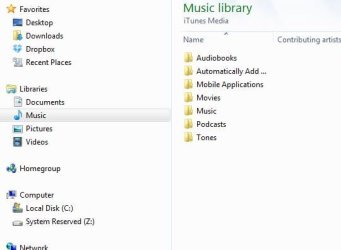
If the iphone did sync all the files should be inside the iTunes folder located in your My Music folder where you can copy and paste from there,
Click Start/ Music/ Open iTunes folder/ Media and there should be a pictures listing if sync actually did import them for you.
 

My Computer My Computer

Computer type
PC/Desktop
Computer Manufacturer/Model Number
Custom assembled by me :}
OS
Win-7-Pro64bit 7-H-Prem-64bit
CPU
i7-5930K 2nd i9-9940x both water blocked VRM's too
Motherboard
ASUS SABERTOOTH X99 2nd ASUS x299 Apex
Memory
Trident-z 3200C14 2nd Trident-z 3600C16
Graphics Card(s)
EVGA 1080ti ftw3 2nd Titan Xp both water blocked
Sound Card
Built-in Realtek
Monitor(s) Displays
1-AOC G2460PG 24"G-Sync 144Hz/ 2nd 1-ASUS VG248QE 24" 144Hz
Screen Resolution
1920 x 1080 144Hz
Hard Drives
2-Samsung M.2 Evo & Evo Plus
2-Samsung 850 EVO 500GB SSD's/ 3-2.5 W.D. Black 1tb-&3-1tb/3-3.5 WD Black 1tb hdd's
PSU
EVGA SuperNOVA 1000-P2 2nd 1200-P2
Case
2-Corsair Obsidian Series 450D Black ATX Mid Tower
Cooling
Custom water loops
Keyboard
Logitech G710+/ 2nd Logitech G910
Mouse
2-RedDragon M901 Perdition 16400 dpi Gaming mouse = wired
Internet Speed
Comcast Ping 19ms 89.31mbps download speed 6.12mbps upload
Antivirus
Malwarebytes Pro/ Superantispyware Pro
Browser
FireFox & Pale moon
Other Info
2nd ASUS X299 Apex/Intel i9-9940x with Custom water loop/7H-Prem-x64/Corsair 450D case/Ram Trident-z 3600C16 4x8gb / Samsung970Evo plus 500gb SSD/Dual ssd EZ swap evo/PSU EVGA SuperNova 1200w-P2 80+Platinum/GPU Titan Xp /8-ML-140 on push-pull on 2-280GTX rads
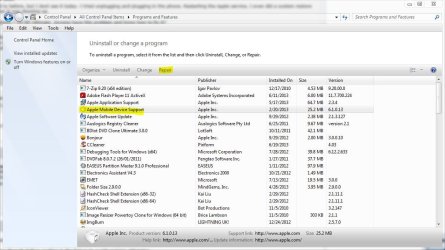
Have you tried using the repair option through Programs and Features?

Highlight the Apple Mobile Device Support, then click repair,
 

Attachments

  • iphone.JPG
    iphone.JPG
    105.6 KB · Views: 5

My Computer My Computer

Computer type
PC/Desktop
Computer Manufacturer/Model Number
Self Built
OS
Win 10 Pro x64
CPU
Intel I5-2500K @3.3GHz
Motherboard
Asrock P67 Extreme4
Memory
16GB G.Skill Ripjaws X (4x4GB)
Graphics Card(s)
EVGA GeForce 750 Ti SC 2GB
Sound Card
ASUS Xonar DG 5.1 Channels 24-bit 96KHz PCI Interface Sound
Monitor(s) Displays
auria eq2367
Screen Resolution
1920 x 1080
Hard Drives
250GB Samsung 850 EVO SSD
1TB WD Blue
1TB Hitachi
PSU
SeaSonic X 650W 80 Plus Gold
Case
Corsair Obsidian 750D
Cooling
Corsair H60, Three 140mm case fans
Keyboard
Logitech Wireless Keyboard K520
Mouse
Logitech Wireless Mouse M310
Internet Speed
Wave Broadband ~ 100 dn 5 up
Antivirus
Windows Defender, Malwarebytes Premium
Browser
Edge, IE11, Chrome
Other Info
Laptop specs: HP g7-1365dx /
CPU: AMD A6-3420M APU with Radeon(tm) HD Graphics /
RAM: Crucial 8Gb (2x4Gb) /
SSD: Crucial M4-CT128M4SSD2 ATA Device/ FW 000F /
GFX: AMD Radeon HD 6520G /
OS: Windows 10 Pro x64
Thanks for all the advice so far, folks.

ThrashZone, I plugged my iPhone into another computer (laptop) just to get the photos off of it and again, it wouldn't appear under "My Computer," so I wonder if it's an iOS issue. I did open iTunes media folder on my PC but there doesn't seem to be any folder with pictures in it.

Derekimo, I did a repair on the Apple Mobile Driver but nothing seems to have changed.

iTunes hasn't asked to update any software on the phone so I puzzled as to why this is happening on both my computers....
 

Attachments

  • iTunesfolderCapture.JPG
    iTunesfolderCapture.JPG
    24.5 KB · Views: 43

My Computer My Computer

Computer type
PC/Desktop
Computer Manufacturer/Model Number
custom build
OS
Windows 7 64-bit
Graphics Card(s)
Nvidia
Hard Drives
western digital
Antivirus
Norton
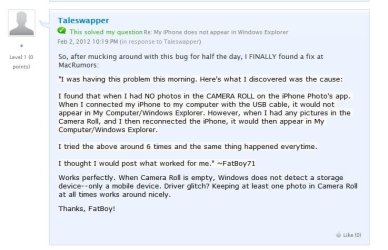
Do you have any pictures in the camera roll on the iPhone?

Try putting some there if you don't, seems like windows won't show the iPhone if there are no pictures in the camera roll.
 

My Computer My Computer

Computer type
PC/Desktop
Computer Manufacturer/Model Number
Self Built
OS
Win 10 Pro x64
CPU
Intel I5-2500K @3.3GHz
Motherboard
Asrock P67 Extreme4
Memory
16GB G.Skill Ripjaws X (4x4GB)
Graphics Card(s)
EVGA GeForce 750 Ti SC 2GB
Sound Card
ASUS Xonar DG 5.1 Channels 24-bit 96KHz PCI Interface Sound
Monitor(s) Displays
auria eq2367
Screen Resolution
1920 x 1080
Hard Drives
250GB Samsung 850 EVO SSD
1TB WD Blue
1TB Hitachi
PSU
SeaSonic X 650W 80 Plus Gold
Case
Corsair Obsidian 750D
Cooling
Corsair H60, Three 140mm case fans
Keyboard
Logitech Wireless Keyboard K520
Mouse
Logitech Wireless Mouse M310
Internet Speed
Wave Broadband ~ 100 dn 5 up
Antivirus
Windows Defender, Malwarebytes Premium
Browser
Edge, IE11, Chrome
Other Info
Laptop specs: HP g7-1365dx /
CPU: AMD A6-3420M APU with Radeon(tm) HD Graphics /
RAM: Crucial 8Gb (2x4Gb) /
SSD: Crucial M4-CT128M4SSD2 ATA Device/ FW 000F /
GFX: AMD Radeon HD 6520G /
OS: Windows 10 Pro x64
Hi Derekkimo,

Yes there are photos on the camera roll...!
 

My Computer My Computer

Computer type
PC/Desktop
Computer Manufacturer/Model Number
custom build
OS
Windows 7 64-bit
Graphics Card(s)
Nvidia
Hard Drives
western digital
Antivirus
Norton
Do you have Apple's Quicktime player installed ?
Very odd that windows does not recognize the device but iTunes does.
 

My Computer My Computer

Computer type
PC/Desktop
Computer Manufacturer/Model Number
Custom assembled by me :}
OS
Win-7-Pro64bit 7-H-Prem-64bit
CPU
i7-5930K 2nd i9-9940x both water blocked VRM's too
Motherboard
ASUS SABERTOOTH X99 2nd ASUS x299 Apex
Memory
Trident-z 3200C14 2nd Trident-z 3600C16
Graphics Card(s)
EVGA 1080ti ftw3 2nd Titan Xp both water blocked
Sound Card
Built-in Realtek
Monitor(s) Displays
1-AOC G2460PG 24"G-Sync 144Hz/ 2nd 1-ASUS VG248QE 24" 144Hz
Screen Resolution
1920 x 1080 144Hz
Hard Drives
2-Samsung M.2 Evo & Evo Plus
2-Samsung 850 EVO 500GB SSD's/ 3-2.5 W.D. Black 1tb-&3-1tb/3-3.5 WD Black 1tb hdd's
PSU
EVGA SuperNOVA 1000-P2 2nd 1200-P2
Case
2-Corsair Obsidian Series 450D Black ATX Mid Tower
Cooling
Custom water loops
Keyboard
Logitech G710+/ 2nd Logitech G910
Mouse
2-RedDragon M901 Perdition 16400 dpi Gaming mouse = wired
Internet Speed
Comcast Ping 19ms 89.31mbps download speed 6.12mbps upload
Antivirus
Malwarebytes Pro/ Superantispyware Pro
Browser
FireFox & Pale moon
Other Info
2nd ASUS X299 Apex/Intel i9-9940x with Custom water loop/7H-Prem-x64/Corsair 450D case/Ram Trident-z 3600C16 4x8gb / Samsung970Evo plus 500gb SSD/Dual ssd EZ swap evo/PSU EVGA SuperNova 1200w-P2 80+Platinum/GPU Titan Xp /8-ML-140 on push-pull on 2-280GTX rads
Try the diagnostics under help on the menu bar in iTunes.
 

My Computer My Computer

Computer type
PC/Desktop
Computer Manufacturer/Model Number
Self Built
OS
Win 10 Pro x64
CPU
Intel I5-2500K @3.3GHz
Motherboard
Asrock P67 Extreme4
Memory
16GB G.Skill Ripjaws X (4x4GB)
Graphics Card(s)
EVGA GeForce 750 Ti SC 2GB
Sound Card
ASUS Xonar DG 5.1 Channels 24-bit 96KHz PCI Interface Sound
Monitor(s) Displays
auria eq2367
Screen Resolution
1920 x 1080
Hard Drives
250GB Samsung 850 EVO SSD
1TB WD Blue
1TB Hitachi
PSU
SeaSonic X 650W 80 Plus Gold
Case
Corsair Obsidian 750D
Cooling
Corsair H60, Three 140mm case fans
Keyboard
Logitech Wireless Keyboard K520
Mouse
Logitech Wireless Mouse M310
Internet Speed
Wave Broadband ~ 100 dn 5 up
Antivirus
Windows Defender, Malwarebytes Premium
Browser
Edge, IE11, Chrome
Other Info
Laptop specs: HP g7-1365dx /
CPU: AMD A6-3420M APU with Radeon(tm) HD Graphics /
RAM: Crucial 8Gb (2x4Gb) /
SSD: Crucial M4-CT128M4SSD2 ATA Device/ FW 000F /
GFX: AMD Radeon HD 6520G /
OS: Windows 10 Pro x64
You might need to go to Folder options or in a Windows explorer window/ Organize on the top left/ Folder and search options/ View section/ Scroll down and tick the box to Show hidden folders, files and drives/ Apply and Okay.
 

My Computer My Computer

Computer type
PC/Desktop
Computer Manufacturer/Model Number
Custom assembled by me :}
OS
Win-7-Pro64bit 7-H-Prem-64bit
CPU
i7-5930K 2nd i9-9940x both water blocked VRM's too
Motherboard
ASUS SABERTOOTH X99 2nd ASUS x299 Apex
Memory
Trident-z 3200C14 2nd Trident-z 3600C16
Graphics Card(s)
EVGA 1080ti ftw3 2nd Titan Xp both water blocked
Sound Card
Built-in Realtek
Monitor(s) Displays
1-AOC G2460PG 24"G-Sync 144Hz/ 2nd 1-ASUS VG248QE 24" 144Hz
Screen Resolution
1920 x 1080 144Hz
Hard Drives
2-Samsung M.2 Evo & Evo Plus
2-Samsung 850 EVO 500GB SSD's/ 3-2.5 W.D. Black 1tb-&3-1tb/3-3.5 WD Black 1tb hdd's
PSU
EVGA SuperNOVA 1000-P2 2nd 1200-P2
Case
2-Corsair Obsidian Series 450D Black ATX Mid Tower
Cooling
Custom water loops
Keyboard
Logitech G710+/ 2nd Logitech G910
Mouse
2-RedDragon M901 Perdition 16400 dpi Gaming mouse = wired
Internet Speed
Comcast Ping 19ms 89.31mbps download speed 6.12mbps upload
Antivirus
Malwarebytes Pro/ Superantispyware Pro
Browser
FireFox & Pale moon
Other Info
2nd ASUS X299 Apex/Intel i9-9940x with Custom water loop/7H-Prem-x64/Corsair 450D case/Ram Trident-z 3600C16 4x8gb / Samsung970Evo plus 500gb SSD/Dual ssd EZ swap evo/PSU EVGA SuperNova 1200w-P2 80+Platinum/GPU Titan Xp /8-ML-140 on push-pull on 2-280GTX rads
Hi derekimo,

Ran the diagnostics. All tests passed.
 

My Computer My Computer

Computer type
PC/Desktop
Computer Manufacturer/Model Number
custom build
OS
Windows 7 64-bit
Graphics Card(s)
Nvidia
Hard Drives
western digital
Antivirus
Norton
Thanks for all the advice so far, folks.

ThrashZone, I plugged my iPhone into another computer (laptop) just to get the photos off of it and again, it wouldn't appear under "My Computer," so I wonder if it's an iOS issue. I did open iTunes media folder on my PC but there doesn't seem to be any folder with pictures in it.

Derekimo, I did a repair on the Apple Mobile Driver but nothing seems to have changed.

iTunes hasn't asked to update any software on the phone so I puzzled as to why this is happening on both my computers....

Since this is happening on both computers, it is most likely something with the phone.

I know you said there are pictures in the camera roll and I'm not trying to question your knowledge or ability, but it is a known fact that there must be pictures in the camera roll for it to be recognized by windows, which is why I suggested it.

You'll notice it did solve the same issue here,

https://discussions.apple.com/thread/3706292?start=0&tstart=0

iphone2.JPG

If you are still having problems after that, I would suggest a complete reinstall of iTunes.

You might need to go to Folder options or in a Windows explorer window/ Organize on the top left/ Folder and search options/ View section/ Scroll down and tick the box to Show hidden folders, files and drives/ Apply and Okay.

iTunes syncs are not viewable natively even with hidden folders enabled.

https://discussions.apple.com/thread/3030024?start=0&tstart=0
 

My Computer My Computer

Computer type
PC/Desktop
Computer Manufacturer/Model Number
Self Built
OS
Win 10 Pro x64
CPU
Intel I5-2500K @3.3GHz
Motherboard
Asrock P67 Extreme4
Memory
16GB G.Skill Ripjaws X (4x4GB)
Graphics Card(s)
EVGA GeForce 750 Ti SC 2GB
Sound Card
ASUS Xonar DG 5.1 Channels 24-bit 96KHz PCI Interface Sound
Monitor(s) Displays
auria eq2367
Screen Resolution
1920 x 1080
Hard Drives
250GB Samsung 850 EVO SSD
1TB WD Blue
1TB Hitachi
PSU
SeaSonic X 650W 80 Plus Gold
Case
Corsair Obsidian 750D
Cooling
Corsair H60, Three 140mm case fans
Keyboard
Logitech Wireless Keyboard K520
Mouse
Logitech Wireless Mouse M310
Internet Speed
Wave Broadband ~ 100 dn 5 up
Antivirus
Windows Defender, Malwarebytes Premium
Browser
Edge, IE11, Chrome
Other Info
Laptop specs: HP g7-1365dx /
CPU: AMD A6-3420M APU with Radeon(tm) HD Graphics /
RAM: Crucial 8Gb (2x4Gb) /
SSD: Crucial M4-CT128M4SSD2 ATA Device/ FW 000F /
GFX: AMD Radeon HD 6520G /
OS: Windows 10 Pro x64
Derekimo and ThrasZone, I appreciate ANY AND ALL ADVICE you guys give and am grateful, so I wasn't assuming anything when asked about pictures in the camera roll.

I did reinstall iTunes, but nothing different is happening. Still syncs the phone, but no icon for me to access on the desktop.

ThrashZone, I checked the box to Show Hidden Folders, etc. but nothing seems to surface.

I hooked up my wife's Iphone 4 and the same thing is happening to her as well.
 

My Computer My Computer

Computer type
PC/Desktop
Computer Manufacturer/Model Number
custom build
OS
Windows 7 64-bit
Graphics Card(s)
Nvidia
Hard Drives
western digital
Antivirus
Norton
I hooked up my wife's Iphone 4 and the same thing is happening to her as well.
I do have a iphone 4 and tested with it without any issues,
What security suite do have installed just for the record ?
 

My Computer My Computer

Computer type
PC/Desktop
Computer Manufacturer/Model Number
Custom assembled by me :}
OS
Win-7-Pro64bit 7-H-Prem-64bit
CPU
i7-5930K 2nd i9-9940x both water blocked VRM's too
Motherboard
ASUS SABERTOOTH X99 2nd ASUS x299 Apex
Memory
Trident-z 3200C14 2nd Trident-z 3600C16
Graphics Card(s)
EVGA 1080ti ftw3 2nd Titan Xp both water blocked
Sound Card
Built-in Realtek
Monitor(s) Displays
1-AOC G2460PG 24"G-Sync 144Hz/ 2nd 1-ASUS VG248QE 24" 144Hz
Screen Resolution
1920 x 1080 144Hz
Hard Drives
2-Samsung M.2 Evo & Evo Plus
2-Samsung 850 EVO 500GB SSD's/ 3-2.5 W.D. Black 1tb-&3-1tb/3-3.5 WD Black 1tb hdd's
PSU
EVGA SuperNOVA 1000-P2 2nd 1200-P2
Case
2-Corsair Obsidian Series 450D Black ATX Mid Tower
Cooling
Custom water loops
Keyboard
Logitech G710+/ 2nd Logitech G910
Mouse
2-RedDragon M901 Perdition 16400 dpi Gaming mouse = wired
Internet Speed
Comcast Ping 19ms 89.31mbps download speed 6.12mbps upload
Antivirus
Malwarebytes Pro/ Superantispyware Pro
Browser
FireFox & Pale moon
Other Info
2nd ASUS X299 Apex/Intel i9-9940x with Custom water loop/7H-Prem-x64/Corsair 450D case/Ram Trident-z 3600C16 4x8gb / Samsung970Evo plus 500gb SSD/Dual ssd EZ swap evo/PSU EVGA SuperNova 1200w-P2 80+Platinum/GPU Titan Xp /8-ML-140 on push-pull on 2-280GTX rads
OK, just checking.

Lets go back to this statement,

I opened Device Manager and the Apple Mobile Device Driver seems to be working properly.

Have you tried right clicking on that and uninstalling it, then let windows reinstall a fresh driver?


Also, not really relevant to this problem but I was wondering why your system reserved partition has been assigned a drive letter, Z ?
 

My Computer My Computer

Computer type
PC/Desktop
Computer Manufacturer/Model Number
Self Built
OS
Win 10 Pro x64
CPU
Intel I5-2500K @3.3GHz
Motherboard
Asrock P67 Extreme4
Memory
16GB G.Skill Ripjaws X (4x4GB)
Graphics Card(s)
EVGA GeForce 750 Ti SC 2GB
Sound Card
ASUS Xonar DG 5.1 Channels 24-bit 96KHz PCI Interface Sound
Monitor(s) Displays
auria eq2367
Screen Resolution
1920 x 1080
Hard Drives
250GB Samsung 850 EVO SSD
1TB WD Blue
1TB Hitachi
PSU
SeaSonic X 650W 80 Plus Gold
Case
Corsair Obsidian 750D
Cooling
Corsair H60, Three 140mm case fans
Keyboard
Logitech Wireless Keyboard K520
Mouse
Logitech Wireless Mouse M310
Internet Speed
Wave Broadband ~ 100 dn 5 up
Antivirus
Windows Defender, Malwarebytes Premium
Browser
Edge, IE11, Chrome
Other Info
Laptop specs: HP g7-1365dx /
CPU: AMD A6-3420M APU with Radeon(tm) HD Graphics /
RAM: Crucial 8Gb (2x4Gb) /
SSD: Crucial M4-CT128M4SSD2 ATA Device/ FW 000F /
GFX: AMD Radeon HD 6520G /
OS: Windows 10 Pro x64
ThrashZone, I use Norton 360 premium version 20.4.0.40.

derekimo, The Apple Mobile Device driver was okay, but it turns out the Apple iPhone driver was corrupt. I thought they were the same thing so I didn't even notice until now. I uninstalled the Apple iPhone driver and then reinstalled it, and you know what? It's working. Thanks so much you guys!

As for what my system reserved partition has been assigned a drive letter z, I have no idea. My hard drive got corrupted a year or so ago and I had to zero it out and reinstall everything and I don't know how to partition properly, I guess.
 

My Computer My Computer

Computer type
PC/Desktop
Computer Manufacturer/Model Number
custom build
OS
Windows 7 64-bit
Graphics Card(s)
Nvidia
Hard Drives
western digital
Antivirus
Norton
Great news! Glad you got it working again. :)

Usually there is no drive letter assigned to the system reserved, which would then make it not show up in windows explorer.

Usually a good thing since there is no need for access to this.

If you want you can remove the drive letter following step 7 of this tutorial,

http://www.sevenforums.com/tutorials/82994-drive-letter-add-change-remove-windows-7-a.html

Or if you just want to leave it be, make sure you don't put anything in there.
 

My Computer My Computer

Computer type
PC/Desktop
Computer Manufacturer/Model Number
Self Built
OS
Win 10 Pro x64
CPU
Intel I5-2500K @3.3GHz
Motherboard
Asrock P67 Extreme4
Memory
16GB G.Skill Ripjaws X (4x4GB)
Graphics Card(s)
EVGA GeForce 750 Ti SC 2GB
Sound Card
ASUS Xonar DG 5.1 Channels 24-bit 96KHz PCI Interface Sound
Monitor(s) Displays
auria eq2367
Screen Resolution
1920 x 1080
Hard Drives
250GB Samsung 850 EVO SSD
1TB WD Blue
1TB Hitachi
PSU
SeaSonic X 650W 80 Plus Gold
Case
Corsair Obsidian 750D
Cooling
Corsair H60, Three 140mm case fans
Keyboard
Logitech Wireless Keyboard K520
Mouse
Logitech Wireless Mouse M310
Internet Speed
Wave Broadband ~ 100 dn 5 up
Antivirus
Windows Defender, Malwarebytes Premium
Browser
Edge, IE11, Chrome
Other Info
Laptop specs: HP g7-1365dx /
CPU: AMD A6-3420M APU with Radeon(tm) HD Graphics /
RAM: Crucial 8Gb (2x4Gb) /
SSD: Crucial M4-CT128M4SSD2 ATA Device/ FW 000F /
GFX: AMD Radeon HD 6520G /
OS: Windows 10 Pro x64
After googling for most of my 3 day weekend along with apple support as well as AT&T....i have solved the problem on my own. i was having a problem with Win 7 not recognizing my Iphone under portable devices. it would sync with itunes...just not under MY COMPUTER. I like to manually cut/copy and paste my pictures on my lap top so i can keep a little memory on my iphone. after apple told me i would prob need to take my cpu to a shop for repair or order a new win 7 installation disk...i figured out my problem! once i went back into the device manager for about the 100th time this weekend...i had my iphone plugged in and noticed under portable devices, it had an exclamation mark. i right clicked the iphone...all devices were up to date, i even disabled and enabled again..finally i just hit the uninstall after right clicking..rebooted...plugged my phone back in and it reregistered the portable device...and BAM, it's back in the MY COMPUTER portable devices.
 

My Computer My Computer

Computer type
Laptop
Computer Manufacturer/Model Number
HP
OS
win 7
After googling for most of my 3 day weekend along with apple support as well as AT&T....i have solved the problem on my own. i was having a problem with Win 7 not recognizing my Iphone under portable devices. it would sync with itunes...just not under MY COMPUTER. I like to manually cut/copy and paste my pictures on my lap top so i can keep a little memory on my iphone. after apple told me i would prob need to take my cpu to a shop for repair or order a new win 7 installation disk...i figured out my problem! once i went back into the device manager for about the 100th time this weekend...i had my iphone plugged in and noticed under portable devices, it had an exclamation mark. i right clicked the iphone...all devices were up to date, i even disabled and enabled again..finally i just hit the uninstall after right clicking..rebooted...plugged my phone back in and it reregistered the portable device...and BAM, it's back in the MY COMPUTER portable devices.

Thank you, this was quite helpful. I right clicked the iPhone, just as you did, and was presented with the option to get help with the issue. It seemed to be some kind of driver issue which Windows was very quickly able to fix. (I had already made sure I had the latest driver installed.) There are 2 other things I thought I'd mention. One is that I had a cord that was starting to have issues, so I got a brand new cord out. The other is that I noticed of the 3 USB plugs on my laptop, it seems to prefer the right side bottom plug. It's very odd. For example, although iTunes would "see" my iPhone no matter which plug I used, if I tried to click on the button to look at my phone it iTunes, the button would actually disappear when I used the other 2 plugs. I don't know if that's related to the photo issue, but you never know what info may end up helping someone.
 

My Computer My Computer

Computer type
Laptop
OS
Windows 7
Back
Top