
I was in my computer case to clean dust out & to just look around before I have to change one of the HD's soon. Also went into BIOS to check on UEFI but made no changes. But after reboot ALL 3 internal hard drives show up as removable disks, system began driver software installation of ATA Channel 4 & 5, PCI standard PCI-to-PCI bridge & SD Audigy. Now some playback devices are missing AND the remaining ones don't work. Also USB ports don't work.
I did a System Restore but the problems remain. I could restore w/ an image backup BUT the external drive isn't recognized presumably due to USB problem. Could an internal cable or other hardware not being seated properly cause this? Or some BIOS setting? The attached image of the Gigabyte BIOS screen shown had NEVER appeared before - it was a totally different screen!?
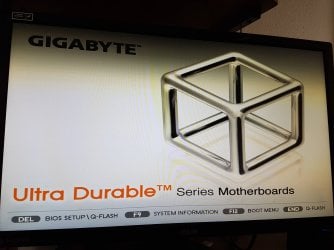
- - - Updated - - -
This thread can be deleted as I've solved the issue (though idk how or why it occurred).
I did a System Restore but the problems remain. I could restore w/ an image backup BUT the external drive isn't recognized presumably due to USB problem. Could an internal cable or other hardware not being seated properly cause this? Or some BIOS setting? The attached image of the Gigabyte BIOS screen shown had NEVER appeared before - it was a totally different screen!?
- - - Updated - - -
This thread can be deleted as I've solved the issue (though idk how or why it occurred).
Last edited:
My Computers
-
At a glance
Windows 7 Home Premium 64bit with SP1, OEMIntel Core i7-3770G Skill 8GB (2x4GB) Ripkaws PC3-12800 DDR3 16...EVGA, GeForce GTX 560 Ti FPB (AR) 1GB GDDR5 4...- Computer type
- PC/Desktop
- OS
- Windows 7 Home Premium 64bit with SP1, OEM
- CPU
- Intel Core i7-3770
- Motherboard
- Gigabyte GA-Z77X-UD3H LGA1155
- Memory
- G Skill 8GB (2x4GB) Ripkaws PC3-12800 DDR3 1600MHz
- Graphics Card(s)
- EVGA, GeForce GTX 560 Ti FPB (AR) 1GB GDDR5 4104MHz
- Sound Card
- Creative Sound Blaster Audigy SE, 7.1 channels, 24 bit
- Monitor(s) Displays
- HP ZR24w
- Screen Resolution
- 1920x1200 - 60Hz
- Hard Drives
- Intel 60GB 520 Series SSD, MLC SandForce SF-2281, 550/475 MB/s
WD 1TB Caviar Blue, SATA 6 Gb/s, 7200 RPM
- PSU
- Seasonic X-560, 80 PLUS Gold
- Case
- Cooler Master Elite 430
- Cooling
- 2 stock fans
-
- Antivirus
- MS Security Essentials


