
Multiple IPs on 1 NIC-How do I forse them to use the same gateway?

Thank you so much for you help thus far. If I change from .200.120 and .121 to .242.120 and .121 then I will no longer be able to connect to the wireless device that is being moved from the main area of the building (.200.xxx) to the 2nd area (.242.xxx). When I do a tracert from .242.xxx to .200.xx there are four hops the 1st router being the default GW.

I did have a thought... could I use the hosts file to map 1 IP to another?
 

My Computer My Computer

At a glance

Windows 7
Computer type
PC/Desktop
OS
Windows 7
Both source and destination (xxx.xxx.200.y and xxx.xxx.242.z) (both subnet 255.255.255.0) are on another subnet. So it MUST be routed through a router!

True and yes that would work but the OP wanted xxx.xxx.242.119 to talk to xxx.xxx.200.120 and .121 which are on the local switch as well as talk to xxx.xxx.200.100 to .118 which are on a different subnet. What I am trying to say and I do apologise if I have caused confusion :(, is to set a custom subnet mask so that the computer can tell that xxx.xxx.200.100 to xxx.xxx.200.119 is on a separate subnet while xxx.xxx.200.120 and .121 is on the local switch.

Josh
 

My Computer My Computer

At a glance

Windows 7 Professional x64 SP1 ; Windows Serv...Intel Core i5 2400 @ 3.10GHz8.0GB DDR3 @ 665MHz (2GBx4)AMD Radeon HD 6870
Computer type
PC/Desktop
Computer Manufacturer/Model Number
Custom Built
OS
Windows 7 Professional x64 SP1 ; Windows Server 2012 R2 Standard
CPU
Intel Core i5 2400 @ 3.10GHz
Motherboard
Foxconn H67MP-S/-V/H67MP
Memory
8.0GB DDR3 @ 665MHz (2GBx4)
Graphics Card(s)
AMD Radeon HD 6870
Sound Card
Realtek High Definition Audio
Monitor(s) Displays
AOC 2243W & SMB1930NW
Screen Resolution
1440x900 & 1920x1080
Hard Drives
977GB Seagate ST31000524AS ATA Drive (SATA)
250GB WD iSCSI attached Drive
PSU
750W Gaming PSU
Case
Novatech Night
Cooling
Fan
Keyboard
Dell Standard PS/2 Keyboard
Mouse
R.A.T 07 Gaming Mouse
Internet Speed
Download: 10 Mbps Ping: 30ms Upload: 0.81 Mbps
Browser
Google Chrome
Other Info
Optiarc DVD RW AD-5260S ATA Device
Thank you so much for you help thus far. If I change from .200.120 and .121 to .242.120 and .121 then I will no longer be able to connect to the wireless device that is being moved from the main area of the building (.200.xxx) to the 2nd area (.242.xxx). When I do a tracert from .242.xxx to .200.xx there are four hops the 1st router being the default GW.

I did have a thought... could I use the hosts file to map 1 IP to another?

I would assume so but that is out my area :( The only issue I could think is that the destination device would also need that ip mapping in their hosts in order to know to send the packets back rather than to its local area network/switch

If that is the case then any .242.xxx device would also be unable to connect? That would render your address range given by your IT dept useless? If I am missing something please say
 

My Computer My Computer

At a glance

Windows 7 Professional x64 SP1 ; Windows Serv...Intel Core i5 2400 @ 3.10GHz8.0GB DDR3 @ 665MHz (2GBx4)AMD Radeon HD 6870
Computer type
PC/Desktop
Computer Manufacturer/Model Number
Custom Built
OS
Windows 7 Professional x64 SP1 ; Windows Server 2012 R2 Standard
CPU
Intel Core i5 2400 @ 3.10GHz
Motherboard
Foxconn H67MP-S/-V/H67MP
Memory
8.0GB DDR3 @ 665MHz (2GBx4)
Graphics Card(s)
AMD Radeon HD 6870
Sound Card
Realtek High Definition Audio
Monitor(s) Displays
AOC 2243W & SMB1930NW
Screen Resolution
1440x900 & 1920x1080
Hard Drives
977GB Seagate ST31000524AS ATA Drive (SATA)
250GB WD iSCSI attached Drive
PSU
750W Gaming PSU
Case
Novatech Night
Cooling
Fan
Keyboard
Dell Standard PS/2 Keyboard
Mouse
R.A.T 07 Gaming Mouse
Internet Speed
Download: 10 Mbps Ping: 30ms Upload: 0.81 Mbps
Browser
Google Chrome
Other Info
Optiarc DVD RW AD-5260S ATA Device
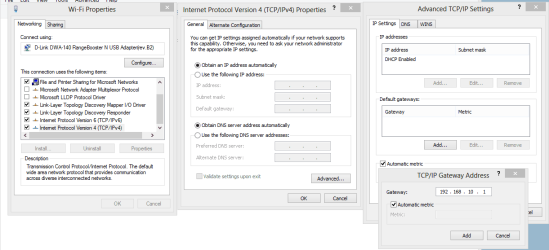
In order to connect to multiple subnet's with a single NIC without having to type everything in each time you would go into the Advanced TCP/IP settings then list all the different networks, subnets etc. that you require to connect to. You can bind each different subnet to a singular NIC this way.

You just need to go into the IPv4 properties of the NIC and then go to the Advanced settings and then Add each different network, gateway, subnet etc. add them all one at a time. The picture shows where you can do this. :)
 

Attachments

  • type in gateway advanced TCP IP.PNG
    type in gateway advanced TCP IP.PNG
    26.2 KB · Views: 2

My Computer My Computer

At a glance

Windows 7 Ult, Windows 8.1 Pro,Q9650-4.275GHz, E8600 4.5GHz, E6750-3.8GHzG.Skill PC2 9600 1200Mhz 5 5 5 15 2TGTX480
Computer type
PC/Desktop
Computer Manufacturer/Model Number
Home built
OS
Windows 7 Ult, Windows 8.1 Pro,
CPU
Q9650-4.275GHz, E8600 4.5GHz, E6750-3.8GHz
Motherboard
Evga 780i FTW
Memory
G.Skill PC2 9600 1200Mhz 5 5 5 15 2T
Graphics Card(s)
GTX480
Sound Card
Asus Xonar D2
Monitor(s) Displays
HannsG
Screen Resolution
1680X1050
Hard Drives
GSkill Phoenix Pro 120GB SSD
PSU
ThermalTake Toughpower 1000Watt modular
Case
ThermalTake XaserV
Cooling
Xigmatek S1283
Keyboard
Logitech G15
Mouse
Logitech G9
Internet Speed
T1
Back
Top