Toshiba X505-Q8104 Blu-Ray (BD) Drive Not Found

DSH0969

New member
Local time
11:39 AM
Messages
5
Over the past several months I have noticed that at times my BD drive is not listed in 'my computer'. When I immediately log on & go to my computer it's there, but after everything finishes loading it's gone. Toshiba Video Player msg "drive not found". WinDVD (10) does not located the drive either. Yet, the drive opens / closes manually.

Fixes I've tried...> Xionix RegServe to fix the registry - Xionix Driver Hound to locate drivers - run all antivirus / spyware software - PLDS Smartpack Utility to locate driver, msg "optical device not found" & numerous hours of searching online for a fix.

IDK if this matters...> In the Device Manager I do not have a listing for "DVD/CD", but I do have "Disk Drives". Under Disk Drives is... ST9500420AS ATA Drive - ST95005620AS ATA Drive - WDC WD20 EARS 00S8B1 USB Device. Also, nothing is marked with a yellow exclamation point.

* NOTE: Please post responses in simple terms that I can follow cuz I know basics.

Thanks!

Debra
 

My Computer My Computer

At a glance

Win 7 HP (sp1) 64 bitIntel (R) Core (TM) i7-2630QM CPU @ 2ghz8GB DDR3 1333MHz (max 8GB)NVIDIA® GeForce® GTX 460M
Computer type
Laptop
Computer Manufacturer/Model Number
Toshiba Qosmio X505-Q8104
OS
Win 7 HP (sp1) 64 bit
CPU
Intel (R) Core (TM) i7-2630QM CPU @ 2ghz
Motherboard
Mobile Intel® HM65 Express Chipset
Memory
8GB DDR3 1333MHz (max 8GB)
Graphics Card(s)
NVIDIA® GeForce® GTX 460M
Hard Drives
500GB (7200 RPM) Serial ATA hard disk drive
500GB (7200 RPM) Hybrid 4G Serial ATA hard disk drive
Antivirus
Avast
Browser
IE 10
Other Info
Blu-Ray Disc® (BD-ROM) and DVD SuperMulti drive with Labelflash®
ALSO... Forgot to include that I have dwnlded updates listed on Toshiba website for my model (which hasn't resolved the problem) & ran several Windows Troubleshooting scans that I found on other sites w/o any luck.
 

My Computer My Computer

At a glance

Win 7 HP (sp1) 64 bitIntel (R) Core (TM) i7-2630QM CPU @ 2ghz8GB DDR3 1333MHz (max 8GB)NVIDIA® GeForce® GTX 460M
Computer type
Laptop
Computer Manufacturer/Model Number
Toshiba Qosmio X505-Q8104
OS
Win 7 HP (sp1) 64 bit
CPU
Intel (R) Core (TM) i7-2630QM CPU @ 2ghz
Motherboard
Mobile Intel® HM65 Express Chipset
Memory
8GB DDR3 1333MHz (max 8GB)
Graphics Card(s)
NVIDIA® GeForce® GTX 460M
Hard Drives
500GB (7200 RPM) Serial ATA hard disk drive
500GB (7200 RPM) Hybrid 4G Serial ATA hard disk drive
Antivirus
Avast
Browser
IE 10
Other Info
Blu-Ray Disc® (BD-ROM) and DVD SuperMulti drive with Labelflash®
Over the past several months I have noticed that at times my BD drive is not listed in 'my computer'. When I immediately log on & go to my computer it's there, but after everything finishes loading it's gone. Toshiba Video Player msg "drive not found". WinDVD (10) does not located the drive either. Yet, the drive opens / closes manually.

Fixes I've tried...> Xionix RegServe to fix the registry - Xionix Driver Hound to locate drivers - run all antivirus / spyware software - PLDS Smartpack Utility to locate driver, msg "optical device not found" & numerous hours of searching online for a fix.

IDK if this matters...> In the Device Manager I do not have a listing for "DVD/CD", but I do have "Disk Drives". Under Disk Drives is... ST9500420AS ATA Drive - ST95005620AS ATA Drive - WDC WD20 EARS 00S8B1 USB Device. Also, nothing is marked with a yellow exclamation point.

* NOTE: Please post responses in simple terms that I can follow cuz I know basics.

Thanks!

Debra

Hi Debra,

Welcome to the Sevenforums.

Please check the links below which would help you resolve this issue:

Fix problems with CD or DVD drives that can

Your CD drive or DVD drive is missing or is not recognized by Windows or other programs

Hope it helps.
 

My Computer My Computer

At a glance

Winndows 7 32 bit
Computer type
PC/Desktop
OS
Winndows 7 32 bit
SandeepP... TY but I have tried Microsoft's Fix It and it didn't resolve the issue. Also, I can not delete the drivers in the Device Manager cuz the drive isn't listed.
 

My Computer My Computer

At a glance

Win 7 HP (sp1) 64 bitIntel (R) Core (TM) i7-2630QM CPU @ 2ghz8GB DDR3 1333MHz (max 8GB)NVIDIA® GeForce® GTX 460M
Computer type
Laptop
Computer Manufacturer/Model Number
Toshiba Qosmio X505-Q8104
OS
Win 7 HP (sp1) 64 bit
CPU
Intel (R) Core (TM) i7-2630QM CPU @ 2ghz
Motherboard
Mobile Intel® HM65 Express Chipset
Memory
8GB DDR3 1333MHz (max 8GB)
Graphics Card(s)
NVIDIA® GeForce® GTX 460M
Hard Drives
500GB (7200 RPM) Serial ATA hard disk drive
500GB (7200 RPM) Hybrid 4G Serial ATA hard disk drive
Antivirus
Avast
Browser
IE 10
Other Info
Blu-Ray Disc® (BD-ROM) and DVD SuperMulti drive with Labelflash®
It's getting power so you can open and close it, that's all.

Have you removed the drive and checked the pins/contacts inside the slot and back of the drive? Looking for debris or very dirty contacts.

Otherwise the drive electronics is probably failing, those drives don't last forever either, and are typically more fragile then desktop drives.

Internal workings could be loose rendering the connection bad from the drive to the rest, also.
 

My Computer My Computer

At a glance

Windows 7 Ultimate Retail Box (64-bit install...AMD FX-8350 CPU v1.15 (or 1.0F) BIOS was requ...8G CAS-7 G-Skill DDR3 @1333 (2 fours) [mobo n...Radeon HD 7950 [3 gigs of GDDR5] MSI Twin Fro...
Computer type
PC/Desktop
Computer Manufacturer/Model Number
Self Built Custom
OS
Windows 7 Ultimate Retail Box (64-bit installed) + Service Pack 1
CPU
AMD FX-8350 CPU v1.15 (or 1.0F) BIOS was required!
Motherboard
MSI 890FXA-GD70
Memory
8G CAS-7 G-Skill DDR3 @1333 (2 fours) [mobo nonOC max rec'd]
Graphics Card(s)
Radeon HD 7950 [3 gigs of GDDR5] MSI Twin Frozr model
Sound Card
Realtek High Definition Audio (onboard mobo, ALC-889 chip)
Monitor(s) Displays
2 WS LED Monitors: One LG One Viewsonic
Screen Resolution
1920 by 1080
Hard Drives
SSD for OS: Samsung 840 Pro
SSD for VM and utilities: Adata SX900
7200 RPM SATA HDs for the rest: Hitachi and Seagate
PSU
Corsair TX850 - 850W max, in service since August 2010.
Case
Thermaltake Armor A90
Cooling
Thermaltake Spin Q CPU Cooler, in service since August 2010
Keyboard
Logitech G11
Mouse
Logitech M310 Wireless
Internet Speed
100 Megabit broadband supposedly upgraded from 50 (Cable)
Antivirus
Bitdefender Internet Security 2014 suite
Browser
Pale Moon 64-bit main, also IceDragon, Opera, and Maxthon.
Other Info
CompTIA A+ certified (220-800 series) in July 2013.
Faladu... Opening up my laptop is not something I am comfortable with, but have contacted a tech guy who is willing to check it out for me if it comes down to that.

Fixin to upload some images of what I found in the system information about a 'disabled' driver, but idk if that's the problem.
 

My Computer My Computer

At a glance

Win 7 HP (sp1) 64 bitIntel (R) Core (TM) i7-2630QM CPU @ 2ghz8GB DDR3 1333MHz (max 8GB)NVIDIA® GeForce® GTX 460M
Computer type
Laptop
Computer Manufacturer/Model Number
Toshiba Qosmio X505-Q8104
OS
Win 7 HP (sp1) 64 bit
CPU
Intel (R) Core (TM) i7-2630QM CPU @ 2ghz
Motherboard
Mobile Intel® HM65 Express Chipset
Memory
8GB DDR3 1333MHz (max 8GB)
Graphics Card(s)
NVIDIA® GeForce® GTX 460M
Hard Drives
500GB (7200 RPM) Serial ATA hard disk drive
500GB (7200 RPM) Hybrid 4G Serial ATA hard disk drive
Antivirus
Avast
Browser
IE 10
Other Info
Blu-Ray Disc® (BD-ROM) and DVD SuperMulti drive with Labelflash®
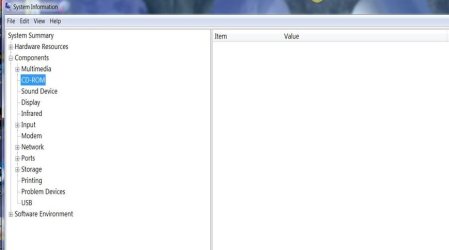
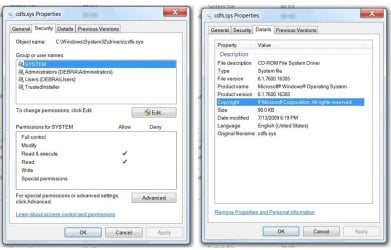
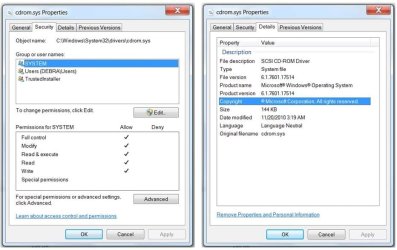
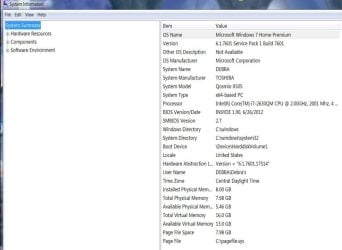
Here are some pics of what I located in my system information. Maybe one of them will show something that you tech savvy ppl will understand. However, I do find it odd that the 'cdfs.sys' driver is disabled and in the properties it looks to be a 'read only' file.

*Hope the pics attach correctly! If not I'll try again.
 

Attachments

  • Slide1.JPG
    Slide1.JPG
    51 KB · Views: 3
  • Slide2.JPG
    Slide2.JPG
    20.3 KB · Views: 3
  • Slide3.JPG
    Slide3.JPG
    115.2 KB · Views: 5
  • Slide4.JPG
    Slide4.JPG
    69.7 KB · Views: 4
  • Slide5.JPG
    Slide5.JPG
    66.6 KB · Views: 3

My Computer My Computer

At a glance

Win 7 HP (sp1) 64 bitIntel (R) Core (TM) i7-2630QM CPU @ 2ghz8GB DDR3 1333MHz (max 8GB)NVIDIA® GeForce® GTX 460M
Computer type
Laptop
Computer Manufacturer/Model Number
Toshiba Qosmio X505-Q8104
OS
Win 7 HP (sp1) 64 bit
CPU
Intel (R) Core (TM) i7-2630QM CPU @ 2ghz
Motherboard
Mobile Intel® HM65 Express Chipset
Memory
8GB DDR3 1333MHz (max 8GB)
Graphics Card(s)
NVIDIA® GeForce® GTX 460M
Hard Drives
500GB (7200 RPM) Serial ATA hard disk drive
500GB (7200 RPM) Hybrid 4G Serial ATA hard disk drive
Antivirus
Avast
Browser
IE 10
Other Info
Blu-Ray Disc® (BD-ROM) and DVD SuperMulti drive with Labelflash®

My Computer My Computer

At a glance

Desk1 7 Home Prem / Desk2 10 Pro / Main lap A...Desk1 i5 3750K / Laptop i7 GTX 860M / Desk2 i...Desk1 8GB (1866) / Desk2 16GB (1333) / Laptop...Desk 1& 2NVidia GTX 650 & Laptops on board Intel
Computer type
PC/Desktop
Computer Manufacturer/Model Number
Own build (new) Desk1 / Asus ROG Win 7 / Desk2 1st build
OS
Desk1 7 Home Prem / Desk2 10 Pro / Main lap Asus ROG 10 Pro 2 laptop Toshiba 7 Pro Asus P2520 7 & 10
CPU
Desk1 i5 3750K / Laptop i7 GTX 860M / Desk2 i5 2500
Motherboard
Desk1 Asus P877-V / Desk2 Gigabyte H67 UD3H / Laptop ?
Memory
Desk1 8GB (1866) / Desk2 16GB (1333) / Laptop 8Gb DDR3
Graphics Card(s)
Desk 1& 2NVidia GTX 650 & Laptops on board Intel
Sound Card
Desk 1 & 2 -XONAR DG Realtek High Def audio Laptop
Monitor(s) Displays
Desk 1 Benq HD 2450 / Desk2 Philips 24" / Laptop 17.5"
Screen Resolution
1920x1080 D1 & D2 & Laptop 1
Hard Drives
Desk1 Samsung 120GB 830 SSD
Asus ROG 256GB 850 Pro SSD
Desk2 Samsung 840 256 SSD
Toshiba 120GB EVO
PSU
Desk 1 Corsair HX 1050/ Laptop ? / Desk 2 Corsair HX 650
Case
Desk 1 Cooler HAF XM ? Toshiba laptop / Desk2 Coolermaster
Cooling
Fans on all Desk1 -2 Desk2 - all Coolermasters 5 Laptop ?
Keyboard
Desk 1 MS Sidewinder X6 Desk 2 MS Sidewinder X 4
Mouse
Desk 1&2 - Gigabyte MS 900 gamer - laptop - Logitec wireless
Internet Speed
ADSL2+
Other Info
One other Desktop (tester) and spare Toshba laptop both with SSD's
Running Kaspersky 2016 ISS on all machines config'd identically
Logitec audio stereo systems on each machine (x3)
Canon MG5250MFC
Router/modem TP-Link running WPA2SK
have you checked to see if there are any Bios updates available fro your laptop ?
 

My Computer My Computer

At a glance

win7 ultimate / virtual boxIntel Core i7 3770K,1155, Ivy BridgeGSkill Ripjaws Z Series 1600 CL 9.0 16GBKFA2 GeForce GTX 670 EX OC 2048MB GDDR5 PCI-E...
Computer Manufacturer/Model Number
built my own
OS
win7 ultimate / virtual box
CPU
Intel Core i7 3770K,1155, Ivy Bridge
Motherboard
MSI Z77A-G43
Memory
GSkill Ripjaws Z Series 1600 CL 9.0 16GB
Graphics Card(s)
KFA2 GeForce GTX 670 EX OC 2048MB GDDR5 PCI-E gfx card
Sound Card
onboard Nvidia HDMI audio
Monitor(s) Displays
ASUS VK222H 22" widescreen LCD monitor
Screen Resolution
1680x1050
Hard Drives
Kingston 128gb SSD
OCZ Vertex 90gb SSD
500GB WDCaviar 16mb 5000KS
320GB WDCaviar 16mb 3200AAKS sata 2
1TB Samsung 16mb HD103SJ sata 2
PSU
Corsair HX 750W ATX2.2 Modular
Cooling
Antec 25 Kuhler H2O 620
Keyboard
logitech
Mouse
logitech MX518
Internet Speed
7mb adsl
SandeepP... TY but I have tried Microsoft's Fix It and it didn't resolve the issue. Also, I can not delete the drivers in the Device Manager cuz the drive isn't listed.

Hi Debra,

Thanks for providing us this information. Kindly post a screenshot of your device manager so we can check if it is detected as unknown device:

http://www.sevenforums.com/tutorials/9733-screenshots-files-upload-post-seven-forums.html

Also, check if the CD drive is detected in BIOS to isolate if it is Windows fault or not. First you should check under BIOS before reseating the drive.

As, if it is detected in BIOS then it won't be required to take out the drive and put it back again.

Kindly perform these steps and let us know the results of the same.
 
Last edited:

My Computer My Computer

At a glance

Winndows 7 32 bit
Computer type
PC/Desktop
OS
Winndows 7 32 bit
I don't see the target. So shooting in the dark. There is a chance it may hit the target. Try anyway since itsn't going to kill anything, if not revive. :D

Control Panel > Folder Options> View > uncheck Hide Empty drives in the Computer folder - if it is checked by any chance.
 

My Computer My Computer

At a glance

Windows 7 Home Premium 32 bit
OS
Windows 7 Home Premium 32 bit
Back
Top