Solved Image your system with free Macrium

Update

Well I just had my first re-image failure using Macrium. :eek:

I tried to re-image my XP partition and somehow my Linux Mint partition suffered some sort of damage, which rendered my PC unbootable.
Not only that, it totally hosed the recovery disc functions.
I couldn't use the Linux Recovery disc to restore any images at all (it would "stick" on the image folders and then reboot the machine).
...

I just updated Macrium Reflect.
As near as I can tell, there have been 2 updates since last month.

Checking the details showed that there was a bug in the Linux Recovery CD.
That might have been responsible for the problem I experienced.
 

My Computer My Computer

At a glance

W7 Ultimate SP1, LM19.2 MATE, W10 Home 1703, ...AMD Phenom II x6 1100T, 3.3 GHz12GB DDR3 1333 G-Skill (4GB x 2), G-Skill (2G...NVIDIA GeForce GTX 660
Computer type
PC/Desktop
Computer Manufacturer/Model Number
n/a
OS
W7 Ultimate SP1, LM19.2 MATE, W10 Home 1703, W10 Pro 1703 VM, #All 64 bit
CPU
AMD Phenom II x6 1100T, 3.3 GHz
Motherboard
ASUS M4A88T-M/USB3 (AM3)
Memory
12GB DDR3 1333 G-Skill (4GB x 2), G-Skill (2GB x 2)
Graphics Card(s)
NVIDIA GeForce GTX 660
Sound Card
Realtek?
Monitor(s) Displays
Samsung S23B350
Screen Resolution
1920x1080
Hard Drives
WD Green 2TB (SATA), WD Green 3TB (SATA), WD Blue 4TB (SATA), WD Blue 6TB (SATA)
PSU
Cooler Master
Case
Antec GX300 Tower
Cooling
3x Antec TRICOOL 120mm Fans
Mouse
Wired Optical
Internet Speed
DSL
Antivirus
Avast
Browser
Pale Moon (64 bit)
Other Info
2018-12-27 Upgraded HDDs
2015-12-10 Upgraded case, graphics card, storage
2015-08-15 Upgraded motherboard & RAM
2015-07-15 Upgraded LM17.1 to LM17.2
Peter maybe the Grub boot loader screwed it up for you.
 

My Computer My Computer

At a glance

Windows 7 Ultimate X64 SP1Intel i5-2550K, Differing ~4.4-4.8GHz No buil...16GB G.Skill Sniper 1866MHz @ 2133MHz 2x8GBASUS GTX650TIB-DC2OC-2GD5, (650TI Boost)
Computer type
PC/Desktop
Computer Manufacturer/Model Number
Home Built Desktop By DataTech
OS
Windows 7 Ultimate X64 SP1
CPU
Intel i5-2550K, Differing ~4.4-4.8GHz No built in GPU
Motherboard
ASUS P8Z68-V PRO/GEN3
Memory
16GB G.Skill Sniper 1866MHz @ 2133MHz 2x8GB
Graphics Card(s)
ASUS GTX650TIB-DC2OC-2GD5, (650TI Boost)
Sound Card
Onboard Realtek 5-1
Monitor(s) Displays
Samsung P2570HD
Screen Resolution
1920x1080
Hard Drives
Samsung 840 Pro 256GB SSD for OS, 500GB Seagate Constellation (Enterprise drive) for Data
PSU
Corsair HX650W
Case
Inwin Dragon Rider
Cooling
Hyper 212 EVO w/two Noctua fans, push-pull, @1300 RPM
Keyboard
E-Z Eyes, bright yellow keys with large characters
Mouse
steelseries SENSEI Laser Pro Gaming
Internet Speed
48-51Mbs Mbs down, 11 Mbs up Xfinity Cable
Antivirus
Norton Internet Security 2013
Browser
IE 10, Opera, Pale Moon if needed
Other Info
4 case fans, LG BluRay-RE, ASUS DVD-RW, Mr. Fusion power supply, 1.21 gigawatts.
Weird

Peter maybe the Grub boot loader screwed it up for you.

I've never had a problem re-imaging my triple-boot setup before.

I have done multiple re-imaging operations on all my operating systems (mainly to eliminate software that I had tried, but that hadn't lived up to its creator's promises).
This was the first failure I've had with Macrium.

I usually image/re-image XP (and Linux) from W7, but for some reason this time Reflect refused to allow it.
I had to use my Recovery CD.
I re-imaged my XP partition, which succeeded, but crucial parts of my Linux Mint partition got corrupted.

Luckily my friend (Linux expert) was able to force a disc check on the partition.
This fixed Linux Mint and my PC booted up normally.

My hypothesis:
According to the bug description, that version of the Linux Recovery CD sometimes attempts to re-image additional partitions, not just the selected one.
I chose the XP partition (#2), only.
The Linux Recovery CD may have tried to also re-image Mint partition (#3) but it only had the image data for the XP partition.
This may have "confused" it, resulting in some file system corruption. :confused:

I shouldn't have updated my Recovery Disc.
The previous version had worked correctly. :(
 

My Computer My Computer

At a glance

W7 Ultimate SP1, LM19.2 MATE, W10 Home 1703, ...AMD Phenom II x6 1100T, 3.3 GHz12GB DDR3 1333 G-Skill (4GB x 2), G-Skill (2G...NVIDIA GeForce GTX 660
Computer type
PC/Desktop
Computer Manufacturer/Model Number
n/a
OS
W7 Ultimate SP1, LM19.2 MATE, W10 Home 1703, W10 Pro 1703 VM, #All 64 bit
CPU
AMD Phenom II x6 1100T, 3.3 GHz
Motherboard
ASUS M4A88T-M/USB3 (AM3)
Memory
12GB DDR3 1333 G-Skill (4GB x 2), G-Skill (2GB x 2)
Graphics Card(s)
NVIDIA GeForce GTX 660
Sound Card
Realtek?
Monitor(s) Displays
Samsung S23B350
Screen Resolution
1920x1080
Hard Drives
WD Green 2TB (SATA), WD Green 3TB (SATA), WD Blue 4TB (SATA), WD Blue 6TB (SATA)
PSU
Cooler Master
Case
Antec GX300 Tower
Cooling
3x Antec TRICOOL 120mm Fans
Mouse
Wired Optical
Internet Speed
DSL
Antivirus
Avast
Browser
Pale Moon (64 bit)
Other Info
2018-12-27 Upgraded HDDs
2015-12-10 Upgraded case, graphics card, storage
2015-08-15 Upgraded motherboard & RAM
2015-07-15 Upgraded LM17.1 to LM17.2
Good story Peter. I still use the, I think, 5828 PE and it works fine for me. New isn't always better. ;)
 

My Computer My Computer

At a glance

Windows 7 Ultimate X64 SP1Intel i5-2550K, Differing ~4.4-4.8GHz No buil...16GB G.Skill Sniper 1866MHz @ 2133MHz 2x8GBASUS GTX650TIB-DC2OC-2GD5, (650TI Boost)
Computer type
PC/Desktop
Computer Manufacturer/Model Number
Home Built Desktop By DataTech
OS
Windows 7 Ultimate X64 SP1
CPU
Intel i5-2550K, Differing ~4.4-4.8GHz No built in GPU
Motherboard
ASUS P8Z68-V PRO/GEN3
Memory
16GB G.Skill Sniper 1866MHz @ 2133MHz 2x8GB
Graphics Card(s)
ASUS GTX650TIB-DC2OC-2GD5, (650TI Boost)
Sound Card
Onboard Realtek 5-1
Monitor(s) Displays
Samsung P2570HD
Screen Resolution
1920x1080
Hard Drives
Samsung 840 Pro 256GB SSD for OS, 500GB Seagate Constellation (Enterprise drive) for Data
PSU
Corsair HX650W
Case
Inwin Dragon Rider
Cooling
Hyper 212 EVO w/two Noctua fans, push-pull, @1300 RPM
Keyboard
E-Z Eyes, bright yellow keys with large characters
Mouse
steelseries SENSEI Laser Pro Gaming
Internet Speed
48-51Mbs Mbs down, 11 Mbs up Xfinity Cable
Antivirus
Norton Internet Security 2013
Browser
IE 10, Opera, Pale Moon if needed
Other Info
4 case fans, LG BluRay-RE, ASUS DVD-RW, Mr. Fusion power supply, 1.21 gigawatts.
Next time I have to do a re-image from outside my Windows OS installs, I'll try the WinPE disc that you and whs provided. :)
 

My Computer My Computer

At a glance

W7 Ultimate SP1, LM19.2 MATE, W10 Home 1703, ...AMD Phenom II x6 1100T, 3.3 GHz12GB DDR3 1333 G-Skill (4GB x 2), G-Skill (2G...NVIDIA GeForce GTX 660
Computer type
PC/Desktop
Computer Manufacturer/Model Number
n/a
OS
W7 Ultimate SP1, LM19.2 MATE, W10 Home 1703, W10 Pro 1703 VM, #All 64 bit
CPU
AMD Phenom II x6 1100T, 3.3 GHz
Motherboard
ASUS M4A88T-M/USB3 (AM3)
Memory
12GB DDR3 1333 G-Skill (4GB x 2), G-Skill (2GB x 2)
Graphics Card(s)
NVIDIA GeForce GTX 660
Sound Card
Realtek?
Monitor(s) Displays
Samsung S23B350
Screen Resolution
1920x1080
Hard Drives
WD Green 2TB (SATA), WD Green 3TB (SATA), WD Blue 4TB (SATA), WD Blue 6TB (SATA)
PSU
Cooler Master
Case
Antec GX300 Tower
Cooling
3x Antec TRICOOL 120mm Fans
Mouse
Wired Optical
Internet Speed
DSL
Antivirus
Avast
Browser
Pale Moon (64 bit)
Other Info
2018-12-27 Upgraded HDDs
2015-12-10 Upgraded case, graphics card, storage
2015-08-15 Upgraded motherboard & RAM
2015-07-15 Upgraded LM17.1 to LM17.2

My Computer My Computer

At a glance

Windows 7 Ultimate X64 SP1Intel i5-2550K, Differing ~4.4-4.8GHz No buil...16GB G.Skill Sniper 1866MHz @ 2133MHz 2x8GBASUS GTX650TIB-DC2OC-2GD5, (650TI Boost)
Computer type
PC/Desktop
Computer Manufacturer/Model Number
Home Built Desktop By DataTech
OS
Windows 7 Ultimate X64 SP1
CPU
Intel i5-2550K, Differing ~4.4-4.8GHz No built in GPU
Motherboard
ASUS P8Z68-V PRO/GEN3
Memory
16GB G.Skill Sniper 1866MHz @ 2133MHz 2x8GB
Graphics Card(s)
ASUS GTX650TIB-DC2OC-2GD5, (650TI Boost)
Sound Card
Onboard Realtek 5-1
Monitor(s) Displays
Samsung P2570HD
Screen Resolution
1920x1080
Hard Drives
Samsung 840 Pro 256GB SSD for OS, 500GB Seagate Constellation (Enterprise drive) for Data
PSU
Corsair HX650W
Case
Inwin Dragon Rider
Cooling
Hyper 212 EVO w/two Noctua fans, push-pull, @1300 RPM
Keyboard
E-Z Eyes, bright yellow keys with large characters
Mouse
steelseries SENSEI Laser Pro Gaming
Internet Speed
48-51Mbs Mbs down, 11 Mbs up Xfinity Cable
Antivirus
Norton Internet Security 2013
Browser
IE 10, Opera, Pale Moon if needed
Other Info
4 case fans, LG BluRay-RE, ASUS DVD-RW, Mr. Fusion power supply, 1.21 gigawatts.

My Computer My Computer

At a glance

W7 Ultimate SP1, LM19.2 MATE, W10 Home 1703, ...AMD Phenom II x6 1100T, 3.3 GHz12GB DDR3 1333 G-Skill (4GB x 2), G-Skill (2G...NVIDIA GeForce GTX 660
Computer type
PC/Desktop
Computer Manufacturer/Model Number
n/a
OS
W7 Ultimate SP1, LM19.2 MATE, W10 Home 1703, W10 Pro 1703 VM, #All 64 bit
CPU
AMD Phenom II x6 1100T, 3.3 GHz
Motherboard
ASUS M4A88T-M/USB3 (AM3)
Memory
12GB DDR3 1333 G-Skill (4GB x 2), G-Skill (2GB x 2)
Graphics Card(s)
NVIDIA GeForce GTX 660
Sound Card
Realtek?
Monitor(s) Displays
Samsung S23B350
Screen Resolution
1920x1080
Hard Drives
WD Green 2TB (SATA), WD Green 3TB (SATA), WD Blue 4TB (SATA), WD Blue 6TB (SATA)
PSU
Cooler Master
Case
Antec GX300 Tower
Cooling
3x Antec TRICOOL 120mm Fans
Mouse
Wired Optical
Internet Speed
DSL
Antivirus
Avast
Browser
Pale Moon (64 bit)
Other Info
2018-12-27 Upgraded HDDs
2015-12-10 Upgraded case, graphics card, storage
2015-08-15 Upgraded motherboard & RAM
2015-07-15 Upgraded LM17.1 to LM17.2
Hi all,

I've been reading the posts here but haven't read the complete thread yet. I'm interested in trying Macruim and have been reading about it at their site and here as well.

I have a couple of questions to see if I'm understanding the Imaging process. I'm mainly a cloner, cloning every 6 weeks, but am interested in getting up to speed with basic full-disc imaging (basically identical to cloning, complete backup HDD with all OS, MBR, included).

I use Acronis 2011 but am wanting to try another tool as, for me, the Imaging dialog with Acronis isn't too clear to me as a novice with Imaging.

- When I select the Image option within Macrium, does it offer a "full-disc" imaging option without asking the user numerous partition/custom-image questions? Since I'm primarily interested in imaging the entire HDD, with no customization of partitions, that's all I'm wanting to do.

- Regarding incremental backups, I would like to run scheduled incremental backups and merge/write that backup into a pre-existing full image of the HDD.

Do I have the right understanding of the following?

- Day 1: Image my entire HDD, a full bootable HDD replacement.

- Day 2 and thereafter, depending on defined frequency, set up an incremental backup with the Scheduler that will write any changes to the previously-created image, thus keeping an up-to-date complete HDD image restorable with the Recovery media.

Looking at the comparison chart at the Macruim site, it looks like I'd need the paid "Standard" version to have incremental capability.

The "recover to new hardware" option looks interesting but I'd need the "Pro" version for that option.

Has anyone used that option to install a HDD from an older machine to a new one and how complex is that operation? I assume that you'd need to find a way to load all-new drivers and to deploy that data into the new machine's OS registry.
 

My Computer My Computer

At a glance

Windows 7 Home Premium 64 bitIntel i5 650 Dual Core 3.20 GHz Cache 4MB Thr...Corsair 16GB DDR3 1600MHz 9-9-9-24 P/N: CMZ8G...ZOTAC GeFORCE 9500 ZT-95TEK2M-FSL 1GB GDDR2
Computer type
PC/Desktop
Computer Manufacturer/Model Number
Built at Micro Center Richardson, TX
OS
Windows 7 Home Premium 64 bit
CPU
Intel i5 650 Dual Core 3.20 GHz Cache 4MB Threads: 4
Motherboard
ASUS PRO P7P55D-E
Memory
Corsair 16GB DDR3 1600MHz 9-9-9-24 P/N: CMZ8GX3M2A1600C
Graphics Card(s)
ZOTAC GeFORCE 9500 ZT-95TEK2M-FSL 1GB GDDR2
Sound Card
Mother Bd
Monitor(s) Displays
ASUS V228H 21.5” Diag
Screen Resolution
1440 x 900
Hard Drives
SEAGATE BARRACUDA (2ea) 3.5” INTERNAL 1Tb 16 MB SATA ST1000DM003-9YN162 7200RPM, 64MB, SATA 6Gb/s ** 2 Sata Hot-Swap Racks installed in Tower
PSU
Thermaltake Model TR2 RX 750W
Cooling
2 Tower Fans
Keyboard
Dell Quietkey PS/2 Windows 104 P/N 0463CD
Mouse
Kensington Mechanical Trackball USB Model 64217
Internet Speed
35/35
Antivirus
Norton 360 & MBAM Pro
Browser
IE10
Other Info
Printer: HP DeskJet 3520 USB 2.0 **
Speakers: ALTEC Model VS4621 2.1 28 W/Channel w/Sub-woofer **
IOGEAR HDMI Monitor Switcher Swx3 MODEL GHDSW3 ** Addonics ZDRWESU3 eSata/USB 3.0 external DVD Read/Write DVD Drive** SEAGATE GoFlex USB 2.0 Portable HD 500GB 5400 RPM P/N: 9ZF2A2-570
Looking at the comparison chart at the Macruim site, it looks like I'd need the paid "Standard" version to have incremental capability.
Correct


The "recover to new hardware" option looks interesting but I'd need the "Pro" version for that option.

Has anyone used that option to install a HDD from an older machine to a new one and how complex is that operation? I assume that you'd need to find a way to load all-new drivers and to deploy that data into the new machine's OS registry.

You better do this..it's free http://www.sevenforums.com/tutorials/292068-make-windows-7-bootable-after-motherboard-swap.html
 

My Computer My Computer

At a glance

Microsoft Windows 7 Home Premium 64-bits 7601...Intel(R) Core(TM) i3 CPU M 370 @ 2.40GHz4,00 GBATI Mobility Radeon HD 5400 Series
Computer type
Laptop
Computer Manufacturer/Model Number
ACER ASPIRE 5742G
OS
Microsoft Windows 7 Home Premium 64-bits 7601 Multiprocessor Free Service Pack 1
CPU
Intel(R) Core(TM) i3 CPU M 370 @ 2.40GHz
Motherboard
Acer Aspire 5742G
Memory
4,00 GB
Graphics Card(s)
ATI Mobility Radeon HD 5400 Series
Sound Card
(1) AMD High Definition Audio Device (2) Realtek High Defi
Screen Resolution
1366 x 768 x 32 bits (4294967296 colors) @ 60 Hz
Hard Drives
WDC WD5000BEVT-22ZAT0
- Day 1: Image my entire HDD, a full bootable HDD replacement.

- Day 2 and thereafter, depending on defined frequency, set up an incremental backup with the Scheduler that will write any changes to the previously-created image, thus keeping an up-to-date complete HDD image restorable with the Recovery media.
An image must be restored.... it's not a bootable HDD!
What is incremental and differential.... v5: How to create Incremental and differential disk images (Backup, Differential, Image, Incremental, v5)
You only have to restore 1 image. It knows what previous differentials/incrementials/full backup to load.

Notes on scheduling:
  • User that runs it must have password
  • If system shutdowns while running backup... backup will be cancelled
 

My Computer My Computer

At a glance

Microsoft Windows 7 Home Premium 64-bits 7601...Intel(R) Core(TM) i3 CPU M 370 @ 2.40GHz4,00 GBATI Mobility Radeon HD 5400 Series
Computer type
Laptop
Computer Manufacturer/Model Number
ACER ASPIRE 5742G
OS
Microsoft Windows 7 Home Premium 64-bits 7601 Multiprocessor Free Service Pack 1
CPU
Intel(R) Core(TM) i3 CPU M 370 @ 2.40GHz
Motherboard
Acer Aspire 5742G
Memory
4,00 GB
Graphics Card(s)
ATI Mobility Radeon HD 5400 Series
Sound Card
(1) AMD High Definition Audio Device (2) Realtek High Defi
Screen Resolution
1366 x 768 x 32 bits (4294967296 colors) @ 60 Hz
Hard Drives
WDC WD5000BEVT-22ZAT0
You would be safer doing differential backups than incremental. Incremental backup rely on the full backup and all incrementals. Differentials rely on the full backup and on differential. I personally do one full backup per week and daily differentials. The paid version of macrium has a storage management option. I chose to keep three full backups and their associated differentials.

Kaktussoft is correct. The image is not bootable, it is just a file. You need to create a recovery disk to restore it. The WinPE recovery disk is more reliable and has more features than the Linux one.
 

My Computer My Computer

At a glance

Microsoft Windows 7 Home Premium 64-bit Servi...Intel(R) Core(TM) i3 CPU M 330 @ 2.13GHz8 GB DDR3Intel(R) HD Graphics
Computer type
Laptop
Computer Manufacturer/Model Number
Hewlett-Packard/G62-107SA Notebook
OS
Microsoft Windows 7 Home Premium 64-bit Service Pack 1
CPU
Intel(R) Core(TM) i3 CPU M 330 @ 2.13GHz
Motherboard
Hewlett-Packard 1425
Memory
8 GB DDR3
Graphics Card(s)
Intel(R) HD Graphics
Sound Card
Realtek High Definition Audio
Monitor(s) Displays
Builtin
Screen Resolution
1366 x 768 x 32 bits (4294967296 colors) @ 60 Hz
Hard Drives
250 GB SATA Hard Disk Drive 7200 rpm
2TB Seagate GoFlex USB 2 Drive
1TB Iomega Prestige USB 2 Drive
1.5TB Iomega Prestige USB 2 Drive (Samsung)
2TB WD MyBook Live NAS.
Mouse
Logitech Anywhere MX
Internet Speed
152 Mbs download 10 Mbs upload
Antivirus
Norton 360
Browser
Chrome
- When I select the Image option within Macrium, does it offer a "full-disc" imaging option without asking the user numerous partition/custom-image questions? Since I'm primarily interested in imaging the entire HDD, with no customization of partitions, that's all I'm wanting to do.
No problem. All you have to do is tick the partitions you want to include into this image. If you have a look at my other Macrium tutorial, it may become clearer.
 

My Computer My Computer

At a glance

Vista, Windows7, Mint Mate, Zorin, Windows 8from 1.6GHz Duo to i7
Computer Manufacturer/Model Number
HP, Dell, Gateway, Toshiba - 4 laptops and 2 desktops
OS
Vista, Windows7, Mint Mate, Zorin, Windows 8
CPU
from 1.6GHz Duo to i7
Monitor(s) Displays
2x HP w2207
Hard Drives
5x HDD, 7x SSD, 12x Externals
Keyboard
with trackball - no mices
Mouse
Trackball mice
Internet Speed
DSL 6000
Looking at the comparison chart at the Macruim site, it looks like I'd need the paid "Standard" version to have incremental capability.
Correct

The "recover to new hardware" option looks interesting but I'd need the "Pro" version for that option.

Has anyone used that option to install a HDD from an older machine to a new one and how complex is that operation? I assume that you'd need to find a way to load all-new drivers and to deploy that data into the new machine's OS registry.

You better do this..it's free http://www.sevenforums.com/tutorials/292068-make-windows-7-bootable-after-motherboard-swap.html

Thanks for this link. I'll look at it closer as I have more time.

- Day 1: Image my entire HDD, a full bootable HDD replacement.

- Day 2 and thereafter, depending on defined frequency, set up an incremental backup with the Scheduler that will write any changes to the previously-created image, thus keeping an up-to-date complete HDD image restorable with the Recovery media.
An image must be restored.... it's not a bootable HDD!
What is incremental and differential.... v5: How to create Incremental and differential disk images (Backup, Differential, Image, Incremental, v5)
You only have to restore 1 image. It knows what previous differentials/incrementials/full backup to load.


Notes on scheduling:
  • User that runs it must have password
  • If system shutdowns while running backup... backup will be cancelled

Thanks. I knew that the image needed to be restored but forgot to include that in that part of my post.

I wasn't aware of differential imaging. I will need to understand that info in the link before deciding on the best method for me.


You would be safer doing differential backups than incremental. Incremental backup rely on the full backup and all incrementals. Differentials rely on the full backup and on differential. I personally do one full backup per week and daily differentials. The paid version of macrium has a storage management option. I chose to keep three full backups and their associated differentials.

Kaktussoft is correct. The image is not bootable, it is just a file. You need to create a recovery disk to restore it. The WinPE recovery disk is more reliable and has more features than the Linux one.

The once/week full backup is probably what I would gravitate toward, having first learned the cloning portion of the HDD tools.

What is the compression ratio with Macrium? In other words, how many full-backup images would I be able to store on a spare HDD that is storing my full back up images from my Source 1 Tb HDD? I'm currently have about 400 Gb used out of 1 Tb.

- When I select the Image option within Macrium, does it offer a "full-disc" imaging option without asking the user numerous partition/custom-image questions? Since I'm primarily interested in imaging the entire HDD, with no customization of partitions, that's all I'm wanting to do.
No problem. All you have to do is tick the partitions you want to include into this image. If you have a look at my other Macrium tutorial, it may become clearer.

This will help a lot, thanks.
 

My Computer My Computer

At a glance

Windows 7 Home Premium 64 bitIntel i5 650 Dual Core 3.20 GHz Cache 4MB Thr...Corsair 16GB DDR3 1600MHz 9-9-9-24 P/N: CMZ8G...ZOTAC GeFORCE 9500 ZT-95TEK2M-FSL 1GB GDDR2
Computer type
PC/Desktop
Computer Manufacturer/Model Number
Built at Micro Center Richardson, TX
OS
Windows 7 Home Premium 64 bit
CPU
Intel i5 650 Dual Core 3.20 GHz Cache 4MB Threads: 4
Motherboard
ASUS PRO P7P55D-E
Memory
Corsair 16GB DDR3 1600MHz 9-9-9-24 P/N: CMZ8GX3M2A1600C
Graphics Card(s)
ZOTAC GeFORCE 9500 ZT-95TEK2M-FSL 1GB GDDR2
Sound Card
Mother Bd
Monitor(s) Displays
ASUS V228H 21.5” Diag
Screen Resolution
1440 x 900
Hard Drives
SEAGATE BARRACUDA (2ea) 3.5” INTERNAL 1Tb 16 MB SATA ST1000DM003-9YN162 7200RPM, 64MB, SATA 6Gb/s ** 2 Sata Hot-Swap Racks installed in Tower
PSU
Thermaltake Model TR2 RX 750W
Cooling
2 Tower Fans
Keyboard
Dell Quietkey PS/2 Windows 104 P/N 0463CD
Mouse
Kensington Mechanical Trackball USB Model 64217
Internet Speed
35/35
Antivirus
Norton 360 & MBAM Pro
Browser
IE10
Other Info
Printer: HP DeskJet 3520 USB 2.0 **
Speakers: ALTEC Model VS4621 2.1 28 W/Channel w/Sub-woofer **
IOGEAR HDMI Monitor Switcher Swx3 MODEL GHDSW3 ** Addonics ZDRWESU3 eSata/USB 3.0 external DVD Read/Write DVD Drive** SEAGATE GoFlex USB 2.0 Portable HD 500GB 5400 RPM P/N: 9ZF2A2-570
The compression ratio with Macrium is about 50%, but that depends on the type of data. Things like pictures and videos don't compress well as they are already compressed. If I were you I would separate your data (pictures, videos and documents) onto a different partition to Windows and programs and only image the Windows partition. For the data backup use a file and folder backup. The paid version of Macrium has this feature but I prefer to use a dedicated program for that. I use FreeFileSync now although I have also used Microsoft's SyncToy which is similar but with fewer features.
 

My Computer My Computer

At a glance

Microsoft Windows 7 Home Premium 64-bit Servi...Intel(R) Core(TM) i3 CPU M 330 @ 2.13GHz8 GB DDR3Intel(R) HD Graphics
Computer type
Laptop
Computer Manufacturer/Model Number
Hewlett-Packard/G62-107SA Notebook
OS
Microsoft Windows 7 Home Premium 64-bit Service Pack 1
CPU
Intel(R) Core(TM) i3 CPU M 330 @ 2.13GHz
Motherboard
Hewlett-Packard 1425
Memory
8 GB DDR3
Graphics Card(s)
Intel(R) HD Graphics
Sound Card
Realtek High Definition Audio
Monitor(s) Displays
Builtin
Screen Resolution
1366 x 768 x 32 bits (4294967296 colors) @ 60 Hz
Hard Drives
250 GB SATA Hard Disk Drive 7200 rpm
2TB Seagate GoFlex USB 2 Drive
1TB Iomega Prestige USB 2 Drive
1.5TB Iomega Prestige USB 2 Drive (Samsung)
2TB WD MyBook Live NAS.
Mouse
Logitech Anywhere MX
Internet Speed
152 Mbs download 10 Mbs upload
Antivirus
Norton 360
Browser
Chrome
Macrium is a very good option. It does a few things which might not be ideal for advanced users, but overall,does the job. Paragon is a great choice, Aomei is terrific, too. They differ in which functions they offer, so try them and see.
 

My Computers My Computers

  • At a glance

    7 X64i5 84002x8gb 3200mhz
    Computer type
    PC/Desktop
    OS
    7 X64
    CPU
    i5 8400
    Motherboard
    gigabyte b365m ds3h
    Memory
    2x8gb 3200mhz
    Hard Drives
    various
    PSU
    pure power 11 400w cm
    Case
    Coolermaster
    Cooling
    cryorig m9i
  • At a glance

    7x64g54008gb ddr4 2400
    Computer type
    PC/Desktop
    OS
    7x64
    CPU
    g5400
    Motherboard
    ga b365m ds3h
    Memory
    8gb ddr4 2400
    PSU
    xfx pro 450w
For quite some time I have created images with that which is built into Windows 7 and also the one in Windows 8. I have created images and also restored several times and have never had problem. I'm not putting down the others; I'm just saying that I like the one in Windows.
 

My Computer My Computer

At a glance

Desk Top with Win 7 Home Premium 64 bit and L...8Gig
Computer type
Laptop
Computer Manufacturer/Model Number
HP Pavilion g7-1260us Notebook
OS
Desk Top with Win 7 Home Premium 64 bit and Lap Top with Windows 8.1 Pro 64 bit
Memory
8Gig
Screen Resolution
1600x900
For quite some time I have created images with that which is built into Windows 7 and also the one in Windows 8. I have created images and also restored several times and have never had problem. I'm not putting down the others; I'm just saying that I like the one in Windows.
Frank,
I use the native Windows imaging also for some time now and have never had a problem (but see my signature). I also use Macrium Reflect which offers more flexible options. I see no reason to go any further.
 

My Computer My Computer

At a glance

Windows 7x64 Home Premium SP1Intel i7 2600kG.Skill Ripjaws (DDR3-1600) 2x4GBNvidia GeForce GTS 450; Intel HD Graphics 300...
Computer type
PC/Desktop
Computer Manufacturer/Model Number
Own build
OS
Windows 7x64 Home Premium SP1
CPU
Intel i7 2600k
Motherboard
ASUS P8Z68 Deluxe
Memory
G.Skill Ripjaws (DDR3-1600) 2x4GB
Graphics Card(s)
Nvidia GeForce GTS 450; Intel HD Graphics 3000(GT2+)
Monitor(s) Displays
Dell Ultrasharp IPS panel U2311H, Samsung SyncMaster P2350
Screen Resolution
1920x1080
Hard Drives
Samsung 850 Pro SSD 256GB, Samsung SSD 840 120GB, Seagates 1TB Barracuda ST31000528AS x2
PSU
Seasonic M12II 520W
Case
Lian Li Lancool PC-K60
Cooling
Case: 1x120mm, 3x140mm CPU: Hyper 212+
Keyboard
Logitech MK520 (wireless)
Mouse
Logitech MK520
Internet Speed
6-7 Mbps
Antivirus
Norton Security Premium, Malwarebytes on 2 (MSE on 3rd PC)
Browser
FireFox
Other Info
Audio: Logitech Z523 2.1
The compression ratio with Macrium is about 50%, but that depends on the type of data. Things like pictures and videos don't compress well as they are already compressed. If I were you I would separate your data (pictures, videos and documents) onto a different partition to Windows and programs and only image the Windows partition.

Agreed.
I use separate partitions for my documents, music, pictures, and videos (as well as a few others).

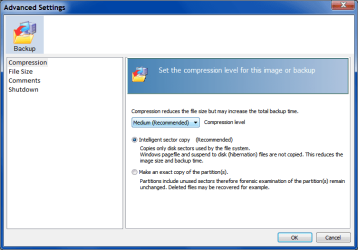
The compression level can be adjusted, but I have mine set to the default level (medium).
Macrium Reflect Compression Level.png
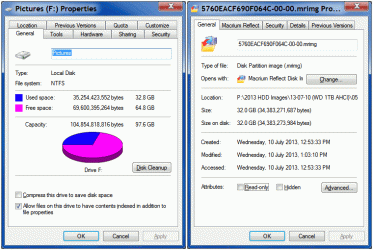
Music, pictures and video partitions will create images roughly equal to their uncompressed size.
Here is a comparison of my Pictures partition and the Reflect image of it.
Macrium Reflect Image Size - Image Partition.gif
 

My Computer My Computer

At a glance

W7 Ultimate SP1, LM19.2 MATE, W10 Home 1703, ...AMD Phenom II x6 1100T, 3.3 GHz12GB DDR3 1333 G-Skill (4GB x 2), G-Skill (2G...NVIDIA GeForce GTX 660
Computer type
PC/Desktop
Computer Manufacturer/Model Number
n/a
OS
W7 Ultimate SP1, LM19.2 MATE, W10 Home 1703, W10 Pro 1703 VM, #All 64 bit
CPU
AMD Phenom II x6 1100T, 3.3 GHz
Motherboard
ASUS M4A88T-M/USB3 (AM3)
Memory
12GB DDR3 1333 G-Skill (4GB x 2), G-Skill (2GB x 2)
Graphics Card(s)
NVIDIA GeForce GTX 660
Sound Card
Realtek?
Monitor(s) Displays
Samsung S23B350
Screen Resolution
1920x1080
Hard Drives
WD Green 2TB (SATA), WD Green 3TB (SATA), WD Blue 4TB (SATA), WD Blue 6TB (SATA)
PSU
Cooler Master
Case
Antec GX300 Tower
Cooling
3x Antec TRICOOL 120mm Fans
Mouse
Wired Optical
Internet Speed
DSL
Antivirus
Avast
Browser
Pale Moon (64 bit)
Other Info
2018-12-27 Upgraded HDDs
2015-12-10 Upgraded case, graphics card, storage
2015-08-15 Upgraded motherboard & RAM
2015-07-15 Upgraded LM17.1 to LM17.2
I'd been using the built-in imaging program since Vista, but once I saw how it had been deprecated in Win 8 I started looking at free alternatives.

I finally settled on the free version of EaseUS Backup Manager, and used it successfully for some time.

But around last April, I got the full version of EaseUS Backup WorkStation 5.8 off 'Giveaway of the Day' as one of their free giveaways. Nothing is disabled or crippled, it is the full retail package.

I've had very good results with this program, and will likely stick with it.


Wenda.


EDIT: Re compression... I found using EaseUS that the default setting was best. I did try an experiment, and imaged my entire C: drive including my VMs (which are not normally included in my images) using the Maximum compression setting.

The size of the installation to be imaged was around 170GB, and the image was created successfully, if somewhat slowly. A considerable amount of space was saved. So all was good.

Or was it???

The time taken to actually restore the image went from around 35-40 min using the default compression setting, to almost 3 hours using the max setting. So if space is at a premium, it's worth doing, but if not, or if speed is more important, probably best not bother.
 

My Computer My Computer

At a glance

Windows 7 Ultimate SP1 32-bit; Windows 7 Home...Intel T6500 Core 2 Duo@2Ghz.3GB DDR2Intel 4500MHD
Computer type
Laptop
Computer Manufacturer/Model Number
Acer AS5735
OS
Windows 7 Ultimate SP1 32-bit; Windows 7 Home Premium 64-bit (VM).
CPU
Intel T6500 Core 2 Duo@2Ghz.
Motherboard
Acer
Memory
3GB DDR2
Graphics Card(s)
Intel 4500MHD
Sound Card
Realtek onboard
Monitor(s) Displays
Built-in, no touch
Screen Resolution
1366x768
Hard Drives
250GB SATA in two equal partitions.
PSU
Stock
Case
Laptop
Cooling
Stock
Keyboard
Full 101-key
Mouse
USB cordless IR
Antivirus
MSE
Browser
IE9, Firefox.
Other Info
A top little machine that hasn't let me down once since the day I removed it from its packaging over four years ago. It's done everything I could want, and more, all without a single issue. 10/10, Acer!!
Macrium is the same. The default setting gives a slightly bigger file than maximum but takes a lot longer to back up. I haven't compared restore times but I would expect something similar.
 

My Computer My Computer

At a glance

Microsoft Windows 7 Home Premium 64-bit Servi...Intel(R) Core(TM) i3 CPU M 330 @ 2.13GHz8 GB DDR3Intel(R) HD Graphics
Computer type
Laptop
Computer Manufacturer/Model Number
Hewlett-Packard/G62-107SA Notebook
OS
Microsoft Windows 7 Home Premium 64-bit Service Pack 1
CPU
Intel(R) Core(TM) i3 CPU M 330 @ 2.13GHz
Motherboard
Hewlett-Packard 1425
Memory
8 GB DDR3
Graphics Card(s)
Intel(R) HD Graphics
Sound Card
Realtek High Definition Audio
Monitor(s) Displays
Builtin
Screen Resolution
1366 x 768 x 32 bits (4294967296 colors) @ 60 Hz
Hard Drives
250 GB SATA Hard Disk Drive 7200 rpm
2TB Seagate GoFlex USB 2 Drive
1TB Iomega Prestige USB 2 Drive
1.5TB Iomega Prestige USB 2 Drive (Samsung)
2TB WD MyBook Live NAS.
Mouse
Logitech Anywhere MX
Internet Speed
152 Mbs download 10 Mbs upload
Antivirus
Norton 360
Browser
Chrome
Back
Top