Solved New Windows Updates - Are they the correct ones for my computer

Melissa

New member
Power User
Local time
11:04 AM
Messages
394
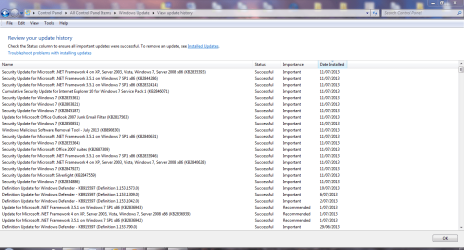
I have just had the new Windows updates installed on my computer and I am not sure they are the correct updates for my Windows 7 Home Premium 32 bit.

I also had the issue where my computer was still on at the time the the updates were installed. Does this cause any harm to the computer.

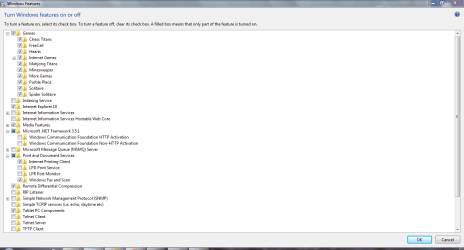
I also have attached the file where I found the CBS logs file - am I effectively part of a Homegroup or can you not tell by my attachment?

I just wish to ensure that the updates that have the extension x86 are the correct updates for my computer.

Thank you and I hope that I provided the correct information
 

Attachments
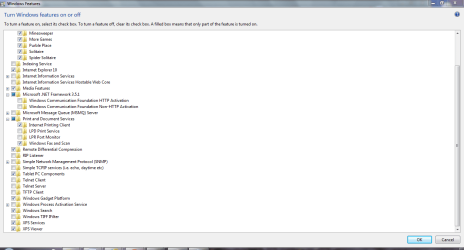
  • windows features 2.PNG
    windows features 2.PNG
    27.6 KB · Views: 3
  • windows features 1.PNG
    windows features 1.PNG
    27.3 KB · Views: 3
  • HomeGroup.zip
    HomeGroup.zip
    168.6 KB · Views: 0
  • windows updates - 11-07-2013.PNG
    windows updates - 11-07-2013.PNG
    51.9 KB · Views: 3

My Computer My Computer

At a glance

Windows 7 Home Premium 64bitWindows 7 Service Pack 1 x86 NTFS4 GB
Computer type
Laptop
Computer Manufacturer/Model Number
Sony VAIO / E Series VPCEB46FG
OS
Windows 7 Home Premium 64bit
CPU
Windows 7 Service Pack 1 x86 NTFS
Motherboard
AMD E-350 Processor
Memory
4 GB
Hard Drives
500GB
Other Info
1.6GHz
x86 is for 32bit so i think your got the right updates.
 

My Computer My Computer

At a glance

Windows 7 Professional 64bitIntel core i7 950 stock6x2GB corsair @ 1600 MhzNvidia GeForce GTX 460 1GB
Computer type
PC/Desktop
Computer Manufacturer/Model Number
Custom build
OS
Windows 7 Professional 64bit
CPU
Intel core i7 950 stock
Motherboard
AsRock x58 Extreme 3
Memory
6x2GB corsair @ 1600 Mhz
Graphics Card(s)
Nvidia GeForce GTX 460 1GB
Sound Card
Integrated VIA chip
Monitor(s) Displays
BenQ G2420HDB
Screen Resolution
1920x1080
Hard Drives
Corsair Force F60 SSD (C:)
WD black 750GB & Segate Baracuda 1TB (Raid 0)
PSU
Corsair VX 550W
Case
Cooler Master Haf X
Cooling
Corsair H100
Keyboard
Microsoft Sidewinder X4
Mouse
Razer Deathadder
Internet Speed
20 Down 2 Up ADSL Telia
Antivirus
Microsoft security essentials
Browser
Firefox
Thank you for the prompt reply.

I read the posting instructions - so hopefully I did alright.

I panic.

I also noticed in my programs menu that I have Microsoft Silverlight - is this still required - it may have just been updated.

I am looking at uninstalling a lot programs - but hesitant on MS products.

How do 'trick' your computer not to shut down your computer and cause your computer to crash. I had some MS Word and Excel documents that crashed
 
Last edited:

My Computer My Computer

At a glance

Windows 7 Home Premium 64bitWindows 7 Service Pack 1 x86 NTFS4 GB
Computer type
Laptop
Computer Manufacturer/Model Number
Sony VAIO / E Series VPCEB46FG
OS
Windows 7 Home Premium 64bit
CPU
Windows 7 Service Pack 1 x86 NTFS
Motherboard
AMD E-350 Processor
Memory
4 GB
Hard Drives
500GB
Other Info
1.6GHz
I also had the issue where my computer was still on at the time the the updates were installed.
Of course computer was on! Updates can only be installed if computer is on.
I just wish to ensure that the updates that have the extension x86 are the correct updates for my computer.
Windows updates serves you ONLY the updates for your version
 

My Computer My Computer

At a glance

Microsoft Windows 7 Home Premium 64-bits 7601...Intel(R) Core(TM) i3 CPU M 370 @ 2.40GHz4,00 GBATI Mobility Radeon HD 5400 Series
Computer type
Laptop
Computer Manufacturer/Model Number
ACER ASPIRE 5742G
OS
Microsoft Windows 7 Home Premium 64-bits 7601 Multiprocessor Free Service Pack 1
CPU
Intel(R) Core(TM) i3 CPU M 370 @ 2.40GHz
Motherboard
Acer Aspire 5742G
Memory
4,00 GB
Graphics Card(s)
ATI Mobility Radeon HD 5400 Series
Sound Card
(1) AMD High Definition Audio Device (2) Realtek High Defi
Screen Resolution
1366 x 768 x 32 bits (4294967296 colors) @ 60 Hz
Hard Drives
WDC WD5000BEVT-22ZAT0
How do 'trick' your computer not to shut down your computer and cause your computer to crash. I had some MS Word and Excel documents that crashed

What happens exactly? Does Word/Excel crash?
Or does windows crash... forcing a BSOD and restart?
 

My Computer My Computer

At a glance

Microsoft Windows 7 Home Premium 64-bits 7601...Intel(R) Core(TM) i3 CPU M 370 @ 2.40GHz4,00 GBATI Mobility Radeon HD 5400 Series
Computer type
Laptop
Computer Manufacturer/Model Number
ACER ASPIRE 5742G
OS
Microsoft Windows 7 Home Premium 64-bits 7601 Multiprocessor Free Service Pack 1
CPU
Intel(R) Core(TM) i3 CPU M 370 @ 2.40GHz
Motherboard
Acer Aspire 5742G
Memory
4,00 GB
Graphics Card(s)
ATI Mobility Radeon HD 5400 Series
Sound Card
(1) AMD High Definition Audio Device (2) Realtek High Defi
Screen Resolution
1366 x 768 x 32 bits (4294967296 colors) @ 60 Hz
Hard Drives
WDC WD5000BEVT-22ZAT0
Hello Thanks for assisting again.

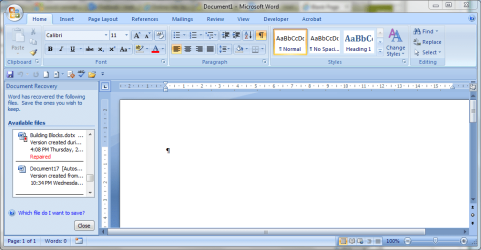
As my computer will not shut down at present - the whole system shut down and the programs that were open crashed.

For instance the MS Word document that I was working on.

Here is what I faced with. No error messages or BSOD - I have googled the subject and this person suggests as per this website - would this help in future -
Trick Windows Into Shutting Down Without Installing Updates

Thanks. I know you do not like much talk
 

Attachments

  • crash after update.PNG
    crash after update.PNG
    50.7 KB · Views: 1

My Computer My Computer

At a glance

Windows 7 Home Premium 64bitWindows 7 Service Pack 1 x86 NTFS4 GB
Computer type
Laptop
Computer Manufacturer/Model Number
Sony VAIO / E Series VPCEB46FG
OS
Windows 7 Home Premium 64bit
CPU
Windows 7 Service Pack 1 x86 NTFS
Motherboard
AMD E-350 Processor
Memory
4 GB
Hard Drives
500GB
Other Info
1.6GHz
Can you normally close WORD (save document and close)? Can you logoff succesfully?
 

My Computer My Computer

At a glance

Microsoft Windows 7 Home Premium 64-bits 7601...Intel(R) Core(TM) i3 CPU M 370 @ 2.40GHz4,00 GBATI Mobility Radeon HD 5400 Series
Computer type
Laptop
Computer Manufacturer/Model Number
ACER ASPIRE 5742G
OS
Microsoft Windows 7 Home Premium 64-bits 7601 Multiprocessor Free Service Pack 1
CPU
Intel(R) Core(TM) i3 CPU M 370 @ 2.40GHz
Motherboard
Acer Aspire 5742G
Memory
4,00 GB
Graphics Card(s)
ATI Mobility Radeon HD 5400 Series
Sound Card
(1) AMD High Definition Audio Device (2) Realtek High Defi
Screen Resolution
1366 x 768 x 32 bits (4294967296 colors) @ 60 Hz
Hard Drives
WDC WD5000BEVT-22ZAT0
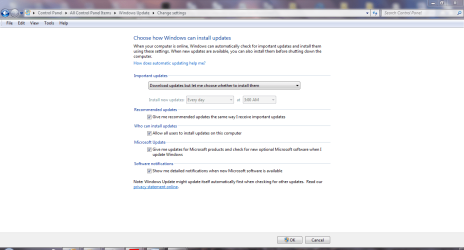
I have altered the settings of the Windows Update so that I can control when it closes my computer.
I guess I have been stupid and leaving open MS Office programs like Word and Excel and causing crashes.

Prior to crashing in word I get a message saying that my computer is having memory issues. But after a clean not it seems to have resolved itself.

No BSOD - I will post if that situation becomes an issue.

I also did not want to loose my information and tried to put off the updates. I guess I am silly.

Thank you again
 

Attachments

  • windows update.PNG
    windows update.PNG
    45.2 KB · Views: 1

My Computer My Computer

At a glance

Windows 7 Home Premium 64bitWindows 7 Service Pack 1 x86 NTFS4 GB
Computer type
Laptop
Computer Manufacturer/Model Number
Sony VAIO / E Series VPCEB46FG
OS
Windows 7 Home Premium 64bit
CPU
Windows 7 Service Pack 1 x86 NTFS
Motherboard
AMD E-350 Processor
Memory
4 GB
Hard Drives
500GB
Other Info
1.6GHz
Back
Top