
Getting Bluetooth to work, win 7 64 bit. No sound out!

jjr

New member
Member
VIP
Local time
4:01 AM
Messages
315
Hi,
I have a wireless speaker called the OONTZ made by Cambridge. It will work by Bluetooth and does work fine from my Bluetooth Cowon Mp3 player.

But when I try to run it from my Dell INSPIRON 5520 I can not seem to get any sound out. The 5520 does see my device and I see it in my device .

I have been trying for the last few days to figure it out but w/o any luck? My 5520 has something called Stage and I tried that but again it will not show the speaker?

Sorry I do not know enough at this time to give and more details. Please get myself on the right track if possible:huh:
 

My Computer My Computer

At a glance

Microsoft Windows 7 Professional 64-bitIntel(R) Core(TM) i7-4790 CPU @ 3.60GHz16.00 GB Hynix/Hyundai HMT451U6BFR8A-PBNVIDIA GeForce GT 720 1920 x 1080 x 32 bits (...
Computer type
PC/Desktop
Computer Manufacturer/Model Number
DELL XPS 8700 DESKTOP
OS
Microsoft Windows 7 Professional 64-bit
CPU
Intel(R) Core(TM) i7-4790 CPU @ 3.60GHz
Motherboard
Dell Inc.Base Board 0KWVT8
Memory
16.00 GB Hynix/Hyundai HMT451U6BFR8A-PB
Graphics Card(s)
NVIDIA GeForce GT 720 1920 x 1080 x 32 bits (4294967296 colo
Sound Card
Broadcom Bluetooth Hands-free Audio
Screen Resolution
1920 x 1080 x 32 bits (4294967296 colors) @ 60 Hz
Hard Drives
ST1000DM ST1000DM003-1ER1 SCSI Disk Device
Hey jjr, As you mentioned that both device are discovering each other. Have you tried pairing them? Once a bluetooth device is discovered, it needs to be paired for creating FTP file sharing or playing music. Try that and let us know.
 

My Computer My Computer

At a glance

Windows 11 x64i5 2500K @ 3.3 GHz16 GB DDR 3 @ 1600MhzMSI 1050TI 4GB OC version
Computer type
PC/Desktop
Computer Manufacturer/Model Number
Custom Bulid/Self made
OS
Windows 11 x64
CPU
i5 2500K @ 3.3 GHz
Motherboard
ASUS P8 Z77 V pro
Memory
16 GB DDR 3 @ 1600Mhz
Graphics Card(s)
MSI 1050TI 4GB OC version
Sound Card
On Board (Realtek HD audio)
Monitor(s) Displays
Samsung 22" LCD
Screen Resolution
1920*1080
Hard Drives
Seagate 1 TB, WD 1TB, Seagate 2 TB ( I use a lot of space)
PSU
coolermaster 750 W
Case
Coolermaster HAF912
Cooling
Coolermaster hyper 212 EVO
Keyboard
Samsung
Mouse
Dell Wireless
Internet Speed
Wireless 50 Mbps
Antivirus
AVG 2016 Internet Security
Browser
Google Chrome
I did have the WMP going w/ music on when I did this and still got no sound. Sorry I really do not know how to pair them. Again this is ALL new to myself. What I need is a simple tutorial I guess.


Hey jjr, As you mentioned that both device are discovering each other. Have you tried pairing them? Once a bluetooth device is discovered, it needs to be paired for creating FTP file sharing or playing music. Try that and let us know.
 

My Computer My Computer

At a glance

Microsoft Windows 7 Professional 64-bitIntel(R) Core(TM) i7-4790 CPU @ 3.60GHz16.00 GB Hynix/Hyundai HMT451U6BFR8A-PBNVIDIA GeForce GT 720 1920 x 1080 x 32 bits (...
Computer type
PC/Desktop
Computer Manufacturer/Model Number
DELL XPS 8700 DESKTOP
OS
Microsoft Windows 7 Professional 64-bit
CPU
Intel(R) Core(TM) i7-4790 CPU @ 3.60GHz
Motherboard
Dell Inc.Base Board 0KWVT8
Memory
16.00 GB Hynix/Hyundai HMT451U6BFR8A-PB
Graphics Card(s)
NVIDIA GeForce GT 720 1920 x 1080 x 32 bits (4294967296 colo
Sound Card
Broadcom Bluetooth Hands-free Audio
Screen Resolution
1920 x 1080 x 32 bits (4294967296 colors) @ 60 Hz
Hard Drives
ST1000DM ST1000DM003-1ER1 SCSI Disk Device
You have to plug on the speaker.
Then from your laptop, in tray icons, Bluetooth device is present.Double click that and search for new device.
When your speaker is searched, click add to devices/pair.
Then in properties of that paired device, select "play media".
Or it is automatically detected to play.
Remember that do not place the speaker more than 10 meters away from laptop.
 

My Computer My Computer

At a glance

Windows 11 x64i5 2500K @ 3.3 GHz16 GB DDR 3 @ 1600MhzMSI 1050TI 4GB OC version
Computer type
PC/Desktop
Computer Manufacturer/Model Number
Custom Bulid/Self made
OS
Windows 11 x64
CPU
i5 2500K @ 3.3 GHz
Motherboard
ASUS P8 Z77 V pro
Memory
16 GB DDR 3 @ 1600Mhz
Graphics Card(s)
MSI 1050TI 4GB OC version
Sound Card
On Board (Realtek HD audio)
Monitor(s) Displays
Samsung 22" LCD
Screen Resolution
1920*1080
Hard Drives
Seagate 1 TB, WD 1TB, Seagate 2 TB ( I use a lot of space)
PSU
coolermaster 750 W
Case
Coolermaster HAF912
Cooling
Coolermaster hyper 212 EVO
Keyboard
Samsung
Mouse
Dell Wireless
Internet Speed
Wireless 50 Mbps
Antivirus
AVG 2016 Internet Security
Browser
Google Chrome
Do you mean plug the speaker into my headphone out jack?? Plug on the speaker what I do not understand? This speaker has a wired mp3/3.5mm input plug and a usb plug that is only used to charge. If I did plug in the usb cable it would not be recognised as its only used to charge the oontz...

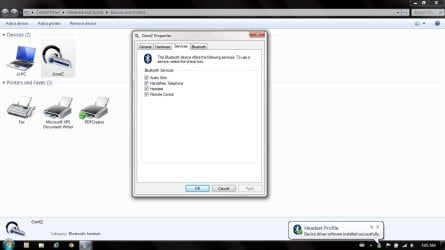
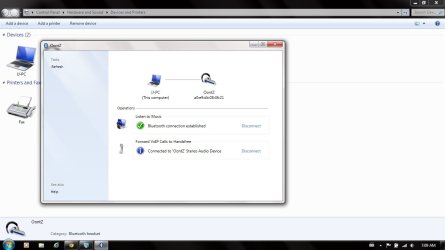
The only speaker Icon I see in the tray is for the volume settings on the WMP nothing else. If I do double click on the bluetooth icon that opens control panel>Devices and printers>bluetooth and in there under devices I see the OONTZ Icon. If I double click on that icon I see computer connected to the oontz and it says Listen to Music Bluetooth connection is established.

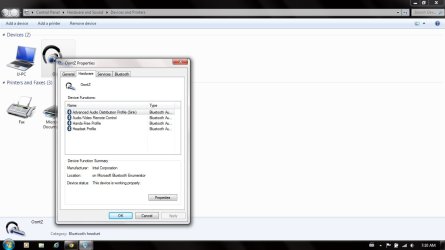
If I right click and go to properties I see that under hardware that the device is working properly, under services it I have the following boxes checked off. audio sync, headset and remote control.

Now if I go out of that and go to Bluetooth settings under the options tab have under discovery the box checked that says ALLOW Bluetooth devices to find this computer.

Under the connections below that I have all 3 boxes checked off. Allow bluetooth to connect to this computer ,alert me when a new bluetooth device wants to connect and Show the bluetooth icon in the notification area.

Under the Audio tab there two boxes, one is connect to a audio device only if it supports SCMS-T content protection ( that I have tried both checked and unchecked) did not work.

The other box says Enable Skype switching, there is a drop down box next to that and that does show the OONTZ again I have tried that both enabled and disabeled and still no luck.

Also I tried the MS Mobile device center 6.1 and it would not recogise the OONTZ


You have to plug on the speaker.
Then from your laptop, in tray icons, Bluetooth device is present.Double click that and search for new device.
When your speaker is searched, click add to devices/pair.
Then in properties of that paired device, select "play media".
Or it is automatically detected to play.
Remember that do not place the speaker more than 10 meters away from laptop.
 
Last edited:

My Computer My Computer

At a glance

Microsoft Windows 7 Professional 64-bitIntel(R) Core(TM) i7-4790 CPU @ 3.60GHz16.00 GB Hynix/Hyundai HMT451U6BFR8A-PBNVIDIA GeForce GT 720 1920 x 1080 x 32 bits (...
Computer type
PC/Desktop
Computer Manufacturer/Model Number
DELL XPS 8700 DESKTOP
OS
Microsoft Windows 7 Professional 64-bit
CPU
Intel(R) Core(TM) i7-4790 CPU @ 3.60GHz
Motherboard
Dell Inc.Base Board 0KWVT8
Memory
16.00 GB Hynix/Hyundai HMT451U6BFR8A-PB
Graphics Card(s)
NVIDIA GeForce GT 720 1920 x 1080 x 32 bits (4294967296 colo
Sound Card
Broadcom Bluetooth Hands-free Audio
Screen Resolution
1920 x 1080 x 32 bits (4294967296 colors) @ 60 Hz
Hard Drives
ST1000DM ST1000DM003-1ER1 SCSI Disk Device
No, Just turn the power on and turn bluetooth on the speakers(if, it had to be done manually) and then follow the steps.
 

My Computer My Computer

At a glance

Windows 11 x64i5 2500K @ 3.3 GHz16 GB DDR 3 @ 1600MhzMSI 1050TI 4GB OC version
Computer type
PC/Desktop
Computer Manufacturer/Model Number
Custom Bulid/Self made
OS
Windows 11 x64
CPU
i5 2500K @ 3.3 GHz
Motherboard
ASUS P8 Z77 V pro
Memory
16 GB DDR 3 @ 1600Mhz
Graphics Card(s)
MSI 1050TI 4GB OC version
Sound Card
On Board (Realtek HD audio)
Monitor(s) Displays
Samsung 22" LCD
Screen Resolution
1920*1080
Hard Drives
Seagate 1 TB, WD 1TB, Seagate 2 TB ( I use a lot of space)
PSU
coolermaster 750 W
Case
Coolermaster HAF912
Cooling
Coolermaster hyper 212 EVO
Keyboard
Samsung
Mouse
Dell Wireless
Internet Speed
Wireless 50 Mbps
Antivirus
AVG 2016 Internet Security
Browser
Google Chrome
You said that I have to plug on the speaker which I did not understand? If you ment plug in the speaker what do I plug it into?? Its wireless? I do have the speaker in the sync mode there is a led that flashes red and blue to show that it is and the laptop sees it and says it conneected but just cant figure how to get the sound out.

Please bear with me this is all new and I seem to be getting nowhere? I thought since eveything shows its connected that there would be a icon to click on to go from the laptops speakers to a bluetooth device ??

You mentioned to do "When your speaker is searched, click add to devices/pair." I do not see this option? I see no pair option nowhere??


No, Just turn the power on and turn bluetooth on the speakers(if, it had to be done manually) and then follow the steps.
 

My Computer My Computer

At a glance

Microsoft Windows 7 Professional 64-bitIntel(R) Core(TM) i7-4790 CPU @ 3.60GHz16.00 GB Hynix/Hyundai HMT451U6BFR8A-PBNVIDIA GeForce GT 720 1920 x 1080 x 32 bits (...
Computer type
PC/Desktop
Computer Manufacturer/Model Number
DELL XPS 8700 DESKTOP
OS
Microsoft Windows 7 Professional 64-bit
CPU
Intel(R) Core(TM) i7-4790 CPU @ 3.60GHz
Motherboard
Dell Inc.Base Board 0KWVT8
Memory
16.00 GB Hynix/Hyundai HMT451U6BFR8A-PB
Graphics Card(s)
NVIDIA GeForce GT 720 1920 x 1080 x 32 bits (4294967296 colo
Sound Card
Broadcom Bluetooth Hands-free Audio
Screen Resolution
1920 x 1080 x 32 bits (4294967296 colors) @ 60 Hz
Hard Drives
ST1000DM ST1000DM003-1ER1 SCSI Disk Device
picture1

Screen shot one
 

Attachments

  • oontz1.jpg
    oontz1.jpg
    62.8 KB · Views: 3
  • oontz2.jpg
    oontz2.jpg
    54.2 KB · Views: 6
  • oontz3.jpg
    oontz3.jpg
    60.3 KB · Views: 3

My Computer My Computer

At a glance

Microsoft Windows 7 Professional 64-bitIntel(R) Core(TM) i7-4790 CPU @ 3.60GHz16.00 GB Hynix/Hyundai HMT451U6BFR8A-PBNVIDIA GeForce GT 720 1920 x 1080 x 32 bits (...
Computer type
PC/Desktop
Computer Manufacturer/Model Number
DELL XPS 8700 DESKTOP
OS
Microsoft Windows 7 Professional 64-bit
CPU
Intel(R) Core(TM) i7-4790 CPU @ 3.60GHz
Motherboard
Dell Inc.Base Board 0KWVT8
Memory
16.00 GB Hynix/Hyundai HMT451U6BFR8A-PB
Graphics Card(s)
NVIDIA GeForce GT 720 1920 x 1080 x 32 bits (4294967296 colo
Sound Card
Broadcom Bluetooth Hands-free Audio
Screen Resolution
1920 x 1080 x 32 bits (4294967296 colors) @ 60 Hz
Hard Drives
ST1000DM ST1000DM003-1ER1 SCSI Disk Device
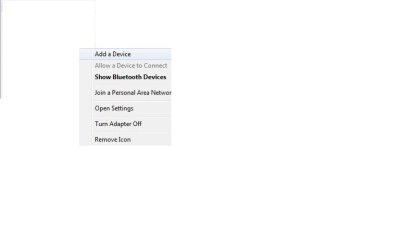
Hey jjr. On your laptop, in the system tray icon you will see the bluetooth icon. Once you turn on the bluetooth on your laptop, you have to search for new devices which are available. For this right click on the bluetooth icon and click "Add device". Below is the screen shot.

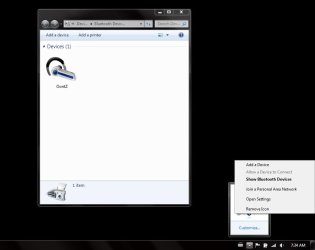
Once a device is added, right click on the BT (bluetooth) icon again and go to "Show bluetooth Devices". In that window select your speakers and right click on the icon=> go to control=>You will see option "Headset and Speakerphone", Make sure the button on this tab should say Connect. Also, the option below that "Music and Audio" should also say Connect.

Please let us know the output.
 

Attachments

  • blue.jpg
    blue.jpg
    7.9 KB · Views: 2
  • adasd.jpg
    adasd.jpg
    33.3 KB · Views: 3

My Computer My Computer

At a glance

Windows 11 x64i5 2500K @ 3.3 GHz16 GB DDR 3 @ 1600MhzMSI 1050TI 4GB OC version
Computer type
PC/Desktop
Computer Manufacturer/Model Number
Custom Bulid/Self made
OS
Windows 11 x64
CPU
i5 2500K @ 3.3 GHz
Motherboard
ASUS P8 Z77 V pro
Memory
16 GB DDR 3 @ 1600Mhz
Graphics Card(s)
MSI 1050TI 4GB OC version
Sound Card
On Board (Realtek HD audio)
Monitor(s) Displays
Samsung 22" LCD
Screen Resolution
1920*1080
Hard Drives
Seagate 1 TB, WD 1TB, Seagate 2 TB ( I use a lot of space)
PSU
coolermaster 750 W
Case
Coolermaster HAF912
Cooling
Coolermaster hyper 212 EVO
Keyboard
Samsung
Mouse
Dell Wireless
Internet Speed
Wireless 50 Mbps
Antivirus
AVG 2016 Internet Security
Browser
Google Chrome
Archer,
As you see I have no speaker options? I think that your laptop is a different make then Dell so the setup may be different??
I have been into the Dell Audio setting and have not been able t see what I need ;-)
 

Attachments

  • oontz4.jpg
    oontz4.jpg
    28.7 KB · Views: 3

My Computer My Computer

At a glance

Microsoft Windows 7 Professional 64-bitIntel(R) Core(TM) i7-4790 CPU @ 3.60GHz16.00 GB Hynix/Hyundai HMT451U6BFR8A-PBNVIDIA GeForce GT 720 1920 x 1080 x 32 bits (...
Computer type
PC/Desktop
Computer Manufacturer/Model Number
DELL XPS 8700 DESKTOP
OS
Microsoft Windows 7 Professional 64-bit
CPU
Intel(R) Core(TM) i7-4790 CPU @ 3.60GHz
Motherboard
Dell Inc.Base Board 0KWVT8
Memory
16.00 GB Hynix/Hyundai HMT451U6BFR8A-PB
Graphics Card(s)
NVIDIA GeForce GT 720 1920 x 1080 x 32 bits (4294967296 colo
Sound Card
Broadcom Bluetooth Hands-free Audio
Screen Resolution
1920 x 1080 x 32 bits (4294967296 colors) @ 60 Hz
Hard Drives
ST1000DM ST1000DM003-1ER1 SCSI Disk Device
Archer,
As you see I have no speaker options? I think that your laptop is a different make then Dell so the setup may be different??
I have been into the Dell Audio setting and have not been able t see what I need ;-)

jjr, I have Dell Latitude E5400.

In the screenshot posted by you, just right click on the icon named "Oontz" and go to control and you will see the options that I mentioned above.
 

My Computer My Computer

At a glance

Windows 11 x64i5 2500K @ 3.3 GHz16 GB DDR 3 @ 1600MhzMSI 1050TI 4GB OC version
Computer type
PC/Desktop
Computer Manufacturer/Model Number
Custom Bulid/Self made
OS
Windows 11 x64
CPU
i5 2500K @ 3.3 GHz
Motherboard
ASUS P8 Z77 V pro
Memory
16 GB DDR 3 @ 1600Mhz
Graphics Card(s)
MSI 1050TI 4GB OC version
Sound Card
On Board (Realtek HD audio)
Monitor(s) Displays
Samsung 22" LCD
Screen Resolution
1920*1080
Hard Drives
Seagate 1 TB, WD 1TB, Seagate 2 TB ( I use a lot of space)
PSU
coolermaster 750 W
Case
Coolermaster HAF912
Cooling
Coolermaster hyper 212 EVO
Keyboard
Samsung
Mouse
Dell Wireless
Internet Speed
Wireless 50 Mbps
Antivirus
AVG 2016 Internet Security
Browser
Google Chrome
Archer,
As you see I have no speaker options? I think that your laptop is a different make then Dell so the setup may be different??
I have been into the Dell Audio setting and have not been able t see what I need ;-)

jjr, I have Dell Latitude E5400.

In the screenshot posted by you, just right click on the icon named "Oontz" and go to control and you will see the options that I mentioned above.

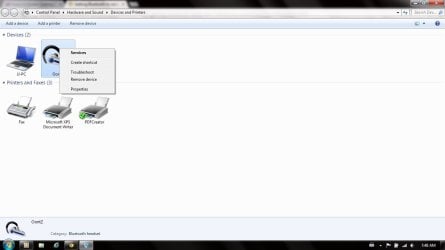
Thats the problem when I right click on my OONtz I do not see a control option?
 

Attachments

  • oontz5.jpg
    oontz5.jpg
    42.6 KB · Views: 2

My Computer My Computer

At a glance

Microsoft Windows 7 Professional 64-bitIntel(R) Core(TM) i7-4790 CPU @ 3.60GHz16.00 GB Hynix/Hyundai HMT451U6BFR8A-PBNVIDIA GeForce GT 720 1920 x 1080 x 32 bits (...
Computer type
PC/Desktop
Computer Manufacturer/Model Number
DELL XPS 8700 DESKTOP
OS
Microsoft Windows 7 Professional 64-bit
CPU
Intel(R) Core(TM) i7-4790 CPU @ 3.60GHz
Motherboard
Dell Inc.Base Board 0KWVT8
Memory
16.00 GB Hynix/Hyundai HMT451U6BFR8A-PB
Graphics Card(s)
NVIDIA GeForce GT 720 1920 x 1080 x 32 bits (4294967296 colo
Sound Card
Broadcom Bluetooth Hands-free Audio
Screen Resolution
1920 x 1080 x 32 bits (4294967296 colors) @ 60 Hz
Hard Drives
ST1000DM ST1000DM003-1ER1 SCSI Disk Device
Archer,
As you see I have no speaker options? I think that your laptop is a different make then Dell so the setup may be different??
I have been into the Dell Audio setting and have not been able t see what I need ;-)

jjr, I have Dell Latitude E5400.

In the screenshot posted by you, just right click on the icon named "Oontz" and go to control and you will see the options that I mentioned above.

Thats the problem when I right click on my OONtz I do not see a control option?

Click on "Services" and see if you get those options.
 

My Computer My Computer

At a glance

Windows 11 x64i5 2500K @ 3.3 GHz16 GB DDR 3 @ 1600MhzMSI 1050TI 4GB OC version
Computer type
PC/Desktop
Computer Manufacturer/Model Number
Custom Bulid/Self made
OS
Windows 11 x64
CPU
i5 2500K @ 3.3 GHz
Motherboard
ASUS P8 Z77 V pro
Memory
16 GB DDR 3 @ 1600Mhz
Graphics Card(s)
MSI 1050TI 4GB OC version
Sound Card
On Board (Realtek HD audio)
Monitor(s) Displays
Samsung 22" LCD
Screen Resolution
1920*1080
Hard Drives
Seagate 1 TB, WD 1TB, Seagate 2 TB ( I use a lot of space)
PSU
coolermaster 750 W
Case
Coolermaster HAF912
Cooling
Coolermaster hyper 212 EVO
Keyboard
Samsung
Mouse
Dell Wireless
Internet Speed
Wireless 50 Mbps
Antivirus
AVG 2016 Internet Security
Browser
Google Chrome
If I click on the services tab I have the option to listen to music but no speaker options.
 

Attachments

  • oontz2.jpg
    oontz2.jpg
    54.2 KB · Views: 1

My Computer My Computer

At a glance

Microsoft Windows 7 Professional 64-bitIntel(R) Core(TM) i7-4790 CPU @ 3.60GHz16.00 GB Hynix/Hyundai HMT451U6BFR8A-PBNVIDIA GeForce GT 720 1920 x 1080 x 32 bits (...
Computer type
PC/Desktop
Computer Manufacturer/Model Number
DELL XPS 8700 DESKTOP
OS
Microsoft Windows 7 Professional 64-bit
CPU
Intel(R) Core(TM) i7-4790 CPU @ 3.60GHz
Motherboard
Dell Inc.Base Board 0KWVT8
Memory
16.00 GB Hynix/Hyundai HMT451U6BFR8A-PB
Graphics Card(s)
NVIDIA GeForce GT 720 1920 x 1080 x 32 bits (4294967296 colo
Sound Card
Broadcom Bluetooth Hands-free Audio
Screen Resolution
1920 x 1080 x 32 bits (4294967296 colors) @ 60 Hz
Hard Drives
ST1000DM ST1000DM003-1ER1 SCSI Disk Device
It looks like you have things paired correctly. In the system tray, right-click on the Speaker icon and select "Playback devices". Make sure that your Bluetooth speaker is selected as the Playback device.

bt_spkr.png

If your Bluetooth device is selected as the Playback device then I would check to see if the volume
on the speaker is turned down or off.

From this dialog, you should be able to switch between your regular speakers and BT speakers. If you do that, do you hear sound from the regular speakers?

On my system, when I turn the BT speaker on and it connects, it automatically changes the default Playback device to the BT speaker and when I turn it off it automatically switches back to the regular speakers.
 

My Computer My Computer

At a glance

W10 Pro desktop, W11 laptop, W11 Pro tablet (...3.7Ghz 8700K i7, i7-11800H, i7-1065G716G desktop, 16G laptop, 4G tabletAMD Radeon RX580, RTX 3060, Intel Iris Plus
Computer type
PC/Desktop
Computer Manufacturer/Model Number
Home Built desktop, Dell G15 5511 Gaming laptop,MS Surface Pro 7 tablet
OS
W10 Pro desktop, W11 laptop, W11 Pro tablet (all 64-bit)
CPU
3.7Ghz 8700K i7, i7-11800H, i7-1065G7
Motherboard
ASUS TUF Z370-Pro Gaming in desktop
Memory
16G desktop, 16G laptop, 4G tablet
Graphics Card(s)
AMD Radeon RX580, RTX 3060, Intel Iris Plus
Sound Card
High Definition Audio (Built-in to mobo)
Monitor(s) Displays
Samsung U32J59 32" (2x), 15.6", 12"
Screen Resolution
3840x2160, 3840x2160, 1920x1080, 2160x1440
Hard Drives
500G SSD for OS; 2T, 10T & 15T HDDs for Data on Desktop, 1TB SSD laptop, 128G SSD tablet.
PSU
Corsair CX 750M
Case
Antec 100
Cooling
CM 212+
Keyboard
IBM Model M - used continuously since 1986
Mouse
Microsoft Pro IntelliMouse
Internet Speed
400M down 8M up
Antivirus
Windows Defender
Browser
FireFox
Other Info
Built my first computer (8Mhz 8088cpu, 640K RAM, 20MB HDD, 2 360K floppy drives) in 1985 and have been building them for myself, relatives and friends ever since.
Finally !!! I just popped over to the Dell forum and found a reply there:
You will need to select the Bluetooth speakers as the default sound device. Please follow the steps provided below to set the default device:

1. Right click on the Speaker icon on the bottom right of the screen.
2. Click on "Playback devices"
3. The Speaker would be listed if it is connected.
4. Click on the Bluetooth Speaker and then click on the "Set Default" tab.
5. Click OK.

You will now be able to listen to the audio on the Bluetooth speaker.

Please let me know if you need further assistance.

Archer I cant thank you enough for your patience!!!!
 

My Computer My Computer

At a glance

Microsoft Windows 7 Professional 64-bitIntel(R) Core(TM) i7-4790 CPU @ 3.60GHz16.00 GB Hynix/Hyundai HMT451U6BFR8A-PBNVIDIA GeForce GT 720 1920 x 1080 x 32 bits (...
Computer type
PC/Desktop
Computer Manufacturer/Model Number
DELL XPS 8700 DESKTOP
OS
Microsoft Windows 7 Professional 64-bit
CPU
Intel(R) Core(TM) i7-4790 CPU @ 3.60GHz
Motherboard
Dell Inc.Base Board 0KWVT8
Memory
16.00 GB Hynix/Hyundai HMT451U6BFR8A-PB
Graphics Card(s)
NVIDIA GeForce GT 720 1920 x 1080 x 32 bits (4294967296 colo
Sound Card
Broadcom Bluetooth Hands-free Audio
Screen Resolution
1920 x 1080 x 32 bits (4294967296 colors) @ 60 Hz
Hard Drives
ST1000DM ST1000DM003-1ER1 SCSI Disk Device
You are most welcome jjr. strollin gave the solution to your issue.
 

My Computer My Computer

At a glance

Windows 11 x64i5 2500K @ 3.3 GHz16 GB DDR 3 @ 1600MhzMSI 1050TI 4GB OC version
Computer type
PC/Desktop
Computer Manufacturer/Model Number
Custom Bulid/Self made
OS
Windows 11 x64
CPU
i5 2500K @ 3.3 GHz
Motherboard
ASUS P8 Z77 V pro
Memory
16 GB DDR 3 @ 1600Mhz
Graphics Card(s)
MSI 1050TI 4GB OC version
Sound Card
On Board (Realtek HD audio)
Monitor(s) Displays
Samsung 22" LCD
Screen Resolution
1920*1080
Hard Drives
Seagate 1 TB, WD 1TB, Seagate 2 TB ( I use a lot of space)
PSU
coolermaster 750 W
Case
Coolermaster HAF912
Cooling
Coolermaster hyper 212 EVO
Keyboard
Samsung
Mouse
Dell Wireless
Internet Speed
Wireless 50 Mbps
Antivirus
AVG 2016 Internet Security
Browser
Google Chrome

My Computer My Computer

At a glance

Microsoft Windows 7 Professional 64-bitIntel(R) Core(TM) i7-4790 CPU @ 3.60GHz16.00 GB Hynix/Hyundai HMT451U6BFR8A-PBNVIDIA GeForce GT 720 1920 x 1080 x 32 bits (...
Computer type
PC/Desktop
Computer Manufacturer/Model Number
DELL XPS 8700 DESKTOP
OS
Microsoft Windows 7 Professional 64-bit
CPU
Intel(R) Core(TM) i7-4790 CPU @ 3.60GHz
Motherboard
Dell Inc.Base Board 0KWVT8
Memory
16.00 GB Hynix/Hyundai HMT451U6BFR8A-PB
Graphics Card(s)
NVIDIA GeForce GT 720 1920 x 1080 x 32 bits (4294967296 colo
Sound Card
Broadcom Bluetooth Hands-free Audio
Screen Resolution
1920 x 1080 x 32 bits (4294967296 colors) @ 60 Hz
Hard Drives
ST1000DM ST1000DM003-1ER1 SCSI Disk Device
Back
Top