Installed win 7 64 bit now sound wont work

mummy2011

New member
Local time
12:49 PM
Messages
14
Hi i have a sound blaster Audigy 24 bit advanced HD sound card. It worked fine while i had xp installed but i have now gone to 64bit windows 7 and be buggered if i can get it to work.
I can not seem to find the right driver for 64 bit. Have tried a couple of downloads but they just gave me an error. I have disabled the on board sound and this was infact done about 6 months ago. I rechecked the bios and it is still disabled. The error i am getting is
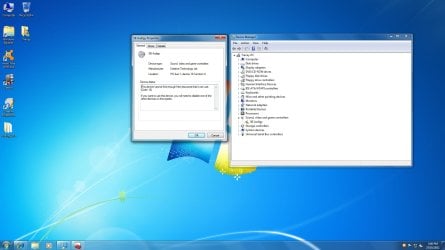
This device cannot find enough free resources that it can use. (Code 12)
If you want to use this device, you will need to disable one of the other devices on this system.
I have no other sound devices listed and onboard has been disabled....Hope someone can help.

As a side note it is NOT a sound blaster LIVE
 
Last edited:

My Computer My Computer

At a glance

xp pro 32 bit
OS
xp pro 32 bit
Hi,

It's probably the lack of x64 driver that is causing issues I would guess?

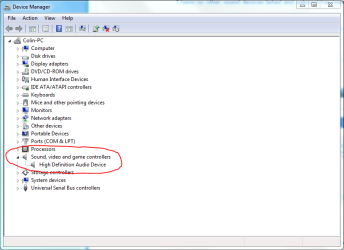
Please take a screen capture image of the relevent device under Device Manager, as shown in the image below. Does it show up? Does it have a yellow exclamation mark under it? Is your on-board sound card still shown?

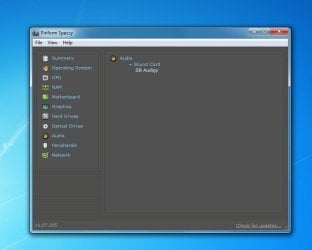
Also try this : Download Speccy and run it. Click the Audio section, and take a screen capture of that and post it here too please.

Regards,
Golden
 

Attachments

  • Capture.PNG
    Capture.PNG
    21.9 KB · Views: 49

My Computer My Computer

At a glance

Windows 10 Pro x64 ; Xubuntu x64Intel i7 860 @ 2.80 GHz O/C'ed to 4.0GHz16GB Corsair Vengance DDR3 @ 661 MHz Dual Cha...EVGA NVidia GTX 560 1024MB
Computer type
PC/Desktop
Computer Manufacturer/Model Number
Golden Mk. I.4
OS
Windows 10 Pro x64 ; Xubuntu x64
CPU
Intel i7 860 @ 2.80 GHz O/C'ed to 4.0GHz
Motherboard
Gigabyte P55A-UD3R Rev.1. Award BIOS F13
Memory
16GB Corsair Vengance DDR3 @ 661 MHz Dual Channel (9-9-9-24)
Graphics Card(s)
EVGA NVidia GTX 560 1024MB
Sound Card
Realtek Integrated
Monitor(s) Displays
Dual Samsung SyncMaster 2494HS
Screen Resolution
1920*1080 and 1920*1080
Hard Drives
1*Samsung 840 EVO 120GB SSD;
1*OCZ Vertex 2 60GB SSD;
2*Samsung F3 SpinPoint 1TB in RAID0;
1*Samsung F1 SpinPoint 1TB;
2*Western Digital 1TB External USB 3.0
1*Western Digital 500GB External USB 3.0
1*Seagate 500GB External USB 2.0
PSU
Thermaltake ToughPower QFan 750W
Case
Thermaltake Element S VK60001W2Z
Cooling
Corsair H60 Water Cooling, 2*230mm and 2*80mm case fans
Keyboard
Logitech G110
Mouse
Logitech MX518
Hi thanks for the reply. At the moment my computer is at the tech shop being fixed. I was getting BSOD trying to install nortons. I ran memory test and uninstalled updates, uninstalled generic sound drivers and still BSOD. Suspect it is a driver issue with the mobo. Kn9s is what the box says and what it looks like but motherboard says kn9 ultra so decided off to the technician and let them do it. I think it needed a bios update so i will let them do it. I will report back once it comes back hopefully they will get the sound sorted while its there....
 

My Computer My Computer

At a glance

xp pro 32 bit
OS
xp pro 32 bit
Hi I'm back again. New stick of ram giving me issues. That is now fixed but alas still no sound. I have downloaded speccy and here is a screen capture.
I have a kn9s mobo amd athlon 3500+ 64
I have on board sound disabled in the bios. The on board sound is realtek hd audio but it was a bit unstable at times so 6 months or so ago i brought a sound blaster Audigy 24-bit advanced HD (it does not say live 24-bit)
I hope someone can help me. I have let windows update install new drivers but that did not work. I also let the creative auto update try to update but still no sound. I have a feeling it could be mobo drivers as the disk that came with my board wont install due to no windows 7 drivers? I went to abit and downloaded the 64 bit drivers but they were for Vista but that still did not help (chipset drivers that is). Oh well here's hoping someone can help......
 

Attachments

  • spekky.jpg
    spekky.jpg
    31.1 KB · Views: 23
  • Untitled.jpg
    Untitled.jpg
    120.4 KB · Views: 28

My Computer My Computer

At a glance

xp pro 32 bit
OS
xp pro 32 bit
Hi,

Is your on-board sound (the one you disabled in the BIOS) shown as uninstalled under Device Manager? If not, you need to uninstall the on-board, then reinstall the new sound card.

Regards,
Golden
 

My Computer My Computer

At a glance

Windows 10 Pro x64 ; Xubuntu x64Intel i7 860 @ 2.80 GHz O/C'ed to 4.0GHz16GB Corsair Vengance DDR3 @ 661 MHz Dual Cha...EVGA NVidia GTX 560 1024MB
Computer type
PC/Desktop
Computer Manufacturer/Model Number
Golden Mk. I.4
OS
Windows 10 Pro x64 ; Xubuntu x64
CPU
Intel i7 860 @ 2.80 GHz O/C'ed to 4.0GHz
Motherboard
Gigabyte P55A-UD3R Rev.1. Award BIOS F13
Memory
16GB Corsair Vengance DDR3 @ 661 MHz Dual Channel (9-9-9-24)
Graphics Card(s)
EVGA NVidia GTX 560 1024MB
Sound Card
Realtek Integrated
Monitor(s) Displays
Dual Samsung SyncMaster 2494HS
Screen Resolution
1920*1080 and 1920*1080
Hard Drives
1*Samsung 840 EVO 120GB SSD;
1*OCZ Vertex 2 60GB SSD;
2*Samsung F3 SpinPoint 1TB in RAID0;
1*Samsung F1 SpinPoint 1TB;
2*Western Digital 1TB External USB 3.0
1*Western Digital 500GB External USB 3.0
1*Seagate 500GB External USB 2.0
PSU
Thermaltake ToughPower QFan 750W
Case
Thermaltake Element S VK60001W2Z
Cooling
Corsair H60 Water Cooling, 2*230mm and 2*80mm case fans
Keyboard
Logitech G110
Mouse
Logitech MX518
When i upgraded to win 7 64 bit i never installed the realtek drivers. The only sound i have installed is the sound blaster sound card. On board sound was disabled when i had xp sp3 as well as the realtek drivers. The realtek drivers have never been installed on win 7.
 

My Computer My Computer

At a glance

xp pro 32 bit
OS
xp pro 32 bit
Yes i have done the windows update to install drivers (that was said in my post) and i still have no sound. The sound card was working perfectly with xp sp3. The only thing that changed was going from xp sp3 32 bit to win 7 64 bit. Everything else is working fine i just have no sound.
 

My Computer My Computer

At a glance

xp pro 32 bit
OS
xp pro 32 bit
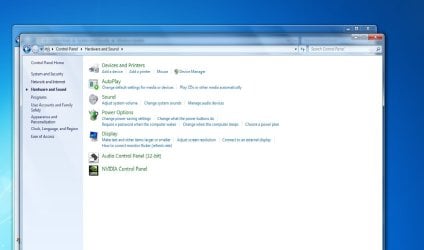
This is what is in my control panel
Im guessing it should not be 32 bit as i have win 7 64 bit
 

Attachments

  • Control Panel.jpg
    Control Panel.jpg
    72.5 KB · Views: 38
Last edited:

My Computer My Computer

At a glance

xp pro 32 bit
OS
xp pro 32 bit
Hi, I have gone back to on board sound which was realtek HD audio. Although i can not install the realtek audio manager from the disk and when i tried to install the program from abit it only has vista 64 drivers. Well at least for now i have sound that is working with win 7 drivers that will do until i decide if i will update my mobo and CPU or i may just buy another sound card that comes with win 7 64 bit drivers. I hate wasting time on problems like this as it appears there is no solution. I have tried heaps of creative drivers and none are working with this 64 bit system...Oh well
 

My Computer My Computer

At a glance

xp pro 32 bit
OS
xp pro 32 bit
Download the latest drivers from here.....
Realtek
 

My Computer My Computer

At a glance

Windows 7 Home Premium 64 bitIntel Core i7-4790G.SKILL 8GB (2 x 4GB) DDR3 F3-10666CL9D-8GBNTAMD Radeon R7 250
Computer type
PC/Desktop
Computer Manufacturer/Model Number
Custom Build
OS
Windows 7 Home Premium 64 bit
CPU
Intel Core i7-4790
Motherboard
GA-Z87X-D3H
Memory
G.SKILL 8GB (2 x 4GB) DDR3 F3-10666CL9D-8GBNT
Graphics Card(s)
AMD Radeon R7 250
Sound Card
Realtek ALC892
Monitor(s) Displays
Samsung UN32EH5000, Dell 1703FPT
Screen Resolution
1920 x 1080, 1280 x 1024
Hard Drives
WD5003AZEX
WD10EZEX
Samsung HD103SJ
Samsung 128 GB 840 PRO
PSU
SeaSonic M12II SS-500GM
Case
Fractal Design Define R4
Cooling
Zalman CNPS9900ALED
Keyboard
Logitech K800
Mouse
Logitech M705
Internet Speed
16 Mbps
Antivirus
Avast
Browser
Firefox
Other Info
Bose Companion 2 Multimedia Speakers
Thanks. I actually did that last night....Cheers for everyones help
 

My Computer My Computer

At a glance

xp pro 32 bit
OS
xp pro 32 bit
Back
Top