More Than 3 Out of 4 Enthusiasts Reject Windows 8

Status
Not open for further replies.
Steve Ballmer is a wonderful person. Just keep him with phones and tablets and the hell away from PC's and Laptops.
I don't believe that would be good.... I like my Windows phone, keep him away from the phones too... Maybe Microsoft would be better off without him...


and when he goes, he can take W8 with him. :thumbsup:
Nothing wrong with Win 8...for phones, tablets, and netbooks with touchscreens. The big mistake was trying to use it as a laptop (the larger ones, at least) and desktop OS.

What I would love to see is development continue on Win 8, concentrating on phones and tablets, and an SP2 come out for Win 7 (even if it's only a compilation of previous updates). Win 9 could be geared for desktops, Win 10 for phones and tablets, Win 11, desktops, and so on.
 

My Computer My Computer

At a glance

Win 7 Ultimate 64 bitIntel i7-3930KKingston HyperX Genesis 32GB Kit (8x4GB Modul...MSI R7850 Twin Frozr 2GD5/OC Radeon HD 7850 2...
Computer type
PC/Desktop
Computer Manufacturer/Model Number
Custom Build
OS
Win 7 Ultimate 64 bit
CPU
Intel i7-3930K
Motherboard
ASUS P9X79 WS
Memory
Kingston HyperX Genesis 32GB Kit (8x4GB Modules) 1600MHz DDR
Graphics Card(s)
MSI R7850 Twin Frozr 2GD5/OC Radeon HD 7850 2GB 256-bit GDDR
Sound Card
Asus Xonar Essence STX
Monitor(s) Displays
3x Asus VG248QE 24", Vizio 32" TV
Screen Resolution
1920 x 1080, ?
Hard Drives
Samsung 128GB 840 Pro SSD (1),
Samsung 4TB 850 EVO SSDs (4)
Samsung 4TB 850 EVO SSDs (16) external backup drives used in 2.5" hot swap bays in the computer.
PSU
Corsair HX750w
Case
Antec Two Hundred v2 (modified)
Cooling
Cooler Master GeminII S524 120mm (fan replaced with a 140mm)
Keyboard
Logitech G510s
Mouse
Logitech M525 (two in use)
Internet Speed
=< 32Mbps down, 8Mbps up
Antivirus
AVAST!, MBAM, SAS, Spybot S&D (all but MBAM free) Glary Util
Browser
IE11
Other Info
LSI 9211-8i HBA card (8 SATA III ports), 2.5" & 3.5" Hot Swap Bays, HooToo HT-CR001 PCI-E to USB 3.0 Internal Hub + 6 Slot Card Reader, and LG Model CH12LS28 BD-ROM Optical Drive. Also, ScanSnap S1500 ADF duplexing scanner, Canon 9000F flat bed scanner, Corsair SP2500 2.1 speakers, Samsung CLP 415nw laser color printer, Cyberpower PP2200SW UPS
Nothing wrong with Win 8...for phones, tablets, and netbooks with touchscreens. The big mistake was trying to use it as a laptop (the larger ones, at least) and desktop OS.

What I would love to see is development continue on Win 8, concentrating on phones and tablets, and an SP2 come out for Win 7 (even if it's only a compilation of previous updates). Win 9 could be geared for desktops, Win 10 for phones and tablets, Win 11, desktops, and so on.

2e0qu1j.jpg
Wish MS would take your advice.

As for Win 8 and suggestions that some of us haven't tried it long enough, or may be concluding a bit prematurely that 8 isn't our preference on a Desktop or Laptop, I understand that pov but it didn't take a lot of time for me to get familiar with the basic functionality of 8 in a local PC store with comparisons to 7.

7 fits my needs by a substantial margin vs 8 but I've yet to join the tablet/smart phone generation so am not in need of a touch-screen platform.

7 is still cruising along on my Desktop & Laptop since around May '10 with no as yet BSOD's or other major issues encountered. The last time I saw one of those "Stack Overflow" screens, was with XP.

The only thing that I see is an intermittent issue with 7 loading to the Desktop, (explorer.exe or iexplore.exe ?). Occasionally my Desktop PC seems to struggle completing launching to the Desktop screen, sometimes not launching the Taskbar, or not completing Desktop Icon associations.

However once it completes the Desktop load, I'm cruising with no issues until the next Restart or startup after Shutdown but it's intermittent and seems to have a 50-50 chance of loading to the Desktop perfectly vs having issues.

The only thing that I can think of that may be a factor in this issue, is that I clone frequently but the Target HDD always boots up without issue. Occasionally the Source HDD will struggle but runs perfectly once it completes the Desktop screen launch, after any Restart or Startup after a Shutdown.

I rarely shut down (power off) the Desktop PC. I just put into Standby (Sleep) mode when I walk away from the PC.
 

My Computer My Computer

At a glance

Windows 7 Home Premium 64 bitIntel i5 650 Dual Core 3.20 GHz Cache 4MB Thr...Corsair 16GB DDR3 1600MHz 9-9-9-24 P/N: CMZ8G...ZOTAC GeFORCE 9500 ZT-95TEK2M-FSL 1GB GDDR2
Computer type
PC/Desktop
Computer Manufacturer/Model Number
Built at Micro Center Richardson, TX
OS
Windows 7 Home Premium 64 bit
CPU
Intel i5 650 Dual Core 3.20 GHz Cache 4MB Threads: 4
Motherboard
ASUS PRO P7P55D-E
Memory
Corsair 16GB DDR3 1600MHz 9-9-9-24 P/N: CMZ8GX3M2A1600C
Graphics Card(s)
ZOTAC GeFORCE 9500 ZT-95TEK2M-FSL 1GB GDDR2
Sound Card
Mother Bd
Monitor(s) Displays
ASUS V228H 21.5” Diag
Screen Resolution
1440 x 900
Hard Drives
SEAGATE BARRACUDA (2ea) 3.5” INTERNAL 1Tb 16 MB SATA ST1000DM003-9YN162 7200RPM, 64MB, SATA 6Gb/s ** 2 Sata Hot-Swap Racks installed in Tower
PSU
Thermaltake Model TR2 RX 750W
Cooling
2 Tower Fans
Keyboard
Dell Quietkey PS/2 Windows 104 P/N 0463CD
Mouse
Kensington Mechanical Trackball USB Model 64217
Internet Speed
35/35
Antivirus
Norton 360 & MBAM Pro
Browser
IE10
Other Info
Printer: HP DeskJet 3520 USB 2.0 **
Speakers: ALTEC Model VS4621 2.1 28 W/Channel w/Sub-woofer **
IOGEAR HDMI Monitor Switcher Swx3 MODEL GHDSW3 ** Addonics ZDRWESU3 eSata/USB 3.0 external DVD Read/Write DVD Drive** SEAGATE GoFlex USB 2.0 Portable HD 500GB 5400 RPM P/N: 9ZF2A2-570
...I rarely shut down (power off) the Desktop PC. I just put into Standby (Sleep) mode when I walk away from the PC.

I never put desktop PC to sleep; it takes as long to wake up as I do and I'm impatient. I just kill the monitor (poor monitor). I also have some processes that run at night (mostly uploads to Carbonite if I've added a lot of data and updates). I have put my notebook to sleep on occasion (I have it set to do that when I close the lid) but usually just power it down (I have the power button set for that).
 

My Computer My Computer

At a glance

Win 7 Ultimate 64 bitIntel i7-3930KKingston HyperX Genesis 32GB Kit (8x4GB Modul...MSI R7850 Twin Frozr 2GD5/OC Radeon HD 7850 2...
Computer type
PC/Desktop
Computer Manufacturer/Model Number
Custom Build
OS
Win 7 Ultimate 64 bit
CPU
Intel i7-3930K
Motherboard
ASUS P9X79 WS
Memory
Kingston HyperX Genesis 32GB Kit (8x4GB Modules) 1600MHz DDR
Graphics Card(s)
MSI R7850 Twin Frozr 2GD5/OC Radeon HD 7850 2GB 256-bit GDDR
Sound Card
Asus Xonar Essence STX
Monitor(s) Displays
3x Asus VG248QE 24", Vizio 32" TV
Screen Resolution
1920 x 1080, ?
Hard Drives
Samsung 128GB 840 Pro SSD (1),
Samsung 4TB 850 EVO SSDs (4)
Samsung 4TB 850 EVO SSDs (16) external backup drives used in 2.5" hot swap bays in the computer.
PSU
Corsair HX750w
Case
Antec Two Hundred v2 (modified)
Cooling
Cooler Master GeminII S524 120mm (fan replaced with a 140mm)
Keyboard
Logitech G510s
Mouse
Logitech M525 (two in use)
Internet Speed
=< 32Mbps down, 8Mbps up
Antivirus
AVAST!, MBAM, SAS, Spybot S&D (all but MBAM free) Glary Util
Browser
IE11
Other Info
LSI 9211-8i HBA card (8 SATA III ports), 2.5" & 3.5" Hot Swap Bays, HooToo HT-CR001 PCI-E to USB 3.0 Internal Hub + 6 Slot Card Reader, and LG Model CH12LS28 BD-ROM Optical Drive. Also, ScanSnap S1500 ADF duplexing scanner, Canon 9000F flat bed scanner, Corsair SP2500 2.1 speakers, Samsung CLP 415nw laser color printer, Cyberpower PP2200SW UPS
This is what happened to the MS tablet which was intended to show the way for Windows 8:

In some unknown warehouse presumably sits a pile of millions of beautiful, unused Surface RTs, the tablet computer that was supposed to resurrect Microsoft. Late Thursday, the company revealed for the first time that it has failed to entice many people to buy the product, and the software maker made an unexpected, $900 million writeoff on its unsold Surface inventory. The losses don't end there: On Friday morning, Microsoft shed $30 billion in value after its stock tumbled 10 percent.

According to one calculation, that loss translates to nearly 6 million sleek and rather stunning machines that consumers have decided they don't care to own. No matter how the math works out -- the company would not provide exact sales numbers -- that heap of Surfaces just burned a nearly $1 billion hole in Microsoft's pocket.

The irony of the Surface debacle is that Microsoft actually managed to design a product that many reviewers admired, but it failed anyway -- underscoring the degree to which this once-dominant technology company appears to be past its moment. Good, bad or mediocre, the Surface was apparently doomed on arrival because that arrival was way too late, with the market already claimed by Apple’s wildly popular iPad.

How did such a powerful company manage to engineer such a colossal loser?
Microsoft's Surface RT Didn't Have To Be A $900 Million Disaster

And now those will simply sit there in some big warehouse and collect dust! MS decided to get into the tablet game a bit too late and "with the wrong approach" not looking before leaping! This will cost the hard way.

I don't believe that would be good.... I like my Windows phone, keep him away from the phones too... Maybe Microsoft would be better off without him...


and when he goes, he can take W8 with him. :thumbsup:
Nothing wrong with Win 8...for phones, tablets, and netbooks with touchscreens. The big mistake was trying to use it as a laptop (the larger ones, at least) and desktop OS.

What I would love to see is development continue on Win 8, concentrating on phones and tablets, and an SP2 come out for Win 7 (even if it's only a compilation of previous updates). Win 9 could be geared for desktops, Win 10 for phones and tablets, Win 11, desktops, and so on.

A truly innovative company would have worked on RT and Surface totally separate from their main cash cow desktop OS to begin with. But someone at MS was asleep at the switch again not taking a serious look at what 7 was doing for computing in general with a guaranteed win to expand on further after Vista was labeled ME II.

Continued work with the MinWin still seen while still seen in as well as other working ideas 7 brought in elightened on further would put MS over the top as far as desktop OSs."Oh no we can't have that now! We bash the Fruit company and others like Google getting into the OS business by focusing our efforts there." is now proving itself to many as hindsight.

According to the info on the old 90s action being taken against MS with BG trying to jam IE on everyone as a mandate that lead to him leaving and instead someone comes in lacking ideas in too many ways. BG was still an innovator despite his drive to monopolize the browser war that was seen then. Presently MS is now seemingly lacking the things BG started off with by ignoring the success story 7 became in a moment's notice!

EVERYONE wanted to get their hands on 7 when first new! People had enthusiasm for an OS they realized was a new positive for MS which unfortunately wasn't followed up. I have to wonder if BG was still CEO if he would simply trashed 8 or expand operations to see a totally separate development team work out things for tablet and phone and not effect the actual desktop OS? A totally separate tablet OS(RT is supposedly) wouldn't necessarily need to look exactly the same as the "Windows" desktop users have on their machines! But I guess having a separate branch for tablet and phone would have meant hiring more people as MS expanded a little to fill the needs?
 

My Computers My Computers

  • At a glance

    W7 Ultimate x64/W10 Pro x64/W11 Pro Triple Bo...AMD Phenom II X4 975 Deneb 3.6ghz - 965 2nd r...Kingston Hyper X DDR3 1600 1.5v 16gb - Hyper ...MSI HD Radeon 5750 1gb - MSI HD Radeon 6450 o...
    Computer type
    PC/Desktop
    Computer Manufacturer/Model Number
    Custom builds = 2
    OS
    W7 Ultimate x64/W10 Pro x64/W11 Pro Triple Boot - Main PC W7 Remote PC Micro ATX W7 Pro x64/W11 Pro
    CPU
    AMD Phenom II X4 975 Deneb 3.6ghz - 965 2nd remote pc
    Motherboard
    Gigabyte GA-790XTA-UD4-Gigabyte GA-880GM-D2H remote pc
    Memory
    Kingston Hyper X DDR3 1600 1.5v 16gb - Hyper X Fury 8gb 2nd
    Graphics Card(s)
    MSI HD Radeon 5750 1gb - MSI HD Radeon 6450 on mini tower
    Sound Card
    Creative Labs X-Fi Xtreme Audio P - Realtek onooard 2nd case
    Monitor(s) Displays
    ASUS VW199T-P 19" HP 2082a Main-HP 2082a 20" remote pc
    Screen Resolution
    Asus 1440x900 - HP 1600x900
    Hard Drives
    WD Black 1TB HD per OS W7, W10, and pending W11 presently on 500gb OS Drive - Pending Triple 1TB HDs for Spanned Storage/backup volume
    Single 2TB external USB enclosure, single 1TB System 7 Host/Boot drive, Pending 8TB external HD for system image b
    PSU
    Corsair 750TX - primary / Corsair CX600 - second
    Case
    Antec 900-2 - SSD compatible / NZXT Vulcan mini tower
    Cooling
    Zalman CNPS9900A
    Keyboard
    AZIO L70 Backlit Letters Gaming - ONN Cordless/USB
    Mouse
    MSI DS200 Programmable, Logitech Cordless
    Internet Speed
    30mbps upgrade - primary hard wired - mini tower usb WiFi
    Antivirus
    GFI VIPRE Internet Security 2014 on W7 2016 beta on W10,
    Browser
    Cyberfox, WaterFox 64bit FF variants, FireFox x64, Pale Moon
    Other Info
    Accomdata fan cooled usb 2.0 PIDE/Sata II, III external enclosure.
    Sambient usb/eSata PATA/Sata II, III external enclosure.
  • At a glance

    W7 Pro x64/W11 ProAMD Deneb 3.6ghz - 965Kingston Hyper X Fury 8gbMSI HD Radeon 6450 DVI Output
    Computer type
    PC/Desktop
    System Manufacturer/Model Number
    CUSTOM ASSEMBLY
    OS
    W7 Pro x64/W11 Pro
    CPU
    AMD Deneb 3.6ghz - 965
    Motherboard
    Gigabyte GA-880GM-D2H remote pc
    Memory
    Kingston Hyper X Fury 8gb
    Graphics Card(s)
    MSI HD Radeon 6450 DVI Output
    Sound Card
    Realtek onooard Creative or Other separate PENDING
    Monitor(s) Displays
    VIZIO 32" LCD TV Separate LCD Pending
    Screen Resolution
    1600x1080
    Hard Drives
    WD 500GB OS Host/Boot WD Green 1TB Storage/Backup
    PSU
    Corsair 600W - THERMALTAKE 600W spare case
    Case
    NZXT Vulcan mini tower
    Cooling
    Twin 120mm Top Fans - 240mm Side Cover
    Keyboard
    ONN Cordless/USB Logitech Cordless
    Mouse
    ONN USB/Cordless - Logitech Cordless
    Internet Speed
    DSL 5G
    Browser
    MS Edge, FireFox, WaterFox x64, FireFox Nightly
    Other Info
    OS Testing-Remote Access to Main TeamViewer
I never put desktop PC to sleep; it takes as long to wake up as I do and I'm impatient. I just kill the monitor (poor monitor). I also have some processes that run at night (mostly uploads to Carbonite if I've added a lot of data and updates). I have put my notebook to sleep on occasion (I have it set to do that when I close the lid) but usually just power it down (I have the power button set for that).

I became a "sleep" guy :D for a specific reason although I have a workaround in the event that I encounter wakeup issues. So far, I haven't seen any problems waking the Desktop. It usually wakes up within ~8-10 seconds, with the Win login screen appearing after that.

I close all apps before putting the PC to sleep though, and that may contribute to the faster "wakeup" action on my Desktop. I usually call the Standby dll with a <win> s hotkey, similar to locking the PC with <win> L, etc, or I go to "Desktop Active" and use the built-in Windows shutdown menu (alt F4 remapped to <win> x on my PC).

The other reason that I do a manual "Sleep" command, is that with my PC's (both Desktop and Laptop), I found that they will not always go into Sleep mode after my specified timeout setting in Control Panel/Power Optons.

After reading some things about this, the best explanation that intermittently prevents my PC's from going to Sleep in timeout mode, is possibly related to "powercfg", receiving a power request, either from my Homegroup network or possibly an outside 'net request.

I looked at Powercfg at the CMD prompt and found a request that appeared to originate from an external USB device. I have a USB hub in my gear, so rather than digging further into the issue, I just went with the habit of putting my PC's to Sleep with my hotkey before I leave my workstation.

I also have a KVM switch and an HDMI switcher in my gear, since I'm hopelessly hooked on an old Dell "Quietkey' Win 104 keyBd and Kensington Trackball :D so I rarely use my Laptop keyBd. These devices may be contributing to the Power Request that can prevent the PC from going into Sleep mode via the Control Panel timeout value.

I also have a couple of scans that run overnight, my AV and an MBAM (MalwareBytes) scan. I use the Windows Task Scheduler to wake the PC about 1 minute before my MBAM scan begins. Then the AV (Norton) scan runs and Norton has a pull-down option to put the PC back to sleep after that scan completes.

Scoop, I'd go over your install closely with Troubleshooting Steps for Windows 7 making sure to keep a Clean Boot, checking for infection, logs, System Resources, etc.

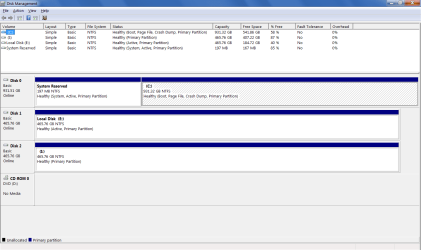
If you'll post back a screenshot of Disk Management - Post a Screen Capture Image we can also look it over for anything obvious.

Greg, thanks for the info. I haven't checked into the Troubleshooting Steps yet but included is my Disk Mgmt screencap at the end of the post.

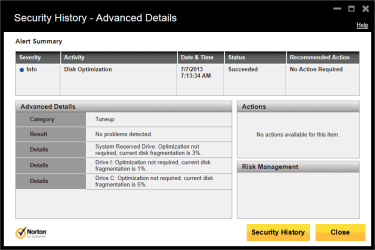
I also included a recent Defrag data screencap from my Norton AV.

Drive C is my everyday HDD, 1 Tb Seagate Barracuda. HDD product info:

3.5” INTERNAL 1Tb 16 MB SATA ST1000DM003-9YN162
7200RPM, 64MB, SATA III 6Gb/s

My shelf clone HDD's (2) are identical product-line 1 Tb HDD's.

Drive E is another Seagate 500Gb HDD, same product line. It's mainly an additional-storage HDD for video files.

Both HDD's are installed in the tower with Kingwin hot-swap racks.

Drive I is a Seagate "Goflex" portable USB (2.0) HDD. I use this HDD for twice-daily incremental backups for specific items with Acronis 2011.

Fyi note about my Desktop system: I had this system built at a local store. Dallas-area residents may be familiar with the store... "Micro Center". They are a reputable dealer with good support/associates in the store.

I originally had Raid 1 installed with 2 HDD's but I had intermittent issues with the array halting, which turned out to be an intermittent RAM stick which I replaced, but I disabled my Raid 1 in my BIOS after doing some research into Raid operation.

I'm not an experienced PC guy, so I'm not certain that I disabled the original Raid 1 config properly and perhaps that's contributing to the struggling Windows startup issues. That's just a novice's guess here though. I'm wondering if Windows is searching for a Raid array at startup and is getting a little confused when it's not detecting the working array.

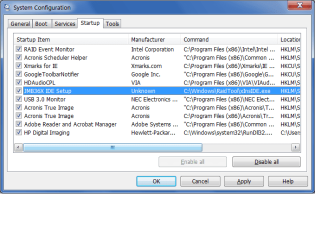
I mention this since I see a couple Raid drivers that are included in my Windows Startup actions with my "Process Explorer" (Sysinternals utility). I also see Raid 1 Intel Event Monitor checked in the Msconfig "Startup" tab. I haven't unchecked it yet since I didn't want to render my HDD unbootable, if that's a possibility.

Since my primary reason for initially going with a Raid 1 install was not to protect against a HDD failure but to have a plug-and-play complete HDD in the event of intrusions (virus, malware), my reason was flawed due to my inexperience regarding Raid 1. Since they mirror, any hit will affect both HDD's.

So I became a "cloner". It's worked out good but I'm slowly catching up with the Imaging ideas for having another option for backing up my complete C drive.

Thanks to all here
2elv0vc.jpg
for the Imaging info. As a "baby" PC user compared to other members here, it'll take time to absorb that info and begin an Imaging/backup routine.


Attachments

  • Disk Mgmt.png
    Disk Mgmt.png
    23.7 KB · Views: 9
  • Norton Degrag.png
    Norton Degrag.png
    16.4 KB · Views: 7

My Computer My Computer

At a glance

Windows 7 Home Premium 64 bitIntel i5 650 Dual Core 3.20 GHz Cache 4MB Thr...Corsair 16GB DDR3 1600MHz 9-9-9-24 P/N: CMZ8G...ZOTAC GeFORCE 9500 ZT-95TEK2M-FSL 1GB GDDR2
Computer type
PC/Desktop
Computer Manufacturer/Model Number
Built at Micro Center Richardson, TX
OS
Windows 7 Home Premium 64 bit
CPU
Intel i5 650 Dual Core 3.20 GHz Cache 4MB Threads: 4
Motherboard
ASUS PRO P7P55D-E
Memory
Corsair 16GB DDR3 1600MHz 9-9-9-24 P/N: CMZ8GX3M2A1600C
Graphics Card(s)
ZOTAC GeFORCE 9500 ZT-95TEK2M-FSL 1GB GDDR2
Sound Card
Mother Bd
Monitor(s) Displays
ASUS V228H 21.5” Diag
Screen Resolution
1440 x 900
Hard Drives
SEAGATE BARRACUDA (2ea) 3.5” INTERNAL 1Tb 16 MB SATA ST1000DM003-9YN162 7200RPM, 64MB, SATA 6Gb/s ** 2 Sata Hot-Swap Racks installed in Tower
PSU
Thermaltake Model TR2 RX 750W
Cooling
2 Tower Fans
Keyboard
Dell Quietkey PS/2 Windows 104 P/N 0463CD
Mouse
Kensington Mechanical Trackball USB Model 64217
Internet Speed
35/35
Antivirus
Norton 360 & MBAM Pro
Browser
IE10
Other Info
Printer: HP DeskJet 3520 USB 2.0 **
Speakers: ALTEC Model VS4621 2.1 28 W/Channel w/Sub-woofer **
IOGEAR HDMI Monitor Switcher Swx3 MODEL GHDSW3 ** Addonics ZDRWESU3 eSata/USB 3.0 external DVD Read/Write DVD Drive** SEAGATE GoFlex USB 2.0 Portable HD 500GB 5400 RPM P/N: 9ZF2A2-570
I'll have more time later but for now the things that jump out are there should be no Active flag on DISK1, and I would run for awhile without Norton after using Norton Removal Tool - try MS Security Essentials.

Try also plugging in directly to mobo without rack.

Establish a Clean Boot now with only MSE starting w Win7. Check in BIOS setup that AHCI mode is chosen. Did you wipe the HD's before install and install with other unplugged?

I am at the Cambridge MicroCenter now.
 
I don't believe that would be good.... I like my Windows phone, keep him away from the phones too... Maybe Microsoft would be better off without him...


and when he goes, he can take W8 with him. :thumbsup:

Nothing wrong with Win 8...for phones, tablets, and netbooks with touchscreens. The big mistake was trying to use it as a laptop (the larger ones, at least) and desktop OS.

What I would love to see is development continue on Win 8, concentrating on phones and tablets, and an SP2 come out for Win 7 (even if it's only a compilation of previous updates). Win 9 could be geared for desktops, Win 10 for phones and tablets, Win 11, desktops, and so on.


I certainly agree with that. MS's "One size fits all" brainstorm was the deal killer for me. It's fine for tablet's/phones because that's what it was designed for, but it'll never reside on my desktop.

I don't have much hope for W9 unless MS changes their direction. They seem to be sold on their tablet style "One size fit's all" philosophy and shoving it down the public's throat.
If the public continues to shove it right back at 'em, maybe M$ will come to their senses.
 

My Computer My Computer

At a glance

Windows 7 Pro x64Intel I7 6700 3.40 GHz8GB
Computer type
PC/Desktop
Computer Manufacturer/Model Number
HP ProDesk 400 G3
OS
Windows 7 Pro x64
CPU
Intel I7 6700 3.40 GHz
Memory
8GB
Monitor(s) Displays
Samsung 21.5" LED
Hard Drives
1 TB
Keyboard
Ducky mechanical with PBT double shot keycaps.
I'll have more time later but for now the things that jump out are there should be no Active flag on DISK1, and I would run for awhile without Norton after using Norton Removal Tool - try MS Security Essentials.

Try also plugging in directly to mobo without rack.

Establish a Clean Boot now with only MSE starting w Win7. Check in BIOS setup that AHCI mode is chosen. Did you wipe the HD's before install and install with other unplugged?

I am at the Cambridge MicroCenter now.


Greg,

Thanks for the info. I didn't know that Micro Center is a nation-wide chain. Cool. I've always found that store to be the best place to shop in the Dallas area.

I'll need help with a lot of this stuff.

- I don't know how to make the "E" drive inactive. I clicked on the drive's Properties in Disk Mgmt but I don't see an option for disabling the "active" flag. If I need to format E Drive to clear the 'active' flag, it's not a problem since I have the E-Drive data backed up elsewhere.

- I'll look into uninstalling Norton. It'll take me a little time to get that part done as I'm short on time at present.

fyi on my timeline regarding Norton: I was running ESET (installed at Micro Center at the time of the initial 7 OS install on the new PC) until 12/07/12, when I removed ESET and installed Norton. After installing Norton, I've had several restarts/reboots that booted up ok, no Windows startup issues. However since the Startup issue is intermittent, I guess Norton's not eliminated as a possible source of the issue.

- Mobo, I had to google that one :) , learned that one today. I'll give that a try. Do you think the Kingwin racks are an issue with the Windows startup issues that I'm seeing? The reason I'm curious is that I installed the racks on 10/13/11 and after looking at my Excel file, (my event tracking info) I don't seem to see a tie-in to the startup issues and the Kingwin Rack installs.

- I'll need help with the "clean boot" part of your list. I'm not sure how to go about that part.

- If I recall, my BIOS isn't set to AHCI. I looked at that a couple of years ago when I was reading about Sata hot-swap enablement. I believe my BIOS is set to IDE. I will verify that before I post here tomorrow. After reading about it, I haven't changed the BIOS to AHCI, since, according to what I've been able to google, I'd have to do a clean OS install since Windows won't boot if the BIOS has been changed to AHCI after the initial OS install. Is that urban legend or accurate info? I've read that, if the BIOS is changed to AHCI, the BSOD will appear when booting up afterward.

- I'm not sure about the question regarding wiping the drives prior to install but here's what I do when I clone:

I shut down the PC, then install both Source & Target HDD's. I then boot up on my "Gparted" CD to format the Target HDD. I do that since, as far as I can tell, the Acronis bootable CD doesn't have a standalone 'format' option prior to starting the cloning operation.

I format the Target HDD before cloning, mainly to more easily differentiate between the Source & Target HDD's in Acronis, or Clonezilla, to prevent a "face-palm" moment (accidentally cloning in reverse).

After receiving advice at the Acronis forum, I always clone from outside of Windows, with the Acronis CD (or Clonezilla with a CD).

I boot up on the Acronis CD, clone, and then shut down the PC.

I then boot up on the newly-cloned Target HDD, to verify its operation, ie, launch a few programs, IE, etc.

I shut down the PC, removing the Target HDD and putting it away as my emergency backup HDD.

I boot up on the Source HDD.

I always clone with the Target HDD in my 1st Kingwin slot, the one where I'm running the Source HDD daily.

I was initially cloning within Windows and would encounter what I believe is a Windows "don't do", allowing Windows to see 2 identical cloned HDD's. However, since November of last year, I always clone outside of Windows with a bootable media, Arconis, Clonezilla.

I formatted E Drive prior to installing it a couple of weeks ago.

I'm able to install the E Drive hot but Windows doesn't see it until I either restart or wake up the PC from Sleep mode. Once the PC wakes and I log into Windows, it sees the E Drive. I assume the reason that Windows doesn't recognize a hot-installed HDD is that my BIOS isn't set to AHCI mode.

I've only recently added E Drive to my tower so I'm guessing that it's not related to my intermittent Windows startup symptoms.

As an fyi note about my typical HDD user modes, I rarely install or remove my HDD's hot since I don't usually have a need for that on my PC. I installed the Kingwin racks primarily for ease of periodic cloning, to prevent the need to remove my tower covers to install/remove my HDD's.

I never hot-remove or hot-install my Source/OS HDD.

I can provide a timeline with symptoms/actions, etc, since I keep that info on an Excel file to help me see trends and frequencies of issues.

The weird part of this Startup issue is that it's only an intermittent problem at that time. Once past the Desktop build/launch, 7 sails along like a champ surfer :)

That's why I've not looked into it a lot as yet since I'm not a frequent "restart/bootup" PC guy.

 

My Computer My Computer

At a glance

Windows 7 Home Premium 64 bitIntel i5 650 Dual Core 3.20 GHz Cache 4MB Thr...Corsair 16GB DDR3 1600MHz 9-9-9-24 P/N: CMZ8G...ZOTAC GeFORCE 9500 ZT-95TEK2M-FSL 1GB GDDR2
Computer type
PC/Desktop
Computer Manufacturer/Model Number
Built at Micro Center Richardson, TX
OS
Windows 7 Home Premium 64 bit
CPU
Intel i5 650 Dual Core 3.20 GHz Cache 4MB Threads: 4
Motherboard
ASUS PRO P7P55D-E
Memory
Corsair 16GB DDR3 1600MHz 9-9-9-24 P/N: CMZ8GX3M2A1600C
Graphics Card(s)
ZOTAC GeFORCE 9500 ZT-95TEK2M-FSL 1GB GDDR2
Sound Card
Mother Bd
Monitor(s) Displays
ASUS V228H 21.5” Diag
Screen Resolution
1440 x 900
Hard Drives
SEAGATE BARRACUDA (2ea) 3.5” INTERNAL 1Tb 16 MB SATA ST1000DM003-9YN162 7200RPM, 64MB, SATA 6Gb/s ** 2 Sata Hot-Swap Racks installed in Tower
PSU
Thermaltake Model TR2 RX 750W
Cooling
2 Tower Fans
Keyboard
Dell Quietkey PS/2 Windows 104 P/N 0463CD
Mouse
Kensington Mechanical Trackball USB Model 64217
Internet Speed
35/35
Antivirus
Norton 360 & MBAM Pro
Browser
IE10
Other Info
Printer: HP DeskJet 3520 USB 2.0 **
Speakers: ALTEC Model VS4621 2.1 28 W/Channel w/Sub-woofer **
IOGEAR HDMI Monitor Switcher Swx3 MODEL GHDSW3 ** Addonics ZDRWESU3 eSata/USB 3.0 external DVD Read/Write DVD Drive** SEAGATE GoFlex USB 2.0 Portable HD 500GB 5400 RPM P/N: 9ZF2A2-570
Microsoft financial results take a beating

But what Ballmer didn’t really address is something much more important in the long run, and that’s finding out what customers actually want in terms of products from Microsoft and how they want those products delivered. It’s here that big technology companies are finding that opportunities are rife for missteps. How else can you explain the debacle that was Windows 8?

Microsoft was well aware that customers like Windows and Windows-like operating systems. Other people know this: many of the user interfaces for Linux look like they came straight from Redmond, for example.

Windows 8 probably tested very well with people using mobile devices where it makes sense.

But how could Microsoft’s product managers release a touch-based operating system interface on a customer base that is equipped in large part with a keyboard and mouse hardware? Clearly Microsoft was trying to drive innovation by encouraging a touch interface.

Few people in the real world are going to drop a thousand or so dollars just so they can
use a new OS.

That’s especially true in the business world where hardware replacement budgets have suffered greatly at the hands of the worst economic downturn since the Great Depression.
Microsoft financial results take a beating | TG Daily
 

My Computer My Computer

At a glance

Windows 10 (64 bit)AMD FX832016 GBAMD 7870
Computer type
PC/Desktop
Computer Manufacturer/Model Number
Custom Build
OS
Windows 10 (64 bit)
CPU
AMD FX8320
Motherboard
Asus M5A99X EVO
Memory
16 GB
Graphics Card(s)
AMD 7870
I don't know how to make the "E" drive inactive.

Sorry I didn't have my bag of links at Microcenter: Partition - Mark as Inactive - Windows 7 Forums

The issue can be any of the things I mentioned. I'd try plugging in directly to the motherboard to see if the rack is interfering at all. Do not hot plug drives at all until you have an AHCI install.

Remove the Norton bloatware using Norton Removal Tool to uninstall your Norton product and replace with Microsoft Security Essentials as it is such overweening bloatware it can cause issues, too.

Turn off all Startups except AV, any sync, gadgets/stickies to see if a program is interfering. This is explained in Troubleshooting Steps for Windows 7

There is no hot swapping with IDE - you need it installed in AHCI mode. Did you hot-swap anyway? The drives may be damaged. I'd consider changing to AHCI : Enable in Windows 7 / Vista - Windows 7 Forums . I'd read the drives' SMART data with CrystalDiskInfo - Software and run a Disk Check on each. If indicated unplug all other drives to run the maker's HD Diagnostic extended CD scan on each.

Unplug all HD's except OS HD. Does the problem still exist? Then add back each other HD one at a time until you find the HD causing the trouble.

I'd compare the steps to get and keep a perfect install in Clean Reinstall - Factory OEM Windows 7 to what you have as you might want to wipe the HD using Diskpart Clean Command to do a perfect install if it varied much, and to get the cleanest slate if the OS HD seems at fault.

I'd also work through the other Troubleshooting Steps for Windows 7 so you can say you've gone over Win7 most thoroughly.
 
^ Greg,

Thanks much for these links. I'll be taking them one at a time slowly since I don't have the experience as most here.

I've marked my HDD E Drive as Inactive at the CMD prompt. Worked great. I didn't know that Windows would try and boot from any HDD marked as Active. Although this isn't the root of my intermittent Windows Startup issue (since I've been seeing the issue several months before installing HDD E) it's good info for me to avoid the issue down the road.

I checked my BIOS and as I remembered, it's still set to IDE storage mode. The good news is that only my spare 500 Gb HDD's were hot-installed. My 1 Tb OS/boot HDD's haven't been affected as I'd not previously hot-installed those HDD's.

I read the link about disabling all Startup's except for my AV. Now I see what you were referring to as a "clean" boot. I didn't understand the meaning. It's clear now. Thanks :)

Included is my Msconfig "Startup" tab screencap to give you an idea of what's currently loading at startup.

I will check into the HDD scanning utilities that you mentioned, to see if any of my 500 Gb HDD's were damaged due to hot-installing while in IDE mode. I'm not too concerned about them if damaged though since my 1 Tb's are my cloning drives.

I started reading the AHCI-enable link. I'll try that when I have more time. I'll need to create a Restore Point, as, from reading some of that thread, it seems like the AHCI switching (after the initial OS install) can result in somewhat unpredictable results. This item is a little lower on my priority list as I don't hot-swap my HDD's, except for one time shortly after I had installed the Kingwin Racks.

Since I've been running with 1 HDD installed in my tower after disabling Raid 1, except for the last couple of weeks with the E Drive installed, I figure my Startup issues have something to do with the C Drive. I first began to see the Startup issue about Nov '12 and I had been cloning since Sept '11 without any Startup issues.

Thanks again for these links. I've learned more at this forum during the last few weeks than I'd learned the last couple of years.

[edit updates] I disabled the Raid Event Monitor in Msconfig and restarted with the same Windows startup issues.

The HDD E marked as inactive change was eliminated as the root cause of the issue.

I usually keep en eye on the duration of the Windows start screens when I restart my PC. I'm not sure how this compares with what's normal:

The MBR takes about 25-28 seconds to complete. I was told that the first Windows black-background screen, with the rotating Windows logo, is the MBR screen.

The "Welcome" screen duration varies but it usually takes about 10-15 seconds before the Desktop screen begins to visibly launch.
 

Attachments

  • msconfig.png
    msconfig.png
    18.9 KB · Views: 12
Last edited:

My Computer My Computer

At a glance

Windows 7 Home Premium 64 bitIntel i5 650 Dual Core 3.20 GHz Cache 4MB Thr...Corsair 16GB DDR3 1600MHz 9-9-9-24 P/N: CMZ8G...ZOTAC GeFORCE 9500 ZT-95TEK2M-FSL 1GB GDDR2
Computer type
PC/Desktop
Computer Manufacturer/Model Number
Built at Micro Center Richardson, TX
OS
Windows 7 Home Premium 64 bit
CPU
Intel i5 650 Dual Core 3.20 GHz Cache 4MB Threads: 4
Motherboard
ASUS PRO P7P55D-E
Memory
Corsair 16GB DDR3 1600MHz 9-9-9-24 P/N: CMZ8GX3M2A1600C
Graphics Card(s)
ZOTAC GeFORCE 9500 ZT-95TEK2M-FSL 1GB GDDR2
Sound Card
Mother Bd
Monitor(s) Displays
ASUS V228H 21.5” Diag
Screen Resolution
1440 x 900
Hard Drives
SEAGATE BARRACUDA (2ea) 3.5” INTERNAL 1Tb 16 MB SATA ST1000DM003-9YN162 7200RPM, 64MB, SATA 6Gb/s ** 2 Sata Hot-Swap Racks installed in Tower
PSU
Thermaltake Model TR2 RX 750W
Cooling
2 Tower Fans
Keyboard
Dell Quietkey PS/2 Windows 104 P/N 0463CD
Mouse
Kensington Mechanical Trackball USB Model 64217
Internet Speed
35/35
Antivirus
Norton 360 & MBAM Pro
Browser
IE10
Other Info
Printer: HP DeskJet 3520 USB 2.0 **
Speakers: ALTEC Model VS4621 2.1 28 W/Channel w/Sub-woofer **
IOGEAR HDMI Monitor Switcher Swx3 MODEL GHDSW3 ** Addonics ZDRWESU3 eSata/USB 3.0 external DVD Read/Write DVD Drive** SEAGATE GoFlex USB 2.0 Portable HD 500GB 5400 RPM P/N: 9ZF2A2-570
Scoop, you may have to uncheck the following at the Startup list:

Xmarks for IE
GoogleToolbar Notifier
Adobe Reader and Acrobat Notifier
HP Digital Imaging
 

My Computer My Computer

At a glance

Windows 7 Ultimate 32 Bit, Windows Developer ...Intel Pentium Dual CPU E2180@2GHzNVIDIA GeForce 7200 GS
Computer Manufacturer/Model Number
Custom Built
OS
Windows 7 Ultimate 32 Bit, Windows Developer Preview, Linux Mint 9 Gnome 32 Bit
CPU
Intel Pentium Dual CPU E2180@2GHz
Motherboard
Elitegroup 671T-M3
Graphics Card(s)
NVIDIA GeForce 7200 GS
Monitor(s) Displays
AOC TFT1560 15" LCD Monitor
Screen Resolution
1024x768
Keyboard
Logitech USB Keyboard
There was no need to post back the Startup list, as this isn't XP. I have already told you (twice now) that you can uncheck everything except your AV.

I would also uninstall any programs you don't use, all toolbars and search services. Use only the stable Google search box built into your browser. Disable all Add-ons besides Flashplayer in your browser. Then install and run SUPERAntiSpyware.com - Downloads - keep it turned off at Startup in Prefs.
 
If Microsoft doesn't wake up and make the PC OS one that customers want to use because it can be far superior to a smartphone / tablet then indeed eventually Microsoft will become irrelevant. I don't have a problem with Microsoft trying to develop a smartphone / tablet OS, but Microsoft needs to separately develop and maintain a desktop OS that plays on the strengths of a desktop. Windows 8 to me feels like Microsoft is trying to turn my desktop into an oversized tablet.

The ‘irrelevance of Microsoft’ illustrated in a single chart


...Evans noted that Microsoft and the PC market as a whole’s collapse will undoubtedly take some time, but there is apparently no turning back now. “Just as overnight success can take a lifetime, so overnight collapse can also take a long time,” he wrote.
http://bgr.com/2013/07/22/microsoft-market-share-connected-devices/
 

My Computer My Computer

At a glance

Windows 10 (64 bit)AMD FX832016 GBAMD 7870
Computer type
PC/Desktop
Computer Manufacturer/Model Number
Custom Build
OS
Windows 10 (64 bit)
CPU
AMD FX8320
Motherboard
Asus M5A99X EVO
Memory
16 GB
Graphics Card(s)
AMD 7870
Scoop, you may have to uncheck the following at the Startup list:

Xmarks for IE
GoogleToolbar Notifier
Adobe Reader and Acrobat Notifier
HP Digital Imaging

Thanks for the info :)

There was no need to post back the Startup list, as this isn't XP. I have already told you (twice now) that you can uncheck everything except your AV.

I would also uninstall any programs you don't use, all toolbars and search services. Use only the stable Google search box built into your browser. Disable all Add-ons besides Flashplayer in your browser. Then install and run SUPERAntiSpyware.com - Downloads - keep it turned off at Startup in Prefs.

Thanks, I added the link to my list. I didn't understand the XP part.

Thanks again for all the help.

Best
91jxw0.jpg


- Jeff
 

My Computer My Computer

At a glance

Windows 7 Home Premium 64 bitIntel i5 650 Dual Core 3.20 GHz Cache 4MB Thr...Corsair 16GB DDR3 1600MHz 9-9-9-24 P/N: CMZ8G...ZOTAC GeFORCE 9500 ZT-95TEK2M-FSL 1GB GDDR2
Computer type
PC/Desktop
Computer Manufacturer/Model Number
Built at Micro Center Richardson, TX
OS
Windows 7 Home Premium 64 bit
CPU
Intel i5 650 Dual Core 3.20 GHz Cache 4MB Threads: 4
Motherboard
ASUS PRO P7P55D-E
Memory
Corsair 16GB DDR3 1600MHz 9-9-9-24 P/N: CMZ8GX3M2A1600C
Graphics Card(s)
ZOTAC GeFORCE 9500 ZT-95TEK2M-FSL 1GB GDDR2
Sound Card
Mother Bd
Monitor(s) Displays
ASUS V228H 21.5” Diag
Screen Resolution
1440 x 900
Hard Drives
SEAGATE BARRACUDA (2ea) 3.5” INTERNAL 1Tb 16 MB SATA ST1000DM003-9YN162 7200RPM, 64MB, SATA 6Gb/s ** 2 Sata Hot-Swap Racks installed in Tower
PSU
Thermaltake Model TR2 RX 750W
Cooling
2 Tower Fans
Keyboard
Dell Quietkey PS/2 Windows 104 P/N 0463CD
Mouse
Kensington Mechanical Trackball USB Model 64217
Internet Speed
35/35
Antivirus
Norton 360 & MBAM Pro
Browser
IE10
Other Info
Printer: HP DeskJet 3520 USB 2.0 **
Speakers: ALTEC Model VS4621 2.1 28 W/Channel w/Sub-woofer **
IOGEAR HDMI Monitor Switcher Swx3 MODEL GHDSW3 ** Addonics ZDRWESU3 eSata/USB 3.0 external DVD Read/Write DVD Drive** SEAGATE GoFlex USB 2.0 Portable HD 500GB 5400 RPM P/N: 9ZF2A2-570
There was no need to post back the Startup list, as this isn't XP. I have already told you (twice now) that you can uncheck everything except your AV.

I would also uninstall any programs you don't use, all toolbars and search services. Use only the stable Google search box built into your browser. Disable all Add-ons besides Flashplayer in your browser. Then install and run SUPERAntiSpyware.com - Downloads - keep it turned off at Startup in Prefs.
Absolutely as Greg says Jeff and if you take my two cents worth you will check from time to time what is in Start up mine has a tendency for stuff to creep back in.

By the by I keep my msconfig in the Start menu along with regedit and command prompt - savesa lot of typing:)
 

My Computer My Computer

At a glance

Desk1 7 Home Prem / Desk2 10 Pro / Main lap A...Desk1 i5 3750K / Laptop i7 GTX 860M / Desk2 i...Desk1 8GB (1866) / Desk2 16GB (1333) / Laptop...Desk 1& 2NVidia GTX 650 & Laptops on board Intel
Computer type
PC/Desktop
Computer Manufacturer/Model Number
Own build (new) Desk1 / Asus ROG Win 7 / Desk2 1st build
OS
Desk1 7 Home Prem / Desk2 10 Pro / Main lap Asus ROG 10 Pro 2 laptop Toshiba 7 Pro Asus P2520 7 & 10
CPU
Desk1 i5 3750K / Laptop i7 GTX 860M / Desk2 i5 2500
Motherboard
Desk1 Asus P877-V / Desk2 Gigabyte H67 UD3H / Laptop ?
Memory
Desk1 8GB (1866) / Desk2 16GB (1333) / Laptop 8Gb DDR3
Graphics Card(s)
Desk 1& 2NVidia GTX 650 & Laptops on board Intel
Sound Card
Desk 1 & 2 -XONAR DG Realtek High Def audio Laptop
Monitor(s) Displays
Desk 1 Benq HD 2450 / Desk2 Philips 24" / Laptop 17.5"
Screen Resolution
1920x1080 D1 & D2 & Laptop 1
Hard Drives
Desk1 Samsung 120GB 830 SSD
Asus ROG 256GB 850 Pro SSD
Desk2 Samsung 840 256 SSD
Toshiba 120GB EVO
PSU
Desk 1 Corsair HX 1050/ Laptop ? / Desk 2 Corsair HX 650
Case
Desk 1 Cooler HAF XM ? Toshiba laptop / Desk2 Coolermaster
Cooling
Fans on all Desk1 -2 Desk2 - all Coolermasters 5 Laptop ?
Keyboard
Desk 1 MS Sidewinder X6 Desk 2 MS Sidewinder X 4
Mouse
Desk 1&2 - Gigabyte MS 900 gamer - laptop - Logitec wireless
Internet Speed
ADSL2+
Other Info
One other Desktop (tester) and spare Toshba laptop both with SSD's
Running Kaspersky 2016 ISS on all machines config'd identically
Logitec audio stereo systems on each machine (x3)
Canon MG5250MFC
Router/modem TP-Link running WPA2SK
Absolutely as Greg says Jeff and if you take my two cents worth you will check from time to time what is in Start up mine has a tendency for stuff to creep back in.

By the by I keep my msconfig in the Start menu along with regedit and command prompt - savesa lot of typing:)

Thanks for the info. I use "Autoruns" (Sysinternals) to periodically check my login items. I've noticed that too, uninvited things appearing there.

I also check Task Manager occasionally to see if there are any unrecognizable processes present. I saw one recently that I'd never seen previously... "Seaport.exe". Using the Process Explorer, I checked that one on the 'net and disabled it.

Great tip
dexixz.jpg
. I just added those into my Start Menu. I don't have much in there so those 3 will come in handy.
 

My Computer My Computer

At a glance

Windows 7 Home Premium 64 bitIntel i5 650 Dual Core 3.20 GHz Cache 4MB Thr...Corsair 16GB DDR3 1600MHz 9-9-9-24 P/N: CMZ8G...ZOTAC GeFORCE 9500 ZT-95TEK2M-FSL 1GB GDDR2
Computer type
PC/Desktop
Computer Manufacturer/Model Number
Built at Micro Center Richardson, TX
OS
Windows 7 Home Premium 64 bit
CPU
Intel i5 650 Dual Core 3.20 GHz Cache 4MB Threads: 4
Motherboard
ASUS PRO P7P55D-E
Memory
Corsair 16GB DDR3 1600MHz 9-9-9-24 P/N: CMZ8GX3M2A1600C
Graphics Card(s)
ZOTAC GeFORCE 9500 ZT-95TEK2M-FSL 1GB GDDR2
Sound Card
Mother Bd
Monitor(s) Displays
ASUS V228H 21.5” Diag
Screen Resolution
1440 x 900
Hard Drives
SEAGATE BARRACUDA (2ea) 3.5” INTERNAL 1Tb 16 MB SATA ST1000DM003-9YN162 7200RPM, 64MB, SATA 6Gb/s ** 2 Sata Hot-Swap Racks installed in Tower
PSU
Thermaltake Model TR2 RX 750W
Cooling
2 Tower Fans
Keyboard
Dell Quietkey PS/2 Windows 104 P/N 0463CD
Mouse
Kensington Mechanical Trackball USB Model 64217
Internet Speed
35/35
Antivirus
Norton 360 & MBAM Pro
Browser
IE10
Other Info
Printer: HP DeskJet 3520 USB 2.0 **
Speakers: ALTEC Model VS4621 2.1 28 W/Channel w/Sub-woofer **
IOGEAR HDMI Monitor Switcher Swx3 MODEL GHDSW3 ** Addonics ZDRWESU3 eSata/USB 3.0 external DVD Read/Write DVD Drive** SEAGATE GoFlex USB 2.0 Portable HD 500GB 5400 RPM P/N: 9ZF2A2-570
Task Scheduler

Remember to check the Task Scheduler too.
Some programs like to add entries there.
 

My Computer My Computer

At a glance

W7 Ultimate SP1, LM19.2 MATE, W10 Home 1703, ...AMD Phenom II x6 1100T, 3.3 GHz12GB DDR3 1333 G-Skill (4GB x 2), G-Skill (2G...NVIDIA GeForce GTX 660
Computer type
PC/Desktop
Computer Manufacturer/Model Number
n/a
OS
W7 Ultimate SP1, LM19.2 MATE, W10 Home 1703, W10 Pro 1703 VM, #All 64 bit
CPU
AMD Phenom II x6 1100T, 3.3 GHz
Motherboard
ASUS M4A88T-M/USB3 (AM3)
Memory
12GB DDR3 1333 G-Skill (4GB x 2), G-Skill (2GB x 2)
Graphics Card(s)
NVIDIA GeForce GTX 660
Sound Card
Realtek?
Monitor(s) Displays
Samsung S23B350
Screen Resolution
1920x1080
Hard Drives
WD Green 2TB (SATA), WD Green 3TB (SATA), WD Blue 4TB (SATA), WD Blue 6TB (SATA)
PSU
Cooler Master
Case
Antec GX300 Tower
Cooling
3x Antec TRICOOL 120mm Fans
Mouse
Wired Optical
Internet Speed
DSL
Antivirus
Avast
Browser
Pale Moon (64 bit)
Other Info
2018-12-27 Upgraded HDDs
2015-12-10 Upgraded case, graphics card, storage
2015-08-15 Upgraded motherboard & RAM
2015-07-15 Upgraded LM17.1 to LM17.2
Remember to check the Task Scheduler too.
Some programs like to add entries there.

Good idea. I periodically open Task Scheduler and check the library, mainly to check my custom tasks' history.
 

My Computer My Computer

At a glance

Windows 7 Home Premium 64 bitIntel i5 650 Dual Core 3.20 GHz Cache 4MB Thr...Corsair 16GB DDR3 1600MHz 9-9-9-24 P/N: CMZ8G...ZOTAC GeFORCE 9500 ZT-95TEK2M-FSL 1GB GDDR2
Computer type
PC/Desktop
Computer Manufacturer/Model Number
Built at Micro Center Richardson, TX
OS
Windows 7 Home Premium 64 bit
CPU
Intel i5 650 Dual Core 3.20 GHz Cache 4MB Threads: 4
Motherboard
ASUS PRO P7P55D-E
Memory
Corsair 16GB DDR3 1600MHz 9-9-9-24 P/N: CMZ8GX3M2A1600C
Graphics Card(s)
ZOTAC GeFORCE 9500 ZT-95TEK2M-FSL 1GB GDDR2
Sound Card
Mother Bd
Monitor(s) Displays
ASUS V228H 21.5” Diag
Screen Resolution
1440 x 900
Hard Drives
SEAGATE BARRACUDA (2ea) 3.5” INTERNAL 1Tb 16 MB SATA ST1000DM003-9YN162 7200RPM, 64MB, SATA 6Gb/s ** 2 Sata Hot-Swap Racks installed in Tower
PSU
Thermaltake Model TR2 RX 750W
Cooling
2 Tower Fans
Keyboard
Dell Quietkey PS/2 Windows 104 P/N 0463CD
Mouse
Kensington Mechanical Trackball USB Model 64217
Internet Speed
35/35
Antivirus
Norton 360 & MBAM Pro
Browser
IE10
Other Info
Printer: HP DeskJet 3520 USB 2.0 **
Speakers: ALTEC Model VS4621 2.1 28 W/Channel w/Sub-woofer **
IOGEAR HDMI Monitor Switcher Swx3 MODEL GHDSW3 ** Addonics ZDRWESU3 eSata/USB 3.0 external DVD Read/Write DVD Drive** SEAGATE GoFlex USB 2.0 Portable HD 500GB 5400 RPM P/N: 9ZF2A2-570
Status
Not open for further replies.
Back
Top