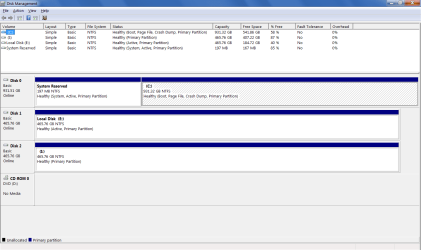
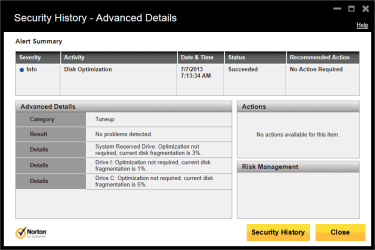
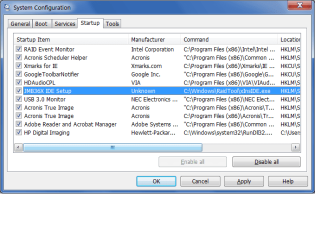
I'll have more time later but for now the things that jump out are there should be no Active flag on DISK1, and I would run for awhile without Norton after using Norton Removal Tool - try MS Security Essentials.
Try also plugging in directly to mobo without rack.
Establish a Clean Boot now with only MSE starting w Win7. Check in BIOS setup that AHCI mode is chosen. Did you wipe the HD's before install and install with other unplugged?
I am at the Cambridge MicroCenter now.
Greg,
Thanks for the info. I didn't know that Micro Center is a nation-wide chain. Cool. I've always found that store to be the best place to shop in the Dallas area.
I'll need help with a lot of this stuff.
- I don't know how to make the "E" drive inactive. I clicked on the drive's Properties in Disk Mgmt but I don't see an option for disabling the "active" flag. If I need to format E Drive to clear the 'active' flag, it's not a problem since I have the E-Drive data backed up elsewhere.
- I'll look into uninstalling Norton. It'll take me a little time to get that part done as I'm short on time at present.
fyi on my timeline regarding Norton: I was running ESET (installed at Micro Center at the time of the initial 7 OS install on the new PC) until 12/07/12, when I removed ESET and installed Norton. After installing Norton, I've had several restarts/reboots that booted up ok, no Windows startup issues. However since the Startup issue is intermittent, I guess Norton's not eliminated as a possible source of the issue.
- Mobo, I had to google that one

, learned that one today. I'll give that a try. Do you think the Kingwin racks are an issue with the Windows startup issues that I'm seeing? The reason I'm curious is that I installed the racks on 10/13/11 and after looking at my Excel file, (my event tracking info) I don't seem to see a tie-in to the startup issues and the Kingwin Rack installs.
- I'll need help with the "clean boot" part of your list. I'm not sure how to go about that part.
- If I recall, my BIOS isn't set to AHCI. I looked at that a couple of years ago when I was reading about Sata hot-swap enablement. I believe my BIOS is set to IDE. I will verify that before I post here tomorrow. After reading about it, I haven't changed the BIOS to AHCI, since, according to what I've been able to google, I'd have to do a clean OS install since Windows won't boot if the BIOS has been changed to AHCI after the initial OS install. Is that urban legend or accurate info? I've read that, if the BIOS is changed to AHCI, the BSOD will appear when booting up afterward.
- I'm not sure about the question regarding wiping the drives prior to install but here's what I do when I clone:
I shut down the PC, then install both Source & Target HDD's. I then boot up on my "Gparted" CD to format the Target HDD. I do that since, as far as I can tell, the Acronis bootable CD doesn't have a standalone 'format' option prior to starting the cloning operation.
I format the Target HDD before cloning, mainly to more easily differentiate between the Source & Target HDD's in Acronis, or Clonezilla, to prevent a "face-palm" moment (accidentally cloning in reverse).
After receiving advice at the Acronis forum, I always clone from outside of Windows, with the Acronis CD (or Clonezilla with a CD).
I boot up on the Acronis CD, clone, and then shut down the PC.
I then boot up on the newly-cloned Target HDD, to verify its operation, ie, launch a few programs, IE, etc.
I shut down the PC, removing the Target HDD and putting it away as my emergency backup HDD.
I boot up on the Source HDD.
I always clone with the Target HDD in my 1st Kingwin slot, the one where I'm running the Source HDD daily.
I was initially cloning within Windows and would encounter what I believe is a Windows "don't do", allowing Windows to see 2 identical cloned HDD's. However, since November of last year, I always clone outside of Windows with a bootable media, Arconis, Clonezilla.
I formatted E Drive prior to installing it a couple of weeks ago.
I'm able to install the E Drive hot but Windows doesn't see it until I either restart or wake up the PC from Sleep mode. Once the PC wakes and I log into Windows, it sees the E Drive. I assume the reason that Windows doesn't recognize a hot-installed HDD is that my BIOS isn't set to AHCI mode.
I've only recently added E Drive to my tower so I'm guessing that it's not related to my intermittent Windows startup symptoms.
As an fyi note about my typical HDD user modes, I rarely install or remove my HDD's hot since I don't usually have a need for that on my PC. I installed the Kingwin racks primarily for ease of periodic cloning, to prevent the need to remove my tower covers to install/remove my HDD's.
I never hot-remove or hot-install my Source/OS HDD.
I can provide a timeline with symptoms/actions, etc, since I keep that info on an Excel file to help me see trends and frequencies of issues.
The weird part of this Startup issue is that it's only an intermittent problem at that time. Once past the Desktop build/launch, 7 sails along like a champ surfer
That's why I've not looked into it a lot as yet since I'm not a frequent "restart/bootup" PC guy.



 for a specific reason although I have a workaround in the event that I encounter wakeup issues. So far, I haven't seen any problems waking the Desktop. It usually wakes up within ~8-10 seconds, with the Win login screen appearing after that.