
Solved Error code 0x80070035 redux, and I am getting battier by the minute

450125

New member
Power User
Local time
8:18 AM
Messages
281
This is not a new problem, and at the end of this post I'll list a much longer "thread to a thread" with an overkill amount of background.

One of my daughters got a new Macbook, and passed her ASUS laptop to the other daughter. In configuring the ASUS, I hoped I could again "confront the beast" of that computer, alone among my household's stable of laptops and desktops, not being able to print to my shared network printer USB connected to my Win7 box. Yes, XP, Win7, and now even a Macbook, all print fine to my printer, but not the second-newest computer in the house, a two-year-old Win7 ASUS.

Somehow the ASUS stopped being able to access my computer on the home network.

Let's say my computer is called MYWIN7:

  • You can see MYWIN7 from the ASUS networking configuration
  • You can ping MYWIN7 from a command prompt from the ASUS
  • But if you double click on MYWIN7 from the ASUS, or if you try to browse to it when adding a printer, or if you specify the printer by its share name (\\MYWIN7\Canon iP4800 series), you get Error code: 0x80070035 The network path was not found
And nothing I've tried, with a lot of googling and a lot of use of this forum and others, has fixed the problem.

Remember, without breaking a sweat, I've gotten more than five different computers, running Win7, XP, and MacOS, printing off my PC's USB printer. And remember also that the ASUS was one of them, and then about 19 months ago it just magically lost its ability to print because it couldn't "find" my PC, and I've spun my wheels since.

Ideas? Remember, it's not so much a printing issue as it is that the ASUS, alone among my computer portfolio, cannot access my computer across our home network.

Could a Windows 7 repair (something I'm not super familiar with, and although I do have a Win7 disk at home, this laptop did not come with one of its own) perhaps restore what's missing?

http://www.sevenforums.com/network-...rinter-its-network-error-code-0x80070035.html is the thread I referenced at the start, for much more background.
 

My Computer My Computer

Computer Manufacturer/Model Number
custom-built
OS
Win7 Professional 64
CPU
Intel I3 550 (3.2 GHz)
Motherboard
GIGABYTE|GA-H55M-S2V H55 1156 R
Memory
8 gig (2x4gig Kingston DDR 3)
Graphics Card(s)
Intel HD graphics (from CPU)
Sound Card
Realtek ALC888B
Monitor(s) Displays
ViewSonic
Screen Resolution
1280x1024
Hard Drives
Seagate ST3250310CS (250 gig C drive for OS and programs)
WDC WD5000AAKS-00V1A0 (2x500 gig drives, software mirrored in a RAID 1 configuration, as a D drive, for documents and data)
Internet Speed
download > 15 mbps; upload approx 1 mbps
Hi there,

Usually, the most common issue in regards to the error that your getting might be coming from your Security program or Firewall. Try to temp disable your firewall or Security program. If you have not done it yet.....allow the printer sharing or IP address of your printer on LAN from your Security/Firewall program. You may also try accessing the computer by it's IP Address instead of the Hosts or Computer Name, for ex. \\192.168.0.11\SharedPrinter.

If the above suggestions didn't work please follow the recommendations from this link, quite helpful. Try not to overlook.....it will save you some headaches. ;)

An update will be nice.
 
Last edited:

My Computer My Computer

Computer Manufacturer/Model Number
Lenovo Desktop/Samsung Laptop
OS
Win7 & Win8 64bit
CPU
Intel i5
Internet Speed
Charter-20 Mbps
Antivirus
Avast
Browser
FF, IE9 and Chrome
Thanks for this.

Your great reply includes a link to Error code: 0x80070035 The network path was not found so I will use this opportunity to mention several of the "tricks" mentioned there that I've tried and have not worked.

  • Enable NetBIOS over TCP/IP (I think Win7 default is to have it set on "automatic detect" or something like that, which it was set for; I flat-out enabled it - no luck)
  • Disable my firewall (Windows FW is all I have)
  • Disable antivirus (AVG Free, current edition)
  • Used Credential Manager to provide login/password information
  • Attempt to use IP name rather than share name for my PC (maybe I was doing this wrong - how do I find the IP address of my PC, just in case I screwed it up?)
  • Go to device manager and "show hidden devices" for my network adapter, then delete the extraneous stuff (this wasn't referenced in the above, but I have tried this... a lot... and it hasn't worked)
Things I have not tried but will (daughter has the ASUS now, so this will wait until tonight):

  • Enter computer description on the ASUS (not mentioned in the above link)
  • In Control Panel\Network and Internet\Network Connections make sure under 'Local Area Connections" that the "Client for Microsoft Networks' connection is installed, is being used, and is active
  • Go to Services.Msc and search for a service named "Server" start that service if its stopped and here you go... you will now be able to access the server using \\servername
  • Right-Click on the Wireless Network Connection and choose Properties/in this box, click on File and Printer sharing for Microsoft Networks, although this check box was enabled... click on install button and install the client and again install the service under this menu... I close the menu and restart
I have the most faith in the last item.

Please though, I have found the network connection control panel suggestions to be a bear, as the options I'm seeing do not align with what a lot of stuff on the web blithely suggests. So could someone give me a step-by-step primer on how to do the last bullet? For starters, I don't know where the "wireless network connection" is that I'm supposed to right-click on!

As I have mentioned before, without breaking a sweat I have configured at least five other machines to print through my Win7 desktop, and in fact this ASUS was one of them, and then just lost this ability. So although not an expert, I'm not a piker either. Just very helpless and confused!
 

My Computer My Computer

Computer Manufacturer/Model Number
custom-built
OS
Win7 Professional 64
CPU
Intel I3 550 (3.2 GHz)
Motherboard
GIGABYTE|GA-H55M-S2V H55 1156 R
Memory
8 gig (2x4gig Kingston DDR 3)
Graphics Card(s)
Intel HD graphics (from CPU)
Sound Card
Realtek ALC888B
Monitor(s) Displays
ViewSonic
Screen Resolution
1280x1024
Hard Drives
Seagate ST3250310CS (250 gig C drive for OS and programs)
WDC WD5000AAKS-00V1A0 (2x500 gig drives, software mirrored in a RAID 1 configuration, as a D drive, for documents and data)
Internet Speed
download > 15 mbps; upload approx 1 mbps
I'm using my work computer and I can't show you the WLAN properties but similar to the LAN, see attached snip.
Right-Click on the Wireless Network Connection and choose Properties/in this box, click on File and Printer sharing for Microsoft Networks, although this check box was enabled... click on install button and install the client and again install the service under this menu... I close the menu and restart
Have you also tried my previous suggestion?
You may also try accessing the computer by it's IP Address instead of the Hosts or Computer Name, for ex. \\192.168.0.11\SharedPrinter.
Another update of your progress is also appreciated.
 

Attachments

  • LAN properties.JPG
    LAN properties.JPG
    40.3 KB · Views: 6

My Computer My Computer

Computer Manufacturer/Model Number
Lenovo Desktop/Samsung Laptop
OS
Win7 & Win8 64bit
CPU
Intel i5
Internet Speed
Charter-20 Mbps
Antivirus
Avast
Browser
FF, IE9 and Chrome
I'm using my work computer and I can't show you the WLAN properties but similar to the LAN, see attached snip.
Right-Click on the Wireless Network Connection and choose Properties/in this box, click on File and Printer sharing for Microsoft Networks, although this check box was enabled... click on install button and install the client and again install the service under this menu... I close the menu and restart

Thanks. I do know what to do when I get to the box, but I have kind of bumbled getting to the box, so it's those steps (starting from the start menu or control panel) that I seek.

By the way, another concern I have is that some of the tips seem to be things to do with my desktop computer, the one to which the printer is USB-connected.

I don't want to do that. Five other computers in my house can print to that printer (and thus, can find that computer). That suggests that there's nothing wrong with that computer, and I sure as heck am not going to risk munging things up for the majority of the computers in our house that work fine with it.

I'm looking for a solution that would be implemented solely on the ASUS laptop that used to be able to "find" my computer and print through it, then suddenly stopped being able to.
 

My Computer My Computer

Computer Manufacturer/Model Number
custom-built
OS
Win7 Professional 64
CPU
Intel I3 550 (3.2 GHz)
Motherboard
GIGABYTE|GA-H55M-S2V H55 1156 R
Memory
8 gig (2x4gig Kingston DDR 3)
Graphics Card(s)
Intel HD graphics (from CPU)
Sound Card
Realtek ALC888B
Monitor(s) Displays
ViewSonic
Screen Resolution
1280x1024
Hard Drives
Seagate ST3250310CS (250 gig C drive for OS and programs)
WDC WD5000AAKS-00V1A0 (2x500 gig drives, software mirrored in a RAID 1 configuration, as a D drive, for documents and data)
Internet Speed
download > 15 mbps; upload approx 1 mbps
Have you tried rebooting the computer where the printer is connected too, then reboot the problematic computer? See if you can access the printer, I'd suggest to try accessing it both - thru the computer name and IP Address then the shared printer name.
 

My Computer My Computer

Computer Manufacturer/Model Number
Lenovo Desktop/Samsung Laptop
OS
Win7 & Win8 64bit
CPU
Intel i5
Internet Speed
Charter-20 Mbps
Antivirus
Avast
Browser
FF, IE9 and Chrome
Have you tried rebooting the computer where the printer is connected too, then reboot the problematic computer? See if you can access the printer, I'd suggest to try accessing it both - thru the computer name and IP Address then the shared printer name.

Thanks, but yes, to say that the computers have been rebooted would be a bland understatement. This problem began in January 2012, and the computers have thus been rebooted more than 500 times since then!

Because the ASUS laptop having the problem just changed hands within my family, I recently resurrected this issue here, hoping to finally get it fixed.
 

My Computer My Computer

Computer Manufacturer/Model Number
custom-built
OS
Win7 Professional 64
CPU
Intel I3 550 (3.2 GHz)
Motherboard
GIGABYTE|GA-H55M-S2V H55 1156 R
Memory
8 gig (2x4gig Kingston DDR 3)
Graphics Card(s)
Intel HD graphics (from CPU)
Sound Card
Realtek ALC888B
Monitor(s) Displays
ViewSonic
Screen Resolution
1280x1024
Hard Drives
Seagate ST3250310CS (250 gig C drive for OS and programs)
WDC WD5000AAKS-00V1A0 (2x500 gig drives, software mirrored in a RAID 1 configuration, as a D drive, for documents and data)
Internet Speed
download > 15 mbps; upload approx 1 mbps
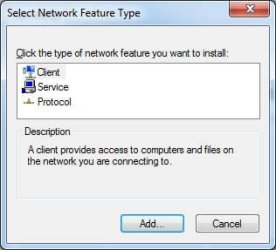
Tried much, with no successes:

  • Enter computer description on the ASUS - no go. I even thought I'd stumbled into something when I tried to change the computer name from MARY_ASUS to SUE_ASUS. The underscore is a nonstandard character, I was warned, and might interfere with the computer being "found." So I changed the name to SUE-ASUS, and I did add a description. Restarted the computer. No luck.
  • In Control Panel\Network and Internet\Network Connections make sure under 'Local Area Connections" that the "Client for Microsoft Networks' connection is installed, is being used, and is active - It's already installed and active.
  • Go to Services.Msc and search for a service named "Server" start that service if its stopped and here you go... you will now be able to access the server using \\servername - the server service was started already.
  • Right-Click on the Wireless Network Connection and choose Properties/in this box, click on File and Printer sharing for Microsoft Networks, although this check box was enabled... click on install button and install the client and again install the service under this menu... I close the menu and restart - This one really puzzled and frustrated me. I followed the instructions, but when I clicked the install button (yes, my checkbox was enabled), I got the boxes shown below as attachments. Doesn't look like there's much I can do with them.
I could not be more at a loss to figure out why my computer connected to my printer can be pinged by name from the ASUS, it shows up in the network view, but cannot otherwise be accessed. I can access the ASUS from my computer.
 

Attachments

  • box1.jpg
    box1.jpg
    14.3 KB · Views: 21
  • box2.jpg
    box2.jpg
    17.1 KB · Views: 6

My Computer My Computer

Computer Manufacturer/Model Number
custom-built
OS
Win7 Professional 64
CPU
Intel I3 550 (3.2 GHz)
Motherboard
GIGABYTE|GA-H55M-S2V H55 1156 R
Memory
8 gig (2x4gig Kingston DDR 3)
Graphics Card(s)
Intel HD graphics (from CPU)
Sound Card
Realtek ALC888B
Monitor(s) Displays
ViewSonic
Screen Resolution
1280x1024
Hard Drives
Seagate ST3250310CS (250 gig C drive for OS and programs)
WDC WD5000AAKS-00V1A0 (2x500 gig drives, software mirrored in a RAID 1 configuration, as a D drive, for documents and data)
Internet Speed
download > 15 mbps; upload approx 1 mbps
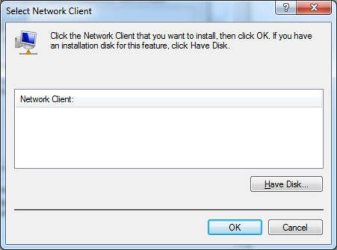
I've used another one of my dwindling bullets.

Changed the workgroup name on the ASUS, restarted, changed workgroup name on ASUS back to original workgroup name, that it of course shares with my computer connected to the printer, and restarted.

Though I'd read of some solving the problem I'm having by doing this, it did not work.
 

My Computer My Computer

Computer Manufacturer/Model Number
custom-built
OS
Win7 Professional 64
CPU
Intel I3 550 (3.2 GHz)
Motherboard
GIGABYTE|GA-H55M-S2V H55 1156 R
Memory
8 gig (2x4gig Kingston DDR 3)
Graphics Card(s)
Intel HD graphics (from CPU)
Sound Card
Realtek ALC888B
Monitor(s) Displays
ViewSonic
Screen Resolution
1280x1024
Hard Drives
Seagate ST3250310CS (250 gig C drive for OS and programs)
WDC WD5000AAKS-00V1A0 (2x500 gig drives, software mirrored in a RAID 1 configuration, as a D drive, for documents and data)
Internet Speed
download > 15 mbps; upload approx 1 mbps
I'm not with the ASUS now, but wondering if this command from its command prompt might do what I want:

net use "\\mywin7\canon ip4800 series" /user:myusername mypassword /p:yes
Remember, though I can't access my computer (MYWIN7) from the ASUS Windows environment, I can ping it by name from an ASUS command prompt.
 

My Computer My Computer

Computer Manufacturer/Model Number
custom-built
OS
Win7 Professional 64
CPU
Intel I3 550 (3.2 GHz)
Motherboard
GIGABYTE|GA-H55M-S2V H55 1156 R
Memory
8 gig (2x4gig Kingston DDR 3)
Graphics Card(s)
Intel HD graphics (from CPU)
Sound Card
Realtek ALC888B
Monitor(s) Displays
ViewSonic
Screen Resolution
1280x1024
Hard Drives
Seagate ST3250310CS (250 gig C drive for OS and programs)
WDC WD5000AAKS-00V1A0 (2x500 gig drives, software mirrored in a RAID 1 configuration, as a D drive, for documents and data)
Internet Speed
download > 15 mbps; upload approx 1 mbps
I was gone for a while, apologize....I have a day time job. :D
Have you resolved your issue yet? If not, please see below....

I just need to verify that you've tried disabling the Windows Firewall and any Security programs (if there are any installed) on both computers.

From your initial post, you've mentioned this:
It's not the printer, it's the network (Error code 0x80070035) is the thread I referenced at the start, for much more background.
If you don't mind.... have you considered a print server, it's a hassle free setup. :D
 

My Computer My Computer

Computer Manufacturer/Model Number
Lenovo Desktop/Samsung Laptop
OS
Win7 & Win8 64bit
CPU
Intel i5
Internet Speed
Charter-20 Mbps
Antivirus
Avast
Browser
FF, IE9 and Chrome
I was gone for a while, apologize....I have a day time job. :D
Have you resolved your issue yet? If not, please see below....

I just need to verify that you've tried disabling the Windows Firewall and any Security programs (if there are any installed) on both computers.

From your initial post, you've mentioned this:
It's not the printer, it's the network (Error code 0x80070035) is the thread I referenced at the start, for much more background.
If you don't mind.... have you considered a print server, it's a hassle free setup. :D

Good stuff in here, and I thank you.

Windows Firewall and security: I did try this on the ASUS - disabled both (security is AVG antivirus free). Doing so did not help. I did not do so on my computer however, for these reasons:

  • Network access from the ASUS to my computer was there, and just stopped working in early 2012 or late 2011. In fact, for this reason I expected that the disabling FW and security on the ASUS would not help and it didn't.
  • There are currently one other Windows 7 laptop, one XP desktop, one XP laptop, and a Macbook (obviously MacOS) successfully printing from my computer. Configuring each was a no-hassle matter. Since all computers (including at one time the ASUS) could access my computer and print from it, I am VERY reluctant to tweak anything on my computer!
Print Server: Yes, I have realized that if I stop being stubborn, the print server will solve this problem, and probably make future expansion of my home network even easier. I've not done so though for two reasons:

  • There aren't a lot of printing needs from the ASUS, and when there are, the user just dumps the content to a pdf, emails the pdf to someone else, and prints.
  • Just that perpetual nagging question of "what happened" where the ASUS worked fine accessing my computer, and then, boom, it just stopped working and never has again.
Last point here, that I one may have made in one of the long-ago threads.


One of the first things I did when the problem first happened was to use Windows System Restore to "roll back" about two weeks, to a time when the networking and printer access was working. The system restore was successful, but the functionality was not fixed by doing so.
 

My Computer My Computer

Computer Manufacturer/Model Number
custom-built
OS
Win7 Professional 64
CPU
Intel I3 550 (3.2 GHz)
Motherboard
GIGABYTE|GA-H55M-S2V H55 1156 R
Memory
8 gig (2x4gig Kingston DDR 3)
Graphics Card(s)
Intel HD graphics (from CPU)
Sound Card
Realtek ALC888B
Monitor(s) Displays
ViewSonic
Screen Resolution
1280x1024
Hard Drives
Seagate ST3250310CS (250 gig C drive for OS and programs)
WDC WD5000AAKS-00V1A0 (2x500 gig drives, software mirrored in a RAID 1 configuration, as a D drive, for documents and data)
Internet Speed
download > 15 mbps; upload approx 1 mbps
Uninstalling AVG completely would be the first course of action. AVG is famous for causing problems like this. Use the special link at the bottom of the page where it says "following section" then choose the version that relates to the one you have.

Uninstalling AVG 2012 | FAQ | AVG Worldwide
 

My Computer My Computer

Computer type
PC/Desktop
Computer Manufacturer/Model Number
Home built
OS
Windows 7 Ult, Windows 8.1 Pro,
CPU
Q9650-4.275GHz, E8600 4.5GHz, E6750-3.8GHz
Motherboard
Evga 780i FTW
Memory
G.Skill PC2 9600 1200Mhz 5 5 5 15 2T
Graphics Card(s)
GTX480
Sound Card
Asus Xonar D2
Monitor(s) Displays
HannsG
Screen Resolution
1680X1050
Hard Drives
GSkill Phoenix Pro 120GB SSD
PSU
ThermalTake Toughpower 1000Watt modular
Case
ThermalTake XaserV
Cooling
Xigmatek S1283
Keyboard
Logitech G15
Mouse
Logitech G9
Internet Speed
T1
Almost three full years after it began, this issue is solved. I had never paid anyone to clean a machine of malware, but after increasingly bizarre behavior from the computer, I brought it in to the shop, and whatever they cleaned out restored the networking functionality. Marking as solved!
 

My Computer My Computer

Computer Manufacturer/Model Number
custom-built
OS
Win7 Professional 64
CPU
Intel I3 550 (3.2 GHz)
Motherboard
GIGABYTE|GA-H55M-S2V H55 1156 R
Memory
8 gig (2x4gig Kingston DDR 3)
Graphics Card(s)
Intel HD graphics (from CPU)
Sound Card
Realtek ALC888B
Monitor(s) Displays
ViewSonic
Screen Resolution
1280x1024
Hard Drives
Seagate ST3250310CS (250 gig C drive for OS and programs)
WDC WD5000AAKS-00V1A0 (2x500 gig drives, software mirrored in a RAID 1 configuration, as a D drive, for documents and data)
Internet Speed
download > 15 mbps; upload approx 1 mbps
Back
Top