Solved Ram halved by windows

danil11

New member
Member
Local time
2:19 PM
Messages
36
hi,

have been having trouble with my ram for past couple of months, once every couple of days or weeks I will have 8gb usable but the majority of the time it only gives me 3.98 of 8gb which can happen without me changing any settings.

So far I have run windows memory diagnostic, memtest x86 with no errors, updated my bios to the most current and unchecked the max ram box in msconfig and made changes permenent, I'm starting to think that the socket could be intermittently faulty but that wouldn't make sense as every boot the ram is detected as 8gb but only reads 4096, I have also had a look at the pins on the motherboard and they look straight and I have not messed any installs up. Im fairly stuck so any help would be appreciated. I will detail the full spec of the system below.

MB: Asus F1A55-M LE
CPU: ATHLON X4 651K
RAM: 8GB (4GBx2) 1333MHZ DDR3
GPU: GT440 (GAINWARD 1GB GDDR5)
HDD: SEAGATE BARRACUDA 7200.2
BIOS VERSION: 1503
OS: WINDOWS 7 ULTIMATE X64
souncard: sounblaster x-fi xtreme audio.

Doubt you need to know the soundcard but hopefully the info I've given helps.

thanks in advance
 

My Computer

Computer type
PC/Desktop
Computer Manufacturer/Model Number
custom build
OS
windows 7 ultimate X64
CPU
athlon x4 651k
Motherboard
asus f1a55-m le
Memory
8gb ddr 3 1333mhz
Graphics Card(s)
gainward nvidia geforce gt 440 1gb gddr5
Sound Card
soundblaster x-fi xtreme audio
Monitor(s) Displays
22" dgm led 1080p
Screen Resolution
1920x1080
Hard Drives
1TB SATA Seagate

My Computer

Computer type
PC/Desktop
Computer Manufacturer/Model Number
Custom built by me.
OS
Windows 10 Pro
CPU
Intel Core i7-4770K (3.5Ghz)
Motherboard
Gigabyte G1 Sniper 5 (F10 Bios)
Memory
32 gig Corsair Dominator Platinum (4x8Gig)
Graphics Card(s)
Sapphire Tri-X R9 Fury
Sound Card
Soundblaster ZXR
Monitor(s) Displays
NEC PA242W 24" LCD Monitor
Screen Resolution
1920 x 1200
Hard Drives
Primary - Samsung 850 Pro (512gig), Samsung 840 Pro (256gig), 2TB WD Caviar Black.
PSU
EVGA Supernova 1000 G2
Case
Cooler Master HAF X
Cooling
Corsair H100i with Corsair Air Series SP120 Quiet Fans
Keyboard
Logitech Wireless Wave
Mouse
Logitech Performance MX
Internet Speed
High Speed Cable
Antivirus
Norton Security
Browser
IE11
Other Info
Memory Timings - 1866MHz @ 9-9-9-27-1T @ 1.5 volts
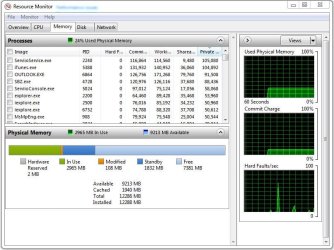
RESOURSE MONITOR ATTACHED.

Have run memtest x86 with no reported errors
 

Attachments

  • Capture.PNG
    Capture.PNG
    82.3 KB · Views: 10

My Computer

Computer type
PC/Desktop
Computer Manufacturer/Model Number
custom build
OS
windows 7 ultimate X64
CPU
athlon x4 651k
Motherboard
asus f1a55-m le
Memory
8gb ddr 3 1333mhz
Graphics Card(s)
gainward nvidia geforce gt 440 1gb gddr5
Sound Card
soundblaster x-fi xtreme audio
Monitor(s) Displays
22" dgm led 1080p
Screen Resolution
1920x1080
Hard Drives
1TB SATA Seagate
RESOURSE MONITOR ATTACHED.

Have run memtest x86 with no reported errors

Well first thing that jumps out at me is that you have WAY too much (nearly 4gig) hardware memory reserved.

First, check your MSCONFIG settings by typing "msconfig" (no quotes) in the search bar and making sure the Maximum memory box is not ticked. See this post - http://www.sevenforums.com/performa...al-memory-but-1-74-gb-usable.html#post1649304

You can also check this post for clarification as well - http://www.sevenforums.com/performa...-memory-but-1-74-gb-usable-4.html#post1650067

If that doesn't work check to see if your motherboard has an integrated GPU. If so disable it in the BIOS.

Let me know.
 

My Computer

Computer type
PC/Desktop
Computer Manufacturer/Model Number
Custom built by me.
OS
Windows 10 Pro
CPU
Intel Core i7-4770K (3.5Ghz)
Motherboard
Gigabyte G1 Sniper 5 (F10 Bios)
Memory
32 gig Corsair Dominator Platinum (4x8Gig)
Graphics Card(s)
Sapphire Tri-X R9 Fury
Sound Card
Soundblaster ZXR
Monitor(s) Displays
NEC PA242W 24" LCD Monitor
Screen Resolution
1920 x 1200
Hard Drives
Primary - Samsung 850 Pro (512gig), Samsung 840 Pro (256gig), 2TB WD Caviar Black.
PSU
EVGA Supernova 1000 G2
Case
Cooler Master HAF X
Cooling
Corsair H100i with Corsair Air Series SP120 Quiet Fans
Keyboard
Logitech Wireless Wave
Mouse
Logitech Performance MX
Internet Speed
High Speed Cable
Antivirus
Norton Security
Browser
IE11
Other Info
Memory Timings - 1866MHz @ 9-9-9-27-1T @ 1.5 volts
already done step one , the igfx is disabled on the bios also.

thanks btw
 

My Computer

Computer type
PC/Desktop
Computer Manufacturer/Model Number
custom build
OS
windows 7 ultimate X64
CPU
athlon x4 651k
Motherboard
asus f1a55-m le
Memory
8gb ddr 3 1333mhz
Graphics Card(s)
gainward nvidia geforce gt 440 1gb gddr5
Sound Card
soundblaster x-fi xtreme audio
Monitor(s) Displays
22" dgm led 1080p
Screen Resolution
1920x1080
Hard Drives
1TB SATA Seagate
You might want to go through that thread I linked as I seem to remember there was an issue with the type and age of the motherboard used in that thread. As I recall, the OP there also had an AMD board and memory being lost.

In short, if this is an old(er) board, it may not support that much memory.

Let us know.
 

My Computer

Computer type
PC/Desktop
Computer Manufacturer/Model Number
Custom built by me.
OS
Windows 10 Pro
CPU
Intel Core i7-4770K (3.5Ghz)
Motherboard
Gigabyte G1 Sniper 5 (F10 Bios)
Memory
32 gig Corsair Dominator Platinum (4x8Gig)
Graphics Card(s)
Sapphire Tri-X R9 Fury
Sound Card
Soundblaster ZXR
Monitor(s) Displays
NEC PA242W 24" LCD Monitor
Screen Resolution
1920 x 1200
Hard Drives
Primary - Samsung 850 Pro (512gig), Samsung 840 Pro (256gig), 2TB WD Caviar Black.
PSU
EVGA Supernova 1000 G2
Case
Cooler Master HAF X
Cooling
Corsair H100i with Corsair Air Series SP120 Quiet Fans
Keyboard
Logitech Wireless Wave
Mouse
Logitech Performance MX
Internet Speed
High Speed Cable
Antivirus
Norton Security
Browser
IE11
Other Info
Memory Timings - 1866MHz @ 9-9-9-27-1T @ 1.5 volts
That's not the case as the user guide for this board states that it will support up to 32gb 2x16gb which I never even knew existed lol. i'm reading through other thread now
 

My Computer

Computer type
PC/Desktop
Computer Manufacturer/Model Number
custom build
OS
windows 7 ultimate X64
CPU
athlon x4 651k
Motherboard
asus f1a55-m le
Memory
8gb ddr 3 1333mhz
Graphics Card(s)
gainward nvidia geforce gt 440 1gb gddr5
Sound Card
soundblaster x-fi xtreme audio
Monitor(s) Displays
22" dgm led 1080p
Screen Resolution
1920x1080
Hard Drives
1TB SATA Seagate
That's cool, just making sure.

That's said, do you have the RAM properly configured? All motherboards want their RAM installed a certain way depending on the amount and number of sticks used. Check your user guide to make sure you're using the correct slots.
 

My Computer

Computer type
PC/Desktop
Computer Manufacturer/Model Number
Custom built by me.
OS
Windows 10 Pro
CPU
Intel Core i7-4770K (3.5Ghz)
Motherboard
Gigabyte G1 Sniper 5 (F10 Bios)
Memory
32 gig Corsair Dominator Platinum (4x8Gig)
Graphics Card(s)
Sapphire Tri-X R9 Fury
Sound Card
Soundblaster ZXR
Monitor(s) Displays
NEC PA242W 24" LCD Monitor
Screen Resolution
1920 x 1200
Hard Drives
Primary - Samsung 850 Pro (512gig), Samsung 840 Pro (256gig), 2TB WD Caviar Black.
PSU
EVGA Supernova 1000 G2
Case
Cooler Master HAF X
Cooling
Corsair H100i with Corsair Air Series SP120 Quiet Fans
Keyboard
Logitech Wireless Wave
Mouse
Logitech Performance MX
Internet Speed
High Speed Cable
Antivirus
Norton Security
Browser
IE11
Other Info
Memory Timings - 1866MHz @ 9-9-9-27-1T @ 1.5 volts
The board only has two slots and the sticks are identical make/model.
 

My Computer

Computer type
PC/Desktop
Computer Manufacturer/Model Number
custom build
OS
windows 7 ultimate X64
CPU
athlon x4 651k
Motherboard
asus f1a55-m le
Memory
8gb ddr 3 1333mhz
Graphics Card(s)
gainward nvidia geforce gt 440 1gb gddr5
Sound Card
soundblaster x-fi xtreme audio
Monitor(s) Displays
22" dgm led 1080p
Screen Resolution
1920x1080
Hard Drives
1TB SATA Seagate
hi.
have just finished reading the thread and as mine is a custom build I don't think that sending it back will be an option for me as home builds are generally shunned by warranty stipulation. I have however had 8gb working in this system but that was previous ram which was not a matching stick, I used that one in another systemand replaced with a matching stick. does this help at all?
 

My Computer

Computer type
PC/Desktop
Computer Manufacturer/Model Number
custom build
OS
windows 7 ultimate X64
CPU
athlon x4 651k
Motherboard
asus f1a55-m le
Memory
8gb ddr 3 1333mhz
Graphics Card(s)
gainward nvidia geforce gt 440 1gb gddr5
Sound Card
soundblaster x-fi xtreme audio
Monitor(s) Displays
22" dgm led 1080p
Screen Resolution
1920x1080
Hard Drives
1TB SATA Seagate
hi.
have just finished reading the thread and as mine is a custom build I don't think that sending it back will be an option for me as home builds are generally shunned by warranty stipulation. I have however had 8gb working in this system but that was previous ram which was not a matching stick, I used that one in another systemand replaced with a matching stick. does this help at all?

Well if 8 gig was working before your changes, than I'd go back where those changes were made.

Bottom line is you need to figure out what is eating so much of your RAM as I said before, you have way too much hardware reserved RAM. It should never be that high.

You might want to check out this article - Windows 7 memory usage: What's the best way to measure? | ZDNet

Also I fail to see how home builds are shunned unless you did something to actually void the warranty?
 

My Computer

Computer type
PC/Desktop
Computer Manufacturer/Model Number
Custom built by me.
OS
Windows 10 Pro
CPU
Intel Core i7-4770K (3.5Ghz)
Motherboard
Gigabyte G1 Sniper 5 (F10 Bios)
Memory
32 gig Corsair Dominator Platinum (4x8Gig)
Graphics Card(s)
Sapphire Tri-X R9 Fury
Sound Card
Soundblaster ZXR
Monitor(s) Displays
NEC PA242W 24" LCD Monitor
Screen Resolution
1920 x 1200
Hard Drives
Primary - Samsung 850 Pro (512gig), Samsung 840 Pro (256gig), 2TB WD Caviar Black.
PSU
EVGA Supernova 1000 G2
Case
Cooler Master HAF X
Cooling
Corsair H100i with Corsair Air Series SP120 Quiet Fans
Keyboard
Logitech Wireless Wave
Mouse
Logitech Performance MX
Internet Speed
High Speed Cable
Antivirus
Norton Security
Browser
IE11
Other Info
Memory Timings - 1866MHz @ 9-9-9-27-1T @ 1.5 volts
Any time I have seen people with hardware that high it not Windows 7 causing the problem. My hardware is 9MB.
Normally it's the ram is not installed properly or mismatched. Not setting the ram properly in the bios has also cause the problem. I have on one of my computers had a seating problem cause this problem. I discovered this by using my palm heal and smacking the corner of the case while watching Resource Monitor. Reseated the ram and it was fixed.
You say you have matched ram. Matched ram has to be the same manufacture, same part number, same speed and the same volts. If possible they came in the same package. Yours would be one package of two modules.
Please post the exact ram (both sticks) you are using.

How often do you reboot/restart?
 

My Computer

Computer type
PC/Desktop
Computer Manufacturer/Model Number
Home made Desktop
OS
Windows 10 Pro. 64/ version 1709 Windows 7 Pro/64
CPU
Intel i7-6800K @ 4.3
Motherboard
ASUS X-99 Deluxe II
Memory
Corsair Platinum 16 gig @2400
Graphics Card(s)
EVGA GTX 1070 OC
Monitor(s) Displays
Asus 27" LED LCD/VE278Q
Screen Resolution
1920-1080 or 1280-720 HDMI
Hard Drives
INTEL SSD 730-240 Gb Sata 3.0/
PSU
EVGA Platium 1200W
Case
Phanteks Luxe Tempered Glass 8 fans/ one radiator
Cooling
XSPC/ Water Cooled CPU
Keyboard
Das 4 Professional
Mouse
Logitech M705/MX Anywhere 2-S
Internet Speed
100 mbits
Antivirus
Microsoft Security Essentials/ Malwarebytes Premium 3.0/ SAS
Browser
I.E. 11 default/Firefox/ ISP Time Warner Cable/Spectrum
Other Info
LG BluRay Burner/
Sound system-KLipsch-THX/
Icy Dock ssd Hot Swap bays.

My Computer

Computer type
PC/Desktop
Computer Manufacturer/Model Number
Custom built by me.
OS
Windows 10 Pro
CPU
Intel Core i7-4770K (3.5Ghz)
Motherboard
Gigabyte G1 Sniper 5 (F10 Bios)
Memory
32 gig Corsair Dominator Platinum (4x8Gig)
Graphics Card(s)
Sapphire Tri-X R9 Fury
Sound Card
Soundblaster ZXR
Monitor(s) Displays
NEC PA242W 24" LCD Monitor
Screen Resolution
1920 x 1200
Hard Drives
Primary - Samsung 850 Pro (512gig), Samsung 840 Pro (256gig), 2TB WD Caviar Black.
PSU
EVGA Supernova 1000 G2
Case
Cooler Master HAF X
Cooling
Corsair H100i with Corsair Air Series SP120 Quiet Fans
Keyboard
Logitech Wireless Wave
Mouse
Logitech Performance MX
Internet Speed
High Speed Cable
Antivirus
Norton Security
Browser
IE11
Other Info
Memory Timings - 1866MHz @ 9-9-9-27-1T @ 1.5 volts
hi I can tell you that I have two stick of 1333mhz pny 4gb ddr3 cl9 240 pin 1.5v in there but not the model numbers off by heart. I usually turn it on to use amd turn it off at the end of the day. I reboot whenever prompted throughout usage period. Unfortunately as regards to the earlier reply I cant go back the settings that worked as I haven't actually changed anything until I started trying to troubleshoot the issue
 

My Computer

Computer type
PC/Desktop
Computer Manufacturer/Model Number
custom build
OS
windows 7 ultimate X64
CPU
athlon x4 651k
Motherboard
asus f1a55-m le
Memory
8gb ddr 3 1333mhz
Graphics Card(s)
gainward nvidia geforce gt 440 1gb gddr5
Sound Card
soundblaster x-fi xtreme audio
Monitor(s) Displays
22" dgm led 1080p
Screen Resolution
1920x1080
Hard Drives
1TB SATA Seagate
Correct sygnus21. It's really not Windows 7 do it on it's own. It is being instructed to do such things by the owner/operator.
 

My Computer

Computer type
PC/Desktop
Computer Manufacturer/Model Number
Home made Desktop
OS
Windows 10 Pro. 64/ version 1709 Windows 7 Pro/64
CPU
Intel i7-6800K @ 4.3
Motherboard
ASUS X-99 Deluxe II
Memory
Corsair Platinum 16 gig @2400
Graphics Card(s)
EVGA GTX 1070 OC
Monitor(s) Displays
Asus 27" LED LCD/VE278Q
Screen Resolution
1920-1080 or 1280-720 HDMI
Hard Drives
INTEL SSD 730-240 Gb Sata 3.0/
PSU
EVGA Platium 1200W
Case
Phanteks Luxe Tempered Glass 8 fans/ one radiator
Cooling
XSPC/ Water Cooled CPU
Keyboard
Das 4 Professional
Mouse
Logitech M705/MX Anywhere 2-S
Internet Speed
100 mbits
Antivirus
Microsoft Security Essentials/ Malwarebytes Premium 3.0/ SAS
Browser
I.E. 11 default/Firefox/ ISP Time Warner Cable/Spectrum
Other Info
LG BluRay Burner/
Sound system-KLipsch-THX/
Icy Dock ssd Hot Swap bays.
I understand that but i'm trying to get to the bottom of what I may have inadvertently told it to do hence why I posted the steps I have already taken to ensure that people reading can suggest thing that I may not have tried yet
 

My Computer

Computer type
PC/Desktop
Computer Manufacturer/Model Number
custom build
OS
windows 7 ultimate X64
CPU
athlon x4 651k
Motherboard
asus f1a55-m le
Memory
8gb ddr 3 1333mhz
Graphics Card(s)
gainward nvidia geforce gt 440 1gb gddr5
Sound Card
soundblaster x-fi xtreme audio
Monitor(s) Displays
22" dgm led 1080p
Screen Resolution
1920x1080
Hard Drives
1TB SATA Seagate
I suggest you find out what sticks your motherboard supports/accepts and find a matching set for use. Mixing and matching RAM can and will cause problems.

You also need to clarify if you have 2 or four sticks of RAM and what densities (size) they are. It would also be helpful if you gave us exact spec as this statement leads me to believe you're mixing RAM....

I have two stick of 1333mhz pny 4gb ddr3 cl9 240 pin 1.5v in there

Unless you're saying you just have two sticks (4gig each) of PNY?
 

My Computer

Computer type
PC/Desktop
Computer Manufacturer/Model Number
Custom built by me.
OS
Windows 10 Pro
CPU
Intel Core i7-4770K (3.5Ghz)
Motherboard
Gigabyte G1 Sniper 5 (F10 Bios)
Memory
32 gig Corsair Dominator Platinum (4x8Gig)
Graphics Card(s)
Sapphire Tri-X R9 Fury
Sound Card
Soundblaster ZXR
Monitor(s) Displays
NEC PA242W 24" LCD Monitor
Screen Resolution
1920 x 1200
Hard Drives
Primary - Samsung 850 Pro (512gig), Samsung 840 Pro (256gig), 2TB WD Caviar Black.
PSU
EVGA Supernova 1000 G2
Case
Cooler Master HAF X
Cooling
Corsair H100i with Corsair Air Series SP120 Quiet Fans
Keyboard
Logitech Wireless Wave
Mouse
Logitech Performance MX
Internet Speed
High Speed Cable
Antivirus
Norton Security
Browser
IE11
Other Info
Memory Timings - 1866MHz @ 9-9-9-27-1T @ 1.5 volts
sorry.

Yes I do have two sticks of pny, just as an update though, as something that I haven't tried I have enabled the multi igfx monitor in the bios and after three resetsi am still seeing the full 8gb, with any luck that was the mystery setting but im not sure, what do you guys think?
 

My Computer

Computer type
PC/Desktop
Computer Manufacturer/Model Number
custom build
OS
windows 7 ultimate X64
CPU
athlon x4 651k
Motherboard
asus f1a55-m le
Memory
8gb ddr 3 1333mhz
Graphics Card(s)
gainward nvidia geforce gt 440 1gb gddr5
Sound Card
soundblaster x-fi xtreme audio
Monitor(s) Displays
22" dgm led 1080p
Screen Resolution
1920x1080
Hard Drives
1TB SATA Seagate
Your post #14
I have no idea what this means.
but not the model numbers off by heart

Set your bios to default. No over clock of anything.
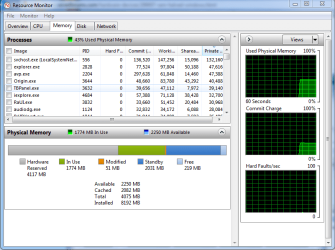
Then give us another Resource Monitor picture of your memory.
Did you have this problem before you installed Windows Ultimate? Did it work correctly with the other Windows 7?

I would like to see one of these.

boot advanced options.PNG
 

My Computer

Computer type
PC/Desktop
Computer Manufacturer/Model Number
Home made Desktop
OS
Windows 10 Pro. 64/ version 1709 Windows 7 Pro/64
CPU
Intel i7-6800K @ 4.3
Motherboard
ASUS X-99 Deluxe II
Memory
Corsair Platinum 16 gig @2400
Graphics Card(s)
EVGA GTX 1070 OC
Monitor(s) Displays
Asus 27" LED LCD/VE278Q
Screen Resolution
1920-1080 or 1280-720 HDMI
Hard Drives
INTEL SSD 730-240 Gb Sata 3.0/
PSU
EVGA Platium 1200W
Case
Phanteks Luxe Tempered Glass 8 fans/ one radiator
Cooling
XSPC/ Water Cooled CPU
Keyboard
Das 4 Professional
Mouse
Logitech M705/MX Anywhere 2-S
Internet Speed
100 mbits
Antivirus
Microsoft Security Essentials/ Malwarebytes Premium 3.0/ SAS
Browser
I.E. 11 default/Firefox/ ISP Time Warner Cable/Spectrum
Other Info
LG BluRay Burner/
Sound system-KLipsch-THX/
Icy Dock ssd Hot Swap bays.
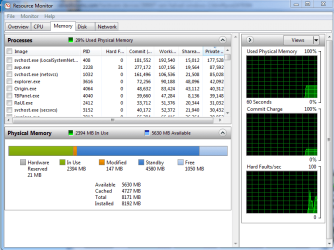
current state
 

Attachments

  • Capture3.PNG
    Capture3.PNG
    79.5 KB · Views: 6

My Computer

Computer type
PC/Desktop
Computer Manufacturer/Model Number
custom build
OS
windows 7 ultimate X64
CPU
athlon x4 651k
Motherboard
asus f1a55-m le
Memory
8gb ddr 3 1333mhz
Graphics Card(s)
gainward nvidia geforce gt 440 1gb gddr5
Sound Card
soundblaster x-fi xtreme audio
Monitor(s) Displays
22" dgm led 1080p
Screen Resolution
1920x1080
Hard Drives
1TB SATA Seagate
Back
Top