
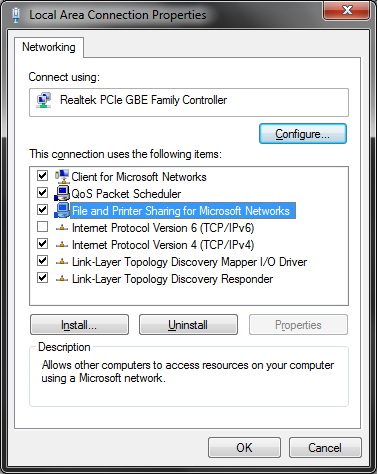
Enable File and Printer Sharing via Group Policy or Registry

edgex

New member
Local time
6:51 AM
Messages
6
e5GWKam.png


I really need this enabled on all of the computers on my network. Unfortunately they weren't enabled durring the initial setup process and now they are spread out across 5 branches in three cities, and I really don't want to have to remote to each one and enable it manually.

I couldnt figure out a group policy setting that would enable this specific check box, I enabled the firewall rule that allows it to work once this box is checked, however. I've also been trying for several hours to find a registry value I can enable this with or something. Any help is greatly appreciated. Thanks.
 

My Computer My Computer

At a glance

Windows 7 Ultimate x64 SP1Intel i5 2500k @ 4.5GHz8GB GSkill 1600MHzCrossfire MSI 2GB 6950s (unlocked and OCed to...
OS
Windows 7 Ultimate x64 SP1
CPU
Intel i5 2500k @ 4.5GHz
Motherboard
ASRock P67 Fatal1ty Pro
Memory
8GB GSkill 1600MHz
Graphics Card(s)
Crossfire MSI 2GB 6950s (unlocked and OCed to 900 - 1400)
Monitor(s) Displays
u2412m + u2211h
Screen Resolution
1200p + 1080p
Hard Drives
Corsair Force GT 120GB + 1TB WD Black
PSU
Corsair AX850W
Case
HAF 922
Cooling
Corsair H60 two fans in Push/Pull
Did you try a Registry snapshot utility? Something like RegShot may be able to tell you the key that's changed when you enable F & P sharing. There must be some remote registry setting tool?
 

My Computer My Computer

At a glance

Windows 7 32 bitAMD 5200+ dual core2 GBNVidia GeForce 6150SE 128 MB
Computer Manufacturer/Model Number
HP Media Center
OS
Windows 7 32 bit
CPU
AMD 5200+ dual core
Memory
2 GB
Graphics Card(s)
NVidia GeForce 6150SE 128 MB
Monitor(s) Displays
CRT
Screen Resolution
1280x1024
Hard Drives
500 GB Sata internal :

SIIG USB 3.0 docking stations w/WD Caviar Black 6 Gb/s drives
Keyboard
PS/2
Mouse
PS/2 Wheel Mouse
Other Info
SIIG USB 3.0 PCIexpress card.
Are you on a Windows Domain ??
 

My Computer My Computer

At a glance

Windows 7 Professional 64 bit4096
Computer Manufacturer/Model Number
Dell Optiplex
OS
Windows 7 Professional 64 bit
Memory
4096
I am. Running Server 2008 R2.

And I will I was thinking about a tool like that, but wasnt sure what was a good one. I will give that a shot.
 

My Computer My Computer

At a glance

Windows 7 Ultimate x64 SP1Intel i5 2500k @ 4.5GHz8GB GSkill 1600MHzCrossfire MSI 2GB 6950s (unlocked and OCed to...
OS
Windows 7 Ultimate x64 SP1
CPU
Intel i5 2500k @ 4.5GHz
Motherboard
ASRock P67 Fatal1ty Pro
Memory
8GB GSkill 1600MHz
Graphics Card(s)
Crossfire MSI 2GB 6950s (unlocked and OCed to 900 - 1400)
Monitor(s) Displays
u2412m + u2211h
Screen Resolution
1200p + 1080p
Hard Drives
Corsair Force GT 120GB + 1TB WD Black
PSU
Corsair AX850W
Case
HAF 922
Cooling
Corsair H60 two fans in Push/Pull
I found one article on TechNet about local policy to turn in on or off, but I don't find any parallel in Domain policy, nor do I find any reference to it on Microsoft's website.

A Registry setting is probably your best bet. I'll see if I can find any articles on that.
 

My Computer My Computer

At a glance

Windows 7 Professional 64 bit4096
Computer Manufacturer/Model Number
Dell Optiplex
OS
Windows 7 Professional 64 bit
Memory
4096
I found one article on TechNet about local policy to turn in on or off, but I don't find any parallel in Domain policy, nor do I find any reference to it on Microsoft's website.

A Registry setting is probably your best bet. I'll see if I can find any articles on that.

I tried that tool, and it showed some registry settings being deleted, but they were not re-created when I enabled it again, which makes me think they were unrelated. And then a bunch of gibberish in hex values or something. Nothing applicable to solve this problem, at least that I can tell. Maybe if you can find it though. Thanks.
 

My Computer My Computer

At a glance

Windows 7 Ultimate x64 SP1Intel i5 2500k @ 4.5GHz8GB GSkill 1600MHzCrossfire MSI 2GB 6950s (unlocked and OCed to...
OS
Windows 7 Ultimate x64 SP1
CPU
Intel i5 2500k @ 4.5GHz
Motherboard
ASRock P67 Fatal1ty Pro
Memory
8GB GSkill 1600MHz
Graphics Card(s)
Crossfire MSI 2GB 6950s (unlocked and OCed to 900 - 1400)
Monitor(s) Displays
u2412m + u2211h
Screen Resolution
1200p + 1080p
Hard Drives
Corsair Force GT 120GB + 1TB WD Black
PSU
Corsair AX850W
Case
HAF 922
Cooling
Corsair H60 two fans in Push/Pull
Sorry, struck out. I find plenty of references to turning on or off the Firewall for File and Printer Sharing, but nothing about turning the setting itself on or off.

This should be doable remotely without having to log in to each workstation one at a time. I'll keep looking. This one has me intrigued.

Joe
 

My Computer My Computer

At a glance

Windows 7 Professional 64 bit4096
Computer Manufacturer/Model Number
Dell Optiplex
OS
Windows 7 Professional 64 bit
Memory
4096
I found one article on TechNet about local policy to turn in on or off, but I don't find any parallel in Domain policy, nor do I find any reference to it on Microsoft's website.

A Registry setting is probably your best bet. I'll see if I can find any articles on that.

I tried that tool, and it showed some registry settings being deleted, but they were not re-created when I enabled it again, which makes me think they were unrelated. And then a bunch of gibberish in hex values or something. Nothing applicable to solve this problem, at least that I can tell. Maybe if you can find it though. Thanks.

After you enabled the setting, did you do anything to cause the registry to be flushed to disk? Perhaps you need to log off. I don't know how it is in domain server setting.. but just on my personal machines Windows tends to change the registry in memory and not write it to disk unless I at least log off, then log back on.
 

My Computer My Computer

At a glance

Windows 7 32 bitAMD 5200+ dual core2 GBNVidia GeForce 6150SE 128 MB
Computer Manufacturer/Model Number
HP Media Center
OS
Windows 7 32 bit
CPU
AMD 5200+ dual core
Memory
2 GB
Graphics Card(s)
NVidia GeForce 6150SE 128 MB
Monitor(s) Displays
CRT
Screen Resolution
1280x1024
Hard Drives
500 GB Sata internal :

SIIG USB 3.0 docking stations w/WD Caviar Black 6 Gb/s drives
Keyboard
PS/2
Mouse
PS/2 Wheel Mouse
Other Info
SIIG USB 3.0 PCIexpress card.

My Computer My Computer

At a glance

Windows 7 Ult, Windows 8.1 Pro,Q9650-4.275GHz, E8600 4.5GHz, E6750-3.8GHzG.Skill PC2 9600 1200Mhz 5 5 5 15 2TGTX480
Computer type
PC/Desktop
Computer Manufacturer/Model Number
Home built
OS
Windows 7 Ult, Windows 8.1 Pro,
CPU
Q9650-4.275GHz, E8600 4.5GHz, E6750-3.8GHz
Motherboard
Evga 780i FTW
Memory
G.Skill PC2 9600 1200Mhz 5 5 5 15 2T
Graphics Card(s)
GTX480
Sound Card
Asus Xonar D2
Monitor(s) Displays
HannsG
Screen Resolution
1680X1050
Hard Drives
GSkill Phoenix Pro 120GB SSD
PSU
ThermalTake Toughpower 1000Watt modular
Case
ThermalTake XaserV
Cooling
Xigmatek S1283
Keyboard
Logitech G15
Mouse
Logitech G9
Internet Speed
T1
Back
Top